Page 422 of 692
uuBluetooth ® HandsFreeLink ®u HFL Menus
420
Features
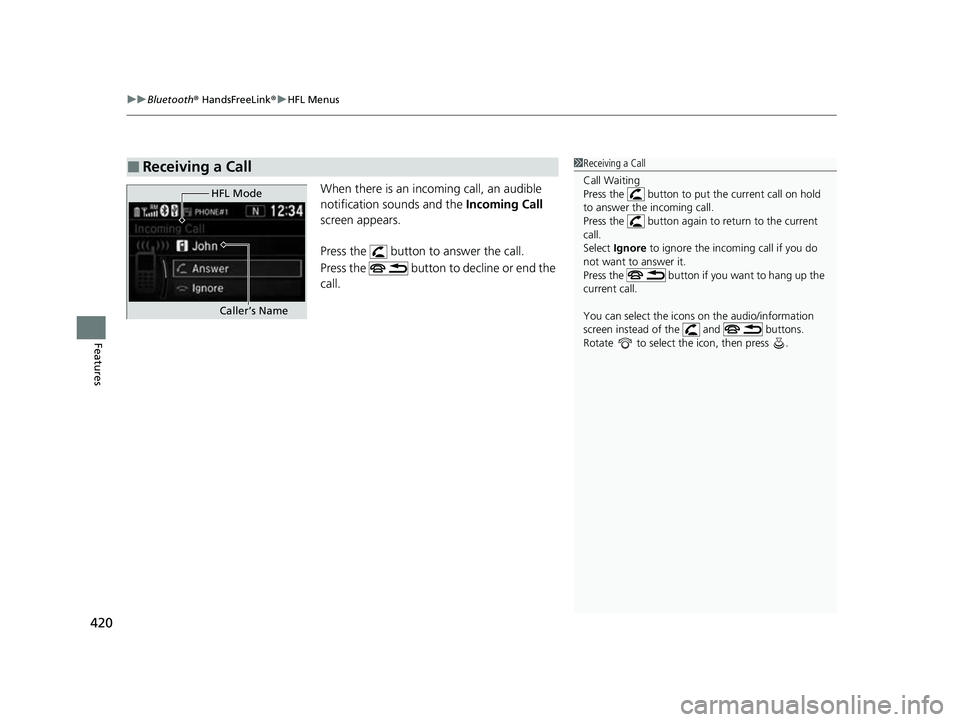
When there is an incoming call, an audible
notification sounds and the Incoming Call
screen appears.
Press the button to answer the call.
Press the button to decline or end the
call.
■Receiving a Call1Receiving a Call
Call Waiting
Press the button to put the current call on hold
to answer the incoming call.
Press the button again to return to the current
call.
Select Ignore to ignore the incoming call if you do
not want to answer it.
Press the button if y ou want to hang up the
current call.
You can select the icons on the audio/information
screen instead of the and buttons.
Rotate to select the icon, then press .
HFL Mode
Caller’s Name
22 CR-V HEV ELP-31TPG6200.book 420 ページ 2021年6月30日 水曜日 午前11時6分
Page 424 of 692

422
Features
Bluetooth® HandsFreeLink ®
Bluetooth® HandsFreeLink ® (HFL) allows you to place and receive phone calls using
your vehicle’s audio system, without handling your cell phone.
Using HFL
■HFL Buttons
1 Bluetooth ® HandsFreeLink ®
Place your phone where y ou can get good reception.
To use HFL, you need a Bluetooth-compatible cell
phone. For a list of compatible phones, pairing
procedures, and special feature capabilities:
Visit automobiles.honda.com/handsfreelink/ , or call
1-888-528 -7876.
To use the system, the Bluetooth On/Off Status
setting must be On. If there is an active connection to
Apple CarPlay
TM or Android AutoTM, HFL is
unavailable. 2 How to customize P. 369
Voice control tips
•Aim the vents away from the ceiling and close the
windows, as noise coming from them may interfere
with the microphone.
•Press the button when you want to call a
number using a stored voice tag, a phonebook
name, or a number. Spe ak clearly and naturally
after a beep.
•If the microphone picks up vo ices other than yours,
the command may be misinterpreted.
•To change the volume level, select the audio
system’s VOL (Volume) or use the remote audio
controls on the steering wheel.
Up to three speed dial entries can be displayed
among a total of 20 that can be entered. 2 Speed Dial P. 436
Up to three previous calls can be displayed at a time
among a total of 20 that can be entered. If there is no
call history, Call History is disabled.
Models with Display Audio
(Talk) Button
( + (- Bar
(Hang-up/Back) Button
(Pick-up) Button
ENTEq Button
(Display/Information) Button
Buttons34
22 CR-V HEV ELP-31TPG6200.book 422 ページ 2021年6月30日 水曜日 午前11時6分
Page 425 of 692

Continued423
uuBluetooth ® HandsFreeLink ®u Using HFL
Features
(Pick-up) button: Press to go directly to the phone menu on the driver
information interface, or to answer an incoming call.
(Hang-up/back) button: Press to end a call, go back to the previous
command, or cancel a command.
(Talk) button: Press to access Voice Portal.
buttons: Press to select an item displayed on the phone menu in the driver
information interface.
ENTER button: Press to call a number listed in the selected item on the phone
menu in the driver information interface.
(display/information) button: Select and press ENTER to display Speed
Dial , Call History , or Phonebook on the phone menu in the driver information
interface.
To go to the Phone Menu screen:
1. Select to switch the disp lay to the phone screen.
2. Select MENU .1Bluetooth ® HandsFreeLink ®
Bluetooth ® Wireless Technology
The Bluetooth ® word mark and logos are registered
trademarks owned by Bluetooth SIG, Inc., and any
use of such marks by Honda Motor Co., Ltd., is under
license. Other trademarks and trade names are those
of their respective owners.
HFL Limitations
An incoming call on HFL will interrupt the audio
system when it is playing. It will resume when the call
is ended.
34
22 CR-V HEV ELP-31TPG6200.book 423 ページ 2021年6月30日 水曜日 午前11時6分
Page 448 of 692
uuBluetooth ® HandsFreeLink ®u HFL Menus
446
Features
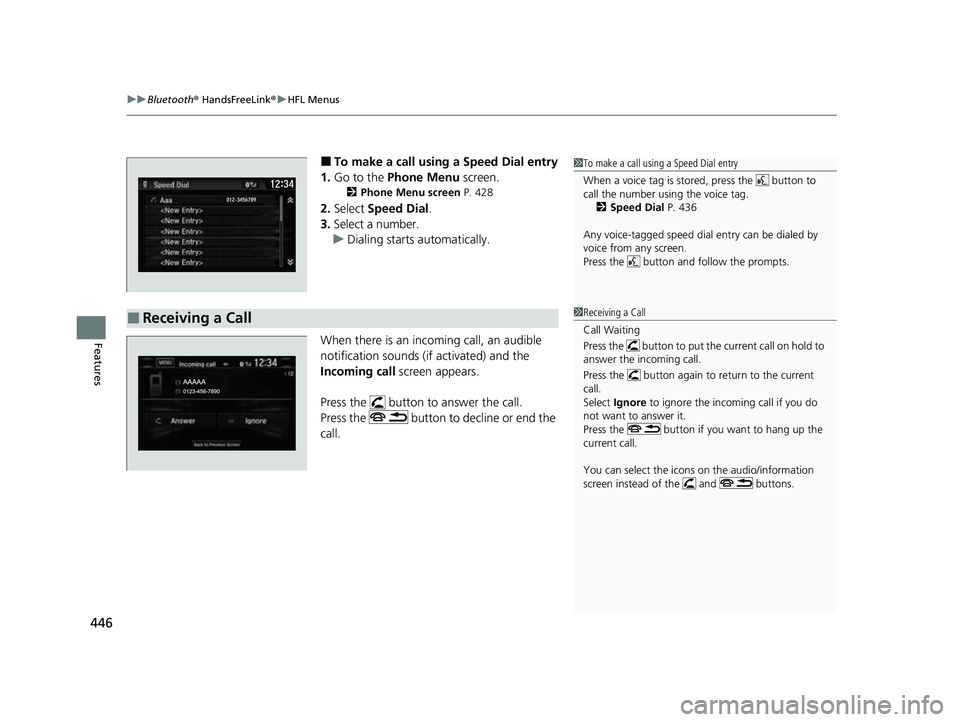
■To make a call using a Speed Dial entry
1. Go to the Phone Menu screen.
2Phone Menu screen P. 428
2.Select Speed Dial .
3. Select a number.
u Dialing starts automatically.
When there is an incoming call, an audible
notification sounds (if activated) and the
Incoming call screen appears.
Press the button to answer the call.
Press the button to decline or end the
call.
1 To make a call using a Speed Dial entry
When a voice tag is stored, press the button to
call the number using the voice tag.
2 Speed Dial P. 436
Any voice-tagged speed dial entry can be dialed by
voice from any screen.
Press the button and follow the prompts.
■Receiving a Call1Receiving a Call
Call Waiting
Press the button to put the current call on hold to
answer the incoming call.
Press the button again to return to the current
call.
Select Ignore to ignore the incoming call if you do
not want to answer it.
Press the button if you want to hang up the
current call.
You can select the icons on the audio/information
screen instead of the and buttons.
22 CR-V HEV ELP-31TPG6200.book 446 ページ 2021年6月30日 水曜日 午前11時6分
Page 479 of 692
477
uuWhen Driving uShifting
Continued
Driving
Shifting
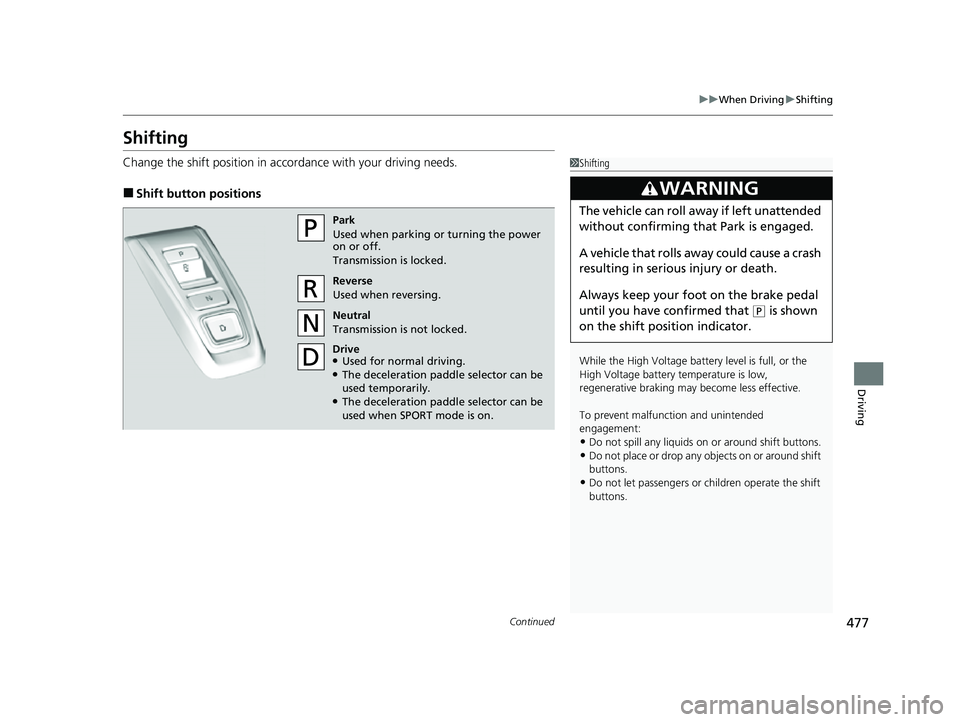
Change the shift position in accordance with your driving needs.
■Shift button positions
1Shifting
While the High Voltage battery level is full, or the
High Voltage battery temperature is low,
regenerative braking ma y become less effective.
To prevent malfunc tion and unintended
engagement:
•Do not spill any liquids on or around shift buttons.
•Do not place or drop any objects on or around shift
buttons.
•Do not let passengers or ch ildren operate the shift
buttons.
3WARNING
The vehicle can roll aw ay if left unattended
without confirming that Park is engaged.
A vehicle that rolls away could cause a crash
resulting in seriou s injury or death.
Always keep your foot on the brake pedal
until you have confirmed that
( P is shown
on the shift posi tion indicator.
Park
Used when parking or turning the power
on or off.
Transmission is locked.
Reverse
Used when reversing.
Neutral
Transmission is not locked.
Drive
●Used for normal driving.●The deceleration paddle selector can be
used temporarily.
●The deceleration paddle selector can be
used when SPORT mode is on.
22 CR-V HEV ELP-31TPG6200.book 477 ページ 2021年6月30日 水曜日 午前11時6分
Page 506 of 692
504
uuHonda Sensing ®u
Driving
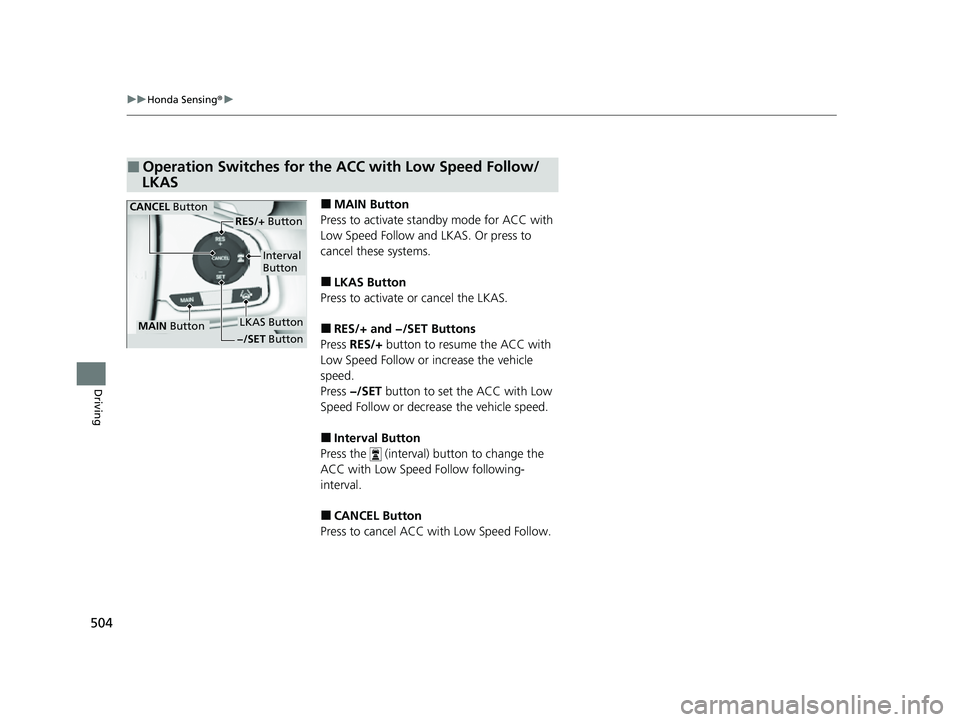
■MAIN Button
Press to activate standby mode for ACC with
Low Speed Follow and LKAS. Or press to
cancel these systems.
■LKAS Button
Press to activate or cancel the LKAS.
■RES/+ and −/SET Buttons
Press RES/+ button to resume the ACC with
Low Speed Follow or increase the vehicle
speed.
Press −/SET button to set the ACC with Low
Speed Follow or decrease the vehicle speed.
■Interval Button
Press the (interval) button to change the
ACC with Low Speed Follow following-
interval.
■CANCEL Button
Press to cancel ACC with Low Speed Follow.
■Operation Switches for the ACC with Low Speed Follow/
LKAS
MAIN Button
Interval
Button
CANCEL Button
LKAS Button
RES/+ Button
−/SET Button
22 CR-V HEV ELP-31TPG6200.book 504 ページ 2021年6月30日 水曜日 午前11時6分
Page 619 of 692
617
Maintenance
Remote Transmitter Care
Replacing the Remote Battery
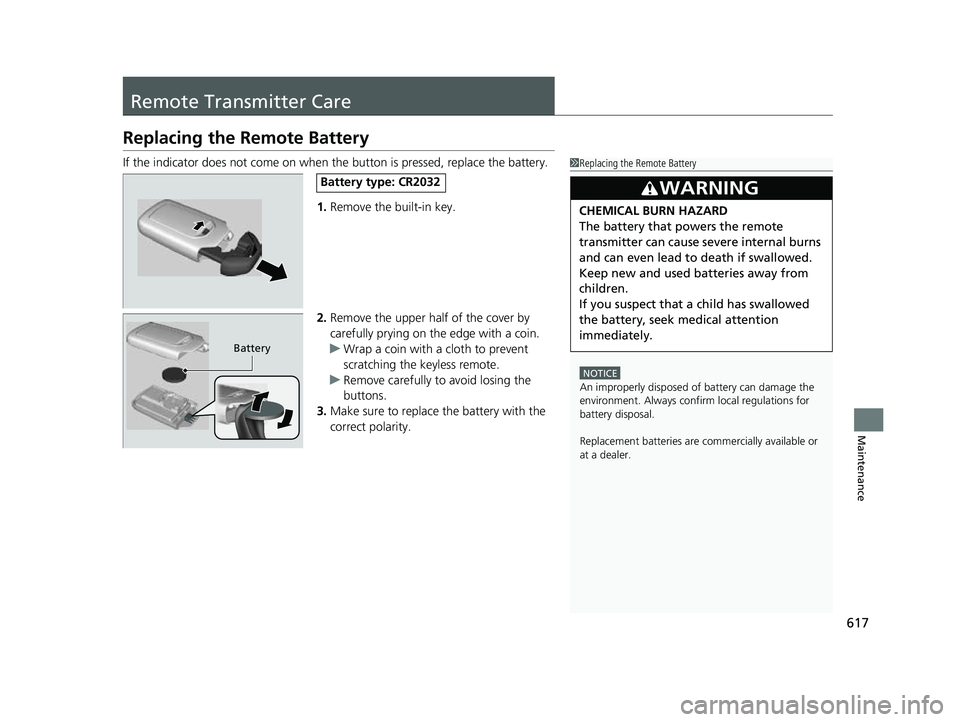
If the indicator does not come on when the button is pressed, replace the battery.
1. Remove the built-in key.
2. Remove the upper half of the cover by
carefully prying on the edge with a coin.
u Wrap a coin with a cloth to prevent
scratching the keyless remote.
u Remove carefully to avoid losing the
buttons.
3. Make sure to replace the battery with the
correct polarity.1Replacing the Remote Battery
NOTICE
An improperly disposed of battery can damage the
environment. Always conf irm local regulations for
battery disposalM
Replacement batteries are commercially available or
at a dealer.
3WARNING
CHEMICAL BURN HAZARD
The battery that powers the remote
transmitter can cause severe internal burns
and can even lead to death if swallowed.
Keep new and used batteries away from
children.
If you suspect that a child has swallowed
the battery, seek medical attention
immediately.
Battery type: CR2032
Battery
22 CR-V HEV ELP-31TPG6200.book 617 ページ 2021年6月30日 水曜日 午前11時6分
Page 647 of 692
645
uuPower System Won’t Start uIf the Keyless Remote Battery is Weak
Handling the Unexpected
If the Keyless Remo te Battery is Weak
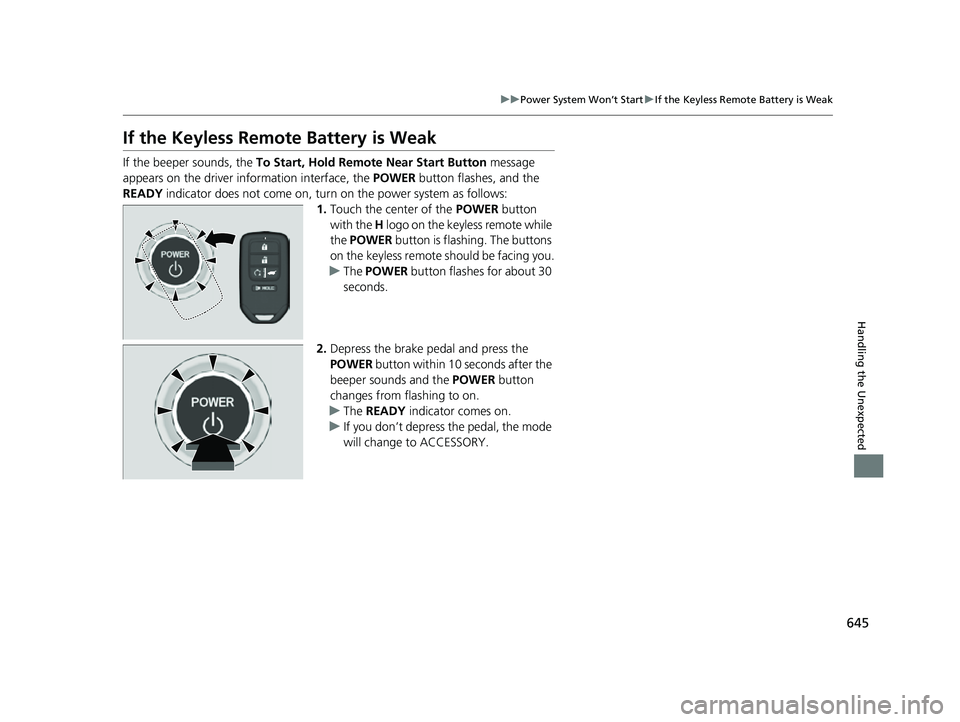
If the beeper sounds, the To Start, Hold Remote Near Start Button message
appears on the driver information interface, the POWER button flashes, and the
READY indicator does not come on, turn on the power system as follows:
1.Touch the center of the POWER button
with the H logo on the keyless remote while
the POWER button is flashing. The buttons
on the keyless remote should be facing you.
u The POWER button flashes for about 30
seconds.
2. Depress the brake pedal and press the
POWER button within 10 seconds after the
beeper sounds and the POWER button
changes from flashing to on.
u The READY indicator comes on.
u If you don’t depress the pedal, the mode
will change to ACCESSORY.
22 CR-V HEV ELP-31TPG6200.book 645 ページ 2021年6月30日 水曜日 午前11時6分