2022 HONDA CRV Front camera
[x] Cancel search: Front cameraPage 197 of 692

195
uuOperating the Switches Around the Steering Wheel uAuto High-Beam
Continued
Controls
Auto High-Beam
The front sensor camera detects the light sources ahead of the vehicle such as the
lights of a preceding or oncoming vehicle, or street lights. When you are driving at
night, the system automatically switches the headlights between low beam and high
beam depending on the situation.
When all of the following conditions have been met, the auto high-beam indicator
comes on and the auto high-beam is activated. •The power mode is in ON.
• The light switch is in AUTO.
• The lever is in the low beam position.
• The headlights have been automatically
activated.
• It is dark outside the vehicle.
If the auto high-beam indica tor does not come on even when all the conditions have
been met, carry out the following procedure and the indicator will come on.
• Pull the lever toward you for flashing the high beams then release it while driving.1Auto High-Beam
The auto high-beam system does not always operate
in every situation. This syst em is just for assisting the
driver. Always observe your surroundings and switch
the headlights between high beam and low beam
manually if necessary.
If you find the timing of beam changes inconvenient
for driving, change the headlight beams manually.
The range and the distance at which the camera can
recognize varies de pending on conditions
surrounding your vehicle.
Regarding the handling of the camera mounted to
the inside of the windshiel d, refer to the following.
2 Front Sensor Camera P. 548
For the auto high-beam to work properly:
•Do not place an object that reflects light on the
dashboard.
•Keep the windshield around the camera clean.
•When cleaning the windshield, be careful not to
apply the windshield cleans er to the camera lens.
•Do not attach an object, sticker or film to the area
around the camera.
•Do not touch the camera lens.
If the camera receives a st rong impact, or repairing of
the area near the camera is required, consult a dealer.
■How to Use the Auto High-Beam
Front Sensor
Camera
Light Switch Auto High-Beam
Indicator
22 CR-V HEV ELP-31TPG6200.book 195 ページ 2021年6月30日 水曜日 午前11時6分
Page 198 of 692
uuOperating the Switches Around the Steering Wheel uAuto High-Beam
196
Controls
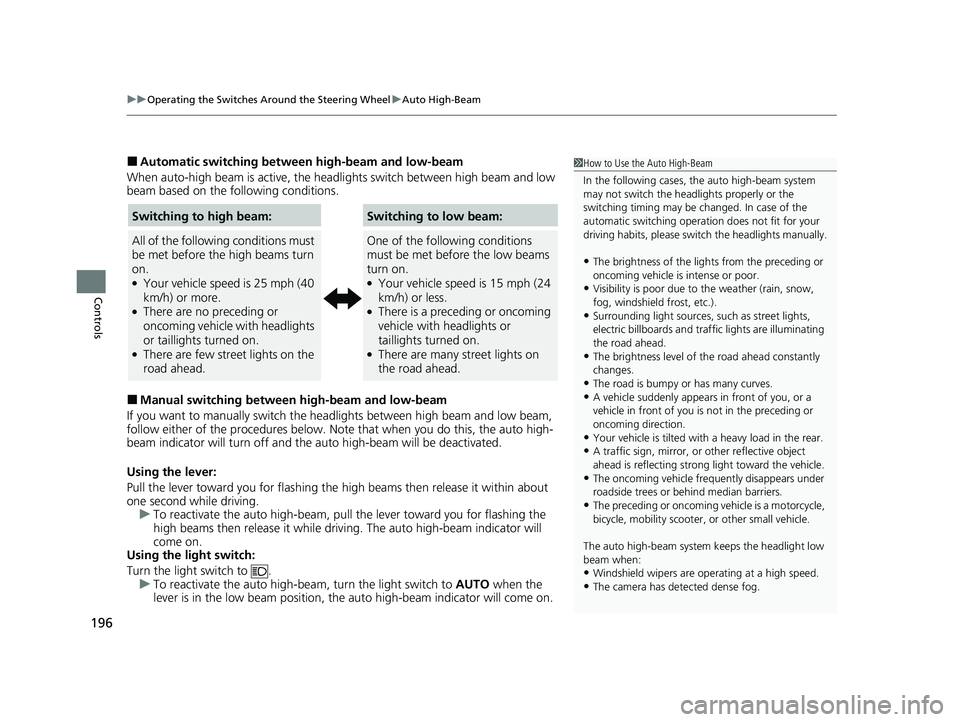
■Automatic switching between high-beam and low-beam
When auto-high beam is active, the head lights switch between high beam and low
beam based on the following conditions.
■Manual switching between high-beam and low-beam
If you want to manually switch the headlights between high beam and low beam,
follow either of the proced ures below. Note that when you do this, the auto high-
beam indicator will turn off and the auto high-beam will be deactivated.
Using the lever:
Pull the lever toward you fo r flashing the high beams then release it within about
one second while driving. u To reactivate the auto high-beam, pull the lever toward you for flashing the
high beams then release it while driving. The auto high-beam indicator will
come on.
Using the light switch:
Turn the light switch to . u To reactivate the auto high-be am, turn the light switch to AUTO when the
lever is in the low beam position, the auto high-beam indicator will come on.
1 How to Use the Auto High-Beam
In the following cases, th e auto high-beam system
may not switch the head lights properly or the
switching timing may be ch anged. In case of the
automatic switching operati on does not fit for your
driving habits, please swit ch the headlights manually.
•The brightness of the lights from the preceding or
oncoming vehicle is intense or poor.
•Visibility is poor due to the weather (rain, snow,
fog, windshield frost, etc.).
•Surrounding light sources, such as street lights,
electric billboards and traf fic lights are illuminating
the road ahead.
•The brightness level of th e road ahead constantly
changes.
•The road is bumpy or has many curves.•A vehicle suddenly appears in front of you, or a
vehicle in front of you is not in the preceding or
oncoming direction.
•Your vehicle is tilted with a heavy load in the rear.•A traffic sign, mirror, or other reflective object
ahead is reflecting strong light toward the vehicle.
•The oncoming vehicle freq uently disappears under
roadside trees or be hind median barriers.
•The preceding or oncoming vehicle is a motorcycle,
bicycle, mobility scooter, or other small vehicle.
The auto high-beam system keeps the headlight low
beam when:
•Windshield wipers are op erating at a high speed.
•The camera has detected dense fog.
Switching to high beam:
All of the following conditions must
be met before the high beams turn
on.
●Your vehicle speed is 25 mph (40
km/h) or more.
●There are no preceding or
oncoming vehicle with headlights
or taillights turned on.
●There are few street lights on the
road ahead.
Switching to low beam:
One of the following conditions
must be met before the low beams
turn on.
●Your vehicle speed is 15 mph (24
km/h) or less.
●There is a preceding or oncoming
vehicle with headlights or
taillights turned on.
●There are many street lights on
the road ahead.
22 CR-V HEV ELP-31TPG6200.book 196 ページ 2021年6月30日 水曜日 午前11時6分
Page 199 of 692
197
uuOperating the Switches Around the Steering Wheel uAuto High-Beam
Controls
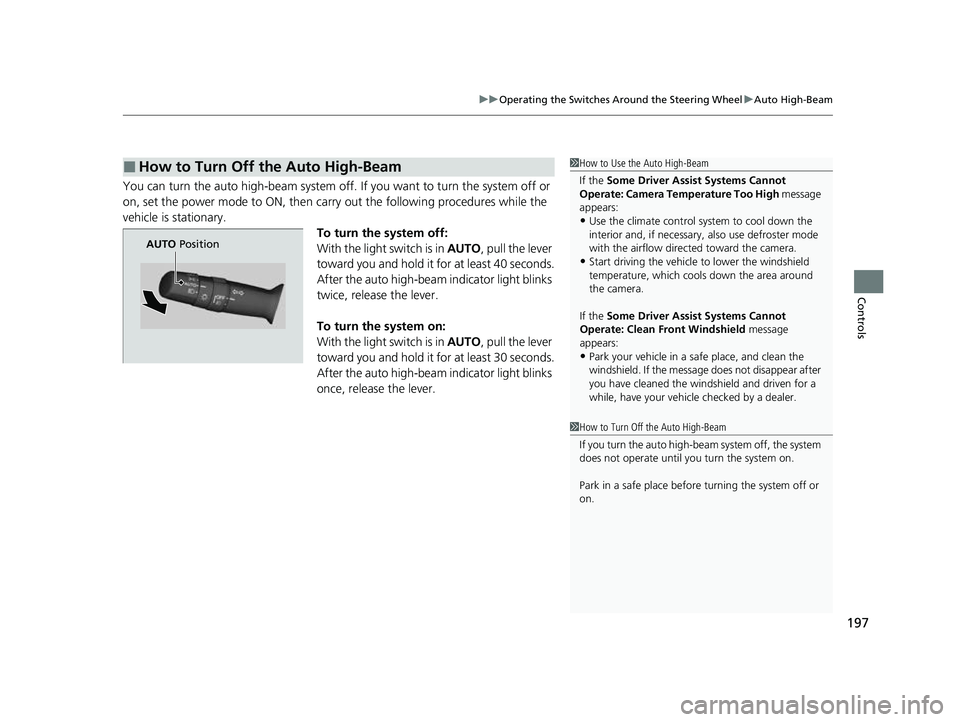
You can turn the auto high-beam system off. If you want to turn the system off or
on, set the power mode to ON, then carry out the following procedures while the
vehicle is stationary. To turn the system off:
With the light switch is in AUTO, pull the lever
toward you and hold it for at least 40 seconds.
After the auto high-beam indicator light blinks
twice, release the lever.
To turn the system on:
With the light switch is in AUTO, pull the lever
toward you and hold it for at least 30 seconds.
After the auto high-beam indicator light blinks
once, release the lever.
■How to Turn Off the Auto High-Beam1 How to Use the Auto High-Beam
If the Some Driver Assist Systems Cannot
Operate: Camera Temperature Too High message
appears:
•Use the climate control system to cool down the
interior and, if necessary, also use defroster mode
with the airflow directed toward the camera.
•Start driving the vehicle to lower the windshield
temperature, which cool s down the area around
the camera.
If the Some Driver Assist Systems Cannot
Operate: Clean Front Windshield message
appears:
•Park your vehicle in a sa fe place, and clean the
windshield. If the message does not disappear after
you have cleaned the windshield and driven for a
while, have your vehicle checked by a dealer.
1 How to Turn Off the Auto High-Beam
If you turn the au to high-beam system off, the system
does not operate until you turn the system on.
Park in a safe place before turning the system off or
on.
AUTO Position
22 CR-V HEV ELP-31TPG6200.book 197 ページ 2021年6月30日 水曜日 午前11時6分
Page 461 of 692

459
Driving
This chapter discusses driving and refueling.
Before Driving................................... 460
Towing a Trailer ................................ 465
Towing Behind a Motorhome .......... 466
Off-Highway Driving Guidelines General Information ......................... 467
Important Safety Precautions............ 467
Avoiding Trouble ............................. 468
When Driving Turning on the Power ...................... 469
Precautions While Driving................. 475
Transmission .................................... 476
Shifting ............................................ 477
SPORT Mode.................................... 483 Deceleration Paddl
e Selector ............ 484
ECON Mode .................................... 487
Acoustic Vehicle Alerting System...... 488
Vehicle Stability AssistTM (VSA®), aka Electronic
Stability Control (ESC), System .............. 489
Agile Handling Assist ....................... 491
Real Time AWD with Intelligent Control System
TM........................................ 492Tire Pressure Monitoring System (TPMS) .. 493Tire Pressure Monitoring System (TPMS) - Required Federal Explanation ......... 497
Blind spot information System*........... 499High Voltage Battery ........................ 502 Honda Sensing®
................................ 503
Collision Mitigation Braking SystemTM (CMBSTM) .... 506Adaptive Cruise Control (ACC) with Low Speed Follow ....... 517Lane Keeping Assist System (LKAS) .. 534Road Departure Mitigation (RDM) System.... 543Front Sensor Camera ....................... 548
Radar Sensor ................................... 550
Braking Brake System ................................... 551
Anti-lock Brake System (ABS) ........... 557
Brake Assist System ......................... 558
Parking Your Vehicle ........................ 559
Multi-View Rear Camera .................. 570
Refueling ........................................... 572
Fuel Economy and CO
2 Emissions .... 575
* Not available on all models
22 CR-V HEV ELP-31TPG6200.book 459 ページ 2021年6月30日 水曜日 午前11時6分
Page 505 of 692

503Continued
Driving
Honda Sensing®
Honda Sensing® is a driver support system which employs the use of two distinctly
different kinds of sensors: a radar sensor located inside the front grille and a front
sensor camera mounted to the interior side of the windshield, behind the rearview
mirror.
Honda Sensing ® has following functions.
■The functions which do not requir e switch operations to activate
• Collision Mitigation Braking SystemTM (CMBSTM) 2 P. 506
• Road Departure Mitigation (RDM) System 2 P. 543
■The functions wh ich require switch operations to activate
• Adaptive Cruise Control ( ACC) with Low Speed Follow
2 P. 517
• Lane Keeping Assist System (LKAS) 2 P. 534
22 CR-V HEV ELP-31TPG6200.book 503 ページ 2021年6月30日 水曜日 午前11時6分
Page 508 of 692
506
uuHonda Sensing ®u Collision Mitigation Braking SystemTM (CMBSTM)
Driving
Collision Mitigati on Braking SystemTM (CMBSTM)
The system can assist you when it determine s there is a possibility of your vehicle
colliding with a vehicle or a pedestrian de tected in front of your vehicle. The CMBSTM
is designed to alert you when the potential for a collision is determined, as well as to
reduce your vehicle speed to help minimize collision severity when a collision is
deemed unavoidable.
1 Collision Mitigation Braking SystemTM (CMBSTM)
Important Safety Reminder
The CMBS
TM is designed to reduce the severity of an
unavoidable collision. It does not prevent collisions
nor stop the vehicle automati cally. It is still your
responsibility to operate th e brake pedal and steering
wheel appropriately acco rding to the driving
conditions.
The CMBS
TM may not activate or may not detect a
vehicle in front of y our vehicle under certain
conditions:
2 CMBS
TM Conditions and Limitations P. 511
For directions on the prop er handling of the radar
sensor, refer to the following page. 2 Radar Sensor P. 550
You can read about handling information for the
camera equipped with this system. 2 Front Sensor Camera P. 548
22 CR-V HEV ELP-31TPG6200.book 506 ページ 2021年6月30日 水曜日 午前11時6分
Page 509 of 692

Continued507
uuHonda Sensing ®u Collision Mitigation Braking SystemTM (CMBSTM)
Driving
■How the system works
The system starts monitoring the roadway ah ead when your vehicle speed is about
3 mph (5 km/h) or above and will search for a vehicle in front of you. The radar sensor is
in the front grille.
The CMBS
TM activates when:●The speed difference between your vehicle and a vehicle or pedestrian detected in
front of you becomes about 3 mph (5 km/h) and over with a chance of a collision.
●Your vehicle speed is about 62 mph (100 km/h) or less and the system
determines there is a chance of a collision with:
- Vehicles detected in front of you that are stationary, oncoming, or traveling in
your same direction.
- A pedestrian who is detected in front of you.
●Your vehicle speed is above 62 mph (100 km/h), and the system determines
there is a chance of a collision with a vehicle detected in front of you traveling
in your same direction. The camera is
located behind the
rearview mirror.
When to use
1
How the system works
When the CMBS
TM activates, it may automatically
apply the brake. It will be canceled when your vehicle
stops or a potential coll ision is not determined.
22 CR-V HEV ELP-31TPG6200.book 507 ページ 2021年6月30日 水曜日 午前11時6分
Page 510 of 692
uuHonda Sensing ®u Collision Mitigation Braking SystemTM (CMBSTM)
508
Driving
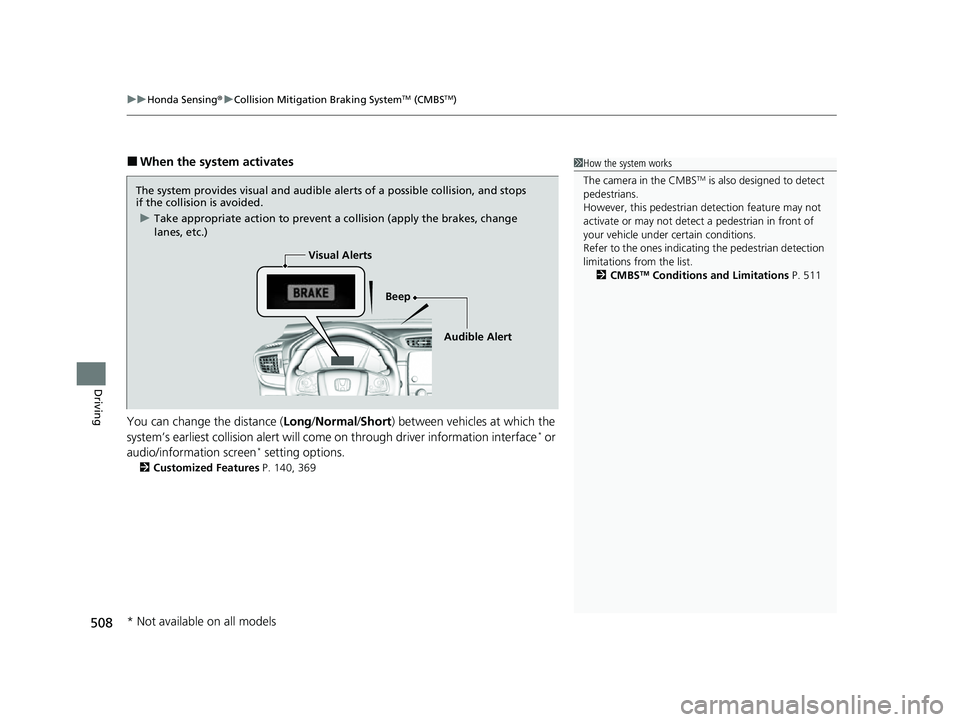
■When the system activates
You can change the distance ( Long/Normal /Short ) between vehicles at which the
system’s earliest collision alert will co me on through driver information interface
* or
audio/information screen* setting options.
2 Customized Features P. 140, 369
1How the system works
The camera in the CMBS
TM is also designed to detect
pedestrians.
However, this pedestrian detection feature may not
activate or may not detect a pedestrian in front of
your vehicle under certain conditions.
Refer to the ones indicating the pedestrian detection
limitations from the list. 2 CMBS
TM Conditions and Limitations P. 511
The system provides visual and audible alerts of a possible collision, and stops
if the collision is avoided.
u Take appropriate action to prevent a collision (apply the brakes, change
lanes, etc.)
Beep
Visual Alerts
Audible Alert
* Not available on all models
22 CR-V HEV ELP-31TPG6200.book 508 ページ 2021年6月30日 水曜日 午前11時6分