Page 376 of 692
374
uuCustomized Features u
Features
Voice Recog.
Voice Prompt
Voice Recog. Volume
Song by Voice
Song by Voice Phonetic Modification
Phonebook Phonetic Modification
Automatic Phone Sync
Clock Adjustment
Clock Format
Auto Time Zone
Manual Time Zone
Auto Daylight Saving Time
Clock Display
Overlay Clock Location
Clock Reset
Clock
Wallpaper
One Press Voice Operation
*1 : Does not appear when you chang e the screen interface design.
*2 : Appears only when you change the screen interface design.
Clock/Wallpaper Type*1/
Clock Type*2Clock
22 CR-V HEV ELP-31TPG6200.book 374 ページ 2021年6月30日 水曜日 午前11時6分
Page 377 of 692
375
uuCustomized Features u
Continued
Features
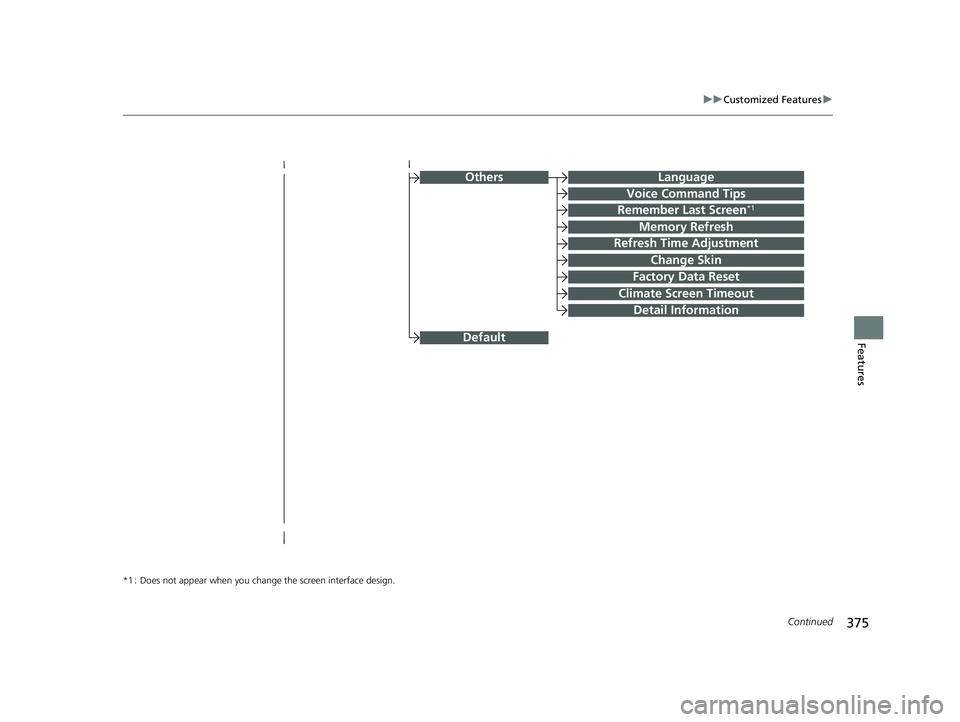
OthersLanguage
Voice Command Tips
Remember Last Screen*1
Memory Refresh
Refresh Time Adjustment
Change Skin
Factory Data Reset
Climate Screen Timeout
Detail Information
*1 : Does not appear when you chang e the screen interface design.
Default
22 CR-V HEV ELP-31TPG6200.book 375 ページ 2021年6月30日 水曜日 午前11時6分
Page 379 of 692
377
uuCustomized Features u
Continued
Features
Hands Free Access Function*
Keyless Open Mode
Lighting SetupInterior Light Dimming Time
Headlight Auto Off Timer
Auto Light Sensitivity
Auto Interior Illumination Sensitivity
Auto Door Lock
Key and Remote Unlock Mode
Door/Window Setup
Apple CarPlay
Maintenance Info.
Android Auto
Keyless Lock Answer Back
Security Relock Timer
Walk Away Auto Lock
Keyless Access Setup
Keyless Access Light Flash
Door Unlock Mode
Remote Start System On/Off
Keyless Access Beep
Smartphone
Power Tailgate Setup*
Power Open By Outer Handle
Default
Auto Door Unlock
Auto Headlight ON With Wiper ON
* Not available on all models
22 CR-V HEV ELP-31TPG6200.book 377 ページ 2021年6月30日 水曜日 午前11時6分
Page 380 of 692
378
uuCustomized Features u
Features
■List of customizable options
*1:Does not appear when you change the screen interface design.
*2:Appears only when you change the screen interface design. Setup
Group Customizable Features Descri
ption Selectable Settings
Clock
Clock
Clock/
Wallpaper
Type
*1/Clock
Type*2
Clock
See Info on P. 379
Wallpaper
Clock Adjustment
Auto Time Zone
Manual Time Zone
Auto Daylight Saving Time
Clock Format
Clock Display
Overlay Clock Location
Clock Reset
HondaLinkDiagnostic & Location Data
OthersInfo Screen Preference
DefaultCancels/Resets all customized items in the
Clock settings group as default.Yes/No
22 CR-V HEV ELP-31TPG6200.book 378 ページ 2021年6月30日 水曜日 午前11時6分
Page 381 of 692

379
uuCustomized Features u
Continued
Features
*1:Default Setting
*2:Does not appear when you chan ge the screen interface design.
*3:Appears only when you change the screen interface design. Setup
Group Customizable Features Description Selectable Settings
Info Clock Clock/
Wallpaper
Type
*2/
Clock
Type
*3
Clock Changes the clock display type. Analog
/Digital*1/
Small Digital /Off
Wallpaper
●Changes the wallpaper type.●Imports an image file for a new wallpaper.●Deletes an image file for a wallpaper. Blank
/Galaxy
*1/
Metallic /Time Zone*
Clock Adjustment Adjusts Clock. —
Auto Time Zone Automatically adjusts the clock when driving
through different time zones. On
*1/
Off
Manual Time Zone Changes the time zone manually. —
Auto Daylight Saving Time Select
On to have the GPS automatically adjust
the clock to daylight savings time. Select Off to
cancel this function. On
*1/
Off
Clock Format Selects the digital clock display from 12H to 24H. 12H
*1/24H
Clock Display Selects whether the clock display comes on. On
*1/Off
Overlay Clock Location Changes the clock display layout. Upper Right
*1/
Upper
Left/ Lower Right/
Lower Left /Off
Clock Reset Resets the clock settings to the factory default. Yes/No
* Not available on all models
22 CR-V HEV ELP-31TPG6200.book 379 ページ 2021年6月30日 水曜日 午前11時6分
Page 386 of 692

384
uuCustomized Features u
Features
*1:Default Setting
*2:Appears only when you change the screen interface design.Setup
Group Customizable Features
DescriptionSelectable Settings
Audio
BluetoothBluetooth Device List
Pairs a new phone to HFL, edits or deletes a
paired phone.
2Phone Setup P. 430
—
Other
[Your selected media]
Cover ArtTurns the cover art display on and off.On*1/Off
Audio Source Pop-Up
Selects whether the list of selectable audio source
comes on when Audio is selected on the home
screen.
On /Off*1
SoundAdjusts the settings of the audio speakers’ sound.
2 Adjusting the Sound P. 294—
DefaultCancels/Resets all cust omized items in the Audio
settings group as default.Yes /No
SystemHome
Home Screen Edit OrderChanges the home screen icon layout.—
Menu Icon Position*2Changes the position of the menu icons on the
Audio , Phone , and Info screen.—
Configuration of
Instrument PanelChanges the Instrument Panel screen icon
layout. —
Tachometer SettingNot available on this model—
Bluetooth® mode
iPod or USB mode
22 CR-V HEV ELP-31TPG6200.book 384 ページ 2021年6月30日 水曜日 午前11時6分
Page 387 of 692
385
uuCustomized Features u
Continued
Features
*1:Default Setting
*2:Does not appear when you chan ge the screen interface design.
Setup
Group Customizable Features Desc
ription Selectable Settings
System
Display
Display
Settings
BrightnessChanges the brightness of the audio/information
screen.—
ContrastChanges the contrast of the audio/information
screen.—
Black LevelChanges the black level of the audio/information
screen.—
Background Color*2Changes the background color of the audio/
information screen.Blue*1/Amber /Red/
Violet/ BlueGreen
Touch Panel SensitivitySets the sensitivity of the touch panel screen.High/Low*1
Sound/
BeepGuidance Volume
Changes the sound volume.
Adjusts the guidance volume of the navigation
system.
1 ~6*1~11
Text Message VolumeChanges the text/e-mail message reading
volume. 1~6*1~11
22 CR-V HEV ELP-31TPG6200.book 385 ページ 2021年6月30日 水曜日 午前11時6分
Page 389 of 692
387
uuCustomized Features u
Continued
Features
*1:Default Setting
*2:Does not appear when you chan ge the screen interface design.
*3:Appears only when you change the screen interface design. Setup
Group Customizable Featur
es Description Selectable Settings
System
Clock
Clock/Wallpaper
Type*2/Clock
Type*3
Clock
See Info on P. 379
Wallpaper
Clock Adjustment
Auto Time Zone
Manual Time Zone
Auto Daylight Saving Time
Clock Format
Clock Display
Overlay Clock Location
Clock Reset
Others
LanguageChange the display language.
English (United
States)*1/Français /
Español
Voice Command Tips
Alerts you when manual co ntrol of the system is
disabled to prevent distraction while driving.
Only voice commands are available.
On*1/ Off
22 CR-V HEV ELP-31TPG6200.book 387 ページ 2021年6月30日 水曜日 午前11時6分