2022 HONDA CIVIC tires
[x] Cancel search: tiresPage 464 of 700

Continued463
uuWhen Driving uTire Pressure Monitoring System (TPMS)
Driving
You must start TPMS calibration every time you:
• Adjust the pressure in one or more tires.
• Rotate the tires.
• Replace one or more tires.
Before calibrating the TPMS:
• Set the cold tire pressure in all four tires.
2 Checking Tires P. 617
Make sure:
•The vehicle is at a complete stop.
• The transmission is in
(P.
• The power mode is in ON.
1Tire Pressure Monitoring System (TPMS)
The Vehicle Stability Assist
TM (VSA ®) system, Vehicle
Stability AssistTM (VSA ®) OFF , Adaptive Cruise Control
(ACC) with Low Speed Follow, low tire pressure/
TPMS and safety support i ndicators may come on in
amber along with a message in the gauge when you
set the power mode to ON after reconnecting the
battery.
Drive a short distance at more than 12 mph (20 km/h).
Each indicator should go off. If any do not, have your
vehicle checked by a dealer.
■TPMS Calibration1 TPMS Calibration
TPMS cannot be calibrated if a compact spare tire is
installed.
The calibration process requires approximately 30
minutes of cumulative dr iving at speeds between
31-62 mph (50-100 km/h).
During this period, if power mode is set to ON and
the vehicle is not moved within 45 seconds, you may
notice the low tire pres sure indicator comes on
briefly. This is normal and indicates that the
calibration process is not yet complete.
If the tire chains are installed, remove them before
calibrating the TPMS.
If the low tire pressure/TPMS indicator comes on even
when the properly inflated specified regular tires are
installed, have your vehi cle checked by a dealer.
We recommend that the tires be replaced with the
same brand, model, and size as the originals. Ask a
dealer for details.
Page 468 of 700

467
uuWhen Driving uTire Pressure Monitoring System (TPMS) - Required Federal Explanation
Continued
Driving
Tire Pressure Monitoring System (TPMS) - Required
Federal Explanation
Each tire, including the spare (if provided), should be checked
monthly when cold and inflated to the inflation pressure
recommended by the vehicle manufa cturer on the vehicle placard
or tire inflation pressure label.
(If your vehicle has tires of a diff erent size than the size indicated
on the vehicle placard or tire inflation pressure label, you should
determine the proper tire inflat ion pressure for those tires.)
As an added safety feature, your vehicle has been equipped with
a tire pressure monitoring system (TPMS) that illuminates a low
tire pressure telltale
when one or more of your tires is significantly under-inflated.
Accordingly, when the low tire pressure telltale illuminates, you
should stop and check your tires as soon as possible, and inflate
them to the proper pressure.
Driving on a significantly under-inf lated tire causes the tire to
overheat and can lead to tire fail ure. Under-inflation also reduces
fuel efficiency and tire tread life, and may affect the vehicle's
handling and stopping ability.
U.S. models
Page 469 of 700

468
uuWhen Driving uTire Pressure Monitoring System (TPMS) - Required Federal Explanation
Driving
Please note that the TPMS is not a substitute for proper tire
maintenance, and it is the driver 's responsibility to maintain
correct tire pressure, even if un der-inflation has not reached the
level to trigger illumina tion of the TPMS low ti re pressure telltale.
Your vehicle has also been eq uipped with a TPMS malfunction
indicator to indicate when the sy stem is not operating properly.
The TPMS malfunction indicator is combined with the low tire
pressure telltale. When the system detects a malfunction, the
telltale will flash fo r approximately one minute and then remain
continuously illuminated. This sequence will continue upon
subsequent vehicle start-ups as long as the malfunction exists.
When the malfunction indicator is illuminated, the system may
not be able to detect or signal low tire pressure as intended.
TPMS malfunctions may occur for a variety of reasons, including
the installation of replacement or alternate tires or wheels on the
vehicle that prevent the TPMS from functioning properly.
Always check the TPMS malfunction telltale after replacing one or
more tires or wheels on your vehicle to ensure that the
replacement or alternate tires and wheels allow the TPMS to
continue to function properly.
Page 484 of 700

Continued483
uuHonda Sensing ®u Collision Mitigation Braking SystemTM (CMBSTM)
Driving
■Examples of limitations on the correc t detection of the camera due to the
condition of the vehicle ahead of you, oncoming vehicles, pedestrians, or
moving bicycles
• The distance between your vehicle and the vehicle ahead of you, oncoming
vehicle, pedestrian, or moving bicycle ahead of you is too short.
• The vehicle ahead of you, oncoming vehicle, pedestrian, or moving bicycle
suddenly cuts in front of or jumps out in front of you.
• The bicycle is stopped.
• The oncoming vehicle or vehicle ahead of you is sideways.
• When the vehicle ahead of you, oncoming vehicle, pedestrian, or moving bicycle
blends in with the background, preventing the system from recognizing them.
• When several pedestrians or bicycles are moving ahead of you in a group.
• When a pedestrian or moving bicy cle crosses the road too quickly.
• A pedestrian or moving bicycle approaches from the opposite direction.
• The headlights of the vehicle ahead of you or oncoming vehicle are lit on one side
or not lit on either side in a dark place.
• When part of a pedestrian (heads, limbs, etc.) is hidden by load.
• When a pedestrian is bent over or squatting, when their hands are raised, or they
are running.
• When the pedestrian is shorte r than about 3.3 feet (1 meter) or taller than about
6.6 feet (2 meters) in height.
• When the pedestrian is push ing a stroller or bicycle.1Collision Mitigation Braking SystemTM (CMBSTM)
Make sure that all the tires are of the same specified
size, type and brand, and that they are evenly worn.
If you use tires of different sizes, types, brands, or
degree of wear, the syst em may not work properly.
Do not modify the suspensi on. Altering the height of
the vehicle may prevent the system from working
properly.
Page 485 of 700

484
uuHonda Sensing ®u Collision Mitigation Braking SystemTM (CMBSTM)
Driving
■Examples of other limitations on detection or system operation
• When the vehicle ahead of you is a motorcycle, wheelch air, or other specially-
shaped vehicle.
• When a vehicle is lower in the rear than the front such as trucks that are not
carrying a load, or a narrow vehicle.
• When the vehicle ahead of you, oncoming vehicle, pedestrian or moving bicycle
is not in front of the vehicle.
• The speed difference between your vehi cle and the vehicle ahead of you,
oncoming vehicle, pedestrian or moving bicycle is significantly large.
• When the vehicle or moving bicycle in front of you slows suddenly.
• When the driver operates the brake pedal and steering wheel to avoid a collision.
• When you approach the vehicle ahead of you, oncoming vehicle, pedestrians or
moving bicycles while accelerating rapidl y or operating the steering wheel (except
when turning left at an intersection etc.)
*1
• When the moving bicycle is a child-sized bicycle, folding bicycle, three-wheeler or
other bicycle with small tires, or a long bicycle like a tandem bicycle.
• When the camera cannot correctly identify the shape of the vehicle ahead of you,
oncoming vehicle, pedestrian, or moving bicycle.
• When the minimum ground clearance of a vehicle ahead of you is extremely high.
*1 : When there is a possibility of a frontal collision with the oncoming vehicle while turning left, the CMBSTM
is activated. However, it may not be acti vated if you suddenly turn the steering wheel.
Page 513 of 700
uuHonda Sensing ®u Adaptive Cruise Control (ACC) with Low Speed Follow
512
Driving
■Automatic cancellation
The beeper sounds and a message appears on the driver information interface when
ACC with Low Speed Follow is automaticall y canceled. Any of these conditions may
cause the ACC with Low Speed Fo llow to automatically cancel:
• Bad weather (rain, fog, snow, etc.)
• The vehicle ahead of you cannot be detected.
• An abnormal tire condition is detected, or the tires are skidding.
• Driving on a mountainous road, or driving off road for extended periods.
• Abrupt steering wheel movement.
• When the ABS, VSA ®, CMBS
TM or Low Speed Braking Control* is activated.
• When the VSA ® system indicator comes on.
• When the vehicle is stopped on a very steep slope.
• When you manually apply the parking brake.
• Water is sprayed by or snow blown from a vehicle ahead.
• Driving into low sunlight (e.g., at dawn or dusk).
• When the detected vehicle within the ACC with Low Speed Follow range is too
close to your vehicle.
• When accelerating rapidly.
• The front of the camera is covered by dirt, fog, rain, mud, wet snow, seals,
accessories, stickers, or film on the windshield.
• The vehicle is loaded heavy load in the trunk or rear seats.
• When passing through a dark place, such as tunnel.
• When the parking brake and brake sy stem indicator (amber) comes on.
• The vehicle has repeatedly applied the brakes to maintain the set speed (for
example, you are descending a long slope).
• When the system doesn't detect any driv ing actions from the driver for a certain
amount of time while the LKAS is also activated.
The ACC with Low Speed Follow automatic ca ncellation can be also triggered by the
following causes. In these cases, the pa rking brake will be automatically applied.
• The driver’s seat belt is unfasten ed when the vehicle is stationary.
• The vehicle stops for mo re than 10 minutes.
• The engine is turned off.
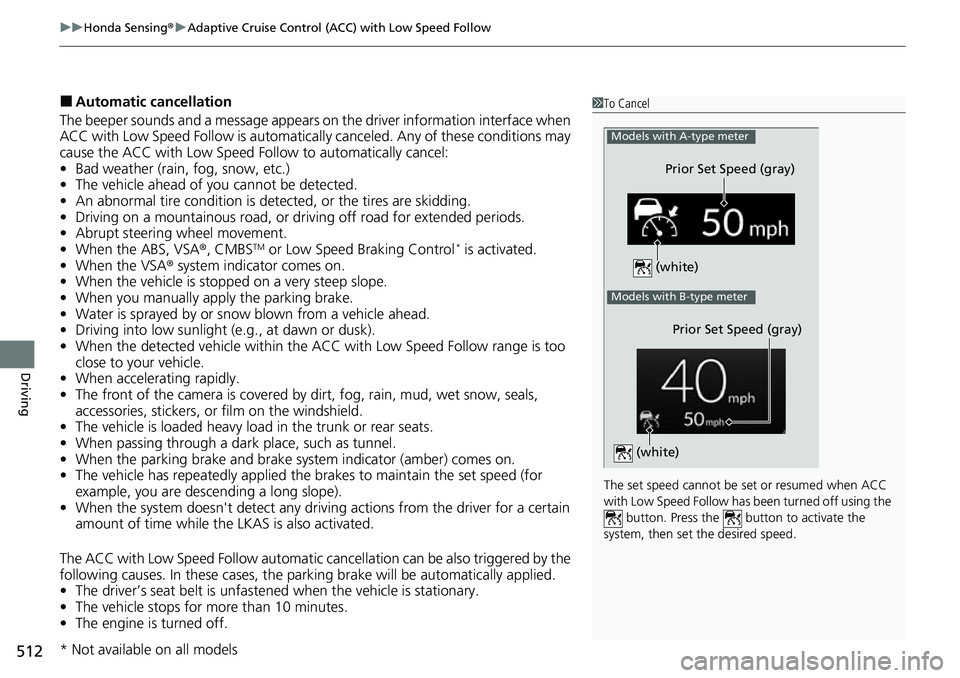
1To Cancel
The set speed cannot be set or resumed when ACC
with Low Speed Follow has been turned off using the button. Press the button to activate the
system, then set the desired speed.
Models with A-type meter
Prior Set Speed (gray)
(white)
Models with B-type meter
Prior Set Speed (gray)
(white)
* Not available on all models
Page 531 of 700

uuHonda Sensing ®u Traffic Jam Assist
530
Driving
Traffic Jam Assist is activated when all of the following conditions exist:
• LKAS is activated.
• The lane in which you are driving has dete ctable lane markers on both sides, and
your vehicle is in the center of the lane.
• The vehicle is traveling between about 0 and 45mph (0 and 72km/h).
• You are driving on a straight or slightly curved road.
• The driver is gripping the steering wheel.
• The shift position is in
(D.
Do not use Traffic Jam Assist in any of the following situations:
• You are traveling on a ro ad with sharp curves.
u The system may not allow your vehicle to respond in a manner best suited for
the road conditions.
• You are entering a toll booth, interchange, service area, or parking area.
• You are driving in adverse weat her (rain, fog, snow, etc.).
• The surface of the road is slippery; for ex ample, it is icy or covered with snow.
u The tires may slip, causing you to lose control of the vehicle.
■Traffic Jam Assist Activation1Traffic Jam Assist Activation
Refer to the following pa ge for proper handling of
the Lane Keeping Assist System (LKAS):
2 Lane Keeping Assist System (LKAS) P. 516
Refer to the following page for steering buttons and
displays: 2 Operation Switches for the Adaptive
Cruise Control (ACC) with Low Speed
Follow/Lane Keeping Assist System
(LKAS)/Traffic Jam Assist P. 474
Page 561 of 700

560
uuBraking uAnti-lock Brake System (ABS)
Driving
Anti-lock Brake System (ABS)
Helps prevent the wheels from locking up, a nd helps you retain steering control by
pumping the brakes rapidly, much faster than you can.
The electronic brake distribution (EBD) system, which is part of the ABS, also
balances the front-to-rear braking distri bution according to vehicle loading.
You should never pump the brake pedal. Let the ABS work for you by always
keeping firm, steady pressure on the brake pe dal. This is sometimes referred to as
“stomp and steer.”
■ABS operation
The brake pedal may pulsate slightly when the ABS is working. Depress the brake
pedal and keep holding the pedal firmly dow n. On dry pavement, you will need to
press on the brake pedal very hard before the ABS activates. However, you may feel
the ABS activate immediately if yo u are trying to stop on snow or ice.
ABS may activate when you depress the brake pedal when driving on:
• Wet or snow covered roads.
• Roads paved with stone.
• Roads with uneven surfaces, such as potholes, cracks, manholes, etc.
When the vehicle speed goes unde r 6 mph (10 km/h), the ABS stops.
■ABS1Anti-lock Brake System (ABS)
NOTICE
The ABS may not function correctly if you use a tire of
the incorrect size or type.
If the ABS indicator comes on while driving, there
may be a problem with the system.
While normal braking will not be affected, there is a
possibility that the ABS wi ll not be operating. Have
your vehicle checked by a dealer immediately.
The ABS is not designed for the purpose of reducing
the time or distance it takes for a vehicle to stop: It is
designed to limit brake lo ckup which can lead to
skidding and loss of steering control.
In the following cases, yo ur vehicle may need more
distance to stop than a vehicle without the ABS:
•You are driving on rough or uneven road surfaces,
such as gravel or snow.
•The tires are equipped with tire chains.
The following may be observed with the ABS system:
•Motor sounds coming from the engine
compartment when the brakes are applied, or
when system checks are being performed after the
engine has been started and while the vehicle
accelerates.
•Brake pedal and/or the vehicle body vibration when
ABS activates.
These vibrations and sounds are normal to ABS
systems and are no cause for concern.