2022 GMC SIERRA tow
[x] Cancel search: towPage 159 of 474

GMC Sierra/Sierra Denali 1500 Owner Manual (GMNA-Localizing-U.S./
Canada/Mexico-15883563) - 2022 - CRC - 11/19/21
158 Infotainment System
.Press to exit Android Auto or Apple
CarPlay. To enter back into Android
Auto or Apple CarPlay, press and
hold. SeeApple CarPlay and
Android Auto (Uplevel Radio) 0183
or Apple CarPlay and Android Auto
(Base Radio) 0182.
2.O(Power)
.Press to turn the power on.
.Press and hold to turn the
power off.
.Press to mute/unmute the system
when on.
.Turn to decrease or increase the
volume.
Home Page
The Home Page is where vehicle application
icons are accessed. Some applications are
disabled when the vehicle is moving.
Swipe left or right across the display to
access the pages of icons. Card view is located on the right side of the
screen. Scroll up and down through the
different cards. Individual cards cannot be
added or deleted. For most of the apps in
the cards, an open card view app will
temporarily not be shown in card view.
Managing Home Page Icons
1. Touch and hold any of the Home Page icons to enter edit mode.
2. Continue holding the icon and drag it to the desired position.
3. Release your finger to drop the icon in the desired position.
Move an Icon to Another Page 1. Drag the icon to the edge of the display toward the desired page.
2. Continue dragging and dropping application icons as desired.
Move an Icon to the Application Tray
To move an icon to the application tray on
the left side of the screen, drag the icon to
the applications tray.
Steering Wheel Controls
If equipped, some audio controls can be
adjusted at the steering wheel.
g: Press to answer an incoming call or
start voice recognition. See Bluetooth
(Overview) 0174 or
Bluetooth (Pairing and Using a Phone for
Uplevel Radio) 0178 or
Bluetooth (Pairing and Using a Phone for
Base Radio) 0175.
c:Press to decline an incoming call or
end a current call. Press to mute or unmute
the infotainment system when not on a call.
Page 166 of 474

GMC Sierra/Sierra Denali 1500 Owner Manual (GMNA-Localizing-U.S./
Canada/Mexico-15883563) - 2022 - CRC - 11/19/21
Infotainment System 165
categories and system learned
recommendations toward discovering more
personalized content.
To use the full SiriusXM 360L program,
including streaming content and listening
recommendations, OnStar Connected Access
is required. Connected vehicle services vary
by model and require a complete working
electrical system, cell reception, and GPS
signal. An active connected plan is required.
Reference the SiriusXM user guide for use
and subscription information.
Finding a Channel
Seeking a Channel
From the SiriusXM active source page, touch
SCH or CHTto open the tuner and swipe
through the SXM’s broadcast channels.
Touch the Tune icon to enter a channel
using the keypad. Touch
g,j,rordon the infotainment
display to rewind, pause, play live, or fast
forward a SiriusXM broadcast.
Browsing Categories
Touch
(to show the following categories:
.Music
.Sports
.News
.Talk
.Channels
Touching a category will show the channels
associated with that category.
Favorites
Favorites are stored by touching Hold to Set.
Favorites show in the area at the bottom of
the display.
SiriusXM Settings
From the SiriusXM source main page, touch
audio settings icon on the upper right to
display the following: Audio Settings
Touch to adjust the audio settings.
See
“Audio Settings” inAM-FM Radio
(Uplevel Radio) 0163 or
AM-FM Radio (Base Radio) 0161.
From the SiriusXM source main page, touch
the user settings icon on the upper right to
display the following:
Subscription
Select to subscribe to SiriusXM.
Your Items
Select and the following may display:
Listener Settings : Touch to start songs at
the beginning when tuning to a music
channel. Explicit content and resetting
listening history is not supported.
System Settings
Select and the following may display:
Location Services : Touch to turn Location
Services on or off.
Radio ID : Touch to show the radio id and
version.
Help & Support
Touch to contact SiriusXM.
Page 194 of 474

GMC Sierra/Sierra Denali 1500 Owner Manual (GMNA-Localizing-U.S./
Canada/Mexico-15883563) - 2022 - CRC - 11/19/21
Infotainment System 193
.Some safety systems, such as Automatic
Emergency Braking, if equipped, cannot
be turned off.
.The gap setting for Adaptive Cruise
Control and the alert timing setting for
Forward Collision Alert, if equipped,
cannot be changed.
.When trying to change a safety feature
that is not configurable in Teen Driver,
the DIC displays a message indicating
that Teen Driver is active and the action
is not available.
.Super Cruise, if equipped, is not available.
.Enhanced Low Fuel Warning (if equipped)
–When the vehicle is low on fuel, the
low fuel light on the instrument cluster
flashes and the DIC low fuel warning
cannot be dismissed.
.Do not tow a trailer if equipped with
Automatic Emergency Braking.
Report Card
The vehicle owner must secure the driver’s
consent to record certain vehicle data when
the vehicle is driven with a registered Teen
Driver key. There is one Report Card per
vehicle. Data is only recorded when a
registered Teen Driver key is used to
operate the vehicle. The Report Card data is collected from the
time Teen Driver is activated or the last
time the Report Card was reset. The
following items may be recorded:
.Distance Driven
–the total distance
driven.
.Maximum Speed –the maximum vehicle
speed detected.
.Overspeed Warnings –the number of
times the speed warning setting was
exceeded.
.Wide Open Throttle –the number of
times the accelerator pedal was pressed
nearly all the way down.
.Forward Collision Alerts (if equipped) –
the number of times the driver was
notified when approaching a vehicle
ahead too quickly and at potential risk for
a crash.
.Forward Automatic Braking, also called
Automatic Emergency Braking (if
equipped) –the number of times the
vehicle detected that a forward collision
was imminent and applied the brakes.
.Reverse Automatic Braking (if equipped) –
the number of times the vehicle detected
that a rearward collision was imminent
and applied the brakes.
.Traction Control –the number of times
the Traction Control System activated to
reduce wheel spin or loss of traction.
.Stability Control –the number of events
which required the use of electronic
stability control.
.Antilock Braking System Active –The
number of Antilock Brake System
activations.
.Tailgating Alerts (if equipped) –the
number of times the driver was alerted
for following a vehicle ahead too closely.
Report Card Data
Cumulative Data is saved for all trips until
the Report Card is reset or until the
maximum count is exceeded. If the
maximum count is exceeded for a Report
Card line item, that item will no longer be
updated in the Report Card until it is reset.
Each item will report a maximum of
1,000 counts. The distance driven will report
a maximum of 64,374 km (40,000 mi).
To delete Report Card data, do one of the
following:
.From the Report Card display, touch
Reset.
Page 205 of 474
GMC Sierra/Sierra Denali 1500 Owner Manual (GMNA-Localizing-U.S./
Canada/Mexico-15883563) - 2022 - CRC - 11/19/21
204 Driving and Operating
Driving and Operating
Driving Information
Driving for Better Fuel Economy . . . . . . 205
Distracted Driving . . . . . . . . . . . . . . . . . . . . . 206
Defensive Driving . . . . . . . . . . . . . . . . . . . . . 206
Impaired Driving . . . . . . . . . . . . . . . . . . . . . . 206
Control of a Vehicle . . . . . . . . . . . . . . . . . . . 207
Braking . . . . . . . . . . . . . . . . . . . . . . . . . . . . . . . . 207
Steering . . . . . . . . . . . . . . . . . . . . . . . . . . . . . . . 207
Off-Road Recovery . . . . . . . . . . . . . . . . . . . . 208
Loss of Control . . . . . . . . . . . . . . . . . . . . . . . . 208
Off-Road Driving . . . . . . . . . . . . . . . . . . . . . . 208
Driving on Wet Roads . . . . . . . . . . . . . . . . . 212
Hill and Mountain Roads . . . . . . . . . . . . . . 213
Winter Driving . . . . . . . . . . . . . . . . . . . . . . . . . 213
If the Vehicle Is Stuck . . . . . . . . . . . . . . . . . 214
Vehicle Load Limits . . . . . . . . . . . . . . . . . . . . 215
Truck-Camper Loading Information . . . . 220
Starting and Operating
New Vehicle Break-In . . . . . . . . . . . . . . . . . . 222
Ignition Positions . . . . . . . . . . . . . . . . . . . . . . 222
Starting the Engine . . . . . . . . . . . . . . . . . . . . 224
Stop/Start System . . . . . . . . . . . . . . . . . . . . . 225
Engine Heater . . . . . . . . . . . . . . . . . . . . . . . . . 225
Retained Accessory Power (RAP) . . . . . . . 227
Shifting Into Park (MechanicalShifter) . . . . . . . . . . . . . . . . . . . . . . . . . . . . . . 227 Shifting Into Park (Electronic
Shifter) . . . . . . . . . . . . . . . . . . . . . . . . . . . . . . 228
Shifting out of Park (Mechanical Shifter) . . . . . . . . . . . . . . . . . . . . . . . . . . . . . . 229
Shifting out of Park (Electronic
Shifter) . . . . . . . . . . . . . . . . . . . . . . . . . . . . . . 229
Parking over Things That Burn . . . . . . . . 230
Active Fuel Management . . . . . . . . . . . . . . 230
Extended Parking . . . . . . . . . . . . . . . . . . . . . . 230
Engine Exhaust
Engine Exhaust . . . . . . . . . . . . . . . . . . . . . . . . 230
Running the Vehicle While Parked . . . . . 231
Automatic Transmission
Automatic Transmission (Mechanical Shifter) . . . . . . . . . . . . . . . . . . . . . . . . . . . . . . . 231
Automatic Transmission (Electronic Shifter) . . . . . . . . . . . . . . . . . . . . . . . . . . . . . . 233
Manual Mode (Mechanical Shifter) . . . . 237
Manual Mode (Electronic Shifter) . . . . . . 239
Tow/Haul Mode . . . . . . . . . . . . . . . . . . . . . . . 240
Drive Systems
Four-Wheel Drive . . . . . . . . . . . . . . . . . . . . . . 240
Brakes
Electric Brake Boost . . . . . . . . . . . . . . . . . . . 245
Antilock Brake System (ABS) . . . . . . . . . . 245
Electric Parking Brake . . . . . . . . . . . . . . . . . . 245
Brake Assist . . . . . . . . . . . . . . . . . . . . . . . . . . . 247
Hill Start Assist (HSA) . . . . . . . . . . . . . . . . . 247
Ride Control Systems
Traction Control/Electronic Stability Control . . . . . . . . . . . . . . . . . . . . . . . . . . . . . . 247
Hill Descent Control (HDC) . . . . . . . . . . . . 249
Driver Mode Control . . . . . . . . . . . . . . . . . . 249
Limited-Slip Differential . . . . . . . . . . . . . . . . 252
Locking Rear Axle . . . . . . . . . . . . . . . . . . . . . . 253
Locking Front Axle . . . . . . . . . . . . . . . . . . . . . 253
Cruise Control
Cruise Control . . . . . . . . . . . . . . . . . . . . . . . . . 254
Adaptive Cruise Control (Camera) . . . . . . 256
Super Cruise . . . . . . . . . . . . . . . . . . . . . . . . . . . 267
Driver Assistance Systems
Driver Assistance Systems . . . . . . . . . . . . . 282
Assistance Systems for Parking or Backing . . . . . . . . . . . . . . . . . . . . . . . . . . . . . . 283
Rear Vision Camera (RVC) . . . . . . . . . . . . . 283
Surround Vision System . . . . . . . . . . . . . . . 284
Park Assist . . . . . . . . . . . . . . . . . . . . . . . . . . . . . 291
Rear Pedestrian Alert . . . . . . . . . . . . . . . . . . 292
Rear Cross Traffic Alert (RCTA) System . . . . . . . . . . . . . . . . . . . . . . . . . . . . . . 293
Assistance Systems for Driving . . . . . . . . 293
Forward Collision Alert (FCA) System . . . . . . . . . . . . . . . . . . . . . . . . . . . . . . 293
Automatic Emergency Braking (AEB) . . . . . . . . . . . . . . . . . . . . . . . . 295
Front Pedestrian Braking (FPB)
System . . . . . . . . . . . . . . . . . . . . . . . . . . . . . . 297
Page 206 of 474

GMC Sierra/Sierra Denali 1500 Owner Manual (GMNA-Localizing-U.S./
Canada/Mexico-15883563) - 2022 - CRC - 11/19/21
Driving and Operating 205
Side Blind Zone Alert (SBZA) . . . . . . . . . . 299
Lane Change Alert (LCA) . . . . . . . . . . . . . . . 299
Lane Departure Warning (LDW) . . . . . . . . 301
Lane Keep Assist (LKA) . . . . . . . . . . . . . . . . 302
Fuel
Top Tier Fuel . . . . . . . . . . . . . . . . . . . . . . . . . . 304
Recommended Fuel (2.7L L4 and 5.3LV8 Engines) . . . . . . . . . . . . . . . . . . . . . . . . . 304
Recommended Fuel (6.2L V8 Engine) . . . . . . . . . . . . . . . . . . . . . . . . . . 305
Prohibited Fuels . . . . . . . . . . . . . . . . . . . . . . . 305
Fuels in Foreign Countries . . . . . . . . . . . . . 305
Fuel Additives . . . . . . . . . . . . . . . . . . . . . . . . . 305
Filling the Tank (Pickup Model) . . . . . . . 306
Filling the Tank (Chassis Cab Model) . . . . . . . . . . . . . . . . . . . . . . . . . . . . . . 307
Filling a Portable Fuel Container . . . . . . 308
Trailer Towing
General Towing Information . . . . . . . . . . 309
Driving Characteristics and Towing Tips . . . . . . . . . . . . . . . . . . . . . . . . . 309
Trailer Towing . . . . . . . . . . . . . . . . . . . . . . . . . 313
Towing Equipment . . . . . . . . . . . . . . . . . . . . . 317
Trailer Sway Control (TSC) . . . . . . . . . . . . . 327
Trailering App . . . . . . . . . . . . . . . . . . . . . . . . . 329
Conversions and Add-Ons
Add-On Electrical Equipment . . . . . . . . . . . 338
Adding a Snow Plow or Similar Equipment . . . . . . . . . . . . . . . . . . . . . . . . . . . 338
Pickup Conversion to Chassis Cab . . . . . 340Driving Information
Driving for Better Fuel Economy
Driving habits can affect fuel mileage. Here
are some driving tips to get the best fuel
economy possible:
.Set the climate controls to the desired
temperature after the engine is started,
or turn them off when not required.
.Avoid fast starts and accelerate smoothly.
.Brake gradually and avoid abrupt stops.
.Avoid idling the engine for long periods
of time.
.When road and weather conditions are
appropriate, use cruise control.
.Always follow posted speed limits or
drive more slowly when conditions
require.
.Keep vehicle tires properly inflated.
.Combine several trips into a single trip.
.Replace the vehicle's tires with the same
TPC Spec number molded into the tire's
sidewall near the size.
.Follow recommended scheduled
maintenance.
Page 216 of 474

GMC Sierra/Sierra Denali 1500 Owner Manual (GMNA-Localizing-U.S./
Canada/Mexico-15883563) - 2022 - CRC - 11/19/21
Driving and Operating 215
{Warning
If the vehicle's tires spin at high speed,
they can explode, and you or others
could be injured. The vehicle can
overheat, causing an engine compartment
fire or other damage. Spin the wheels as
little as possible and avoid going above
56 km/h (35 mph).
For information about using tire chains on
the vehicle, see Tire Chains0395.
Rocking the Vehicle to Get It Out
Caution
Do not hold the steering wheel at full
rotation for more than 15 seconds and/or
at an elevated RPM. Damage may occur
to the power steering system and there
may be loss of power steering assist.
Turn the steering wheel left and right to
clear the area around the front wheels. Then
make sure the wheels are pointed straight
ahead. For four-wheel-drive vehicles, shift
into Four-Wheel Drive High. Turn the TCS
off. Shift back and forth between R (Reverse)
and a forward gear, spinning the wheels as
little as possible. To prevent transmission wear, wait until the wheels stop spinning
before shifting gears. Slowly spinning the
wheels in the forward and reverse directions
causes a rocking motion that could free the
vehicle. If that does not get the vehicle out
after a few tries, it might need to be towed
out. See
Towing the Vehicle 0409. Recovery
hooks can be used, if the vehicle has them.
Recovery Hooks
{Warning
Never pull on recovery hooks from the
side. The hooks could break and you and
others could be injured. When using
recovery hooks, always pull the vehicle
from the front.Caution
Never use recovery hooks to tow the
vehicle. The vehicle could be damaged,
and the repairs would not be covered by
the vehicle warranty.
If equipped, there are recovery hooks at the
front of the vehicle. Use them if the vehicle
is stuck off-road and needs to be pulled
some place to continue driving.
Vehicle Load Limits
It is very important to know how much
weight the vehicle can carry. This
weight is called the vehicle capacity
weight and includes the weight of all
Page 218 of 474
GMC Sierra/Sierra Denali 1500 Owner Manual (GMNA-Localizing-U.S./
Canada/Mexico-15883563) - 2022 - CRC - 11/19/21
Driving and Operating 217
if the "XXX" amount equals 1400 lbs.
and there will be five 150 lb
passengers in your vehicle, the
amount of available cargo and
luggage load capacity is 650 lbs.
(1400-750 (5 x 150) = 650 lbs.)
5.Determine the combined weight of
luggage and cargo being loaded on
the vehicle. That weight may not
safely exceed the available cargo and
luggage load capacity calculated in
Step 4.
6.If your vehicle will be towing a
trailer, load from your trailer will be
transferred to your vehicle. Consult
this manual to determine how this
reduces the available cargo and
luggage load capacity of your
vehicle.”
See Trailer Towing 0313 for important
information on towing a trailer, towing
safety rules, and trailering tips.
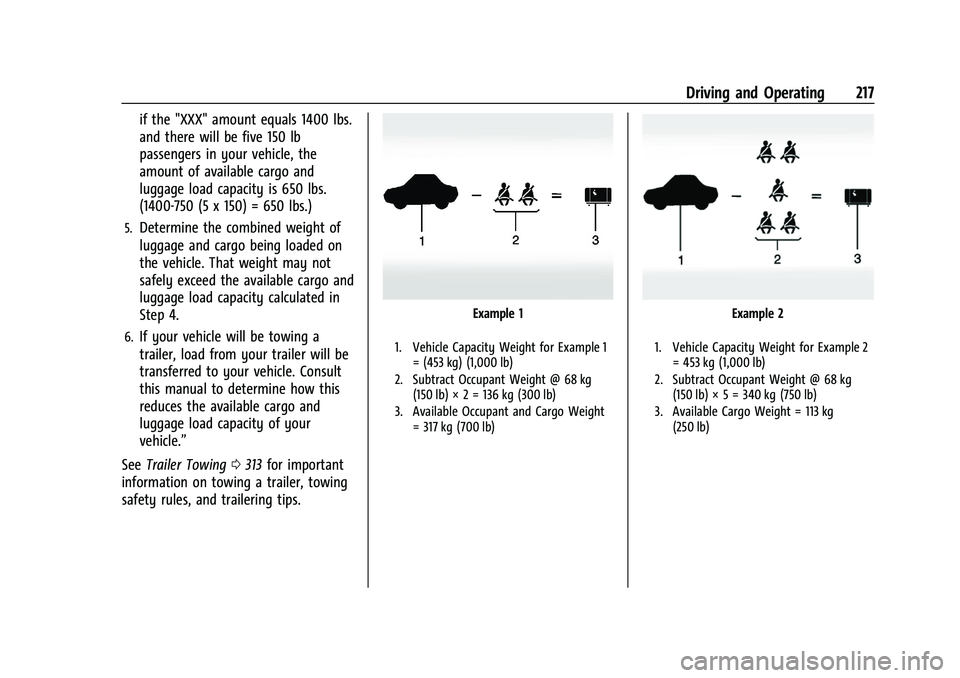
Example 1
1. Vehicle Capacity Weight for Example 1
= (453 kg) (1,000 lb)
2. Subtract Occupant Weight @ 68 kg (150 lb) × 2 = 136 kg (300 lb)
3. Available Occupant and Cargo Weight = 317 kg (700 lb)
Example 2
1. Vehicle Capacity Weight for Example 2= 453 kg (1,000 lb)
2. Subtract Occupant Weight @ 68 kg (150 lb) × 5 = 340 kg (750 lb)
3. Available Cargo Weight = 113 kg (250 lb)
Page 223 of 474
GMC Sierra/Sierra Denali 1500 Owner Manual (GMNA-Localizing-U.S./
Canada/Mexico-15883563) - 2022 - CRC - 11/19/21
222 Driving and Operating
“Certification/Tire Label”underVehicle
Load Limits 0215. If weight ratings are
exceeded, move or remove items to
bring all weights below the ratings.
See your dealer for more information
on curb weights, cargo weights, Cargo
Weight Rating, and the correct center of
gravity zone.
Starting and Operating
New Vehicle Break-In
Caution
The vehicle does not need an elaborate
break-in. But it will perform better in the
long run if you follow these guidelines:
.Do not drive at any one constant
speed, fast or slow, for the first
800 km (500 mi). Do not make
full-throttle starts. Avoid downshifting
to brake or slow the vehicle.
.Avoid making hard stops for the first
300 km (200 mi) or so. During this
time the new brake linings are not yet
broken in. Hard stops with new linings
(Continued)
Caution (Continued)
can mean premature wear and earlier
replacement. Follow this breaking-in
guideline every time you get new
brake linings.
.Do not tow a trailer during break-in.
See Trailer Towing 0313 for the trailer
towing capabilities of the vehicle and
more information.
Following break-in, engine speed and load
can be gradually increased.
On new vehicles, the various mechanical and
electrical systems experience a “break-in”
period during the first 6 400 km (4,000 mi)
of routine driving. As the vehicle is driven,
the mechanical systems adjust to provide
optimal fuel economy and transmission shift
performance.
Electrical systems will adapt and calibrate
during the break-in period. A one-time
occurrence of clicks and similar vehicle
noises is normal during this process.
Normal driving charges the vehicle’s battery
to achieve the best operation of the vehicle,
including fuel economy and the Stop/Start
System. See Stop/Start System 0225.
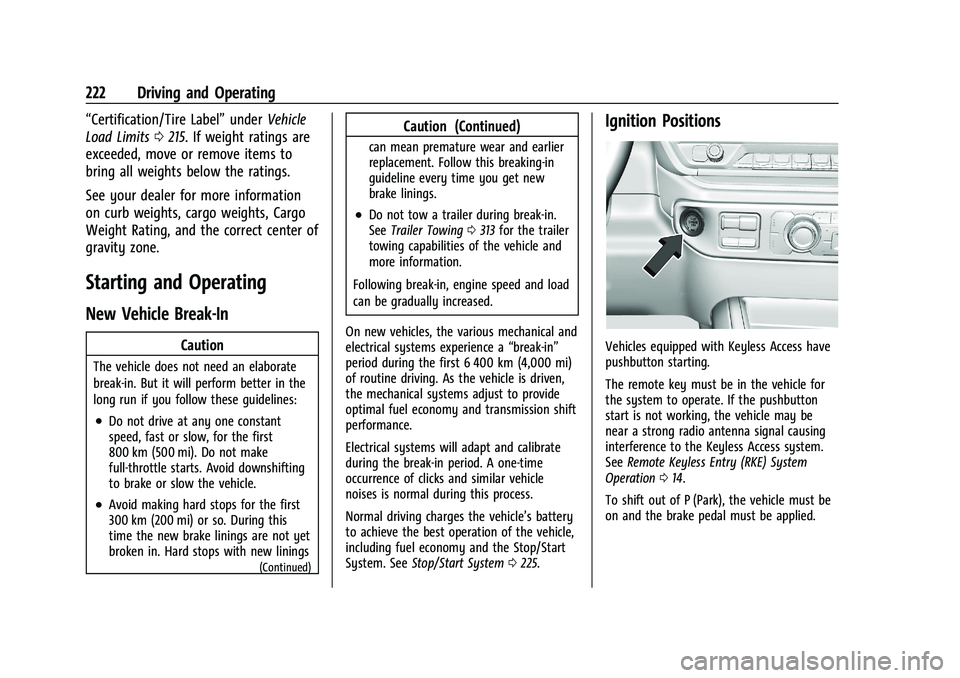
Ignition Positions
Vehicles equipped with Keyless Access have
pushbutton starting.
The remote key must be in the vehicle for
the system to operate. If the pushbutton
start is not working, the vehicle may be
near a strong radio antenna signal causing
interference to the Keyless Access system.
See Remote Keyless Entry (RKE) System
Operation 014.
To shift out of P (Park), the vehicle must be
on and the brake pedal must be applied.