2022 GMC SIERRA remote control
[x] Cancel search: remote controlPage 202 of 474

GMC Sierra/Sierra Denali 1500 Owner Manual (GMNA-Localizing-U.S./
Canada/Mexico-15883563) - 2022 - CRC - 11/19/21
Climate Controls 201
If equipped with heated outside mirrors,
press
fto turn them on or off. SeeHeated
Mirrors 036.
Caution
Using a razor blade or sharp object to
clear the inside rear window can damage
the rear window defogger. Repairs would
not be covered by the vehicle warranty.
Do not clear the inside rear window with
sharp objects.
Remote Start Climate Control Operation :
If equipped with remote start, the climate
control system may run when the vehicle is
started remotely. If equipped with heated or
ventilated seats or a heated steering wheel,
these features may come on during a
remote start. See Remote Vehicle Start 020,
Heated and Ventilated Front Seats 052, and
Heated Steering Wheel 0102.
Sensors
The solar sensor, on top of the instrument
panel near the windshield, monitors the
solar heat.
The climate control system uses the sensor
information to adjust the temperature, fan
speed, recirculation, and air delivery mode
for best comfort.
Do not cover the sensor; otherwise the
automatic climate control system may not
work properly. Afterblow Feature
If equipped, under certain conditions, the
fan may stay on or may turn on and off
several times after you turn off and lock the
vehicle. This is normal.
Air Vents
Use the sliding knobs on the center and side
air vents to change the direction of the
airflow.
Air vents blow warm air on the side
windows in cold weather. If Floor, Defog,
or Defrost modes are selected, a small
amount of air will come from the vents
closest to the window.
To close the front A/C vents, move the
sliding knobs to the full down position for
vertical slats or away from you for
horizontal slats.
To close the rear A/C vents, move the
sliding knobs to the full inboard position.
Operation Tips
.Clear away any ice, snow, or leaves from
air inlets at the base of the windshield
that could block airflow.
Page 264 of 474
GMC Sierra/Sierra Denali 1500 Owner Manual (GMNA-Localizing-U.S./
Canada/Mexico-15883563) - 2022 - CRC - 11/19/21
Driving and Operating 263
Warning (Continued)
ahead changing lanes. Your vehicle may
not stop and could cause a crash. Use
caution when using ACC. Your complete
attention is always required while driving
and you should be ready to take action
and apply the brakes.
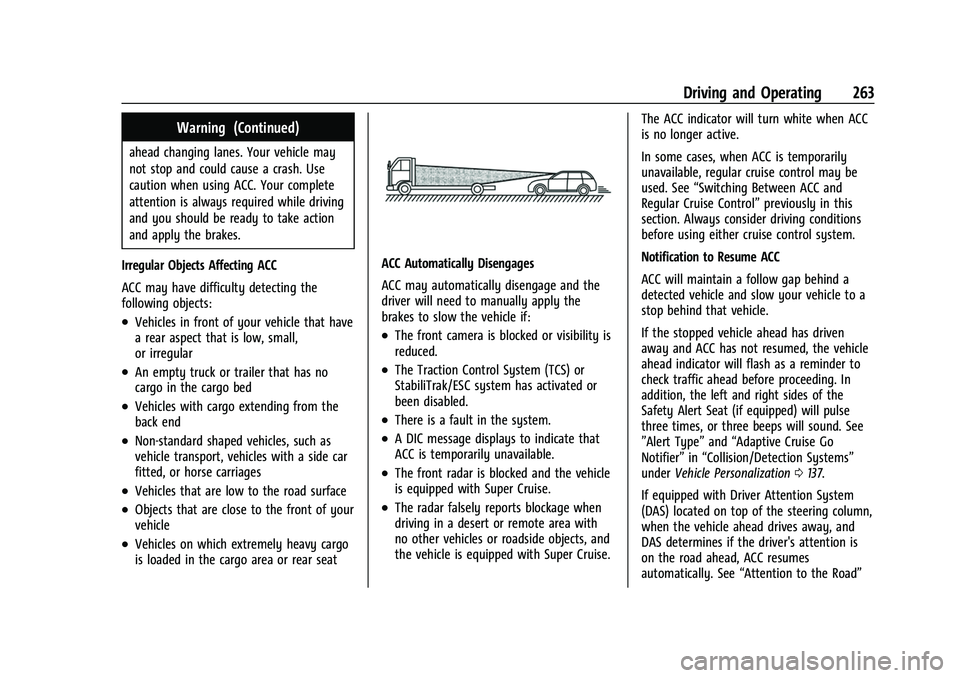
Irregular Objects Affecting ACC
ACC may have difficulty detecting the
following objects:
.Vehicles in front of your vehicle that have
a rear aspect that is low, small,
or irregular
.An empty truck or trailer that has no
cargo in the cargo bed
.Vehicles with cargo extending from the
back end
.Non-standard shaped vehicles, such as
vehicle transport, vehicles with a side car
fitted, or horse carriages
.Vehicles that are low to the road surface
.Objects that are close to the front of your
vehicle
.Vehicles on which extremely heavy cargo
is loaded in the cargo area or rear seat
ACC Automatically Disengages
ACC may automatically disengage and the
driver will need to manually apply the
brakes to slow the vehicle if:
.The front camera is blocked or visibility is
reduced.
.The Traction Control System (TCS) or
StabiliTrak/ESC system has activated or
been disabled.
.There is a fault in the system.
.A DIC message displays to indicate that
ACC is temporarily unavailable.
.The front radar is blocked and the vehicle
is equipped with Super Cruise.
.The radar falsely reports blockage when
driving in a desert or remote area with
no other vehicles or roadside objects, and
the vehicle is equipped with Super Cruise. The ACC indicator will turn white when ACC
is no longer active.
In some cases, when ACC is temporarily
unavailable, regular cruise control may be
used. See
“Switching Between ACC and
Regular Cruise Control” previously in this
section. Always consider driving conditions
before using either cruise control system.
Notification to Resume ACC
ACC will maintain a follow gap behind a
detected vehicle and slow your vehicle to a
stop behind that vehicle.
If the stopped vehicle ahead has driven
away and ACC has not resumed, the vehicle
ahead indicator will flash as a reminder to
check traffic ahead before proceeding. In
addition, the left and right sides of the
Safety Alert Seat (if equipped) will pulse
three times, or three beeps will sound. See
”Alert Type” and“Adaptive Cruise Go
Notifier” in“Collision/Detection Systems”
under Vehicle Personalization 0137.
If equipped with Driver Attention System
(DAS) located on top of the steering column,
when the vehicle ahead drives away, and
DAS determines if the driver's attention is
on the road ahead, ACC resumes
automatically. See “Attention to the Road”
Page 377 of 474
GMC Sierra/Sierra Denali 1500 Owner Manual (GMNA-Localizing-U.S./
Canada/Mexico-15883563) - 2022 - CRC - 11/19/21
376 Vehicle Care
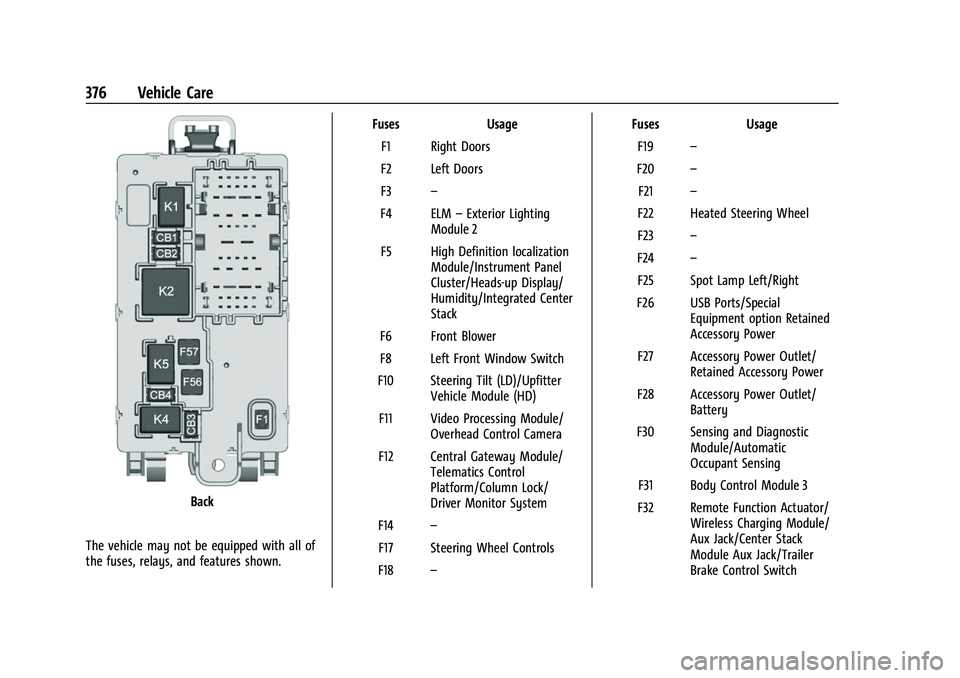
Back
The vehicle may not be equipped with all of
the fuses, relays, and features shown. Fuses Usage
F1 Right Doors
F2 Left Doors
F3 –
F4 ELM –Exterior Lighting
Module 2
F5 High Definition localization Module/Instrument Panel
Cluster/Heads-up Display/
Humidity/Integrated Center
Stack
F6 Front Blower
F8 Left Front Window Switch
F10 Steering Tilt (LD)/Upfitter Vehicle Module (HD)
F11 Video Processing Module/ Overhead Control Camera
F12 Central Gateway Module/ Telematics Control
Platform/Column Lock/
Driver Monitor System
F14 –
F17 Steering Wheel Controls
F18 – Fuses
Usage
F19 –
F20 –
F21 –
F22 Heated Steering Wheel
F23 –
F24 –
F25 Spot Lamp Left/Right
F26 USB Ports/Special Equipment option Retained
Accessory Power
F27 Accessory Power Outlet/ Retained Accessory Power
F28 Accessory Power Outlet/ Battery
F30 Sensing and Diagnostic Module/Automatic
Occupant Sensing
F31 Body Control Module 3
F32 Remote Function Actuator/ Wireless Charging Module/
Aux Jack/Center Stack
Module Aux Jack/Trailer
Brake Control Switch
Page 456 of 474
GMC Sierra/Sierra Denali 1500 Owner Manual (GMNA-Localizing-U.S./
Canada/Mexico-15883563) - 2022 - CRC - 11/19/21
OnStar 455
.After change in ownership and at
90 days.
Transferring Service
PressQto request account transfer
eligibility information. The Advisor can
cancel or change account information.
Selling/Transferring the Vehicle
Call 1-888-4ONSTAR (1-888-466-7827)
immediately to terminate your OnStar or
connected services if the vehicle is disposed
of, sold, transferred, or if the lease ends.
Reactivation for Subsequent Owners
PressQand follow the prompts to speak to
an Advisor as soon as possible. The Advisor
will update vehicle records and explain
OnStar or connected service options.
How OnStar Service Works
Automatic Crash Response, Emergency
Services, Crisis Assist, Stolen Vehicle
Assistance, Remote Services, and Roadside
Assistance are available on most vehicles.
Not all OnStar services are available
everywhere or on all vehicles. For more
information, a full description of OnStar services, system limitations, and OnStar User
Terms, Privacy Statement, and Software
Terms:
.Call 1-888-4ONSTAR (1-888-466-7827).
.See www.onstar.com (U.S.).
.See www.onstar.ca (Canada).
.Call TTY 1-877-248-2080.
.PressQto speak with an Advisor.
OnStar or connected services cannot work
unless the vehicle is in a place where OnStar
has an agreement with a wireless service
provider for service in that area. The
wireless service provider must also have
coverage, network capacity, reception, and
technology compatible with OnStar or
connected services. Service involving location
information about the vehicle cannot work
unless GPS signals are available,
unobstructed, and compatible with the
OnStar hardware. OnStar or connected
services may not work if the OnStar
equipment is not properly installed or it has
not been properly maintained. If equipment
or software is added, connected,
or modified, OnStar or connected services
may not work. Other problems beyond the
control of OnStar —such as hills, tall
buildings, tunnels, weather, electrical system
design and architecture of the vehicle, damage to the vehicle in a crash, or wireless
phone network congestion or jamming
—
may prevent service.
See Radio Frequency Statement 0450.
Services for People with Disabilities
Advisors provide services to help with
physical disabilities and medical conditions.
Press
Qto help:
.Locate a gas station with an attendant to
pump gas.
.Find a hotel, restaurant, etc., that meets
accessibility needs.
.Provide directions to the closest hospital
or pharmacy in urgent situations.
TTY Users
OnStar has the ability to communicate to
deaf, hard-of-hearing, or speech-impaired
customers while in the vehicle. The available
TTY system can provide in-vehicle access to
all OnStar services, except Virtual Advisor
and OnStar Turn-by-Turn Navigation.
If equipped, TTY mode can be turned on or
off by touching Settings, then Apps, and
then Phone. When TTY mode is on, phone
calls can be made or received with OnStar
using the infotainment display.
Page 460 of 474

GMC Sierra/Sierra Denali 1500 Owner Manual (GMNA-Localizing-U.S./
Canada/Mexico-15883563) - 2022 - CRC - 11/19/21
Connected Services 459
Ensuring Security
.Change the default passwords for the
Wi-Fi hotspot and myGMC mobile
application. Make these passwords
different from each other and use a
combination of letters and numbers to
increase the security.
.Change the default name of the SSID
(Service Set Identifier). This is your
network’s name that is visible to other
wireless devices. Choose a unique name
and avoid family names or vehicle
descriptions.
Wi-Fi Hotspot (If Equipped)
The vehicle may have a built-in Wi-Fi
hotspot that provides access to the Internet
and web content at 4G LTE speed. Up to
seven mobile devices can be connected.
A data plan is required. Use the in-vehicle
controls only when it is safe to do so. 1. To retrieve Wi-Fi hotspot information, press
=to open the OnStar app on the
infotainment display, then select Wi-Fi
Hotspot. On some vehicles, touch Wi-Fi
or Wi-Fi Settings on the screen.
2. The Wi-Fi settings will display the Wi-Fi hotspot name (SSID), password, and on
some vehicles, the connection type (no Internet connection, 3G, 4G, 4G LTE), and
signal quality (poor, good, excellent). The
LTE icon shows connection to Wi-Fi. It is
possible that the icon may not illuminate
even though the vehicle has an active
connection.
3. To change the SSID or password, press
Qor call 1-888-4ONSTAR to connect
with an Advisor. On some vehicles, the
SSID and password can be changed in
the Wi-Fi Hotspot menu.
After initial set-up, your vehicle’s Wi-Fi
hotspot will connect automatically to your
mobile devices. Manage data usage by
turning Wi-Fi on or off on your mobile
device, using the myGMC mobile app, or
by contacting an OnStar Advisor. On some
vehicles, Wi-Fi can also be managed from
the Wi-Fi Hotspot menu.
MyGMC Mobile App (If Available)
Download the myGMC mobile app to
compatible Apple and Android smartphones.
GMC users can access the following services
from a smartphone:
.Remotely start/stop the vehicle,
if factory-equipped.
.Lock/unlock doors, if equipped with
automatic locks.
.Activate the horn and lamps.
.Check the vehicle’s fuel level, oil life,
or tire pressure, if factory-equipped with
the Tire Pressure Monitor System.
.Send destinations to the vehicle.
.Locate the vehicle on a map (U.S.
market only).
.Turn the vehicle's Wi-Fi hotspot on/off,
manage settings, and monitor data
consumption, if equipped.
.Locate a dealer and schedule service.
.Request Roadside Assistance.
.Set a parking reminder with pin drop,
take a photo, make a note, and set a
timer.
.Connect with GMC on social media.
Features are subject to change. For myGMC
mobile app information and compatibility,
see my.gmc.com.
An active OnStar or connected service plan
may be required. A compatible device,
factory-installed remote start, and power
locks are required. Data rates apply. See
www.onstar.com for details and system
limitations.
Page 467 of 474

GMC Sierra/Sierra Denali 1500 Owner Manual (GMNA-Localizing-U.S./Cana-
da/Mexico-15883563) - 2022 - CRC - 11/19/21
466 Index
Heated (cont'd)Steering Wheel . . . . . . . . . . . . . . . . . . . . . . . . 102
Heated and Ventilated Front Seats . . . . . . . .52
Heated Mirrors . . . . . . . . . . . . . . . . . . . . . . . . . . . 36
Heater Engine . . . . . . . . . . . . . . . . . . . . . . . . . . . . . . . . . 225
Heating . . . . . . . . . . . . . . . . . . . . . . . . . . . . . 196, 198
High-Beam On Light . . . . . . . . . . . . . . . . . . . . . . 127
Hill and Mountain Roads . . . . . . . . . . . . . . . . . 213
Hill Descent Control (HDC) . . . . . . . . . . . . . . . 249
Hill Descent Control Light . . . . . . . . . . . . . . . . . 122
Hill Start Assist (HSA) . . . . . . . . . . . . . . . . . . . . 247
Hood . . . . . . . . . . . . . . . . . . . . . . . . . . . . . . . . . . . . 343
Horn . . . . . . . . . . . . . . . . . . . . . . . . . . . . . . . . . . . . . 102
How to Wear Seat Belts Properly . . . . . . . . . 56
HVAC . . . . . . . . . . . . . . . . . . . . . . . . . . . . . . . 196, 198
I
Ignition Positions . . . . . . . . . . . . . . . . . . . . . . . . 222
Immobilizer . . . . . . . . . . . . . . . . . . . . . . . . . . . . . . . .32
Indicator Pedestrian Ahead . . . . . . . . . . . . . . . . . . . . . . 123
Vehicle Ahead . . . . . . . . . . . . . . . . . . . . . . . . . 123
Infants and Young Children, Restraints . . . . .73
Information Publication Ordering . . . . . . . . . . . . . . . . . . . 449
Infotainment System . . . . . . . . . . . . . . . . . . . . 452
Instrument Cluster . . . . . . . . . . . . . . . . . . . 109, 110 Instrument Panel Overview . . . . . . . . . . . . . . . . 4
Interior Rearview Mirrors . . . . . . . . . . . . . . . . . .37
Introduction . . . . . . . . . . . . . . . . . . . . . . . . . . . 1, 155
J
Jump Starting - North America . . . . . . . . . . . 407
K
Keyless Entry
Remote (RKE) System . . . . . . . . . . . . . . . . . . . 14
Keys . . . . . . . . . . . . . . . . . . . . . . . . . . . . . . . . . . . . . . . 13
L
Labeling, Tire Sidewall . . . . . . . . . . . . . . . . . . . 379
Lamps Auxiliary Roof Mounted Lamp . . . . . . . . . 150
Daytime Running (DRL) . . . . . . . . . . . . . . . . 147
Dome . . . . . . . . . . . . . . . . . . . . . . . . . . . . . . . . . . 152
Exterior Cargo . . . . . . . . . . . . . . . . . . . . . . . . . . 151
Exterior Controls . . . . . . . . . . . . . . . . . . . . . . . 145
Exterior Lamps Off Reminder . . . . . . . . . . 147
Exterior Lighting Battery Saver . . . . . . . . 154
License Plate . . . . . . . . . . . . . . . . . . . . . . . . . . . 368
Malfunction Indicator (CheckEngine) . . . . . . . . . . . . . . . . . . . . . . . . . . . . . . . 119
On Reminder . . . . . . . . . . . . . . . . . . . . . . . . . . . 127
Reading . . . . . . . . . . . . . . . . . . . . . . . . . . . . . . . . 153
Lane Change Alert (LCA) . . . . . . . . . . . . . . . . . 299
Lane Departure Warning (LDW) . . . . . . . . . . 301 Lane Keep Assist (LKA) . . . . . . . . . . . . . . . . . . . 302
Lane Keep Assist Light . . . . . . . . . . . . . . . . . . . . 123
Lap-Shoulder Belt . . . . . . . . . . . . . . . . . . . . . . . . . 58
LATCH System
Replacing Parts after a Crash . . . . . . . . . . . 89
LATCH, Lower Anchors and Tethers for Children . . . . . . . . . . . . . . . . . . . . . . . . . . . . . . . . . 78
LED Lighting . . . . . . . . . . . . . . . . . . . . . . . . . . . . . 366
Lighting Entry . . . . . . . . . . . . . . . . . . . . . . . . . . . . . . . . . . 153
Exit . . . . . . . . . . . . . . . . . . . . . . . . . . . . . . . . . . . . 153
Illumination Control . . . . . . . . . . . . . . . . . . . 152
LED . . . . . . . . . . . . . . . . . . . . . . . . . . . . . . . . . . . . 366
Task . . . . . . . . . . . . . . . . . . . . . . . . . . . . . . . . . . . 150
Lights Airbag Readiness . . . . . . . . . . . . . . . . . . . . . . . 118
Antilock Brake System (ABS)
Warning . . . . . . . . . . . . . . . . . . . . . . . . . . . . . 122
Brake System Warning . . . . . . . . . . . . . . . . . 121
Charging System . . . . . . . . . . . . . . . . . . . . . . . 119
Check Engine (Malfunction Indicator) . . . . . . . . . . . . . . . . . . . . . . . . . . . . . 119
Cruise Control . . . . . . . . . . . . . . . . . . . . . . . . . 128
Door Ajar . . . . . . . . . . . . . . . . . . . . . . . . . . . . . . 128
Driver Mode Control . . . . . . . . . . . . . . . . . . . 125
Electric Parking Brake . . . . . . . . . . . . . . . . . . . 121
Engine Coolant Temperature Warning . . . . . . . . . . . . . . . . . . . . . . . . . . . . . 125
Page 470 of 474

GMC Sierra/Sierra Denali 1500 Owner Manual (GMNA-Localizing-U.S./Cana-
da/Mexico-15883563) - 2022 - CRC - 11/19/21
Index 469
Publication Ordering Information . . . . . . . . 449
R
Radio Data System (RDS) . . . . . . . . . . . . . . . . 164
Radio Frequency Statement . . . . . . . . . . . . . . 450
Radio Reception . . . . . . . . . . . . . . . . . . . . . . . . . 166
RadiosAM-FM Radio . . . . . . . . . . . . . . . . . . . . . . 161, 163
Satellite . . . . . . . . . . . . . . . . . . . . . . . . . . . . . . . . 164
Reading Lamps . . . . . . . . . . . . . . . . . . . . . . . . . . . 153
Rear Axle . . . . . . . . . . . . . . . . . . . . . . . . . . . . . . . . 363 Locking . . . . . . . . . . . . . . . . . . . . . . . . . . . . . . . . 253
Rear Camera Mirror . . . . . . . . . . . . . . . . . . . . . . . .37
Rear Cross Traffic Alert System . . . . . . . . . . 293
Rear Pedestrian Alert . . . . . . . . . . . . . . . . . . . . 292
Rear Seats . . . . . . . . . . . . . . . . . . . . . . . . . . . . . . . . .53 Heated . . . . . . . . . . . . . . . . . . . . . . . . . . . . . . . . . 54
Rear Storage . . . . . . . . . . . . . . . . . . . . . . . . . . . . . . 97
Rear Vision Camera (RVC) . . . . . . . . . . . . . . . . 283
Rear Windows . . . . . . . . . . . . . . . . . . . . . . . . . . . . 42
Rearview Mirrors . . . . . . . . . . . . . . . . . . . . . . . . . .37 Automatic Dimming . . . . . . . . . . . . . . . . . . . . 37
Reclining Seatbacks . . . . . . . . . . . . . . . . . . . . . . . 47
Recognition Voice . . . . . . . . . . . . . . . . . . . . . . . . . . . . . . . . . . . 172
Recommended
Fuel . . . . . . . . . . . . . . . . . . . . . . . . . . . . . . . 304, 305
Recommended Fluids and Lubricants . . . . . 434 Records
Maintenance . . . . . . . . . . . . . . . . . . . . . . . . . . . 437
Recreational Vehicle Towing . . . . . . . . . . . . . . 411
Reimbursement Program, GM Mobility . . . . . . . . . . . . . . . . . . . . . . . . . . . . . . . 445
Remote Keyless Entry (RKE) System . . . . . . .14
Remote Vehicle Start . . . . . . . . . . . . . . . . . . . . . 20
Replacement Glass . . . . . . . . . . . . . . . . . . . . . . . . . . . . . . . . . . 365
Replacement Parts Airbags . . . . . . . . . . . . . . . . . . . . . . . . . . . . . . . . . . 71
Maintenance . . . . . . . . . . . . . . . . . . . . . . . . . . . 435
Replacing Airbag System . . . . . . . . . . . . . . . . . . . 71
Replacing LATCH System Parts after a Crash . . . . . . . . . . . . . . . . . . . . . . . . . . . . . . . . . . . 89
Replacing Seat Belt System Parts after
a Crash . . . . . . . . . . . . . . . . . . . . . . . . . . . . . . . . . .61
Reporting Safety Defects Canadian Government . . . . . . . . . . . . . . . . . 450
General Motors . . . . . . . . . . . . . . . . . . . . . . . . 451
U.S. Government . . . . . . . . . . . . . . . . . . . . . . . 450
Restraints Where to Put . . . . . . . . . . . . . . . . . . . . . . . . . . . 77
Retained Accessory Power (RAP) . . . . . . . . . 227
Reverse Tilt Mirrors . . . . . . . . . . . . . . . . . . . . . . . .37
Ride Control Systems Enhanced Traction System (ETS) . . . . . . . 252 Roads
Driving, Wet . . . . . . . . . . . . . . . . . . . . . . . . . . . 212
Roadside Assistance Program . . . . . . . . . . . . 445
Roof Sunroof . . . . . . . . . . . . . . . . . . . . . . . . . . . . . . . . . 43
Rotation, Tires . . . . . . . . . . . . . . . . . . . . . . . . . . . 390
Routing, Engine Drive Belt . . . . . . . . . . . . . . . 441
Running the Vehicle While Parked . . . . . . . . 231
S
Safety Defects Reporting Canadian Government . . . . . . . . . . . . . . . . . 450
General Motors . . . . . . . . . . . . . . . . . . . . . . . . 451
U.S. Government . . . . . . . . . . . . . . . . . . . . . . . 450
Safety Locks . . . . . . . . . . . . . . . . . . . . . . . . . . . . . . .22
Safety System Check . . . . . . . . . . . . . . . . . . . . . .61
Satellite Radio . . . . . . . . . . . . . . . . . . . . . . . . . . . 164
Scheduling Appointments . . . . . . . . . . . . . . . . 447
Seat Belts . . . . . . . . . . . . . . . . . . . . . . . . . . . . . . . . . 54 Buckle To Drive . . . . . . . . . . . . . . . . . . . . . . . . . 55
Care . . . . . . . . . . . . . . . . . . . . . . . . . . . . . . . . . . . . 61
Extender . . . . . . . . . . . . . . . . . . . . . . . . . . . . . . . . 61
How to Wear Seat Belts Properly . . . . . . . 56
Lap-Shoulder Belt . . . . . . . . . . . . . . . . . . . . . . . 58
Reminders . . . . . . . . . . . . . . . . . . . . . . . . . . . . . . 117
Replacing after a Crash . . . . . . . . . . . . . . . . . 61
Use During Pregnancy . . . . . . . . . . . . . . . . . . 60
Page 471 of 474

GMC Sierra/Sierra Denali 1500 Owner Manual (GMNA-Localizing-U.S./Cana-
da/Mexico-15883563) - 2022 - CRC - 11/19/21
470 Index
SeatsAdjustment, Front . . . . . . . . . . . . . . . . . . . . . . 46
Center Seat . . . . . . . . . . . . . . . . . . . . . . . . . . . . . 46
Head Restraints . . . . . . . . . . . . . . . . . . . . . . . . . 45
Heated and Ventilated Front . . . . . . . . . . . . 52
Heated, Rear . . . . . . . . . . . . . . . . . . . . . . . . . . . . 54
Lumbar Adjustment, Front . . . . . . . . . . . . . . 48
Massage . . . . . . . . . . . . . . . . . . . . . . . . . . . . . . . . 49
Memory . . . . . . . . . . . . . . . . . . . . . . . . . . . . . . . . 50
Power Adjustment, Front . . . . . . . . . . . . . . . 47
Rear . . . . . . . . . . . . . . . . . . . . . . . . . . . . . . . . . . . . 53
Reclining Seatbacks . . . . . . . . . . . . . . . . . . . . . 47
Underseat Storage . . . . . . . . . . . . . . . . . . . . . . 97
Securing Child Restraints . . . . . . . . . . .89, 93, 95
Security Light . . . . . . . . . . . . . . . . . . . . . . . . . . . . . . . . . . . . 127
OnStar . . . . . . . . . . . . . . . . . . . . . . . . . . . . . . . . . 454
Vehicle . . . . . . . . . . . . . . . . . . . . . . . . . . . . . . . . . . 31
Vehicle Alarm . . . . . . . . . . . . . . . . . . . . . . . . . . . . 31
Service . . . . . . . . . . . . . . . . . . . . . . . . . . . . . . . . . . . 203 Accessories and Modifications . . . . . . . . . 342
Climate Control System . . . . . . . . . . . . . . . . 196
Doing Your Own Work . . . . . . . . . . . . . . . . . 343
Maintenance Records . . . . . . . . . . . . . . . . . . 437
Maintenance, General Information . . . . . 424
Parts Identification . . . . . . . . . . . . . . . . . . . . . 438
Scheduling Appointments . . . . . . . . . . . . . . 447
Service Electric Parking Brake Light . . . . . . . 121 Services
Special Application . . . . . . . . . . . . . . . . . . . . . 431
Servicing the Airbag . . . . . . . . . . . . . . . . . . . . . . 70
Settings . . . . . . . . . . . . . . . . . . . . . . . . . . . . . . 185, 187
Shift Lock Control Function Check, Automatic Transmission . . . . . . . . . . . . . . . . 364
Shifting
Into Park . . . . . . . . . . . . . . . . . . . . . . . . . 227, 228
Out of Park . . . . . . . . . . . . . . . . . . . . . . . . . . . . 229
Side Blind Zone Alert (SBZA) . . . . . . . . . . . . . 299
Signals, Turn and Lane-Change . . . . . . . . . . . 149
Snow Plow . . . . . . . . . . . . . . . . . . . . . . . . . . . . . . 338
Software Updates . . . . . . . . . . . . . . . . . . . . . . . . . 161
Special Application Services . . . . . . . . . . . . . . .431
Specifications and Capacities . . . . . . . . . . . . . 439
Speedometer . . . . . . . . . . . . . . . . . . . . . . . . . . . . . 113
StabiliTrak OFF Light . . . . . . . . . . . . . . . . . . . . . . . . . . . . . . 124
Start Assist, Hill . . . . . . . . . . . . . . . . . . . . . . . . . . 247
Start Vehicle, Remote . . . . . . . . . . . . . . . . . . . . . 20
Starting the Engine . . . . . . . . . . . . . . . . . . . . . . 224
Steering . . . . . . . . . . . . . . . . . . . . . . . . . . . . . . . . . 207 Heated Wheel . . . . . . . . . . . . . . . . . . . . . . . . . 102
Wheel Adjustment . . . . . . . . . . . . . . . . . . . . . 101
Wheel Controls . . . . . . . . . . . . . . . . . . . . . . . . 101
Steering Column Lock . . . . . . . . . . . . . . . . . . . . . .32
Steering Wheel Controls . . . . . . . . . . . . . . . . . .158 Steps
Power Assist . . . . . . . . . . . . . . . . . . . . . . . . . . . . 30
Stop/Start System . . . . . . . . . . . . . . . . . . . . . . . 225
Stoplamps and Back-up Lamps Bulb Replacement . . . . . . . . . . . . . . . . . . . . . . 367
Storage Rear . . . . . . . . . . . . . . . . . . . . . . . . . . . . . . . . . . . . 97
Storage Areas Center Console . . . . . . . . . . . . . . . . . . . . . . . . . 97
Floor Console . . . . . . . . . . . . . . . . . . . . . . . . . . . 98
Glove Box . . . . . . . . . . . . . . . . . . . . . . . . . . . . . . 96
Underseat . . . . . . . . . . . . . . . . . . . . . . . . . . . . . . 97
Storage Compartments . . . . . . . . . . . . . . . . . . . 96
Struts Gas . . . . . . . . . . . . . . . . . . . . . . . . . . . . . . . . . . . . 365
Stuck Vehicle . . . . . . . . . . . . . . . . . . . . . . . . . . . . .214
Sun Visors . . . . . . . . . . . . . . . . . . . . . . . . . . . . . . . . 42
Sunroof . . . . . . . . . . . . . . . . . . . . . . . . . . . . . . . . . . . 43
Super Cruise . . . . . . . . . . . . . . . . . . . . . . . . . . . . . 267
Surround Vision System . . . . . . . . . . . . . . . . . 284
Symbols . . . . . . . . . . . . . . . . . . . . . . . . . . . . . . . . . . . .2
Navigation . . . . . . . . . . . . . . . . . . . . . . . . . . . . . 170
System Brake Pad Life . . . . . . . . . . . . . . . . . . . . . . . . . 359
Engine Air Filter Life . . . . . . . . . . . . . . . . . . . 351
Forward Collision Alert (FCA) . . . . . . . . . . . 293
Global Positioning . . . . . . . . . . . . . . . . . . . . . . 171
Infotainment . . . . . . . . . . . . . . . . . . . . . . . . . . . 452