2022 GMC ACADIA airbag off
[x] Cancel search: airbag offPage 215 of 397
GMC Acadia/Acadia Denali Owner Manual (GMNA-Localizing-U.S./Canada/
Mexico-15170041) - 2022 - CRC - 10/6/21
214 Driving and Operating
If the vehicle must be shut off in an
emergency:1. Brake using a firm and steady pressure. Do not pump the brakes repeatedly. This
may deplete power assist, requiring
increased brake pedal force.
2. Shift the vehicle to N (Neutral). This can be done while the vehicle is moving.
After shifting to N (Neutral), firmly apply
the brakes and steer the vehicle to a
safe location.
3. Come to a complete stop and shift to P (Park).
4. Set the parking brake. See Electric
Parking Brake 0225. And press ENGINE
START/STOP to turn the vehicle off.
{Warning
Turning off the vehicle while moving may
cause loss of power assist in the brake
and steering systems and disable the
airbags. While driving, only shut the
vehicle off in an emergency.
If the vehicle cannot be pulled over, and
must be shut off while driving, press and
hold ENGINE START/STOP for longer than
two seconds, or press twice in five seconds. ACC/ACCESSORY (Amber Indicator Light) :
This mode allows some electrical accessories
to be used when the engine is off.
With the ignition off, pressing the button
one time without the brake pedal applied
will place the ignition system in
ACC/ACCESSORY.
The ignition will switch from
ACC/ACCESSORY to off after five minutes
to prevent battery rundown.
ON/RUN/START (Green Indicator Light) :
This
mode is for driving and starting. With the
ignition off, and the brake pedal applied,
pressing the button once will place the
ignition system in ON/RUN/START. Once
engine cranking begins, release the button.
Engine cranking will continue until the
engine starts. See Starting the Engine 0214.
The ignition will then remain in ON/RUN.
Service Mode
This power mode is available for service and
diagnostics, and to verify the proper
operation of the malfunction indicator lamp
as may be required for emission inspection
purposes. With the vehicle off, and the
brake pedal not applied, pressing and
holding the button for more than
five seconds will place the vehicle in Service Mode. The instruments and audio systems
will operate as they do in ON/RUN, but the
vehicle will not be able to be driven. The
engine will not start in Service Mode. Press
the button again to turn the vehicle off.
Starting the Engine
Shift the vehicle into P (Park) or N (Neutral).
To restart the engine when the vehicle is
already moving, use N (Neutral) only.
Caution
Do not try to shift to P (Park) if the
vehicle is moving. If you do, you could
damage the transmission. Shift to P (Park)
only when the vehicle is stopped.
Caution
If you add electrical parts or accessories,
you could change the way the engine
operates. Any resulting damage would
not be covered by the vehicle warranty.
See
Add-On Electrical Equipment 0268.
Page 272 of 397

GMC Acadia/Acadia Denali Owner Manual (GMNA-Localizing-U.S./Canada/
Mexico-15170041) - 2022 - CRC - 10/6/21
Vehicle Care 271
This vehicle has an airbag system. Before
attempting to do your own service work,
seeServicing the Airbag-Equipped Vehicle
0 64.
If equipped with remote vehicle start, open
the hood before performing any service
work to prevent remote starting the vehicle
accidentally. See Remote Vehicle Start 014.
Keep a record with all parts receipts and list
the mileage and the date of any service
work performed. See Maintenance Records
0 359.
Caution
Even small amounts of contamination can
cause damage to vehicle systems. Do not
allow contaminants to contact the fluids,
reservoir caps, or dipsticks.
Hood
{Warning
For vehicles with auto engine stop/start,
turn the vehicle off before opening the
hood. If the vehicle is on, the engine will
start when the hood is opened. You or
others could be injured.
{Warning
Components under the hood can get hot
from running the engine. To help avoid
the risk of burning unprotected skin,
never touch these components until they
have cooled, and always use a glove or
towel to avoid direct skin contact.
Clear any snow from the hood before
opening.
To open the hood: 1. Pull the hood release lever with the
isymbol. It is on the lower left side
of the instrument panel.
2. Go to the front of the vehicle and locate the secondary release lever under the
front center of the hood. Push the
secondary hood release lever to the right
to release.
3. After you have partially lifted the hood, the gas strut system will automatically
lift the hood and hold it in the fully
open position.
To close the hood: 1. Before closing the hood, be sure all filler caps are on properly, and all tools are
removed.
2. Pull the hood down until the strut system is no longer holding up the hood.
3. Allow the hood to fall. Check to make sure the hood is latched completely.
Repeat this process with additional force
if necessary.
{Warning
Do not drive the vehicle if the hood is
not latched completely. The hood could
open fully, block your vision, and cause a
crash. You or others could be injured.
Always close the hood completely before
driving.
Page 298 of 397
GMC Acadia/Acadia Denali Owner Manual (GMNA-Localizing-U.S./Canada/
Mexico-15170041) - 2022 - CRC - 10/6/21
Vehicle Care 297
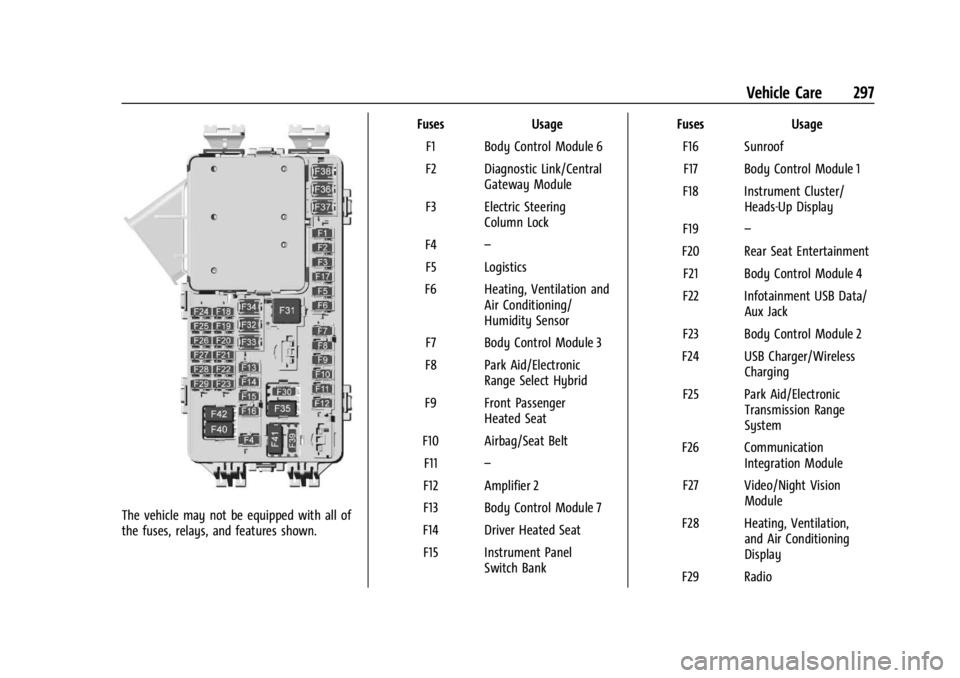
The vehicle may not be equipped with all of
the fuses, relays, and features shown.Fuses Usage
F1 Body Control Module 6
F2 Diagnostic Link/Central Gateway Module
F3 Electric Steering Column Lock
F4 –
F5 Logistics
F6 Heating, Ventilation and Air Conditioning/
Humidity Sensor
F7 Body Control Module 3
F8 Park Aid/Electronic Range Select Hybrid
F9 Front Passenger Heated Seat
F10 Airbag/Seat Belt F11 –
F12 Amplifier 2
F13 Body Control Module 7
F14 Driver Heated Seat F15 Instrument Panel Switch Bank Fuses Usage
F16 SunroofF17 Body Control Module 1
F18 Instrument Cluster/ Heads-Up Display
F19 –
F20 Rear Seat Entertainment F21 Body Control Module 4
F22 Infotainment USB Data/ Aux Jack
F23 Body Control Module 2
F24 USB Charger/Wireless Charging
F25 Park Aid/Electronic Transmission Range
System
F26 Communication Integration Module
F27 Video/Night Vision Module
F28 Heating, Ventilation, and Air Conditioning
Display
F29 Radio
Page 373 of 397

GMC Acadia/Acadia Denali Owner Manual (GMNA-Localizing-U.S./Canada/
Mexico-15170041) - 2022 - CRC - 10/6/21
372 Customer Information
Read the lease carefully, as you may be
charged at the end of the lease for poor
quality repairs.
If a Crash Occurs
If there has been an injury, call emergency
services for help. Do not leave the scene of
a crash until all matters have been taken
care of. Move the vehicle only if its position
puts you in danger, or you are instructed to
move it by a police officer.
Give only the necessary information to
police and other parties involved in the
crash.
For emergency towing seeRoadside
Assistance Program 0368.
Gather the following information:
.Driver name, address, and telephone
number
.Driver license number
.Owner name, address, and telephone
number
.Vehicle license plate number
.Vehicle make, model, and model year
.Vehicle Identification Number (VIN)
.Insurance company and policy number
.General description of the damage to the
other vehicle
Choose a reputable repair facility that uses
quality replacement parts. See “Collision
Parts” earlier in this section.
If the airbag has inflated, see What Will You
See after an Airbag Inflates? 059.
Managing the Vehicle Damage Repair
Process
In the event that the vehicle requires
damage repairs, GM recommends that you
take an active role in its repair. If you have
a pre-determined repair facility of choice,
take the vehicle there, or have it towed
there. Specify to the facility that any
required replacement collision parts be
original equipment parts, either new
Genuine GM parts or recycled original GM
parts. Remember, recycled parts will not be
covered by the GM vehicle warranty.
Insurance pays the bill for the repair, but
you must live with the repair. Depending on
your policy limits, your insurance company
may initially value the repair using
aftermarket parts. Discuss this with the
repair professional, and insist on Genuine
GM parts. Remember, if the vehicle is
leased, you may be obligated to have the vehicle repaired with Genuine GM parts,
even if your insurance coverage does not
pay the full cost.
If another party's insurance company is
paying for the repairs, you are not obligated
to accept a repair valuation based on that
insurance company's collision policy repair
limits, as you have no contractual limits
with that company. In such cases, you can
have control of the repair and parts choices
as long as the cost stays within reasonable
limits.
Publication Ordering Information
Service Manuals
Service manuals have the diagnosis and
repair information on the engine,
transmission, axle, suspension, brakes,
electrical system, steering system, body, etc.
Customer Literature
Owner’s manuals are written specifically for
owners and are intended to provide basic
operational information about the vehicle.
The owner’s manual includes the
Maintenance Schedule for all models.
Page 391 of 397

GMC Acadia/Acadia Denali Owner Manual (GMNA-Localizing-U.S./Canada/-
Mexico-15170041) - 2022 - CRC - 10/6/21
390 Index
Infants and Young Children, Restraints . . . . 67
InformationPublication Ordering . . . . . . . . . . . . . . . . . . . 372
Infotainment System . . . . . . . . . . . . . . . . . . . . 376
Instrument Cluster . . . . . . . . . . . . . . . . . . . . 98, 101
Instrument Panel Overview . . . . . . . . . . . . . . . . 4
Interior Rearview Mirrors . . . . . . . . . . . . . . . . . 28
Introduction . . . . . . . . . . . . . . . . . . . . . . . . . . . 1, 139
J
Jump Starting - North America . . . . . . . . . . . 332
K
Keyless Entry Remote (RKE) System . . . . . . . . . . . . . . . . . . . . 7
Keys . . . . . . . . . . . . . . . . . . . . . . . . . . . . . . . . . . . . . . . 6
L
Labeling, Tire Sidewall . . . . . . . . . . . . . . . . . . . 302
Lamps Courtesy . . . . . . . . . . . . . . . . . . . . . . . . . . . . . . . 136
Daytime Running (DRL) . . . . . . . . . . . . . . . . 134
Dome . . . . . . . . . . . . . . . . . . . . . . . . . . . . . . . . . . 136
Exterior Controls . . . . . . . . . . . . . . . . . . . . . . . 132
Exterior Lamps Off Reminder . . . . . . . . . . 133
Exterior Lighting Battery Saver . . . . . . . . 138
Malfunction Indicator (CheckEngine) . . . . . . . . . . . . . . . . . . . . . . . . . . . . . . 108
On Reminder . . . . . . . . . . . . . . . . . . . . . . . . . . . 115 Lamps (cont'd)
Reading . . . . . . . . . . . . . . . . . . . . . . . . . . . . . . . . 136
Lane Change Alert (LCA) . . . . . . . . . . . . . . . . . . 251
Lane Keep Assist (LKA) . . . . . . . . . . . . . . . . . . . 253
Lane Keep Assist Light . . . . . . . . . . . . . . . . . . . . 111
Lap-Shoulder Belt . . . . . . . . . . . . . . . . . . . . . . . . . . 51
LATCH System Replacing Parts after a Crash . . . . . . . . . . . 79
LATCH, Lower Anchors and Tethers for Children . . . . . . . . . . . . . . . . . . . . . . . . . . . . . . . . . .72
LED Lighting . . . . . . . . . . . . . . . . . . . . . . . . . . . . . 291
Liftgate . . . . . . . . . . . . . . . . . . . . . . . . . . . . . . . . . . . .18
Lighting Entry . . . . . . . . . . . . . . . . . . . . . . . . . . . . . . . . . . . 137
Exit . . . . . . . . . . . . . . . . . . . . . . . . . . . . . . . . . . . . . 137
Illumination Control . . . . . . . . . . . . . . . . . . . 136
LED . . . . . . . . . . . . . . . . . . . . . . . . . . . . . . . . . . . . 291
Lights Airbag Readiness . . . . . . . . . . . . . . . . . . . . . . 106
Antilock Brake System (ABS)Warning . . . . . . . . . . . . . . . . . . . . . . . . . . . . . . 111
Brake System Warning . . . . . . . . . . . . . . . . 109
Charging System . . . . . . . . . . . . . . . . . . . . . . 108
Check Engine (Malfunction Indicator) . . . . . . . . . . . . . . . . . . . . . . . . . . . . 108
Cruise Control . . . . . . . . . . . . . . . . . . . . . . . . . . 116
Door Ajar . . . . . . . . . . . . . . . . . . . . . . . . . . . . . . . 116
Driver Mode Control . . . . . . . . . . . . . . . . . . . . 113 Lights (cont'd)
Electric Parking Brake . . . . . . . . . . . . . . . . . . 110
Engine Coolant Temperature
Warning . . . . . . . . . . . . . . . . . . . . . . . . . . . . . . 113
Engine Oil Pressure . . . . . . . . . . . . . . . . . . . . . 114
Flash-to-Pass . . . . . . . . . . . . . . . . . . . . . . . . . . . 133
Front Fog Lamp . . . . . . . . . . . . . . . . . . . . . . . . . 115
Gear Shifting . . . . . . . . . . . . . . . . . . . . . . . . . . . 111
High-Beam On . . . . . . . . . . . . . . . . . . . . . . . . . . 115
High/Low Beam Changer . . . . . . . . . . . . . . 133
Hill Descent Control . . . . . . . . . . . . . . . . . . . . 111
Lane Keep Assist . . . . . . . . . . . . . . . . . . . . . . . . 111
Low Fuel Warning . . . . . . . . . . . . . . . . . . . . . . 115
Seat Belt Reminders . . . . . . . . . . . . . . . . . . . 106
Security . . . . . . . . . . . . . . . . . . . . . . . . . . . . . . . . . 115
Service Electric Parking Brake . . . . . . . . . . 110
StabiliTrak OFF . . . . . . . . . . . . . . . . . . . . . . . . . . 112
Tire Pressure . . . . . . . . . . . . . . . . . . . . . . . . . . . . 114
Traction Control System (TCS)/StabiliTrak . . . . . . . . . . . . . . . . . . . . . . 113
Traction Off . . . . . . . . . . . . . . . . . . . . . . . . . . . . . 112
Locks Automatic Door . . . . . . . . . . . . . . . . . . . . . . . . . . 17
Delayed Locking . . . . . . . . . . . . . . . . . . . . . . . . . 17
Door . . . . . . . . . . . . . . . . . . . . . . . . . . . . . . . . . . . . . 15
Lockout Protection . . . . . . . . . . . . . . . . . . . . . . . 17
Power Door . . . . . . . . . . . . . . . . . . . . . . . . . . . . . . 17
Safety . . . . . . . . . . . . . . . . . . . . . . . . . . . . . . . . . . 18
Page 394 of 397

GMC Acadia/Acadia Denali Owner Manual (GMNA-Localizing-U.S./Canada/-
Mexico-15170041) - 2022 - CRC - 10/6/21
Index 393
RestraintsWhere to Put . . . . . . . . . . . . . . . . . . . . . . . . . . . . 71
Retained Accessory Power (RAP) . . . . . . . . . . 217
Reverse Tilt Mirrors . . . . . . . . . . . . . . . . . . . . . . . 28
Roads Driving, Wet . . . . . . . . . . . . . . . . . . . . . . . . . . . 207
Roadside Assistance Program . . . . . . . . . . . . 368
Roof
Sunroof . . . . . . . . . . . . . . . . . . . . . . . . . . . . . . . . . 33
Roof Rack System . . . . . . . . . . . . . . . . . . . . . . . . . 89
Rotation, Tires . . . . . . . . . . . . . . . . . . . . . . . . . . . . 313
Routing, Engine Drive Belt . . . . . . . . . . . . . . . 364
Running the Vehicle While Parked . . . . . . . 220
S
Safety Defects Reporting Canadian Government . . . . . . . . . . . . . . . . . 374
General Motors . . . . . . . . . . . . . . . . . . . . . . . . 374
U.S. Government . . . . . . . . . . . . . . . . . . . . . . . 373
Safety Locks . . . . . . . . . . . . . . . . . . . . . . . . . . . . . . .18
Safety System Check . . . . . . . . . . . . . . . . . . . . . 54
Satellite Radio . . . . . . . . . . . . . . . . . . . . . . . . . . . .147
Scheduling Appointments . . . . . . . . . . . . . . . . 370
Sealant Kit, Tire . . . . . . . . . . . . . . . . . . . . . . . . . . . 321
Seat Belts . . . . . . . . . . . . . . . . . . . . . . . . . . . . . . . . . 48 Care . . . . . . . . . . . . . . . . . . . . . . . . . . . . . . . . . . . . 54
Extender . . . . . . . . . . . . . . . . . . . . . . . . . . . . . . . . 54
How to Wear Seat Belts Properly . . . . . . . 49 Seat Belts (cont'd)
Lap-Shoulder Belt . . . . . . . . . . . . . . . . . . . . . . . . 51
Reminders . . . . . . . . . . . . . . . . . . . . . . . . . . . . . 106
Replacing after a Crash . . . . . . . . . . . . . . . . . 54
Use During Pregnancy . . . . . . . . . . . . . . . . . . 53
Seats Adjustment, Front . . . . . . . . . . . . . . . . . . . . . . 37
Head Restraints . . . . . . . . . . . . . . . . . . . . . . . . . 35
Heated and Ventilated Front . . . . . . . . . . . . 42
Heated, Rear . . . . . . . . . . . . . . . . . . . . . . . . . . . . 46
Lumbar Adjustment, Front . . . . . . . . . . . . . . 39
Memory . . . . . . . . . . . . . . . . . . . . . . . . . . . . . . . . 39
Power Adjustment, Front . . . . . . . . . . . . . . . 37
Rear . . . . . . . . . . . . . . . . . . . . . . . . . . . . . . . . . . . . 43
Reclining Seatbacks . . . . . . . . . . . . . . . . . . . . . 38
Third Row Seat . . . . . . . . . . . . . . . . . . . . . . . . . 47
Securing Child Restraints . . . . . . . . . . . . . . . 79, 81
Security Light . . . . . . . . . . . . . . . . . . . . . . . . . . . . . . . . . . . . 115
OnStar . . . . . . . . . . . . . . . . . . . . . . . . . . . . . . . . . 378
Vehicle . . . . . . . . . . . . . . . . . . . . . . . . . . . . . . . . . 25
Vehicle Alarm . . . . . . . . . . . . . . . . . . . . . . . . . . . 25
Service . . . . . . . . . . . . . . . . . . . . . . . . . . . . . . . . . . . 198 Accessories and Modifications . . . . . . . . . 270
Doing Your Own Work . . . . . . . . . . . . . . . . . 270
Maintenance Records . . . . . . . . . . . . . . . . . . 359
Maintenance, General Information . . . . . 347
Parts Identification . . . . . . . . . . . . . . . . . . . . . 360 Service (cont'd)
Scheduling Appointments . . . . . . . . . . . . . . 370
Service Electric Parking Brake Light . . . . . . .110
Services Special Application . . . . . . . . . . . . . . . . . . . . . 353
Servicing System . . . . . . . . . . . . . . . . . . . . . . . . 162
Servicing the Airbag . . . . . . . . . . . . . . . . . . . . . . 64
Settings . . . . . . . . . . . . . . . . . . . . . . . . . . . . . . . . . . .174
Shifting Into Park . . . . . . . . . . . . . . . . . . . . . . . . . . . . . . 218
Out of Park . . . . . . . . . . . . . . . . . . . . . . . . . . . . 219
Side Blind Zone Alert (SBZA) . . . . . . . . . . . . . . 251
Signals, Turn and Lane-Change . . . . . . . . . . . . 135
Software Updates . . . . . . . . . . . . . . . . . . . . . . . . .145
Spare Tire Compact . . . . . . . . . . . . . . . . . . . . . . . . . . . . . . . 332
Special Application Services . . . . . . . . . . . . . . 353
Specifications and Capacities . . . . . . . . . . . . . 361
Speedometer . . . . . . . . . . . . . . . . . . . . . . . . . . . . 103
StabiliTrak OFF Light . . . . . . . . . . . . . . . . . . . . . . . . . . . . . . . 112
Start Assist, Hill . . . . . . . . . . . . . . . . . . . . . . . . . . 226
Start Vehicle, Remote . . . . . . . . . . . . . . . . . . . . . .14
Starting the Engine . . . . . . . . . . . . . . . . . . . . . . .214
Steering . . . . . . . . . . . . . . . . . . . . . . . . . . . . . . . . . 202 Heated Wheel . . . . . . . . . . . . . . . . . . . . . . . . . . 91
Wheel Adjustment . . . . . . . . . . . . . . . . . . . . . . 91
Wheel Controls . . . . . . . . . . . . . . . . . . . . . . . . . 91