2022 GMC ACADIA charging
[x] Cancel search: chargingPage 138 of 397

GMC Acadia/Acadia Denali Owner Manual (GMNA-Localizing-U.S./Canada/
Mexico-15170041) - 2022 - CRC - 10/6/21
Lighting 137
Rear Reading Lamps
Press the buttons to turn the rear passenger
reading lamps on or off.
Lighting Features
Entry Lighting
The interior lamps turn on when pressingK
on the Remote Keyless Entry (RKE)
transmitter or opening any doors, and the
dome lamp control is in the DOOR position.
Some exterior lamps also turn on when
pressing
Kon the RKE transmitter or
opening any doors. Low-Beam lamps will
only turn on briefly at night, or in areas
with limited lighting.
All lamps will gradually fade out after about
30 seconds. Entry lighting can be disabled manually by
closing all doors, pressing
Qon the RKE
transmitter, or starting the vehicle.
This feature can be changed. See “Vehicle
Locator Lights” underVehicle Personalization
0 124.
Exit Lighting
Some exterior lamps and interior lamps turn
on when the key is removed from the
ignition.
The exterior and interior lamps remain on
for a set amount of time, then automatically
turn off. If equipped with Keyless Access,
the exterior lamps automatically turn on
when the driver door is opened after the
ignition is turned off.
The interior lights turn on when the ignition
is turned off.
The exterior lamps turn off immediately by
turning the exterior lamp control off.
This feature can be changed. See Vehicle
Personalization 0124.
Battery Load Management
The vehicle has Electric Power Management
(EPM) that estimates the battery's
temperature and state of charge. It then
adjusts the voltage for best performance
and extended life of the battery.
When the battery's state of charge is low,
the voltage is raised slightly to quickly bring
the charge back up. When the state of
charge is high, the voltage is lowered
slightly to prevent overcharging. If the
vehicle has a voltmeter gauge or a voltage
display on the Driver Information Center
(DIC), you may see the voltage move up or
down. This is normal. If there is a problem,
an alert will be displayed.
The battery can be discharged at idle if the
electrical loads are very high. This is true for
all vehicles. This is because the generator
(alternator) may not be spinning fast
enough at idle to produce all of the power
needed for very high electrical loads.
Page 139 of 397

GMC Acadia/Acadia Denali Owner Manual (GMNA-Localizing-U.S./Canada/
Mexico-15170041) - 2022 - CRC - 10/6/21
138 Lighting
A high electrical load occurs when several of
the following are on, such as: headlamps,
high beams, rear window defogger, climate
control fan at high speed, heated seats,
engine cooling fans, trailer loads, and loads
plugged into accessory power outlets.
EPM works to prevent excessive discharge of
the battery. It does this by balancing the
generator's output and the vehicle's
electrical needs. It can increase engine idle
speed to generate more power whenever
needed. It can temporarily reduce the power
demands of some accessories.
Normally, these actions occur in steps or
levels, without being noticeable. In rare
cases at the highest levels of corrective
action, this action may be noticeable to the
driver. If so, a DIC battery voltage and
charging message displays. It is
recommended that the driver reduce the
electrical loads as much as possible. See
Driver Information Center (DIC) (Base Level)
0116 or
Driver Information Center (DIC) (Midlevel and
Uplevel) 0118.Battery Power Protection
This feature helps prevent the battery from
being drained, if the interior courtesy lamps
or reading lamps are accidentally left on.
If any of these lamps are left on, they
automatically turn off after 10 minutes,
if the ignition is off. The lamps will not
come back on again until one of the
following occurs:
.The ignition is turned on.
.The doors are closed and then re-opened.
Exterior Lighting Battery Saver
The exterior lamps turn off about 10 minutes
after the ignition is turned off, if the parking
lamps or headlamps have been manually
left on. This protects against draining the
battery. To restart the 10-minute timer, turn
the exterior lamp control to the
Oposition
and then back to the
;or2position.
To keep the lamps on for more than
10 minutes, the ignition must be on or in
ACC/ACCESSORY.
Page 149 of 397

GMC Acadia/Acadia Denali Owner Manual (GMNA-Localizing-U.S./Canada/
Mexico-15170041) - 2022 - CRC - 10/6/21
148 Infotainment System
by model and require a complete working
electrical system, cell reception, and GPS
signal. An active connected plan is required.
Reference the SiriusXM user guide for use
and subscription information.
Radio Reception
Unplug electronic devices from the accessory
power outlets if there is interference or
static in the radio.
FM
FM signals only reach about 16 to 65 km (10
to 40 mi). Although the radio has a built-in
electronic circuit that automatically works to
reduce interference, some static can occur,
especially around tall buildings or hills,
causing the sound to fade in and out.
AM
The range for most AM stations is greater
than for FM, especially at night. The longer
range can cause station frequencies to
interfere with each other. Static can also
occur when things like storms and power
lines interfere with radio reception. When
this happens, try reducing the treble on the
radio.
SiriusXM Satellite Radio Service
If equipped, SiriusXM Satellite Radio Service
provides digital radio reception. Tall
buildings or hills can interfere with satellite
radio signals, causing the sound to fade in
and out. In addition, traveling or standing
under heavy foliage, bridges, garages,
or tunnels may cause loss of the SiriusXM
signal for a period of time. Some cellular
services may interfere with SXM reception
causing loss of signal.
Mobile Device Usage
Mobile device usage, such as making or
receiving calls, charging, or just having the
mobile device on may cause static
interference in the radio. Unplug the mobile
device or turn it off if this happens.
Multi-Band Antenna
The roof antenna may be used for radio,
navigation, and OnStar, depending on the
equipped options. Keep clear of obstructions
for clear reception. If the vehicle has a
sunroof, and it is open, reception can also
be affected.
Audio Players
Avoiding Untrusted Media Devices
When using media devices such as SD cards,
USB devices, and mobile devices, consider
the source. Untrusted media devices could
contain files that affect system operation or
performance. Avoid use if the content or
origin cannot be trusted.
USB Port
Audio stored on a USB device may be
listened to.
The vehicle may be equipped with two USB
ports on the center stack. These ports are
for data and charging. There may also be
two USB ports for charging only at the rear
of the center console.
Caution
To avoid vehicle damage, unplug all
accessories and disconnect all accessory
cables from the vehicle when not in use.
Accessory cables left plugged into the
vehicle, unconnected to a device, could be
damaged or cause an electrical short if
(Continued)
Page 220 of 397

GMC Acadia/Acadia Denali Owner Manual (GMNA-Localizing-U.S./Canada/
Mexico-15170041) - 2022 - CRC - 10/6/21
Driving and Operating 219
Shifting out of Park
This vehicle is equipped with an electronic
transmission. If the vehicle has an
uncharged battery or a battery with low
voltage, try charging or jump starting the
battery. SeeJump Starting - North America
0 332.
To shift out of P (Park): 1. Ensure the engine is running.
2. Apply the brake pedal.
3. Press or pull the desired shift switch on the center stack.
The P indicator will turn white and the gear
indicator will turn red when the vehicle is
no longer in P (Park).
If the vehicle cannot shift from P (Park), a
Driver Information Center (DIC) message will
be displayed. Check that the ignitionis on,
the engine is running, and the brake pedal
is applied when you are attempting to shift
out of P (Park). If all of these are met but
the vehicle will not shift out of P (Park), see
your dealer for service.
Parking over Things That Burn
{Warning
Things that can burn could touch hot
exhaust parts under the vehicle and
ignite. Do not park over papers, leaves,
dry grass, or other things that can burn.
Active Fuel Management
This vehicle's engine may be equipped with
Active Fuel Management, which allows the
engine to operate on either all of its
cylinders, or in reduced cylinder operation
mode, depending on the driving conditions.
When less power is required, such as
cruising at a constant vehicle speed, the
system will operate in reduced cylinder
operation mode, allowing the vehicle to
achieve better fuel economy. When greater
power demands are required, such as
accelerating from a stop, passing,
or merging onto a freeway, the system will
maintain full-cylinder operation.
If the vehicle has an Active Fuel
Management indicator, see Driver
Information Center (DIC) for more
information on using this display.
Extended Parking
It is best not to park with the vehicle
running. If the vehicle is left running, be
sure it will not move and there is adequate
ventilation.
See Shifting Into Park 0218 and
Engine Exhaust 0220.
If the vehicle is left parked and running with
the RKE transmitter outside the vehicle, it
will continue to run for up to half an hour.
If the vehicle is left parked and running with
the RKE transmitter inside the vehicle, it will
continue to run for up to an hour.
The vehicle could turn off sooner if it is
parked on a hill, due to lack of
available fuel.
The timer will reset if the vehicle is taken
out of P (Park) while it is running.
Page 298 of 397
GMC Acadia/Acadia Denali Owner Manual (GMNA-Localizing-U.S./Canada/
Mexico-15170041) - 2022 - CRC - 10/6/21
Vehicle Care 297
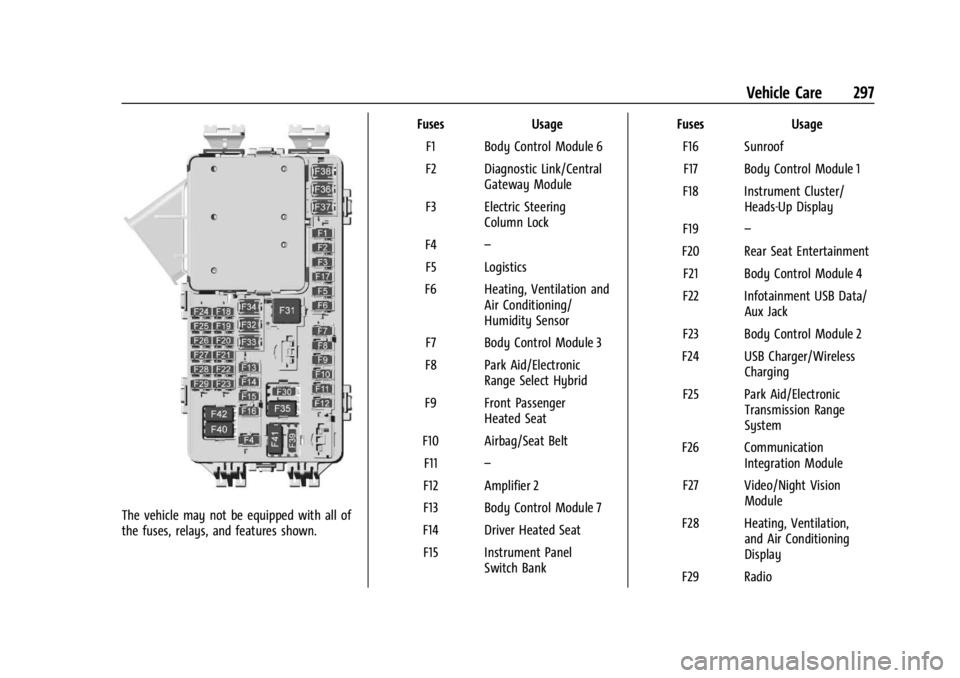
The vehicle may not be equipped with all of
the fuses, relays, and features shown.Fuses Usage
F1 Body Control Module 6
F2 Diagnostic Link/Central Gateway Module
F3 Electric Steering Column Lock
F4 –
F5 Logistics
F6 Heating, Ventilation and Air Conditioning/
Humidity Sensor
F7 Body Control Module 3
F8 Park Aid/Electronic Range Select Hybrid
F9 Front Passenger Heated Seat
F10 Airbag/Seat Belt F11 –
F12 Amplifier 2
F13 Body Control Module 7
F14 Driver Heated Seat F15 Instrument Panel Switch Bank Fuses Usage
F16 SunroofF17 Body Control Module 1
F18 Instrument Cluster/ Heads-Up Display
F19 –
F20 Rear Seat Entertainment F21 Body Control Module 4
F22 Infotainment USB Data/ Aux Jack
F23 Body Control Module 2
F24 USB Charger/Wireless Charging
F25 Park Aid/Electronic Transmission Range
System
F26 Communication Integration Module
F27 Video/Night Vision Module
F28 Heating, Ventilation, and Air Conditioning
Display
F29 Radio
Page 299 of 397

GMC Acadia/Acadia Denali Owner Manual (GMNA-Localizing-U.S./Canada/
Mexico-15170041) - 2022 - CRC - 10/6/21
298 Vehicle Care
FusesUsage
F30 Steering Wheel Adjustment Controls
F31 Electronic Brake Control Module Electric Brake
Booster
F32 DC AC Inverter
F33 Driver Power Seat
F34 Passenger Power Seat F35 Battery IEC 1 Feed
F36 Electric Power Steering F37 Rear Seat Entertainment/USB
Charge/Wireless
Charging Module
F38 Body Control Module 8
F39 –
Circuit Breakers/ Minifuse Usage
F40 –
F41 –
F42 Auxiliary Power Outlet (CB)/Lighter (Minifuse)Rear Compartment Fuse Block
The rear compartment fuse block is behind a
trim panel on the driver side of the rear
storage compartment.
Remove the side bin, load floor, and foam.
SeeCargo Management System 086.
Remove the trim plate to access the fuse
block.
The label for this fuse block is in the spare
tire area, on the foam under the cargo floor.
See your dealer for additional assistance.
Page 387 of 397

GMC Acadia/Acadia Denali Owner Manual (GMNA-Localizing-U.S./Canada/-
Mexico-15170041) - 2022 - CRC - 10/6/21
386 Index
Assistance Systems for Driving . . . . . . . . . . 246
Assistance Systems for Parking andBacking . . . . . . . . . . . . . . . . . . . . . . . . . . . . . . . . .241
Audio Bluetooth . . . . . . . . . . . . . . . . . . . . . . . . . . . . . . . 151
Auto Stop Stop/Start System . . . . . . . . . . . . . . . . . . . . . 215
Automatic Dimming Mirrors . . . . . . . . . . . . . . . . . . . . . . . 28
Door Locks . . . . . . . . . . . . . . . . . . . . . . . . . . . . . . . 17
Emergency Braking (AEB) . . . . . . . . . . . . . . 248
Headlamp System . . . . . . . . . . . . . . . . . . . . . 134
Transmission . . . . . . . . . . . . . . . . . . . . . . . . . . . 220
Transmission Fluid . . . . . . . . . . . . . . . . . . . . . 278
Automatic Transmission Manual Mode . . . . . . . . . . . . . . . . . . . . . . . . . 223
Avoiding Untrusted Media Devices . . . . . . . 148
B
Battery Exterior Lighting Battery Saver . . . . . . . . 138
Load Management . . . . . . . . . . . . . . . . . . . . . . 137
Power Protection . . . . . . . . . . . . . . . . . . . . . . 138
Battery - North America . . . . . . . . . . . . .287, 332
Blade Replacement, Wiper . . . . . . . . . . . . . . . 288
Bluetooth Overview . . . . . . . . . . . . . . . . . . . . . . . . . 168, 169
Bluetooth Audio . . . . . . . . . . . . . . . . . . . . . . . . . . 151 Brake
Electric Boost . . . . . . . . . . . . . . . . . . . . . . . . . . 224
Parking, Electric . . . . . . . . . . . . . . . . . . . . . . . . 225
System Warning Light . . . . . . . . . . . . . . . . . 109
Brakes . . . . . . . . . . . . . . . . . . . . . . . . . . . . . . . . . . . 285 Antilock . . . . . . . . . . . . . . . . . . . . . . . . . . . . . . . . 224
Assist . . . . . . . . . . . . . . . . . . . . . . . . . . . . . . . . . . 226
Fluid . . . . . . . . . . . . . . . . . . . . . . . . . . . . . . . . . . . 286
Braking . . . . . . . . . . . . . . . . . . . . . . . . . . . . . . . . . . 201 Automatic Emergency (AEB) . . . . . . . . . . . 248
Braking System
Front Pedestrian (FPB) . . . . . . . . . . . . . . . . . 249
Break-In, New Vehicle . . . . . . . . . . . . . . . . . . . . . 212
Bulb Replacement Halogen Bulbs . . . . . . . . . . . . . . . . . . . . . . . . . 290
Headlamp Aiming . . . . . . . . . . . . . . . . . . . . . . 290
Headlamps . . . . . . . . . . . . . . . . . . . . . . . . . . . . 290
Buying New Tires . . . . . . . . . . . . . . . . . . . . . . . . . 315C
Calibration . . . . . . . . . . . . . . . . . . . . . . . . . . . . . . . . 94
California Perchlorate MaterialsRequirements . . . . . . . . . . . . . . . . . . . . . . . . 270
California Proposition 65 Warning . . . . . . . . . . . . . . . . . . . . . . . .287, 332,
Back CoverCamera
Rear Vision (RVC) . . . . . . . . . . . . . . . . . . . . . . 241
Canadian Vehicle Owners . . . . . . . . . . . . . . . . . . . 1
Capacities and Specifications . . . . . . . . . . . . . 361
Carbon Monoxide Engine Exhaust . . . . . . . . . . . . . . . . . . . . . . . . 220
Liftgate . . . . . . . . . . . . . . . . . . . . . . . . . . . . . . . . . 18
Winter Driving . . . . . . . . . . . . . . . . . . . . . . . . . 208
Cargo Management System . . . . . . . . . . . . . . . . . . . 86
Tie-Downs . . . . . . . . . . . . . . . . . . . . . . . . . . . . . . 86
Caution, Danger, and Warning . . . . . . . . . . . . . .2
Center Console Storage . . . . . . . . . . . . . . . . . . . 85
Chains, Tire . . . . . . . . . . . . . . . . . . . . . . . . . . . . . . 319
Charging Wireless . . . . . . . . . . . . . . . . . . . . . . . . . . . . . . . . 95
Charging System Light . . . . . . . . . . . . . . . . . . . 108
Check Engine Light (MalfunctionIndicator) . . . . . . . . . . . . . . . . . . . . . . . . . . . . 108
Child Restraints
Infants and Young Children . . . . . . . . . . . . . 67
Lower Anchors and Tethers forChildren . . . . . . . . . . . . . . . . . . . . . . . . . . . . . . . 72
Older Children . . . . . . . . . . . . . . . . . . . . . . . . . . 65
Securing . . . . . . . . . . . . . . . . . . . . . . . . . . . . . 79, 81
Systems . . . . . . . . . . . . . . . . . . . . . . . . . . . . . . . . 69
Circuit Breakers . . . . . . . . . . . . . . . . . . . . . . . . . . 292
Page 391 of 397

GMC Acadia/Acadia Denali Owner Manual (GMNA-Localizing-U.S./Canada/-
Mexico-15170041) - 2022 - CRC - 10/6/21
390 Index
Infants and Young Children, Restraints . . . . 67
InformationPublication Ordering . . . . . . . . . . . . . . . . . . . 372
Infotainment System . . . . . . . . . . . . . . . . . . . . 376
Instrument Cluster . . . . . . . . . . . . . . . . . . . . 98, 101
Instrument Panel Overview . . . . . . . . . . . . . . . . 4
Interior Rearview Mirrors . . . . . . . . . . . . . . . . . 28
Introduction . . . . . . . . . . . . . . . . . . . . . . . . . . . 1, 139
J
Jump Starting - North America . . . . . . . . . . . 332
K
Keyless Entry Remote (RKE) System . . . . . . . . . . . . . . . . . . . . 7
Keys . . . . . . . . . . . . . . . . . . . . . . . . . . . . . . . . . . . . . . . 6
L
Labeling, Tire Sidewall . . . . . . . . . . . . . . . . . . . 302
Lamps Courtesy . . . . . . . . . . . . . . . . . . . . . . . . . . . . . . . 136
Daytime Running (DRL) . . . . . . . . . . . . . . . . 134
Dome . . . . . . . . . . . . . . . . . . . . . . . . . . . . . . . . . . 136
Exterior Controls . . . . . . . . . . . . . . . . . . . . . . . 132
Exterior Lamps Off Reminder . . . . . . . . . . 133
Exterior Lighting Battery Saver . . . . . . . . 138
Malfunction Indicator (CheckEngine) . . . . . . . . . . . . . . . . . . . . . . . . . . . . . . 108
On Reminder . . . . . . . . . . . . . . . . . . . . . . . . . . . 115 Lamps (cont'd)
Reading . . . . . . . . . . . . . . . . . . . . . . . . . . . . . . . . 136
Lane Change Alert (LCA) . . . . . . . . . . . . . . . . . . 251
Lane Keep Assist (LKA) . . . . . . . . . . . . . . . . . . . 253
Lane Keep Assist Light . . . . . . . . . . . . . . . . . . . . 111
Lap-Shoulder Belt . . . . . . . . . . . . . . . . . . . . . . . . . . 51
LATCH System Replacing Parts after a Crash . . . . . . . . . . . 79
LATCH, Lower Anchors and Tethers for Children . . . . . . . . . . . . . . . . . . . . . . . . . . . . . . . . . .72
LED Lighting . . . . . . . . . . . . . . . . . . . . . . . . . . . . . 291
Liftgate . . . . . . . . . . . . . . . . . . . . . . . . . . . . . . . . . . . .18
Lighting Entry . . . . . . . . . . . . . . . . . . . . . . . . . . . . . . . . . . . 137
Exit . . . . . . . . . . . . . . . . . . . . . . . . . . . . . . . . . . . . . 137
Illumination Control . . . . . . . . . . . . . . . . . . . 136
LED . . . . . . . . . . . . . . . . . . . . . . . . . . . . . . . . . . . . 291
Lights Airbag Readiness . . . . . . . . . . . . . . . . . . . . . . 106
Antilock Brake System (ABS)Warning . . . . . . . . . . . . . . . . . . . . . . . . . . . . . . 111
Brake System Warning . . . . . . . . . . . . . . . . 109
Charging System . . . . . . . . . . . . . . . . . . . . . . 108
Check Engine (Malfunction Indicator) . . . . . . . . . . . . . . . . . . . . . . . . . . . . 108
Cruise Control . . . . . . . . . . . . . . . . . . . . . . . . . . 116
Door Ajar . . . . . . . . . . . . . . . . . . . . . . . . . . . . . . . 116
Driver Mode Control . . . . . . . . . . . . . . . . . . . . 113 Lights (cont'd)
Electric Parking Brake . . . . . . . . . . . . . . . . . . 110
Engine Coolant Temperature
Warning . . . . . . . . . . . . . . . . . . . . . . . . . . . . . . 113
Engine Oil Pressure . . . . . . . . . . . . . . . . . . . . . 114
Flash-to-Pass . . . . . . . . . . . . . . . . . . . . . . . . . . . 133
Front Fog Lamp . . . . . . . . . . . . . . . . . . . . . . . . . 115
Gear Shifting . . . . . . . . . . . . . . . . . . . . . . . . . . . 111
High-Beam On . . . . . . . . . . . . . . . . . . . . . . . . . . 115
High/Low Beam Changer . . . . . . . . . . . . . . 133
Hill Descent Control . . . . . . . . . . . . . . . . . . . . 111
Lane Keep Assist . . . . . . . . . . . . . . . . . . . . . . . . 111
Low Fuel Warning . . . . . . . . . . . . . . . . . . . . . . 115
Seat Belt Reminders . . . . . . . . . . . . . . . . . . . 106
Security . . . . . . . . . . . . . . . . . . . . . . . . . . . . . . . . . 115
Service Electric Parking Brake . . . . . . . . . . 110
StabiliTrak OFF . . . . . . . . . . . . . . . . . . . . . . . . . . 112
Tire Pressure . . . . . . . . . . . . . . . . . . . . . . . . . . . . 114
Traction Control System (TCS)/StabiliTrak . . . . . . . . . . . . . . . . . . . . . . 113
Traction Off . . . . . . . . . . . . . . . . . . . . . . . . . . . . . 112
Locks Automatic Door . . . . . . . . . . . . . . . . . . . . . . . . . . 17
Delayed Locking . . . . . . . . . . . . . . . . . . . . . . . . . 17
Door . . . . . . . . . . . . . . . . . . . . . . . . . . . . . . . . . . . . . 15
Lockout Protection . . . . . . . . . . . . . . . . . . . . . . . 17
Power Door . . . . . . . . . . . . . . . . . . . . . . . . . . . . . . 17
Safety . . . . . . . . . . . . . . . . . . . . . . . . . . . . . . . . . . 18