2022 FORD SUPER DUTY service
[x] Cancel search: servicePage 251 of 740
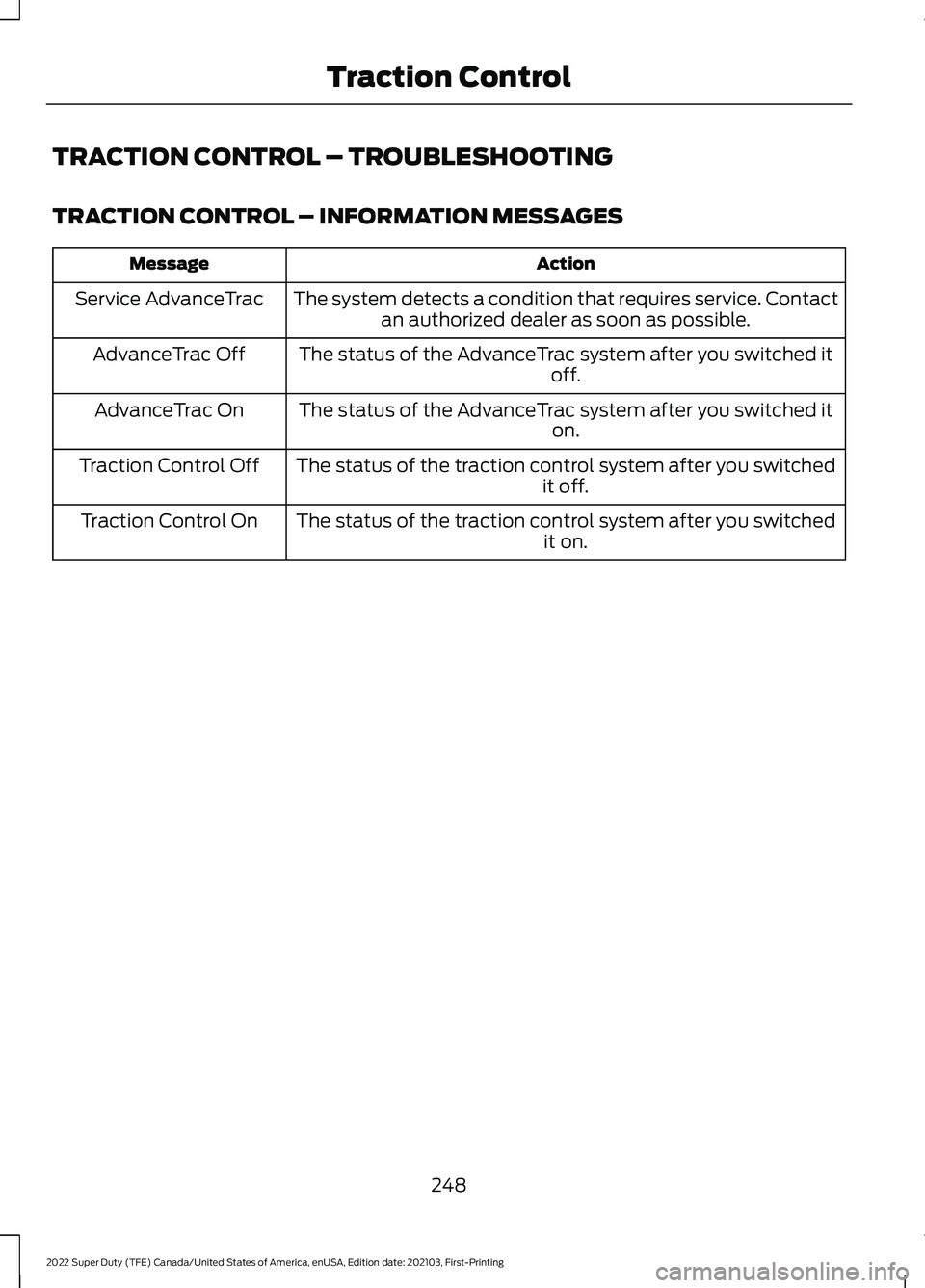
TRACTION CONTROL – TROUBLESHOOTING
TRACTION CONTROL – INFORMATION MESSAGES
Action
Message
The system detects a condition that requires service. Contactan authorized dealer as soon as possible.
Service AdvanceTrac
The status of the AdvanceTrac system after you switched it off.
AdvanceTrac Off
The status of the AdvanceTrac system after you switched it on.
AdvanceTrac On
The status of the traction control system after you switched it off.
Traction Control Off
The status of the traction control system after you switched it on.
Traction Control On
248
2022 Super Duty (TFE) Canada/United States of America, enUSA, Edition date: 202103, First-Printing Traction Control
Page 259 of 740
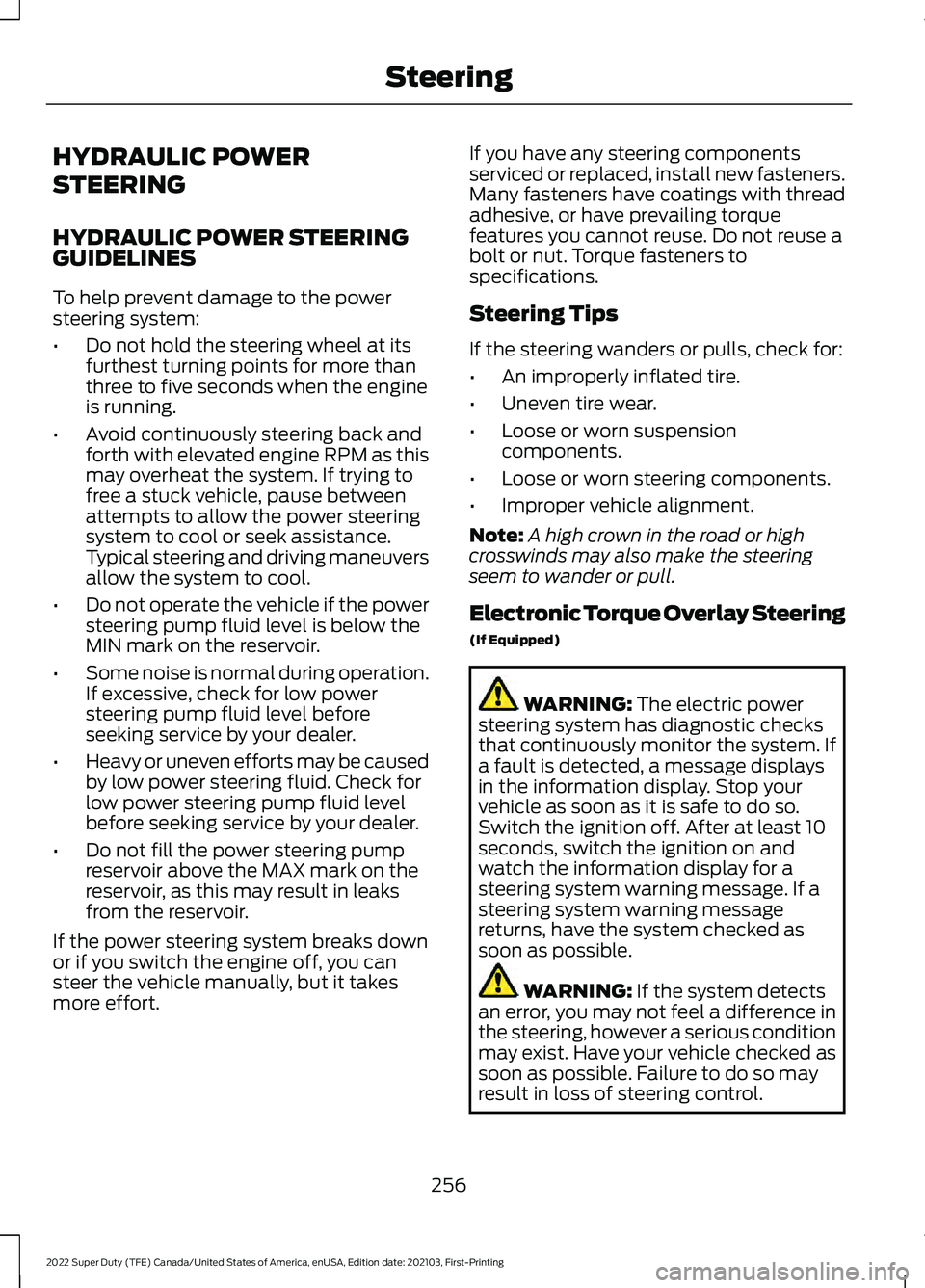
HYDRAULIC POWER
STEERING
HYDRAULIC POWER STEERING
GUIDELINES
To help prevent damage to the power
steering system:
•
Do not hold the steering wheel at its
furthest turning points for more than
three to five seconds when the engine
is running.
• Avoid continuously steering back and
forth with elevated engine RPM as this
may overheat the system. If trying to
free a stuck vehicle, pause between
attempts to allow the power steering
system to cool or seek assistance.
Typical steering and driving maneuvers
allow the system to cool.
• Do not operate the vehicle if the power
steering pump fluid level is below the
MIN mark on the reservoir.
• Some noise is normal during operation.
If excessive, check for low power
steering pump fluid level before
seeking service by your dealer.
• Heavy or uneven efforts may be caused
by low power steering fluid. Check for
low power steering pump fluid level
before seeking service by your dealer.
• Do not fill the power steering pump
reservoir above the MAX mark on the
reservoir, as this may result in leaks
from the reservoir.
If the power steering system breaks down
or if you switch the engine off, you can
steer the vehicle manually, but it takes
more effort. If you have any steering components
serviced or replaced, install new fasteners.
Many fasteners have coatings with thread
adhesive, or have prevailing torque
features you cannot reuse. Do not reuse a
bolt or nut. Torque fasteners to
specifications.
Steering Tips
If the steering wanders or pulls, check for:
•
An improperly inflated tire.
• Uneven tire wear.
• Loose or worn suspension
components.
• Loose or worn steering components.
• Improper vehicle alignment.
Note: A high crown in the road or high
crosswinds may also make the steering
seem to wander or pull.
Electronic Torque Overlay Steering
(If Equipped) WARNING: The electric power
steering system has diagnostic checks
that continuously monitor the system. If
a fault is detected, a message displays
in the information display. Stop your
vehicle as soon as it is safe to do so.
Switch the ignition off. After at least 10
seconds, switch the ignition on and
watch the information display for a
steering system warning message. If a
steering system warning message
returns, have the system checked as
soon as possible. WARNING:
If the system detects
an error, you may not feel a difference in
the steering, however a serious condition
may exist. Have your vehicle checked as
soon as possible. Failure to do so may
result in loss of steering control.
256
2022 Super Duty (TFE) Canada/United States of America, enUSA, Edition date: 202103, First-Printing Steering
Page 262 of 740
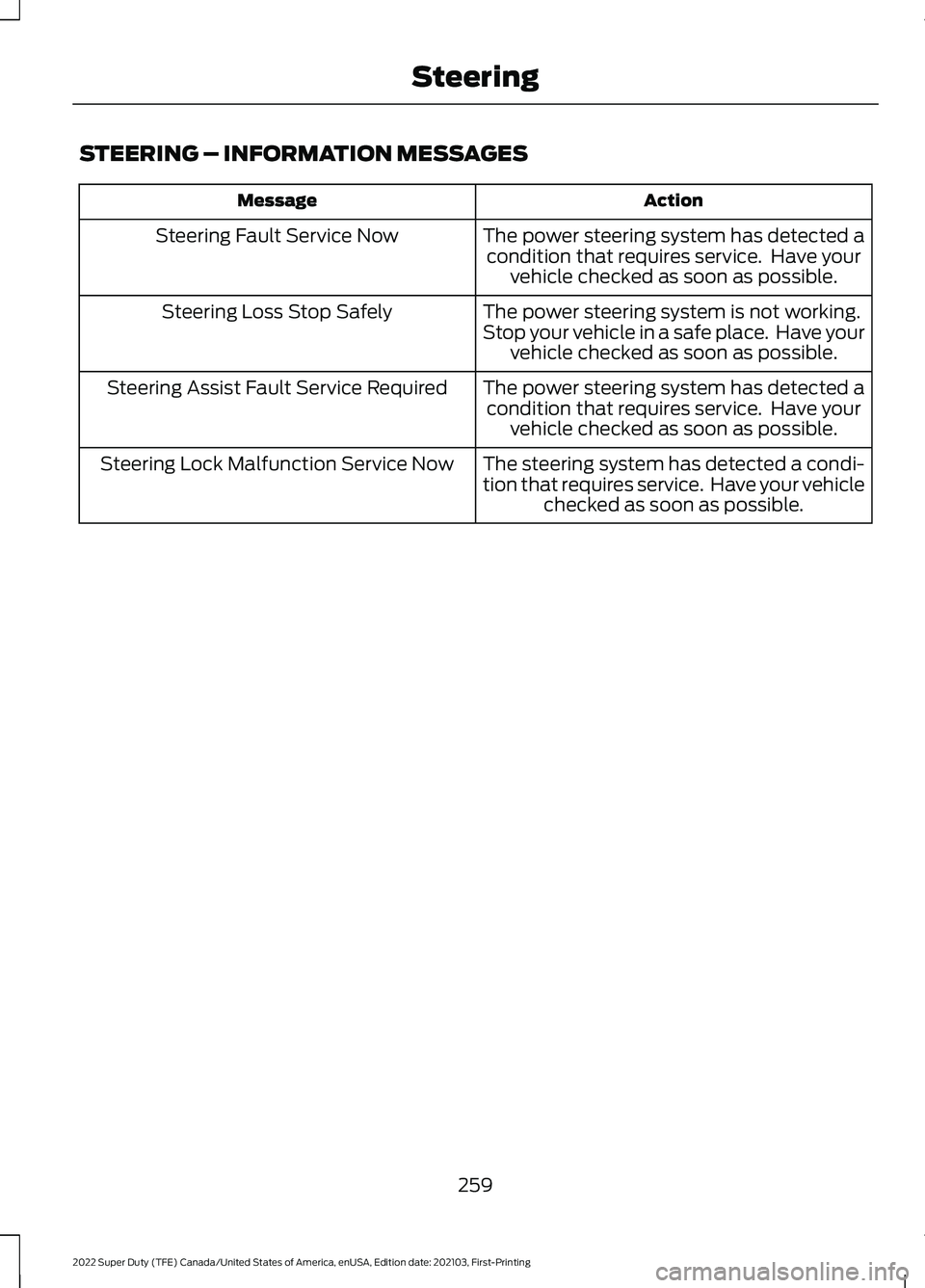
STEERING – INFORMATION MESSAGES
Action
Message
The power steering system has detected acondition that requires service. Have your vehicle checked as soon as possible.
Steering Fault Service Now
The power steering system is not working.
Stop your vehicle in a safe place. Have your vehicle checked as soon as possible.
Steering Loss Stop Safely
The power steering system has detected acondition that requires service. Have your vehicle checked as soon as possible.
Steering Assist Fault Service Required
The steering system has detected a condi-
tion that requires service. Have your vehiclechecked as soon as possible.
Steering Lock Malfunction Service Now
259
2022 Super Duty (TFE) Canada/United States of America, enUSA, Edition date: 202103, First-Printing Steering
Page 265 of 740
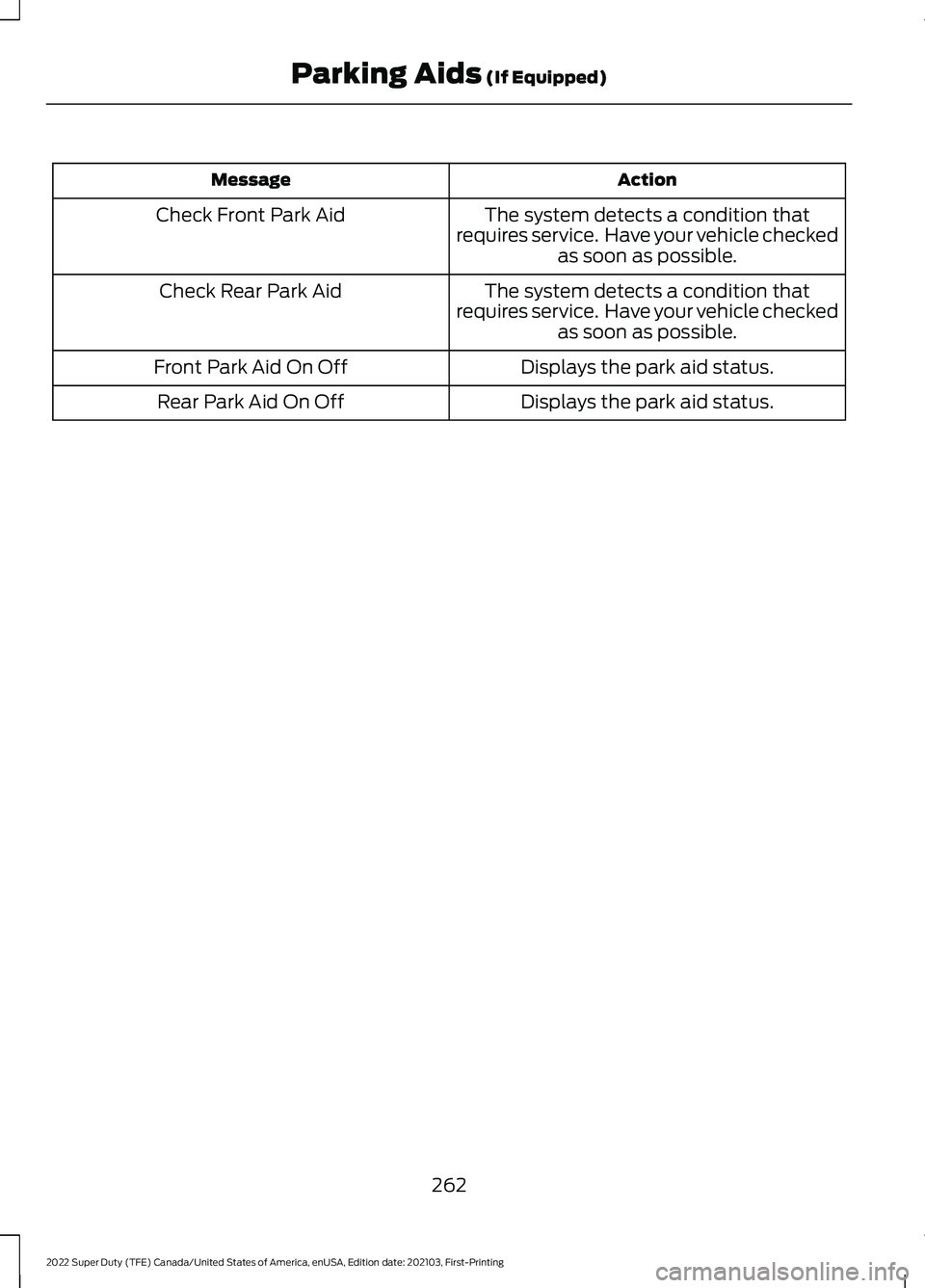
Action
Message
The system detects a condition that
requires service. Have your vehicle checked as soon as possible.
Check Front Park Aid
The system detects a condition that
requires service. Have your vehicle checked as soon as possible.
Check Rear Park Aid
Displays the park aid status.
Front Park Aid On Off
Displays the park aid status.
Rear Park Aid On Off
262
2022 Super Duty (TFE) Canada/United States of America, enUSA, Edition date: 202103, First-Printing Parking Aids (If Equipped)
Page 293 of 740
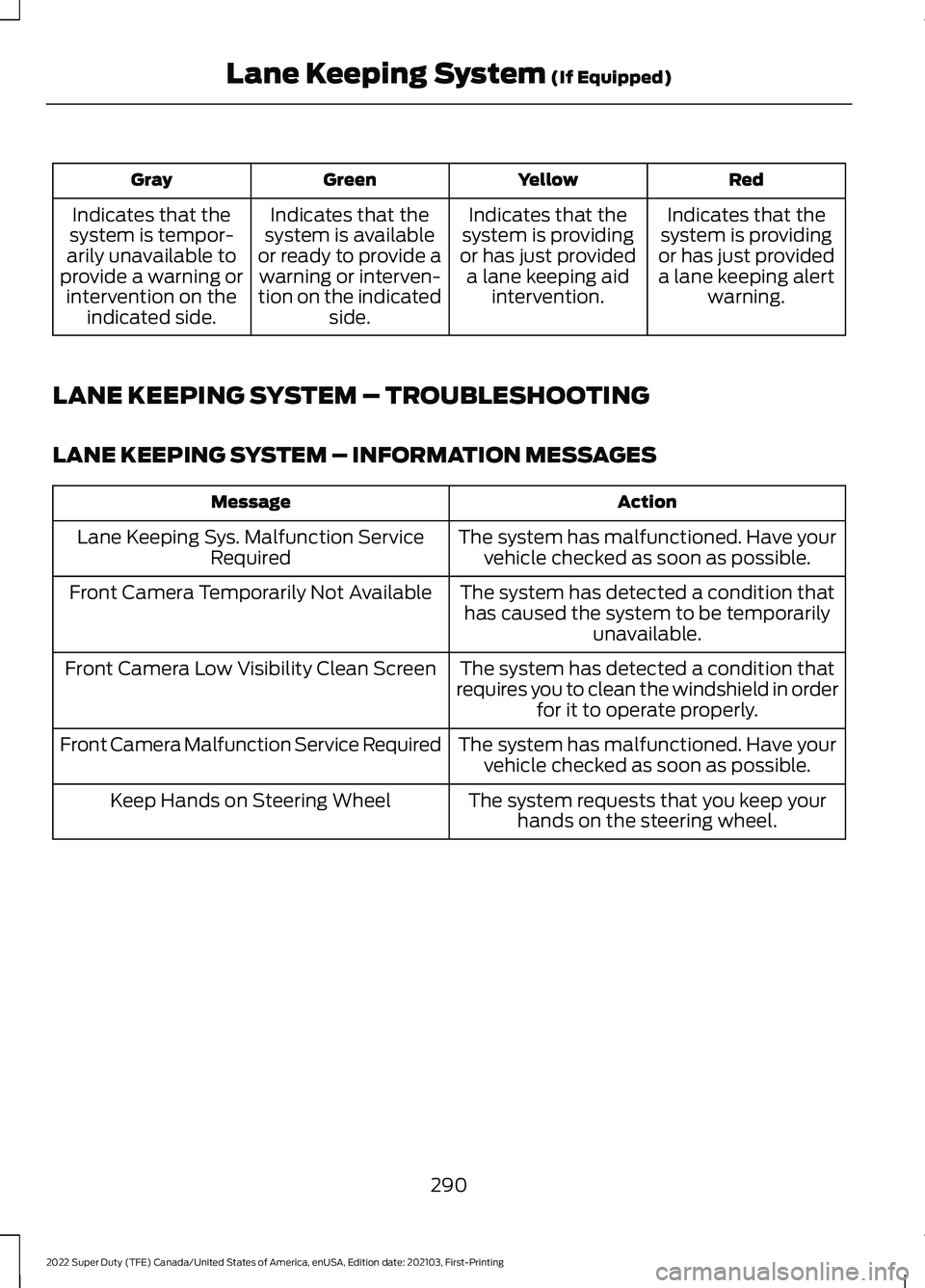
Red
Yellow
Green
Gray
Indicates that the
system is providing
or has just provided a lane keeping alert warning.
Indicates that the
system is providing
or has just provided a lane keeping aid intervention.
Indicates that the
system is available
or ready to provide a warning or interven-
tion on the indicated side.
Indicates that the
system is tempor-
arily unavailable to
provide a warning or intervention on the indicated side.
LANE KEEPING SYSTEM – TROUBLESHOOTING
LANE KEEPING SYSTEM – INFORMATION MESSAGES Action
Message
The system has malfunctioned. Have yourvehicle checked as soon as possible.
Lane Keeping Sys. Malfunction Service
Required
The system has detected a condition thathas caused the system to be temporarily unavailable.
Front Camera Temporarily Not Available
The system has detected a condition that
requires you to clean the windshield in order for it to operate properly.
Front Camera Low Visibility Clean Screen
The system has malfunctioned. Have yourvehicle checked as soon as possible.
Front Camera Malfunction Service Required
The system requests that you keep yourhands on the steering wheel.
Keep Hands on Steering Wheel
290
2022 Super Duty (TFE) Canada/United States of America, enUSA, Edition date: 202103, First-Printing Lane Keeping System (If Equipped)
Page 306 of 740
SWITCHING PRE-COLLISION
ASSIST ON AND OFF -
VEHICLES WITH: 4.2 INCH
SCREEN
To switch the system on or off, use the
instrument cluster display:
1. Select Driver Assist.
2. Select
Pre-Collision.
3. Switch the feature on or off.
Note: If your vehicle has a radar sensor, we
recommend that you switch the system off
if you install a snow plow or similar object
in such a way that it may block the radar
sensor. Your vehicle remembers the selected
setting across key cycles.
SWITCHING PRE-COLLISION
ASSIST ON AND OFF -
VEHICLES WITH: 8 INCH
SCREEN
To switch the system on or off, use the
instrument cluster display:
1. Select
Driver Assist.
2. Select
Pre-Collision.
3. Switch the feature on or off.
Note: If your vehicle has a radar sensor, we
recommend that you switch the system off
if you install a snow plow or similar object
in such a way that it may block the radar
sensor. Your vehicle remembers the selected
setting across key cycles. LOCATING THE PRE-
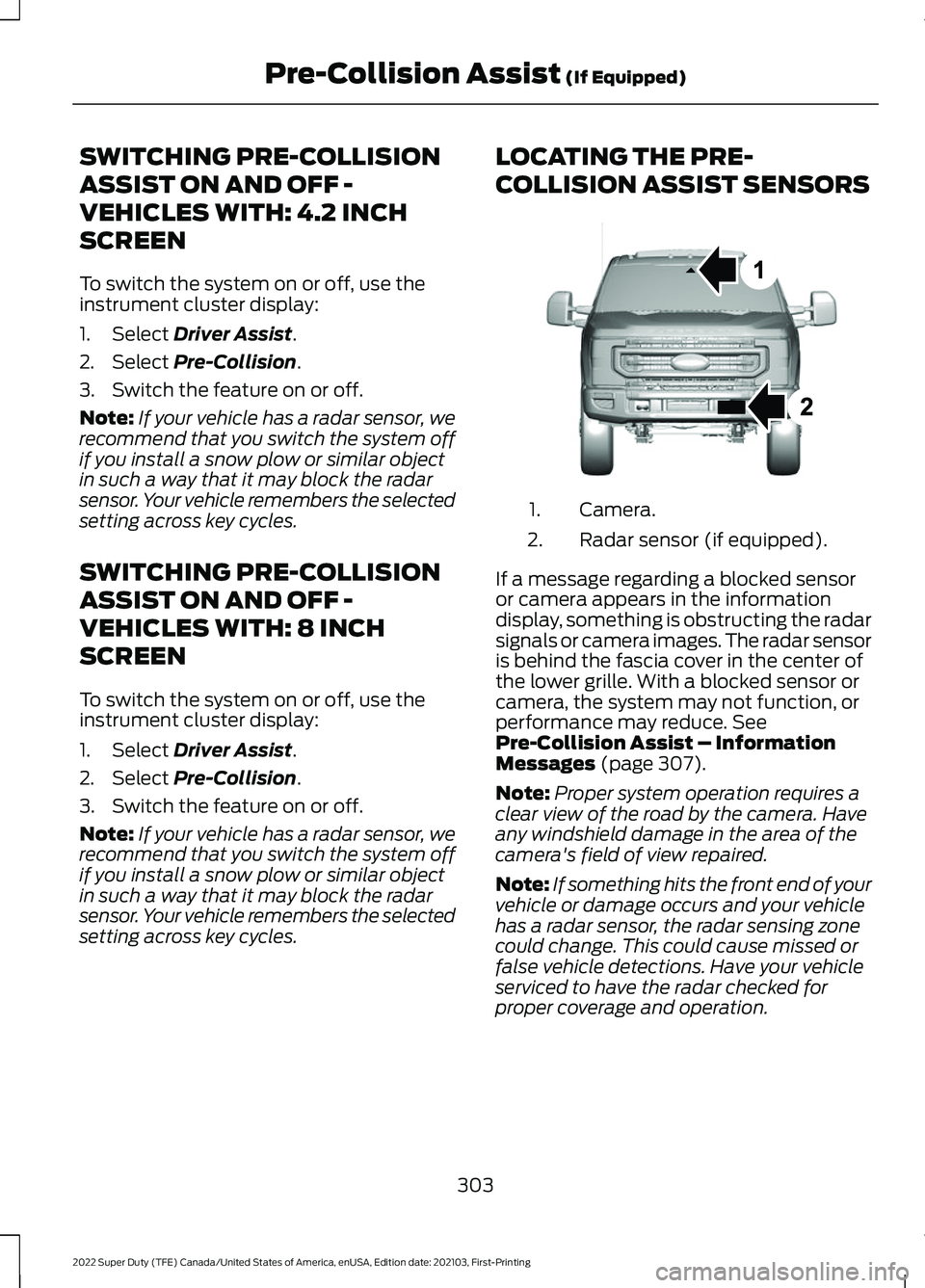
COLLISION ASSIST SENSORS
Camera.
1.
Radar sensor (if equipped).
2.
If a message regarding a blocked sensor
or camera appears in the information
display, something is obstructing the radar
signals or camera images. The radar sensor
is behind the fascia cover in the center of
the lower grille. With a blocked sensor or
camera, the system may not function, or
performance may reduce.
See
Pre-Collision Assist – Information
Messages
(page 307).
Note: Proper system operation requires a
clear view of the road by the camera. Have
any windshield damage in the area of the
camera's field of view repaired.
Note: If something hits the front end of your
vehicle or damage occurs and your vehicle
has a radar sensor, the radar sensing zone
could change. This could cause missed or
false vehicle detections. Have your vehicle
serviced to have the radar checked for
proper coverage and operation.
303
2022 Super Duty (TFE) Canada/United States of America, enUSA, Edition date: 202103, First-Printing Pre-Collision Assist
(If Equipped)E307836
Page 311 of 740
PRE-COLLISION ASSIST –
FREQUENTLY ASKED QUESTIONS
Camera Troubleshooting
The windshield in front of the camera
is dirty or obstructed.
Clean the outside of the windshield in
front of the camera.
The windshield in front of the camera
is clean, but the message remains in
the instrument cluster display. Wait a short time. It could take several
minutes for the camera to detect that
there is no obstruction.
Radar Troubleshooting (If Equipped)
The surface of the radar in the grille is
dirty or obstructed. Clean the grille surface in front of the
radar or remove the object causing the
obstruction.
The surface of the radar in the grille is
clean, but the message remains in the
instrument cluster display. Wait a short time. It could take several
minutes for the radar to detect that
there is no obstruction.
Heavy rain, spray or fog is interfering
with the radar signals. The pre-collision assist system is
temporarily disabled. Pre-collision
assist reactivates a short time after
the weather conditions improve.
Swirling water or snow or ice on the
surface of the road is interfering with
the radar signals. The pre-collision assist system is
temporarily disabled. Pre-collision
assist reactivates a short time after
the weather conditions improve. Radar is out of alignment due to a
front-end impact.
Have your vehicle serviced to have the
radar checked for proper coverage and
operation.
308
2022 Super Duty (TFE) Canada/United States of America, enUSA, Edition date: 202103, First-Printing Pre-Collision Assist
(If Equipped)
Page 326 of 740
CONNECTING A TRAILER
PRECAUTIONS
WARNING: Do not adjust the spring
bars so that your vehicle's rear bumper
is higher than before attaching the trailer.
Doing so will defeat the function of the
weight-distributing hitch, which may
cause unpredictable handling, and could
result in serious personal injury.
Do not tow a trailer until you drive your
vehicle at least 1,000 mi (1,600 km).
Consult your local motor vehicle laws for
towing a trailer.
See the instructions included with towing
accessories for the proper installation and
adjustment specifications.
Service your vehicle more frequently if you
tow a trailer. See
Normal Scheduled
Maintenance (page 625).
If you use a rental trailer, follow the
instructions the rental agency gives you.
When attaching the trailer wiring connector
to your vehicle, only use a proper fitting
connector that works with the vehicle and
trailer functions.
Account for the trailer coupler weight as
part of your vehicle load when calculating
the total vehicle weight.
Do not exceed the load limits. See
Calculating the Load Limit
(page 314). HITCHES
INSTALLING A HITCH WARNING:
You must use the
heavy-duty drawbar pin supplied with
your vehicle when using the heavy-duty
hitch. Failure to follow this instruction
could result in the loss of control of your
vehicle, personal injury or death.
Do not use a hitch that either clamps onto
the bumper or attaches to the axle. You
must distribute the load in your trailer so
that 10-15% for conventional towing or
15-25% for fifth wheel towing of the total
weight of the trailer is on the tongue. Do
not exceed the tongue load rating
indicated on the conventional hitch
receiver.
Note: On pick-up trucks, the trailer hitch
provided on this vehicle enhances crash
protection for the fuel system. Do not
remove!
Hitch Components
The following components are required.
Some are provided in certain vehicles.
• A trailer hitch with a 3 inch receiver and
a 5/8 inch hitch pin. Check the
stamped rating number on the pin to
determine the
21,200 lb (9,616 kg) or
24,200 lb (10,976 kg) hitch pin
capacity.
• A hitch pin sleeve stored in the glove
box to use when mounting the 3 inch
drawbar with the 3/4 inch pin hole.
• A cotter pin to help keep the hitch pin
in place.
323
2022 Super Duty (TFE) Canada/United States of America, enUSA, Edition date: 202103, First-Printing Connecting a Trailer