Page 198 of 533
AUTOMATICALLY RELEASING
THE ELECTRIC PARKING
BRAKE
1. Close the driver door.
2. Shift into gear.
3. Press the accelerator pedal and pull
away in a normal manner.
ELECTRIC PARKING BRAKE
AUDIBLE WARNING
Sounds when the parking brake is on and
your vehicle is moving. If the warning tone
continues after you have released the
parking brake, this indicates a malfunction.
Have your vehicle checked as soon as
possible.
RELEASING THE ELECTRIC
PARKING BRAKE IF THE
VEHICLE BATTERY HAS RUN
OUT OF CHARGE
See Jump Starting Precautions (page
280). ELECTRIC PARKING BRAKE –
TROUBLESHOOTING
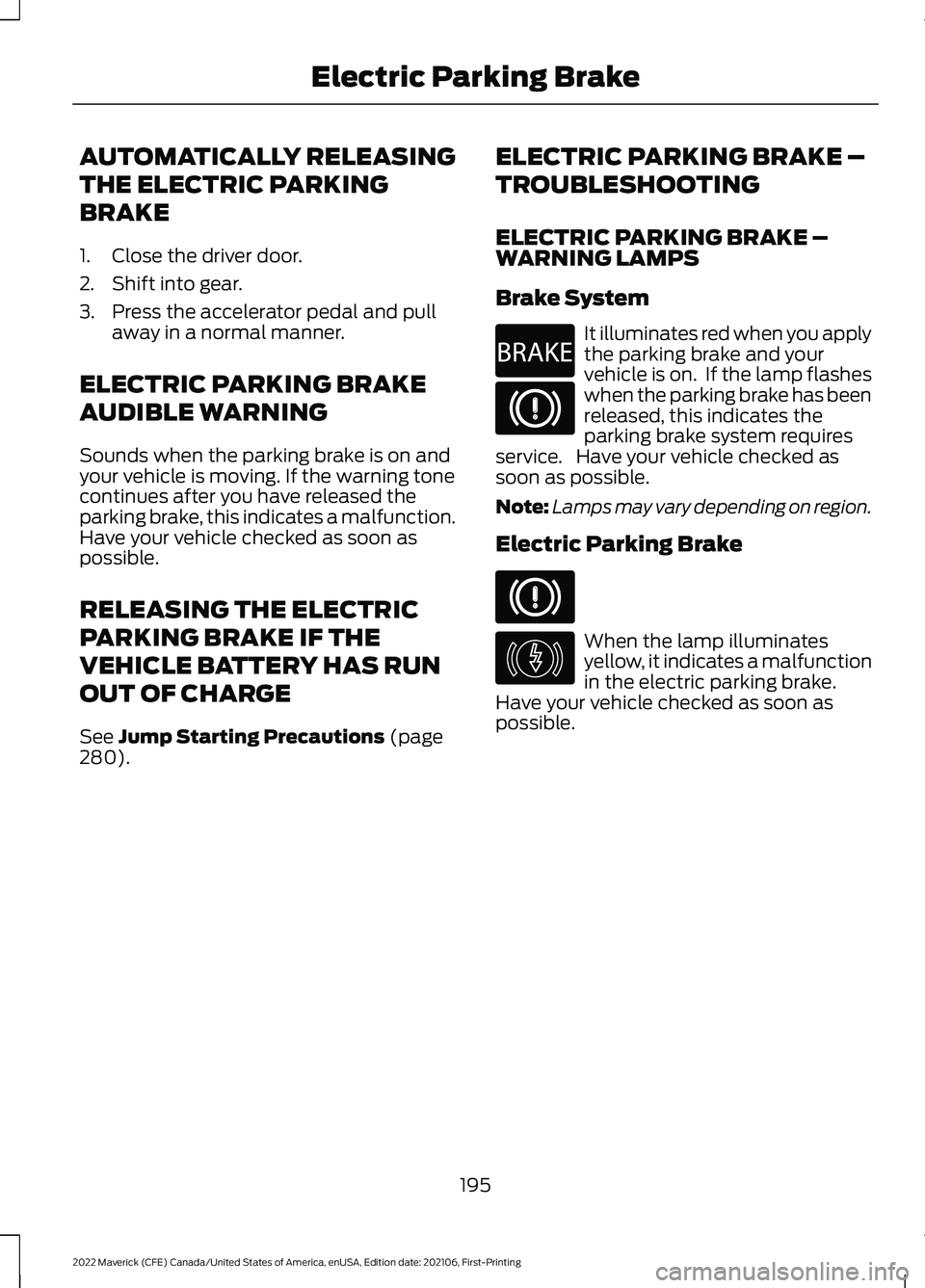
ELECTRIC PARKING BRAKE –
WARNING LAMPS
Brake System It illuminates red when you apply
the parking brake and your
vehicle is on. If the lamp flashes
when the parking brake has been
released, this indicates the
parking brake system requires
service. Have your vehicle checked as
soon as possible.
Note: Lamps may vary depending on region.
Electric Parking Brake When the lamp illuminates
yellow, it indicates a malfunction
in the electric parking brake.
Have your vehicle checked as soon as
possible.
195
2022 Maverick (CFE) Canada/United States of America, enUSA, Edition date: 202106, First-Printing Electric Parking BrakeE270480 E146190
Page 199 of 533
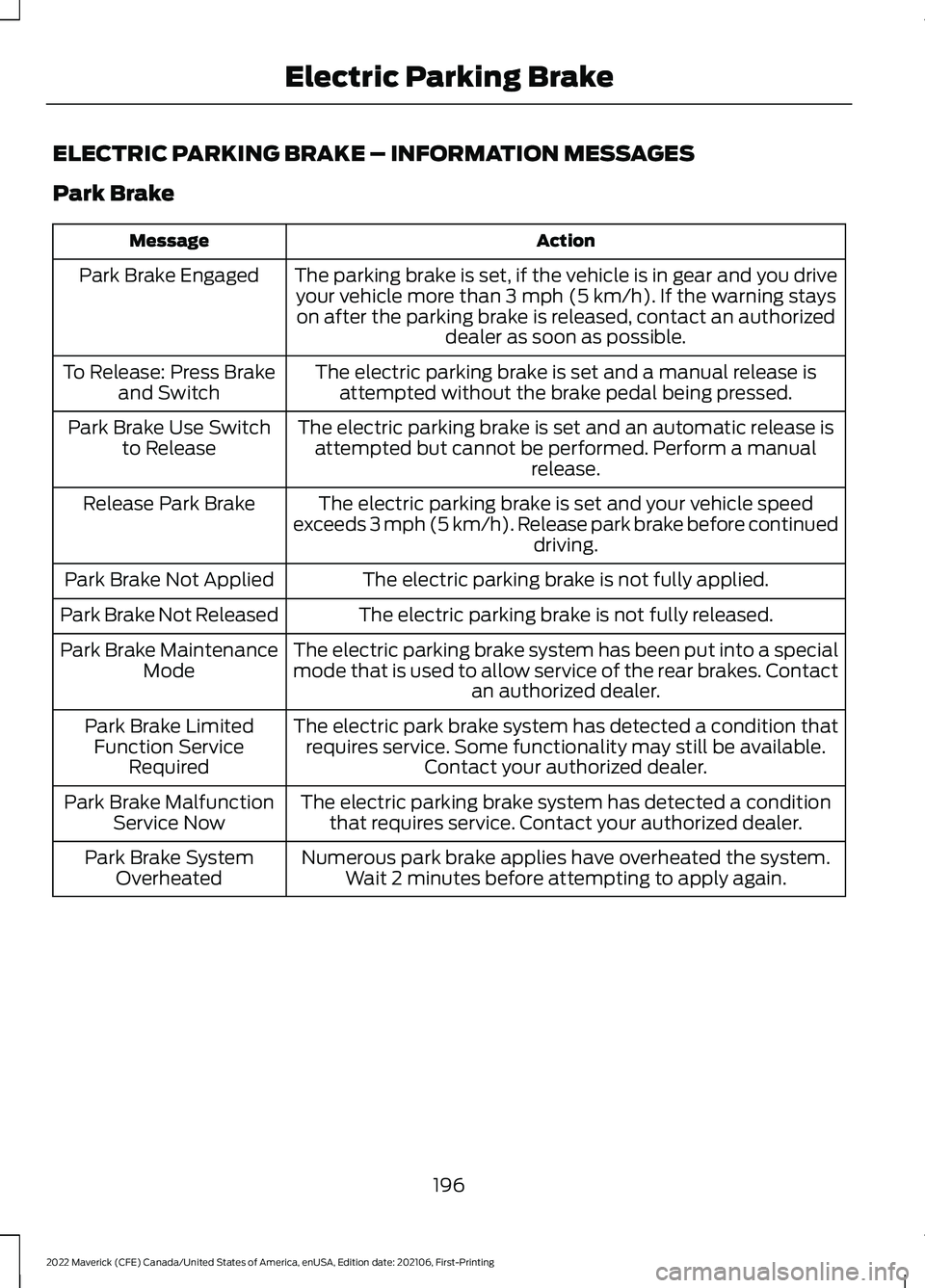
ELECTRIC PARKING BRAKE – INFORMATION MESSAGES
Park Brake
Action
Message
The parking brake is set, if the vehicle is in gear and you driveyour vehicle more than 3 mph (5 km/h). If the warning stays
on after the parking brake is released, contact an authorized dealer as soon as possible.
Park Brake Engaged
The electric parking brake is set and a manual release isattempted without the brake pedal being pressed.
To Release: Press Brake
and Switch
The electric parking brake is set and an automatic release isattempted but cannot be performed. Perform a manual release.
Park Brake Use Switch
to Release
The electric parking brake is set and your vehicle speed
exceeds 3 mph (5 km/h). Release park brake before continued driving.
Release Park Brake
The electric parking brake is not fully applied.
Park Brake Not Applied
The electric parking brake is not fully released.
Park Brake Not Released
The electric parking brake system has been put into a special
mode that is used to allow service of the rear brakes. Contactan authorized dealer.
Park Brake Maintenance
Mode
The electric park brake system has detected a condition thatrequires service. Some functionality may still be available. Contact your authorized dealer.
Park Brake Limited
Function Service Required
The electric parking brake system has detected a conditionthat requires service. Contact your authorized dealer.
Park Brake Malfunction
Service Now
Numerous park brake applies have overheated the system.Wait 2 minutes before attempting to apply again.
Park Brake System
Overheated
196
2022 Maverick (CFE) Canada/United States of America, enUSA, Edition date: 202106, First-Printing Electric Parking Brake
Page 203 of 533
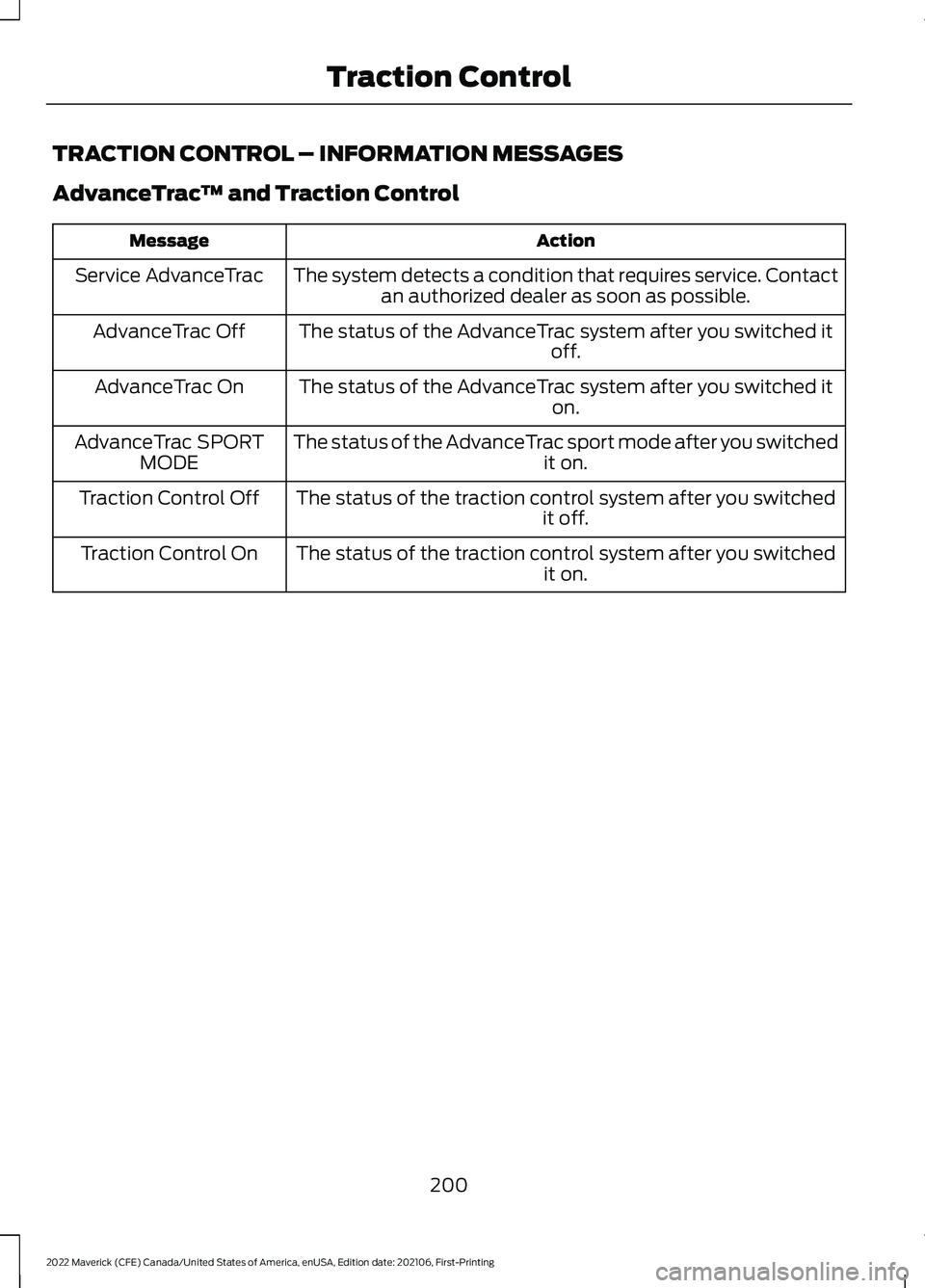
TRACTION CONTROL – INFORMATION MESSAGES
AdvanceTrac
™ and Traction Control Action
Message
The system detects a condition that requires service. Contactan authorized dealer as soon as possible.
Service AdvanceTrac
The status of the AdvanceTrac system after you switched it off.
AdvanceTrac Off
The status of the AdvanceTrac system after you switched it on.
AdvanceTrac On
The status of the AdvanceTrac sport mode after you switched it on.
AdvanceTrac SPORT
MODE
The status of the traction control system after you switched it off.
Traction Control Off
The status of the traction control system after you switched it on.
Traction Control On
200
2022 Maverick (CFE) Canada/United States of America, enUSA, Edition date: 202106, First-Printing Traction Control
Page 209 of 533
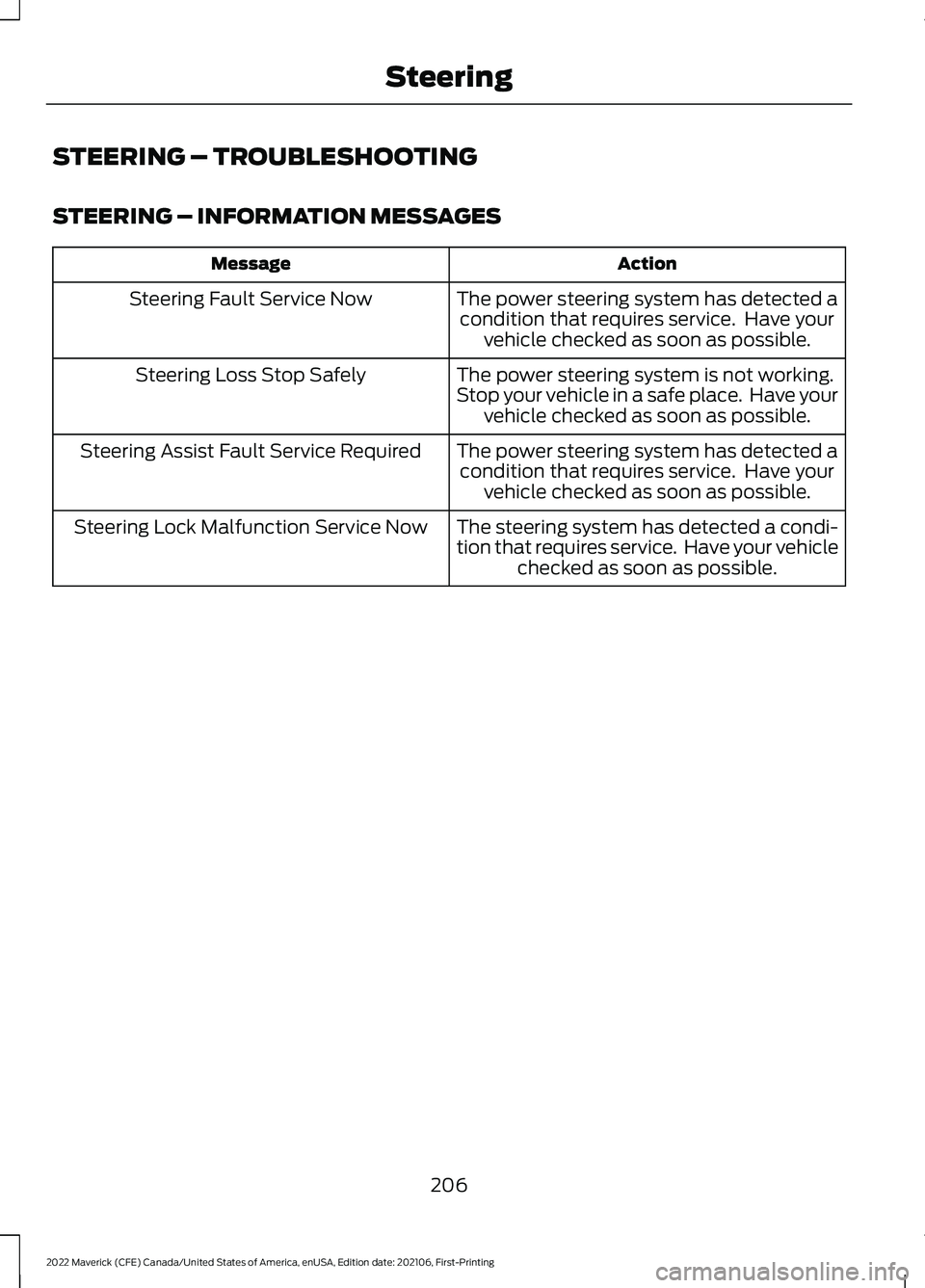
STEERING – TROUBLESHOOTING
STEERING – INFORMATION MESSAGES
Action
Message
The power steering system has detected acondition that requires service. Have your vehicle checked as soon as possible.
Steering Fault Service Now
The power steering system is not working.
Stop your vehicle in a safe place. Have your vehicle checked as soon as possible.
Steering Loss Stop Safely
The power steering system has detected acondition that requires service. Have your vehicle checked as soon as possible.
Steering Assist Fault Service Required
The steering system has detected a condi-
tion that requires service. Have your vehiclechecked as soon as possible.
Steering Lock Malfunction Service Now
206
2022 Maverick (CFE) Canada/United States of America, enUSA, Edition date: 202106, First-Printing Steering
Page 212 of 533
Action
Message
The system detects a condition that
requires service. Have your vehicle checked as soon as possible.
Check Front Park Aid
The system detects a condition that
requires service. Have your vehicle checked as soon as possible.
Check Rear Park Aid
Displays the park aid status.
Front Park Aid On Off
Displays the park aid status.
Rear Park Aid On Off
209
2022 Maverick (CFE) Canada/United States of America, enUSA, Edition date: 202106, First-Printing Parking Aids (If Equipped)
Page 237 of 533
LANE KEEPING SYSTEM – TROUBLESHOOTING
LANE KEEPING SYSTEM – INFORMATION MESSAGES
Action
Message
The system has malfunctioned. Have yourvehicle checked as soon as possible.
Lane Keeping Sys. Malfunction Service
Required
The system has detected a condition thathas caused the system to be temporarily unavailable.
Front Camera Temporarily Not Available
The system has detected a condition that
requires you to clean the windshield in order for it to operate properly.
Front Camera Low Visibility Clean Screen
The system has malfunctioned. Have yourvehicle checked as soon as possible.
Front Camera Malfunction Service Required
The system requests that you keep yourhands on the steering wheel.
Keep Hands on Steering Wheel
234
2022 Maverick (CFE) Canada/United States of America, enUSA, Edition date: 202106, First-Printing Lane Keeping System (If Equipped)
Page 248 of 533
Note:
If you switch automatic emergency
braking off, evasive steering assist switches
off.
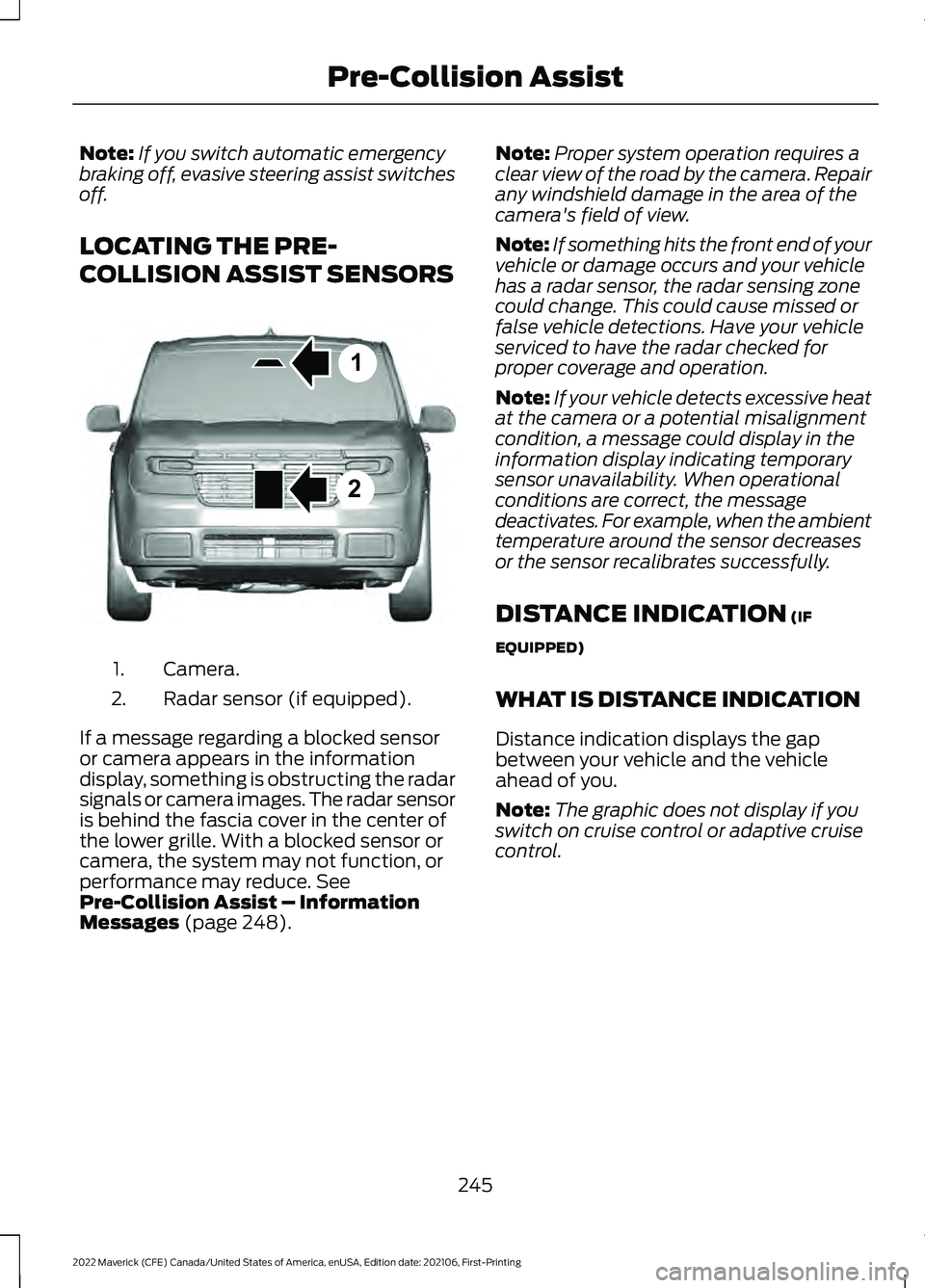
LOCATING THE PRE-
COLLISION ASSIST SENSORS Camera.
1.
Radar sensor (if equipped).
2.
If a message regarding a blocked sensor
or camera appears in the information
display, something is obstructing the radar
signals or camera images. The radar sensor
is behind the fascia cover in the center of
the lower grille. With a blocked sensor or
camera, the system may not function, or
performance may reduce. See
Pre-Collision Assist – Information
Messages
(page 248). Note:
Proper system operation requires a
clear view of the road by the camera. Repair
any windshield damage in the area of the
camera's field of view.
Note: If something hits the front end of your
vehicle or damage occurs and your vehicle
has a radar sensor, the radar sensing zone
could change. This could cause missed or
false vehicle detections. Have your vehicle
serviced to have the radar checked for
proper coverage and operation.
Note: If your vehicle detects excessive heat
at the camera or a potential misalignment
condition, a message could display in the
information display indicating temporary
sensor unavailability. When operational
conditions are correct, the message
deactivates. For example, when the ambient
temperature around the sensor decreases
or the sensor recalibrates successfully.
DISTANCE INDICATION
(IF
EQUIPPED)
WHAT IS DISTANCE INDICATION
Distance indication displays the gap
between your vehicle and the vehicle
ahead of you.
Note: The graphic does not display if you
switch on cruise control or adaptive cruise
control.
245
2022 Maverick (CFE) Canada/United States of America, enUSA, Edition date: 202106, First-Printing Pre-Collision Assist1
2E355015
Page 252 of 533
PRE-COLLISION ASSIST –
FREQUENTLY ASKED QUESTIONS
Camera Troubleshooting
The windshield in front of the camera
is dirty or obstructed.
Clean the outside of the windshield in
front of the camera.
The windshield in front of the camera
is clean, but the message remains in
the instrument cluster display. Wait a short time. It could take several
minutes for the camera to detect that
there is no obstruction.
Radar Troubleshooting (If Equipped)
The surface of the radar in the grille is
dirty or obstructed. Clean the grille surface in front of the
radar or remove the object causing the
obstruction.
The surface of the radar in the grille is
clean, but the message remains in the
instrument cluster display. Wait a short time. It could take several
minutes for the radar to detect that
there is no obstruction.
Heavy rain, spray or fog is interfering
with the radar signals. The pre-collision assist system is
temporarily disabled. Pre-collision
assist reactivates a short time after
the weather conditions improve.
Swirling water or snow or ice on the
surface of the road could interfere with
the radar signals. The pre-collision assist system is
temporarily disabled. Pre-collision
assist reactivates a short time after
the weather conditions improve. Radar is out of alignment due to a front
end impact.
Have your vehicle serviced to have the
radar checked for proper coverage and
operation.
249
2022 Maverick (CFE) Canada/United States of America, enUSA, Edition date: 202106, First-Printing Pre-Collision Assist