2022 FORD MAVERICK Reverse
[x] Cancel search: ReversePage 318 of 533
5. To install, reverse the removal
procedure.
CHANGING A FRONT TURN
SIGNAL LAMP BULB
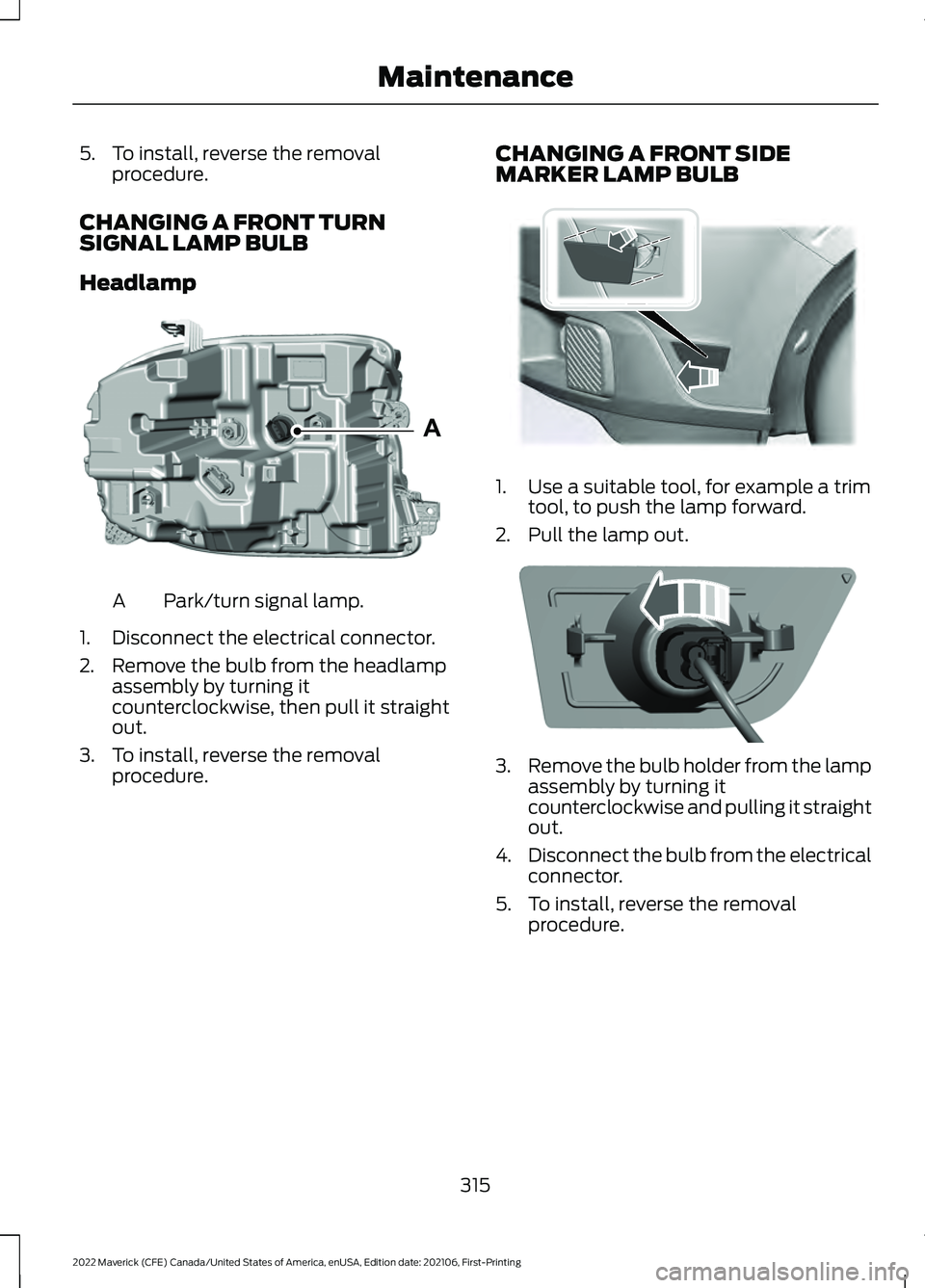
Headlamp Park/turn signal lamp.
A
1. Disconnect the electrical connector.
2. Remove the bulb from the headlamp assembly by turning it
counterclockwise, then pull it straight
out.
3. To install, reverse the removal procedure. CHANGING A FRONT SIDE
MARKER LAMP BULB 1. Use a suitable tool, for example a trim
tool, to push the lamp forward.
2. Pull the lamp out. 3.
Remove the bulb holder from the lamp
assembly by turning it
counterclockwise and pulling it straight
out.
4. Disconnect the bulb from the electrical
connector.
5. To install, reverse the removal procedure.
315
2022 Maverick (CFE) Canada/United States of America, enUSA, Edition date: 202106, First-Printing MaintenanceAE348847 E349259 E349260
Page 319 of 533
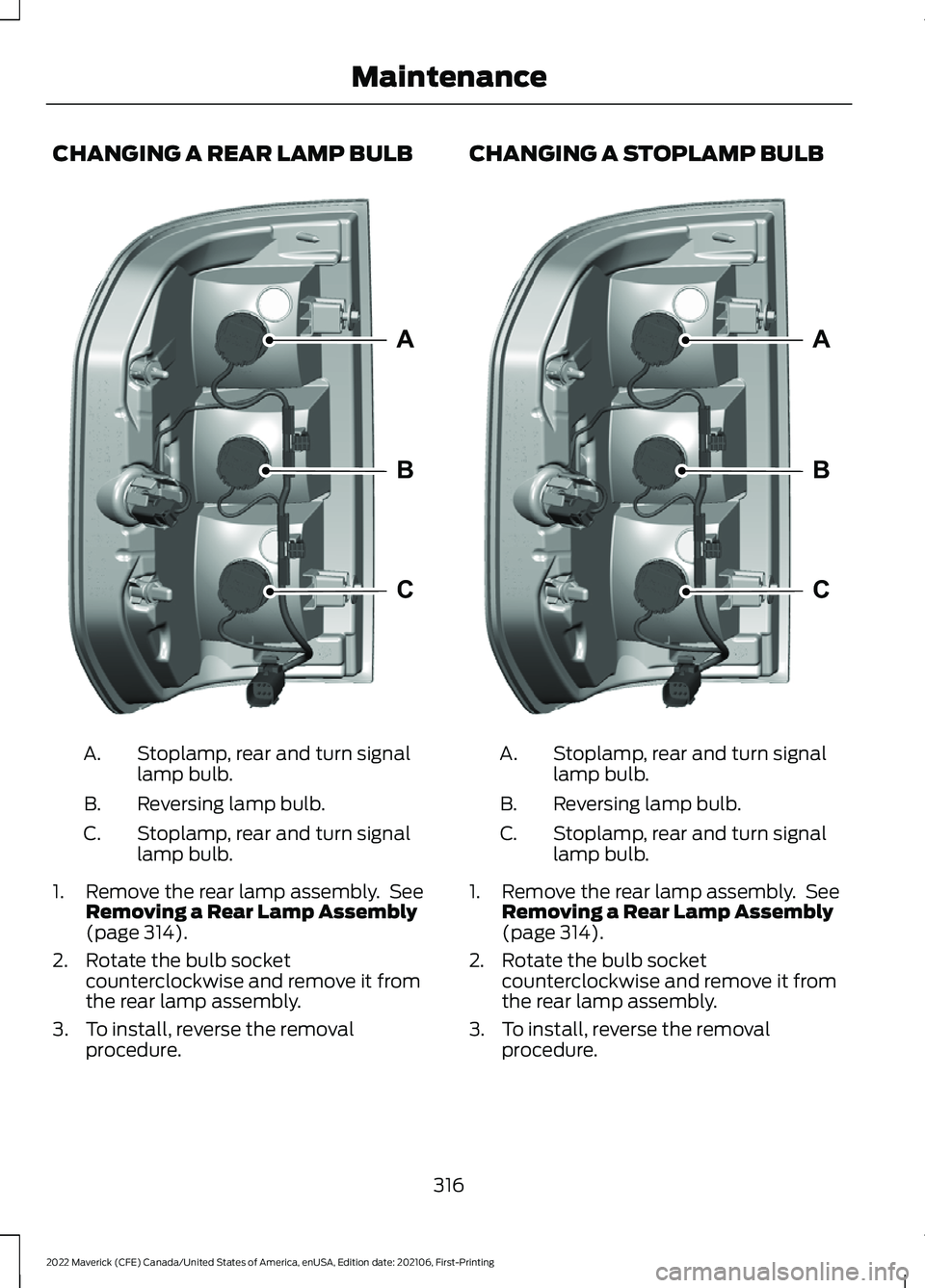
CHANGING A REAR LAMP BULB
Stoplamp, rear and turn signal
lamp bulb.
A.
Reversing lamp bulb.
B.
Stoplamp, rear and turn signal
lamp bulb.
C.
1. Remove the rear lamp assembly. See Removing a Rear Lamp Assembly
(page 314).
2. Rotate the bulb socket counterclockwise and remove it from
the rear lamp assembly.
3. To install, reverse the removal procedure. CHANGING A STOPLAMP BULB
Stoplamp, rear and turn signal
lamp bulb.
A.
Reversing lamp bulb.
B.
Stoplamp, rear and turn signal
lamp bulb.
C.
1. Remove the rear lamp assembly. See Removing a Rear Lamp Assembly
(page 314).
2. Rotate the bulb socket counterclockwise and remove it from
the rear lamp assembly.
3. To install, reverse the removal procedure.
316
2022 Maverick (CFE) Canada/United States of America, enUSA, Edition date: 202106, First-Printing MaintenanceA
B
CE348848 A
B
CE348848
Page 320 of 533
CHANGING A REAR TURN SIGNAL
LAMP BULB
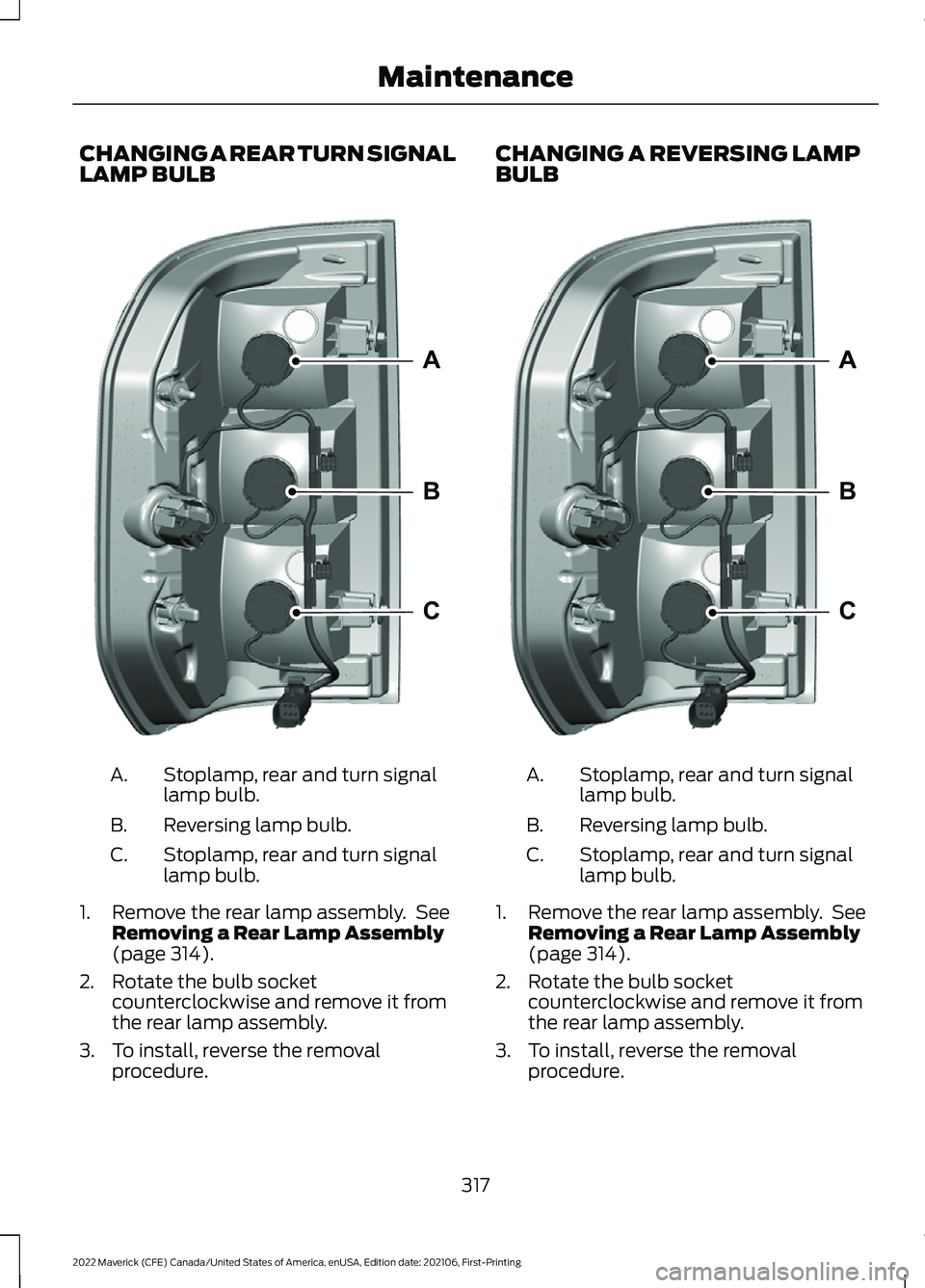
Stoplamp, rear and turn signal
lamp bulb.
A.
Reversing lamp bulb.
B.
Stoplamp, rear and turn signal
lamp bulb.
C.
1. Remove the rear lamp assembly. See Removing a Rear Lamp Assembly
(page 314).
2. Rotate the bulb socket counterclockwise and remove it from
the rear lamp assembly.
3. To install, reverse the removal procedure. CHANGING A REVERSING LAMP
BULB
Stoplamp, rear and turn signal
lamp bulb.
A.
Reversing lamp bulb.
B.
Stoplamp, rear and turn signal
lamp bulb.
C.
1. Remove the rear lamp assembly. See Removing a Rear Lamp Assembly
(page 314).
2. Rotate the bulb socket counterclockwise and remove it from
the rear lamp assembly.
3. To install, reverse the removal procedure.
317
2022 Maverick (CFE) Canada/United States of America, enUSA, Edition date: 202106, First-Printing MaintenanceA
B
CE348848 A
B
CE348848
Page 321 of 533
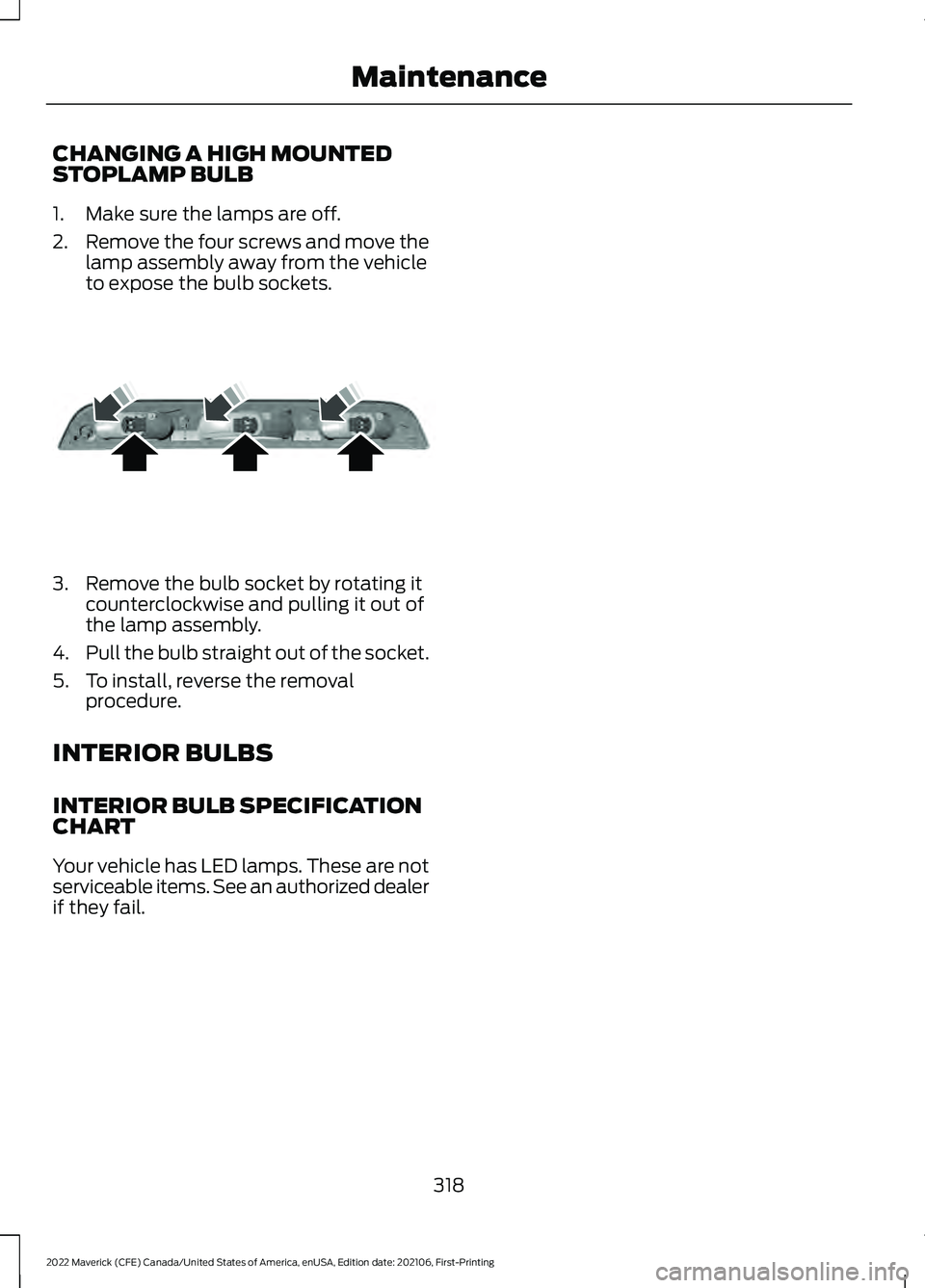
CHANGING A HIGH MOUNTED
STOPLAMP BULB
1. Make sure the lamps are off.
2.
Remove the four screws and move the
lamp assembly away from the vehicle
to expose the bulb sockets. 3. Remove the bulb socket by rotating it
counterclockwise and pulling it out of
the lamp assembly.
4. Pull the bulb straight out of the socket.
5. To install, reverse the removal procedure.
INTERIOR BULBS
INTERIOR BULB SPECIFICATION
CHART
Your vehicle has LED lamps. These are not
serviceable items. See an authorized dealer
if they fail.
318
2022 Maverick (CFE) Canada/United States of America, enUSA, Edition date: 202106, First-Printing MaintenanceE187290
Page 350 of 533

WARNING: Switch the ignition off
and apply the park brake fully before
lifting vehicle. WARNING:
Park your vehicle so
that you do not obstruct the flow of
traffic or place yourself in any danger and
set up a warning triangle. WARNING:
The jack supplied with
this vehicle is only intended for changing
a flat tire in an emergency. Do not
attempt to do any other work on your
vehicle when it is supported by the jack,
as your vehicle could slip off the jack.
Failure to follow this instruction could
result in personal injury or death. WARNING: No person should place
any portion of their body under a vehicle
that is supported by a jack. WARNING:
Make sure that the
wheels are pointing straight ahead. WARNING:
If your vehicle has a
manual transmission, shift into first or
reverse gear. If your vehicle has an
automatic transmission, shift into park
(P). WARNING:
Make sure that the
vehicle jack is vertical to the jacking point
and the base is flat on the ground. WARNING:
Replace the wheels
and tires with the exact original brand,
size and construction that came
originally on your vehicle. Use of any
other wheel or tire combinations, even
with identical size ratings, may result in insufficient running clearances, tire
rubbing and eventual puncture. Failure
to follow tire replacement
recommendations can lead to tire failure,
loss of vehicle control, serious injury or
death.
WARNING:
Do not fit run flat tires
on vehicles that were not originally fitted
with them. See an authorized dealer for
more details about compatibility. WARNING:
Make sure there is no
grease or oil on the threads or the
surface between the wheel lugs and
nuts. This can cause the lug nuts to
loosen while driving. WARNING:
Have the lug nuts
checked for tightness and the tire
pressure checked as soon as possible. WARNING:
Do not install alloy
wheels using lug nuts designed for use
with steel wheels. Dissimilar Spare Wheel and Tire
Assembly Information
WARNING:
Failure to follow these
guidelines could result in an increased
risk of loss of vehicle control, injury or
death.
347
2022 Maverick (CFE) Canada/United States of America, enUSA, Edition date: 202106, First-Printing Changing a Road WheelE166722
Page 409 of 533
Function
Button
For MP3 CDs, this button allows you to toggle through repeat
off, repeat one track (a small number one displays), and repeat
current folder (a small folder displays).
Select the shuffle symbol to have the audio on the disk play
in random order.
Shuffle
You can use the forward, reverse, pause or
play buttons to control the audio playback. Bluetooth Stereo or USB
Bluetooth Stereo and USB allow you to
access media that you store on your
Bluetooth device or USB device such as
music, audio books or podcasts.
The following buttons are available for Bluetooth and USB: Function
Button
Pressing the repeat button toggles the repeat setting through
three modes: repeat off (button not highlighted), repeat all
(button highlighted) and repeat track (button highlighted with
a small number one).
Repeat
Play the tracks in random order.
Shuffle
You can use the forward, reverse, pause or
play buttons to control the audio playback.
To get more information about the
currently playing track, press the cover art
or Info button. For some devices, SYNC 3 is able to
provide 30-second skip buttons when you
listen to audio books or podcasts. These
buttons allow you to skip forward or
backward within a track.
While playing audio from a USB device you
can look for certain music by selecting the
following: Function
Button
If available, displays the list of tracks in the
Now Playing playlist.
Browse
This option, which is available under
browse, allows you to play all tracks or to
filter the available media into one of the
below categories.
New Search
Play All
406
2022 Maverick (CFE) Canada/United States of America, enUSA, Edition date: 202106, First-Printing SYNC™ 3 (If Equipped)
Page 486 of 533
Description of Other Rights and
Limitations.
•
Speech Recognition: If the
SOFTWARE includes speech
recognition component(s), you should
understand that speech recognition is
an inherently statistical process and
that recognition errors are inherent in
the process. Neither FORD MOTOR
COMPANY nor its suppliers shall be
liable for any damages arising out of
errors in the speech recognition
process. It is your responsibility to
monitor any speech recognition
functions included in the system.
• Limitations on Reverse Engineering,
Decompilation and Disassembly:
You may not reverse engineer,
decompile, translate, disassemble or
attempt to discover any source code
or underlying ideas or algorithms of the
SOFTWARE nor permit others to
reverse engineer, decompile or
disassemble the SOFTWARE, except
and only to the extent that such activity
is expressly permitted by applicable
law notwithstanding this limitation or
to the extent as may be permitted by
the licensing terms governing use of
any open source components included
with the SOFTWARE.
• Limitations on Distributing,
Copying, Modifying and Creating
Derivative Works:
You may not
distribute, copy, make modifications
to or create derivative works based on
the SOFTWARE, except and only to the
extent that such activity is expressly
permitted by applicable law
notwithstanding this limitation or to
the extent as may be permitted by the
licensing terms governing use of any
open source components included with
the SOFTWARE. •
Single EULA:
The end user
documentation for the DEVICES and
related systems and services may
contain multiple EULAs, such as
multiple translations and/or multiple
media versions (e.g., in the user
documentation and in the software).
Even if you receive multiple EULAs, you
are licensed to use only one (1) copy of
the SOFTWARE.
• SOFTWARE Transfer:
You may
permanently transfer your rights under
this EULA only as part of a sale or
transfer of the DEVICES, provided you
retain no copies, you transfer all of the
SOFTWARE (including all component
parts, the media and printed materials,
any upgrades, and, if applicable, the
Certificate(s) of Authenticity), and the
recipient agrees to the terms of this
EULA. If the SOFTWARE is an upgrade,
any transfer must include all prior
versions of the SOFTWARE.
• Termination: Without prejudice to any
other rights, FORD MOTOR COMPANY
may terminate this EULA if you fail to
comply with the terms and conditions
of this EULA.
• Internet-Based Services
Components:
The SOFTWARE may
contain components that enable and
facilitate the use of certain
Internet-based services. You
acknowledge and agree that FORD
MOTOR COMPANY, third party
software and service suppliers, its
affiliates and/or its designated agent
may automatically check the version
of the SOFTWARE and/or its
components that you are utilizing and
may provide upgrades or supplements
to the SOFTWARE that may be
automatically downloaded to your
DEVICES.
483
2022 Maverick (CFE) Canada/United States of America, enUSA, Edition date: 202106, First-Printing Customer Information
Page 494 of 533
2. Account Information
You agree: (a) when registering the
TeleNav Software, to provide TeleNav with
true, accurate, current, and complete
information about yourself, and (b) to
inform TeleNav promptly of any changes
to such information, and to keep it true,
accurate, current and complete.
3. Software License
•
Subject to your compliance with the
terms of this Agreement, TeleNav
hereby grants to you a personal,
non-exclusive, non-transferable license
(except as expressly permitted below
in connection with your permanent
transfer of the TeleNav Software
license), without the right to
sublicense, to use the TeleNav
Software (in object code form only) in
order to access and use the TeleNav
Software. This license shall terminate
upon any termination or expiration of
this Agreement. You agree that you will
use the TeleNav Software only for your
personal business or leisure purposes,
and not to provide commercial
navigation services to other parties.
3.1 License Limitations
• (a) reverse engineer, decompile,
disassemble, translate, modify, alter
or otherwise change the TeleNav
Software or any part thereof;
(b)
attempt to derive the source code,
audio library or structure of the
TeleNav Software without the prior
express written consent of TeleNav;
(c)
remove from the TeleNav
Software, or alter, any of TeleNav's or
its suppliers' trademarks, trade names,
logos, patent or copyright notices, or
other notices or markings;
(d) distribute, sublicense or otherwise
transfer the TeleNav Software to
others, except as part of your
permanent transfer of the TeleNav
Software; or
(e) use the TeleNav
Software in any manner that
I. infringes the intellectual property or
proprietary rights, rights of publicity or
privacy or other rights of any party,
ii. violates any law, statute, ordinance or
regulation, including but not limited to laws
and regulations related to spamming,
privacy, consumer and child protection,
obscenity or defamation, or
iii. is harmful, threatening, abusive,
harassing, tortuous, defamatory, vulgar,
obscene, libelous, or otherwise
objectionable; and (f) lease, rent out, or
otherwise permit unauthorized access by
third parties to the TeleNav Software
without advanced written permission of
TeleNav.
4. Disclaimers
• To the fullest extent permissible
pursuant to applicable law, in no event
will TeleNav, its licensors and suppliers,
or agents or employees of any of the
foregoing, be liable for any decision
made or action taken by you or anyone
else in reliance on the information
provided by the TeleNav Software.
TeleNav also does not warrant the
accuracy of the map or other data used
for the TeleNav Software. Such data
may not always reflect reality due to,
among other things, road closures,
construction, weather, new roads and
other changing conditions. You are
responsible for the entire risk arising
out of your use of the TeleNav
Software. For example but without
limitation, you agree not to rely on the
TeleNav Software for critical
navigation in areas where the
well-being or survival of you or others
491
2022 Maverick (CFE) Canada/United States of America, enUSA, Edition date: 202106, First-Printing Customer Information