2022 FORD GT warning
[x] Cancel search: warningPage 48 of 318
GENERAL INFORMATION ON
RADIO FREQUENCIES
This device complies with Part 15 of the
FCC Rules and with Industry Canada
license-exempt RSS standard(s).
Operation is subject to the following two
conditions: (1) This device may not cause
harmful interference, and (2) This device
must accept any interference received,
including interference that may cause
undesired operation.
WARNING: Changes or
modifications not expressively approved
by the party responsible for compliance
could void the user's authority to operate
the equipment. The term "IC:" before the
radio certification number only signifies
that Industry Canada technical
specifications were met.
The typical operating range for your
transmitter is approximately
33 ft (10 m).
Vehicles with the remote start feature will
have a greater range.
One of the following could cause a
decrease in operating range:
• Weather conditions.
• Nearby radio towers.
• Structures around the vehicle.
• Other vehicles parked next to your
vehicle.
The radio frequency used by your remote
control can also be used by other radio
transmitters, for example amateur radios,
medical equipment, wireless headphones,
wireless remote controls, cell phones,
battery chargers and alarm systems. If the
frequencies are jammed, you will not be
able to use your remote control. You can
lock and unlock the doors with the key.
Note: Make sure to lock your vehicle before
leaving it unattended. Note:
If you are in range, the remote control
will operate if you press any button
unintentionally.
Note: The remote control contains sensitive
electrical components. Exposure to moisture
or impact may cause permanent damage.
Intelligent Access
(If Equipped)
The system uses a radio frequency signal
to communicate with your vehicle and
authorize your vehicle to unlock when one
of the following conditions are met:
• You activate the front exterior door
handle switch.
• You press the luggage compartment
button.
• You press a button on the transmitter.
If excessive radio frequency interference
is present in the area or if the transmitter
battery is low, you may need to
mechanically unlock your door. You can
use the mechanical key blade in your
intelligent access key to open the driver
door in this situation. See
Remote
Control (page 46).
45
2022 Ford GT (CGX) Canada/United States of America, enUSA, Edition date: 202111, First-Printing Keys and Remote Controls
Page 50 of 318
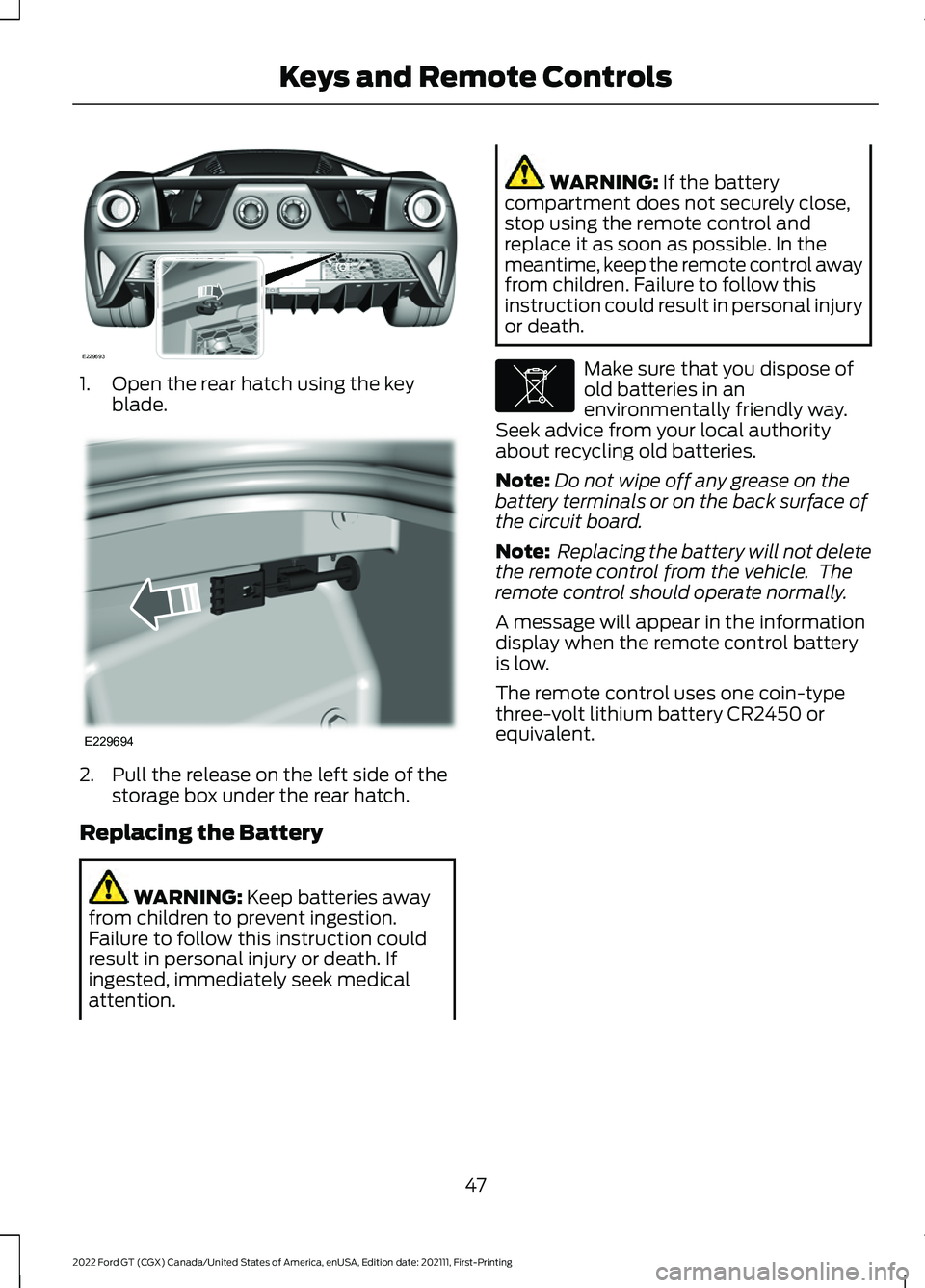
1. Open the rear hatch using the key
blade. 2. Pull the release on the left side of the
storage box under the rear hatch.
Replacing the Battery WARNING: Keep batteries away
from children to prevent ingestion.
Failure to follow this instruction could
result in personal injury or death. If
ingested, immediately seek medical
attention. WARNING:
If the battery
compartment does not securely close,
stop using the remote control and
replace it as soon as possible. In the
meantime, keep the remote control away
from children. Failure to follow this
instruction could result in personal injury
or death. Make sure that you dispose of
old batteries in an
environmentally friendly way.
Seek advice from your local authority
about recycling old batteries.
Note: Do not wipe off any grease on the
battery terminals or on the back surface of
the circuit board.
Note: Replacing the battery will not delete
the remote control from the vehicle. The
remote control should operate normally.
A message will appear in the information
display when the remote control battery
is low.
The remote control uses one coin-type
three-volt lithium battery CR2450 or
equivalent.
47
2022 Ford GT (CGX) Canada/United States of America, enUSA, Edition date: 202111, First-Printing Keys and Remote ControlsE229693 E229694 E107998
Page 59 of 318

ADJUSTING THE STEERING
WHEEL
WARNING: Do not adjust the
steering wheel when your vehicle is
moving.
Note: Make sure that you are sitting in the
correct position. See Sitting in the Correct
Position
(page 86).
Note: There are two steering column
adjustment levers on the steering column.
The left lever is for the telescope
adjustment. The right lever is for the tilt and
small telescope adjustments. 1.
Use the left lever to unlock the steering
column.
Note: You have to hold the lever down to
make adjustments.
2. Adjust the steering wheel to the desired
telescope position. 3. Lock the steering column.
1. Use the right lever to unlock the
steering column.
2. Adjust the steering wheel to the desired
tilt and telescope position. 3. Lock the steering column.
56
2022 Ford GT (CGX) Canada/United States of America, enUSA, Edition date: 202111, First-Printing Steering WheelE232042 E232043 E227122 E227240
Page 63 of 318
ADJUSTING THE PEDALS
WARNING: Never use the pedal
adjustment controls when your feet are
on the accelerator or brake pedal when
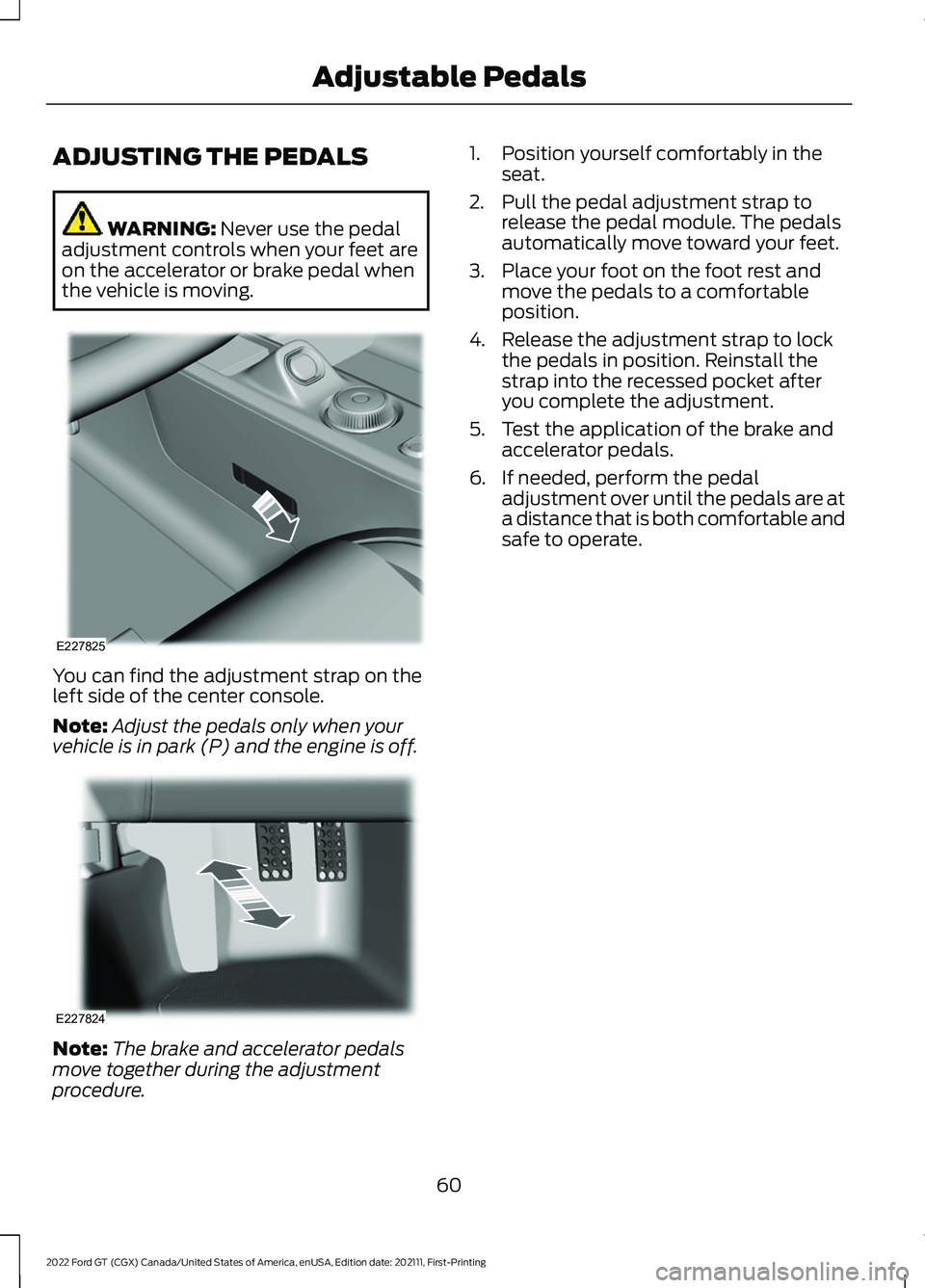
the vehicle is moving. You can find the adjustment strap on the
left side of the center console.
Note:
Adjust the pedals only when your
vehicle is in park (P) and the engine is off. Note:
The brake and accelerator pedals
move together during the adjustment
procedure. 1. Position yourself comfortably in the
seat.
2. Pull the pedal adjustment strap to release the pedal module. The pedals
automatically move toward your feet.
3. Place your foot on the foot rest and move the pedals to a comfortable
position.
4. Release the adjustment strap to lock the pedals in position. Reinstall the
strap into the recessed pocket after
you complete the adjustment.
5. Test the application of the brake and accelerator pedals.
6. If needed, perform the pedal adjustment over until the pedals are at
a distance that is both comfortable and
safe to operate.
60
2022 Ford GT (CGX) Canada/United States of America, enUSA, Edition date: 202111, First-Printing Adjustable PedalsE227825 E227824
Page 66 of 318

Press and hold to switch the high beams
on.
Press and hold again to switch the high
beams off.
AUTOLAMPS
WARNING: The system does not
relieve you of your responsibility to drive
with due care and attention. You may
need to override the system if it does not
turn the headlamps on in low visibility
conditions, for example daytime fog. When the lighting control is in the
autolamps position, the headlamps turn
on in low light situations, or when the
wipers turn on.
The headlamps remain on for a period of
time after you switch the ignition off. Use
the information display controls to adjust
the period of time that the headlamps
remain on.
Note:
If you switch on the autolamps, you
cannot switch the high beams on until the
system turns the low beams on. INSTRUMENT LIGHTING
DIMMER
Note:
If you disconnect the battery or it
becomes discharged, the illuminated
components turn to the maximum setting. Press repeatedly or press and
hold to brighten.
A
Press repeatedly or press and
hold to dim.
B
DAYTIME RUNNING LAMPS WARNING:
The daytime running
lamps system does not activate the rear
lamps and may not provide adequate
lighting during low visibility driving
conditions. Make sure you switch the
headlamps on, as appropriate, during all
low visibility conditions. Failure to do so
may result in a crash.
63
2022 Ford GT (CGX) Canada/United States of America, enUSA, Edition date: 202111, First-Printing LightingE142451 E236438
Page 68 of 318

POWER WINDOWS
WARNING: Do not leave children
unattended in your vehicle and do not
let them play with the power windows.
Failure to follow this instruction could
result in personal injury. WARNING:
When closing the
power windows, verify they are free of
obstruction and make sure that children
and pets are not in the proximity of the
window openings. Note:
You may hear a pulsing noise when
just one of the windows is open. Lower the
opposite window slightly to reduce this
noise.
Press the switch to open the window.
Lift the switch to close the window.
One-Touch Down
Press the switch fully and release it. Press
again or lift it to stop the window.
One-Touch Up
Lift the switch fully and release it. Press or
lift it again to stop the window. Bounce-Back
The window will stop and reverse some
distance if it detects an obstacle while
closing.
Overriding the Bounce-Back Feature
WARNING: If you override
bounce-back, the window does not
reverse if it detects an obstacle. Take
care when closing the windows to avoid
personal injury or damage to your
vehicle.
Pull up the window switch and hold within
two seconds of the window reaching the
bounce-back position. The window will
travel up with no bounce-back protection.
The window will stop if you release the
switch before the window is fully closed.
Accessory Delay
You can use the window switches for
several minutes after you switch the
ignition off or until you open either front
door.
GLOBAL OPENING
You can use the remote control to open
the windows with the ignition off.
Note: You can enable or disable this feature
in the information display, or see an
authorized dealer. See
General
Information (page 73).
Note: To operate this feature, accessory
delay must not be active.
65
2022 Ford GT (CGX) Canada/United States of America, enUSA, Edition date: 202111, First-Printing Windows and MirrorsE146043
Page 69 of 318

Remote Control Front Windows
After you unlock your vehicle with the
remote control, you can open the windows
for a short period of time. Press and hold
the remote control unlock button to open
the windows. Release the button once
movement starts. Press the lock or unlock
button to stop movement.
EXTERIOR MIRRORS
Power Exterior Mirrors
WARNING: Do not adjust the
mirrors when your vehicle is moving. This
could result in the loss of control of your
vehicle, serious personal injury or death.
Note: Do not clean the housing or glass of
any mirror with harsh abrasives, fuel or other
petroleum or ammonia-based cleaning
products. Left-hand mirror
A
Adjustment control
B
Right-hand mirror
C
To adjust a mirror:
1. Select the mirror you want to adjust. The control illuminates. 2. Adjust the position of the mirror.
3. Press the mirror switch again.
Fold-Away Exterior Mirrors
Push the mirror toward the door window
glass. Make sure that you fully engage the
mirror in its support when returning it to its
original position.
INTERIOR MIRROR
WARNING:
Do not adjust the
mirrors when your vehicle is moving. This
could result in the loss of control of your
vehicle, serious personal injury or death.
Note: Do not clean the housing or glass of
any mirror with harsh abrasives, fuel or other
petroleum or ammonia-based cleaning
products.
You can adjust the interior mirror to your
preference. This mirror has a second pivot
point, which lets you move the mirror head
up or down and from side to side.
Pull the tab below the mirror toward you
to reduce glare at night.
66
2022 Ford GT (CGX) Canada/United States of America, enUSA, Edition date: 202111, First-Printing Windows and MirrorsE176804
Page 71 of 318

Normal and Wet Mode:
•
Gear.
Sport Mode:
• Speedometer.
Track Mode:
• Engine Coolant Temperature.
• Engine Oil Temperature.
• Transmission Temperature.
• Fuel Level.
V-Max Mode:
• Engine Coolant Temperature.
• Engine Oil Temperature.
• Engine Oil Pressure.
• Turbo Boost Pressure.
Trip Computer
The trip computer functions only operate
when the engine is running. See General
Information (page 73).
Fuel Gauge
Note: The fuel gauge may vary slightly
when your vehicle is moving or on a slope.
Switch the ignition on. The fuel gauge will
indicate approximately how much fuel is
left in the fuel tank. The arrow adjacent to
the fuel pump symbol indicates on which
side of your vehicle the fuel filler door is
located. The gauge is divided into four segments
and moves towards the right when you
refuel your vehicle. If the gauge remains in
the far left segment after adding fuel, this
indicates your vehicle needs service soon.
After refueling, some variability in gauge
position is normal:
•
It may take a short time for the gauge
to reach full after leaving the gas
station. This is normal and depends
upon the slope of pavement at the gas
station.
• The fuel amount dispensed into the
tank is a little less or more than the
gauge indicated. This is normal and
depends upon the slope of pavement
at the gas station.
• If the gas station nozzle shuts off
before the tank is full, try a different
gas pump nozzle.
Low Fuel Reminder
A low fuel reminder triggers when the
distance to empty value reaches
50 mi
(80 km) to empty, with additional
warnings at 25 mi (40 km), 10 mi (20 km)
and 0 mi (0 km) to empty if the message
is cleared each time.
In Track Mode, the distance to empty
warnings appear at 10% and 0% to empty
if the message is cleared each time.
After extended periods of performance
driving, your distance to empty value may
display low even after refueling. Drive your
vehicle under normal operating conditions
to recalibrate the distance to empty or
reset your trip computer.
Variations
Note: The low fuel warning and distance-to-empty warning can appear at different fuel
gauge positions depending on fuel economy conditions. This variation is normal.
68
2022 Ford GT (CGX) Canada/United States of America, enUSA, Edition date: 202111, First-Printing Instrument Cluster