2022 FORD F-150 steering wheel
[x] Cancel search: steering wheelPage 320 of 750
The side parking aid may not function if:
•
Your vehicle remains stationary for over
two minutes.
• The anti-lock brake system activates.
• The traction control system activates.
• Your vehicle is in park (P).
• The steering wheel angle information
is not available. You must drive at least
492 ft (150 m) above 19 mph
(30 km/h) to reset the steering wheel
angle information.
Note: If you switch traction control off, the
side sensing system also turns off.
To reinitialize the system, drive the length
of your vehicle.
The side parking aid does not detect an
object that is moving toward the side of
your vehicle, for example another vehicle
moving at a low speed, if it does not pass
a front or rear parking aid sensor.
If the transmission is in reverse (R), the side
sensing system provides audible warnings.
When your vehicle is moving slowly,
obstacles are detected within
24 in
(60 cm) and are inside the driving path of
your vehicle. If your vehicle remains
stationary for a few seconds, the audible
warning turns off. Visual indication is
always present in reverse (R).
If your vehicle is in neutral (N), the side
sensing system provides visual indication
only when your vehicle is moving slowly
and there is a front or rear parking aid
obstacle detected, and the side obstacle
is within
24 in (60 cm) from the side of
your vehicle. If your vehicle remains
stationary for a few seconds, the visual
indication turns off. If the transmission is in drive (D) or any
other forward gear, the side sensing system
provides audible and visual warnings.
When your vehicle is moving slowly,
obstacles are detected within
24 in
(60 cm) and are inside the driving path of
your vehicle. If your vehicle remains
stationary for a few seconds, the visual
indication and audible warning turns off.
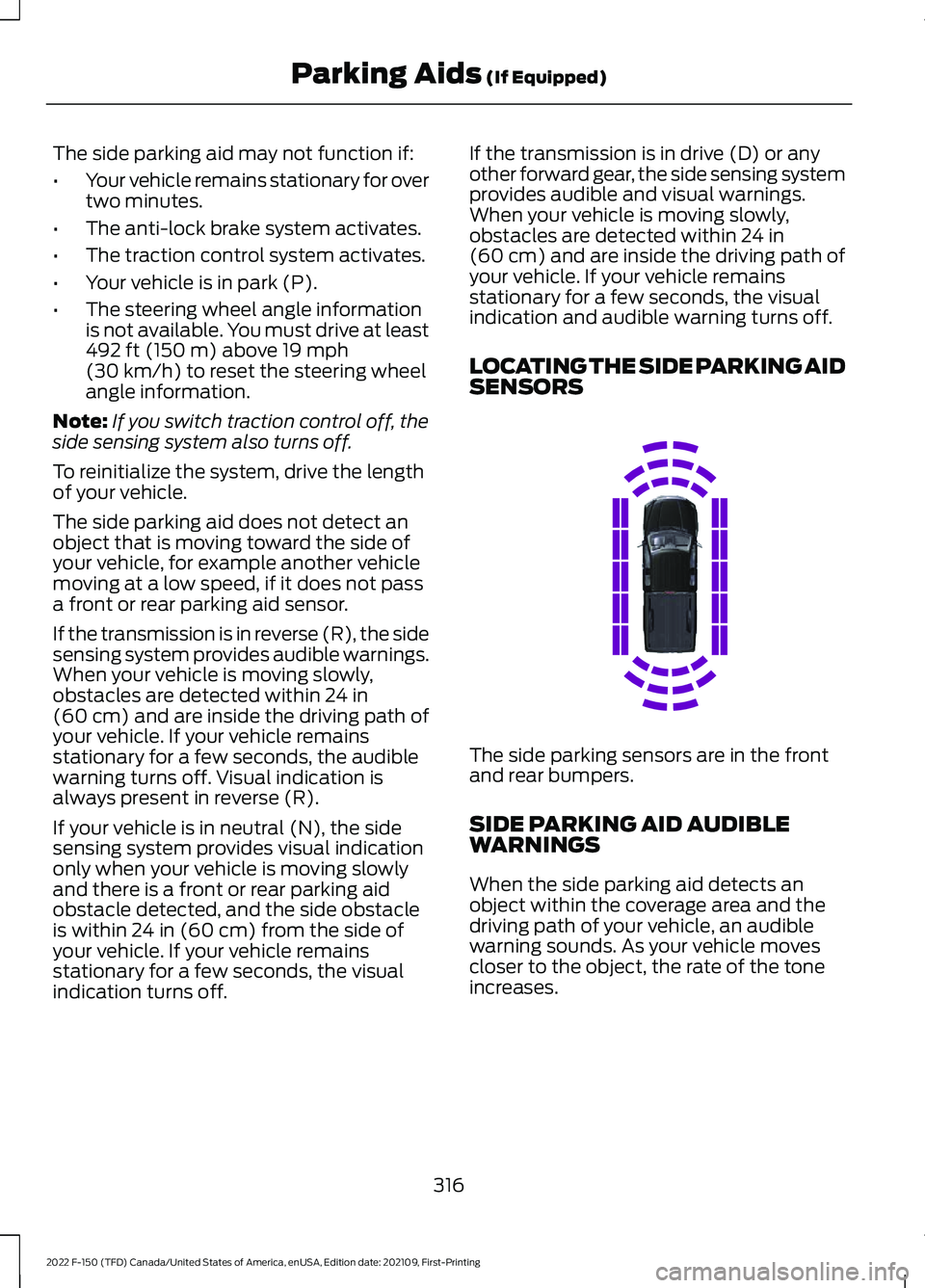
LOCATING THE SIDE PARKING AID
SENSORS The side parking sensors are in the front
and rear bumpers.
SIDE PARKING AID AUDIBLE
WARNINGS
When the side parking aid detects an
object within the coverage area and the
driving path of your vehicle, an audible
warning sounds. As your vehicle moves
closer to the object, the rate of the tone
increases.
316
2022 F-150 (TFD) Canada/United States of America, enUSA, Edition date: 202109, First-Printing Parking Aids
(If Equipped)E310321
Page 323 of 750

REAR VIEW CAMERA GUIDE
LINES
Active guide lines.
A
Centerline.
B
Fixed guide line: Green zone.
C
Fixed guide line: Yellow zone.
D
Fixed guide line: Red zone.
E
Rear bumper.
F
Active guide lines only show with fixed
guide lines. To use active guide lines, turn
the steering wheel to point the guide lines
toward an intended path. If the steering
wheel position changes while reversing,
your vehicle might deviate from the
intended path. The fixed and active guide lines fade in and
out depending on the steering wheel
position. The active guide lines do not
display when the steering wheel position
is straight.
Use caution while reversing. Objects in the
red zone are closest to your vehicle and
objects in the green zone are farther away.
Objects get closer to your vehicle as they
move from the green zone to the yellow or
red zones. Use the side view mirrors and
rear view mirror to get better coverage on
both sides and rear of your vehicle.
Note:
Active guide lines and fixed guide
lines are only available when the
transmission is in reverse (R).
Note: The centerline is only available if the
active or fixed guide lines are on.
Note: Not all camera modes work properly
without an auxiliary camera.
REAR VIEW CAMERA
SETTINGS
ZOOMING THE REAR VIEW
CAMERA IN AND OUT WARNING: When manual zoom is
on, the full area behind your vehicle may
not show. Be aware of your surroundings
when using the manual zoom feature.
Selectable settings for this feature are
zoom in (+) and zoom out (-). Press the
symbol on the camera screen to change
the view. The default setting is zoom off.
This allows you to get a closer view of an
object behind your vehicle. The zoomed
image keeps the bumper in the image to
provide a reference. The zoom is only
active while the transmission is in reverse
(R).
319
2022 F-150 (TFD) Canada/United States of America, enUSA, Edition date: 202109, First-Printing Rear View CameraE306774
Page 327 of 750

Active guide lines.
A
Centerline.
B
Fixed guide line: Green zone.
C
Fixed guide line: Yellow zone.
D
Fixed guide line: Red zone.
E
Rear bumper.
F
Active guide lines only show with fixed
guide lines. Turn the steering wheel to
point the guide lines toward an intended
path. If the steering wheel position changes
when reversing, your vehicle could deviate
from the intended path.
The fixed and active guide lines fade in and
out depending on the steering wheel
position. The active guide lines do not
display when the steering wheel position
is straight. Objects in the red zone are closest to your
vehicle and objects in the green zone are
farther away. Objects get closer to your
vehicle as they move from the green zone
to the yellow or red zones. Use the side
view mirrors and rear view mirror to get
better coverage on both sides and rear of
your vehicle.
Keep Out Zone
The keep out zone is represented by the
yellow dotted lines running parallel to your
vehicle.
360 DEGREE CAMERA
SETTINGS
SWITCHING THE 360 DEGREE
CAMERA ON AND OFF
The 360 degree camera system
button is on the instrument
panel. The front and rear
cameras have multiple screens which
consist of:
• Normal view.
• Normal view with 360.
• Split view.
• Bed camera.
323
2022 F-150 (TFD) Canada/United States of America, enUSA, Edition date: 202109, First-Printing 360 Degree Camera (If Equipped)E306774 E310341 E332186
Page 330 of 750
4. Use the turn signal lever to search for
a parking space on the driver or
passenger side of your vehicle.
Note: If you do not use the turn signal lever,
the system searches for a parking space on
the passenger side of your vehicle.
5. Drive your vehicle approximately 3 ft
(1 m) away from and parallel to the
other parked vehicles when searching
for a parking space.
Note: A tone sounds and a message
appears in the information and
entertainment display when active park
assist finds a suitable parking space.
6. Press and hold the brake pedal.
7. Release the steering wheel and shift into neutral (N).
8. Press and hold the active park assist button.
9. Release the brake pedal to allow your vehicle to park.
Note: You can slow down your vehicle at
any time by pressing the brake pedal.
Note: When parallel parking between
objects, the system parks closer to the
object in front of your vehicle to allow easier
access to the luggage compartment.
Note: When parking is complete, your
vehicle shifts into park (P).
ENTERING A PERPENDICULAR
PARKING SPACE
1. Press the parking aid button.
Note: Active park assist does not recognize
parking space lines and centers your vehicle
between objects.
2. Press the active park assist icon on the
touchscreen.
3. Select perpendicular parking. 4. Use the turn signal lever to search for
a parking space on the driver or
passenger side of your vehicle.
Note: If you do not use the turn signal lever,
the system searches for a parking space on
the passenger side of your vehicle.
5. Drive your vehicle approximately 3 ft
(1 m) away from and perpendicular to
the other parked vehicles when
searching for a parking space.
Note: A tone sounds and a message
appears in the information and
entertainment display when active park
assist finds a parking space.
6. Press and hold the brake pedal.
7. Release the steering wheel and shift into neutral (N).
8. Press and hold the parking aid button.
9. Release the brake pedal to allow the vehicle to park.
Note: Active park assist backs your vehicle
into parking spaces.
Note: Active park assist aligns the front end
of your vehicle with the lane side of the
object next to it.
Note: When the system detects only one
object, it allows enough distance to open
the door on either side.
Note: You can slow down your vehicle at
any time by pressing the brake pedal.
Note: When parking is complete, your
vehicle shifts into park (P).
EXITING A PARKING SPACE
Active park assist only assists leaving
parallel parking spaces.
1. Press the parking aid button.
2. Press the active park assist icon on the
touchscreen.
3. Select parallel park exit.
326
2022 F-150 (TFD) Canada/United States of America, enUSA, Edition date: 202109, First-Printing Active Park Assist
(If Equipped)
Page 331 of 750

4. Use the turn signal to choose the
direction to exit the parking space.
5. Press and hold the brake pedal.
6. Release the steering wheel and shift into neutral (N).
7. Release the parking brake.
8. Press and hold the parking aid button.
9. Release the brake pedal to allow your vehicle to move.
Note: After active park assist drives your
vehicle to a position where you can exit the
parking space in a forward movement, a
message appears instructing you to take full
control of your vehicle.
10. Take control of your vehicle.
Note: You can slow down your vehicle at
any time by pressing the brake pedal.
ACTIVE PARK ASSIST –
TROUBLESHOOTING
ACTIVE PARK ASSIST –
INFORMATION MESSAGES Action
Message
The system
requires service.
Have your vehicle
checked as soon as possible.
Active Park Fault
ACTIVE PARK ASSIST –
FREQUENTLY ASKED QUESTIONS
Why does active park assist not
operate correctly? The system is unable to detect a
vehicle, curb or object to park next to
or in between. The system needs
boundary objects to operate correctly. Why does active park assist not search
for a parking space?
You have switched traction control off.
Why does active park assist not search
for a parking space? The transmission is in reverse (R). Your
vehicle must be moving forward to be
able to detect a parking space.
Why does active park assist not offer
a parking space? The sensors could be blocked. For
example, snow, ice or large
accumulations of dirt. Blocked sensors
can affect how the system functions.
Why does active park assist not offer
a parking space? The sensors in the front or rear bumper
could be damaged.
Why does active park assist not offer
a parking space? There is not enough room in the
parking space for your vehicle to safely
park.
Why does active park assist not offer
a parking space? There is not enough space for the
parking maneuver on the opposite side
of the parking space.
Why does active park assist not offer
a parking space? The parking space is more than 5 ft
(1.5 m) or less than 2 ft (0.5 m) away
from your vehicle.
Why does active park assist not offer
a parking space? Your vehicle's speed is greater than
22 mph (35 km/h) for parallel parking
or greater than
19 mph (30 km/h) for
perpendicular parking.
327
2022 F-150 (TFD) Canada/United States of America, enUSA, Edition date: 202109, First-Printing Active Park Assist
(If Equipped)
Page 333 of 750

WHAT IS CRUISE CONTROL
Cruise control lets you maintain a set
speed without keeping your foot on the
accelerator pedal.
Requirements
Use cruise control when the vehicle speed
is greater than 15 mph in imperial units and
20 km/h in metric units.
SWITCHING CRUISE CONTROL
ON AND OFF
WARNING: Do not use cruise
control on winding roads, in heavy traffic
or when the road surface is slippery. This
could result in loss of vehicle control,
serious injury or death.
The cruise controls are on the steering
wheel.
Switching Cruise Control On Press the button to activate the
system. When the system
activates, the set speed is equal
to whichever is greater, the current vehicle
speed, or 15 mph when in imperial units or
20 km/h when in metric units. If the speed
is too low, or other conditions are not
correct for cruise control activation, the
system will instead enter standby mode.
Switching Cruise Control Off Press the button when the
system is active or switch the
ignition off.
Note: When you switch cruise control off,
the set speed clears. SETTING THE CRUISE
CONTROL SPEED WARNING:
When you are going
downhill, your vehicle speed could
increase above the set speed. The
system does not apply the brakes.
Drive to the speed you prefer. Press either the SET+ or SET-
buttons to set the current speed.
Take your foot off the accelerator pedal.
Note: The indicator changes color in the
information display.
Changing the Set Speed Press the SET+ button to
increase the set speed in small
increments. Press and hold the
SET+ button to accelerate. Release the
button when you have reached your
preferred speed. Press the SET- button to
decrease the set speed in small
increments. Press and hold the
SET- button to decelerate. Release the
button when you have reached your
preferred speed.
Note: If you accelerate by pressing the
accelerator pedal, the set speed does not
change. When you release the accelerator
pedal, your vehicle returns to the speed that
you previously set.
329
2022 F-150 (TFD) Canada/United States of America, enUSA, Edition date: 202109, First-Printing Cruise Control
(If Equipped)E332905 E332905
Page 337 of 750

The radar sensor has a limited field of view.
It may not detect vehicles at all or detect
a vehicle later than expected in some
situations. The lead vehicle image does
not illuminate if the system does not
detect a vehicle in front of you.
Detection Issues Can Occur:
When driving on a different line
than the vehicle in front.
A
With vehicles that edge into your
lane. The system can only detect
these vehicles once they move
fully into your lane.
B
There may be issues with the
detection of vehicles in front
when driving into and coming out
of a bend or curve in the road.
C
In these cases, the system may brake late
or unexpectedly. If something hits the front end of your
vehicle or damage occurs, the
radar-sensing zone may change. This could
cause missed or false vehicle detection.
Optimal system performance requires a
clear view of the road by the windshield
camera.
Optimal performance may not occur if:
•
The camera is blocked.
• There is poor visibility or lighting
conditions.
• There are bad weather conditions.
SWITCHING ADAPTIVE
CRUISE CONTROL ON AND OFF
The cruise controls are on the steering
wheel. See Visual Search (page 32).
Switching Adaptive Cruise Control
On Press the button to activate the
system. When the system
activates, the set speed is equal
to whichever is greater, the current vehicle
speed, or 15 mph when in imperial units or
20 km/h when in metric units. If the speed
is too low, or other conditions are not
correct for adaptive cruise control
activation, the system enters standby
mode. When you are below 15 mph when
in imperial units or 20 km/h when in metric
units, adaptive cruise control does not
activate unless you are following another
vehicle.
The indicator, current gap setting and set
speed appear in the instrument cluster
display.
333
2022 F-150 (TFD) Canada/United States of America, enUSA, Edition date: 202109, First-Printing Adaptive Cruise Control
(If Equipped)E71621 E144529
Page 342 of 750

1. Press Features on the touchscreen.
2. Press
Driver Assistance.
3. Press
Cruise Control.
4. Press
Normal Cruise Control. The cruise control indicator
replaces the adaptive cruise
control indicator if you select
normal cruise control. The gap setting
does not display, and the system does not
respond to lead vehicles. Automatic
braking remains active to maintain set
speed. The system remembers the last
setting when you start your vehicle.
LANE CENTERING
HOW DOES LANE CENTERING
WORK
Adaptive cruise control with lane centering
uses radar and camera sensors to help
keep your vehicle in the middle of the lane
by applying continuous assistance steering
torque input toward the lane center on
highways.
Note: The adaptive cruise control gap
setting operates normally.
If you drive off-center within the lane, the
system sets and maintains that preferred
lane position. The system provides
continuous assistance steering torque
input toward the preferred position.
Note: The system can only set preferred
lane positions within the lane.
Note: If the system cancels, the preferred
position erases. On the next activation, the
system provides continuous assistance
steering torque input toward the lane center. LANE CENTERING PRECAUTIONS WARNING: Do not use the system
when towing a trailer. Failure to follow
this instruction could result in the loss of
control of your vehicle, personal injury or
death. WARNING:
Do not use the system
if any changes or modifications to the
steering wheel have been made. Any
changes or modifications to the steering
wheel could affect the functionality or
performance of the system. Failure to
follow this instruction could result in the
loss of control of your vehicle, personal
injury or death.
Adaptive cruise control precautions apply
to lane centering unless stated otherwise
or contradicted by a lane centering
precaution. See Adaptive Cruise Control
Precautions
(page 331).
LANE CENTERING
REQUIREMENTS
You must keep your hands on the steering
wheel at all times.
The system only activates when all of the
following occur:
• You have adaptive cruise control with
stop and go on.
• Lane centering assist is enabled in your
information and entertainment screen.
See
Switching Lane Centering On
and Off (page 339).
• You have your hands on the steering
wheel.
• The system detects both lane
markings.
Note: If it does not detect valid lane
markings, the system stays inactive until
valid markings are available.
338
2022 F-150 (TFD) Canada/United States of America, enUSA, Edition date: 202109, First-Printing Adaptive Cruise Control
(If Equipped)E332905