2022 FORD F-150 ground
[x] Cancel search: groundPage 427 of 750
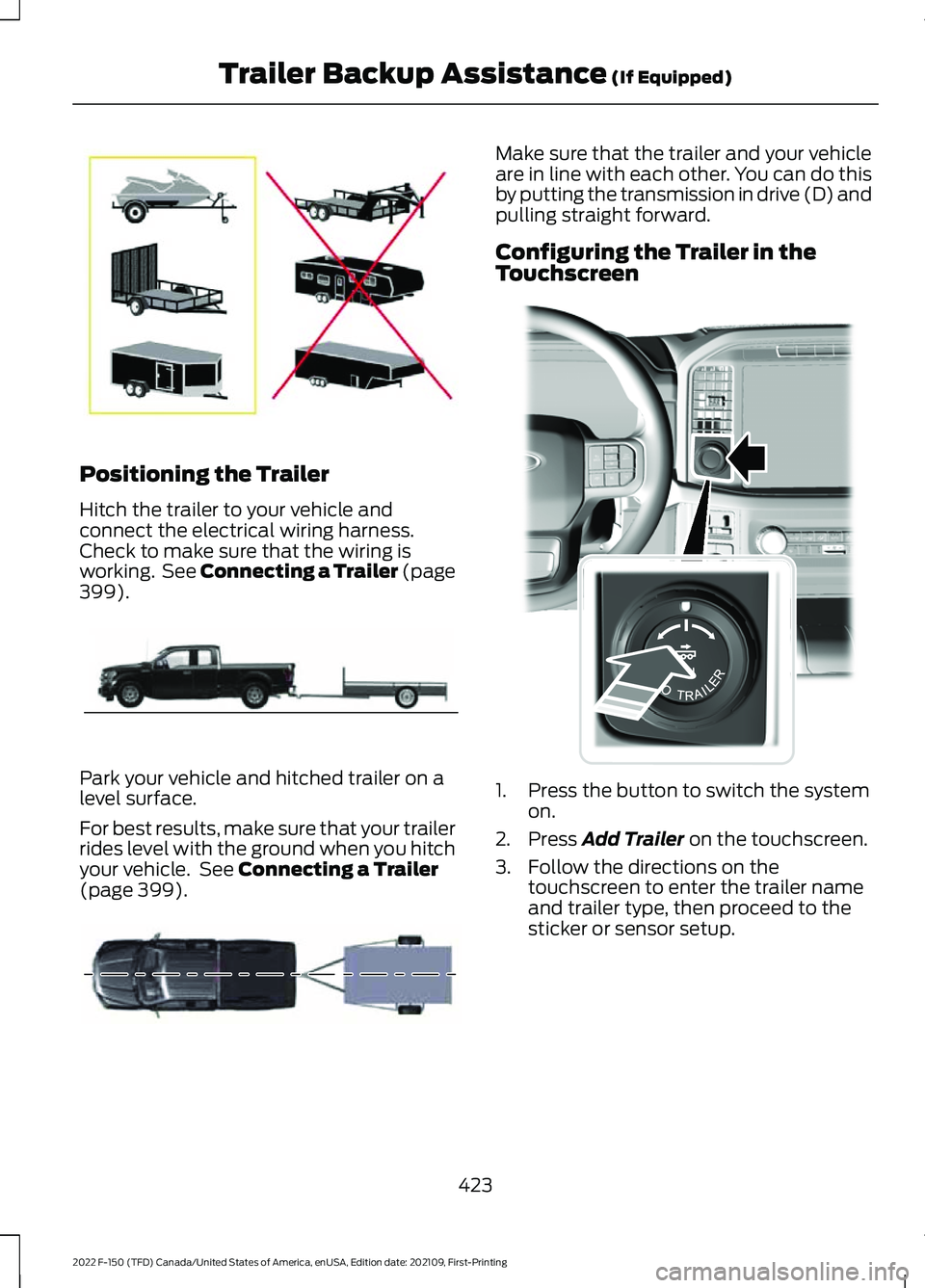
Positioning the Trailer
Hitch the trailer to your vehicle and
connect the electrical wiring harness.
Check to make sure that the wiring is
working. See Connecting a Trailer (page
399).
Park your vehicle and hitched trailer on a
level surface.
For best results, make sure that your trailer
rides level with the ground when you hitch
your vehicle. See
Connecting a Trailer
(page 399). Make sure that the trailer and your vehicle
are in line with each other. You can do this
by putting the transmission in drive (D) and
pulling straight forward.
Configuring the Trailer in the
Touchscreen
1. Press the button to switch the system
on.
2. Press
Add Trailer on the touchscreen.
3. Follow the directions on the touchscreen to enter the trailer name
and trailer type, then proceed to the
sticker or sensor setup.
423
2022 F-150 (TFD) Canada/United States of America, enUSA, Edition date: 202109, First-Printing Trailer Backup Assistance
(If Equipped)E209766 E209759 E209760 E310335
Page 438 of 750

•
The system could have difficulties
recognizing the sticker based on
environmental factors. You could need
to move to a different area to change
the lighting and background or you
could need to change the direction you
are driving. You could also try setting
up the system at a different time of
day.
• Some trailers are not compatible with
the sticker and camera system. If the
issue persists, set up the trailer with a
sensor purchased from your authorized
dealer. See Trailer Sensor
Installation (page 424).
What does it mean if the system
pauses during calibration?
• There could be steering input or trailer
movement during the straight drive
portion of the calibration process.
What does it mean if the system
displays hold steering steady
during turn?
• Part of the calibration process for the
sticker setup requires a steady turn. If
you are continually moving the steering
wheel during the turn, this delays the
calibration process. To enable the
calibration process, hold the steering
wheel at the same position when
turning. What does it mean if the system
displays that it is not available?
•
There could be a sub-system that the
system uses that is not correctly
operating. If the system continues to
display it is not available, visit your
authorized dealer to have your vehicle
checked.
• There could be a battery voltage issue.
Make sure the battery is correctly
charged. If the system continues to
display it is not available, visit your
authorized dealer to have your vehicle
checked.
What does it mean if the system
displays that driving is required to
initialize steering?
• The steering system needs to learn
internal parameters to fully turn on the
feature. Drive your vehicle straight
forward above
25 mph (40 km/h) for
approximately 5 minutes.
• Your vehicle is new, there is a battery
voltage issue or you have serviced the
steering system.
What does it mean if the system
requires you to pull forward to
initialize?
• This occurs when the vehicle has not
moved during the current key cycle
after you connect and select the trailer
in the touchscreen, or you operate the
system at speeds below
1 mph
(1 km/h) for an extended period of
time. Drive forward above 2 mph
(3 km/h) and the system indicates
when it initializes.
434
2022 F-150 (TFD) Canada/United States of America, enUSA, Edition date: 202109, First-Printing Trailer Backup Assistance
(If Equipped)
Page 442 of 750

Positioning the Trailer
Hitch the trailer to your vehicle and
connect the electrical wiring harness.
Check to make sure that the wiring is
working. See Connecting a Trailer (page
399).
Park your vehicle and hitched trailer on a
level surface.
For best results, make sure that your trailer
rides level with the ground when you hitch
your vehicle. See
Connecting a Trailer
(page 399). Make sure that the trailer and your vehicle
are in line with each other. You can do this
by putting the transmission in drive (D) and
pulling straight forward.
Configuring the Trailer in the
Touchscreen
1. Shift to reverse (R).
2. Press the camera view button.
3. Press the trailer view icon.
4. Press
Add Trailer.
5. Follow the directions on the touchscreen to enter the trailer name
and trailer type, then proceed to the
sticker or sensor setup.
Note: Your vehicle has two options for
trailer reverse guidance setup. The system
defaults to the camera based system. See
Applying the Trailer Reverse Aid Sticker
(page 438). You can also setup the system
with the trailer sensor that you can purchase
from your authorized dealer. You must
connect a sensor to your vehicle to setup
the system. See
Trailer Sensor
Installation (page 439).
Note: If you configure the trailer and install
a sensor, the system saves the trailer with
that sensor information. If you want to use
this trailer with the sticker, you need to
delete the trailer from the system and
repeat the setup process.
APPLYING THE TRAILER
REVERSE AID STICKER
Place the sticker in an area visible by the
rear view camera. The entire sticker must
be within
4– 19 in (10–48 cm) from the
center of the hitch ball, as shown in the
following illustration.
438
2022 F-150 (TFD) Canada/United States of America, enUSA, Edition date: 202109, First-Printing Trailer Reverse Guidance
(If Equipped)E209766 E209759 E209760
Page 450 of 750

•
The system could have difficulties
recognizing the sticker based on
environmental factors. You could need
to move to a different area to change
the lighting and background or you
could need to change the direction you
are driving. You could also try setting
up the system at a different time of
day.
• Some trailers are not compatible with
the sticker and camera system. If the
issue persists, set up the trailer with a
sensor purchased from your authorized
dealer. See Trailer Sensor
Installation (page 439).
What does it mean if the system
pauses during calibration?
• There could be steering input or trailer
movement during the straight drive
portion of the calibration process.
What does it mean if the system
displays hold steering steady
during turn?
• Part of the calibration process for the
sticker setup requires a steady turn. If
you are continually moving the steering
wheel during the turn, this delays the
calibration process. To enable the
calibration process, hold the steering
wheel at the same position when
turning. What does it mean if the system
displays that it is not available?
•
There could be a sub-system that the
system uses that is not correctly
operating. If the system continues to
display it is not available, visit your
authorized dealer to have your vehicle
checked.
• There could be a battery voltage issue.
Make sure the battery is correctly
charged. If the system continues to
display it is not available, visit your
authorized dealer to have your vehicle
checked.
What does it mean if the system
displays that driving is required to
initialize steering?
• The steering system needs to learn
internal parameters to fully turn on the
feature. Drive your vehicle straight
forward above
25 mph (40 km/h) for
approximately 5 minutes.
• Your vehicle is new, there is a battery
voltage issue or you have serviced the
steering system.
What does it mean if the system
requires you to pull forward to
initialize?
• This occurs when the vehicle has not
moved during the current key cycle
after you connect and select the trailer
in the touchscreen, or you operate the
system at speeds below
1 mph
(1 km/h) for an extended period of
time. Drive forward above 2 mph
(3 km/h) and the system indicates
when it initializes.
446
2022 F-150 (TFD) Canada/United States of America, enUSA, Edition date: 202109, First-Printing Trailer Reverse Guidance
(If Equipped)
Page 453 of 750

OFF-ROAD DRIVING
WHAT IS OFF-ROAD DRIVING
Off-road driving is driving your vehicle on
unsurfaced roads or trails, made from dirt,
rocks, sand and mud.
OFF-ROAD DRIVING
PRECAUTIONS - RAPTOR
WARNING: If you continue to drive
your vehicle when the engine is
overheating, the engine could stop
without warning. Failure to follow this
instruction could result in the loss of
control of your vehicle.
Before going off-road driving, consult with
all the appropriate government entities to
determine where you are legally allowed
to operate your vehicle and what permits
or registrations are required to do so.
Inspect your vehicle before and after any
off-road driving.
Familiarize yourself with the dimensions
of your vehicle including approach angles,
breakover angles, and ground clearance.
Also familiarize yourself with the features
of your vehicle. Some of these features
such as drive modes and cameras can
improve your off-road driving experience.
Secure loose objects inside your vehicle
and in the cargo area. BASIC OFF-ROAD DRIVING
TECHNIQUES
Off-road Driving Hints
Before taking your vehicle off-roading, a
basic vehicle inspection should be done to
make sure that the vehicle is in top working
condition. It is always recommended that
at least two vehicles are used while
off-roading. The buddy system helps make
sure that help is close at hand should a
vehicle become stuck or damaged. It is also
wise to take supplies such as a first aid kit,
supply of water, tow strap, cell or satellite
phone with you any time an off-road
excursion is planned.
1. Grip the steering wheel with thumbs
on the outside of the rim. This will
reduce the risk of injury due to abrupt
steering wheel motions that occur
when negotiating rough terrain.
2. Throttle, brake and steering inputs should be made in a smooth and
controlled manner. Sudden inputs to
the controls can cause loss of traction
or upset the vehicle, especially while
on loose terrain or while crossing
obstacles such as rocks or logs.
3. Look ahead on your route noting upcoming obstacles, or any other
factors which may indicate a change
in available traction, and adjust the
vehicle speed and route accordingly.
4. When driving off-road, if the front or rear suspension is bottoming out
and/or excessive contact with the
skid-plates is encountered, reduce
vehicle speed to avoid potential
damage to the vehicle.
5. When with other vehicles, it is recommended that communication is
used, and the lead vehicle notify other
vehicles of obstacles that could cause
potential vehicle damage.
449
2022 F-150 (TFD) Canada/United States of America, enUSA, Edition date: 202109, First-Printing Driving Hints
Page 454 of 750
6. Always keep available ground
clearance in mind and pick a route that
minimizes the risk of catching the
underside of the vehicle on an obstacle.
7. When negotiating low speed obstacles,
applying light brake pressure in
conjunction with the throttle will help
prevent the vehicle from jerking and
will allow you to negotiate the obstacle
in a more controlled manner. Using 4L
will also help with this.
8. Off-roading requires a high degree of concentration. Even if your local law
does not prohibit alcohol use while
driving off-road, Ford strongly
recommends against drinking if you
plan to off-road.
Crossing Obstacles
• Review the path ahead before
attempting to cross any obstacle. It is
best if the obstacle is reviewed from
outside the vehicle so that there is a
good understanding of terrain condition
both in front of and behind the
obstacle.
• Approach obstacles slowly.
• If a large obstacle such as a rock
cannot be avoided, choose a path that
places the rock directly under the tire
rather than the undercarriage of the
vehicle. This will help prevent damage
to the vehicle.
• Ditches and washouts should be
crossed at a 45° angle, allowing each
wheel to independently cross the
obstacle.
Hill Climbing WARNING:
Extreme care should
be used when steering the vehicle in
reverse down a slope so as not to cause
the vehicle to swerve out of control. •
Always attempt to climb a steep hill
along the fall line of the slope and not
diagonally.
• If the vehicle is unable to make it up
the hill, DO NOT attempt to turn back
down the slope. Place the vehicle in
low range and slowly back down in
reverse.
• When descending a steep slope, select
low gear and engage hill descent
control. Use the throttle and brake
pedals to control your descent speed.
Note: Hill descent control is functional in
reverse and should be used in this situation.
BASIC OFF-ROAD DRIVING
TECHNIQUES - RAPTOR
Grip the steering wheel with your thumbs
on the outside of the rim. This reduces the
risk of injury due to abrupt steering wheel
motions that occur when negotiating rough
terrain.
If you are driving in a dusty area, be sure to
leave ample distance between your vehicle
and any other vehicles to allow for
adequate vision.
DRIVING OFF-ROAD - RAPTOR
Driving In Snow and Ice WARNING:
Do not become
overconfident in the ability of four-wheel
drive vehicles. Although a four-wheel
drive vehicle may accelerate better than
a two-wheel drive vehicle in low traction
situations, it won't stop any faster than
two-wheel drive vehicles. Always drive
at a safe speed.
Make sure you allow sufficient distance
between your vehicle and other vehicles
for stopping.
450
2022 F-150 (TFD) Canada/United States of America, enUSA, Edition date: 202109, First-Printing Driving Hints
Page 456 of 750

Vehicles used to traverse water should be
periodically inspected for signs of water
ingestion in all of the vehicle's fluids. If
water is found inside your vehicle fluids,
service your vehicle or see an authorized
dealer.
Avoid Getting High-Centered
Always keep available ground clearance
in mind and pick a route that minimizes the
risk of catching the underside of the vehicle
on an obstacle and getting high-centered.
Freeing A Stuck Vehicle
WARNING: Do not spin the wheels
at over 34 mph (55 km/h). The tires may
fail and injure a passenger or bystander.
Recovery hooks are mounted to the
vehicle's structure and are used to pull out
the vehicle from a surface or location when
stuck. Recover your vehicle using various
towing apparatus attached to your
recovery hook such as winch, open hook,
or strap.
Note: Do not use recovery hooks to
recreationally tow your vehicle. See
Recreationally Towing Your Vehicle (page
469
).
Note: Do not rock your vehicle if the engine
is not at normal operating temperature as
damage to the transmission could occur.
Note: Do not rock your vehicle for more
than a minute as damage to the
transmission and tires could occur or the
engine could overheat.
If you are unable to free your vehicle call
roadside assistance. See
Roadside
Assistance (page 462). Crossing A Ravine, Gully, Ditch,
Washout Or Rut
Review the path ahead before attempting
to cross any obstacle.
Driving Over Logs
Review the path ahead before attempting
to cross any obstacle.
DRIVING YOUR VEHICLE AT HIGH
SPEEDS - RAPTOR
If you plan on using your vehicle for severe,
high speed off-road use, we recommend
the following:
•
Equipping your vehicle with the safety
equipment appropriate for off-road
recovery.
• Using personal safety equipment,
including a certified helmet and
approved neck restraint device.
• Doing a low speed reconnaissance run
in unfamiliar areas to become aware
of any obstacles that you could
encounter.
Your vehicle can incur damage if driven
beyond its capabilities. Skid plates, shock
guards and running boards are designed
to help limit damage to vital components
and exterior finishes, but cannot prevent
all damage if driven in extreme off-road
conditions. Damage to skid plates, shock
guards, running boards and exterior
finishes as well as bent, cracked or broken
body, frame and chassis components may
not be covered by warranty.
452
2022 F-150 (TFD) Canada/United States of America, enUSA, Edition date: 202109, First-Printing Driving Hints
Page 469 of 750

JUMP STARTING THE VEHICLE
Connecting the Jumper Cables
WARNING: Do not connect the
negative jumper cable to any other part
of your vehicle. Use the ground point.
Note: If you are using a jump pack or
booster box, follow the manufacturer's
instructions. 1. Pull the red rubber boot backward.
Connect the positive (+) jumper cable
to the positive (+) terminal of the
discharged battery.
2. Connect the other end of the positive (+) jumper cable to the positive (+)
terminal of the booster vehicle battery. 3.
Connect the negative (-) jumper cable
to the negative (-) terminal of the
booster vehicle battery.
4. Make the final connection of the negative (-) jumper cable to an
exposed metal part of the disabled
vehicle's engine, as shown in the
following illustration, away from the
battery and fuel injection system, or
connect the negative (-) jumper cable
to a ground connection point if
available.
Note: Do not use the hood latch as a
negative (-) connection point. This could
cause springs in the latch to burn and
prevent the hood from operating correctly. Starting the Engine
1.
Start the engine of the booster vehicle
and moderately rev the engine, or
gently press the accelerator to keep
the engine speed between 2000 and
3000 RPM, as shown in your
tachometer.
2. Start the engine of the disabled vehicle.
3. Once you start the disabled vehicle, run
both vehicle engines for an additional
three minutes before disconnecting the
jumper cables.
465
2022 F-150 (TFD) Canada/United States of America, enUSA, Edition date: 202109, First-Printing Crash and Breakdown InformationE281345 E309115