2022 FORD F-150 Stability control
[x] Cancel search: Stability controlPage 302 of 750

WHAT IS TRACTION CONTROL
The traction control system helps to avoid
drive wheel spin and loss of traction.
HOW DOES TRACTION
CONTROL WORK
If your wheels begin to spin, the loss of
traction can compromise steering control
and stability of the vehicle. The traction
control system applies the brakes to
individual wheels and when needed,
reduces engine power at the same time to
increase traction.
SWITCHING TRACTION
CONTROL ON AND OFF
WARNING: Operating your vehicle
with the traction control disabled could
lead to an increased risk of loss of vehicle
control, vehicle rollover, personal injury
and death. The traction control system turns on each
time you switch the ignition on.
The button for the stability and traction
control system is on the instrument panel. Press and release the button to switch
traction control off. The stability control
system remains fully active, to switch it off,
press and hold the button for a few
seconds, then release.
When you switch traction control off, a
message and an illuminated icon appear
on the instrument cluster.
Press the switch again to turn the traction
control system back on to normal
operation.
If your vehicle is stuck in mud or snow,
switching traction control off may be
beneficial as this allows the wheels to spin.
Your vehicle may have MyKey restrictions
regarding this feature. See
What Is
MyKey (page 96).
TRACTION CONTROL
INDICATOR
Stability and Traction Control
Indicator If the indicator does not
illuminate when you switch the
ignition on, or remains on when
the engine is running, this indicates a
malfunction. Have your vehicle checked
by an authorized dealer as soon as
possible. The traction control off indicator
illuminates when you switch the
traction control system off, or
when an alternative stability control mode
is selected that requires the traction
control off depending on the drive mode
selected.
298
2022 F-150 (TFD) Canada/United States of America, enUSA, Edition date: 202109, First-Printing Traction ControlE327252 E138639 E130458
Page 304 of 750

HOW DOES STABILITY
CONTROL WORK
WARNING: Vehicle modifications
involving braking system, aftermarket
roof racks, suspension, steering system,
tire construction and wheel and tire size
may change the handling characteristics
of your vehicle and may adversely affect
the performance of the electronic
stability control system. In addition,
installing any stereo speakers may
interfere with and adversely affect the
electronic stability control system.
Reducing the effectiveness of the
electronic stability control system could
lead to an increased risk of loss of vehicle
control, vehicle rollover, personal injury
and death. WARNING:
Remember that even
advanced technology cannot defy the
laws of physics. It's always possible to
lose control of a vehicle due to
inappropriate driver input for the
conditions. Aggressive driving on any
road condition can cause you to lose
control of your vehicle increasing the risk
of personal injury or property damage.
Activation of the electronic stability
control system is an indication that at
least some of the tires have exceeded
their ability to grip the road; this could
reduce the operator's ability to control
the vehicle potentially resulting in a loss
of vehicle control, vehicle rollover,
personal injury and death. WARNING: You are responsible for
controlling your vehicle at all times. The
system is designed to be an aid and does
not relieve you of your responsibility to
drive with due care and attention. Failure
to follow this instruction could result in
the loss of control of your vehicle,
personal injury or death.
If a driving condition activates either the
stability control or traction control you may
experience the following conditions:
• The stability and traction control light
flashes.
• Your vehicle slows down.
• Reduced engine power.
The stability control system has several
features built into it to help you maintain
control of your vehicle:
Electronic Stability Control
Electronic stability control enhances your
vehicle ’s ability to prevent skids or lateral
slides by applying brakes to one or more
of the wheels individually and, if necessary,
reducing engine power.
Roll Stability Control
Roll stability control enhances your
vehicle ’s ability to prevent rollovers by
detecting your vehicle ’s roll motion and
the rate at which it changes by applying
the brakes to one or more wheels
individually.
Curve Control
Curve control enhances your vehicle ’s
ability to follow the road when cornering
severely or avoiding objects in the roadway.
Curve control operates by reducing engine
power and, if necessary, applying brakes
to one or more of the wheels individually.
300
2022 F-150 (TFD) Canada/United States of America, enUSA, Edition date: 202109, First-Printing Stability Control
Page 305 of 750

Side Wind Stabilization
Side wind stabilization is an advanced
feature that works by carefully applying
the brakes on one side of the vehicle to
reduce the effect of a side wind gust on
the vehicle's path.
Torque Vectoring by Brakes
Torque vectoring control applies brake
torque on the inner driven wheel in a curve
for better traction to avoid an understeer,
or oversteer situation. Unlike electronic
stability control, enhanced torque
vectoring control does not slow the
vehicle. It helps control excessive wheel
slip and gives the vehicle improved
cornering agility.
Traction Control
Traction control enhances your vehicle
’s
ability to maintain traction of the wheels
by detecting and controlling wheel spin.
See What Is Traction Control (page 298). Vehicle without stability control
skidding off its intended route.
A
Vehicle with stability control
maintaining control on a slippery
surface.
B
SWITCHING STABILITY
CONTROL ON AND OFF
Stability Control turns on each time you
switch the ignition on.
You can switch the stability control off by
pressing and holding the stability and
traction control button off for 5-15
seconds, or you can press the button again
to switch the system on.
Shifting the transmission into reverse (R)
will disable the system.
You can switch the traction control system
off or on independently. See Switching
Traction Control On and Off (page 298).
301
2022 F-150 (TFD) Canada/United States of America, enUSA, Edition date: 202109, First-Printing Stability ControlE72903
Page 306 of 750
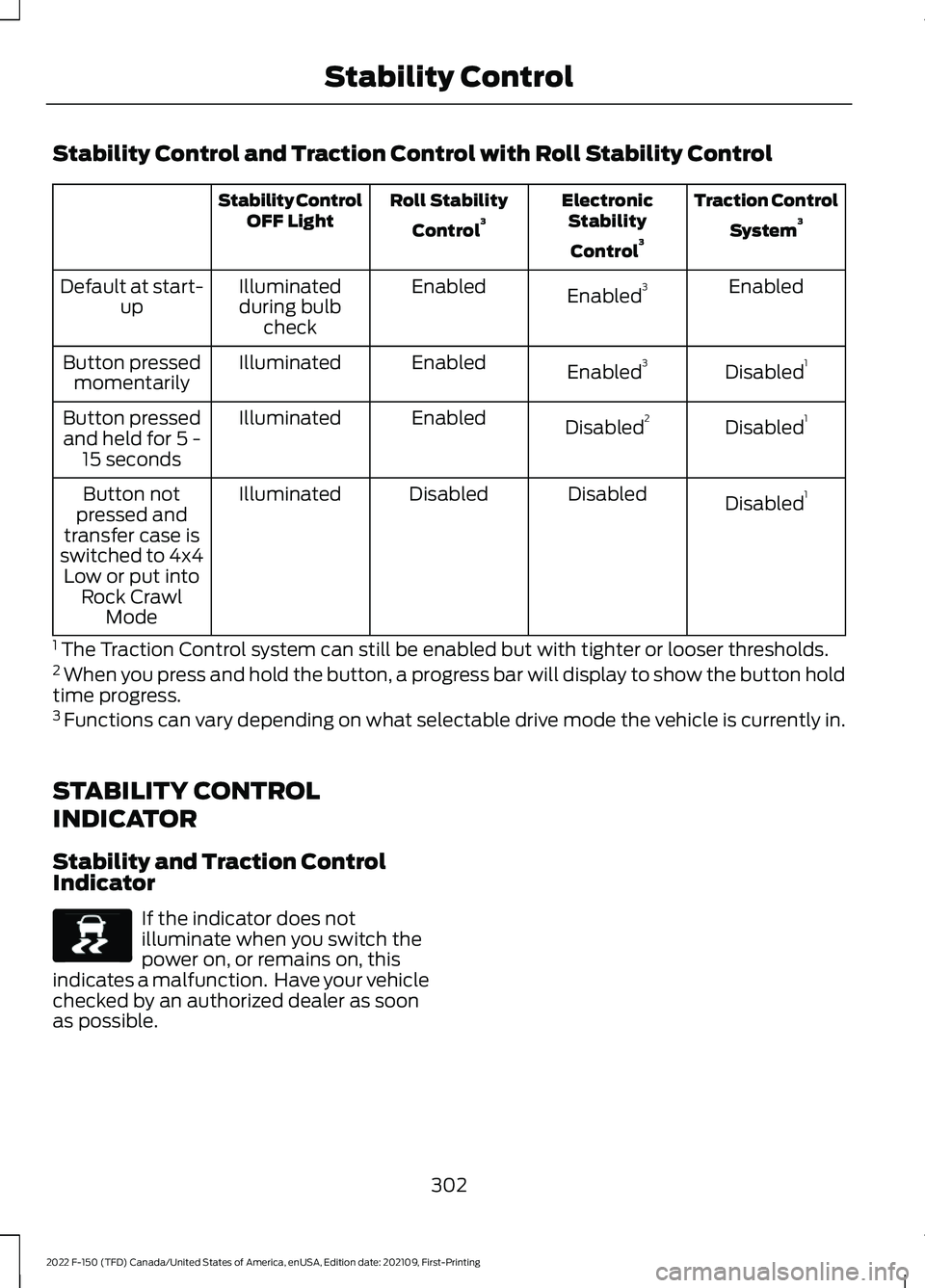
Stability Control and Traction Control with Roll Stability Control
Traction Control
System 3
Electronic
Stability
Control 3
Roll Stability
Control 3
Stability Control
OFF Light
Enabled
Enabled 3
Enabled
Illuminated
during bulb check
Default at start-
up
Disabled1
Enabled 3
Enabled
Illuminated
Button pressed
momentarily
Disabled1
Disabled 2
Enabled
Illuminated
Button pressed
and held for 5 - 15 seconds
Disabled1
Disabled
Disabled
Illuminated
Button not
pressed and
transfer case is
switched to 4x4 Low or put into Rock Crawl Mode
1 The Traction Control system can still be enabled but with tighter or looser thresholds.
2 When you press and hold the button, a progress bar will display to show the button hold
time progress.
3 Functions can vary depending on what selectable drive mode the vehicle is currently in.
STABILITY CONTROL
INDICATOR
Stability and Traction Control
Indicator If the indicator does not
illuminate when you switch the
power on, or remains on, this
indicates a malfunction. Have your vehicle
checked by an authorized dealer as soon
as possible.
302
2022 F-150 (TFD) Canada/United States of America, enUSA, Edition date: 202109, First-Printing Stability ControlE138639
Page 316 of 750

Note:
During parking maneuvers, the
adaptive steering system balances the driver
workload for various steering wheel inputs
and vehicle loading conditions. Under
extreme operating conditions the system
locking device could engage. This strategy
prevents overheating and permanent
damage to the adaptive steering system.
Typical steering and driving maneuvers
allow the system to cool and return to
normal operation.
Adaptive Learning
Adaptive learning helps correct road
irregularities and improves overall handling
and steering. It communicates with the
brake system to help operate advanced
stability control and crash avoidance
systems. Additionally, whenever you
disconnect the battery or install a new
battery, you must drive your vehicle a short
distance before the system relearns the
strategy and reactivates all systems. STEERING –
TROUBLESHOOTING
STEERING – WARNING
INDICATORS The adaptive steering system
indicator illuminates if the
system detects a fault during the
continuous diagnostic checks.
Note: If a red warning message displays,
stop your vehicle as soon as it is safe to do
so.
STEERING – INFORMATION MESSAGES Action
Message
The power steering system has detected acondition that requires service. Have your vehicle checked as soon as possible.
Steering Fault Service Now
The power steering system is not working.
Stop your vehicle in a safe place. Have your vehicle checked as soon as possible.
Steering Loss Stop Safely
The power steering system has detected acondition that requires service. Have your vehicle checked as soon as possible.
Steering Assist Fault Service Required
The steering system has detected a condi-
tion that requires service. Have your vehiclechecked as soon as possible.
Steering Lock Malfunction Service Now
312
2022 F-150 (TFD) Canada/United States of America, enUSA, Edition date: 202109, First-Printing SteeringE223375
Page 354 of 750

WHAT IS DRIVE MODE
CONTROL
Your vehicle has various drive modes that
you can select for different driving
conditions. Depending on the drive mode
that you select, the system adjusts various
vehicle settings.
HOW DOES DRIVE MODE
CONTROL WORK
Selectable drive modes change various
electronic and mechanical settings within
your vehicle to tailor its performance and
driving characteristics to on-road or
off-road driving conditions. Steering feel
and effort, traction control, stability
control, chassis controls, powertrain
response, transmissions shift points,
four-wheel driveline setting, exhaust noise
level and suspension dampening are
automatically altered to a pre-determined
setting depending upon the drive mode
that is selected.
Note:
Your vehicle has diagnostic checks
that continuously monitor all systems for
proper operation. If a drive mode is
unavailable due to a system fault, your
vehicle defaults to normal mode and the
driveline remains in the four-wheel drive
setting that was last selected prior to the
system fault. Note:
Your vehicle reverts to normal mode
each time it is started. If you shut your
vehicle off in a drive mode other than
normal mode, at startup the instrument
cluster screen displays a pop-up asking if
you would like to return to your last used
drive mode. If you select yes to the pop-up,
your vehicle returns to the last selected drive
mode and the default four-wheel driveline
setting associated with that drive mode. If
you select no, your vehicle remains in normal
mode and the default four-wheel driveline
setting associated with that drive mode. If
you do not select yes or no the pop up
message times out, your vehicle remains in
normal mode, and the four-wheel driveline
setting remains in its last used setting.
SELECTING A DRIVE MODE Rotate the drive mode control on the
center console to select or change a drive
mode.
Note:
Button icons vary depending on the
vehicle.
350
2022 F-150 (TFD) Canada/United States of America, enUSA, Edition date: 202109, First-Printing Drive Mode ControlE308146
Page 356 of 750

•
Baja – Loudest setting for off-road use
only. Maximum exhaust noise under all
driving conditions.
• Quiet – Quietest setting for maximum
comfort under all driving conditions.
MyMode You can use MyMode to create
one custom vehicle
configuration based on the
current state of your vehicle.
When you have your vehicle configured to
your desired settings, you can press and
hold the button for a few seconds to save
as MyMode.
Double-pressing the button activates your
saved MyMode.
You can check the saved MyMode settings
with a single press of the button.
You can save the following settings as
MyMode:
• Drive mode.
• Steering mode.
• Suspension mode.
• Exhaust mode.
• Four-wheel drive mode.
• Stop and start on or off.
• Rear electronic locking differential on
or off.
Note: MyMode can only be set with
configurations that are available for each
drive mode. See Drive Modes (page 352).
Note: You can save or view MyMode at any
time, regardless of your vehicle's speed or
transmission selection, as long as your
vehicle is running and it meets system
conditions. Note:
When activating MyMode, your
vehicle must meet all preconditions for the
drive mode and various settings before it
activates. A message appears if it does not
meet system conditions.
DRIVE MODES
BAJA - RAPTOR For high speed off-road driving.
Baja mode optimizes the throttle
control for better response and
torque delivery.
Four-wheel drive high is the default
four-wheel drive mode. Four-wheel drive
auto is not available in baja mode.
Off-road is the default steering and
suspension modes. All steering and
suspension modes are available.
Baja is the default exhaust mode. All
exhaust modes are available.
The system tunes the engine and
transmission controls to baja mode.
The system tunes the stability and traction
controls to baja mode.
The electronic locking differential is
available at all speeds in four-wheel drive.
See
Switching the Electronic Locking
Differential On and Off (page 280).
Note: Using baja mode on dry, hard
surfaces could produce some vibration,
driveline bind up, and potential excessive
tire and vehicle wear depending on the
four-wheel drive mode selection.
352
2022 F-150 (TFD) Canada/United States of America, enUSA, Edition date: 202109, First-Printing Drive Mode ControlE359278 E225314
Page 357 of 750

DEEP SNOW/SAND - 4X4
For off-road driving on soft, dry
sand or deep snow. This mode
optimizes accelerator pedal
response, traction and stability controls to
help maintain forward momentum. If your
vehicle becomes stuck in deep conditions,
use this mode to help get unstuck.
Four-wheel drive high is the default
four-wheel drive mode. Four-wheel drive
low is selectable in deep snow/sand mode.
The electronic locking differential engages
when you select this mode at any speed,
and you can disengage it at any time using
the button. See Switching the Electronic
Locking Differential On and Off (page
280).
Note: Do not use this mode when driving
on pavement or packed snow. This could
cause driveline bind up and damage the
system depending on the four-wheel drive
mode selection. See
Four-Wheel Drive
(page 269).
ECO - 4X4 For efficient driving. This mode
helps deliver maximum fuel
efficiency and helps to increase
driving range.
Two-wheel drive high is the default
four-wheel drive mode. Four-wheel drive
low is not available in eco mode.
The electronic locking differential is
available below
25 mph (40 km/h). See
Switching the Electronic Locking
Differential On and Off
(page 280).
ECO - 4X2 For efficient driving. This mode
helps deliver maximum fuel
efficiency and helps to increase
driving range. The electronic locking differential is
available below
25 mph (40 km/h). See
Switching the Electronic Locking
Differential On and Off
(page 280).
MUD/RUTS - 4X4 For off-road driving. This mode
enhances vehicle performance
to traverse muddy, rutted or
uneven terrains.
Four-wheel drive high is the default
four-wheel drive mode. Four-wheel drive
low is selectable in mud/rut mode.
The electronic locking differential engages
when you select this mode at any speed,
and you can disengage it at any time using
the button. See Switching the Electronic
Locking Differential On and Off
(page
280).
Note: Do not use this mode when driving
on pavement or packed snow. This could
cause driveline bind up and damage the
system depending on the four-wheel drive
mode selection. See
Four-Wheel Drive
(page 269).
NORMAL - RAPTOR For everyday driving. This mode
is the perfect balance of
excitement, comfort and
convenience. This is the default mode after
each ignition cycle.
Two-wheel drive high is the default
four-wheel drive mode. All four-wheel drive
modes are selectable when in normal
mode.
Normal is the default steering, suspension,
and exhaust modes. Off-road steering
mode is not available. All suspension and
exhaust modes are available.
The system tunes the engine and
transmission controls to normal mode.
353
2022 F-150 (TFD) Canada/United States of America, enUSA, Edition date: 202109, First-Printing Drive Mode ControlE295420 E295413 E295413 E296606 E347003