Page 209 of 750

WHAT IS THE GARAGE DOOR
OPENER
HomeLink Wireless Control
System
The universal garage door opener replaces
the common hand-held garage door
opener with a three-button transmitter
integrated into the driver
’s sun visor.
HOW DOES THE GARAGE
DOOR OPENER WORK
The system includes two primary features,
a garage door opener and a platform for
remote activation of devices within the
home. You can program garage doors as
well as entry gate operators, security
systems, entry door locks and home or
office lighting.
Additional system information can be
found online at www.homelink.com or by
calling the toll-free help line at
1-800-355-3515.
Note: You can program a maximum of
three devices. To change or replace any of
the three devices after it has been initially
programmed, you must first erase the
current settings. See Clearing the Garage
Door Opener (page 207). GARAGE DOOR OPENER
PRECAUTIONS WARNING:
Do not use the system
with any garage door opener that does
not have the safety stop and reverse
feature as required by U.S. Federal
Safety Standards (this includes any
garage door opener manufactured
before April 1, 1982). A garage door
opener which cannot detect an object,
signaling the door to stop and reverse,
does not meet current federal safety
standards. Using a garage door opener
without these features increases the risk
of serious injury or death.
Note: Make sure that the garage door and
security device are free from obstruction
when you are programming. Do not program
the system with your vehicle in the garage.
Note: Make sure you keep the original
remote control transmitter for use in other
vehicles as well as for future system
programming.
Note: We recommend that upon the sale
or lease termination of your vehicle, you
erase the programmed function buttons for
security reasons. See Clearing the Garage
Door Opener
(page 207).
GARAGE DOOR OPENER
LIMITATIONS
Canadian radio-frequency laws require
transmitter signals to time-out (or quit)
after several seconds – which may not be
long enough for HomeLink to pick up the
signal.
U.S. gate operators time-out in the same
manner.
205
2022 F-150 (TFD) Canada/United States of America, enUSA, Edition date: 202109, First-Printing Garage Door Opener
(If Equipped)E188211
Page 215 of 750

WHAT IS THE POWER OUTLET
The vehicle functions as a portable
generator and can power devices that
require up to the rating listed on power
outlet label.
POWER OUTLET
PRECAUTIONS - VEHICLES
WITH: 2KW
WARNING: Do not start the engine
in a closed garage or in other enclosed
areas. Exhaust fumes are toxic. Always
open the garage door before you start
the engine. Failure to follow this
instruction could result in personal injury
or death. WARNING: Exhaust leaks may
result in entry of harmful and potentially
lethal fumes into the passenger
compartment. If you smell exhaust
fumes inside your vehicle, have your
vehicle inspected immediately. Do not
drive if you smell exhaust fumes. WARNING:
Do not connect any
vehicle power outlets to any premises.
This can create a backfeed to utility lines.
Failure to follow this instruction could
result in property damage, fire, electrical
shock or death. WARNING:
The vehicle's engine
runs while the generator is switched on.
Running engines emit carbon monoxide.
Only use the generator when the vehicle
is outdoors. Failure to follow this
instruction could result in personal injury
or death.
Note: Automatic engine stop is disabled
and the gasoline engine will continue to idle
when the outlet is switched on.
Note: We recommend using UL approved
devices for use with the power outlet.
Note: Unplug electrical devices from the
power outlet when they are not switched
on.
Note: Make sure there is no damage to the
outlets before driving your vehicle.
Note: Make sure that objects are not
blocking the inverter inlet and exhaust near
the rear underseat storage compartment.
Note: The climate control system may turn
on and power may be limited during extreme
hot or cold temperatures to optimize the
performance of the system.
Note: When the outlet is switched on and
the vehicle is in Park (P) the engine turns
off 30 minutes after the low fuel warning is
displayed. After the vehicle is turned off,
generator mode only operates while driving
or until the vehicle is refueled.
211
2022 F-150 (TFD) Canada/United States of America, enUSA, Edition date: 202109, First-Printing Power Outlet - Vehicles With: Pickup Bed Power Generator
Outlet
Page 227 of 750
USING THE CENTER CONSOLE
WORK SURFACE - VEHICLES
WITH: COLUMN SHIFT
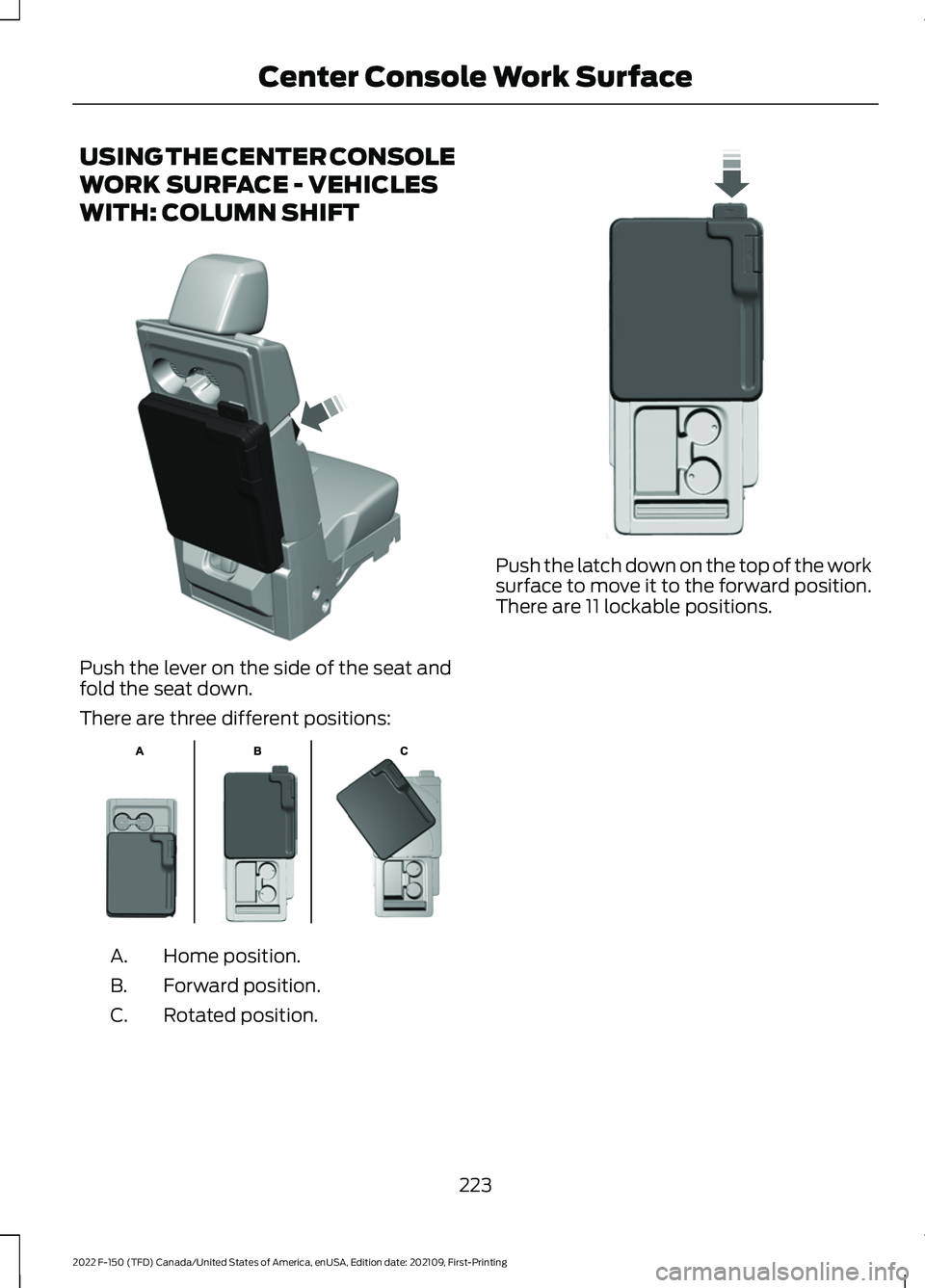
Push the lever on the side of the seat and
fold the seat down.
There are three different positions:
Home position.
A.
Forward position.
B.
Rotated position.
C. Push the latch down on the top of the work
surface to move it to the forward position.
There are 11 lockable positions.
223
2022 F-150 (TFD) Canada/United States of America, enUSA, Edition date: 202109, First-Printing Center Console Work SurfaceE313248 E312215 E327628
Page 228 of 750
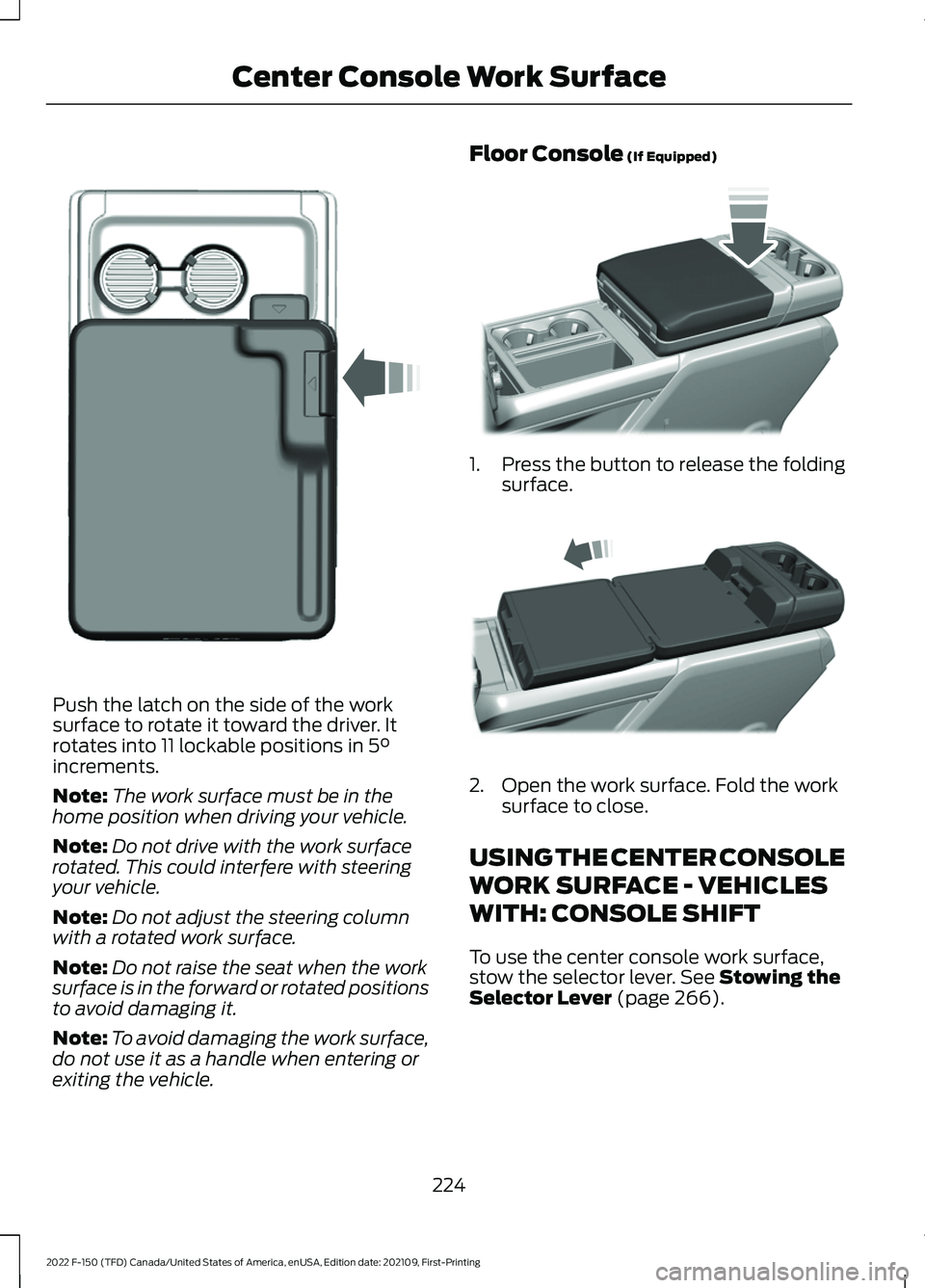
Push the latch on the side of the work
surface to rotate it toward the driver. It
rotates into 11 lockable positions in 5°
increments.
Note: The work surface must be in the
home position when driving your vehicle.
Note: Do not drive with the work surface
rotated. This could interfere with steering
your vehicle.
Note: Do not adjust the steering column
with a rotated work surface.
Note: Do not raise the seat when the work
surface is in the forward or rotated positions
to avoid damaging it.
Note: To avoid damaging the work surface,
do not use it as a handle when entering or
exiting the vehicle. Floor Console
(If Equipped)
1.
Press the button to release the folding
surface. 2. Open the work surface. Fold the work
surface to close.
USING THE CENTER CONSOLE
WORK SURFACE - VEHICLES
WITH: CONSOLE SHIFT
To use the center console work surface,
stow the selector lever.
See Stowing the
Selector Lever (page 266).
224
2022 F-150 (TFD) Canada/United States of America, enUSA, Edition date: 202109, First-Printing Center Console Work SurfaceE331800 E346160 E327043
Page 231 of 750
CUP HOLDERS
CUP HOLDER PRECAUTIONS
WARNING: Use caution when
stowing items or hot drinks in the cup
holders. Items could become loose or
spill during hard braking, acceleration or
crashes. Failure to follow this instruction
could result in personal injury.
GLOVE COMPARTMENT
OPENING THE GLOVE
COMPARTMENT
Upper Glove Compartment Push the button on the instrument panel
to open. Lower Glove Compartment Pull the latch to the left to open.
LOCKING THE GLOVE
COMPARTMENT
You can lock lower glove compartment
using the key.
Unlock.
A
Lock.
B
227
2022 F-150 (TFD) Canada/United States of America, enUSA, Edition date: 202109, First-Printing StorageE310219 E310218 B
AE351063
Page 232 of 750
UNDER SEAT STORAGE
LOCATING THE UNDER SEAT
STORAGE COMPARTMENT
Front Under Seat Storage
Lift the latch to access the storage
compartment under the center seat
cushion.
Locking the Front Under Seat
Storage
1. Use the key in the remote control to
unlock. 2. Press the latch to release the cushion.
3. Lift the cushion to access the storage
compartment.
Rear Under Seat Storage Lift the rear seat to access the under seat
storage bin.
228
2022 F-150 (TFD) Canada/United States of America, enUSA, Edition date: 202109, First-Printing StorageE306120 E224738 E223578 E229819
Page 233 of 750
Locking the Rear Under Seat
Storage
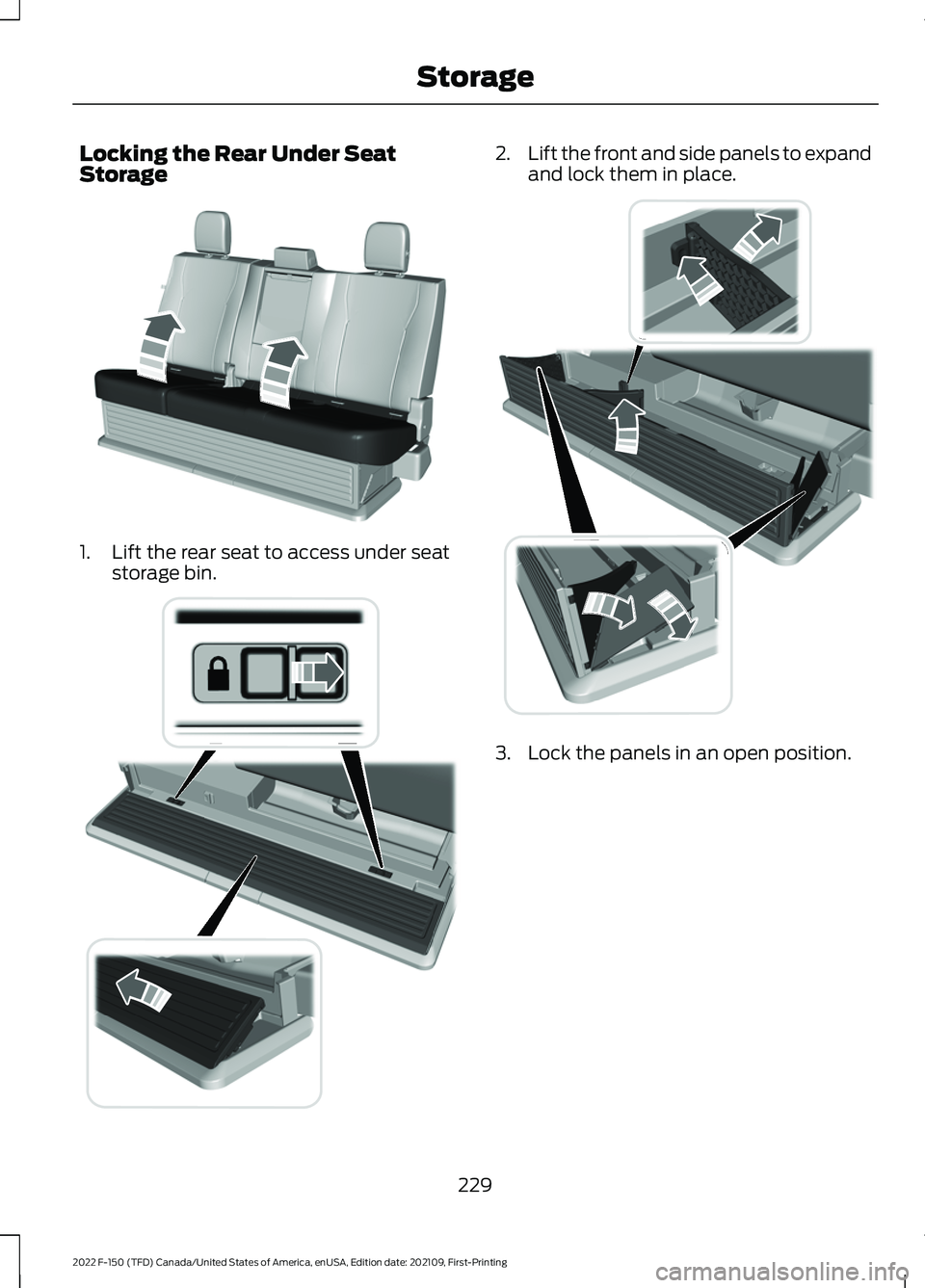
1. Lift the rear seat to access under seat
storage bin. 2.
Lift the front and side panels to expand
and lock them in place. 3. Lock the panels in an open position.
229
2022 F-150 (TFD) Canada/United States of America, enUSA, Edition date: 202109, First-Printing StorageE229819 E235007 E235008
Page 234 of 750
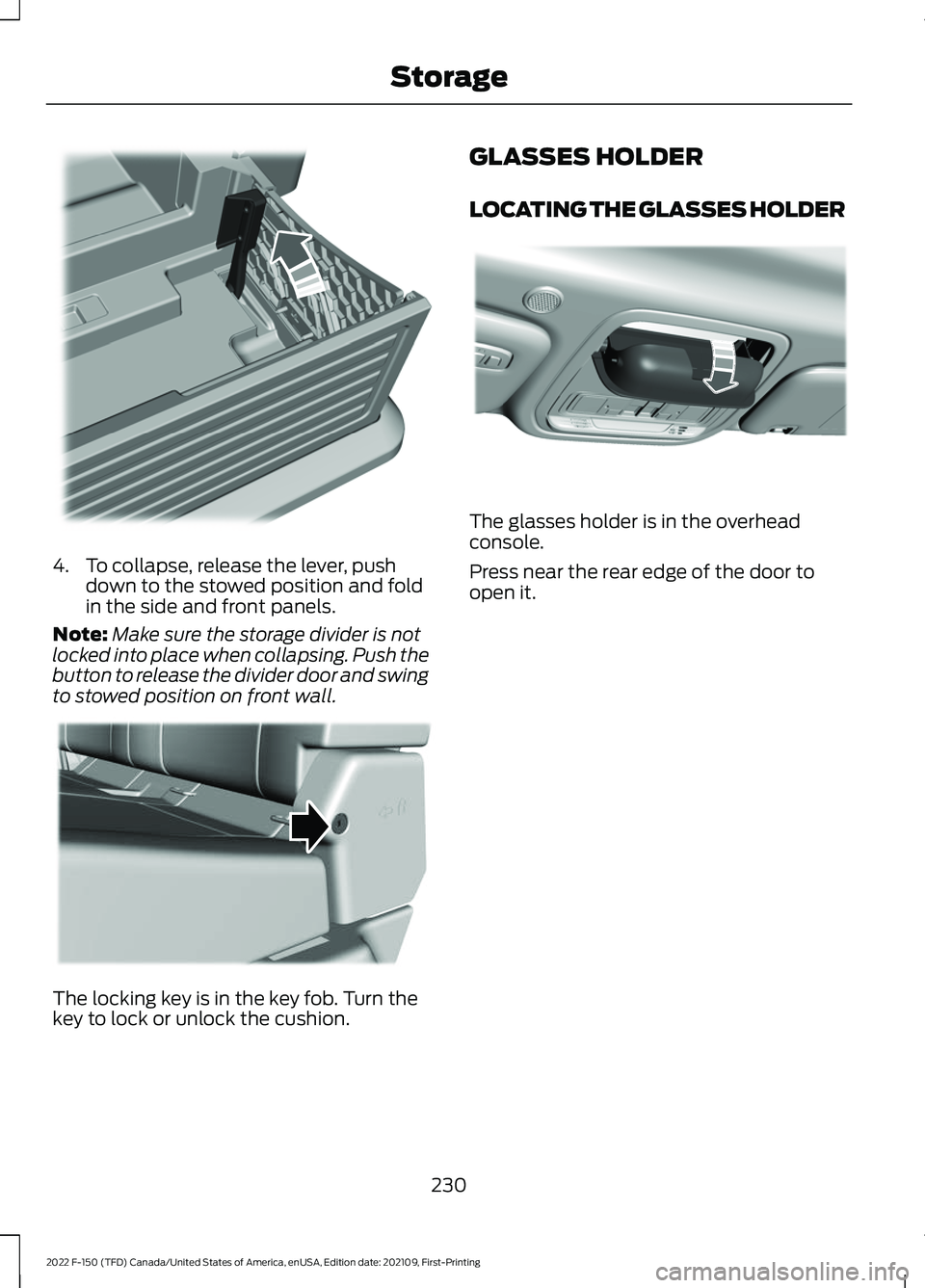
4. To collapse, release the lever, push
down to the stowed position and fold
in the side and front panels.
Note: Make sure the storage divider is not
locked into place when collapsing. Push the
button to release the divider door and swing
to stowed position on front wall. The locking key is in the key fob. Turn the
key to lock or unlock the cushion. GLASSES HOLDER
LOCATING THE GLASSES HOLDER
The glasses holder is in the overhead
console.
Press near the rear edge of the door to
open it.
230
2022 F-150 (TFD) Canada/United States of America, enUSA, Edition date: 202109, First-Printing StorageE235009 E224956 E306967