2022 FORD ESCAPE high beam
[x] Cancel search: high beamPage 6 of 585

Switching the Rear Window Wiper Onand Off ..........................................................93
Reverse Wipe ..................................................93
Checking the Wiper Blades .......................94
Replacing the Front Wiper Blades .........94
Replacing the Rear Wiper Blades ...........94
Washers ............................................................95
Wipers and Washers – Troubleshooting ........................................................................\
..9 6
Exterior Lighting
Exterior Lighting Control .............................97
Headlamps ......................................................97
Headlamps – Troubleshooting ...............98
Autolamps .......................................................98
Exterior Lamps ...............................................99
Automatic High Beam Control ..............100
Automatic High Beam Control –Troubleshooting .......................................102
Interior Lighting
Switching All of the Interior Lamps Onand Off ........................................................103
Switching the Front Interior Lamps On and Off ........................................................103
Switching the Rear Interior Lamps On and Off ........................................................103
Interior Lamp Function ..............................103
Adjusting the Instrument Panel Lighting Brightness ..................................................103
Ambient Lighting .........................................103
Interior Lighting – Troubleshooting ......104
Windows
Opening and Closing the Windows ......105
Window Bounce-Back ..............................105
Locking the Rear Window Controls ......106
Interior Mirror
Interior Mirror Precautions ........................107 Manually Dimming the Interior Mirror
........................................................................\
.107
Auto-Dimming Interior Mirror ..................107
Exterior Mirrors
Adjusting the Exterior Mirrors .................108
Folding the Exterior Mirrors .....................108
Moonroof
Opening and Closing the Sun Shade ........................................................................\
1 0 9
Opening and Closing the Moonroof ......109
Venting the Moonroof ...............................109
Moonroof Bounce-Back ............................110
Instrument Cluster
Instrument Cluster Overview - Hybrid Electric Vehicle (HEV), Vehicles With:
6.5 Inch Instrument Cluster Display
Screen ............................................................111
Instrument Cluster Overview - Hybrid Electric Vehicle (HEV), Vehicles With:
12.3 Inch Instrument Cluster Display
Screen ...........................................................112
Instrument Cluster Overview - Gasoline, Vehicles With: 4.2 Inch Instrument
Cluster Display Screen ............................113
Instrument Cluster Overview - Gasoline, Vehicles With: 6.5 Inch Instrument
Cluster Display Screen ...........................114
Instrument Cluster Overview - Gasoline, Vehicles With: 12.3 Inch Instrument
Cluster Display Screen ............................115
Instrument Cluster Overview - Plug-In Hybrid Electric Vehicle (PHEV),
Vehicles With: 6.5 Inch Instrument
Cluster Display Screen ...........................116
Instrument Cluster Overview - Plug-In Hybrid Electric Vehicle (PHEV),
Vehicles With: 12.3 Inch Instrument
Cluster Display Screen ............................117
Tachometer - Excluding: Hybrid Electric Vehicle (HEV)/Plug-In Hybrid Electric
Vehicle (PHEV) ..........................................117
3
Table of Contents
Page 29 of 585
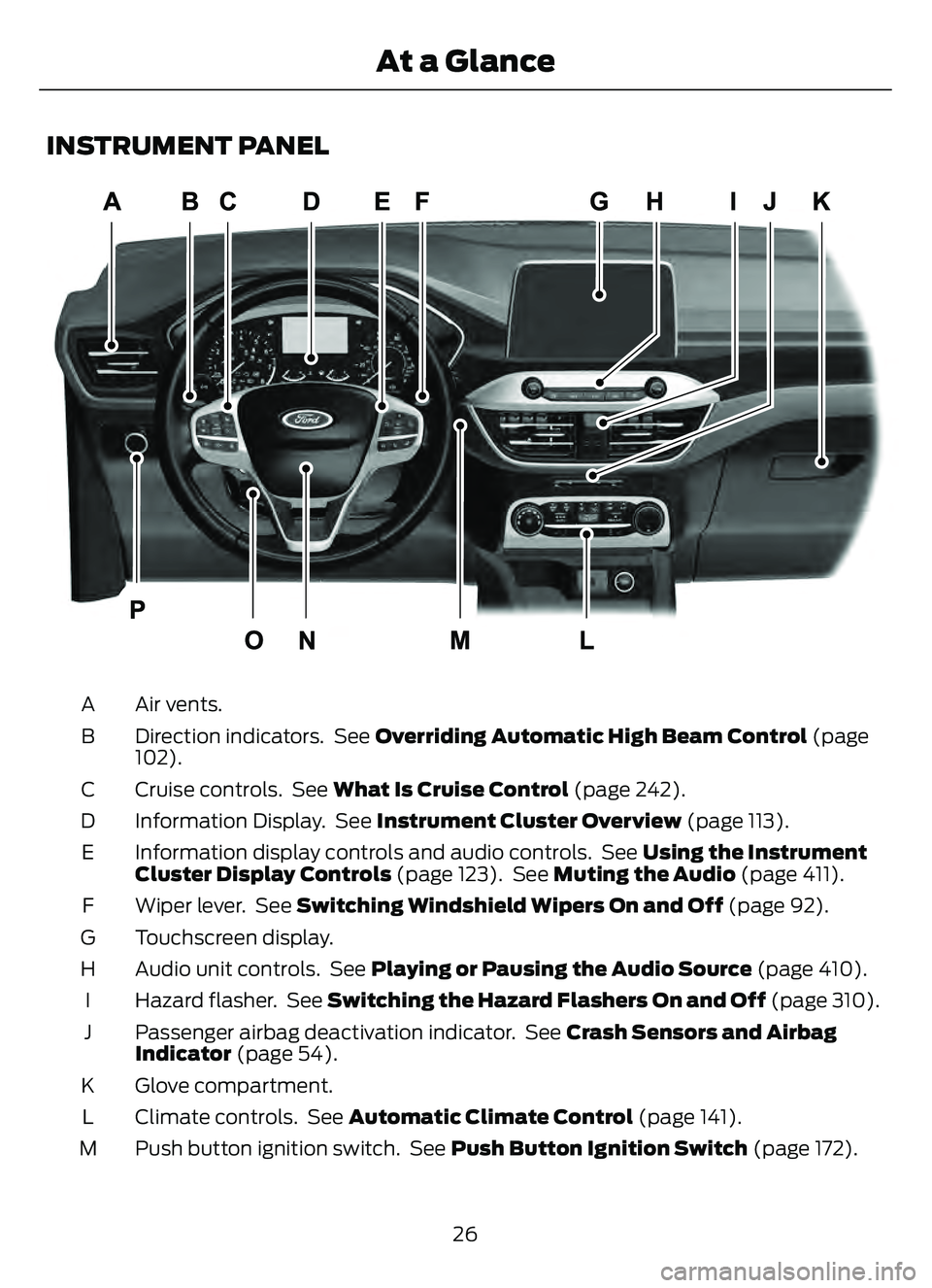
INSTRUMENT PANEL
E285284
Air vents.
A
Direction indicators. See Overriding Automatic High Beam Control (page
102).
B
Cruise controls. See What Is Cruise Control (page 242).
C
Information Display. See Instrument Cluster Overview (page 113).
D
Information display controls and audio controls. See Using the Instrument
Cluster Display Controls (page 123). See Muting the Audio (page 411).
E
Wiper lever. See Switching Windshield Wipers On and Off (page 92).
F
Touchscreen display.
G
Audio unit controls. See Playing or Pausing the Audio Source (page 410).
H
Hazard flasher. See Switching the Hazard Flashers On and Off (page 310).
I
Passenger airbag deactivation indicator. See Crash Sensors and Airbag
Indicator (page 54).
J
Glove compartment.
K
Climate controls. See Automatic Climate Control (page 141).
L
Push button ignition switch. See Push Button Ignition Switch (page 172).
M
26
At a Glance
Page 100 of 585
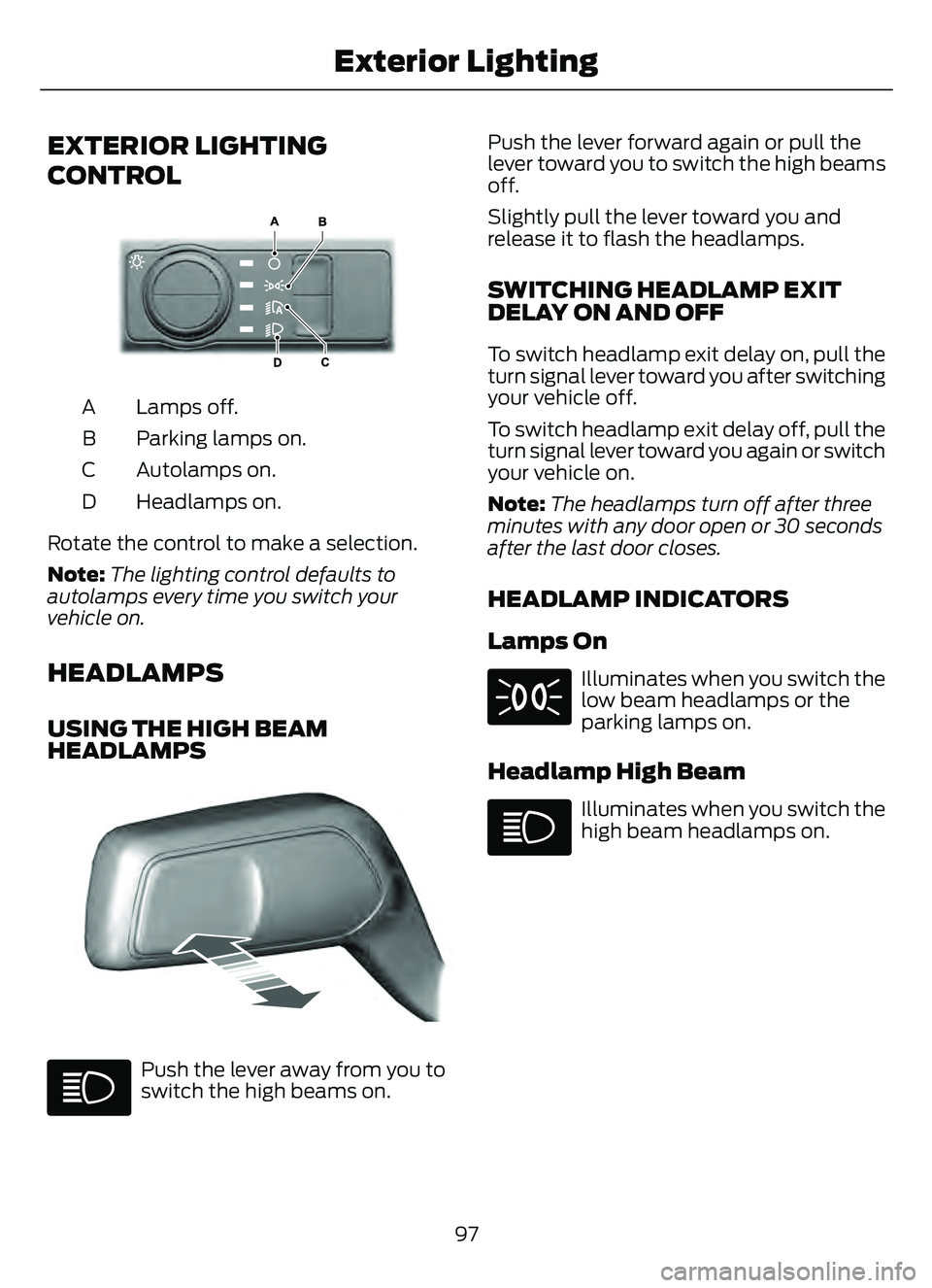
EXTERIOR LIGHTING
CONTROL
E327629E327629
Lamps off.
A
Parking lamps on.
B
Autolamps on.
C
Headlamps on.
D
Rotate the control to make a selection.
Note: The lighting control defaults to
autolamps every time you switch your
vehicle on.
HEADLAMPS
USING THE HIGH BEAM
HEADLAMPS
3853E328253
Push the lever away from you to
switch the high beams on. Push the lever forward again or pull the
lever toward you to switch the high beams
off.
Slightly pull the lever toward you and
release it to flash the headlamps.
SWITCHING HEADLAMP EXIT
DELAY ON AND OFF
To switch headlamp exit delay on, pull the
turn signal lever toward you after switching
your vehicle off.
To switch headlamp exit delay off, pull the
turn signal lever toward you again or switch
your vehicle on.
Note:
The headlamps turn off after three
minutes with any door open or 30 seconds
after the last door closes.
HEADLAMP INDICATORS
Lamps On
Illuminates when you switch the
low beam headlamps or the
parking lamps on.
Headlamp High Beam
Illuminates when you switch the
high beam headlamps on.
97
Exterior Lighting
Page 103 of 585

Note:Only switch the front fog lamps on
during reduced visibility.
Note: The brightness of the daytime running
lamps may decrease when the front fog
lamps are switched on.
Note: When the lighting control is in the
autolamps position, you cannot switch the
fog lamps on unless the headlamps are on.
EXTERIOR LAMP INDICATORS
Front Fog Lamp
It illuminates when you switch
the front fog lamps on.
Turn Signal Lamp
It flashes when you switch the
turn signal lamps on.
Note: An increase in the rate of flashing
warns of a failed turn signal lamp.
EXTERIOR LAMP AUDIBLE
WARNING
Exterior Lamps On
Sounds when you open the driver door and
the exterior lamps are on.
AUTOMATIC HIGH BEAM
CONTROL
HOW DOES AUTOMATIC HIGH
BEAM CONTROL WORK
Automatic high beam control turns the
high beams on if it is dark enough and no
other traffic is present. If it detects an
approaching vehicle’s headlamps or tail
lamps, or street lighting ahead, the system
turns the high beams off. A camera sensor, centrally mounted
behind the windshield of your vehicle,
continuously monitors conditions to turn
the high beams on and off.
E327596
Without automatic high beam
control.
A
With automatic high beam
control.
B
100
Exterior Lighting
Page 104 of 585

AUTOMATIC HIGH BEAM
CONTROL PRECAUTIONS
WARNING: The system does not
relieve you of your responsibility to drive
with due care and attention. You may
need to override the system if it does not
turn the high beams on or off.
WARNING: The system may not
switch the high beams off if the lights of
oncoming vehicles are hidden by
obstacles, for example guard rails.
WARNING: Do not use the system
in poor visibility, for example fog, heavy
rain, spray or snow.
WARNING: You may need to
override the system when approaching
other road users.
WARNING: You may need to
override the system during inclement
weather.
AUTOMATIC HIGH BEAM
CONTROL REQUIREMENTS
The system turns the high beams on if all
of the following occur:
• You switch the system on.
• You set the lighting control to the autolamps position.
• The ambient light level is low enough that you require high beams.
• There is no traffic in front of your vehicle.
• The vehicle speed is greater than approximately 32 mph (52 km/h).
AUTOMATIC HIGH BEAM
CONTROL LIMITATIONS
The system turns the high beams off if any
of the following occur:
• You switch the system off.
• You set the lighting control to anyposition except autolamps.
• The ambient light level is high enough that you do not require high beams.
• The system detects an approaching vehicle's headlamps or a leading
vehicle's tail lamps.
• The system detects severe rain, snow or fog.
• The system detects street lighting.
• The camera has reduced visibility.
• The vehicle speed falls below approximately 27 mph (44 km/h).
SWITCHING AUTOMATIC HIGH
BEAM CONTROL ON AND OFF
1. Press Settings on the touchscreen.
2. Press Vehicle Settings .
3. Press Lighting.
4. Switch Auto Highbeam on or off.
AUTOMATIC HIGH BEAM
CONTROL INDICATORS
Illuminates to confirm when the
system is ready to assist.
101
Exterior Lighting
Page 105 of 585
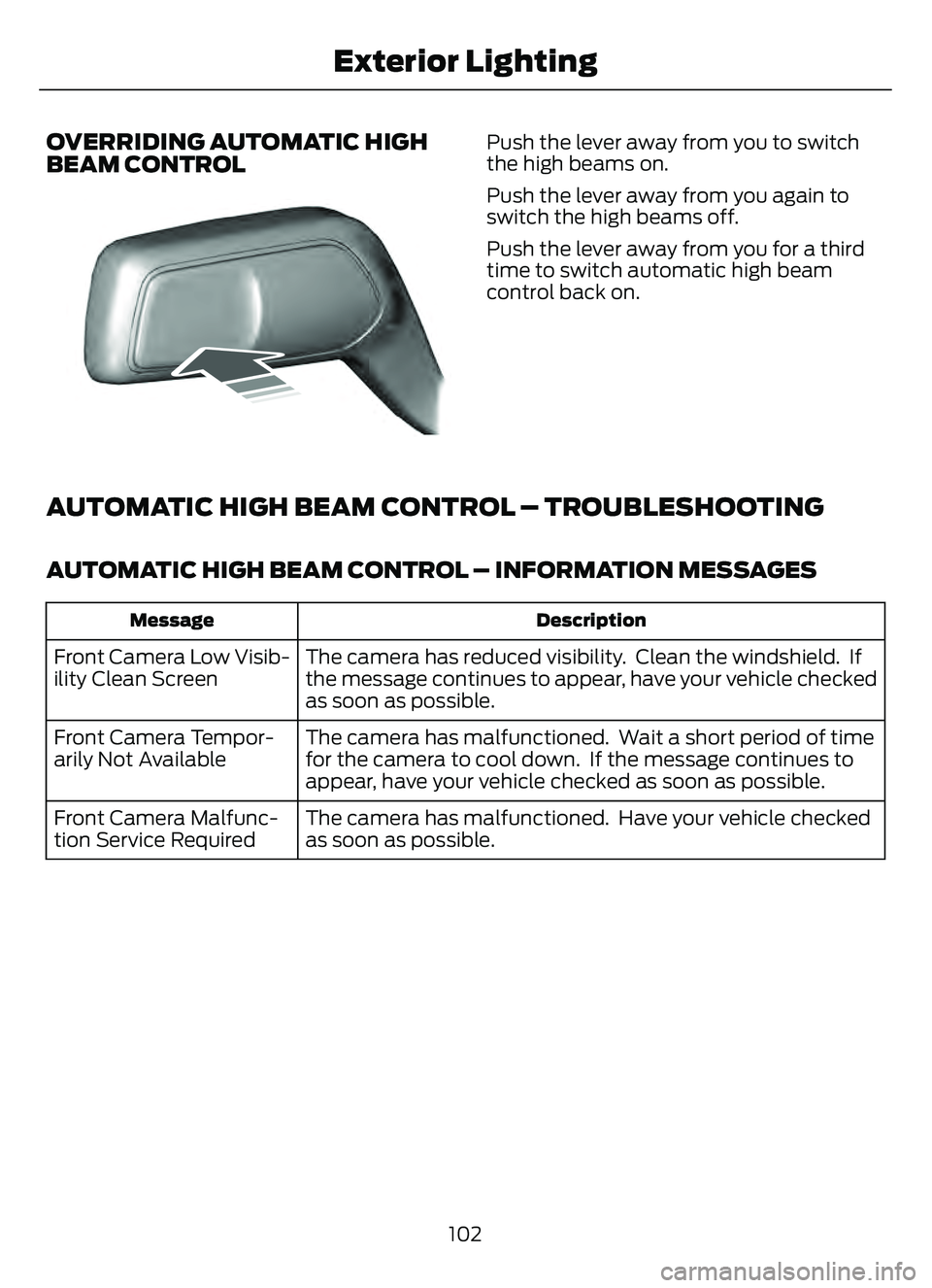
OVERRIDING AUTOMATIC HIGH
BEAM CONTROL
8603E248603
Push the lever away from you to switch
the high beams on.
Push the lever away from you again to
switch the high beams off.
Push the lever away from you for a third
time to switch automatic high beam
control back on.
AUTOMATIC HIGH BEAM CONTROL – TROUBLESHOOTING
AUTOMATIC HIGH BEAM CONTROL – INFORMATION MESSAGES
Description
Message
The camera has reduced visibility. Clean the windshield. If
the message continues to appear, have your vehicle checked
as soon as possible.
Front Camera Low Visib-
ility Clean Screen
The camera has malfunctioned. Wait a short period of time
for the camera to cool down. If the message continues to
appear, have your vehicle checked as soon as possible.
Front Camera Tempor-
arily Not Available
The camera has malfunctioned. Have your vehicle checked
as soon as possible.
Front Camera Malfunc-
tion Service Required
102
Exterior Lighting
Page 124 of 585

Liftgate Ajar
E162453
It illuminates when the ignition
is on and the liftgate is not
completely closed.
Low Beam Warning
E181350
It illuminates when the low
beam headlamp requires service.
Have the system checked as
soon as possible.
Low Fuel Level
It illuminates when the fuel level
is low.
Low Tire Pressure Warning
It illuminates when your tire
pressure is low. If illuminated,
check your tire pressure as soon
as possible. If it begins to flash at anytime,
have the system checked as soon as
possible.
Low Washer Fluid
E132353
It illuminates when the washer
fluid is low.
Malfunction Indicator Lamp
It illuminates when the ignition
is on and the engine is off, this is
normal operation. If it illuminates
when the engine is on this indicates that
the emission control system requires
service. If it flashes, have your vehicle
checked immediately. See Starting and
Stopping the Engine – Warning Lamps
(page 176).
Oil Pressure
It illuminates when the engine
oil pressure is low.
Powertrain Fault
Illuminates when the powertrain
requires service. Have the
system checked as soon as
possible.
Vehicle Plugged In (If Equipped)
E228962
It illuminates when your vehicle
is plugged in.
WHAT ARE THE INSTRUMENT
CLUSTER INDICATORS
Indicators notify you of various features
that are active on your vehicle.
INSTRUMENT CLUSTER
INDICATORS
Adaptive Cruise Control
E144524
See Adaptive Cruise Control
(page 244).
Automatic High Beam Control
See Automatic High Beam
Control Indicators (page 101).
121
Instrument Cluster
Page 125 of 585

Auto Hold
E322410E322410
E197933
EE322411
E197934
See Auto Hold (page 224).
Auto-Start-Stop
See Auto-Start-Stop (page
184).
Blind Spot Monitor
E151262
See Blind Spot Information
System (page 268).
Cruise Control
E71340
See Cruise Control (page 242).
EV Charge
E281479
See Plug-In Hybrid Electric
Vehicle Drive Modes (page
259).
EV Later
E281477
See Plug-In Hybrid Electric
Vehicle Drive Modes (page
259).
EV Now
E281476
See Plug-In Hybrid Electric
Vehicle Drive Modes (page
259).
Front Airbag
E67017
See Airbags (page 47).
Front Fog Lamps
See Switching the Front Fog
Lamps On and Off (page 99).
High Beam
See Using the High Beam
Headlamps (page 97).
Lamps On
See Exterior Lighting Control
(page 97).
Ready to Drive
E224090
See Hybrid Electric Vehicle
Information (page 179).
Stability Control
E138639
E130458
See Stability Control (page
227). See Traction Control
(page 225).
Turn Signal
See Switching the Turn Signal
Lamps On and Off (page 99).
122
Instrument Cluster