Page 154 of 585
E293558
ADJUSTING THE SEAT HEIGHT (If
Equipped)
E293554
POWER SEATS (IF EQUIPPED)
HEAD RESTRAINT COMPONENTS
E291E29139139
The front seat head restraints consists of:
An energy absorbing head
restraint.
A
Two steel stems.
B
Guide sleeve adjust and unlock
button.
C
ADJUSTING THE HEAD
RESTRAINT
WARNING: Fully adjust the head
restraint before you sit in or operate your
vehicle. This will help minimize the risk
of neck injury in the event of a crash. Do
not adjust the head restraint when your
vehicle is moving.
WARNING: The head restraint is a
safety device. Whenever possible it
should be installed and properly
adjusted when the seat is occupied.
Failure to adjust the head restraint
properly could reduce its effectiveness
during certain impacts.
151
Front Seats
Page 155 of 585

WARNING: Adjust the head
restraints for all passengers before you
drive your vehicle. This will help minimize
the risk of neck injury in the event of a
crash. Do not adjust the head restraints
when your vehicle is moving.
Note: Adjust the seat backrest to an upright
driving position before adjusting the head
restraint. Adjust the head restraint so that
the top of it is level with the top of your head
and as far forward as possible. Make sure
that you remain comfortable. If you are
extremely tall, adjust the head restraint to
its highest position.
Pull the head restraint up to raise it.
To lower the head restraint:
1. Press and hold the adjust and unlock button.
2. Push the head restraint down.
To tilt the head restraint (if equipped):
E144727
1. Adjust the seat backrest to an upright driving or riding position.
2. Pivot the head restraint forward toward your head to the preferred position. After the head restraint reaches the
forward-most tilt position, pivot it forward
again to release it to the rearward, untilted
position.
Note:
Do not attempt to force the head
restraint backward after it is tilted. Instead,
continue tilting it forward until the head
restraint releases to the upright position.
REMOVING THE HEAD RESTRAINT
1. Pull up the head restraint until it reaches its highest position.
2. Press and hold the adjust and unlock button.
3. Pull up the head restraint.
INSTALLING THE HEAD
RESTRAINT
Align the steel stems into the guide sleeves
and push the head restraint down until it
locks.
MOVING THE SEAT BACKWARD
AND FORWARD
989E298944
152
Front Seats
Page 157 of 585

HEATED SEATS (IF EQUIPPED)
HEATED SEAT PRECAUTIONS
WARNING: Use caution when using
the heated seat if you are unable to feel
pain to your skin because of advanced
age, chronic illness, diabetes, spinal cord
injury, medication, alcohol use,
exhaustion or other physical conditions.
The heated seat could cause burns even
at low temperatures, especially if used
for long periods of time. Failure to follow
this instruction could result in personal
injury.
WARNING: Do not poke sharp
objects into the seat cushion or seat
backrest. This could damage the heated
seat element and cause it to overheat.
Failure to follow this instruction could
result in personal injury.
WARNING: Do not place anything
on the seat that blocks the heat, for
example a seat cover or a cushion. This
could cause the seat to overheat. Failure
to follow this instruction could result in
personal injury.
Do not:
• Place heavy objects on the seat.
• Operate the heated seat if water or any other liquid spills on the seat. Allow the
seat to dry.
SWITCHING THE HEATED SEATS
ON AND OFF
The vehicle must be running to use this
feature.
E146322
Press the heated seat symbol to cycle
through the various heat settings and off.
The more indicators that display, the
warmer the temperature of the seat.
Note: The heated seats may remain on
after you remote start your vehicle, based
on your remote start settings. The heated
seats may also turn on when you start your
vehicle if they were on when you switched
your vehicle off.
154
Front Seats
Page 158 of 585

MANUAL SEATS
HEAD RESTRAINT COMPONENTS
Center Head Restraint
E187325
The head restraint consists of:An energy absorbing head
restraint.
A
Two steel stems.
B
Guide sleeve adjust and unlock
button.
C
Outermost Head Restraint
E153105
The head restraint consists of: An energy absorbing head
restraint.
A
Two steel stems.
B Guide sleeve adjust and unlock
button.
C
Guide sleeve unlock and remove
button.
D
ADJUSTING THE HEAD
RESTRAINT
WARNING: Fully adjust the head
restraint before you sit in or operate your
vehicle. This will help minimize the risk
of neck injury in the event of a crash. Do
not adjust the head restraint when your
vehicle is moving.
WARNING: The head restraint is a
safety device. Whenever possible it
should be installed and properly
adjusted when the seat is occupied.
Failure to adjust the head restraint
properly could reduce its effectiveness
during certain impacts.
WARNING: Adjust the head
restraints for all passengers before you
drive your vehicle. This will help minimize
the risk of neck injury in the event of a
crash. Do not adjust the head restraints
when your vehicle is moving.
Note: Adjust the seat backrest to an upright
driving position before adjusting the head
restraint. Adjust the head restraint so that
the top of it is level with the top of your head
and as far forward as possible. Make sure
that you remain comfortable. If you are
extremely tall, adjust the head restraint to
its highest position.
Pull the head restraint up to raise it.
To lower the head restraint:
1. Press and hold the adjust and unlock button.
2. Push the head restraint down.
155
Rear Seats
Page 159 of 585
REMOVING THE HEAD RESTRAINT
1. Pull up the head restraint until itreaches its highest position.
2. Press and hold the adjust and unlock button.
3. Pull up the head restraint.
INSTALLING THE HEAD
RESTRAINT
1. Fold the seat backrest forward before installing the head restraint.
2. Align the steel stems into the guide sleeves and push the head restraint
down until it locks.
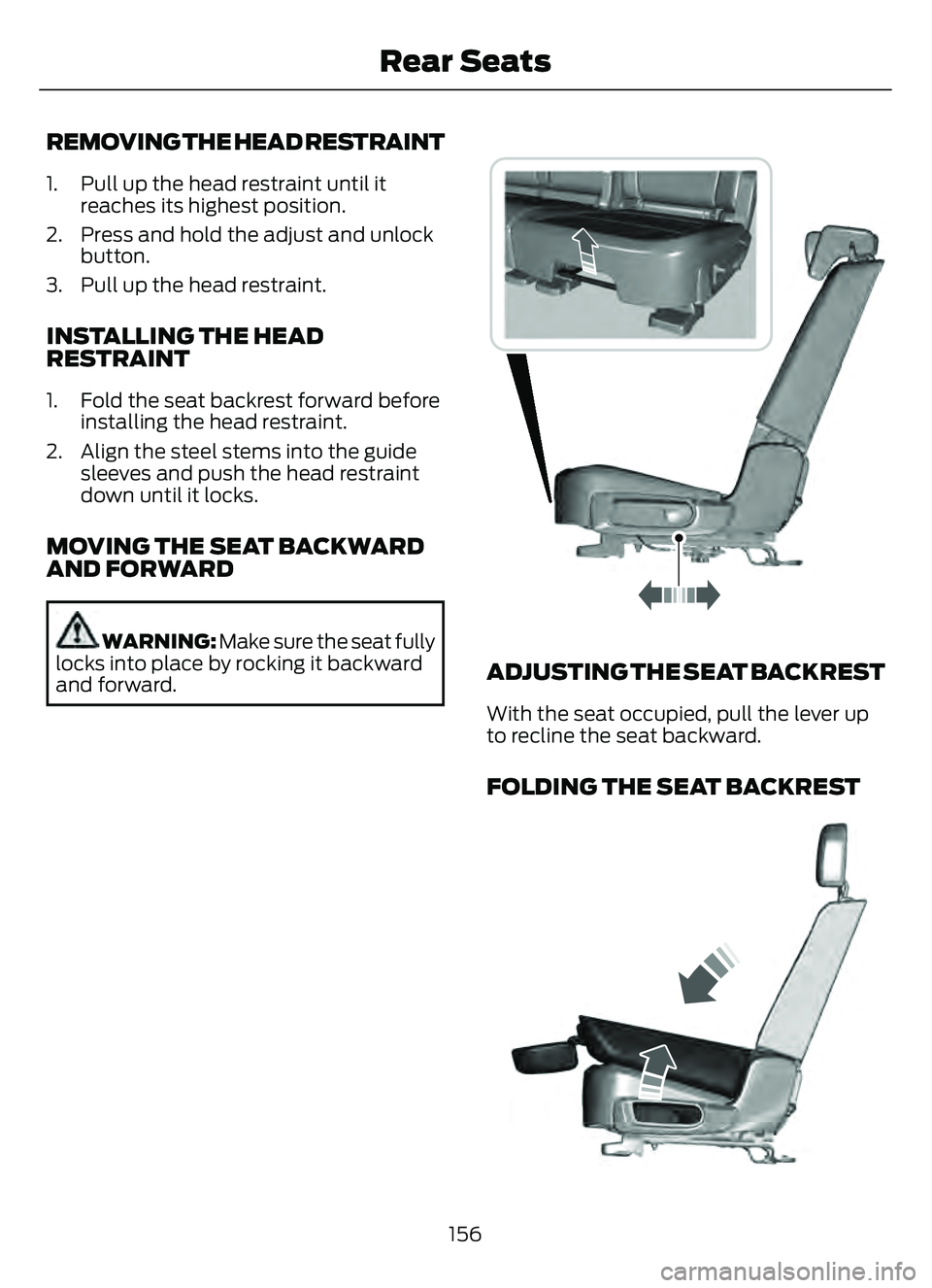
MOVING THE SEAT BACKWARD
AND FORWARD
WARNING: Make sure the seat fully
locks into place by rocking it backward
and forward.E298125E298125
ADJUSTING THE SEAT BACKREST
With the seat occupied, pull the lever up
to recline the seat backward.
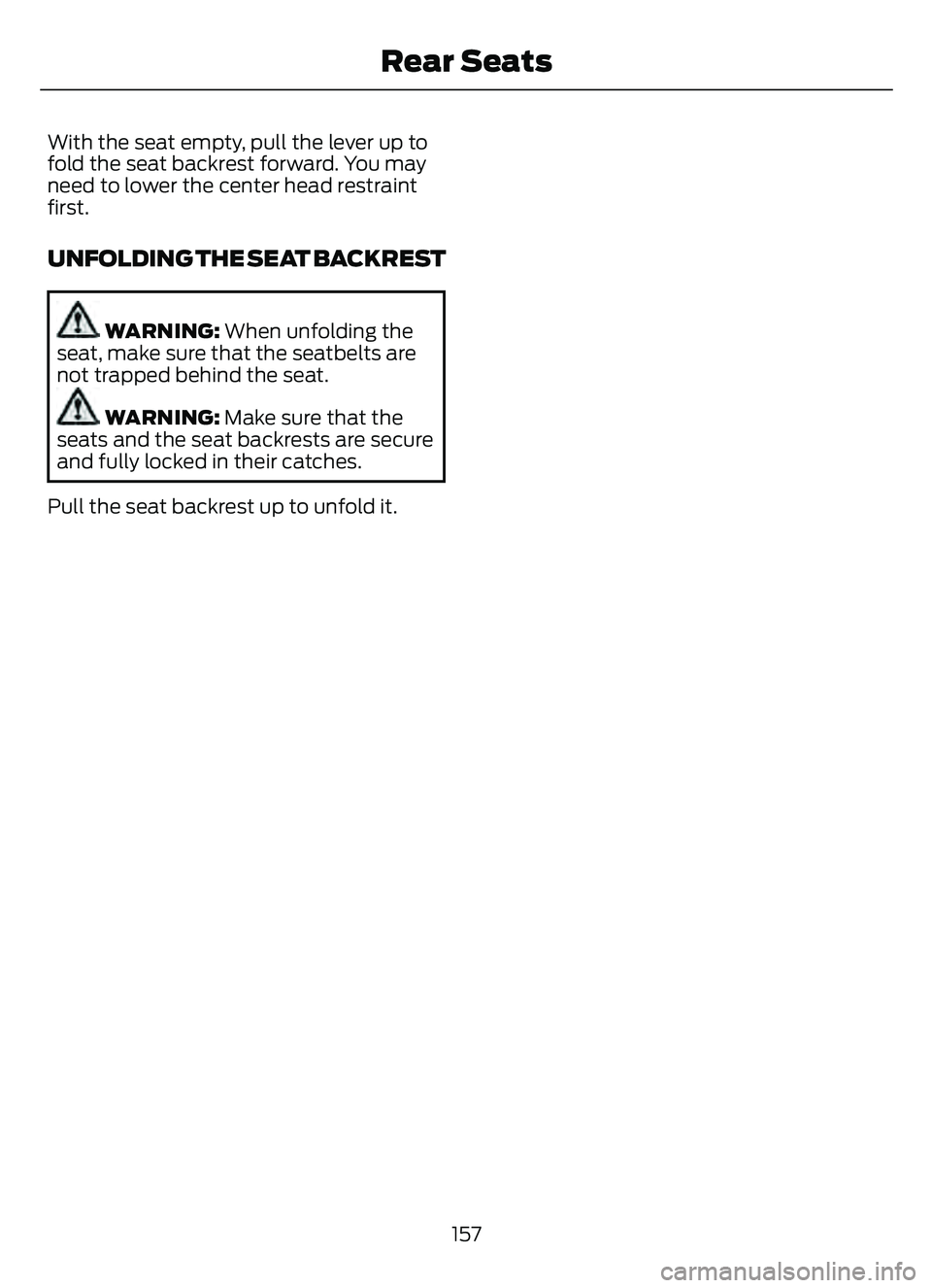
FOLDING THE SEAT BACKREST
E3331247E3331247
156
Rear Seats
Page 160 of 585
With the seat empty, pull the lever up to
fold the seat backrest forward. You may
need to lower the center head restraint
first.
UNFOLDING THE SEAT BACKREST
WARNING: When unfolding the
seat, make sure that the seatbelts are
not trapped behind the seat.
WARNING: Make sure that the
seats and the seat backrests are secure
and fully locked in their catches.
Pull the seat backrest up to unfold it.
157
Rear Seats
Page 163 of 585

HOW DOES THE MEMORY
FUNCTION WORK
The memory function recalls the position
of these features:
• Driver seat.
• Power mirrors.
MEMORY FUNCTION
PRECAUTIONS
WARNING: Before activating the
memory seat, make sure that the area
immediately surrounding the seat is clear
of obstructions and that all occupants
are clear of moving parts.
WARNING: Do not use the memory
function when your vehicle is moving.
LOCATING THE MEMORY
FUNCTION BUTTONS
E142554
The memory function buttons are on the
driver door.
SAVING A PRESET POSITION
1. Switch the ignition on.
2. Adjust the memory features to your preferred position.
3. Press and hold the preferred preset button until you hear a single tone.
A confirmation message appears in the
information display.
You can save up to three preset memory
positions at any time.
RECALLING A PRESET
POSITION
Press and release the preset button.
Note: You can only recall a preset memory
position when the ignition is off, or when you
place the transmission in park (P) or neutral
(N) if the ignition is on and the vehicle is not
moving.
You can also recall a preset memory
position by:
• Pressing the unlock button on your remote control if you linked it to a
preset position.
• Unlocking the intelligent driver door handle if a linked remote control is
present.
Using a linked remote control to recall your
memory position when the ignition is off
moves the seat to the easy entry position.
Note: Pressing any active memory feature
adjustment control, or any preset buttons
during a memory recall cancels the
operation.
Linking a Preset Position to your
Remote Control or Passive Key
Your vehicle can save the preset memory
positions for up to three remote controls
or passive keys.
160
Memory Function (If Equipped)
Page 164 of 585
1. With the ignition on, move the memoryfeatures to the position you prefer.
2. Press and hold a preset button for five seconds. A tone sounds after two
seconds. Continue holding until you
hear a second tone.
3. Within three seconds, press the lock button on the remote control you are
linking.
To unlink a remote control, follow the
same procedure – except in Step 3, press
the unlock button on the remote control.
Note: If more than one linked remote
control or intelligent access key is in range,
the memory function moves to the settings
of the first key to initiate a memory recall.
161
Memory Function (If Equipped)