2022 FORD ESCAPE cold
[x] Cancel search: coldPage 397 of 585

An oil that displays this symbol conforms
to current engine, emission system and
fuel economy performance standards of
ILSAC.
We recommend Motorcraft motor oil for
your vehicle. If Motorcraft oil is not
available, use motor oils of the
recommended viscosity grade that display
the API Certification Mark for gasoline
engines.Do not use supplemental engine oil
additives because they are unnecessary
and could lead to engine damage that your
vehicle warranty does not cover.
Capacities
Including the Oil Filter
Variant
5.5 qt (5.2 L)
All.
Materials
Specification
Name
WSS-M2C961-A1
Motorcraft® SAE 5W-30 Synthetic Blend Motor
Oil(U.S.)
Motorcraft® SAE 5W-30 Super Premium Motor Oil
/ Huile moteur de très haute qualité SAE 5W-30
Motorcraft®(Canada)
XO-5W30-Q1SP(U.S.)
CXO-5W30-LSP6(Canada)
Alternative Engine Oil for
Extremely Cold Climates
To improve engine cold start performance,
we recommend that you use the following
alternative engine oil in extremely cold
climates, where the ambient temperature
reaches -22.0°F (-30°C) or below.
Materials
Specification
Name
WSS-M2C963-A1
Engine Oil - SAE 0W-30 - Synthetic Blend
394
Capacities and Specifications
Page 427 of 585

Phone IssuesPossible Solution(s)
Possible Cause(s)
Issue
Go to the website to review
your phone's compatibility.
This is a phone-dependent
feature.
Text messaging is not working on SYNC. Try turning off the device,
resetting the device orremoving the device's
battery, then trying again.
This may be a possible
phone malfunction.
Press the Phone button to
return to the Phone menu.
You are on the Select a
Character screen.
I cannot return to the Phone
menu when selecting a contact.
USB and Media Issues
Possible Solution(s)
Possible Cause(s)
Issue
Try turning off the device,
resetting the device,
removing the device's
battery, then trying again.
This may be a possible device malfunction.
I am having trouble
connecting my device. Make sure you are using the
manufacturer's cable.
Make sure you insert the
USB cable correctly into the device and the USB port.
Make sure that the device does not have an auto-
install program or active security settings.
Make sure you are not
leaving the device in your vehicle during very hot or cold temperatures.
This is a device limitation.
SYNC does not recognize
my device when I turn on the car.
Review the device compatib-ility chart on the SYNC
website to confirm your phone supports theBluetooth® audio
streaming function.
This is a phone-dependent
feature.
Bluetooth® audio does not
stream.
424
SYNC™ (If Equipped)
Page 461 of 585

• Drive Power: The engine is on due toaccelerator pedal pressure or speed
control activation. Reduce pressure on
the accelerator pedal or switch off the
speed control to return to full electric
mode.
• High Speed: The engine is on because the vehicle speed exceeds the level for
full electric operation. Reduce the
speed to return to electric operation.
• Heater Setting: The engine is on because of the heater setting. Reduce
or turn off the heater setting to return
to electric operation.
• Neutral Gear: The engine is on because the vehicle is in Neutral (N). Shift out
of neutral gear to return to electric
operation.
• Engine Cold: The engine is on because it is cold. The vehicle returns to electric
operation once the engine is sufficiently
warm.
• Battery Charging: The engine is on to charge the high-voltage battery. The
vehicle returns to electric operation
once the battery is charged.
• Low Gear: The engine is on because the vehicle is in low gear. Shift out of
low gear to return to electric operation.
• Normal Operation: The engine is on to optimize vehicle operation. The vehicle
returns to electric operation when
possible.
• Low Use: The engine is on to maintain engine oil quality. The vehicle returns
to electric operation when low engine
use mode is complete. See How Does
Low Engine Use Mode Work (page
182). • Engine Braking Active: The engine is on
to provide increased powertrain
braking. This can occur when you turn
on the grade assist feature, when
speed control is on or when driving with
your foot off the accelerator pedal.
Turning off grade assist or speed
control may allow the vehicle to return
to electric operation.
• Battery Temperature: The engine is on due to high or low high-voltage battery
temperature. This is a normal operating
condition. The vehicle returns to
electric operation when possible.
• Drive Mode: The engine is on due to the drive mode selection. Select an
appropriate drive mode for electric only
operation.
Charge Settings
E304452
The Charge Settings information
for your plug-in hybrid vehicle is
available through the Home
screen or under Vehicle Settings. To
Improve your charging experience, your
vehicle has the following convenience
features.
Charge Times
Once you set up Charge Times for a
specific charging location, your vehicle
prioritizes charging based on your preferred
time settings. You can set two preferred
charging time windows for weekdays and
two for weekends. This feature allows you
to take advantage of electric utility rate
plans that offer lower pricing during certain
times of day. Contact your utility company
to see what plans are available.
Note: You can also set up and use these
features using the FordPass app.
458
SYNC™ 3 (If Equipped)
Page 471 of 585

Possible Cause and Resolution
Symptom
– Incorrect device settings.
• Make sure that your device does not have an auto-install program or active security settings.
• Check that your device is not set only to charge.
– Device lock screen enabled. • Unlock your device before connecting it.
The system does not recog-
nize my device. – Device limitation.
• Do not leave your device in your vehicle during veryhot or very cold weather conditions.
– Cable connection issue. • Correctly connect the cable to your device and thevehicle USB port.
– Incompatible cable. • Use the cable recommended by the manufacturerof your device.
The system does not under-
stand the name of a track or
artist. – Device limitation.
Bluetooth® does not support voice
commands.
• Connect your device to a USB port.
• If you have an iOS device, press and hold the voice control button on the steering wheel to use Siri to
play specific tracks.
I cannot stream audio from
my Bluetooth® device. – Incompatible device.
• Check the compatibility of your device on ourwebsite.
– Device not connected. • Pair your device. See Phone (page 450).
– Media player not running. • Start the media player on your device.
The system does not recog-
nize the music on my device. – Missing or incorrect audio file metadata, for example
artist, song title, album or genre.
• Repair the files on your device.
– Corrupt files. • Repair the files on your device.
468
SYNC™ 3 (If Equipped)
Page 488 of 585
Be sure to ask your dealership service
advisor or technician about the multi-point
vehicle inspection. It is a comprehensive
way to perform a thorough inspection of
your vehicle. Your checklist gives you
immediate feedback on the overall
condition of your vehicle.
NORMAL SCHEDULED
MAINTENANCE
Intelligent Oil-Life Monitor™
Your vehicle has an Intelligent Oil-Life
Monitor that determines when you should
change the engine oil based on how you
use your vehicle. By using several
important factors in its calculations, the
monitor helps reduce the cost of owning
your vehicle and reduces environmental
waste at the same time.This means you do not have to remember
to change the oil on a mileage-based
schedule. Your vehicle lets you know when
an oil change is due by displaying a
message in the information display.
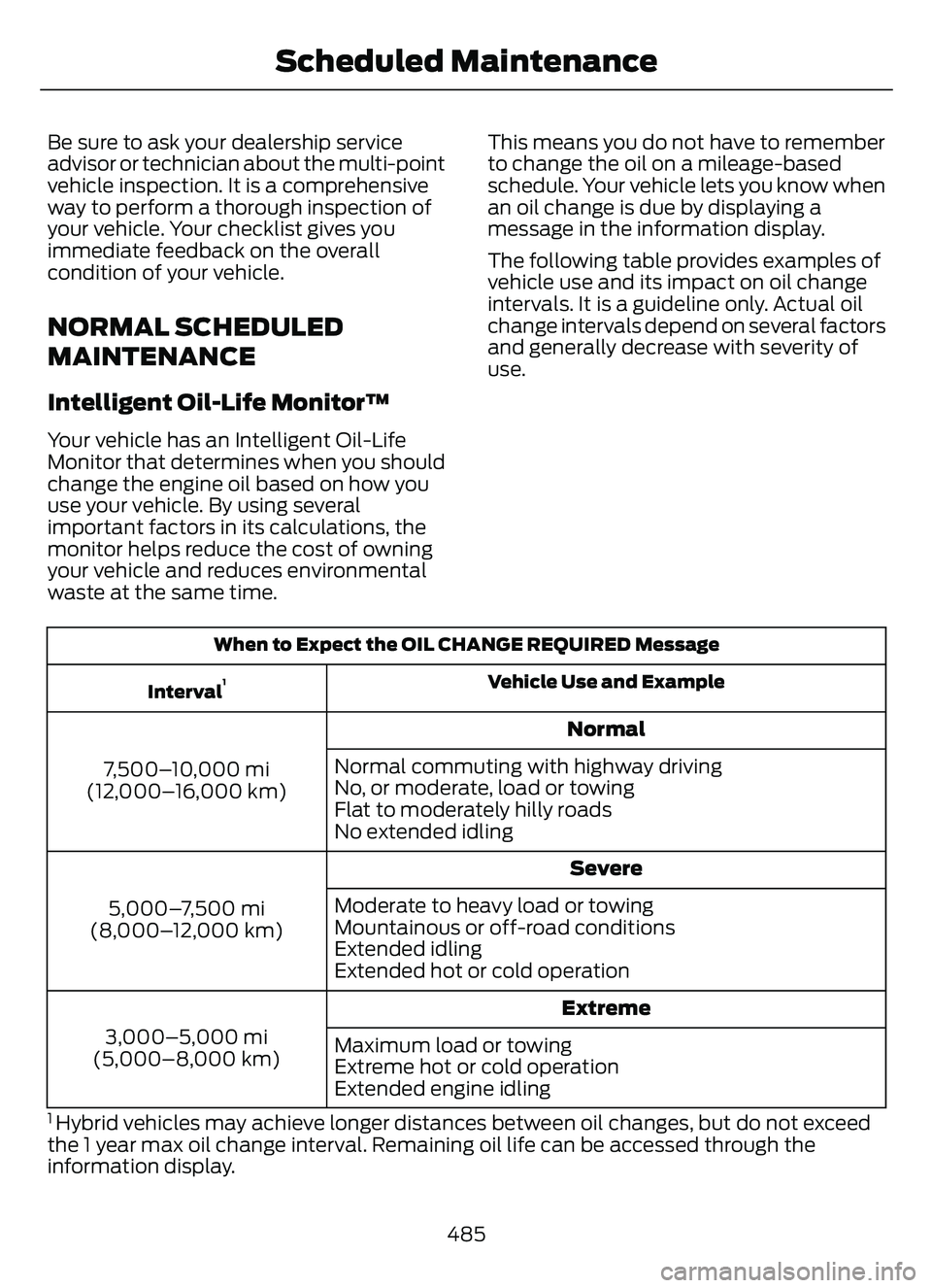
The following table provides examples of
vehicle use and its impact on oil change
intervals. It is a guideline only. Actual oil
change intervals depend on several factors
and generally decrease with severity of
use.
When to Expect the OIL CHANGE REQUIRED Message
Vehicle Use and Example
Interval
1
Normal
7,500–10,000 mi
(12,000–16,000 km) Normal commuting with highway driving
No, or moderate, load or towing
Flat to moderately hilly roads
No extended idling
Severe
5,000–7,500 mi
(8,000–12,000 km) Moderate to heavy load or towing
Mountainous or off-road conditions
Extended idling
Extended hot or cold operation
Extreme
3,000–5,000 mi
(5,000–8,000 km) Maximum load or towing
Extreme hot or cold operation
Extended engine idling
1 Hybrid vehicles may achieve longer distances between oil changes, but do not exceed
the 1 year max oil change interval. Remaining oil life can be accessed through the
information display.
485
Scheduled Maintenance
Page 570 of 585

Cleaning Chrome, Aluminium or StainlessSteel..................................................................350
Cleaning Headlamps and Rear Lamps...............................................................349
Cleaning Stripes or Graphics..........................351
Cleaning the Engine Compartment...........350
Cleaning the Exterior Precautions...............349
Cleaning the Underbody..................................351
Cleaning Wheels................................................350
Cleaning Windows and Wiper Blades...............................................................350
Cleaning the Interior....................................351Cleaning Carpets and Floor Mats................352
Cleaning Displays and Screens....................352
Cleaning Fabric Seats andHeadliners........................................................352
Cleaning Leather and Vinyl............................352
Cleaning Moonroof Tracks.............................353
Cleaning Plastic...................................................351
Cleaning Seatbelts............................................353
Cleaning Storage Compartments...............353
Cleaning the Instrument Panel.....................351
Clearing All MyKeys.......................................66
Clearing the Garage Door Opener.........164
Climate Control..............................................137
Closing the Liftgate.......................................78
Closing the Hands-Free Liftgate....................83
Closing the Liftgate From Inside Your Vehicle.................................................................82
Closing the Liftgate From Outside Your Vehicle.................................................................78
Closing the Liftgate Using the Remote Control.................................................................83
Cold Weather Precautions......................304
Configuring the Trip Computer - VehiclesWith: 4.2 Inch Instrument Cluster
Display Screen............................................129
Connected Vehicle.....................................405
Connecting the Vehicle to a Mobile
Network...........................................................405
Connected Vehicle Data..............................24
Connected Vehicle Limitations..............405
Connected Vehicle Requirements........405
Connected Vehicle – Troubleshooting -Vehicles With: Modem...........................406
Connected Vehicle – Troubleshooting - Vehicles With: SYNC 3............................407
Connecting a Trailer...................................296 Connecting a Trailer Precautions..........296
Connecting the Vehicle to a Mobile
Network.......................................................405
Connecting FordPass to the Modem.........405
Enabling and Disabling the Modem..........405
What Is the Modem.........................................405
Connecting the Vehicle to a Wi-FiNetwork.......................................................405
Contacting Us...................................................15
Cooling System Capacity and Specification - 1.5L EcoBoost™.........396
Cooling System Capacity and Specification - 2.0L EcoBoost™.........397
Cooling System Capacity and Specification - 2.5L, Hybrid Electric
Vehicle (HEV)/Plug-In Hybrid Electric
Vehicle (PHEV)..........................................397
Crash and Breakdown Information.................................................308
Automatic Crash Shutoff.................................314
Jump Starting the Vehicle...............................310
Post-Crash Alert System.................................313
Crash Sensors and Airbag Indicator.......54
Creating a MyKey - Vehicles With: FlipKey....................................................................65
Creating a MyKey - Vehicles With: Push Button Start..................................................65
Creating a Vehicle Wi-Fi Hotspot.........409
Cross Traffic Alert..........................................271
Cross Traffic Alert –
Troubleshooting.............................................273
Cross Traffic Alert Indicators....................272
Cross Traffic Alert Limitations..................271
Cross Traffic Alert Precautions................271
Cross Traffic Alert –Troubleshooting.........................................273
Cross Traffic Alert – Information
Messages..........................................................273
Cruise Control................................................242
Cruise Control Indicators..........................243
Cup Holders....................................................170
Cup Holder Precautions...................................170Customer Information..............................490Radio Frequency CertificationLabels...............................................................493
567
Index