2022 FORD ESCAPE height
[x] Cancel search: heightPage 366 of 585

C.80: Indicates the aspect ratio
which gives the tire's ratio of
height to width. Numbers of 70 or
lower indicate a short sidewall.
D. D: Indicates a diagonal type tire.
R: Indicates a radial type tire.
E. 16: Indicates the wheel or rim
diameter in inches. If you change
your wheel size, you will have to
purchase new tires to match the
new wheel diameter.
GLOSSARY OF TIRE
TERMINOLOGY
*Tire label: A label showing the
original equipment tire sizes,
recommended inflation pressure
and the maximum weight the
vehicle can carry.
*Tire Identification Number
(TIN): A number on the sidewall
of each tire providing information
about the tire brand and
manufacturing plant, tire size and
date of manufacture. Also referred
to as DOT code.
*Inflation pressure: A measure
of the amount of air in a tire.
*Standard load: A class of
P-metric or Metric tires designed
to carry a maximum load at set
pressure. For example: For
P-metric tires 35 psi (2.4 bar) and
for Metric tires 36 psi (2.5 bar).
Increasing the inflation pressure
beyond this pressure will not
increase the tire’s load carrying
capability. *Extra load:
A class of P-metric
or Metric tires designed to carry a
heavier maximum load at 42 psi
(2.9 bar). Increasing the inflation
pressure beyond this pressure will
not increase the tire’s load
carrying capability.
*kPa: Kilopascal, a metric unit of
air pressure.
*PSI: Pounds per square inch, a
standard unit of air pressure.
*Cold tire pressure: The tire
pressure when the vehicle has
been stationary and out of direct
sunlight for an hour or more and
prior to the vehicle being driven for
1 mi (1.6 km).
*Recommended inflation
pressure: The cold inflation
pressure found on the Safety
Compliance Certification Label
(affixed to either the door hinge
pillar, door-latch post, or the door
edge that meets the door-latch
post, next to the driver's seating
position), or Tire Label located on
the B-Pillar or the edge of the
driver door.
* B-pillar: The structural member
at the side of the vehicle behind
the front door.
*Bead area of the tire: Area of
the tire next to the rim.
* Sidewall of the tire: Area
between the bead area and the
tread.
363
Wheel and Tire Information
Page 372 of 585
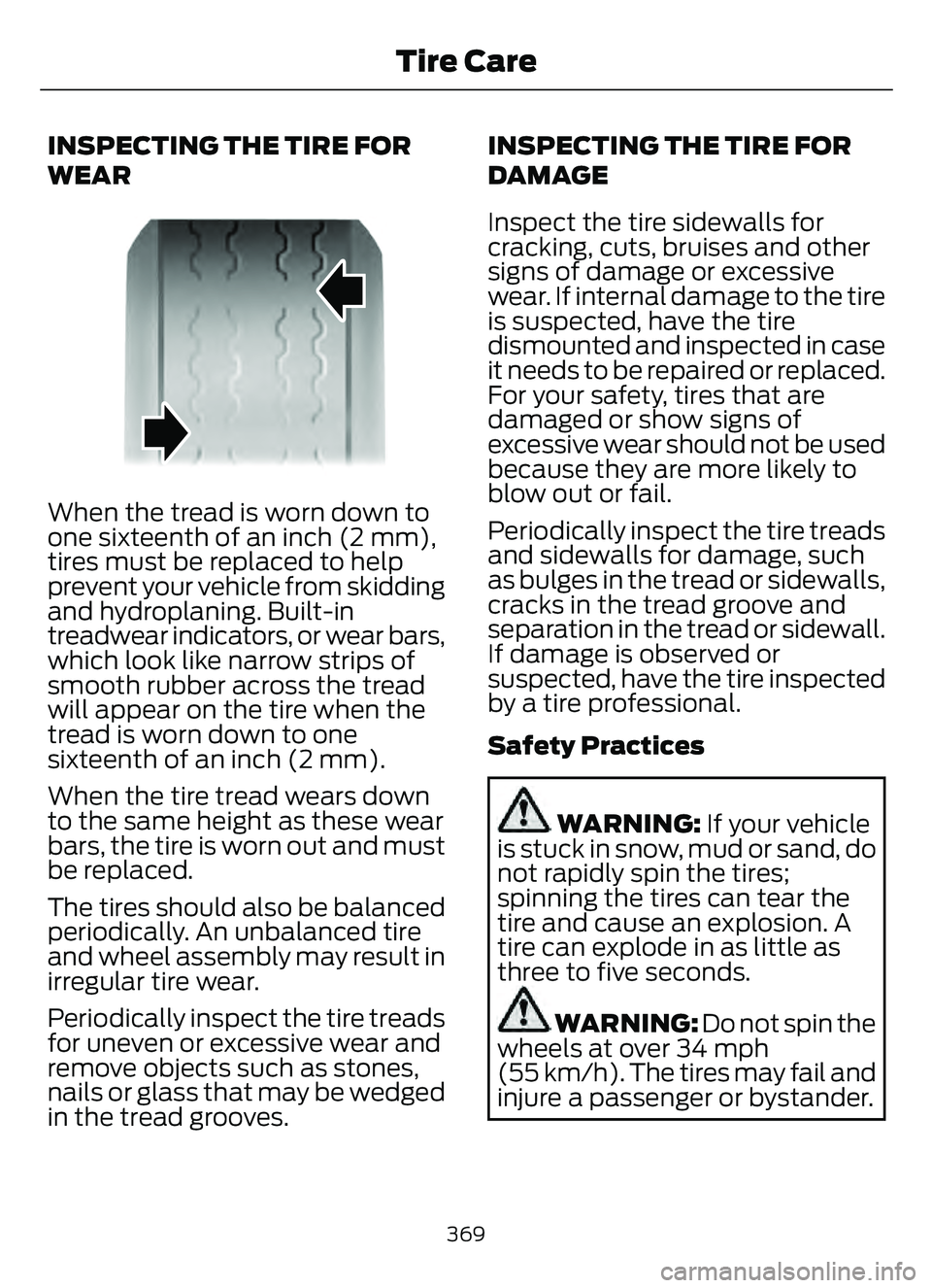
INSPECTING THE TIRE FOR
WEAR
When the tread is worn down to
one sixteenth of an inch (2 mm),
tires must be replaced to help
prevent your vehicle from skidding
and hydroplaning. Built-in
treadwear indicators, or wear bars,
which look like narrow strips of
smooth rubber across the tread
will appear on the tire when the
tread is worn down to one
sixteenth of an inch (2 mm).
When the tire tread wears down
to the same height as these wear
bars, the tire is worn out and must
be replaced.
The tires should also be balanced
periodically. An unbalanced tire
and wheel assembly may result in
irregular tire wear.
Periodically inspect the tire treads
for uneven or excessive wear and
remove objects such as stones,
nails or glass that may be wedged
in the tread grooves.INSPECTING THE TIRE FOR
DAMAGE
Inspect the tire sidewalls for
cracking, cuts, bruises and other
signs of damage or excessive
wear. If internal damage to the tire
is suspected, have the tire
dismounted and inspected in case
it needs to be repaired or replaced.
For your safety, tires that are
damaged or show signs of
excessive wear should not be used
because they are more likely to
blow out or fail.
Periodically inspect the tire treads
and sidewalls for damage, such
as bulges in the tread or sidewalls,
cracks in the tread groove and
separation in the tread or sidewall.
If damage is observed or
suspected, have the tire inspected
by a tire professional.
Safety Practices
WARNING: If your vehicle
is stuck in snow, mud or sand, do
not rapidly spin the tires;
spinning the tires can tear the
tire and cause an explosion. A
tire can explode in as little as
three to five seconds.
WARNING: Do not spin the
wheels at over 34 mph
(55 km/h). The tires may fail and
injure a passenger or bystander.
369
Tire Care
Page 387 of 585

Note:Jack at the specified locations to
avoid damage to the vehicle.
11. The vehicle jacking points shown here are also depicted on the warning
label on the jack. Small arrow-shaped
marks on the vehicle sills show the
location of the jacking points.
E145908
12. Turn the wrench clockwise to raisethe vehicle until the flat tire is
completely off the ground.
E338668E338668
13. Remove the lug nuts with the lugwrench.
Note: For vehicles with full wheel covers
with exposed wheel nuts, remove the wheel
nuts prior to removing the wheel cover or
damage to the wheel cover may occur.
14. Replace the flat tire with the spare tire, making sure the valve stem is
facing outward. Reinstall the lug nuts
until the wheel is snug against the
hub. Do not fully tighten the lug nuts
until the wheel has been lowered. 15. Lower the wheel by turning the jack
handle counterclockwise.
16. Remove the jack and fully tighten the lug nuts in the order shown.
1
2
3
4
5
E306781
Stowing the flat tire
1. To store the jack kit on Non Plug-in or Full Hybrid Electric Vehicles, fold the
jack and wrench handle and engage it
to the bracket of the jack base using
the lug wrench pin.
Note: To store the jack and wrench on
Plug-in and Full Hybrid Electric Vehicles,
fold the jack and wrench into the closed
position, and place the wrench into the
storage compartment. Position the jack
assembly into the closed position and make
sure the jack is fastened securely before you
drive.
2. When attaching the folded wrench on the jack, swing the wrench upward and
adjust the jack height until the wrench
hook engages the hole on the jack.
Tighten the hex nut clockwise until
secure.
384
Changing a Road Wheel (If Equipped)
Page 566 of 585

1
12V Battery......................................................34112V Battery Precautions...................................341
Battery Management SystemLimitations.......................................................342
How Does the Battery Management System Work..................................................342
Recycling and Disposing of the 12V Battery..............................................................342
Resetting the Battery Sensor........................342
What Is the Battery Management System..............................................................342
9
911 Assist............................................................57
A
A/CSee: Climate Control..........................................137About This Publication..................................17
ABS
See: Brakes............................................................217Accessing the Trip Computer - VehiclesWith: 4.2 Inch Instrument Cluster
Display Screen............................................129
Accessing the Trip Computer - Vehicles With: 6.5 Inch Instrument Cluster
Display Screen/ 12.3 Inch Instrument
Cluster Display Screen.............................129
Accessories....................................................479
AC Charging...................................................205
Connecting the Charger..................................205
Stopping Charging............................................206
Active Park Assist........................................238Active Park Assist –
Trouble shooting............................................240
Active Park Assist Precautions...............238
Active Park Assist –
Troubleshooting........................................240
Active Park Assist – Frequently Asked
Questions ........................................................240
Active Park Assist – Information Messages.........................................................240
Adaptive Cruise Control............................244Adaptive Cruise Control –Troubleshooting............................................ 254
Intelligent Adaptive Cruise Control.............253
Lane Centering...................................................250
Adaptive Cruise Control Automatic Cancellation................................................247
Adaptive Cruise Control Indicators.......250
Adaptive Cruise Control Limitations..................................................245
Adaptive Cruise Control Precautions.................................................244
Adaptive Cruise Control – Troubleshooting........................................254
Adaptive Cruise Control – Information
Messages.........................................................254
Adjusting the Exterior Mirrors..................108
Adjusting the Headlamps........................344
Adjusting the Instrument Panel LightingBrightness....................................................103
Adjusting the Seatbelt Height...................42
Adjusting the Seatbelts During Pregnancy......................................................42
Adjusting the Sound Settings...................411
Adjusting the Steering Wheel....................91
Adjusting the Volume.................................410
Aid Mode.........................................................263
How Does Aid Mode Work.............................263
What Is Aid Mode..............................................263
Airbag Precautions........................................49
Airbags................................................................47
Front Passenger Sensing System...................51Air ConditioningSee: Climate Control..........................................137Air Conditioning System Capacity and Specification - 1.5L EcoBoost™.........400
Air Conditioning System Capacity and Specification - 2.0L EcoBoost™.........401
Air Conditioning System Capacity and Specification - 2.5L, Hybrid Electric
Vehicle (HEV)/Plug-In Hybrid Electric
Vehicle (PHEV).........................................402
Air Filter
See: Changing the Engine Air Filter - 1.5L
EcoBoost™/2.0L EcoBoost™.................338
See: Changing the Engine Air Filter - 2.5L, Hybrid Electric Vehicle (HEV)/Plug-In
Hybrid Electric Vehicle (PHEV)...............339
563
Index
Page 577 of 585

Locating the USB Ports.............................166
Locating the Wireless AccessoryCharger..........................................................169
Locating Your Vehicle...................................59
Locking and Unlocking the Doors Using Keyless Entry.................................................75
Locking the Doors.................................................75
Unlocking the Doors............................................75
Locking the Rear WindowControls........................................................106
Luggage Compartment............................294
M
Maintenance.................................................32812V Battery............................................................341
Engine Oil..............................................................\
333
Exterior Bulbs......................................................345
Interior Bulbs.......................................................348
Maintenance Precautions........................328
Manual Climate Control.............................137
Manually Dimming the Interior Mirror..............................................................107
Manually Releasing the Electric Parking Brake.............................................................220
Manual Park Release - Gasoline.............212
Manual Park Release Precautions................212
Using Manual Park Release............................213
What Is Manual Park Release.........................212
Manual Seats.................................................149Adjusting the Head Restraint.........................149
Adjusting the Seat Backrest...........................150
Adjusting the Seat Height................................151
Folding the Seat Backrest...............................156
Head Restraint Components.........................149
Installing the Head Restraint.........................150
Moving the Seat Backward and
Forward............................................................. 150
Removing the Head Restraint.......................150
Unfolding the Seat Backrest...........................157
Master Access Code......................................73Displaying the Master Access Code..............73
What Is the Master Access Code....................73
Memory Function.........................................160
Memory Function Precautions................160
Mislock...............................................................70
Mislock Limitations...............................................71
Switching Mislock On and Off..........................71 What Is Mislock.....................................................70
Mobile Communications
Equipment....................................................531
Mobile Device Data........................................25
Moonroof Bounce-Back.............................110
Overriding Moonroof Bounce-Back.............110
What Is Moonroof Bounce-Back...................110
Moonroof.........................................................109Moonroof Bounce-Back...................................110Motorcraft Parts - 1.5L EcoBoost™................................................390
Motorcraft Parts - 2.0L EcoBoost™................................................390
Motorcraft Parts - 2.5L, Hybrid Electric Vehicle (HEV)/Plug-In Hybrid Electric
Vehicle (PHEV)..........................................391
Muting the Audio...........................................411
MyKey Settings...............................................64
Configurable MyKey Settings..........................64
Non-Configurable MyKey Settings................64
MyKey – Troubleshooting...........................66MyKey – Frequently Asked Questions.........68
MyKey – Information Messages.....................66
MyKey™.............................................................64MyKey Settings.....................................................64
MyKey – Troubleshooting.................................66
N
Navigation......................................................452
Normal Scheduled Maintenance..........485
O
Opening and Closing the Flip Key............58
Opening and Closing the Hood..............328
Opening and Closing the Moonroof......................................................109
Opening and Closing the Sun Shade............................................................109
Opening and Closing the Windows.......105
Opening the Liftgate.....................................78
Opening the Hands-Free Liftgate...................81
Opening the Liftgate From Inside Your
Vehicle................................................................80
Opening the Liftgate From Outside Your Vehicle.................................................................78
574
Index
Page 579 of 585

Power Gauge - Hybrid Electric Vehicle(HEV)/Plug-In Hybrid Electric Vehicle
(PHEV), Vehicles With: 6.5 Inch
Instrument Cluster Display
Screen.............................................................118
Power Outlet..................................................168
Power Outlet Precautions........................168
Power Seats.....................................................151
Adjusting the Head Restraint..........................151
Adjusting the Lumbar Support......................153
Adjusting the Seat Backrest...........................153
Adjusting the Seat Cushion............................153
Adjusting the Seat Height...............................153
Head Restraint Components..........................151
Installing the Head Restraint..........................152
Moving the Seat Backward and
Forward.............................................................152
Removing the Head Restraint........................152
Pre-Collision Assist Limitations..............275
Pre-Collision Assist Precautions............274
Pre-Collision Assist.....................................274
Automatic Emergency Braking.....................278
Distance Alert......................................................278
Distance Indication............................................276
Evasive Steering Assist....................................279
Pre-Collision Assist – Troubleshooting...........................................280
Pre-Collision Assist –Troubleshooting.......................................280
Pre-Collision Assist – Frequently Asked
Questions.........................................................281
Pre-Collision Assist – Information Messages.........................................................280
Preparing Your Vehicle forStorage.........................................................355
Programming a MyKey.................................65
Programming the Garage Door Opener to Your Garage Door Opener
Motor..............................................................163
Programming the Garage Door Opener to Your Gate Opener Motor...................164
Programming the Garage Door Opener to Your Hand-Held Transmitter...........163
Programming the Remote Control..........62
Properly Adjusting the Driver and Front Passenger Seats..........................................50
Puncture
See: Changing a Flat Tire................................382
Push Button Ignition Switch.....................172
R
Radio Frequency Certification Labels...........................................................493
Blind Spot Information System
Sensors.............................................................493
Body Control Module.......................................499
Cruise Control Module.....................................503
Garage Door Opener........................................506
Keys and Remote Controls............................507
Radio Transceiver Module...............................512
SYNC.......................................................................5\
15
Telematics Control Unit...................................519
Tire Pressure Monitoring System Sensors.............................................................520
Wireless Accessory Charging Module.............................................................. 526
Rear Occupant Alert System Audible
Warnings.......................................................159
Rear Occupant Alert System Indicator s......................................................159
Rear Occupant Alert System Limitations...................................................158
Rear Occupant Alert System Precautions..................................................158
Rear Occupant Alert System...................158
Rear Parking Aid...........................................230
Locating the Rear Parking Aid
Sensors..............................................................231
Rear Parking Aid Audible Warnings..............231
Rear Parking Aid Limitations.........................230
What is the Rear Parking Aid.........................230
Rear Seats.......................................................155Manual Seats.......................................................155Rear View Camera Guide Lines..............235
Rear View Camera Object Distance Indicators.....................................................236
Rear View Camera Precautions.............235
Rear View Camera.......................................235
Rear View Camera Settings...........................236Rear View Camera Settings.....................236Switching Rear View Camera Delay On and
Off.......................................................................2\
37
Zooming the Rear View Camera In and Out.....................................................................236
Recalling a Preset Position.......................160
576
Index
Page 581 of 585

Seatbelt Reminder...............................................42
Sensitive Locking Mode....................................40
Security..............................................................87Anti-Theft Alarm System..................................87
Anti-Theft Alarm System Settings...............88
Passive Anti-Theft System...............................87
Security – Troubleshooting..............................89
Security – Troubleshooting........................89Security – Frequently AskedQuestions ..........................................................90
Security – Information Messages..................89
Selecting a Drive Mode - Excluding: Plug-In Hybrid Electric Vehicle
(PHEV)..........................................................257
Selecting a Drive Mode..............................257
Selecting the Audio Source......................410
Sensitive Locking Mode..............................40
How Does Sensitive Locking Mode
Work......................................................................41
What is Sensitive Locking Mode....................40
Service Data.....................................................23
Setting a Memory Preset..........................410
Settings Data...................................................24
Settings...........................................................464
Setting the Adaptive Cruise Control Gap................................................................248
Setting the Adaptive Cruise Control Speed.............................................................247
Setting the Charging Schedule and Preferences................................................206
Setting the Clock and Date........................411
Setting the Cruise Control Speed..........242
Setting the Liftgate Opening Height.......82
Setting the Speed Sign Recognition Speed Tolerance.......................................285
Setting the Speed Sign Recognition Speed Warning..........................................285
Shifting Your Vehicle Into Gear...............210
Side Parking Aid - Vehicles With: Active Park Assist...................................................232
Locating the Side Parking Aid
Sensors.............................................................233
Side Parking Aid Audible Warnings.............233
Side Parking Aid Limitations..........................232
What is the Side Parking Aid.........................232
Sitting in the Correct Position..................148
Sounding the Panic Alarm..........................59 Special Operating Conditions Scheduled
Maintenance...............................................487
Speed Control
See: Cruise Control............................................242Speedomet er.................................................. 118
Speed Sign Recognition Indicator s.....................................................284
Speed Sign Recognition Limitations..................................................284
Speed Sign Recognition Precautions.................................................284
Speed Sign Recognition...........................284
Speed Sign Recognition –
Troubleshooting............................................285
Speed Sign Recognition –Troubleshooting........................................285
Speed Sign Recognition – Frequently Asked
Questions........................................................286
Speed Sign Recognition – Information Messages.........................................................285
Stability Control Indicator........................228
Stability Control............................................227
Stability Control – Troubleshooting...........228Stability Control –Troubleshooting........................................228
Stability Control – Warning Lamps............228Starter SwitchSee: Ignition Switch.............................................171Starting and Stopping the Engine –Precautions...................................................171
Starting and Stopping the Engine...........171
Automatic Engine Stop....................................176
Engine Block Heater...........................................174
Starting and Stopping the Engine –
Troubleshooting.............................................176
Starting the Engine.............................................172
Stopping the Engine...........................................175
Starting and Stopping the Engine – Troubleshooting .........................................176
Starting and Stopping the Engine –
Frequently Asked Questions......................178
Starting and Stopping the Engine – Information Messages..................................177
Starting and Stopping the Engine – Warning Lamps...............................................176
Starting the Engine.......................................172Restarting the Engine After Stoppingit........................................................................\
....173
578
Index