2022 FORD ESCAPE ECU
[x] Cancel search: ECUPage 137 of 585

WHAT IS REMOTE START
The system allows you to remotely start
your vehicle and to adjust the interior
temperature according to the settings that
you chose.
REMOTE START
PRECAUTIONS
WARNING: Do not start the engine
in a closed garage or in other enclosed
areas. Exhaust fumes are toxic. Always
open the garage door before you start
the engine. Failure to follow this
instruction could result in personal injury
or death.
REMOTE START LIMITATIONS
Remote start does not work under the
following conditions:
• The alarm horn is sounding.
• The hood is open.
• The transmission is not in park (P).
• The ignition is on.
• The battery voltage is below the minimum operating voltage.
• Remote start is not enabled.
Note: Do not use remote start if the fuel
level is low.
Note: You can use remote start with
FordPass. See Connecting the Vehicle to
a Wi-Fi Network (page 405).
ENABLING REMOTE START
1. Press Settings on the touchscreen.
2. Press Vehicle Settings .
3. Press Remote Start Setup .4. Switch Remote Start on or off.
Note:
To remote start with FordPass, make
sure that the modem is enabled. See
Connected Vehicle Requirements (page
405).
REMOTELY STARTING AND
STOPPING THE VEHICLE
Remotely Starting the Vehicle
E138623
Press the button on the remote
control.
E138625
Within three seconds, press the
button twice on the remote
control.
Note: You can also use the FordPass App
to start the vehicle.
Note: The turn signals flash twice.
Note: The parking lamps turn on when the
vehicle is running.
Note: The horn sounds if the system fails
to start.
Note: All other vehicle systems remain off
when you have remotely started the vehicle.
Note: The vehicle remains secured when
you have remotely started the vehicle. A
valid key must be inside your vehicle to
switch the ignition on and drive your vehicle.
Remotely Stopping the Vehicle
E138625
Within three seconds, press the
button twice on the remote
control.
EXTENDING THE REMOTE
START DURATION
To extend the remote start duration during
remote start, do the following:
134
Remote Start (If Equipped)
Page 160 of 585
With the seat empty, pull the lever up to
fold the seat backrest forward. You may
need to lower the center head restraint
first.
UNFOLDING THE SEAT BACKREST
WARNING: When unfolding the
seat, make sure that the seatbelts are
not trapped behind the seat.
WARNING: Make sure that the
seats and the seat backrests are secure
and fully locked in their catches.
Pull the seat backrest up to unfold it.
157
Rear Seats
Page 165 of 585
WHAT IS THE GARAGE DOOR
OPENER
HomeLink Wireless Control
System
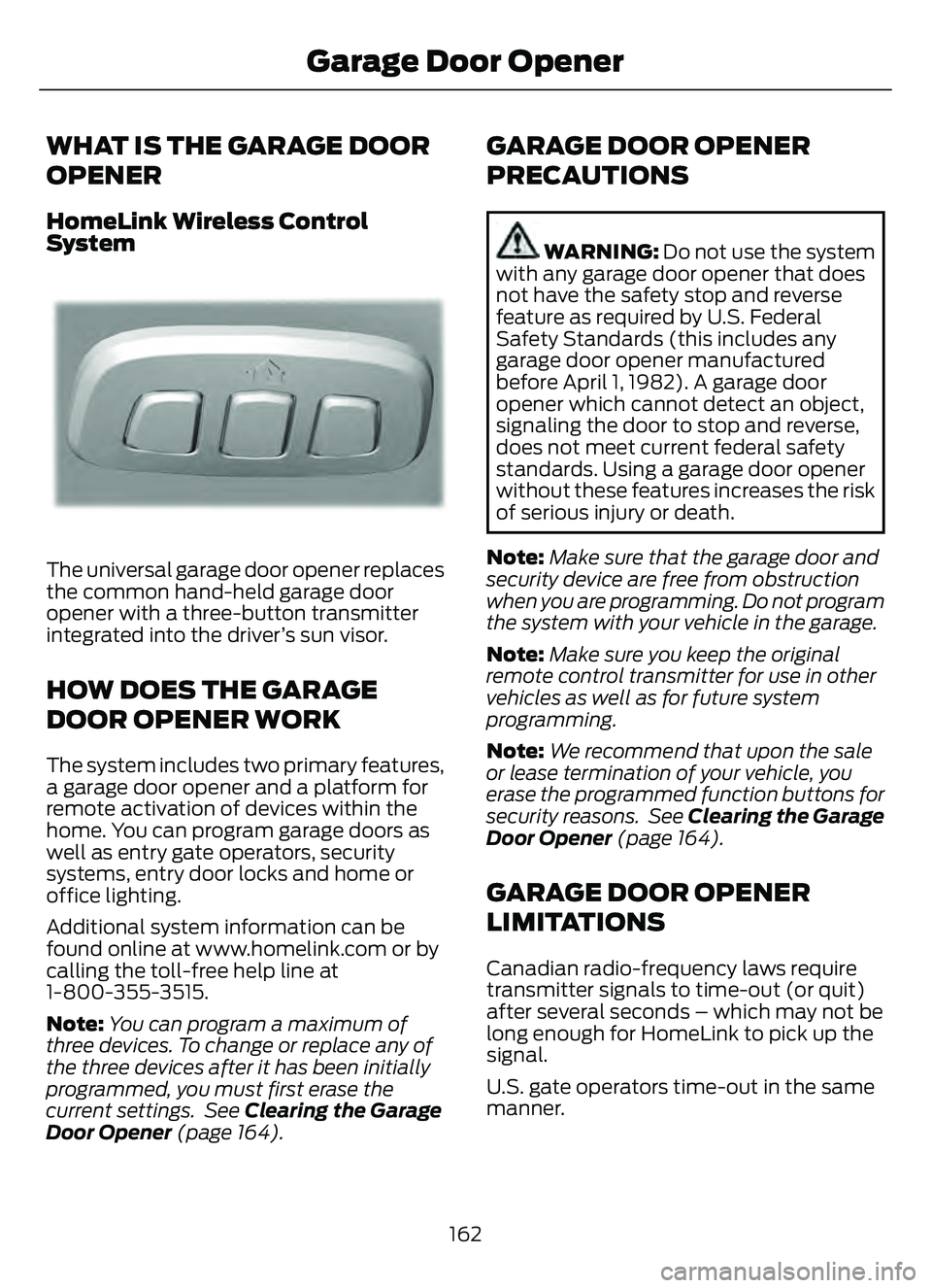
E18821E1882111
The universal garage door opener replaces
the common hand-held garage door
opener with a three-button transmitter
integrated into the driver’s sun visor.
HOW DOES THE GARAGE
DOOR OPENER WORK
The system includes two primary features,
a garage door opener and a platform for
remote activation of devices within the
home. You can program garage doors as
well as entry gate operators, security
systems, entry door locks and home or
office lighting.
Additional system information can be
found online at www.homelink.com or by
calling the toll-free help line at
1-800-355-3515.
Note:You can program a maximum of
three devices. To change or replace any of
the three devices after it has been initially
programmed, you must first erase the
current settings. See Clearing the Garage
Door Opener (page 164).
GARAGE DOOR OPENER
PRECAUTIONS
WARNING: Do not use the system
with any garage door opener that does
not have the safety stop and reverse
feature as required by U.S. Federal
Safety Standards (this includes any
garage door opener manufactured
before April 1, 1982). A garage door
opener which cannot detect an object,
signaling the door to stop and reverse,
does not meet current federal safety
standards. Using a garage door opener
without these features increases the risk
of serious injury or death.
Note: Make sure that the garage door and
security device are free from obstruction
when you are programming. Do not program
the system with your vehicle in the garage.
Note: Make sure you keep the original
remote control transmitter for use in other
vehicles as well as for future system
programming.
Note: We recommend that upon the sale
or lease termination of your vehicle, you
erase the programmed function buttons for
security reasons. See Clearing the Garage
Door Opener (page 164).
GARAGE DOOR OPENER
LIMITATIONS
Canadian radio-frequency laws require
transmitter signals to time-out (or quit)
after several seconds – which may not be
long enough for HomeLink to pick up the
signal.
U.S. gate operators time-out in the same
manner.
162
Garage Door Opener
Page 295 of 585
The above calculations also
assume that the loads are
positioned in your vehicle in a
manner that does not overload
the front or the rear gross axle
weight rating specified for your
vehicle on the Safety Compliance
Certification label.
ROOF RACK
(IF EQUIPPED)
ROOF RACK PRECAUTIONS
WARNING: Read and follow the
manufacturer's instructions when you
are fitting a roof rack.
WARNING: When loading the roof
racks, we recommend you evenly
distribute the load, as well as maintain
a low center of gravity. Loaded vehicles,
with higher centers of gravity, may
handle differently than unloaded
vehicles. Take extra precautions, such
as slower speeds and increased stopping
distance, when driving a heavily loaded
vehicle.
Note: If you use a roof rack, the fuel
consumption of your vehicle will be higher
and you may experience different driving
characteristics.
Note: Never place loads directly on the roof
panel. The roof panel is not designed to
directly carry a load.
You must place loads directly on the
crossbars fitted to the roof rack side rails.
When using the roof rack system, we
recommend that you use genuine Ford
accessory crossbars specifically designed
for your vehicle. Make sure that you securely fasten the
load. Check the tightness of the load
before driving and at each fuel stop.
REMOVING AND INSTALLING
ROOF RACK CROSSBARS
Note:
For less wind noise and better
aerodynamics, only install the crossbars
when you need them for carrying cargo.
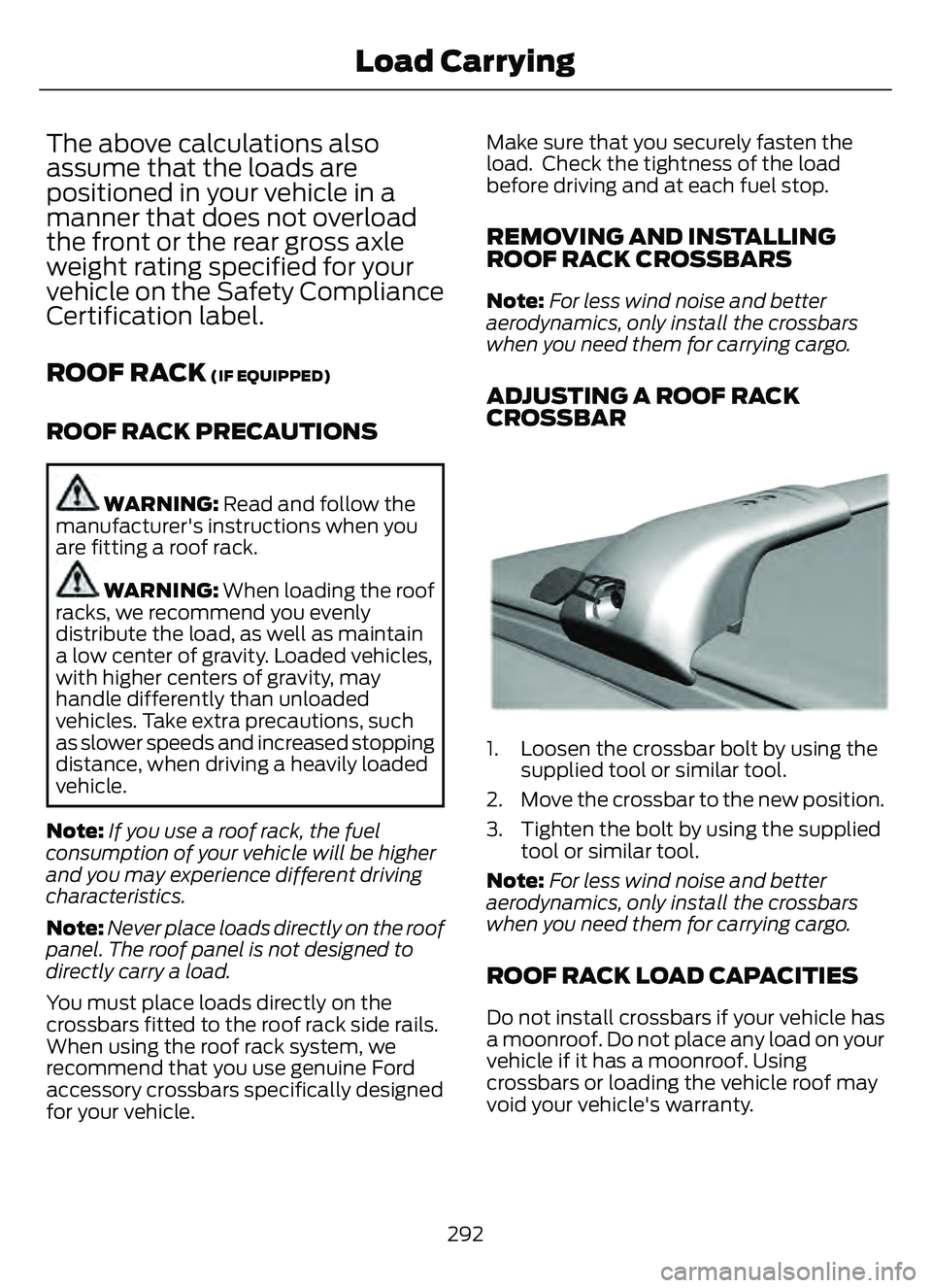
ADJUSTING A ROOF RACK
CROSSBAR
993 9E299329E299E299E2E299E299E29E299E2999999EEE329329299322993299329
1. Loosen the crossbar bolt by using the supplied tool or similar tool.
2. Move the crossbar to the new position.
3. Tighten the bolt by using the supplied tool or similar tool.
Note: For less wind noise and better
aerodynamics, only install the crossbars
when you need them for carrying cargo.
ROOF RACK LOAD CAPACITIES
Do not install crossbars if your vehicle has
a moonroof. Do not place any load on your
vehicle if it has a moonroof. Using
crossbars or loading the vehicle roof may
void your vehicle's warranty.
292
Load Carrying
Page 297 of 585
INSTALLING AND REMOVING
THE LUGGAGE
COMPARTMENT COVER
WARNING: Make sure that you
properly secure the luggage cover.
Failure to follow this instruction could
result in personal injury in the event of a
sudden stop or crash.
WARNING: Do not place objects
on the luggage cover. Failure to follow
this instruction could result in personal
injury or death in the event of a sudden
stop or crash.
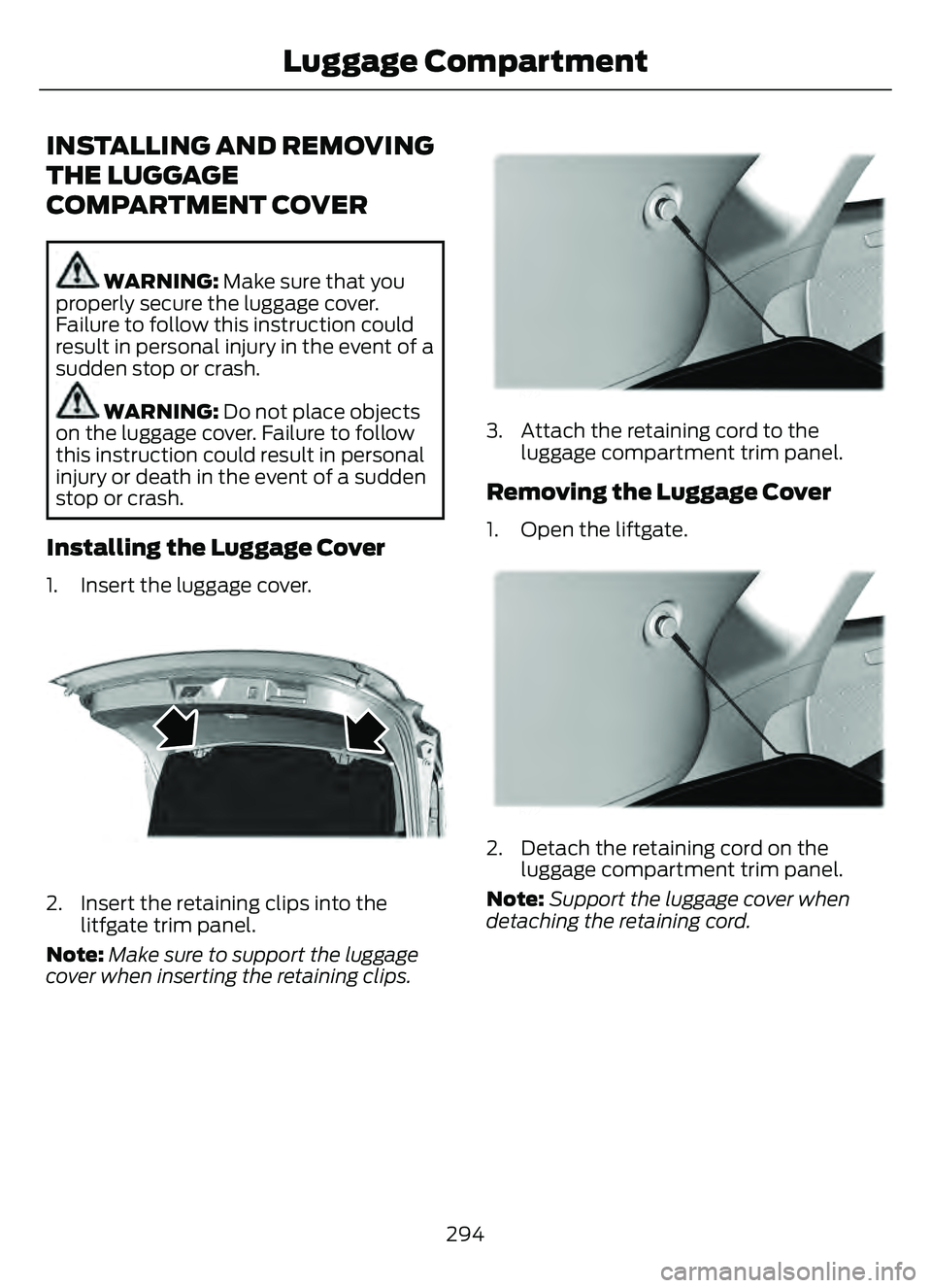
Installing the Luggage Cover
1. Insert the luggage cover.
E309671E309671
2. Insert the retaining clips into the litfgate trim panel.
Note: Make sure to support the luggage
cover when inserting the retaining clips.
E309672E309672E309 672
3. Attach the retaining cord to the
luggage compartment trim panel.
Removing the Luggage Cover
1. Open the liftgate.
E309672E309672E309 672
2. Detach the retaining cord on the
luggage compartment trim panel.
Note: Support the luggage cover when
detaching the retaining cord.
294
Luggage Compartment
Page 310 of 585

WARNING: Secure the floor mat
to both retention devices so that it
cannot slip out of position and interfere
with the pedals. Failure to follow this
instruction could result in the loss of
control of your vehicle, personal injury or
death.
WARNING: Do not place additional
floor mats or any other covering on top
of the original floor mats. This could
result in the floor mat interfering with the
operation of the pedals. Failure to follow
this instruction could result in the loss of
control of your vehicle, personal injury or
death.
WARNING: Always make sure that
objects cannot fall into the driver foot
well while your vehicle is moving. Objects
that are loose can become trapped
under the pedals causing a loss of
vehicle control.
E14266626666666
To install floor mats that have eyelets,
position the floor mat eyelet over the
retention post and press down to lock in
position. Repeat for all eyelets on the floor
mat.
To remove the floor mats, reverse the
installation procedure. Note:
Regularly check the floor mats to
make sure they are secure.
307
Driving Hints
Page 319 of 585

TOWING YOUR VEHICLE
PRECAUTIONS
Use the following guidelines when towing
your vehicle. Failure to follow this
instruction could result in vehicle damage
not covered by the vehicle warranty.
Note: Make sure you properly secure your
vehicle to the tow vehicle.
Note: If you are unsure of the vehicle’s
configuration, contact an authorized dealer.
RECREATIONALLY TOWING
YOUR VEHICLE - GASOLINE,
AWD
You cannot recreational tow your vehicle
with all wheels on the ground because
vehicle or transmission damage could
occur. You must recreational tow your
vehicle with all four wheels off the ground,
such as when using a car-hauling trailer.
Otherwise, you cannot recreational tow
your vehicle.
RECREATIONALLY TOWING
YOUR VEHICLE - GASOLINE,
FWD
You cannot recreational tow your vehicle
with all wheels on the ground because
vehicle or transmission damage could
occur. Place the front wheels on a
two-wheel tow dolly. If you are using a tow
dolly, follow the instructions specified by
the equipment provider.
Note: Release the parking brake before
towing your vehicle. See Manually
Releasing the Electric Parking Brake
(page 220).
RECREATIONALLY TOWING
YOUR VEHICLE - HYBRID
ELECTRIC VEHICLE (HEV)/
PLUG-IN HYBRID ELECTRIC
VEHICLE (PHEV)
Follow these guidelines if you have a need
for recreational towing. An example of
recreational towing is towing your vehicle
behind a motorhome. These guidelines
ensure that you do not damage the
transmission.
Note: Put your climate control system in
recirculated air mode to prevent exhaust
fumes from entering your vehicle. See
Climate Control (page 137).
You can tow your vehicle with all four
wheels on the ground under the following
conditions:
• You switch Neutral Tow on.
• Your vehicle is facing forward for towing in a forward direction.
• You release the parking brake.
• You do not exceed 70 mph (113 km/h).
Switching Neutral Tow On
1. Switch your vehicle on in accessory mode.
2. Press the menu button on the steering wheel to enter the information display
main menu.
3. Select Settings .
4. Select Neutral Tow.
5. Follow the instructions on the information display.
6. Fully press the brake pedal.
7. Shift into neutral (N).
8. Switch the ignition off.
Note: Switching neutral tow on requires
battery power.
316
Towing Your Vehicle
Page 332 of 585
E193263
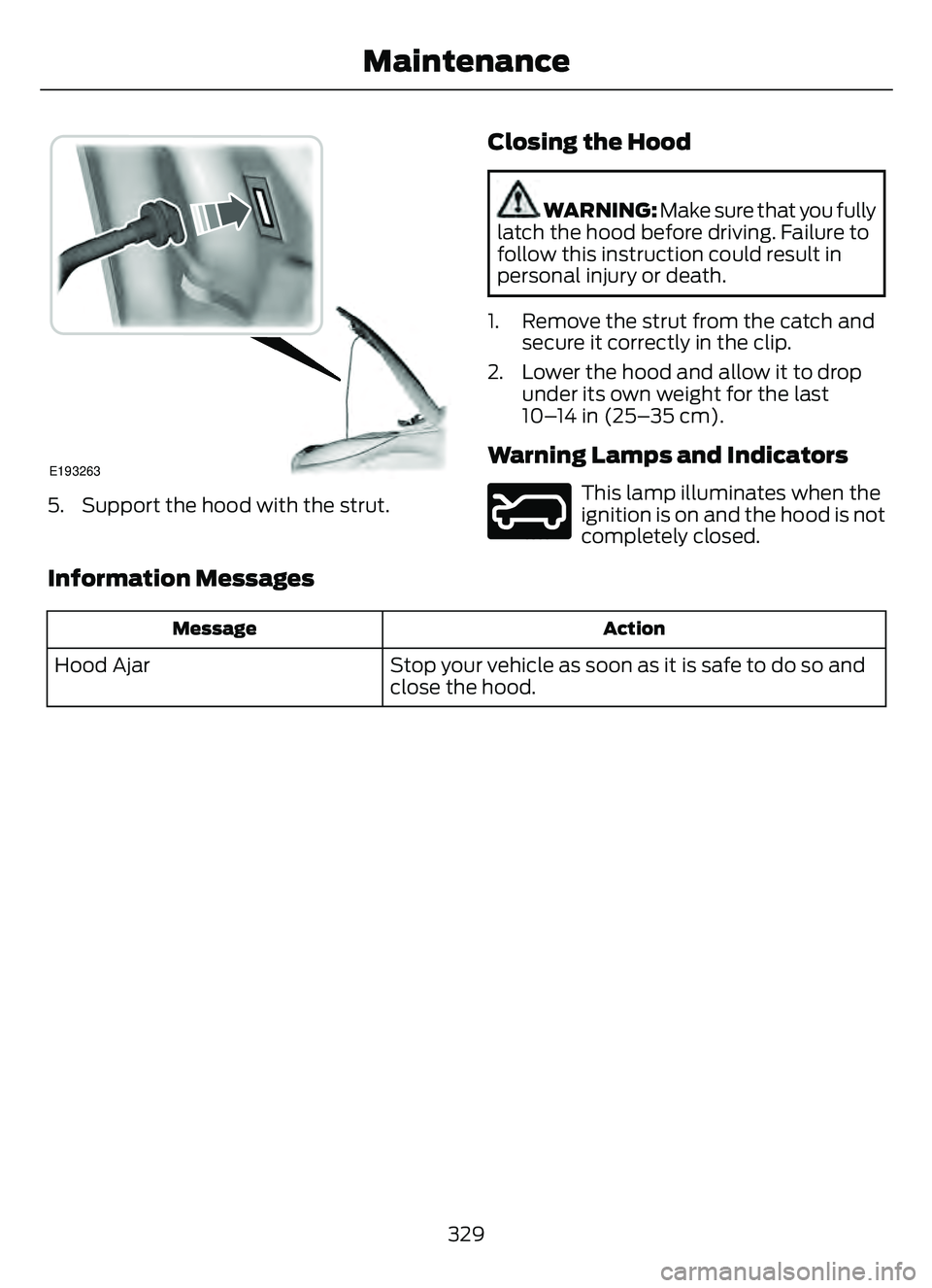
5. Support the hood with the strut.
Closing the Hood
WARNING: Make sure that you fully
latch the hood before driving. Failure to
follow this instruction could result in
personal injury or death.
1. Remove the strut from the catch and secure it correctly in the clip.
2. Lower the hood and allow it to drop under its own weight for the last
10–14 in (25–35 cm).
Warning Lamps and Indicators
E246598
This lamp illuminates when the
ignition is on and the hood is not
completely closed.
Information Messages
Action
Message
Stop your vehicle as soon as it is safe to do so and
close the hood.
Hood Ajar
329
Maintenance