2022 FORD BRONCO SPORT trans
[x] Cancel search: transPage 114 of 494
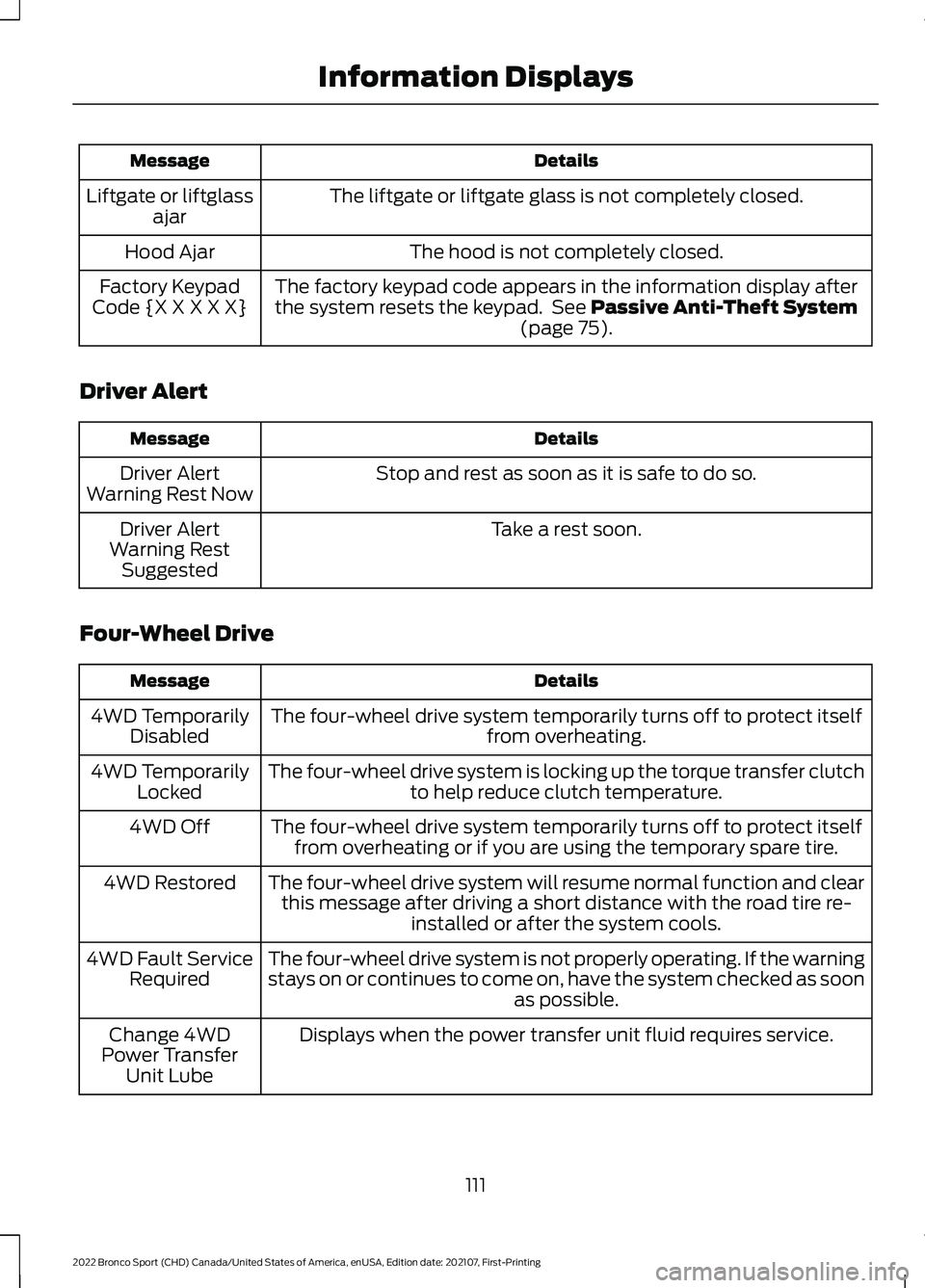
Details
Message
The liftgate or liftgate glass is not completely closed.
Liftgate or liftglass
ajar
The hood is not completely closed.
Hood Ajar
The factory keypad code appears in the information display after
the system resets the keypad. See Passive Anti-Theft System
(page 75).
Factory Keypad
Code {X X X X X}
Driver Alert Details
Message
Stop and rest as soon as it is safe to do so.
Driver Alert
Warning Rest Now
Take a rest soon.
Driver Alert
Warning Rest Suggested
Four-Wheel Drive Details
Message
The four-wheel drive system temporarily turns off to protect itself from overheating.
4WD Temporarily
Disabled
The four-wheel drive system is locking up the torque transfer clutch to help reduce clutch temperature.
4WD Temporarily
Locked
The four-wheel drive system temporarily turns off to protect itselffrom overheating or if you are using the temporary spare tire.
4WD Off
The four-wheel drive system will resume normal function and clearthis message after driving a short distance with the road tire re- installed or after the system cools.
4WD Restored
The four-wheel drive system is not properly operating. If the warning
stays on or continues to come on, have the system checked as soon as possible.
4WD Fault Service
Required
Displays when the power transfer unit fluid requires service.
Change 4WD
Power Transfer Unit Lube
111
2022 Bronco Sport (CHD) Canada/United States of America, enUSA, Edition date: 202107, First-Printing Information Displays
Page 115 of 494

Details
Message
Displays when you have the power transfer unit fluid changed and reset to new.
4WD Power
Transfer Unit Lube Set to New
The selected drive mode does not allow you to turn on the rear differential lock feature.
Rear Differential
Lock Not Available in Current Drive Mode
The selected drive mode requires your vehicle to be in four-wheel drive.
4WD Lock
Required in Current Drive Mode
Fuel Details
Message
An early reminder of a low fuel condition.
Fuel Level Low
The fuel fill inlet may not be properly closed.
Check Fuel Fill
Inlet
Wait for up to 15 seconds while the fuel system depressurizes.
Fuel Door Opening
The fuel system has finished depressurizing and you can begin to
refuel.
Fuel Door Open
A reminder to close the fuel door. Failure to follow this instruction
can cause the check engine light to illuminate.
Close Fuel Door to
Avoid ""CheckEngine"" Light
There is an error in attempting to refill your vehicle.
Refuel Error See
Manual
Hill Start Assist Details
Message
Hill start assist is not available. Have the system checked as soonas possible. See Hill Start Assist (page 184).
Hill Start Assist
Not Available
112
2022 Bronco Sport (CHD) Canada/United States of America, enUSA, Edition date: 202107, First-Printing Information Displays
Page 118 of 494
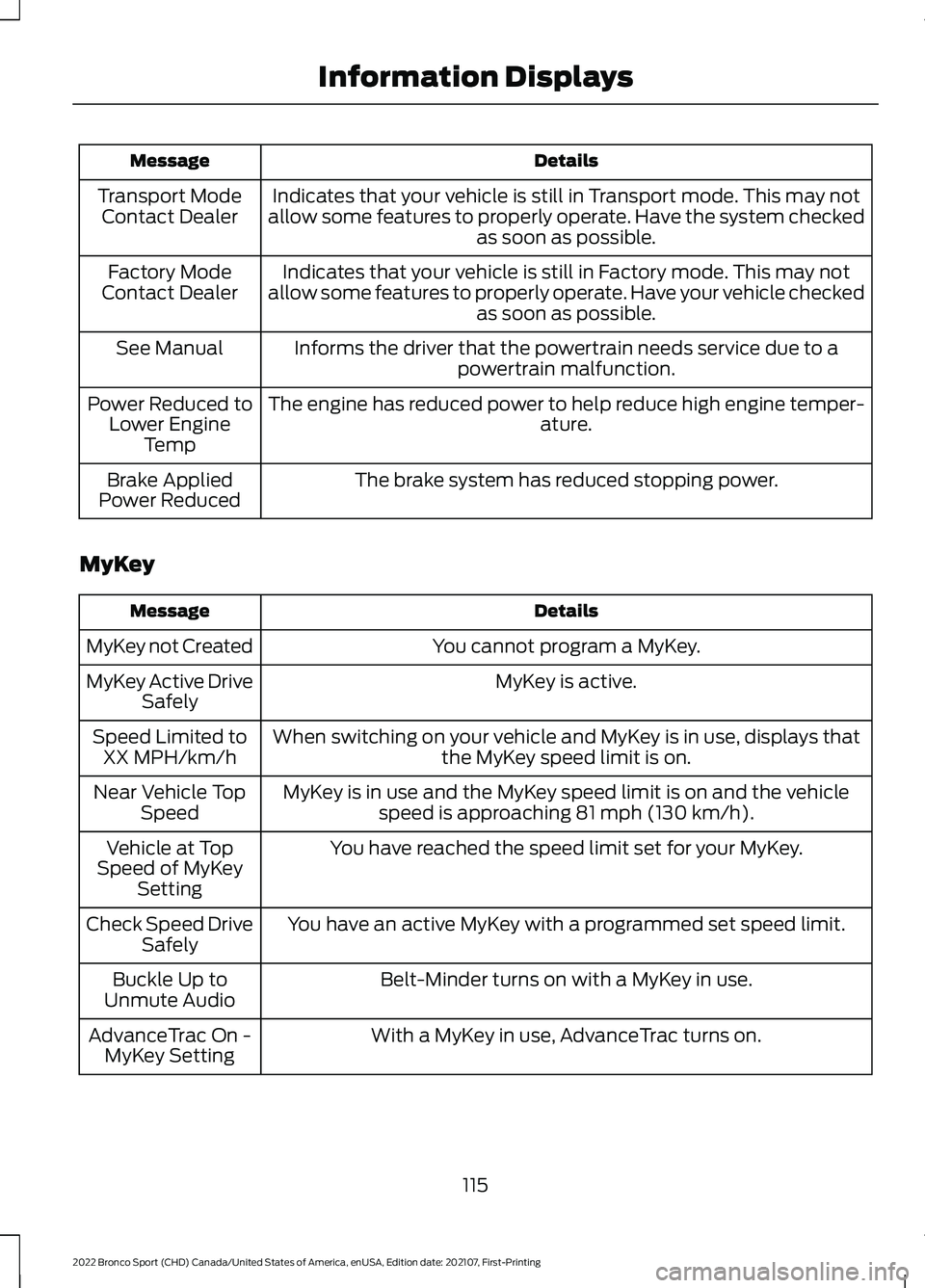
Details
Message
Indicates that your vehicle is still in Transport mode. This may not
allow some features to properly operate. Have the system checked as soon as possible.
Transport Mode
Contact Dealer
Indicates that your vehicle is still in Factory mode. This may not
allow some features to properly operate. Have your vehicle checked as soon as possible.
Factory Mode
Contact Dealer
Informs the driver that the powertrain needs service due to apowertrain malfunction.
See Manual
The engine has reduced power to help reduce high engine temper- ature.
Power Reduced to
Lower Engine Temp
The brake system has reduced stopping power.
Brake Applied
Power Reduced
MyKey Details
Message
You cannot program a MyKey.
MyKey not Created
MyKey is active.
MyKey Active Drive
Safely
When switching on your vehicle and MyKey is in use, displays that the MyKey speed limit is on.
Speed Limited to
XX MPH/km/h
MyKey is in use and the MyKey speed limit is on and the vehiclespeed is approaching 81 mph (130 km/h).
Near Vehicle Top
Speed
You have reached the speed limit set for your MyKey.
Vehicle at Top
Speed of MyKey Setting
You have an active MyKey with a programmed set speed limit.
Check Speed Drive
Safely
Belt-Minder turns on with a MyKey in use.
Buckle Up to
Unmute Audio
With a MyKey in use, AdvanceTrac turns on.
AdvanceTrac On -
MyKey Setting
115
2022 Bronco Sport (CHD) Canada/United States of America, enUSA, Edition date: 202107, First-Printing Information Displays
Page 123 of 494
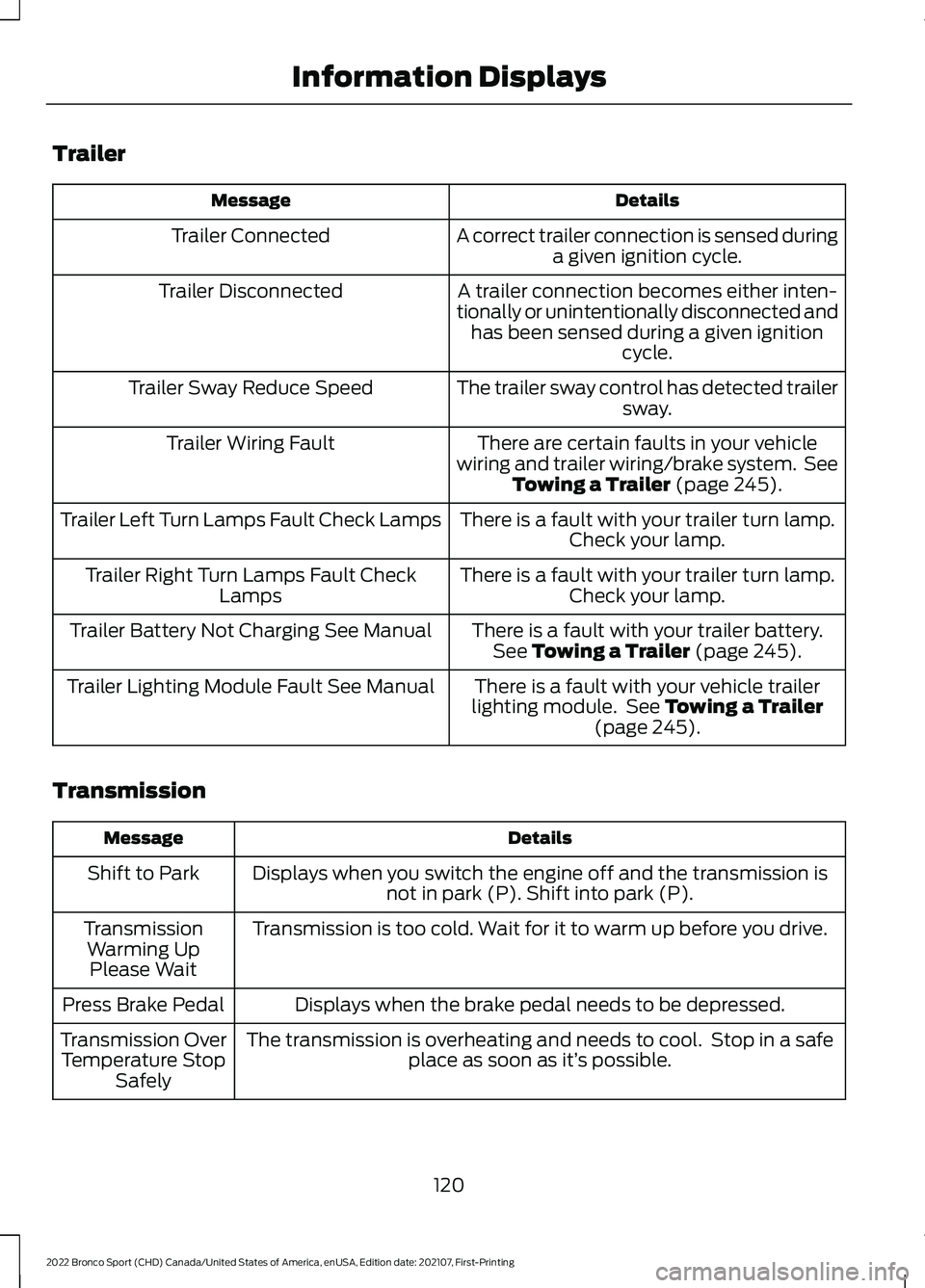
Trailer
Details
Message
A correct trailer connection is sensed duringa given ignition cycle.
Trailer Connected
A trailer connection becomes either inten-
tionally or unintentionally disconnected and has been sensed during a given ignition cycle.
Trailer Disconnected
The trailer sway control has detected trailersway.
Trailer Sway Reduce Speed
There are certain faults in your vehicle
wiring and trailer wiring/brake system. See Towing a Trailer (page 245).
Trailer Wiring Fault
There is a fault with your trailer turn lamp.Check your lamp.
Trailer Left Turn Lamps Fault Check Lamps
There is a fault with your trailer turn lamp.Check your lamp.
Trailer Right Turn Lamps Fault Check
Lamps
There is a fault with your trailer battery.See
Towing a Trailer (page 245).
Trailer Battery Not Charging See Manual
There is a fault with your vehicle trailer
lighting module. See
Towing a Trailer
(page 245).
Trailer Lighting Module Fault See Manual
Transmission Details
Message
Displays when you switch the engine off and the transmission isnot in park (P). Shift into park (P).
Shift to Park
Transmission is too cold. Wait for it to warm up before you drive.
Transmission
Warming UpPlease Wait
Displays when the brake pedal needs to be depressed.
Press Brake Pedal
The transmission is overheating and needs to cool. Stop in a safeplace as soon as it’ s possible.
Transmission Over
Temperature Stop Safely
120
2022 Bronco Sport (CHD) Canada/United States of America, enUSA, Edition date: 202107, First-Printing Information Displays
Page 124 of 494
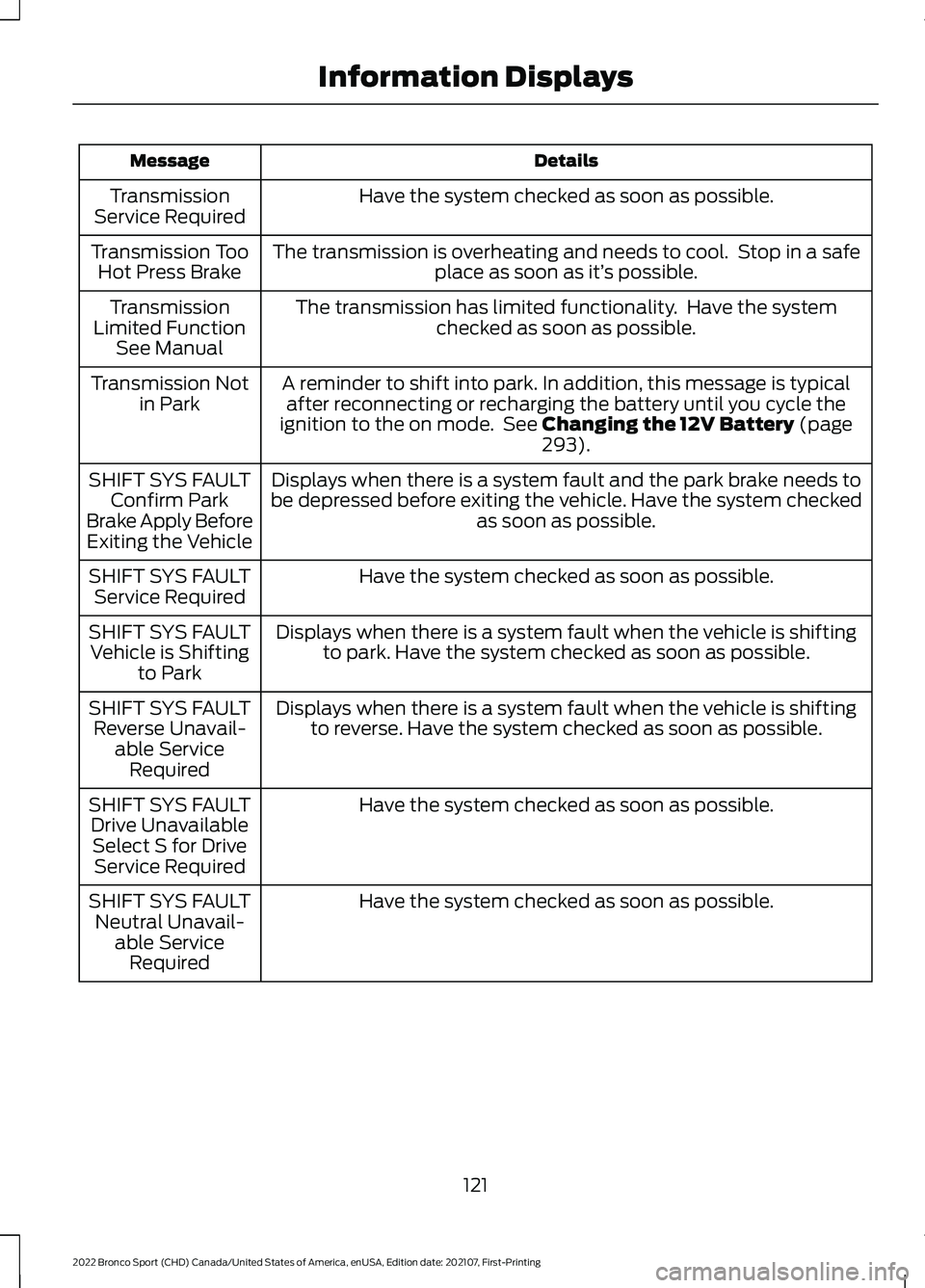
Details
Message
Have the system checked as soon as possible.
Transmission
Service Required
The transmission is overheating and needs to cool. Stop in a safeplace as soon as it’ s possible.
Transmission Too
Hot Press Brake
The transmission has limited functionality. Have the systemchecked as soon as possible.
Transmission
Limited Function See Manual
A reminder to shift into park. In addition, this message is typicalafter reconnecting or recharging the battery until you cycle the
ignition to the on mode. See Changing the 12V Battery (page
293).
Transmission Not
in Park
Displays when there is a system fault and the park brake needs to
be depressed before exiting the vehicle. Have the system checked as soon as possible.
SHIFT SYS FAULT
Confirm Park
Brake Apply Before Exiting the Vehicle
Have the system checked as soon as possible.
SHIFT SYS FAULT
Service Required
Displays when there is a system fault when the vehicle is shiftingto park. Have the system checked as soon as possible.
SHIFT SYS FAULT
Vehicle is Shifting to Park
Displays when there is a system fault when the vehicle is shiftingto reverse. Have the system checked as soon as possible.
SHIFT SYS FAULT
Reverse Unavail- able ServiceRequired
Have the system checked as soon as possible.
SHIFT SYS FAULT
Drive UnavailableSelect S for Drive Service Required
Have the system checked as soon as possible.
SHIFT SYS FAULT
Neutral Unavail- able ServiceRequired
121
2022 Bronco Sport (CHD) Canada/United States of America, enUSA, Edition date: 202107, First-Printing Information Displays
Page 125 of 494
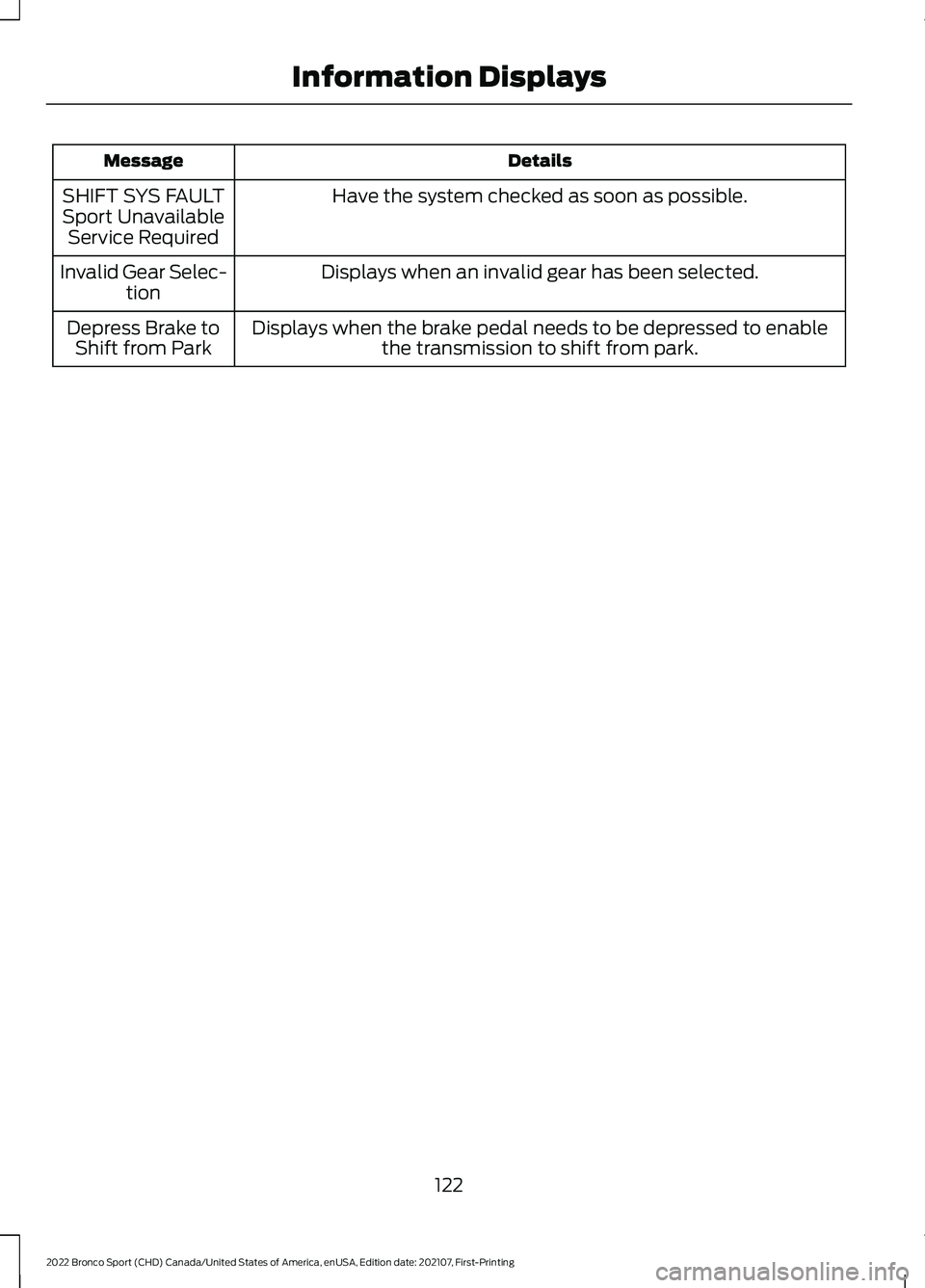
Details
Message
Have the system checked as soon as possible.
SHIFT SYS FAULT
Sport Unavailable Service Required
Displays when an invalid gear has been selected.
Invalid Gear Selec-
tion
Displays when the brake pedal needs to be depressed to enable the transmission to shift from park.
Depress Brake to
Shift from Park
122
2022 Bronco Sport (CHD) Canada/United States of America, enUSA, Edition date: 202107, First-Printing Information Displays
Page 126 of 494
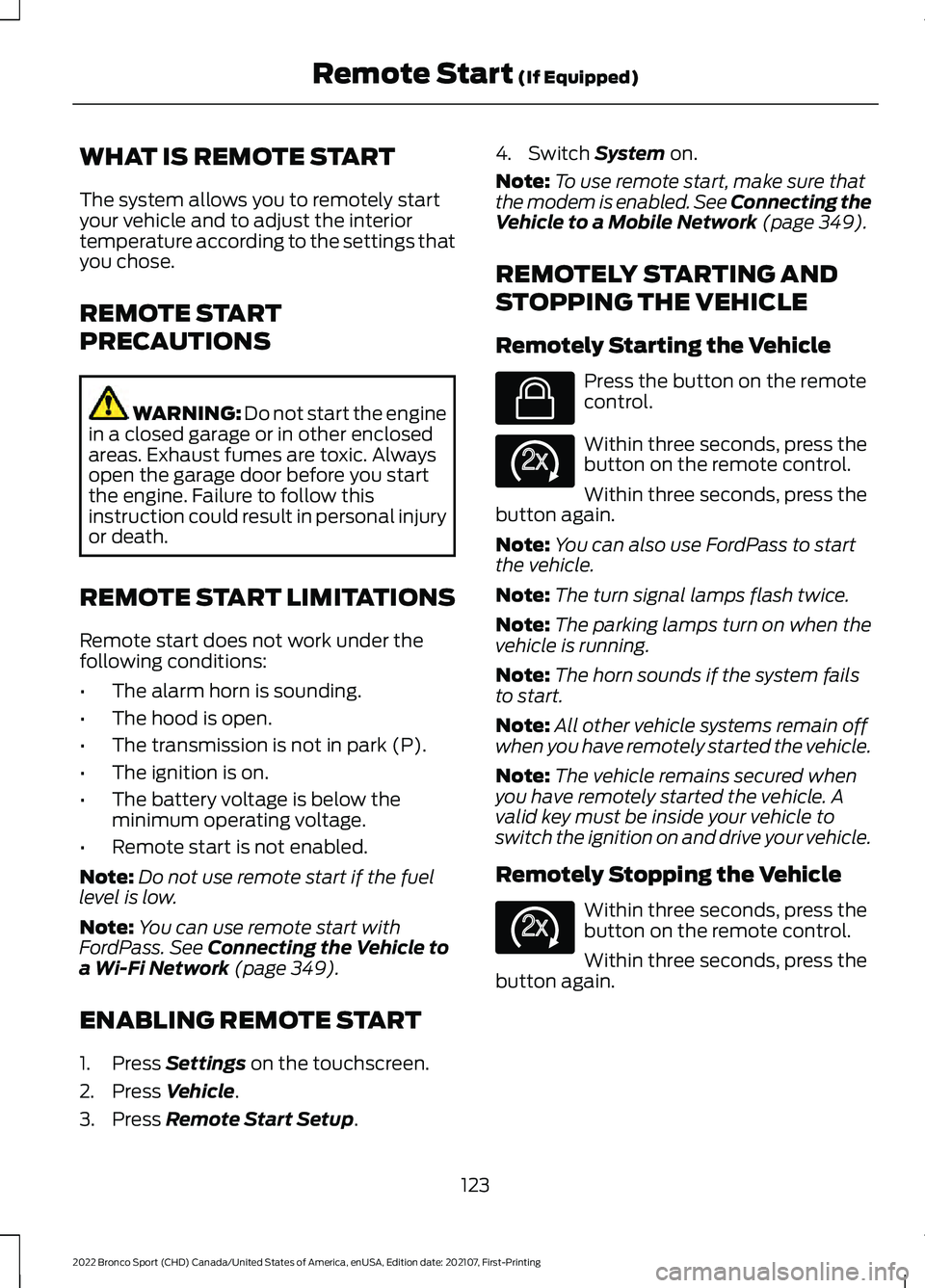
WHAT IS REMOTE START
The system allows you to remotely start
your vehicle and to adjust the interior
temperature according to the settings that
you chose.
REMOTE START
PRECAUTIONS
WARNING: Do not start the engine
in a closed garage or in other enclosed
areas. Exhaust fumes are toxic. Always
open the garage door before you start
the engine. Failure to follow this
instruction could result in personal injury
or death.
REMOTE START LIMITATIONS
Remote start does not work under the
following conditions:
• The alarm horn is sounding.
• The hood is open.
• The transmission is not in park (P).
• The ignition is on.
• The battery voltage is below the
minimum operating voltage.
• Remote start is not enabled.
Note: Do not use remote start if the fuel
level is low.
Note: You can use remote start with
FordPass. See Connecting the Vehicle to
a Wi-Fi Network (page 349).
ENABLING REMOTE START
1. Press
Settings on the touchscreen.
2. Press
Vehicle.
3. Press
Remote Start Setup. 4. Switch
System on.
Note: To use remote start, make sure that
the modem is enabled. See Connecting the
Vehicle to a Mobile Network
(page 349).
REMOTELY STARTING AND
STOPPING THE VEHICLE
Remotely Starting the Vehicle Press the button on the remote
control.
Within three seconds, press the
button on the remote control.
Within three seconds, press the
button again.
Note: You can also use FordPass to start
the vehicle.
Note: The turn signal lamps flash twice.
Note: The parking lamps turn on when the
vehicle is running.
Note: The horn sounds if the system fails
to start.
Note: All other vehicle systems remain off
when you have remotely started the vehicle.
Note: The vehicle remains secured when
you have remotely started the vehicle. A
valid key must be inside your vehicle to
switch the ignition on and drive your vehicle.
Remotely Stopping the Vehicle Within three seconds, press the
button on the remote control.
Within three seconds, press the
button again.
123
2022 Bronco Sport (CHD) Canada/United States of America, enUSA, Edition date: 202107, First-Printing Remote Start
(If Equipped)E138623 E138625 E138625
Page 155 of 494
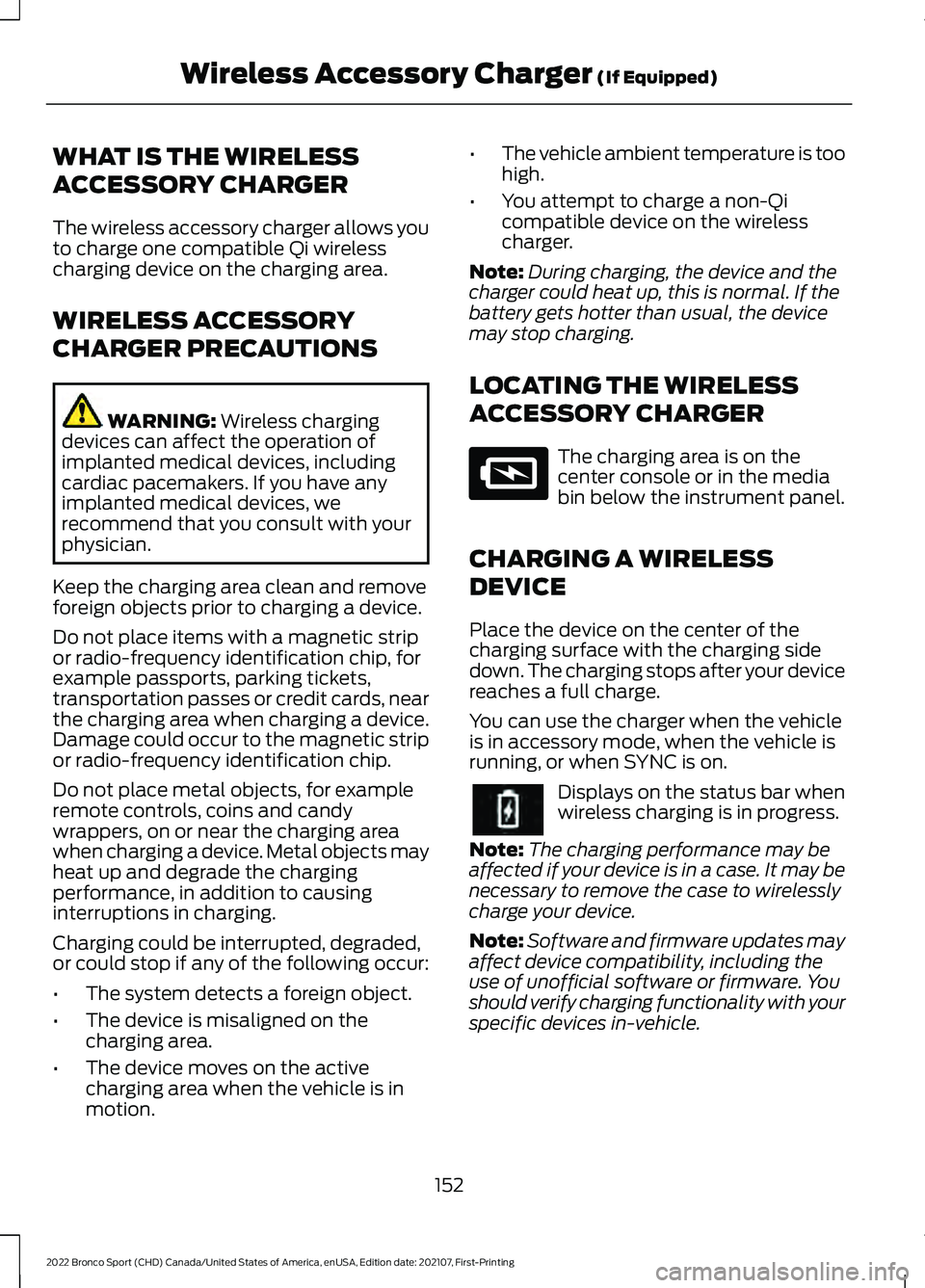
WHAT IS THE WIRELESS
ACCESSORY CHARGER
The wireless accessory charger allows you
to charge one compatible Qi wireless
charging device on the charging area.
WIRELESS ACCESSORY
CHARGER PRECAUTIONS
WARNING: Wireless charging
devices can affect the operation of
implanted medical devices, including
cardiac pacemakers. If you have any
implanted medical devices, we
recommend that you consult with your
physician.
Keep the charging area clean and remove
foreign objects prior to charging a device.
Do not place items with a magnetic strip
or radio-frequency identification chip, for
example passports, parking tickets,
transportation passes or credit cards, near
the charging area when charging a device.
Damage could occur to the magnetic strip
or radio-frequency identification chip.
Do not place metal objects, for example
remote controls, coins and candy
wrappers, on or near the charging area
when charging a device. Metal objects may
heat up and degrade the charging
performance, in addition to causing
interruptions in charging.
Charging could be interrupted, degraded,
or could stop if any of the following occur:
• The system detects a foreign object.
• The device is misaligned on the
charging area.
• The device moves on the active
charging area when the vehicle is in
motion. •
The vehicle ambient temperature is too
high.
• You attempt to charge a non-Qi
compatible device on the wireless
charger.
Note: During charging, the device and the
charger could heat up, this is normal. If the
battery gets hotter than usual, the device
may stop charging.
LOCATING THE WIRELESS
ACCESSORY CHARGER The charging area is on the
center console or in the media
bin below the instrument panel.
CHARGING A WIRELESS
DEVICE
Place the device on the center of the
charging surface with the charging side
down. The charging stops after your device
reaches a full charge.
You can use the charger when the vehicle
is in accessory mode, when the vehicle is
running, or when SYNC is on. Displays on the status bar when
wireless charging is in progress.
Note: The charging performance may be
affected if your device is in a case. It may be
necessary to remove the case to wirelessly
charge your device.
Note: Software and firmware updates may
affect device compatibility, including the
use of unofficial software or firmware. You
should verify charging functionality with your
specific devices in-vehicle.
152
2022 Bronco Sport (CHD) Canada/United States of America, enUSA, Edition date: 202107, First-Printing Wireless Accessory Charger
(If Equipped)E297549