2022 FORD BRONCO SPORT remote control
[x] Cancel search: remote controlPage 73 of 494
•
You shift into any gear putting your
vehicle in motion.
• Your vehicle reaches a speed greater
than 4 mph (7 km/h).
Autolock repeats when:
• You open, then close any door while
the ignition is on and your vehicle speed
is
4 mph (7 km/h) or lower.
• Your vehicle reaches a speed greater
than
4 mph (7 km/h).
Autounlock
Autounlock unlocks all the doors when:
• The ignition is on, all the doors are
closed, and your vehicle has been
moving at a speed greater than
7 mph
(12 km/h).
• Your vehicle comes to a stop and you
switch the ignition off or to the
accessory position.
• You open the driver door within 10
minutes of switching the ignition off or
to accessory.
Note: The doors do not autounlock if you
electronically lock your vehicle after you
switch the ignition off and before you open
the driver door.
Enabling or Disabling Autounlock
To enable or disable autounlock, see an
authorized dealer.
Auto Relock
If you press the unlock button on the
remote control and do not open a door
within 45 seconds, your vehicle locks and
the alarm arms.
Illuminated Entry
The interior lamps and some exterior
lamps illuminate when you unlock the
doors with the remote control. The illuminated entry system turns off the
lights if:
•
The ignition is on.
• You press the remote control lock
button.
• After 25 seconds of illumination.
The lights do not turn off if:
• You turn them on with the lamp
control.
• Any door is open.
Illuminated Exit
The interior lamps and some exterior
lamps illuminate when all doors are closed
and you switch the ignition off.
The lamps turn off if all the doors remain
closed and:
• More than 25 seconds have elapsed.
• You lock your vehicle from the outside.
Battery Saver
If you leave the courtesy lamps, interior
lamps or headlamps on, the battery saver
shuts them off 10 minutes after you switch
the ignition off.
Accessory Mode Battery Saver for
Passive Keys
If you leave the ignition on after leaving
your vehicle, it turns off 15 minutes after
you close all of the doors.
KEYLESS ENTRY
(IF EQUIPPED)
SECURICODE™ KEYLESS ENTRY
KEYPAD
The keypad is located near the driver
window. It is invisible until touched and
then it lights up so you can see and touch
the appropriate buttons.
70
2022 Bronco Sport (CHD) Canada/United States of America, enUSA, Edition date: 202107, First-Printing Doors and Locks
Page 75 of 494
Erasing a Personal Entry Code Using
the Keypad
1. Enter the factory-set five-digit code.
2. Press and release 1·2 on the keypad
within five seconds.
3. Press and hold 1·2 for two seconds. Do
this within five seconds of completing
Step 2.
All personal codes erase and only the
factory-set five-digit code works.
Creating a Personal Entry Codes Using
the Touchscreen
You can create or erase your own personal
entry code through the touchscreen
settings. See
Settings (page 391).
Anti-Scan Feature
The keypad goes into an anti-scan mode
if you enter the wrong code 7 times, or 35
button presses. This mode disables the
keypad for one minute and the keypad
lamp flashes.
The anti-scan feature turns off after:
• One minute of keypad inactivity.
• Pressing the unlock button on the
remote control.
• Switching the ignition on.
• Unlocking the vehicle using intelligent
access.
Unlocking and Locking the Doors
To Unlock the Driver Door
Enter the factory-set five-digit code or your
personal code. You must press each
number within five seconds of each other.
The interior lamps illuminate.
Note: All doors unlock if you disable the
two-stage unlocking feature. See
Locking
and Unlocking (page 68). To Unlock All Doors
Enter the factory-set code or your personal
code, then press
3·4 within five seconds.
To Lock All Doors
Press and hold
7·8 and 9·0 at the same
time with the driver door closed. You do
not need to enter the keypad code first.
72
2022 Bronco Sport (CHD) Canada/United States of America, enUSA, Edition date: 202107, First-Printing Doors and Locks
Page 76 of 494
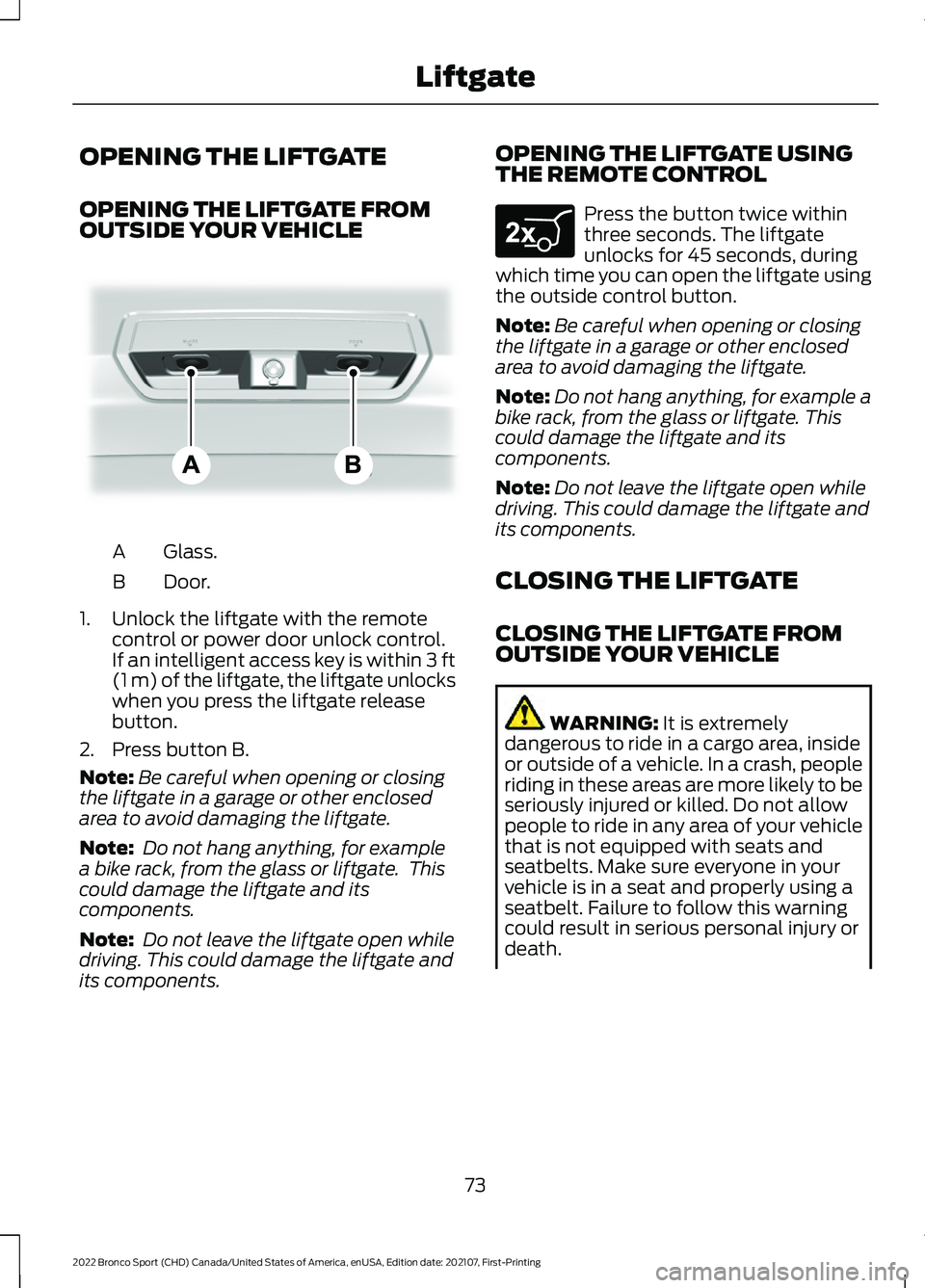
OPENING THE LIFTGATE
OPENING THE LIFTGATE FROM
OUTSIDE YOUR VEHICLE
Glass.
A
Door.
B
1. Unlock the liftgate with the remote control or power door unlock control.
If an intelligent access key is within 3 ft
(1 m) of the liftgate, the liftgate unlocks
when you press the liftgate release
button.
2. Press button B.
Note: Be careful when opening or closing
the liftgate in a garage or other enclosed
area to avoid damaging the liftgate.
Note: Do not hang anything, for example
a bike rack, from the glass or liftgate. This
could damage the liftgate and its
components.
Note: Do not leave the liftgate open while
driving. This could damage the liftgate and
its components. OPENING THE LIFTGATE USING
THE REMOTE CONTROL Press the button twice within
three seconds. The liftgate
unlocks for 45 seconds, during
which time you can open the liftgate using
the outside control button.
Note: Be careful when opening or closing
the liftgate in a garage or other enclosed
area to avoid damaging the liftgate.
Note: Do not hang anything, for example a
bike rack, from the glass or liftgate. This
could damage the liftgate and its
components.
Note: Do not leave the liftgate open while
driving. This could damage the liftgate and
its components.
CLOSING THE LIFTGATE
CLOSING THE LIFTGATE FROM
OUTSIDE YOUR VEHICLE WARNING:
It is extremely
dangerous to ride in a cargo area, inside
or outside of a vehicle. In a crash, people
riding in these areas are more likely to be
seriously injured or killed. Do not allow
people to ride in any area of your vehicle
that is not equipped with seats and
seatbelts. Make sure everyone in your
vehicle is in a seat and properly using a
seatbelt. Failure to follow this warning
could result in serious personal injury or
death.
73
2022 Bronco Sport (CHD) Canada/United States of America, enUSA, Edition date: 202107, First-Printing LiftgateE323752 E267940
Page 77 of 494
WARNING: Make sure that you fully
close the liftgate to prevent exhaust
fumes from entering your vehicle. If you
are unable to fully close the liftgate,
open the air vents or the windows to
allow fresh air to enter your vehicle.
Failure to follow this instruction could
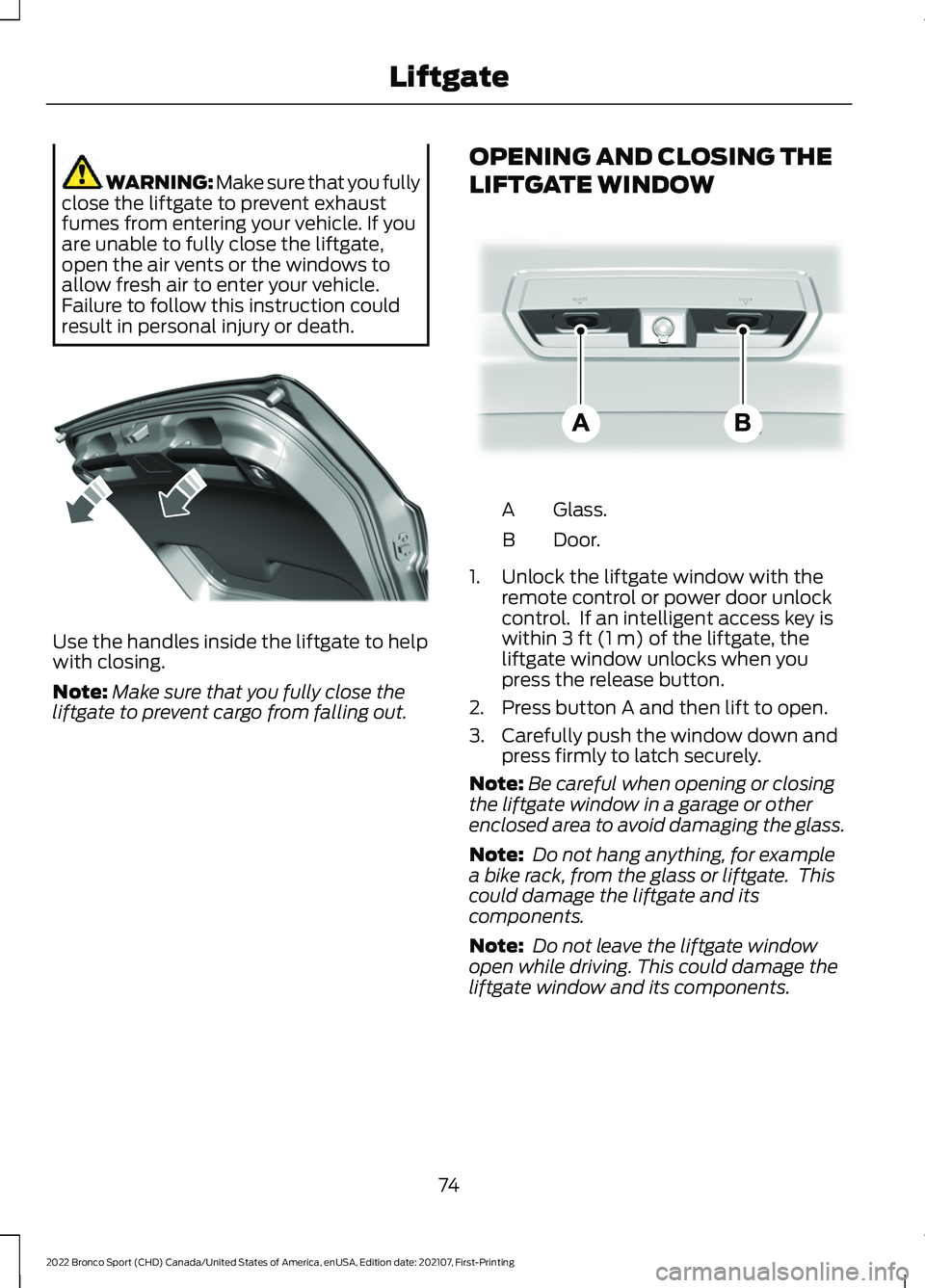
result in personal injury or death. Use the handles inside the liftgate to help
with closing.
Note:
Make sure that you fully close the
liftgate to prevent cargo from falling out. OPENING AND CLOSING THE
LIFTGATE WINDOW Glass.
A
Door.
B
1. Unlock the liftgate window with the remote control or power door unlock
control. If an intelligent access key is
within
3 ft (1 m) of the liftgate, the
liftgate window unlocks when you
press the release button.
2. Press button A and then lift to open.
3. Carefully push the window down and press firmly to latch securely.
Note: Be careful when opening or closing
the liftgate window in a garage or other
enclosed area to avoid damaging the glass.
Note: Do not hang anything, for example
a bike rack, from the glass or liftgate. This
could damage the liftgate and its
components.
Note: Do not leave the liftgate window
open while driving. This could damage the
liftgate window and its components.
74
2022 Bronco Sport (CHD) Canada/United States of America, enUSA, Edition date: 202107, First-Printing LiftgateE327259 E323752
Page 78 of 494
PASSIVE ANTI-THEFT
SYSTEM
Note:
The system is not compatible with
non-Ford aftermarket remote start systems.
Use of these systems could result in vehicle
starting problems and a loss of security
protection.
Note: Metallic objects, electronic devices
or a second coded key on the same key
chain could cause vehicle starting problems
if they are too close to the key when starting
the engine. Prevent these objects from
touching the coded key while starting the
engine. Switch the ignition off, move all
objects on the key chain away from the
coded key and restart the engine if a
problem occurs.
Note: Do not leave a duplicate coded key
in the vehicle. Always take your keys and
lock all doors when leaving the vehicle.
SecuriLock®
The system is an engine immobilization
system. It helps to prevent anyone from
starting the engine without using a coded
key programmed to your vehicle. Using the
wrong key could prevent the engine from
starting. A message may appear in the
information display.
If you are unable to start the engine with a
correctly coded key, there is a problem with
the system and a message could appear
in the information display.
Automatic Arming
The vehicle arms immediately after you
switch the ignition off.
Automatic Disarming
Switching the ignition on with a coded key
disarms the vehicle. Replacement Keys
Note:
Your vehicle comes with two
integrated keyhead transmitters or two
intelligent access keys.
The integrated keyhead transmitter
functions as a programmed ignition key
that operates all the locks and starts the
vehicle, as well as a remote control.
The intelligent access key functions as a
programmed key that operates the driver
door lock and activates the intelligent
access with push button start system, as
well as a remote control.
If your programmed transmitters or
standard SecuriLock coded keys
(integrated keyhead transmitters only) are
lost or stolen and you do not have an extra
coded key, you will need to have your
vehicle towed to an authorized dealer. You
need to erase the key codes from your
vehicle and program new coded keys.
Store an extra programmed key away from
the vehicle in a safe place to help prevent
any inconveniences. See your authorized
dealer to purchase additional spare or
replacement keys.
Programming a Spare Intelligent
Access Key (If Equipped)
See your authorized dealer to have
additional keys programmed to your
vehicle.
ANTI-THEFT ALARM
The system will warn you of an
unauthorized entry to your vehicle. It will
be triggered if any door, the luggage
compartment or the hood is opened
without using the key, remote control or
keyless entry keypad.
The direction indicators will flash and the
horn will sound if unauthorized entry is
attempted while the alarm is armed.
75
2022 Bronco Sport (CHD) Canada/United States of America, enUSA, Edition date: 202107, First-Printing Security
Page 79 of 494
Take all remote controls to an authorized
dealer if there is any potential alarm
problem with your vehicle.
Arming the Alarm
The alarm is ready to arm when there is
not a key in the ignition. Electronically lock
the vehicle to arm the alarm.
The message indicator flashes
when theft protection is active.
Disarming the Alarm
Disarm the alarm by any of the following
actions:
• Unlock the doors or luggage
compartment with the remote control
or keyless entry keypad.
• Switch the ignition on or start the
vehicle.
• Use a key in the driver ’s door to unlock
the vehicle, then switch the ignition on
within 12 seconds.
Note: Pressing the panic button on the
remote control will stop the horn and signal
indicators, but will not disarm the system.
76
2022 Bronco Sport (CHD) Canada/United States of America, enUSA, Edition date: 202107, First-Printing Security
Page 90 of 494

Push the lever up or down to switch the
direction indicators on.
Note:
Tap the lever up or down to make the
direction indicators flash three times.
Set the lever to the middle position to
switch the direction indicators off.
Direction Indicator Flashes when you switch the
direction indicators on.
Note: An increase in the rate of flashing
warns of a failed indicator bulb.
INTERIOR LAMPS
Switching All of the Interior Lamps
On Fully press the button on the
overhead console towards the
icon.
Switching All of the Interior Lamps
Off Fully press the button on the
overhead console towards the
icon.
Interior Lamp Function
Switching the Interior Lamp Function
On
The switch is on the overhead console. Set the switch to the middle position.
When you switch the interior lamp function
on, the interior lamps turn on if:
•
You open a door.
• You press the unlock button on the
remote control.
• You switch the ignition off.
Switching the Front Interior Lamps
On and Off Press the edge of the lamp lens.
Switching the Rear Interior Lamps
On and Off
Press the edge of the lamp lens.
Note:
If the rear lamps are switched on
through the overhead console, you cannot
switch them off with the rear lamp switch.
AMBIENT LIGHTING (IF EQUIPPED)
Use the touchscreen to select the
following: Select the settings option on the
feature bar.
Select
Vehicle.
Select
Ambient Light.
87
2022 Bronco Sport (CHD) Canada/United States of America, enUSA, Edition date: 202107, First-Printing Lighting E299443 E249791 E280315
Page 95 of 494
3.
Lift and hold the switch again for a few
seconds.
4. Release the switch.
5. Lift and hold the switch again for a few
seconds.
6. Release the switch.
7. Press and hold the switch until the window is fully open.
8. Lift and hold the switch until the window is fully closed.
9. Release the switch.
10. Open the window and then try to close it using one-touch close.
Note: Repeat the procedure if the window
does not close when you use one-touch.
Accessory Delay
You can use the window controls for
several minutes after switching off the
ignition or until opening either front door.
GLOBAL OPENING AND
CLOSING (IF EQUIPPED)
You can use the remote control to open
the windows with the ignition off.
Note: You can enable or disable this feature
in the information display or see an
authorized dealer. See
General
Information (page 102).
Note: To operate this feature, accessory
delay must not be active.
Opening the Windows
You can only open the windows for a short
time after you unlock your vehicle with the
remote control. After you unlock your
vehicle, press and hold the remote control
unlock button to open the windows.
Release the button once movement starts.
Press the lock or unlock button to stop
movement. Closing the Windows WARNING:
When closing the
power windows, verify they are free of
obstruction and make sure that children
and pets are not in the proximity of the
window openings.
To close the windows, press and hold the
remote control lock button. Release the
button once movement starts. Press the
lock or unlock button to stop movement.
EXTERIOR MIRRORS
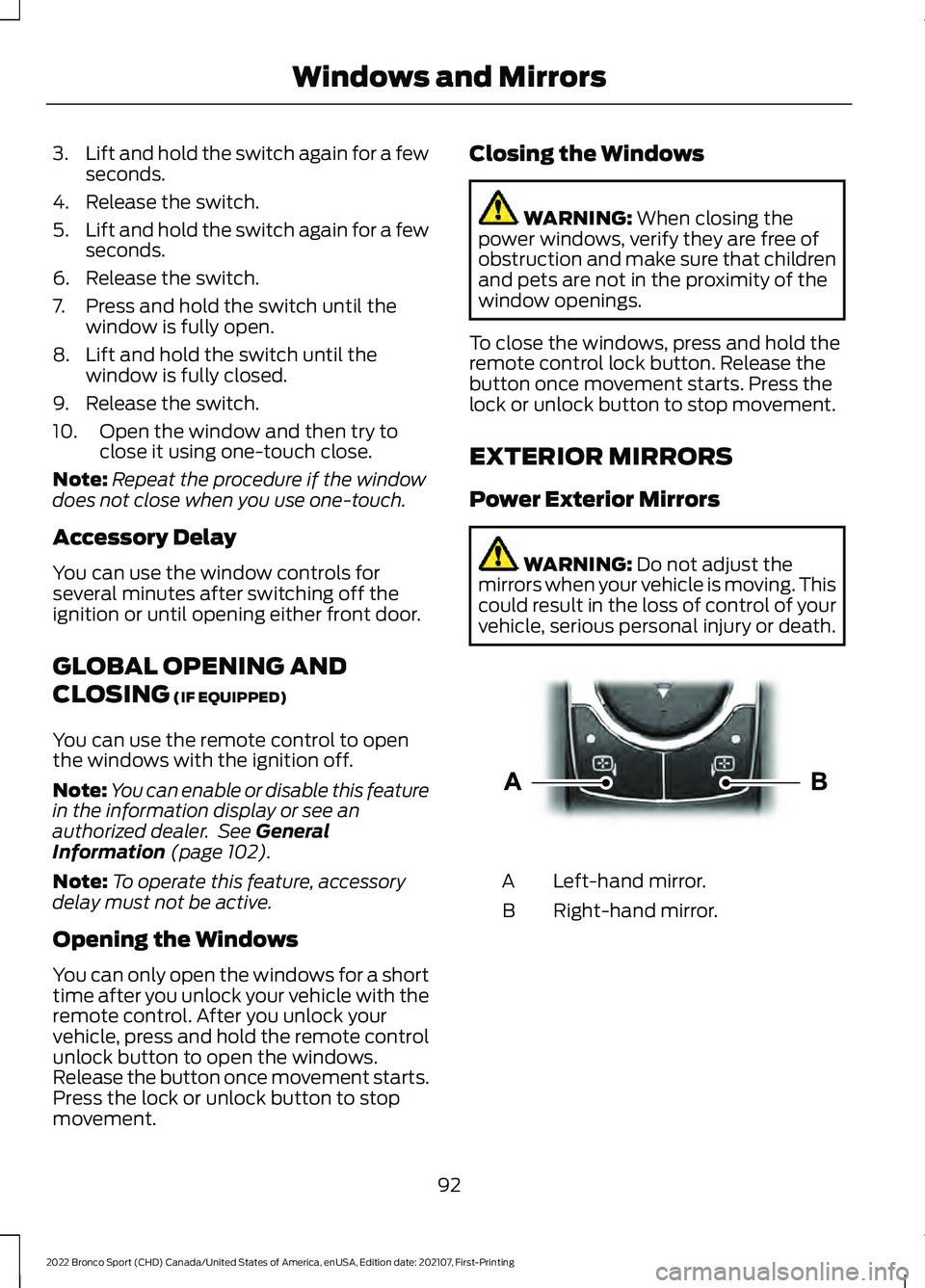
Power Exterior Mirrors WARNING:
Do not adjust the
mirrors when your vehicle is moving. This
could result in the loss of control of your
vehicle, serious personal injury or death. Left-hand mirror.
A
Right-hand mirror.
B
92
2022 Bronco Sport (CHD) Canada/United States of America, enUSA, Edition date: 202107, First-Printing Windows and MirrorsE303926