2022 FORD BRONCO SPORT Panel
[x] Cancel search: PanelPage 155 of 494
WHAT IS THE WIRELESS
ACCESSORY CHARGER
The wireless accessory charger allows you
to charge one compatible Qi wireless
charging device on the charging area.
WIRELESS ACCESSORY
CHARGER PRECAUTIONS
WARNING: Wireless charging
devices can affect the operation of
implanted medical devices, including
cardiac pacemakers. If you have any
implanted medical devices, we
recommend that you consult with your
physician.
Keep the charging area clean and remove
foreign objects prior to charging a device.
Do not place items with a magnetic strip
or radio-frequency identification chip, for
example passports, parking tickets,
transportation passes or credit cards, near
the charging area when charging a device.
Damage could occur to the magnetic strip
or radio-frequency identification chip.
Do not place metal objects, for example
remote controls, coins and candy
wrappers, on or near the charging area
when charging a device. Metal objects may
heat up and degrade the charging
performance, in addition to causing
interruptions in charging.
Charging could be interrupted, degraded,
or could stop if any of the following occur:
• The system detects a foreign object.
• The device is misaligned on the
charging area.
• The device moves on the active
charging area when the vehicle is in
motion. •
The vehicle ambient temperature is too
high.
• You attempt to charge a non-Qi
compatible device on the wireless
charger.
Note: During charging, the device and the
charger could heat up, this is normal. If the
battery gets hotter than usual, the device
may stop charging.
LOCATING THE WIRELESS
ACCESSORY CHARGER The charging area is on the
center console or in the media
bin below the instrument panel.
CHARGING A WIRELESS
DEVICE
Place the device on the center of the
charging surface with the charging side
down. The charging stops after your device
reaches a full charge.
You can use the charger when the vehicle
is in accessory mode, when the vehicle is
running, or when SYNC is on. Displays on the status bar when
wireless charging is in progress.
Note: The charging performance may be
affected if your device is in a case. It may be
necessary to remove the case to wirelessly
charge your device.
Note: Software and firmware updates may
affect device compatibility, including the
use of unofficial software or firmware. You
should verify charging functionality with your
specific devices in-vehicle.
152
2022 Bronco Sport (CHD) Canada/United States of America, enUSA, Edition date: 202107, First-Printing Wireless Accessory Charger
(If Equipped)E297549
Page 164 of 494
•
Your vehicle is moving.
• The interior compartment does not
meet customer comfort when air
conditioning or heat is on.
• Fogging of the windows could occur
and the air conditioning is on.
• The battery is not within optimal
operating conditions.
• You exceed the maximum engine off
time.
• You press the Auto-Start-Stop button
while the engine is stopped.
• The heated windshield is turned on.
Any of the following conditions could result
in an automatic restart of the engine if:
• The blower fan speed increases or the
climate control temperature changes.
• You plug in or switch on an electrical
accessory.
Disabling Auto-Start-Stop
Press the Auto-Start-Stop button on the
instrument panel to switch the system off.
The button illuminates. The system
deactivates for the current ignition cycle
only. Press the button again to restore the
Auto-Start-Stop function.
If your vehicle is in an Auto-Start-Stop
state and you shift the transmission to
reverse without pressing the brake, a
message appears telling you to press the
brake. Press the brake pedal within 60
seconds, or shift into park (P) and
manually restart your vehicle.
Note: If the Shift to P, Restart Engine
message appears and the amber
Auto-Start-Stop indicator light is flashing,
automatic restart is not available. Manually
restart your vehicle. See Information
Displays (page 102).
161
2022 Bronco Sport (CHD) Canada/United States of America, enUSA, Edition date: 202107, First-Printing Unique Driving Characteristics
Page 179 of 494
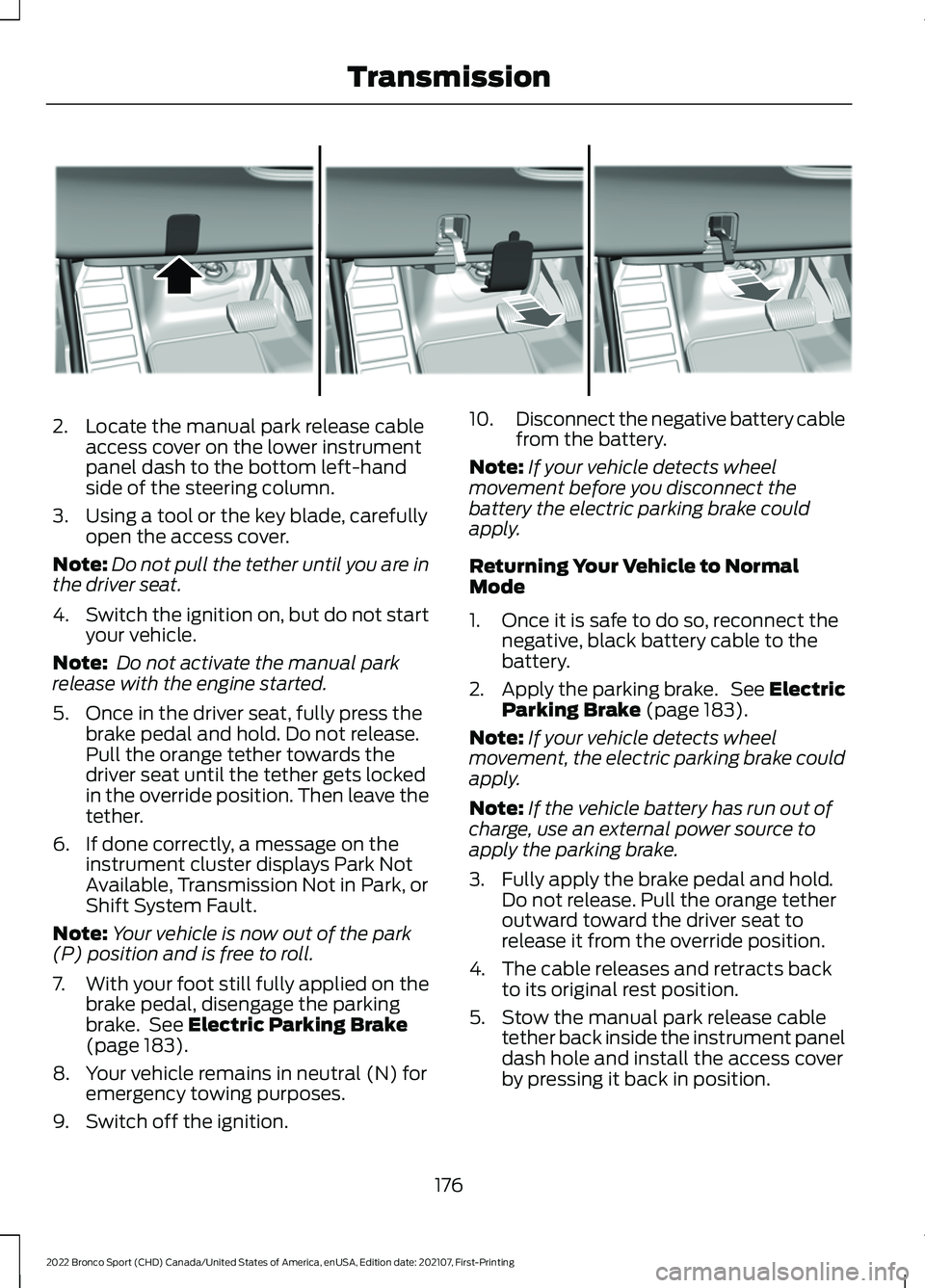
2. Locate the manual park release cable
access cover on the lower instrument
panel dash to the bottom left-hand
side of the steering column.
3. Using a tool or the key blade, carefully open the access cover.
Note: Do not pull the tether until you are in
the driver seat.
4. Switch the ignition on, but do not start
your vehicle.
Note: Do not activate the manual park
release with the engine started.
5. Once in the driver seat, fully press the brake pedal and hold. Do not release.
Pull the orange tether towards the
driver seat until the tether gets locked
in the override position. Then leave the
tether.
6. If done correctly, a message on the instrument cluster displays Park Not
Available, Transmission Not in Park, or
Shift System Fault.
Note: Your vehicle is now out of the park
(P) position and is free to roll.
7. With your foot still fully applied on the
brake pedal, disengage the parking
brake. See Electric Parking Brake
(page 183).
8. Your vehicle remains in neutral (N) for emergency towing purposes.
9. Switch off the ignition. 10.
Disconnect the negative battery cable
from the battery.
Note: If your vehicle detects wheel
movement before you disconnect the
battery the electric parking brake could
apply.
Returning Your Vehicle to Normal
Mode
1. Once it is safe to do so, reconnect the negative, black battery cable to the
battery.
2. Apply the parking brake. See Electric
Parking Brake
(page 183).
Note: If your vehicle detects wheel
movement, the electric parking brake could
apply.
Note: If the vehicle battery has run out of
charge, use an external power source to
apply the parking brake.
3. Fully apply the brake pedal and hold. Do not release. Pull the orange tether
outward toward the driver seat to
release it from the override position.
4. The cable releases and retracts back to its original rest position.
5. Stow the manual park release cable tether back inside the instrument panel
dash hole and install the access cover
by pressing it back in position.
176
2022 Bronco Sport (CHD) Canada/United States of America, enUSA, Edition date: 202107, First-Printing TransmissionE307867
Page 186 of 494
ELECTRIC PARKING BRAKE
WARNING: Always fully apply the
parking brake and make sure you shift
into park (P). Failure to follow this
instruction could result in personal injury
or death. WARNING:
If you drive extended
distances with the parking brake applied,
you could cause damage to the brake
system. WARNING:
The electric parking
brake does not operate if the vehicle
battery is running out of charge.
Your vehicle has an electric parking brake.
You operate it with a switch instead of a
lever. The switch is on the center console
or to the left-hand side of the steering
wheel, on the lower part of the instrument
panel.
Note: The electric parking brake makes
noises during operation. This is normal.
Applying the Electric Parking
Brake Pull the switch upward.
The red warning lamp flashes
during operation and illuminates
when the parking brake is
applied. Note:
It remains illuminated for a short
period of time after you switch the ignition
off. If it continues to flash or does not
illuminate, the system has malfunctioned.
Have your vehicle checked as soon as
possible.
Note:
You can apply the electric parking
brake when the ignition is off.
Note: The electric parking brake could
automatically apply when you shift into park
(P). See
Transmission (page 172).
Applying the Electric Parking Brake in
an Emergency
Note: Do not apply the electric parking
brake when your vehicle is moving, except
in an emergency. If you repeatedly use the
electric parking brake to slow or stop your
vehicle, you could cause damage to the
brake system.
You can use the electric parking brake to
slow or stop your vehicle in an emergency. Pull the switch upward and hold
it.
The red warning lamp
illuminates, a tone sounds and
the stoplamps turn on.
The electric parking brake continues to
slow your vehicle down unless you release
the switch.
Manually Releasing the Electric
Parking Brake
Switch the ignition on.
Press and hold the brake pedal.
Push the switch downward.
The red warning lamp turns off.
183
2022 Bronco Sport (CHD) Canada/United States of America, enUSA, Edition date: 202107, First-Printing BrakesE267156 E270480 E267156 E270480 E267156 E270480
Page 208 of 494
WARNING: The system only warns
of vehicles detected by the radar and
camera sensors. In some cases there
may be no warning or a delayed warning.
Apply the brakes when necessary. Failure
to follow this instruction could result in
personal injury or death. WARNING:
The system may not
detect stationary or slow moving
vehicles below
6 mph (10 km/h). WARNING:
The system does not
detect pedestrians or objects in the road. WARNING:
The system does not
detect oncoming vehicles in the same
lane. WARNING:
The system may not
operate properly if the sensor is blocked.
Keep the windshield free from
obstruction. WARNING:
The sensor may
incorrectly track lane markings as other
structures or objects. This can result in
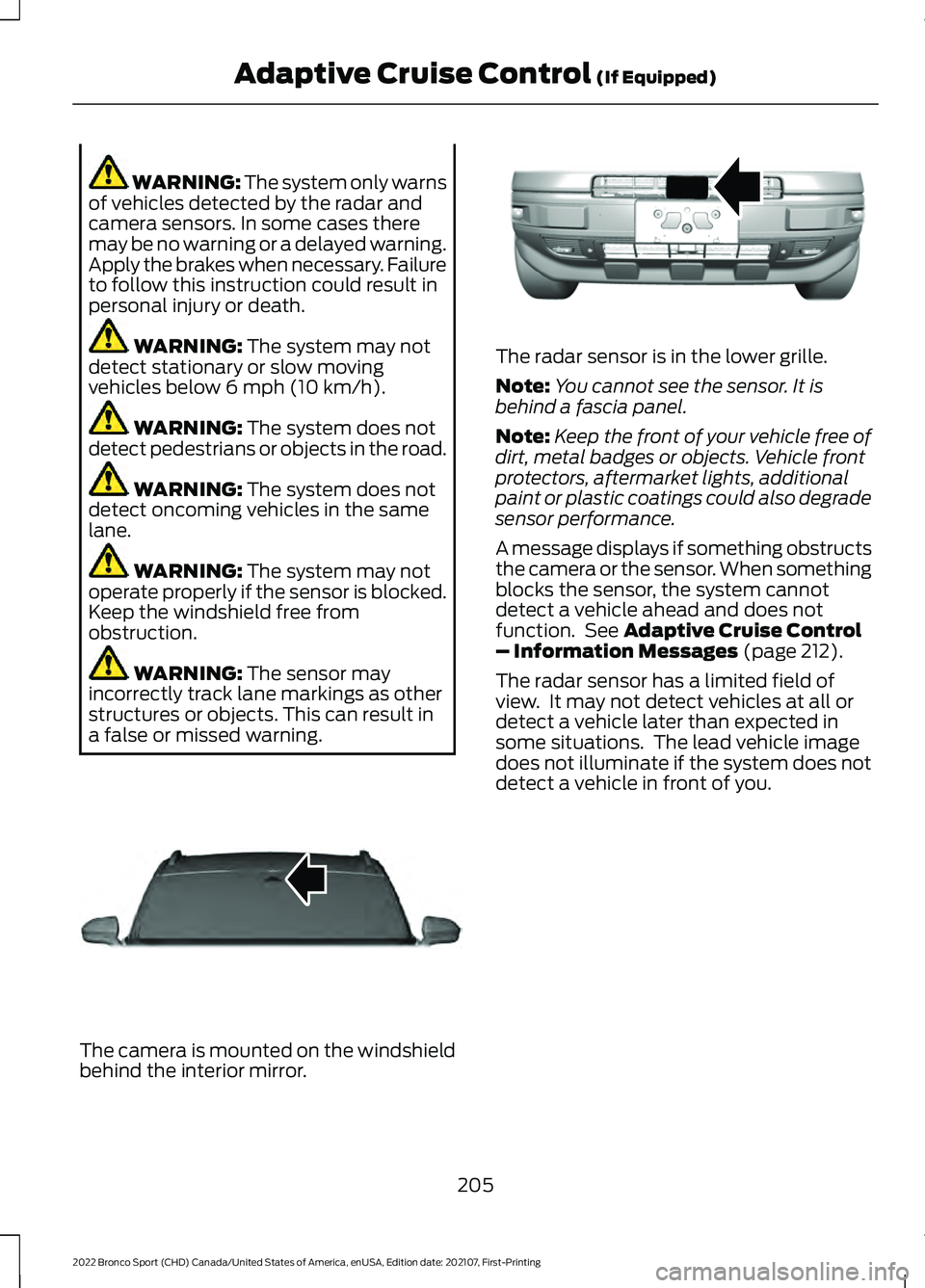
a false or missed warning. The camera is mounted on the windshield
behind the interior mirror. The radar sensor is in the lower grille.
Note:
You cannot see the sensor. It is
behind a fascia panel.
Note: Keep the front of your vehicle free of
dirt, metal badges or objects. Vehicle front
protectors, aftermarket lights, additional
paint or plastic coatings could also degrade
sensor performance.
A message displays if something obstructs
the camera or the sensor. When something
blocks the sensor, the system cannot
detect a vehicle ahead and does not
function. See
Adaptive Cruise Control
– Information Messages (page 212).
The radar sensor has a limited field of
view. It may not detect vehicles at all or
detect a vehicle later than expected in
some situations. The lead vehicle image
does not illuminate if the system does not
detect a vehicle in front of you.
205
2022 Bronco Sport (CHD) Canada/United States of America, enUSA, Edition date: 202107, First-Printing Adaptive Cruise Control
(If Equipped)E307893 E321483
Page 240 of 494
ROOF RACKS AND LOAD
CARRIERS
WARNING: When loading the roof
racks, we recommend you evenly
distribute the load, as well as maintain
a low center of gravity. Loaded vehicles,
with higher centers of gravity, may
handle differently than unloaded
vehicles. Take extra precautions, such
as slower speeds and increased stopping
distance, when driving a heavily loaded
vehicle. For correct roof rack system operation,
directly place loads on crossbars affixed
to the roof rack side rails. When using the
roof rack system, we recommend you use
our genuine accessory crossbars designed
specifically for your vehicle.
Make sure that you securely fasten the
load. Check the tightness of the load
before driving and at each fuel stop.
Note:
Never place loads directly on the roof
panel. The roof panel is not designed to
directly carry a load.
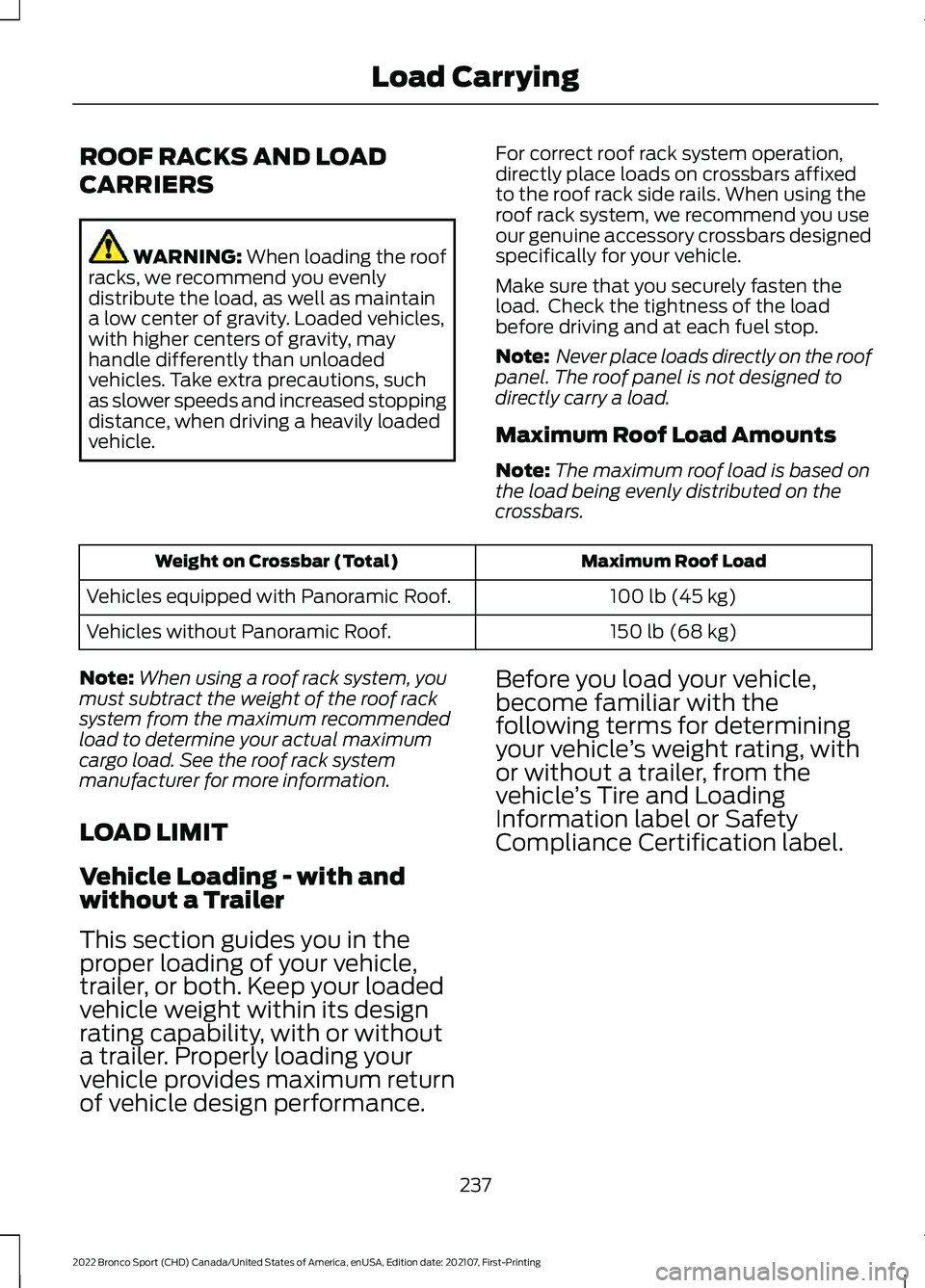
Maximum Roof Load Amounts
Note: The maximum roof load is based on
the load being evenly distributed on the
crossbars. Maximum Roof Load
Weight on Crossbar (Total)
100 lb (45 kg)
Vehicles equipped with Panoramic Roof.
150 lb (68 kg)
Vehicles without Panoramic Roof.
Note: When using a roof rack system, you
must subtract the weight of the roof rack
system from the maximum recommended
load to determine your actual maximum
cargo load. See the roof rack system
manufacturer for more information.
LOAD LIMIT
Vehicle Loading - with and
without a Trailer
This section guides you in the
proper loading of your vehicle,
trailer, or both. Keep your loaded
vehicle weight within its design
rating capability, with or without
a trailer. Properly loading your
vehicle provides maximum return
of vehicle design performance. Before you load your vehicle,
become familiar with the
following terms for determining
your vehicle
’s weight rating, with
or without a trailer, from the
vehicle ’s Tire and Loading
Information label or Safety
Compliance Certification label.
237
2022 Bronco Sport (CHD) Canada/United States of America, enUSA, Edition date: 202107, First-Printing Load Carrying
Page 264 of 494
Vehicles Sold in Canada: Getting
Roadside Assistance
To fully assist you should you have a
vehicle concern, Ford Motor Company of
Canada, Limited offers a complimentary
roadside assistance program. This program
is eligible within Canada or the continental
United States.
The service is available 24 hours a day,
seven days a week.
This program is separate from the New
Vehicle Limited Warranty, but the coverage
is concurrent with the powertrain coverage
period of your vehicle. Canadian roadside
coverage and benefits may differ from the
U.S. coverage.
If you require more information, please call
us in Canada at 1-800-665-2006, or visit
our website at www.ford.ca.
HAZARD FLASHERS
Note:
The hazard flashers operate when
the ignition is in any position, or if the key is
not in the ignition. If used when the vehicle
is not running, the battery loses charge. As
a result, there may be insufficient power to
restart your vehicle. The flasher control is on the
instrument panel. Use your
hazard flashers when your
vehicle is creating a safety hazard for other
motorists.
• Press the flasher control and all front
and rear direction indicators flash.
• Press the button again to switch them
off. FUEL SHUTOFF WARNING: If your vehicle has been
involved in a crash, have the fuel system
checked. Failure to follow this instruction
could result in fire, personal injury or
death.
Note: When you try to restart your vehicle
after a fuel shutoff, the vehicle makes sure
that various systems are safe to restart.
Once the vehicle determines the systems
are safe, then the vehicle allows you to
restart.
Note: In the event that your vehicle does
not restart after your third attempt, contact
a qualified technician.
The fuel pump shutoff stops the flow of
fuel to the engine in the event of a
moderate to severe crash. Not every
impact causes a shutoff.
Should your vehicle shut off after a crash,
you may restart your vehicle.
If your vehicle has a key system:
1. Switch off the ignition.
2. Switch to start position.
3. Switch off the ignition.
4. Switch on the ignition to re-enable the
fuel pump.
5. If the vehicle does not start, repeat steps 1 through 4.
If your vehicle has a push button start
system:
1. Press START/STOP to switch off your
vehicle.
2. Press the brake pedal and START/STOP
to switch on your
vehicle.
3. Remove your foot from the brake pedal
and press
START/STOP to switch off
your vehicle.
261
2022 Bronco Sport (CHD) Canada/United States of America, enUSA, Edition date: 202107, First-Printing Roadside Emergencies
Page 282 of 494
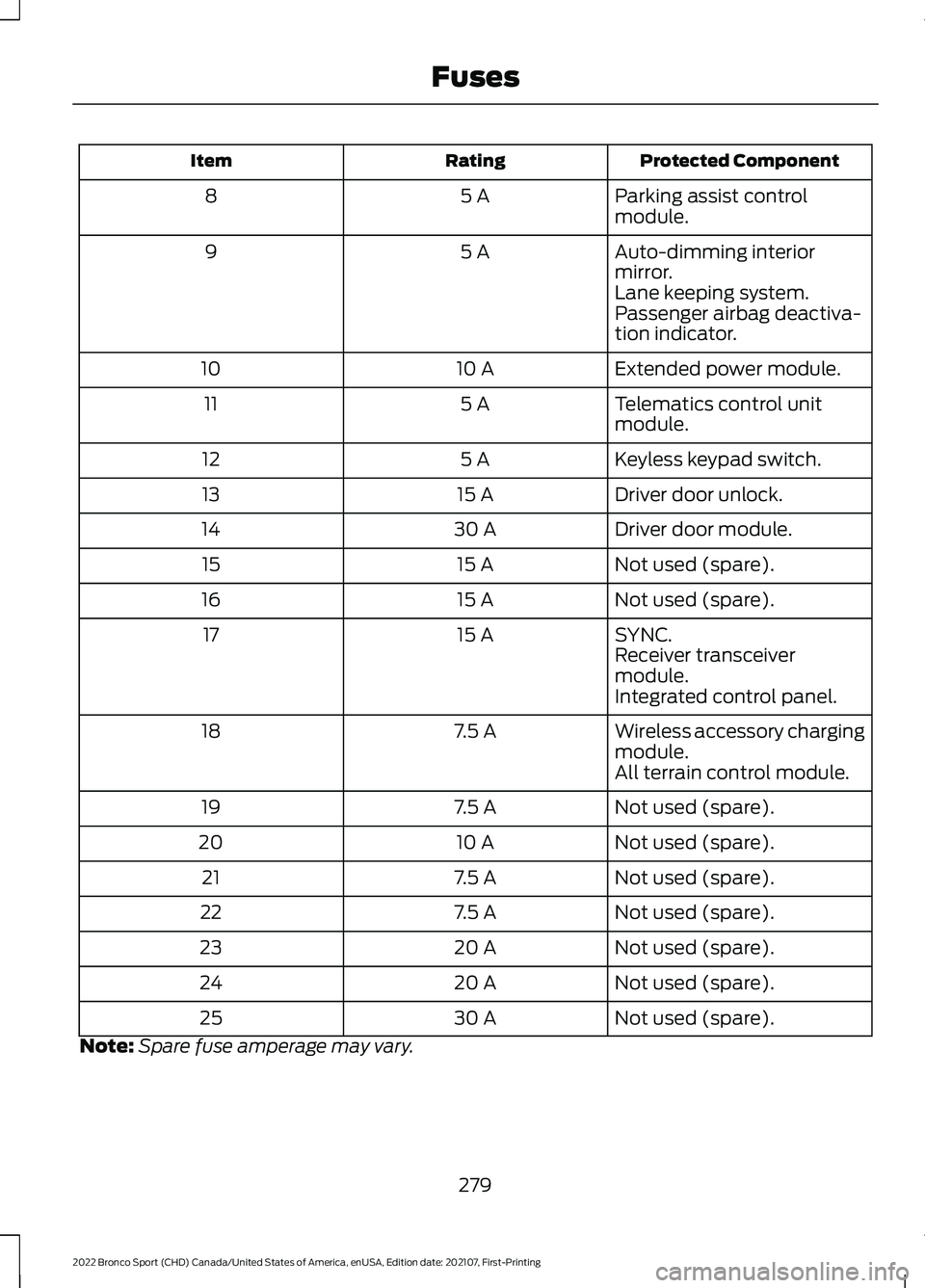
Protected Component
Rating
Item
Parking assist control
module.
5 A
8
Auto-dimming interior
mirror.
5 A
9
Lane keeping system.
Passenger airbag deactiva-
tion indicator.
Extended power module.
10 A
10
Telematics control unit
module.
5 A
11
Keyless keypad switch.
5 A
12
Driver door unlock.
15 A
13
Driver door module.
30 A
14
Not used (spare).
15 A
15
Not used (spare).
15 A
16
SYNC.
15 A
17
Receiver transceiver
module.
Integrated control panel.
Wireless accessory charging
module.
7.5 A
18
All terrain control module.
Not used (spare).
7.5 A
19
Not used (spare).
10 A
20
Not used (spare).
7.5 A
21
Not used (spare).
7.5 A
22
Not used (spare).
20 A
23
Not used (spare).
20 A
24
Not used (spare).
30 A
25
Note: Spare fuse amperage may vary.
279
2022 Bronco Sport (CHD) Canada/United States of America, enUSA, Edition date: 202107, First-Printing Fuses