2022 FORD BRONCO steering
[x] Cancel search: steeringPage 249 of 562

SLIPPERY - 4X4 WITH PART TIMEENGAGEMENT
For less than ideal roadconditions, this mode can beused for crossing terrain wherea firm surface is covered with loose orslippery material, such as snow or ice.Slippery mode lowers throttle responseand optimizes shifting for slippery surfaces.
Four-wheel drive high (4H) is the defaultfour-wheel drive mode. All four-wheel drivemodes are selectable in slippery mode.
The front electronic locking differential isavailable below 25 mph (40 km/h) whenin four-wheel drive low (4L). The rearelectronic locking differential is availablebelow 25 mph (40 km/h).
Note:The rear electronic locking differentialis available at any speed when in four-wheeldrive low (4L).
The stabilizer bar disconnect is notavailable in slippery mode.
Note:When using Slippery mode ondry/hard pavement, your vehicle couldexperience vibration, driveline bind up,damage and potential excessive tire andvehicle wear.
SLIPPERY - ADVANCED 4X4 WITH4A MODE
For less than ideal roadconditions, this mode can beused for crossing terrain wherea firm surface is covered with loose orslippery material, such as snow or ice.Slippery mode lowers throttle responseand optimizes shifting for slippery surfaces.
Four-wheel drive auto (4A) is the defaultfour-wheel drive mode. Two-wheel drivehigh (2H) is not selectable in slipperymode.
The front electronic locking differential isavailable below 25 mph (40 km/h) whenin four-wheel drive low (4L). The rearelectronic locking differential is availablebelow 25 mph (40 km/h).
Note:The rear electronic locking differentialis available at any speed when in four-wheeldrive low (4L).
The stabilizer bar disconnect is notavailable in slippery mode.
Note:When using Slippery mode ondry/hard pavement, your vehicle couldexperience vibration, driveline bind up,damage and potential excessive tire andvehicle wear.
SPORT - 4X4 WITH PART TIMEENGAGEMENT
For sporty driving with improvedperformance handling andresponse. This mode increasesaccelerator pedal response and providesa sportier steering feel. The powertrainsystem holds onto lower gears longer,helping your vehicle accelerate faster.
Two-wheel drive high (2H) is the defaultfour-wheel drive mode. Four-wheel drivelow (4L) is not selectable in sport mode.
The front electronic locking differential isnot available in sport mode. The rearelectronic locking differential is availablebelow 25 mph (40 km/h).
The stabilizer bar disconnect is notavailable in sport mode.
245
2022 Bronco (TG1) Canada/United States of America, enUSA, Edition date: 202109, First-PrintingG.O.A.T. Mode ControlE295414 E295414 E246593
Page 250 of 562

SPORT - ADVANCED 4X4 WITH 4AMODE
For sporty driving with improvedperformance handling andresponse. This mode increasesaccelerator pedal response and providesa sportier steering feel. The powertrainsystem holds onto lower gears longer,helping your vehicle accelerate faster.
Four-wheel drive auto (4A) is the defaultfour-wheel drive mode. Four-wheel drivelow (4L) is not selectable in sport mode.
The front electronic locking differential isnot available in sport mode. The rearelectronic locking differential is availablebelow 25 mph (40 km/h).
The stabilizer bar disconnect is notavailable in sport mode.
G.O.A.T. MODE CONTROL –
TROUBLESHOOTING
G.O.A.T. MODE CONTROL –WARNING LAMPS
Some drive modes reducetraction and stability controlperformance and the indicatorilluminates in the instrument cluster.
G.O.A.T. MODE CONTROL – INFORMATION MESSAGES
DetailsMessage
Displays when the system switches tonormal mode to support towing perform-ance.
Changing to Normal Drive Mode forImproved Towing Performance
Displays when you select a drive mode thatis not available. Select a different drivemode.
Drive Mode Not Available
Displays when you select a drive mode thatis not available. Check the four-wheel drivemode, electronic locking differential andstabilizer bar before selecting a drive mode.
Drive Mode Preconditions Not Met
Displays when you select a drive mode thatis not available. Have the system checked.Drive Mode Selection Reduced due toSystem Fault
Displays when you select an off-road drivemode.Off-Road Use Only
246
2022 Bronco (TG1) Canada/United States of America, enUSA, Edition date: 202109, First-PrintingG.O.A.T. Mode ControlE246593 E130458
Page 253 of 562

WHAT IS THE LANE KEEPING
SYSTEM
The lane keeping system alerts you byproviding temporary steering assistanceor steering wheel vibration when it detectsan unintended lane departure.
HOW DOES THE LANE
KEEPING SYSTEM WORK
The lane keeping system uses a forwardlooking camera mounted on the windshieldto monitor vehicle movement within thetravel lane.
When the camera detects a drift out of thetravel lane, the lane keeping system alertsthe driver by vibrating the steering wheel,or aids the driver by providing a smallsteering input to move the vehicle backinto the travel lane.
The driver can select one of three modes:
•Alert (If Equipped)
•Aid
•Alert + Aid
LANE KEEPING SYSTEM
PRECAUTIONS
WARNING: You are responsible forcontrolling your vehicle at all times. Thesystem is designed to be an aid and doesnot relieve you of your responsibility todrive with due care and attention. Failureto follow this instruction could result inthe loss of control of your vehicle,personal injury or death.
WARNING: The system will notoperate if the sensor cannot track theroad lane markings.
WARNING: The sensor mayincorrectly track lane markings as otherstructures or objects. This can result ina false or missed warning.
WARNING: In cold and severeweather conditions the system may notfunction. Rain, snow and spray can alllimit sensor performance.
WARNING: The system may notoperate properly if the sensor is blocked.Keep the windshield free fromobstruction.
WARNING: If damage occurs in theimmediate area surrounding the sensor,have your vehicle checked as soon aspossible.
WARNING: The system may notcorrectly operate if your vehicle is fittedwith a suspension kit not approved byus.
WARNING: Large contrasts inoutside lighting can limit sensorperformance.
LANE KEEPING SYSTEM
LIMITATIONS
The lane keeping system only operateswhen the vehicle speed is greater than40 mph (64 km/h).
The system works when the camera candetect at least one lane marking.
The lane keeping system may not correctlyoperate in any of the following conditions:
•The lane keeping system does notdetect at least one lane marking.
•You switch the turn signal on.
249
2022 Bronco (TG1) Canada/United States of America, enUSA, Edition date: 202109, First-PrintingLane Keeping System (If Equipped)
Page 254 of 562

•You apply direct steering, acceleratefast or brake hard.
•The vehicle speed is less than 40 mph(64 km/h).
•The anti-lock brake, stability control ortraction control system activates.
•The lane is too narrow.
•Something is obscuring the camera orit is unable to detect the lane markingsdue to environment, traffic or vehicleconditions.
The lane keeping system may not correctlane positioning in any of the followingconditions:
•High winds.
•Uneven road surfaces.
•Heavy or uneven loads.
•Incorrect tire pressure.
SWITCHING THE LANE
KEEPING SYSTEM ON AND
OFF
To activate the lane keepingsystem, press the button on thesteering wheel.
To deactivate the lane keeping system,press the button again.
Note:When switching the system on or offa message appears in the information andentertainment display to show the status.
Note:The system stores the on or offsetting until manually changed, unless itdetects a MyKey™. If the system detects aMyKey™, it defaults to the last setting forthat MyKey™.
Note: If the system detects a MyKey™,pressing the button does not affect the onor off status of the system. You can onlychange the mode and intensity settings.
SWITCHING THE LANE
KEEPING SYSTEM MODE
The lane keeping system has differentsettings that you can view or adjust usingthe information display.
The system stores the last known selectionfor each of these settings. You do not needto readjust your settings each time youswitch on the system.
To change the lane keeping system mode,use the touchscreen:
1.Select Driver Assistance.
2.Select Lane Keeping System.
3.Select Mode.
4.Select a setting.
Note:The system remembers the lastsetting when you start your vehicle. If thesystem detects a MyKey™, the mode is setto alert.
ALERT MODE
WHAT IS ALERT MODE
Alert mode vibrates the steering wheelwhen it detects an unintended lanedeparture.
250
2022 Bronco (TG1) Canada/United States of America, enUSA, Edition date: 202109, First-PrintingLane Keeping System (If Equipped)E308131
Page 255 of 562

HOW DOES ALERT MODE WORK
When in alert mode, the lane keepingsystem alerts you by vibrating the steeringwheel. The intensity of the vibration is setthrough the lane keeping system menu.
ADJUSTING THE STEERINGWHEEL VIBRATION INTENSITY
To change the steering wheel vibrationintensity, use the touchscreen:
1.Select Driver Assistance.
2.Select Lane Keeping System.
3.Select Intensity.
4.Select a setting.
AID MODE
WHAT IS AID MODE
Aid mode provides temporary steeringassistance toward the center of the lane.
HOW DOES AID MODE WORK
The lane keeping system aids you whenan unintentional lane departure occurs.The system provides a small steering inputto move the vehicle towards the center ofthe lane.
ALERT AND AID MODE
WHAT IS ALERT AND AID MODE
Alert and aid mode uses multiple featuresto keep you in your lane. The system firstprovides a small steering input to bringyour vehicle back towards the center ofthe lane. If your vehicle moves too far outof the center of the lane the system alertsyou with vibration in the steering wheel.
251
2022 Bronco (TG1) Canada/United States of America, enUSA, Edition date: 202109, First-PrintingLane Keeping System (If Equipped)E165515 E165516
Page 257 of 562

LANE KEEPING SYSTEM – TROUBLESHOOTING
LANE KEEPING SYSTEM – INFORMATION MESSAGES
ActionMessage
The system has malfunctioned. Have yourvehicle checked as soon as possible.Lane Keeping Sys. Malfunction ServiceRequired
The system has detected a condition thathas caused the system to be temporarilyunavailable.
Front Camera Temporarily Not Available
The system has detected a condition thatrequires you to clean the windshield in orderfor it to operate properly.
Front Camera Low Visibility Clean Screen
The system has malfunctioned. Have yourvehicle checked as soon as possible.Front Camera Malfunction Service Required
The system requests that you keep yourhands on the steering wheel.Keep Hands on Steering Wheel
253
2022 Bronco (TG1) Canada/United States of America, enUSA, Edition date: 202109, First-PrintingLane Keeping System (If Equipped)
Page 266 of 562

WHAT IS PRE-COLLISION
ASSIST
Pre-collision assist detects and warns ofapproaching hazards in the roadway. Ifyour vehicle is rapidly approaching anotherstationary vehicle, a vehicle traveling in thesame direction as yours, or a pedestrianwithin your driving path, the systemprovides multiple levels of assistance tohelp avoid a collision.
HOW DOES PRE-COLLISION
ASSIST WORK
The system warns the driver of potentialhazards by providing three levels ofassistance.
If your vehicle is rapidly approachingpotential hazards the system provides thefollowing levels of functionality:
1.Alert.
2.Brake Support.
3.Automatic Emergency Braking.
Alert: When active, a flashingvisual warning appears and anaudible warning tone sounds.
Brake Support: The system is designedto help reduce the impact speed bypreparing the brakes for rapid braking. Thesystem does not automatically apply thebrakes. If you press the brake pedal, thesystem could apply additional braking upto maximum braking force, even if youlightly press the brake pedal.
Automatic Emergency Braking:Automatic emergency braking mayactivate if the system determines that acollision is imminent.
Note:If you perceive pre-collision assistalerts as being too frequent or disturbing,then you can reduce the alert sensitivity,although the manufacturer recommendsusing the highest sensitivity setting wherepossible. Setting lower sensitivity wouldlead to fewer and later system warnings.
Each system has various levels ofdetection capabilities. See Pre-CollisionAssist Limitations (page 263).
PRE-COLLISION ASSIST
PRECAUTIONS
WARNING: You are responsible forcontrolling your vehicle at all times. Thesystem is designed to be an aid and doesnot relieve you of your responsibility todrive with due care and attention. Failureto follow this instruction could result inthe loss of control of your vehicle,personal injury or death.
WARNING: The system does notdetect vehicles moving in a differentdirection or animals. Apply the brakeswhen necessary. Failure to follow thisinstruction could result in the loss ofcontrol of your vehicle, personal injury ordeath.
WARNING: The system does notoperate during hard acceleration orsteering. Failure to take care may leadto a crash or personal injury.
WARNING: The system may fail oroperate with reduced function duringcold and severe weather conditions.Snow, ice, rain, spray and fog canadversely affect the system. Keep thefront camera and radar free of snow andice. Failure to take care may result in theloss of control of your vehicle, seriouspersonal injury or death.
262
2022 Bronco (TG1) Canada/United States of America, enUSA, Edition date: 202109, First-PrintingPre-Collision AssistE156130 E329466
Page 268 of 562
SWITCHING PRE-COLLISION
ASSIST ON AND OFF
To switch the system on or off, use thetouchscreen:
1.Press Features on the touchscreen.
2.Press Driver Assistance.
3.Press Pre-Collision Assist.
4.Switch the feature on or off.
Adjusting the Pre-Collision AssistSettings
You can adjust the following settings byusing the touchscreen controls in thepre-collision assist menu:
•Change alert and distance alertsensitivity to one of three possiblesettings.
•Switch distance indication and alert onor off.
•If required, switch automaticemergency braking on or off.
•If required, switch the entirepre-collision assist feature on or off.
•If required, switch evasive steeringassist on or off.
Note:Automatic emergency braking andevasive steering turn on every time youswitch the ignition on.
Note:If your vehicle has a radar sensor, werecommend that you switch the system offif you install a snow plow or similar objectin such a way that it may block the radarsensor. Your vehicle remembers the selectedsetting across key cycles.
Note:If you switch automatic emergencybraking off, evasive steering assist switchesoff.
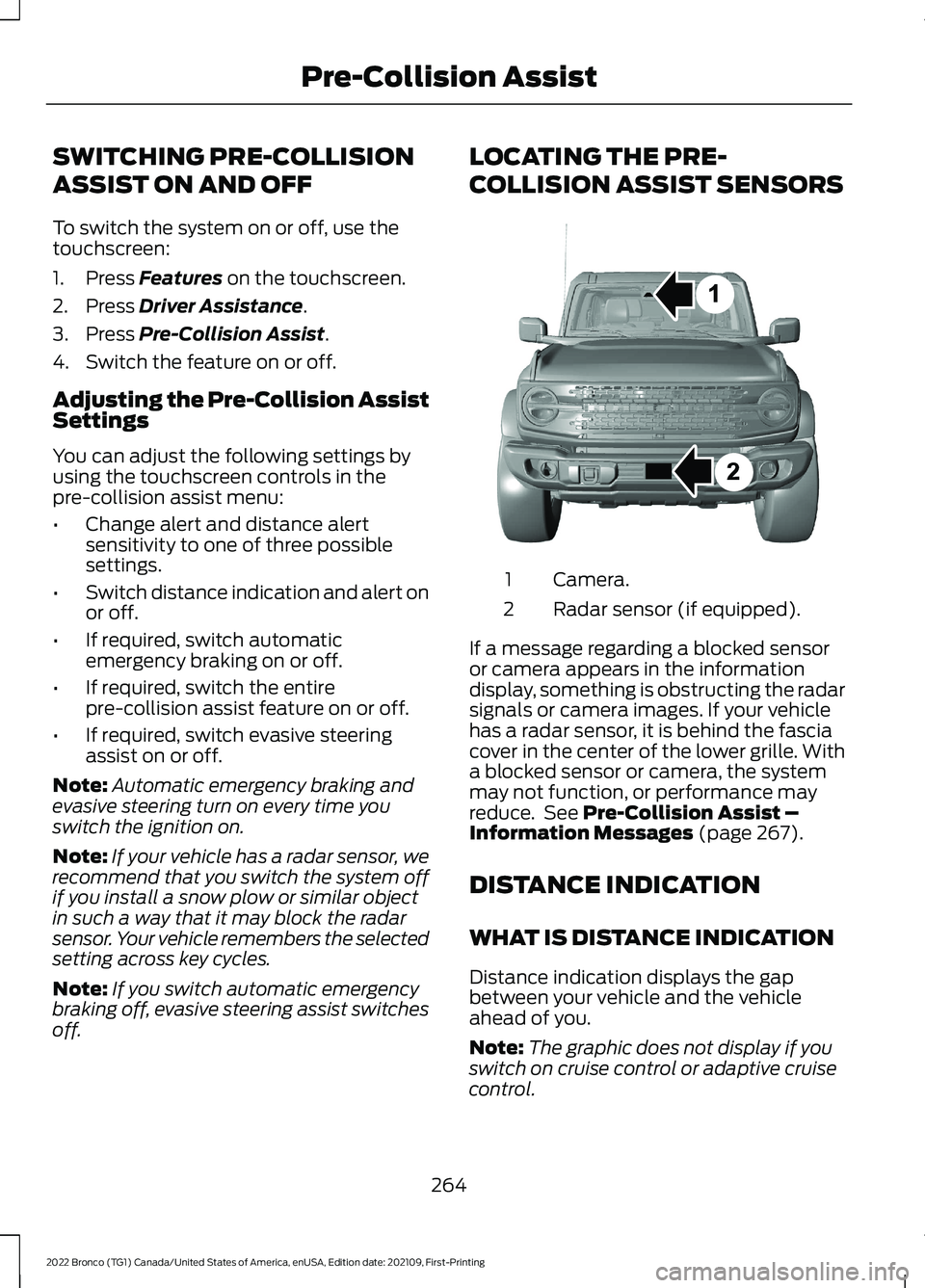
LOCATING THE PRE-
COLLISION ASSIST SENSORS
Camera.1
Radar sensor (if equipped).2
If a message regarding a blocked sensoror camera appears in the informationdisplay, something is obstructing the radarsignals or camera images. If your vehiclehas a radar sensor, it is behind the fasciacover in the center of the lower grille. Witha blocked sensor or camera, the systemmay not function, or performance mayreduce. See Pre-Collision Assist –Information Messages (page 267).
DISTANCE INDICATION
WHAT IS DISTANCE INDICATION
Distance indication displays the gapbetween your vehicle and the vehicleahead of you.
Note:The graphic does not display if youswitch on cruise control or adaptive cruisecontrol.
264
2022 Bronco (TG1) Canada/United States of America, enUSA, Edition date: 202109, First-PrintingPre-Collision AssistE327933