2022 FORD BRONCO automatic transmission
[x] Cancel search: automatic transmissionPage 168 of 562

AUTO-START-STOP –INFORMATION MESSAGES -AUTOMATIC TRANSMISSION
A message appears in the informationdisplay if the system requires you to takeaction.
ActionConditionMessage
Press the brake pedal torestart the engine.The system needs to restartthe engine but requires yourconfirmation.
Auto StartStop Press Braketo Start Engine
Press the brake pedal or theaccelerator pedal to restartthe engine.
The system needs to restartthe engine but requires yourconfirmation.
Auto StartStop Press aPedal to Start Engine
Shift in park (P) and restartthe engine.The System is not func-tioning.Auto StartStop Shift to P,then Restart Engine
164
2022 Bronco (TG1) Canada/United States of America, enUSA, Edition date: 202109, First-PrintingAuto-Start-Stop
Page 182 of 562

AUTOMATIC TRANSMISSION
PRECAUTIONS
WARNING: Apply the parkingbrake, shift into park (P), switch theignition off and remove the key beforeyou leave your vehicle. Failure to followthis instruction could result in personalinjury or death.
WARNING: When your vehicle isstationary, keep the brake pedal fullypressed when shifting gears. Failure tofollow this instruction could result inpersonal injury, death or propertydamage.
WARNING: Do not apply the brakepedal and accelerator pedalsimultaneously. Applying both pedalssimultaneously for more than a fewseconds will limit engine performance,which may result in difficulty maintainingspeed in traffic and could lead to seriousinjury.
AUTOMATIC TRANSMISSION
POSITIONS
PARK (P)
WARNING: Shift into park (P) onlywhen your vehicle is stationary.
In park (P) power is not transmitted to thedriven wheels.
Note:A tone sounds if you attempt to exityour vehicle without the transmission in park(P).
Note:Your vehicle may not shift out of park(P) if the vehicle battery has run out ofcharge. See Jump Starting the Vehicle(page 302).
Note:Your vehicle may not shift out of park(P) if a fuse is blown. See Fuses (page 312).
Note:Your vehicle may not shift out of park(P) unless the key or remote control is insideyour vehicle.
Note:The electronic parking brake couldapply when the transmission selector is inpark (P). See Automatically Releasing theElectric Parking Brake (page 198).
REVERSE (R)
WARNING: Shift into reverse (R)only when your vehicle is stationary.
In reverse (R) power is transmitted to thedriven wheels.
NEUTRAL (N)
WARNING: In neutral (N) yourvehicle is free to roll.
In neutral (N) power is not transmitted tothe driven wheels.
DRIVE (D)
Drive (D) is the normal driving position forthe best fuel economy, and allowsautomatic upshifts and downshifts throughall available gears.
MANUAL (M)
In manual (M) you can select a specificgear. See Manually Shifting Gears (page179).
178
2022 Bronco (TG1) Canada/United States of America, enUSA, Edition date: 202109, First-PrintingAutomatic Transmission (If Equipped)
Page 183 of 562

Note:We recommend using this mode fordriving on hilly or mountainous roads orwhen towing a trailer. See Towing a Trailer(page 283).
SPORT (S)
In sport (S) your vehicle holds gears longer.
Note:We recommend using this mode fora sportier feel or when driving on hilly ormountainous roads.
SHIFTING YOUR VEHICLE INTO
GEAR
1.Fully press down on the brake pedal.
2.Press the front button on the shifterand move the gearshift lever into thedesired gear.
3.When you finish driving, come to acomplete stop.
4.Press the front button on the shifter,move the gearshift lever and securelylatch it in park (P).
AUTOMATIC TRANSMISSION
POSITION INDICATORS
MANUALLY SHIFTING GEARS
SHIFTING USING THE BUTTONSON THE SELECTOR LEVER
Your vehicle has a SelectShift Automatictransmission gearshift lever. This gives youthe ability to change gears up or down,without a clutch, as preferred.
To prevent the engine from running at toolow an RPM, which could cause it to stall,SelectShift still makes some downshiftsif it determines that you have notdownshifted in time. Although SelectShiftmakes some downshifts for you, it stillallows you to downshift at any time if itdetermines that damage to the enginefrom over-revving does not occur.
Note:SelectShift does not automaticallyupshift, even if the engine is approachingthe RPM limit. Shift manually by pressingthe + button.
Note:Engine damage could occur if youmaintain excessive engine revving withoutshifting.
179
2022 Bronco (TG1) Canada/United States of America, enUSA, Edition date: 202109, First-PrintingAutomatic Transmission (If Equipped)E324063 E324267
Page 184 of 562
BRAKE SHIFT INTERLOCK
WHAT IS BRAKE SHIFTINTERLOCK
Brake shift interlock prevents you fromshifting out of park (P) when you haveswitched the ignition on and not pressedthe brake pedal.
BRAKE SHIFT INTERLOCKPRECAUTIONS
WARNING: Do not drive yourvehicle until you verify that thestoplamps are working.
WARNING: When doing thisprocedure, you need to take thetransmission out of park (P) whichmeans your vehicle can roll freely. Toavoid unwanted vehicle movement,apply the parking brake prior to doingthis procedure. Use wheel chocks ifappropriate.
WARNING: If the parking brake isfully released, but the brake warninglamp remains illuminated, the brakesmay not be working properly. Have yourvehicle checked as soon as possible.
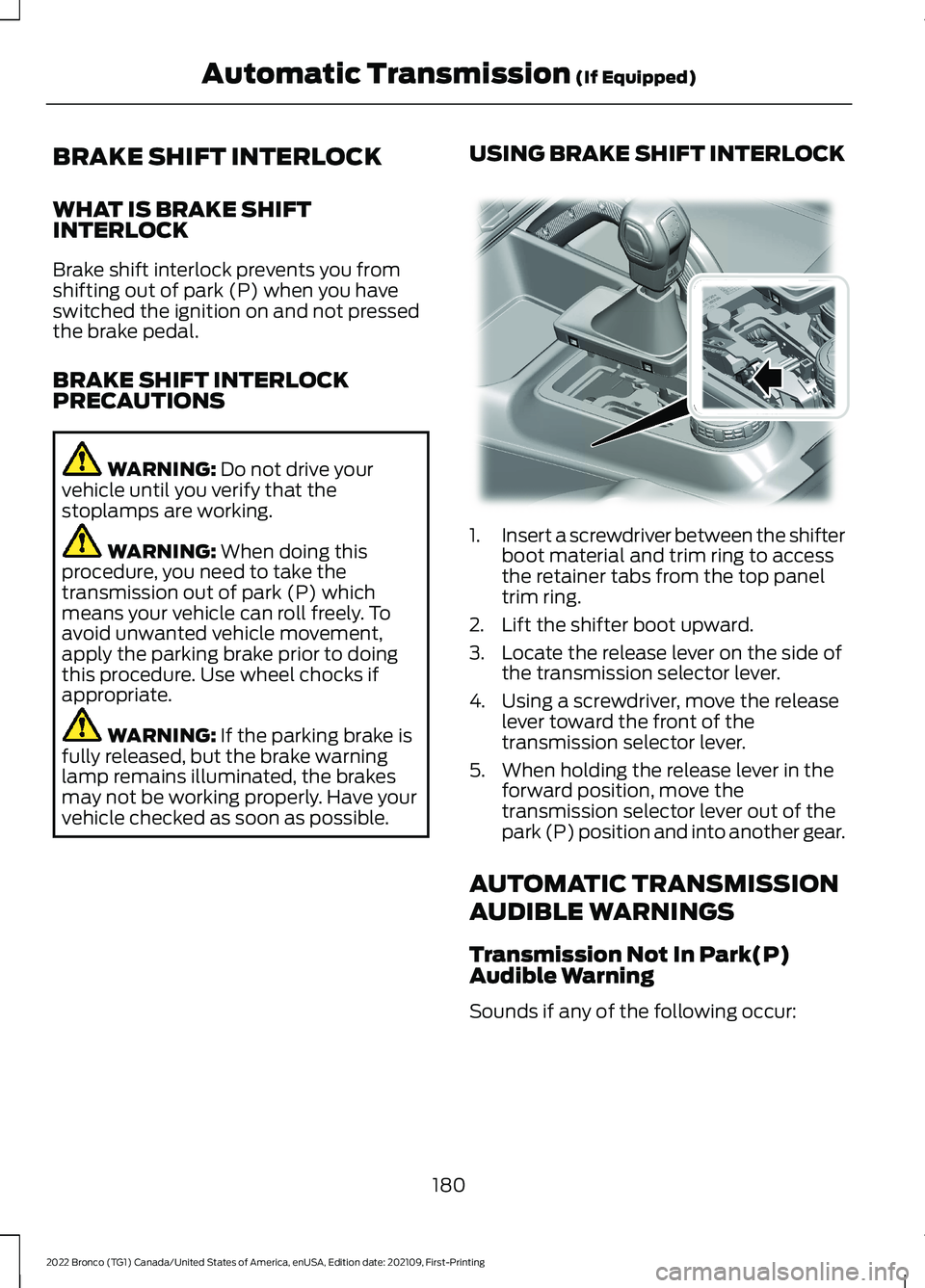
USING BRAKE SHIFT INTERLOCK
1.Insert a screwdriver between the shifterboot material and trim ring to accessthe retainer tabs from the top paneltrim ring.
2.Lift the shifter boot upward.
3.Locate the release lever on the side ofthe transmission selector lever.
4.Using a screwdriver, move the releaselever toward the front of thetransmission selector lever.
5.When holding the release lever in theforward position, move thetransmission selector lever out of thepark (P) position and into another gear.
AUTOMATIC TRANSMISSION
AUDIBLE WARNINGS
Transmission Not In Park(P)Audible Warning
Sounds if any of the following occur:
180
2022 Bronco (TG1) Canada/United States of America, enUSA, Edition date: 202109, First-PrintingAutomatic Transmission (If Equipped)E346836
Page 185 of 562

•You switch your vehicle off beforeshifting into park (P).
•You open the driver door before shiftinginto park (P).
•You unlatch your seatbelt beforeshifting into park (P) when the driverdoor is removed. See RemovableWindows (page 338).
181
2022 Bronco (TG1) Canada/United States of America, enUSA, Edition date: 202109, First-PrintingAutomatic Transmission (If Equipped)
Page 188 of 562

For vehicles with an electronicshift-on-the-fly transfer case, whenshifting into two-wheel drive high on dry,hard surfaced roads, we recommend thatyou follow the following procedure toreduce the likelihood of a mechanical shiftblock:
1.When driving straight, come to acomplete stop on a flat, horizontalsurface.
2.For vehicles with an automatictransmission, shift into park (P). Forvehicles with a manual transmission,press the clutch.
3.Select 2H and wait for the 2H LED tobecome solid.
4.For vehicles with an automatictransmission, shift into reverse (R). Forvehicles with a manual transmission,select reverse (R) and release theclutch. Let the vehicle roll backward upto 3 ft (1 m) and press the brake.
5.For vehicles with an automatictransmission, shift into drive (D). Forvehicles with a manual transmission,press the clutch in again, select aforward gear and release the clutch.Let the vehicle roll forward up to 3 ft(1 m).
If the system is mechanically blocked, oneor more of the following actions can relievethe mechanical shift block:
•Momentary acceleration.
•Momentary braking.
•Bringing the vehicle to a stop.
•Shifting the transmission to neutral andback to drive.
•Shifting the transmission to reverseand back to drive.
•Driving the vehicle around a tight turnat a slow speed.
SWITCHING FOUR-WHEEL
DRIVE ON AND OFF
A vehicle that comes with four-wheel drive,when selected, has the ability to use allfour wheels to power itself. This increasestraction, which may enable you to safelydrive over terrain and road conditions thata conventional two-wheel drive vehiclecannot.
On some four-wheel drive models, theinitial shift from two-wheel drive tofour-wheel drive while the vehicle ismoving can cause a momentary clunk andratcheting sound. These sounds are normalas the front drivetrain comes up to speedand are not cause for concern.
SELECTING A FOUR-WHEEL
DRIVE MODE - 4X4 WITH PART
TIME ENGAGEMENT
To select a four-wheel drive mode, pushthe button.
184
2022 Bronco (TG1) Canada/United States of America, enUSA, Edition date: 202109, First-PrintingFour-Wheel DriveE345849
Page 189 of 562

•2H - Two-wheel drive high.
•4H - Four-wheel drive high. SeeFour-Wheel Drive High (page 186).
•4L - Four-wheel drive low. SeeFour-Wheel Drive Low (page 186).
Shifting to or from Four-WheelDrive Low
Note:Do not perform this operation if therear wheels are slipping or when applyingthe accelerator pedal or when driving in atight turn.
Note:Momentarily releasing the acceleratorpedal when a shift in progress messagedisplays can improve engagement ordisengagement performance.
1.Bring your vehicle to a speed of 0 mph(0 km/h).
2.For vehicles with an automatictransmission, place in neutral (N). Forvehicles with a manual transmission,fully depress the clutch pedal.
3.Push the 4L on the four-wheel drivemode selector.
Note: A 4x4 Shift in Progress messageappears in the information display indicatingthe shift is in progress. If any of the previousshift conditions are not met, the shift shouldnot occur and the information display canguide the driver through the proper shiftingprocedures.
Note:If Shift Delayed Drive Forwarddisplays in the information display, placethe transmission in a forward gear, moveyour vehicle forward approximately 5 ft(1.5 m), and shift the transmission back toneutral (N) to allow the transfer case tocomplete the range shift.
Note:When the light is solid, the systemhas achieved the desired four-wheel drivemode. When a selected four-wheel drivemode light is blinking, the system isattempting to shift to that specificfour-wheel drive mode.
Note:When you achieve recreationaltowing, all lights are off and the instrumentcluster displays Neutral Tow Enabled LeaveTransmission in Neutral.
SELECTING A FOUR-WHEEL
DRIVE MODE - ADVANCED 4X4
WITH 4A MODE
To select a four-wheel drive mode, pushthe button.
•2H - Two-wheel drive high.
•4A - Four-wheel drive Auto. SeeFour-Wheel Drive Auto (page 186).
•4H - Four-wheel drive high. SeeFour-Wheel Drive High (page 186).
•4L - Four-wheel drive low. SeeFour-Wheel Drive Low (page 186).
Shifting to or from Four-WheelDrive Low
Note: Do not perform this operation if therear wheels are slipping or when applyingthe accelerator pedal.
185
2022 Bronco (TG1) Canada/United States of America, enUSA, Edition date: 202109, First-PrintingFour-Wheel DriveE324543
Page 190 of 562
1.Bring your vehicle to a speed of 0 mph(0 km/h).
2.For vehicles with an automaticTransmission, place in neutral (N). Forvehicles with a manual transmission,fully depress the clutch pedal.
3.Push the 4L on the four-wheel drivemode selector.
Note: A 4x4 Shift in Progress messageappears in the information display indicatingthe shift is in progress. If any of the previousshift conditions are not met, the shift shouldnot occur and the information display canguide the driver through the proper shiftingprocedures.
Note:If Shift Delayed Drive Forwarddisplays in the information display, placethe transmission in a forward gear, moveyour vehicle forward approximately 5 ft(1.5 m), and shift the transmission back toneutral (N) to allow the transfer case tocomplete the range shift.
Note:When the light is solid, the systemhas achieved the desired four-wheel drivemode. When a selected four-wheel drivemode LED is blinking, the system isattempting to shift to that specificfour-wheel drive mode.
Note:When all lights are blinking have yourvehicle serviced as soon as possible.
Note:When you achieve recreationaltowing, all lights are off and the instrumentcluster displays Neutral Tow Enabled LeaveTransmission in Neutral.
FOUR-WHEEL DRIVE MODES
TWO-WHEEL DRIVE HIGH
Two-wheel drive high is for generalon-road driving. Power is sent to the rearwheels only.
Note:Two-wheel drive high can turn on oroff based on Drive Mode selection SeeG.O.A.T. Mode Control (page 242).
FOUR-WHEEL DRIVE AUTO (If
Equipped)
Four-wheel drive auto provideselectronically controlled four-wheel drivepower to both the front and rear wheels,as required, for increased traction in varyingon-road conditions. The four-wheel driveauto tuning varies based on selected DriveMode. See Selecting a Four-Wheel DriveMode (page 184).
Note:Four-wheel drive auto can turn on oroff automatically based on Drive Modeselection. See Selecting a Four-WheelDrive Mode (page 184).
FOUR-WHEEL DRIVE HIGH
Four-wheel drive high provideselectronically or mechanically lockedfour-wheel drive power to both the frontand rear wheels for use in off-road orwinter conditions such as deep snow, sandor mud. This mode is not for use on drypavement.
Note:Four-wheel drive high can turn on oroff automatically based on Drive Modeselection.
FOUR-WHEEL DRIVE LOW
Four-wheel drive low provideselectronically or mechanically lockedfour-wheel drive power to both the frontand rear wheels for use on low tractionsurfaces, but does so with additionalgearing for increased torque multiplication.This mode is only for off-road conditionssuch as deep sand, steep slopes, or pullingheavy objects.
186
2022 Bronco (TG1) Canada/United States of America, enUSA, Edition date: 202109, First-PrintingFour-Wheel Drive