2022 FORD BRONCO Connected
[x] Cancel search: ConnectedPage 346 of 562

7.To install the rear window, perform theabove steps in reverse order.
8.After installing the rear window, pressalong the top of the window to securethe hook and loop fastener strip.
Note:The buckles snap together andwindow is flush when correctly installed. Ifthe parts have visible gaps or stick out theyare not correctly secured.
REMOVABLE DOORS
REMOVING AND INSTALLING THEDOORS - VEHICLES WITHOUT:TUBE DOORS
Removing the Doors
WARNING: Removal of doors foroff-road use only. Removing the doorsfrom the vehicle will affect protectionprovided by the doors and may affectsafety system performance, includingsafety canopy and front seat mountedside airbags, during a crash or rollover.
WARNING: Vehicle needs to beturned off before reconnecting doors toverify all electrical connections havebeen properly connected. Failure tofollow these instructions may affectsafety system performance, includingsafety canopy and front seat mountedside airbags, during a crash or rollover.
1.Fully open the windows on the doorsyou are removing.
2.Switch your vehicle off.
3.Fold the mirrors toward the front ofyour vehicle before removing the frontdoors.
4.Fully open the door you are removing.
5.Locate the fender protector in the toolpouch and install it over the fenderedge near the top door hinge.
6.To release the door harness connector,open the connector door and pull theconnector straight out.
342
2022 Bronco (TG1) Canada/United States of America, enUSA, Edition date: 202109, First-PrintingRemovable Vehicle ComponentsE347147 E347602 E328722
Page 421 of 562

WHAT IS A CONNECTED
VEHICLE
A connected vehicle has technology thatallows your vehicle to connect to a mobilenetwork and for you to access a range offeatures. When used in conjunction withthe FordPass app, it could allow you tomonitor and control your vehicle further,for example checking the tire pressures,the fuel level and the vehicle location. Foradditional information, refer to the localFord website.
CONNECTED VEHICLE
REQUIREMENTS
Connected service and related featurefunctionality requires a compatible vehiclenetwork.
Some remote features require additionalservice activation. Log in to your Fordaccount for details. Some restrictions, thirdparty terms and message or data ratesmay apply.
CONNECTED VEHICLE
LIMITATIONS
Evolving technology, cellular networks, orregulations could affect functionality andavailability, or continued provision of somefeatures. These changes could even stopsome features from functioning.
CONNECTING THE VEHICLE TO
A MOBILE NETWORK
WHAT IS THE MODEM
The modem allows access to arange of features built into yourvehicle.
ENABLING AND DISABLING THEMODEM
1.Press Settings.
2.Press Connectivity.
3.Press Connected Vehicle Features.
4.Switch vehicle connectivity on or off.
CONNECTING FORDPASS TO THEMODEM
1.Make sure that the modem is enabledusing the vehicle settings menu.
2.Open the FordPass app on your deviceand log in.
3.Add your vehicle or select your vehicleif already added.
4.Select the option to activate yourvehicle.
5.Make sure that the name on the screenmatches the name shown in yourFordPass account.
6.Confirm that FordPass account isconnected to the modem.
CONNECTING THE VEHICLE TO
A WI-FI NETWORK
Select the settings option on thefeature bar.
1.Press Connectivity.
2.Press Manage Wi-Fi Networks.
3.Switch Wi-Fi on.
4.Press View Available Networks.
5.Select an available Wi-Fi network.
Note:Enter the network password toconnect to a secure network.
417
2022 Bronco (TG1) Canada/United States of America, enUSA, Edition date: 202109, First-PrintingConnected Vehicle E280315
Page 422 of 562

CONNECTED VEHICLE –
TROUBLESHOOTING
CONNECTED VEHICLE –FREQUENTLY ASKED QUESTIONS
Why can I not confirm theconnection of my FordPassaccount to the modem?
•The modem is not enabled. Switchvehicle connectivity on.
•The network signal is weak. Move yourvehicle closer to a place where thenetwork signal is not obstructed.
Why can I not connect to a Wi-Finetwork?
•You entered the wrong networkpassword. Enter the correct password.
•The network signal is weak. Move yourvehicle closer to the Wi-Fi router or toa place where the network signal is notobstructed.
•There are multiple access points inrange with the same network name.Choose a unique name for yournetwork. Do not use the default nameunless it contains a unique identifier,for example as part of the MACaddress.
Why does the Wi-Fi connectiondisconnect after successfulconnection?
•The network signal is weak. Move yourvehicle closer to the Wi-Fi router or toa place where the network signal is notobstructed.
What can I do if I am close to a Wi-Fi router but the network signalstrength is weak?
•If your vehicle has a heated windshield,position your vehicle so that thewindshield is not facing the Wi-Firouter.
•If your vehicle has metallic tinting onthe windows but not on the windshield,position your vehicle so that thewindshield is facing the Wi-Fi router oropen the windows that are facing therouter.
•If your vehicle has metallic tinting onthe windows and the windshield, openthe windows that are facing the router.
•If your vehicle is in a garage and youhave the garage door closed, open thegarage door as it could block the signal.
Why can I not see a network Iexpect to see in the list of availablenetworks?
•The network is hidden. Make thenetwork visible and try again, ormanually add a network in the Wi-Fisettings menu.
Why do software downloads taketoo long?
•The network signal is weak. Move yourvehicle closer to the Wi-Fi router or toa place where the network signal is notobstructed.
•Wi-Fi network is in high demand or hasa slow Internet connection. Use a morereliable Wi-Fi network.
418
2022 Bronco (TG1) Canada/United States of America, enUSA, Edition date: 202109, First-PrintingConnected Vehicle
Page 423 of 562

Why does the software not updatewhen the system seems to connectto a Wi-Fi network and the signalstrength is excellent?
•No software update is available at thistime.
•Select automatic updates option in thesettings menu to enable automaticsoftware update or contact anauthorized dealer.
•There could be a connection problem.Test the network using another device.
419
2022 Bronco (TG1) Canada/United States of America, enUSA, Edition date: 202109, First-PrintingConnected Vehicle
Page 433 of 562

AUDIO SYSTEM – TROUBLESHOOTING
AUDIO SYSTEM – INFORMATION MESSAGES
Satellite Radio Troubleshooting
Recommended ActionPotential EffectsError Message
Internet connectivity isturned off. See ConnectedVehicle (page 417).
Internet streaming and OnDemand shows are unavail-able and some SiriusXMfeatures are disabled.
Connectivity Disabled
SYNC will attempt toconnect. See SatelliteRadio Limitations (page426). Switch to a satelliteconnection for the currentchannel if the option isavailable.
Audio system may mute."Switch to Satellite" buttonmay be displayed on theSiriusXM audio screen if thechannel is also available viasatellite.
No Internet
Antenna may be obstructedor satellite reception is weakin your location. See Satel-lite Radio Limitations(page 426). Switch to aninternet connection for thecurrent channel if the optionis available.
Audio system may mute.“Switch to Internet” buttonmay be displayed on theSiriusXM audio screen if thechannel is also available viastreaming.
No Satellite Signal
Allow some time for audioto load or tune to a differentchannel.
Audio system may mutewhile audio attempts toload.
Slow Network Connection
A temporary update may bein progress. Allow some timebefore retrying to tune to thechannel. If issue persists, thechannel may no longer beavailable.
Audio system may mute.Radio may tune to adifferent channel.
Channel Unavailable
A temporary update may bein progress. Allow some timebefore retrying to play theepisode. If issue persists, theepisode may no longer beavailable.
Audio system may mute.Radio may tune to adifferent channel.
Episode Unavailable
429
2022 Bronco (TG1) Canada/United States of America, enUSA, Edition date: 202109, First-PrintingAudio System
Page 437 of 562

CENTER DISPLAY
PRECAUTIONS
WARNING: Driving while distractedcan result in loss of vehicle control, crashand injury. We strongly recommend thatyou use extreme caution when using anydevice that may take your focus off theroad. Your primary responsibility is thesafe operation of your vehicle. Werecommend against the use of anyhand-held device while driving andencourage the use of voice-operatedsystems when possible. Make sure youare aware of all applicable local lawsthat may affect the use of electronicdevices while driving.
CENTER DISPLAY
LIMITATIONS
Speed-restricted Features
For your safety, some features are notavailable while the vehicle is in motion ator above 5 mph (8 km/h). Settings thatare not critical while driving your vehicleare shown as restricted on your display.Some of these settings include:
•System updates.
•Personal profiles setup.
•Valet mode setup.
•Driver assistance settings.
Vehicle Settings
•MyKey setup.
•Door keypad code setup.
•Backup start passcode setup.
These restricted features becomeavailable when your vehicle is no longer inmotion.
STATUS BAR
The bar is on top of the display andindicates the status of your vehicle'sfeatures.
Audio System
Audio system muted.
Connected Device
Cell phone microphone muted.
Phone call in progress.
Media player connected.
Cell phone network signalstrength.
Cell phone roaming.
Text message received.
Unread email message.
Automatic crash notificationsystem off.
Cell phone battery status.
Vehicle Data
Wi-Fi available.
433
2022 Bronco (TG1) Canada/United States of America, enUSA, Edition date: 202109, First-PrintingCenter Display OverviewE353221 E353213 E353208 E335295 E353216 E335293 E353219
Page 438 of 562

Wi-Fi connected.
Vehicle data sharing on.
Vehicle data sharing off.
Vehicle location sharing on.
Vehicle data and vehicle locationsharing on.
Vehicle System Update
Vehicle system update available.
Vehicle system update requiresschedule.
Vehicle system update requiresconsent.
Vehicle system update requiresWi-Fi.
Vehicle system update schedulereminder.
Vehicle system update notsuccessful.
Vehicle system updatesuccessful.
Wireless Accessory Charger
Wireless accessory chargeractive.
FEATURE BAR
The feature bar is located on the bottomof the display and allows you to accessvehicle features.
Press to use the radio, a USB, amedia player or a Bluetooth®device.
Press to make calls and accessthe phonebook on your cellphone.
Press to use the navigationsystem.
Press to replace this button witha shortcut to a feature or setting.
Press to search for and usecompatible apps on your iOS orAndroid device.
Press to adjust system settings.
Press to view features.
Note:The icon may be different dependingon your vehicle.
434
2022 Bronco (TG1) Canada/United States of America, enUSA, Edition date: 202109, First-PrintingCenter Display Overview E335292 E327789 E327785 E327786 E353217 E327787 E327788 E353218 E353214 E100027 E358432 E353220 E280315 E353210 E335299 E335300 E347104
Page 440 of 562
WHAT IS VOICE INTERACTION
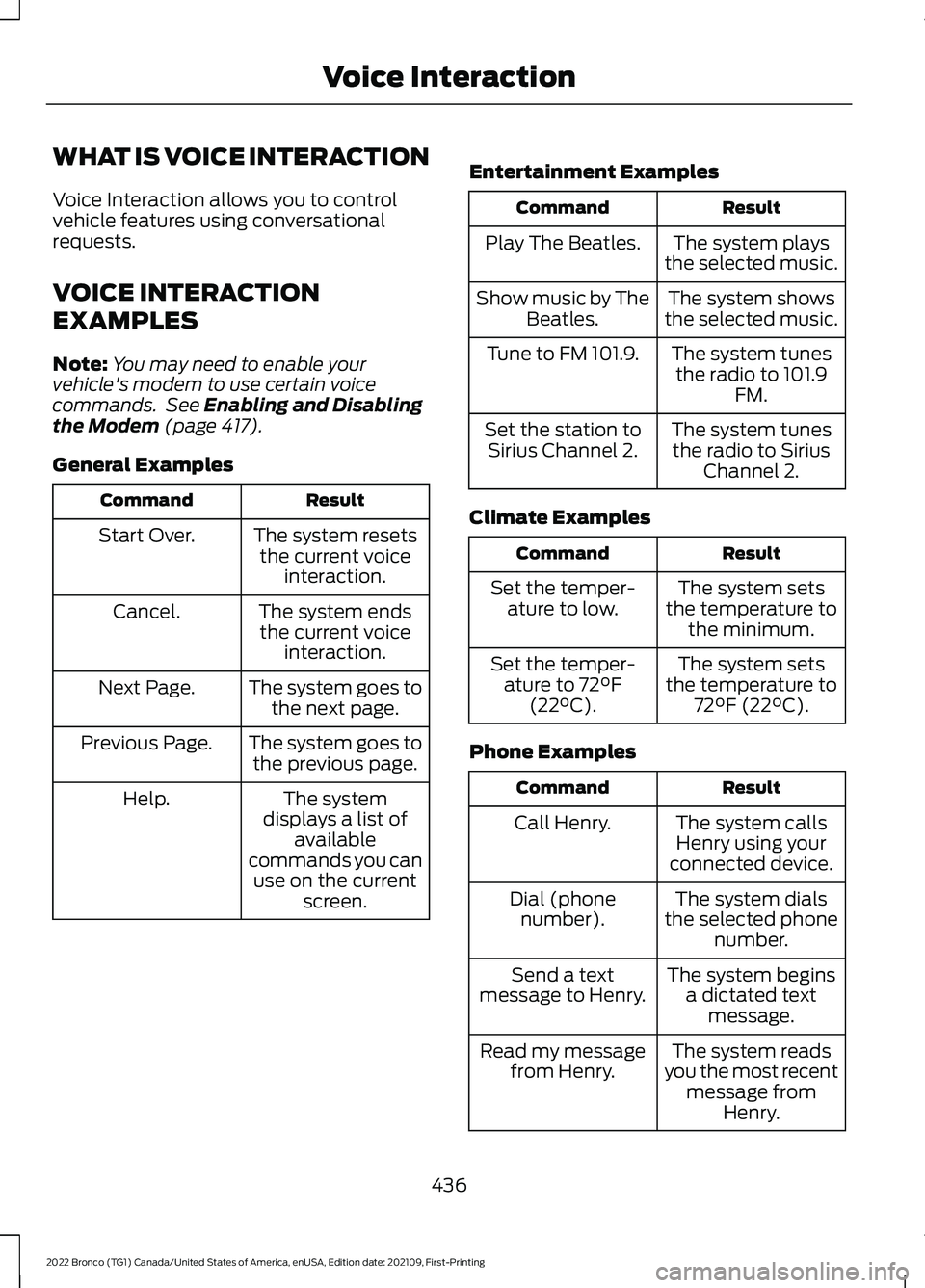
Voice Interaction allows you to controlvehicle features using conversationalrequests.
VOICE INTERACTION
EXAMPLES
Note:You may need to enable yourvehicle's modem to use certain voicecommands. See Enabling and Disablingthe Modem (page 417).
General Examples
ResultCommand
The system resetsthe current voiceinteraction.
Start Over.
The system endsthe current voiceinteraction.
Cancel.
The system goes tothe next page.Next Page.
The system goes tothe previous page.Previous Page.
The systemdisplays a list ofavailablecommands you canuse on the currentscreen.
Help.
Entertainment Examples
ResultCommand
The system playsthe selected music.Play The Beatles.
The system showsthe selected music.Show music by TheBeatles.
The system tunesthe radio to 101.9FM.
Tune to FM 101.9.
The system tunesthe radio to SiriusChannel 2.
Set the station toSirius Channel 2.
Climate Examples
ResultCommand
The system setsthe temperature tothe minimum.
Set the temper-ature to low.
The system setsthe temperature to72°F (22°C).
Set the temper-ature to 72°F(22°C).
Phone Examples
ResultCommand
The system callsHenry using yourconnected device.
Call Henry.
The system dialsthe selected phonenumber.
Dial (phonenumber).
The system beginsa dictated textmessage.
Send a textmessage to Henry.
The system readsyou the most recentmessage fromHenry.
Read my messagefrom Henry.
436
2022 Bronco (TG1) Canada/United States of America, enUSA, Edition date: 202109, First-PrintingVoice Interaction