2022 FORD BRONCO warning
[x] Cancel search: warningPage 507 of 562

Taiwan, China
Ukraine
United Arab Emirates (U.A.E.)
United States and Canada
WARNING: Changes ormodifications not expressively approvedby the party responsible for compliancecould void the user's authority to operatethe equipment. The term "IC:" before theradio certification number only signifiesthat Industry Canada technicalspecifications were met.
FCC ID: L2C0066T
This device complies with Part 15 of theFCC Rules and with Innovation, Scienceand Economic Development Canada’slicence-exempt RSS(s). Operation issubject to the following two conditions:
1.This device may not cause harmfulinterference, and
2.This device must accept anyinterference received, includinginterference that may cause undesiredoperation.
Vietnam
503
2022 Bronco (TG1) Canada/United States of America, enUSA, Edition date: 202109, First-PrintingCustomer InformationE338220 E269682 E340526 E278262
Page 508 of 562

Zambia
PERCHLORATE
Certain components in your vehicle suchas airbag modules, seatbelt pretensionersand remote control batteries may containperchlorate material. Special handlingmay apply for service or vehicle end of lifedisposal.
For more information visit:www.dtsc.ca.gov/hazardouswaste/perchlorate.
REPLACEMENT PARTS
RECOMMENDATION
We have built your vehicle to the higheststandards using quality parts. Werecommend that you demand the use ofgenuine Ford and Motorcraft partswhenever your vehicle requires scheduledmaintenance or repair. You can clearlyidentify genuine Ford and Motorcraft partsby looking for the Ford, FoMoCo orMotorcraft branding on the parts or theirpackaging.
Scheduled Maintenance andMechanical Repairs
One of the best ways for you to make surethat your vehicle provides years of serviceis to have it maintained in line with ourrecommendations and instructions usingparts that conform to the original vehicleparts specification. Genuine Ford andMotorcraft parts meet or exceed thesespecifications.
Collision Repairs
We hope that you never experience acollision, but accidents do happen.Genuine Ford replacement collision partsmeet our stringent requirements for fit,finish, structural integrity, corrosionprotection and dent resistance. Duringvehicle development we validate thatthese parts deliver the intended level ofprotection as a whole system. A great wayto know for sure you are getting this levelof protection is to use genuine Fordreplacement collision parts.
Warranty on Replacement Parts
Genuine Ford and Motorcraft replacementparts are the only replacement parts thatbenefit from a Ford Warranty. The FordWarranty may not cover damage causedto your vehicle because of failed non-Fordparts. For extra information, refer to theterms and conditions of the Ford Warranty.
MOBILE COMMUNICATIONS
EQUIPMENT
WARNING: Driving while distractedcan result in loss of vehicle control, crashand injury. We strongly recommend thatyou use extreme caution when using anydevice that may take your focus off theroad. Your primary responsibility is the
504
2022 Bronco (TG1) Canada/United States of America, enUSA, Edition date: 202109, First-PrintingCustomer InformationE340659
Page 522 of 562

Restrictions. Except where you have beenspecifically licensed to do so by Telenav,and without limiting the precedingparagraph, you may not use this Data (a)with any products, systems, or applicationsinstalled or otherwise connected to or incommunication with vehicles, capable ofvehicle navigation, positioning, dispatch,real time route guidance, fleetmanagement or similar applications; or (b)with or in communication with anypositioning devices or any mobile orwireless-connected electronic or computerdevices, including without limitationcellular phones, palmtop and handheldcomputers, pagers, and personal digitalassistants or PDAs.
Warning. The Data may containinaccurate or incomplete information dueto the passage of time, changingcircumstances, sources used and thenature of collecting comprehensivegeographic data, any of which may lead toincorrect results.
No Warranty. This Data is provided to you“as is,” and you agree to use it at your ownrisk. Telenav and its licensors (and theirlicensors and suppliers) make noguarantees, representations or warrantiesof any kind, express or implied, arising bylaw or otherwise, including but not limitedto, content, quality, accuracy,completeness, effectiveness, reliability,fitness for a particular purpose, usefulness,use or results to be obtained from thisData, or that the Data or server will beuninterrupted or error-free.
Disclaimer of Warranty: TELENAV ANDITS LICENSORS (INCLUDING THEIRLICENSORS AND SUPPLIERS) DISCLAIMANY WARRANTIES, EXPRESS OR IMPLIED,OF QUALITY, PERFORMANCE,MERCHANTABILITY, FITNESS FOR A
PARTICULAR PURPOSE ORNON-INFRINGEMENT. Some States,Territories and Countries do not allowcertain warranty exclusions, so to thatextent the above exclusion may not applyto you.
Disclaimer of Liability: TELENAV ANDITS LICENSORS (INCLUDING THEIRLICENSORS AND SUPPLIERS) SHALL NOTBE LIABLE TO YOU: IN RESPECT OF ANYCLAIM, DEMAND OR ACTION,IRRESPECTIVE OF THE NATURE OF THECAUSE OF THE CLAIM, DEMAND ORACTION ALLEGING ANY LOSS, INJURY ORDAMAGES, DIRECT OR INDIRECT, WHICHMAY RESULT FROM THE USE ORPOSSESSION OF THE INFORMATION; ORFOR ANY LOSS OF PROFIT, REVENUE,CONTRACTS OR SAVINGS, OR ANYOTHER DIRECT, INDIRECT, INCIDENTAL,SPECIAL OR CONSEQUENTIAL DAMAGESARISING OUT OF YOUR USE OF ORINABILITY TO USE THIS INFORMATION,ANY DEFECT IN THE INFORMATION, ORTHE BREACH OF THESE TERMS ORCONDITIONS, WHETHER IN AN ACTIONIN CONTRACT OR TORT OR BASED ON AWARRANTY, EVEN IF TELENAV OR ITSLICENSORS HAVE BEEN ADVISED OF THEPOSSIBILITY OF SUCH DAMAGES. SomeStates, Territories and Countries do notallow certain liability exclusions ordamages limitations, so to that extent theabove may not apply to you.
Export Control. You shall not export fromanywhere any part of the Data or any directproduct thereof except in compliance with,and with all licenses and approvalsrequired under, applicable export laws,rules and regulations, including but notlimited to the laws, rules and regulationsadministered by the Office of ForeignAssets Control of the U.S. Department ofCommerce and the Bureau of Industry andSecurity of the U.S. Department ofCommerce. To the extent that any such
518
2022 Bronco (TG1) Canada/United States of America, enUSA, Edition date: 202109, First-PrintingCustomer Information
Page 534 of 562

SUNA Products and/or Services areintended as an aid to personal motoringand travel planning, and do not providecomprehensive or accurate information onall occasions. On occasions, you mayexperience additional delay as a result ofusing SUNA Products and/or Services. Youacknowledge that it is not intended, orsuitable, for use in applications where timeof arrival or driving directions may impactthe safety of the public or yourself.
4. Use of SUNA Products and Serviceswhile driving
You, and other authorized drivers of thevehicle in which SUNA Products and/orServices are available or installed andactive, remain at all times responsible forobserving all relevant laws and codes ofsafe driving. In particular, you agree to onlyactively operate SUNA Products and/orServices when the Vehicle is at a completestop and it is safe to do so.
5. Service Continuity and Reception ofthe SUNA Traffic Channel
We will use reasonable endeavors toprovide the SUNA Traffic Channel 24 hoursa day, 365 days a year. The SUNA TrafficChannel may occasionally be unavailablefor technical reasons or for plannedmaintenance. We will try to performmaintenance at times when congestion islight. We reserve the right to withdrawSUNA Products and/or Services at anytime.
Also, we cannot assure the uninterruptedreception of the SUNA Traffic ChannelRDS-TMC signal at any particular location.
6. Limitation of Liability
Neither Intelematics (nor its suppliers orthe manufacturer of your device (the“Suppliers”)) shall be liable to you or toany third party for any damages eitherdirect, indirect, incidental, consequentialor otherwise arising out of the use of orinability to use SUNA Products and/or
Services even if Intelematics or a Supplierhas been advised of the possibility of suchdamages. You also acknowledge that theneither Intelematics nor any Supplierguarantees nor make any warranties thatrelate to the availability, accuracy orcompleteness of SUNA Products and/orServices, and to the extent which it islawful to do so, both Intelematics and eachSupplier excludes any warranties whichmight otherwise be implied by any Stateor Federal legislation in relation to SUNAProducts and/or Services.
7. Please Note
Great care has been taken in preparing thismanual. Constant product developmentmay mean that some information is notentirely up-to-date. The information in thisdocument is subject to change withoutnotice.
EMISSION LAW
WARNING: Do not remove or alterthe original equipment floor covering orinsulation between it and the metal floorof the vehicle. The floor covering andinsulation protect occupants of thevehicle from the engine and exhaustsystem heat and noise. On vehicles withno original equipment floor coveringinsulation, do not carry passengers in amanner that permits prolonged skincontact with the metal floor. Failure tofollow these instructions may result infire or personal injury.
U.S. federal laws and certain state lawsprohibit removing or rendering inoperativeemission control system components.Similar federal or provincial laws mayapply in Canada. We do not approve of anyvehicle modification without firstdetermining applicable laws.
530
2022 Bronco (TG1) Canada/United States of America, enUSA, Edition date: 202109, First-PrintingCustomer Information
Page 536 of 562

Manual is written primarily for the U.S. andCanadian markets. Features or equipmentlisted as standard may be different on unitsbuilt for export.Refer to this Owner’sManual for all other requiredinformation and warnings.
532
2022 Bronco (TG1) Canada/United States of America, enUSA, Edition date: 202109, First-PrintingCustomer Information
Page 537 of 562
ELECTROMAGNETIC
COMPATIBILITY
WARNING: Do not place objectsor mount equipment on or near theairbag cover, on the side of the front orrear seatbacks, or in areas that maycome into contact with a deployingairbag. Failure to follow theseinstructions may increase the risk ofpersonal injury in the event of a crash.
WARNING: Do not fasten antennacables to vehicle wiring, fuel pipes andbrake pipes.
WARNING: Keep antenna andpower cables at least 4 in (10 cm) fromany electronic modules and airbags.
Note:We test and certify your vehicle tomeet electromagnetic compatibilitylegislation. It is your responsibility to makesure that any equipment an authorizeddealer installs on your vehicle complies withapplicable local legislation and otherrequirements. Installation of someaftermarket electronic devices coulddegrade the performance of vehiclefunctions, which use radio frequency signalssuch as broadcast radio receiver, tirepressure monitoring system, push buttonstart,Bluetooth® connectivity or satellitenavigation.
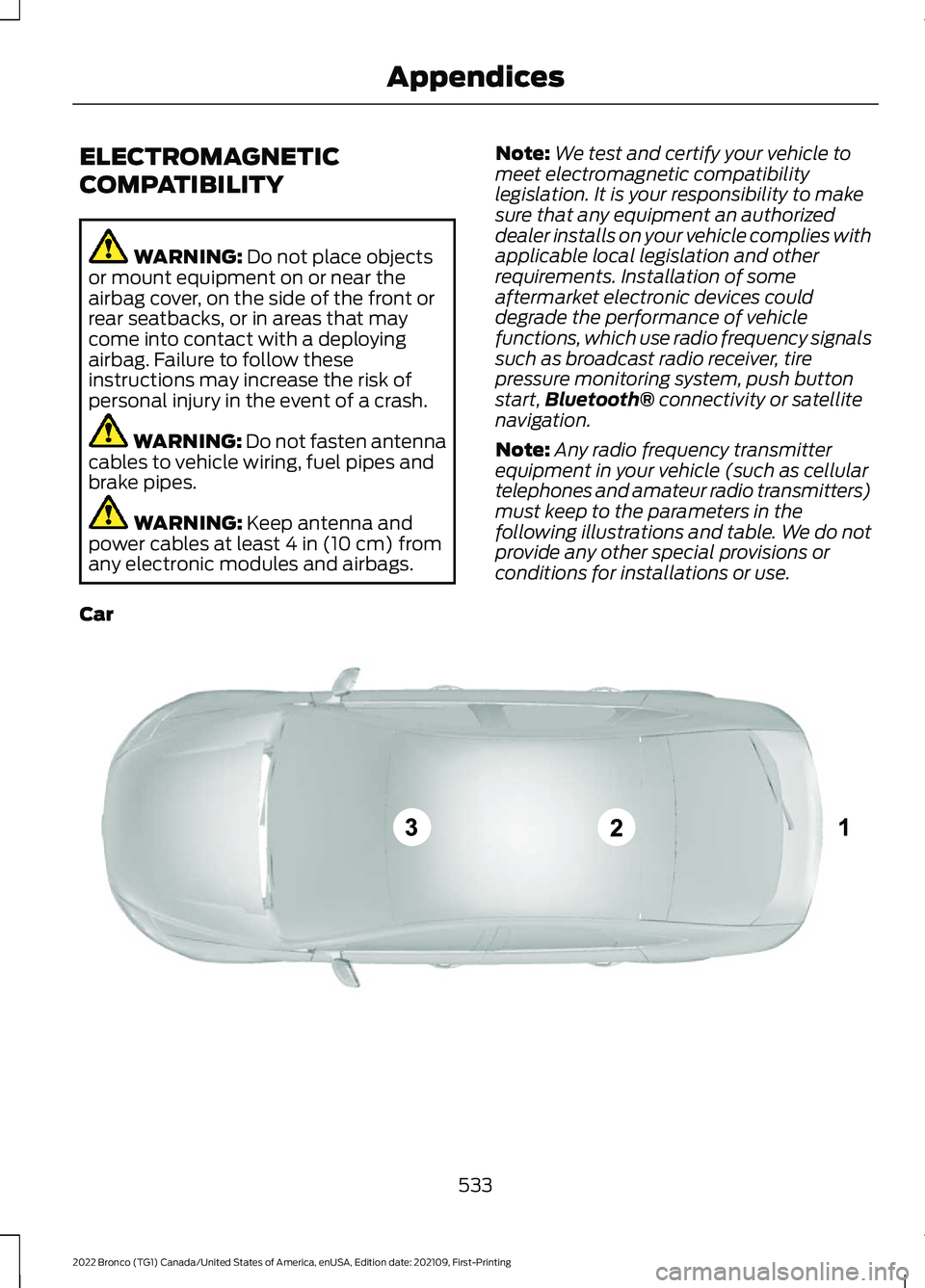
Note:Any radio frequency transmitterequipment in your vehicle (such as cellulartelephones and amateur radio transmitters)must keep to the parameters in thefollowing illustrations and table. We do notprovide any other special provisions orconditions for installations or use.
Car
533
2022 Bronco (TG1) Canada/United States of America, enUSA, Edition date: 202109, First-PrintingAppendicesE239120
Page 541 of 562

1
12V Battery.....................................................32912V Battery Precautions..................................329Battery Management SystemLimitations......................................................330How Does the Battery ManagementSystem Work..................................................330Recycling and Disposing of the 12VBattery..............................................................330Resetting the Battery Sensor........................330What Is the Battery ManagementSystem..............................................................32912V Battery – Troubleshooting...............33012V Battery – Information Messages..........33112V Battery – Warning Lamps......................330
3
360 Degree Camera...................................229360 Degree Camera Settings.........................231360 Degree Camera Guide Lines..........230360 Degree Camera Limitations...........229360 Degree Camera Precautions..........229360 Degree Camera Settings..................231Switching the 360 Degree Camera On andOff........................................................................231Switching the 360 Degree CameraView.....................................................................231
4
4WDSee: Four-Wheel Drive......................................182
9
911 Assist...........................................................68
A
A/CSee: Climate Control - Vehicles With:Automatic Temperature Control..............118See: Climate Control - Vehicles With: ManualTemperature Control....................................123About This Publication..................................17
ABSSee: Brakes...........................................................194Accessing Apps............................................444Accessing Navigation.................................447Accessing the Passive Key BackupPosition.........................................................156Accessories....................................................452Adaptive Cruise Control............................234Adaptive Cruise Control –Troubleshooting............................................240Adaptive Cruise Control Indicators.......239Adaptive Cruise ControlLimitations...................................................235Adaptive Cruise ControlPrecautions.................................................234Adaptive Cruise Control –Troubleshooting........................................240Adaptive Cruise Control – InformationMessages.........................................................240Adjusting the Exterior Mirrors..................106Adjusting the Headlamps.........................333Adjusting the Instrument Panel LightingBrightness....................................................102Adjusting the Map.......................................447Changing the Format of the Map................447Zooming the Map In and Out........................447Adjusting the Seatbelts DuringPregnancy......................................................54Adjusting the Sound Settings.................423Adjusting the Steering Wheel...................89Adjusting the Volume.................................423Aid Mode..........................................................251How Does Aid Mode Work...............................251What Is Aid Mode................................................251Airbag Precautions.........................................61Airbags...............................................................59Front Passenger Sensing System..................63Air ConditioningSee: Climate Control - Vehicles With:Automatic Temperature Control..............118See: Climate Control - Vehicles With: ManualTemperature Control....................................123Air Conditioning System Capacity andSpecification...............................................410Air FilterSee: Changing the Engine Air Filter.............328Alert and Aid Mode......................................251How Does Alert and Aid Mode Work..........252
537
2022 Bronco (TG1) Canada/United States of America, enUSA, Edition date: 202109, First-PrintingIndex
Page 542 of 562

What Is Alert and Aid Mode............................251Alert Mode.....................................................250Adjusting the Steering Wheel VibrationIntensity.............................................................251How Does Alert Mode Work...........................251What Is Alert Mode...........................................250AM/FM Radio................................................424AM/FM Radio Limitations..............................424Selecting a Radio Station...............................424Ambient Lighting..........................................102Adjusting Ambient Lighting............................102Switching Ambient Lighting On andOff.......................................................................102Anti-Lock Braking System........................194Anti-Lock Braking SystemLimitations.......................................................194Appendices....................................................533Applying the Electric ParkingBrake..............................................................198Applying the Electric Parking Brake in anEmergency...................................................198App Precautions..........................................444App Requirements......................................444Apps.................................................................444Audio System................................................422AM/FM Radio......................................................424Audio System – Troubleshooting................429Digital Radio........................................................425Satellite Radio....................................................426Audio System Precautions.......................422Audio System – Troubleshooting..........429Audio System – InformationMessages.........................................................429Auto-Dimming Interior Mirror..................105Auto-Dimming Interior MirrorLimitations.......................................................105What Is the Auto-Dimming InteriorMirror..................................................................105Autolamps........................................................95Autolamp Settings..............................................95What Are Autolamps..........................................95Autolock.............................................................79Autolock Requirements.....................................79What Is Autolock..................................................79Automatically Releasing the ElectricParking Brake..............................................198
Automatic Crash Shutoff.........................305Automatic Crash ShutoffPrecautions.....................................................305Re-Enabling Your Vehicle...............................305What Is Automatic Crash Shutoff...............305Automatic Emergency Braking..............266Switching Automatic Emergency BrakingOn and Off......................................................266What Is Automatic EmergencyBraking..............................................................266Automatic Engine Stop..............................155How Does Automatic Engine StopWork....................................................................155Overriding Automatic Engine Stop..............156Switching Automatic Engine Stop On andOff.......................................................................156What Is Automatic Engine Stop....................155Automatic High Beam Control.................98Automatic High Beam ControlIndicators...........................................................99Automatic High Beam ControlLimitations.........................................................99Automatic High Beam ControlPrecautions.......................................................98Automatic High Beam ControlRequirements...................................................99How Does Automatic High Beam ControlWork.....................................................................98Overriding Automatic High BeamControl................................................................99Switching Automatic High Beam ControlOn and Off.........................................................99Automatic High Beam Control –Troubleshooting........................................100Automatic High Beam Control –Information Messages................................100Automatic Locking Mode............................54Disengaging Automatic Locking Mode........54Engaging Automatic Locking Mode..............54What Is Automatic Locking Mode.................54Automatic Transmission AudibleWarnings......................................................180Automatic Transmission............................178Automatic Transmission Positions..............178Brake Shift Interlock..........................................180Manually Shifting Gears...................................179Automatic Transmission Fluid Capacityand Specification.......................................412
538
2022 Bronco (TG1) Canada/United States of America, enUSA, Edition date: 202109, First-PrintingIndex