2022 FORD BRONCO wiring
[x] Cancel search: wiringPage 357 of 562

5.Push the tab inward when pulling downto disconnect and remove the wiringharness.
6.Push the release button on the hoseconnector and pull down to removethe washer hose.
7.Secure the wiring harness to the bodyside by plugging it into the receptacleand pushing up on the locking tab.
8.Secure the washer hose by snapping itinto the top of the body sidereceptacle.
9.Remove the two fasteners that securethe rear roof panel at the C-pillar usingthe provided head driver and ratchet.
10.Remove the four fasteners on eachside of your vehicle that secure therear roof panel to the vehicle usingthe provided head driver and ratchet.
11.With the tailgate window open, grabthe opening with one hand andslightly lift with the other hand. Liftthe rear roof panel straight up andoff. Place the rear roof panel on a softsurface to prevent damage.
353
2022 Bronco (TG1) Canada/United States of America, enUSA, Edition date: 202109, First-PrintingRemovable Vehicle Components87E335340 E345383 E333997
Page 458 of 562

WHAT ARE THE AUXILIARY
SWITCHES
The auxiliary switchboard on the overheadconsole makes aftermarket customizationeasier with six prewired switchesconnected to the power distribution box.Each circuit is individually fused forconnection of electrical accessories.
For maximum vehicle performance, keepthe following information in mind whenadding accessories or equipment to yourvehicle:
•When adding accessories, equipment,passengers and luggage to yourvehicle, do not exceed the total weightcapacity of the vehicle or of the frontor rear axle (GVWR or GAWR asindicated on the safety compliancecertification label). Ask an authorizeddealer for specific weight information.
•It is your responsibility to ensure thatany equipment you have fittedcomplies with applicable locallegislation.
•An authorized dealer needs to installmobile communication systems.Improper installation may harm theoperation of your vehicle, particularlyif the manufacturer did not design themobile communication systemspecifically for automotive use.
•If you or an authorized dealer add anyelectrical or electronic accessories orcomponents not produced by us toyour vehicle, you may adversely affectbattery performance and durability. Inaddition, you may also adversely affectthe performance of the other electricalsystems in the vehicle.
LOCATING THE AUXILIARY
SWITCHES
The switches are labeled AUX 1 throughAUX 6. They only operate when the ignitionis in the on position or in the off positionwhen Delay Accessory is active, whetherthe engine is running or not. Werecommend that you leave the enginerunning to maintain battery charge whenusing the switches for an extended time orwhen using higher current drawaccessories. When a switch is turned on,the indicator light on the switch illuminatesand the circuit provides power to thedevice wired to that switch.
LOCATING THE AUXILIARY
SWITCH WIRING
There are six powered circuits and fivenon-powered circuits.
454
2022 Bronco (TG1) Canada/United States of America, enUSA, Edition date: 202109, First-PrintingAuxiliary Switches (If Equipped)E220728
Page 460 of 562

IDENTIFYING THE AUXILIARY SWITCH WIRING
The relays are coded as follows:
FuseWire SizeWire ColorPower DistributionBox
30A1.5 mm²YellowAUX 1
15A1.5 mm²Green/BrownAUX 2
10A0.75 mm²Violet/GreenAUX 3
10A0.75 mm²BrownAUX 4
10A0.75 mm²Blue/OrangeAUX 5
10A0.75 mm²Yellow/OrangeAUX 6
Non-powered circuits:
Note:The non-powered circuits correspond with the auxiliary switch wiring graphic. SeeLocating the Auxiliary Switch Wiring (page 454).
Wire SizeWire ColorLocationNon-powered Circuit
1.5 mm²Brown/WhitePassenger compart-mentB1
1.5 mm²WhitePassenger compart-mentB2
1.5 mm²Violet/GrayFront grilleC
1.5 mm²Gray/OrangeRight-hand visorD
1.5 mm²White/OrangeRight-hand rearquarter panelE
456
2022 Bronco (TG1) Canada/United States of America, enUSA, Edition date: 202109, First-PrintingAuxiliary Switches (If Equipped)
Page 537 of 562
ELECTROMAGNETIC
COMPATIBILITY
WARNING: Do not place objectsor mount equipment on or near theairbag cover, on the side of the front orrear seatbacks, or in areas that maycome into contact with a deployingairbag. Failure to follow theseinstructions may increase the risk ofpersonal injury in the event of a crash.
WARNING: Do not fasten antennacables to vehicle wiring, fuel pipes andbrake pipes.
WARNING: Keep antenna andpower cables at least 4 in (10 cm) fromany electronic modules and airbags.
Note:We test and certify your vehicle tomeet electromagnetic compatibilitylegislation. It is your responsibility to makesure that any equipment an authorizeddealer installs on your vehicle complies withapplicable local legislation and otherrequirements. Installation of someaftermarket electronic devices coulddegrade the performance of vehiclefunctions, which use radio frequency signalssuch as broadcast radio receiver, tirepressure monitoring system, push buttonstart,Bluetooth® connectivity or satellitenavigation.
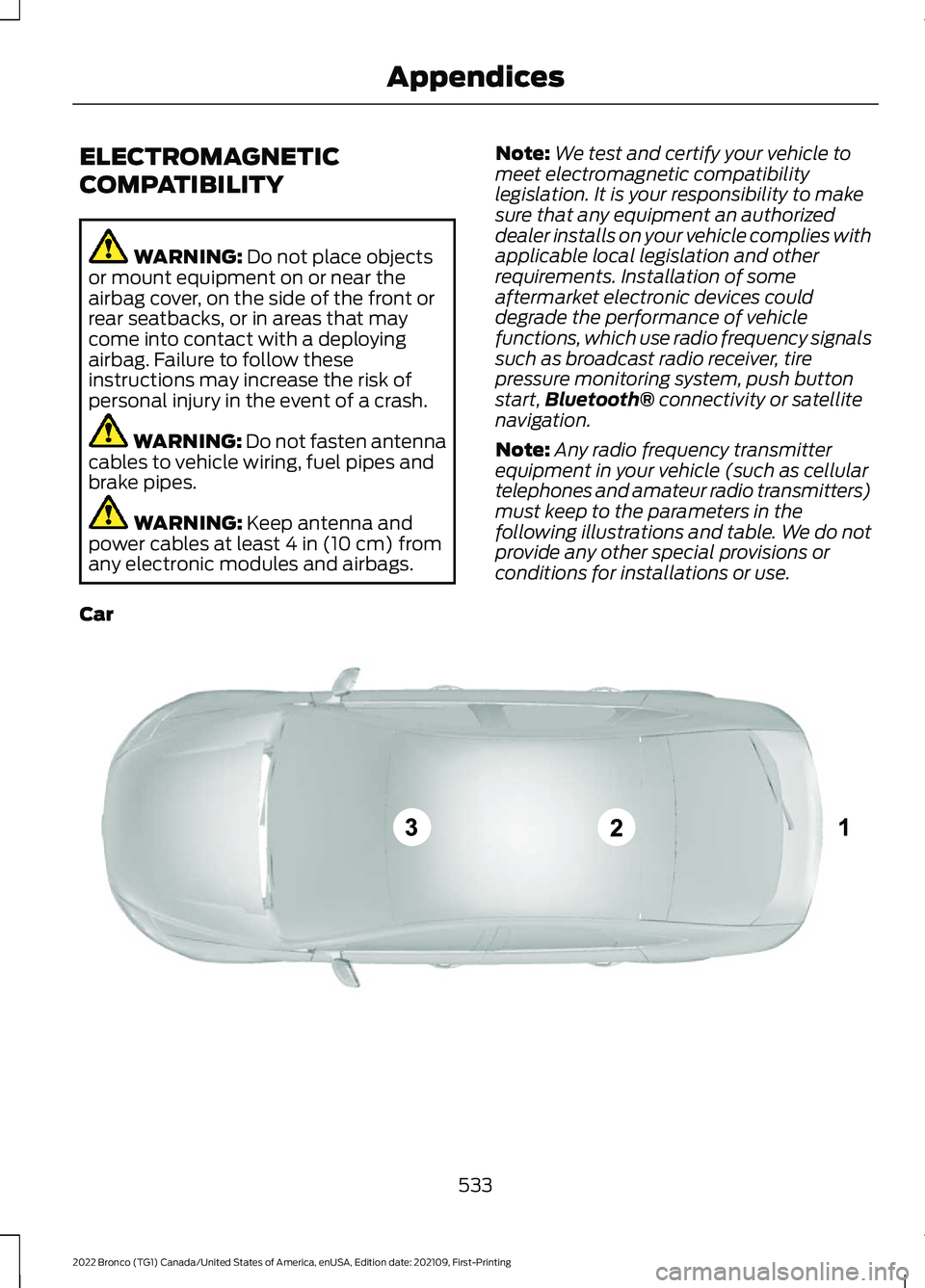
Note:Any radio frequency transmitterequipment in your vehicle (such as cellulartelephones and amateur radio transmitters)must keep to the parameters in thefollowing illustrations and table. We do notprovide any other special provisions orconditions for installations or use.
Car
533
2022 Bronco (TG1) Canada/United States of America, enUSA, Edition date: 202109, First-PrintingAppendicesE239120
Page 549 of 562
How Does Stability Control Work.........204How Does the 360 Degree CameraWork...............................................................229How Does the Garage Door OpenerWork...............................................................139How Does the Lane Keeping SystemWork..............................................................249How Does the Personal Safety SystemWork.................................................................58How Does the Rear Occupant AlertSystem Work................................................137How Does the Safety Canopy™Work................................................................60How Does Traction Control Work..........202How Does Trailer Sway ControlWork..............................................................289How Do the Front Airbags Work...............59How Do the Side Airbags Work................59
I
Identifying Fuse Types................................319Identifying the Audio Unit.........................422Identifying the Auxiliary SwitchWiring............................................................456Identifying the Climate ControlUnit..................................................................118Inflating the Tires.........................................387Information On Demand Screen -Vehicles With: 12.3 Inch Screen...........435Information on the Tire Sidewall............377Inspecting the Tire for Damage.............388Inspecting the Tire for Wear....................388Inspecting the Wheel ValveStems...........................................................389Installing Child Restraints...........................44Combining the Seatbelt and Lower Anchorsfor Attaching Child Restraints.....................47Installing a Child Restraint in a CenterSeat.......................................................................47Using Lower Anchors and Tethers forChildren...............................................................46Using Seatbelts....................................................44Using Tether Straps............................................48Instrument Cluster Display........................113Personalized Settings........................................114Trip Computer.......................................................114
Instrument Cluster Display MainMenu................................................................113Instrument Cluster Indicators...................110Instrument Cluster.......................................107Fuel Gauge............................................................107Instrument Cluster Overview...................107Instrument Cluster WarningLamps............................................................109Instrument Panel...........................................29Interior Air Quality........................................126Interior Bulbs.................................................336Interior Bulb Specification Chart.................336Interior Lamp Function................................101Switching the Interior Lamp Function Onand Off...............................................................101What Is the Interior Lamp Function.............101Interior Lighting..............................................101Ambient Lighting................................................102Interior Lamp Function......................................101Interior Lighting – Troubleshooting.............102Interior Lighting – Troubleshooting.......102Interior Lighting – Frequently AskedQuestions.........................................................102Interior Mirror.................................................105Auto-Dimming Interior Mirror........................105Interior Mirror Precautions........................105Introduction.......................................................17
J
Jump Starting the Vehicle........................302Jump Starting Precautions............................302Jump Starting the Vehicle..............................303Preparing the Vehicle.......................................303
K
Keyless Entry....................................................82Keyless Entry – Troubleshooting....................83Keyless Entry Limitations............................82Keyless Entry Settings..................................82Keyless Entry – Troubleshooting.............83Keyless Entry – Frequently AskedQuestions...........................................................83Keys and Remote Controls........................69Keys and Remote Controls –Troubleshooting...............................................73
545
2022 Bronco (TG1) Canada/United States of America, enUSA, Edition date: 202109, First-PrintingIndex
Page 550 of 562

Keys and Remote Controls –Troubleshooting...........................................73Keys and Remote Controls – InformationMessages............................................................73
L
Lane Keeping System Indicators...........252Lane Keeping System................................249Aid Mode................................................................251Alert and Aid Mode............................................251Alert Mode...........................................................250Lane Keeping System –Troubleshooting............................................253Lane Keeping System Limitations........249Lane Keeping SystemPrecautions.................................................249Lane Keeping System –Troubleshooting........................................253Lane Keeping System – Frequently AskedQuestions........................................................254Lane Keeping System – InformationMessages.........................................................253Launching or Retrieving a Boat orPersonal Watercraft................................286Live Traffic......................................................447Switching Live Traffic On and Off................447What Is Live Traffic............................................447Load Carrying..................................................271Fender Anchor Points.......................................279Roof Rack..............................................................276Load Carrying Precautions........................271Loading Your Trailer....................................284Locating the 360 DegreeCameras.......................................................230Locating the Auxiliary Switches.............454Locating the Auxiliary SwitchWiring............................................................454Locating the Blind Spot InformationSystem Sensors.........................................257Locating the Brake Fluid Reservoir - 2.3LEcoBoost™..................................................194Locating the Brake Fluid Reservoir - 2.7LEcoBoost™..................................................194Locating the Cross Traffic AlertSensors........................................................260Locating the Fuel Filler Funnel.................167Locating the Power Outlets......................145
Locating the Pre-Collision AssistSensors.........................................................264Locating the Rear View Camera............226Locating the Safety ComplianceCertification Labels..................................272Locating the Tire label...............................376Locating the USB Ports..............................143Locating the Wireless AccessoryCharger..........................................................148Locating Your Vehicle...................................70Locking and Unlocking the Tailgate........84Locking the Rear WindowControls........................................................104
M
Maintenance.................................................32012V Battery...........................................................32912V Battery – Troubleshooting.....................330Engine Oil..............................................................323Exterior Bulbs......................................................334Interior Bulbs.......................................................336Maintenance Precautions........................320Making and Receiving a PhoneCall................................................................440Manually Dimming the InteriorMirror..............................................................105Manually Releasing the Electric ParkingBrake..............................................................198Manually Shifting Gears.............................179Shifting Using the Buttons on the SelectorLever....................................................................179Manual Seats.................................................128Adjusting the Head Restraint.........................128Adjusting the Seat Backrest...........................130Folding the Seats................................................135Head Restraint Components.........................128Installing the Head Restraint.........................129Moving the Seat Backward andForward.............................................................129Removing the Head Restraint........................129Unfolding the Seats...........................................136Manual Transmission Fluid Capacity andSpecification................................................176Manual Transmission..................................174Crawler Gear.........................................................174Manual Transmission –Troubleshooting..............................................177
546
2022 Bronco (TG1) Canada/United States of America, enUSA, Edition date: 202109, First-PrintingIndex