2022 FORD BRONCO mirror
[x] Cancel search: mirrorPage 109 of 562

INTERIOR MIRROR
PRECAUTIONS
WARNING: Do not adjust themirrors when your vehicle is moving. Thiscould result in the loss of control of yourvehicle, serious personal injury or death.
Note:Do not clean the mirror housing orglass with harsh abrasives, fuel or otherpetroleum-based cleaning products.
MANUALLY DIMMING THE
INTERIOR MIRROR
Pull the tab below the mirror toward youto reduce glare at night.
AUTO-DIMMING INTERIOR
MIRROR (IF EQUIPPED)
WHAT IS THE AUTO-DIMMINGINTERIOR MIRROR
The mirror dims to reduce the effect ofbright light from behind. It returns tonormal when the bright light from behindis no longer present or if you shift intoreverse (R), to make sure you have a clearview when backing up.
AUTO-DIMMING INTERIORMIRROR LIMITATIONS
Do not block the sensors on the front andback of the mirror.
Note:A rear center passenger or raised rearcenter head restraint could prevent lightfrom reaching the sensor.
105
2022 Bronco (TG1) Canada/United States of America, enUSA, Edition date: 202109, First-PrintingInterior Mirror
Page 110 of 562

ADJUSTING THE EXTERIOR
MIRRORS
WARNING: Do not adjust themirrors when your vehicle is moving. Thiscould result in the loss of control of yourvehicle, serious personal injury or death.
Left-hand mirror.A
Right-hand mirror.B
Adjustment control.C
To adjust your mirrors, switch your vehicleon, with the ignition in accessory mode orthe engine running.
1.Select the mirror you want to adjust.The control light turns on.
2.Use the adjustment control to adjustthe position of the mirror.
3.Press the mirror control again. Thecontrol light turns off.
FOLDING THE EXTERIOR
MIRRORS
Push the mirror toward the door windowglass. Make sure that you fully engage themirror in its support when returning it to itsoriginal position.
106
2022 Bronco (TG1) Canada/United States of America, enUSA, Edition date: 202109, First-PrintingExterior MirrorsE328042
Page 120 of 562

REMOTE START REMOTE
CONTROL INDICATORS (IF
EQUIPPED)
Remote Control Feedback
An LED on the remote control providesstatus feedback of remote start or stopcommands.
StatusLED
Remote startsuccessful.Solid green.
Remote stopsuccessful.Solid red.
Request failed orstatus not received.Blinking red.
Status incomplete.Blinking green.
REMOTE START SETTINGS
SWITCHING CLIMATE CONTROLAUTO MODE ON AND OFF
1.Using the information display controlson the steering wheel, select Settings.
2.Select Vehicle.
3.Select Remote Start.
4.Select Climate Control.
5.Switch Auto on or off.
Note:If you switch the auto mode on, thesystem attempts to heat or cool the interiorto 72°F (22°C).
Note:When you switch the ignition on, theclimate control system returns to the lastused settings.
Note:The heated windshield, heated rearwindow, heated mirrors, heated seats andheated steering wheel could turn on in coldweather.
SWITCHING CLIMATE CONTROLLAST SETTINGS ON AND OFF
1.Using the information display controlson the steering wheel, select Settings.
2.Select Vehicle.
3.Select Remote Start.
4.Select Climate Control.
5.Switch Last Settings on or off.
Note:If you switch the last settings on, thesystem remembers the last used settings.
SWITCHING THE HEATED SEATSETTINGS ON AND OFF (If Equipped)
1.Using the information display controlson the steering wheel, select Settings.
2.Select Vehicle.
3.Select Remote Start.
4.Select Front Seats.
5.Select Auto or Off.
Note:If you switch the heated seat settingson, the heated seats turn on during coldweather.
Note:You cannot adjust the heated seatsettings when you have remotely startedthe engine.
SWITCHING THE HEATEDSTEERING WHEEL SETTINGS ONAND OFF (If Equipped)
1.Using the information display controlson the steering wheel, select Settings.
2.Select Vehicle.
3.Select Remote Start.
4.Select Front Seats & Wheel.
5.Select Auto or Off.
Note:If you switch the heated steeringwheel settings on, the heated steering wheelturns on during cold weather.
116
2022 Bronco (TG1) Canada/United States of America, enUSA, Edition date: 202109, First-PrintingRemote Start (If Equipped)
Page 122 of 562

IDENTIFYING THE CLIMATE
CONTROL UNIT
Depending on your vehicle options, thecontrols could look different than what yousee here.
SWITCHING CLIMATE
CONTROL ON AND OFF
Press the button.
SWITCHING RECIRCULATED
AIR ON AND OFF
Press the button to recirculateair currently in the passengercompartment.
Note:Recirculated air may turn offautomatically, or prevent you from switchingon in all air flow modes except MAX A/C toreduce the risk of fogging. Recirculation mayalso turn on and off automatically in variousair distribution control combinations toimprove heating or cooling efficiency.
SWITCHING AIR
CONDITIONING ON AND OFF
Press the button.
Note:Under certain conditions, the airconditioning compressor could continue tooperate after you switch air conditioning off.
Note:To keep the system and itscomponents fully functional, switch airconditioning on and let your vehicle idle atleast once per month for a minimum of twominutes.
SWITCHING MAXIMUM
DEFROST ON AND OFF
Press the button.
Air flows through the windshield air vents,the temperature is set to the highestsetting, and the blower motor adjusts tothe highest speed.
You can also use this setting to defog andclear the windshield of a thin covering ofice.
Note:To prevent window fogging, youcannot select recirculated air whenmaximum defrost is on.
Note:The heated rear window and heatedmirrors also turn on when you selectmaximum defrost.
Note:When maximum defrost is on, the airconditioning compressor may continue tooperate even though you switch off the A/C.
SWITCHING MAXIMUM
COOLING ON AND OFF
Press the button.
Air flows through the instrument panel airvents, the temperature is set to the lowestsetting, and the blower motor adjusts tothe highest speed.
Note:When you switch maximum coolingoff, air conditioning remains on.
118
2022 Bronco (TG1) Canada/United States of America, enUSA, Edition date: 202109, First-PrintingClimate Control - Vehicles With: Automatic Temperature
Control E358353 E363177
Page 123 of 562
SWITCHING THE HEATED
REAR WINDOW ON AND OFF (IF
EQUIPPED)
Press the button to clear the rearwindow of thin ice and fog. Theheated rear window turns offafter a short period of time.
Note:This button also activates the heatedmirrors.
Note:Do not use harsh chemicals, razorblades or other sharp objects to clean orremove decals from the inside of the heatedrear window as this could cause damage tothe heated rear window grid lines notcovered by the vehicle Warranty.
SETTING THE BLOWER MOTOR
SPEED
Press up or down on the controlto select the blower motorspeed.
Note:For Hybrid Electric Vehicle (HEV) andPlug-In Hybrid Electric Vehicle (PHEV)vehicles, the blower motor may run, and youmay feel airflow when the climate controlis off, to provide cooling to the battery.
SWITCHING THE HEATED
MIRRORS ON AND OFF
Press the button.
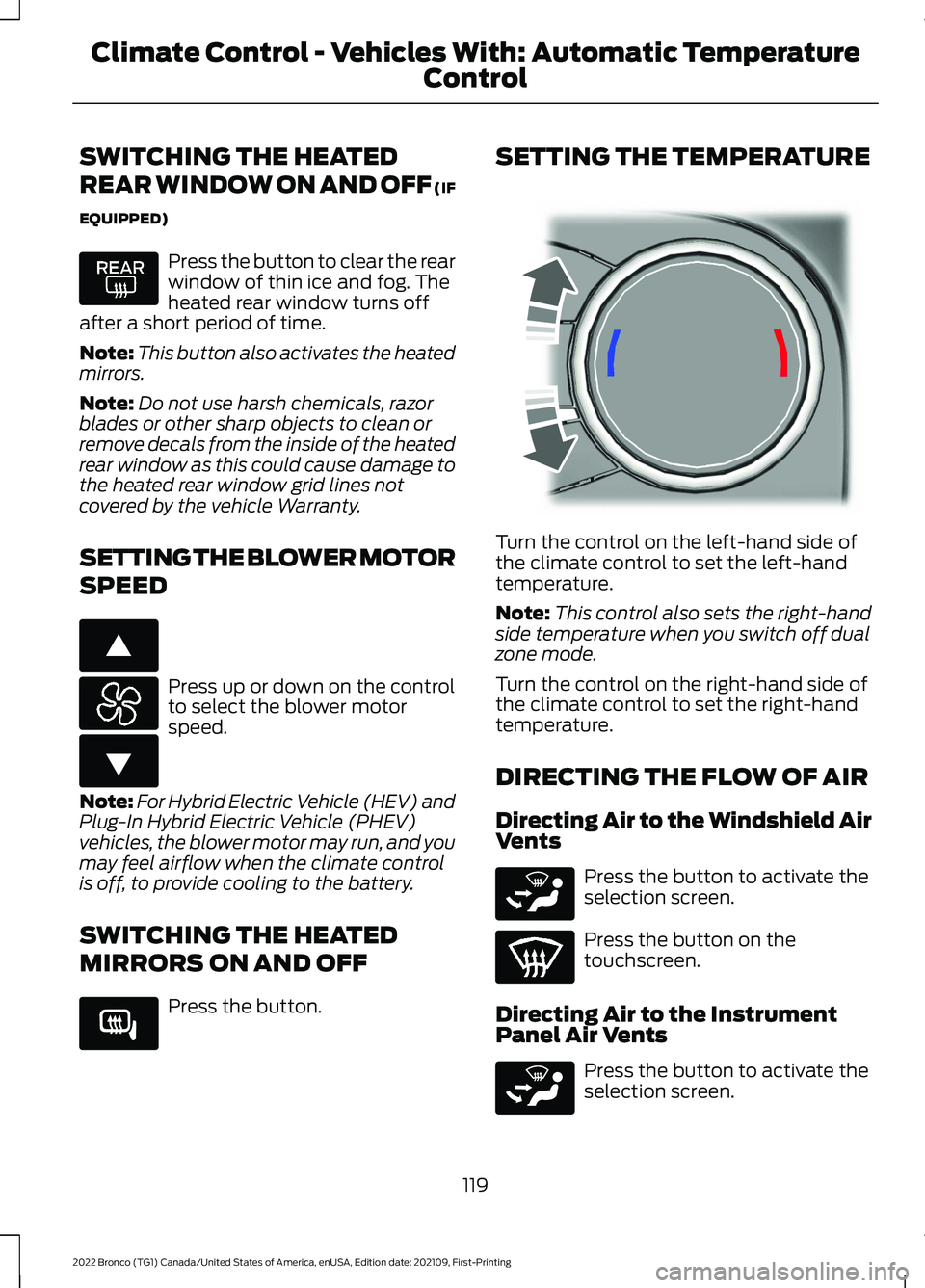
SETTING THE TEMPERATURE
Turn the control on the left-hand side ofthe climate control to set the left-handtemperature.
Note:This control also sets the right-handside temperature when you switch off dualzone mode.
Turn the control on the right-hand side ofthe climate control to set the right-handtemperature.
DIRECTING THE FLOW OF AIR
Directing Air to the Windshield AirVents
Press the button to activate theselection screen.
Press the button on thetouchscreen.
Directing Air to the InstrumentPanel Air Vents
Press the button to activate theselection screen.
119
2022 Bronco (TG1) Canada/United States of America, enUSA, Edition date: 202109, First-PrintingClimate Control - Vehicles With: Automatic Temperature
Control E266187 E266186 E266189 E244115 E265283 E265283
Page 128 of 562

SWITCHING THE HEATED
REAR WINDOW ON AND OFF
Press the button to clear the rearwindow of thin ice and fog. Theheated rear window turns offafter a short period of time.
Note:Do not use harsh chemicals, razorblades or other sharp objects to clean orremove decals from the inside of the heatedrear window as this could cause damage tothe heated rear window grid lines notcovered by the vehicle Warranty.
SETTING THE BLOWER MOTOR
SPEED
Turn the blower motor controlcounterclockwise for a lower blowersetting.
Turn the blower motor control clockwisefor a higher blower setting.
Note:Lights on the control illuminate toindicate the blower motor speed.
Note: When you switch the blower motoroff, air conditioning turns off and thewindows could fog up.
SWITCHING THE HEATED
MIRRORS ON AND OFF
Press the button.
SETTING THE TEMPERATURE
Turn the temperature controlcounterclockwise for cooler temperaturesettings.
Turn the temperature control clockwisefor warmer temperature settings.
DIRECTING THE FLOW OF AIR
Directing Air to the Windshield AirVents
Press the button.
Directing Air to the InstrumentPanel Air Vents
Press the button.
124
2022 Bronco (TG1) Canada/United States of America, enUSA, Edition date: 202109, First-PrintingClimate Control - Vehicles With: Manual Temperature Control E317606 E266189 E244106 E244097
Page 230 of 562

WHAT IS THE REAR VIEW
CAMERA
The rear view camera provides a videoimage of the area behind your vehicle whenthe transmission is in reverse (R).
REAR VIEW CAMERA
PRECAUTIONS
WARNING: The rear view camerasystem is a reverse aid supplementdevice that still requires the driver to useit in conjunction with the interior andexterior mirrors for maximum coverage.
WARNING: Objects that are closeto either corner of the bumper or underthe bumper, might not be seen on thescreen due to the limited coverage of thecamera system.
WARNING: Reverse your vehicleslowly. Failure to follow this instructioncould result in the loss of control of yourvehicle, personal injury or death.
WARNING: Use caution when therear cargo door is ajar. If the rear cargodoor is ajar, the camera will be out ofposition and the video image could beincorrect. All guide lines disappear whenthe rear cargo door is ajar. Failure tofollow this instruction could result inpersonal injury.
WARNING: Use caution whenturning camera features on or off whenthe transmission is not in park (P). Makesure your vehicle is not moving.
Note: When towing, the camera only seeswhat you are towing. This might not provideadequate coverage and you might not seesome objects. In some vehicles, the guidelines may disappear when you connect thetrailer tow connector.
LOCATING THE REAR VIEW
CAMERA
The rear view camera is in the spare tirecarrier.
REAR VIEW CAMERA GUIDE
LINES
Note:Active guide lines and fixed guidelines are only available when thetransmission is in reverse (R).
Note:The centerline is only available if theactive or fixed guide lines are on.
226
2022 Bronco (TG1) Canada/United States of America, enUSA, Edition date: 202109, First-PrintingRear View Camera
Page 231 of 562

A.Active guide lines.
B.Centerline.
C.Fixed guide line: Green zone.
D.Fixed guide line: Yellow zone.
E.Fixed guide line: Red zone.
F.Rear bumper.
Active guide lines only show with fixedguide lines. To use active guide lines, turnthe steering wheel to point the guide linestoward an intended path. If the steeringwheel position changes while reversing,your vehicle might deviate from theintended path.
The fixed and active guide lines fade in andout depending on the steering wheelposition. The active guide lines do notdisplay when the steering wheel positionis straight.
Use caution while reversing. Objects in thered zone are closest to your vehicle andobjects in the green zone are farther away.Objects get closer to your vehicle as theymove from the green zone to the yellow orred zones. Use the side view mirrors andrear view mirror to get better coverage onboth sides and rear of your vehicle.
REAR VIEW CAMERA OBJECT
DISTANCE INDICATORS
The system provides an image of yourvehicle and the sensor zones. The zoneshighlight green, yellow, and red when theparking aid sensors detect an object in thecoverage area.
REAR VIEW CAMERA
SETTINGS
ZOOMING THE REAR VIEWCAMERA IN AND OUT
WARNING: When manual zoom ison, the full area behind your vehicle maynot show. Be aware of your surroundingswhen using the manual zoom feature.
Selectable settings for this feature arezoom in (+) and zoom out (-). Press thesymbol on the camera screen to changethe view. The default setting is zoom off.
This allows you to get a closer view of anobject behind your vehicle. The zoomedimage keeps the bumper in the image toprovide a reference. The zoom is onlyactive while the transmission is in reverse(R).
Note:Manual zoom is only available whenthe transmission is in reverse (R).
Note:Only the centerline shows when youenable manual zoom.
227
2022 Bronco (TG1) Canada/United States of America, enUSA, Edition date: 202109, First-PrintingRear View CameraE306774