2022 FORD BRONCO center console
[x] Cancel search: center consolePage 151 of 562

WHAT IS THE POWER OUTLET
The power outlet can power devices usinga 12 V outlet adapter.
POWER OUTLET
PRECAUTIONS
WARNING: Do not plug optionalelectrical accessories into the cigarlighter socket. Incorrect use of the cigarlighter can cause damage not coveredby the vehicle warranty, and can resultin fire or serious injury.
When you switch the vehicle on, you canuse the socket to power 12 V applianceswith a maximum current rating of 20 A. Donot use the power point over the vehiclecapacity of 12 V DC 240 W or a fuse couldblow. Do not plug in any device thatsupplies power to the vehicle through thepower points. This could result in damageto vehicle systems. Do not hang anyaccessory from the accessory plug. Alwayskeep the power point caps closed whennot in use. Do not insert objects other thanan accessory plug into the power point.
To prevent the battery from running out ofcharge:
•Do not use the power point longer thannecessary when the vehicle is off.
•Do not leave devices plugged inovernight or when you park your vehiclefor extended periods.
LOCATING THE POWER
OUTLETS
Power outlets may be in the followinglocations:
•On the lower instrument panel.
•Inside the center console.
•On the front of the center console.
•On the rear of the center console.
•In the cargo area.
•On the passenger side floor panel.
•3rd row on the quarter trim panels.
147
2022 Bronco (TG1) Canada/United States of America, enUSA, Edition date: 202109, First-PrintingPower Outlet - Vehicles With: 12V Power Outlet
Page 152 of 562

WHAT IS THE WIRELESS
ACCESSORY CHARGER
The wireless accessory charger allows youto charge one compatible Qi wirelesscharging device on the charging area.
WIRELESS ACCESSORY
CHARGER PRECAUTIONS
WARNING: Wireless chargingdevices can affect the operation ofimplanted medical devices, includingcardiac pacemakers. If you have anyimplanted medical devices, werecommend that you consult with yourphysician.
Keep the charging area clean and removeforeign objects prior to charging a device.
Do not place items with a magnetic stripor radio-frequency identification chip, forexample passports, parking tickets,transportation passes or credit cards, nearthe charging area when charging a device.Damage could occur to the magnetic stripor radio-frequency identification chip.
Do not place metal objects, for exampleremote controls, coins and candywrappers, on or near the charging areawhen charging a device. Metal objects mayheat up and degrade the chargingperformance, in addition to causinginterruptions in charging.
Charging could be interrupted, degraded,or could stop if any of the following occur:
•The system detects a foreign object.
•The device is misaligned on thecharging area.
•The device moves on the activecharging area when the vehicle is inmotion.
•The vehicle ambient temperature is toohigh.
•You attempt to charge a non-Qicompatible device on the wirelesscharger.
Note:During charging, the device and thecharger could heat up, this is normal. If thebattery gets hotter than usual, the devicemay stop charging.
LOCATING THE WIRELESS
ACCESSORY CHARGER
The charging area is on thecenter console or in the mediabin below the instrument panel.
CHARGING A WIRELESS
DEVICE
Place the device on the center of thecharging surface with the charging sidedown. The charging stops after your devicereaches a full charge.
You can use the charger when the vehicleis in accessory mode, when the vehicle isrunning, or when SYNC is on.
Displays on the status bar whenwireless charging is in progress.
Note:The charging performance may beaffected if your device is in a case. It may benecessary to remove the case to wirelesslycharge your device.
Note:Software and firmware updates mayaffect device compatibility, including theuse of unofficial software or firmware.Customers should verify chargingfunctionality with their specific devicesin-vehicle.
148
2022 Bronco (TG1) Canada/United States of America, enUSA, Edition date: 202109, First-PrintingWireless Accessory Charger (If Equipped)E297549
Page 153 of 562

GLOVE COMPARTMENT
OPENING THE GLOVECOMPARTMENT
Pull the latch to the left to open.
LOCKING THE GLOVECOMPARTMENT
You can lock lower glove compartmentusing the key.
Unlock.A
Lock.B
CENTER CONSOLE
OPENING THE CENTER CONSOLE
Push the latch to open the center console.
LOCKING THE CENTER CONSOLE
Unlock.A
Lock.B
You can lock the center console using thekey.
149
2022 Bronco (TG1) Canada/United States of America, enUSA, Edition date: 202109, First-PrintingStorageE310218 BAE351063 E333116 E333115
Page 160 of 562
SWITCHING AUTOMATIC ENGINESTOP ON AND OFF
1.Press Settings on the touchscreen.
2.Press Vehicle Settings.
3.Switch 30min Max Idle on or off.
Note:You cannot permanently switch offthe automatic shutdown. If you switch it off,it turns on each time you switch the ignitionon.
OVERRIDING AUTOMATIC ENGINESTOP
Note: You cannot permanently switch offthe automatic engine stop feature. Whenyou switch it off temporarily, it turns on atthe next ignition cycle.
You can stop the engine shutdown, or resetthe timer, at any point before the30-second countdown has expired bydoing any of the following:
•Pressing the brake pedal or acceleratorpedal.
•Pressing the OK or RESET buttonduring the countdown.
ACCESSING THE PASSIVE KEY
BACKUP POSITION
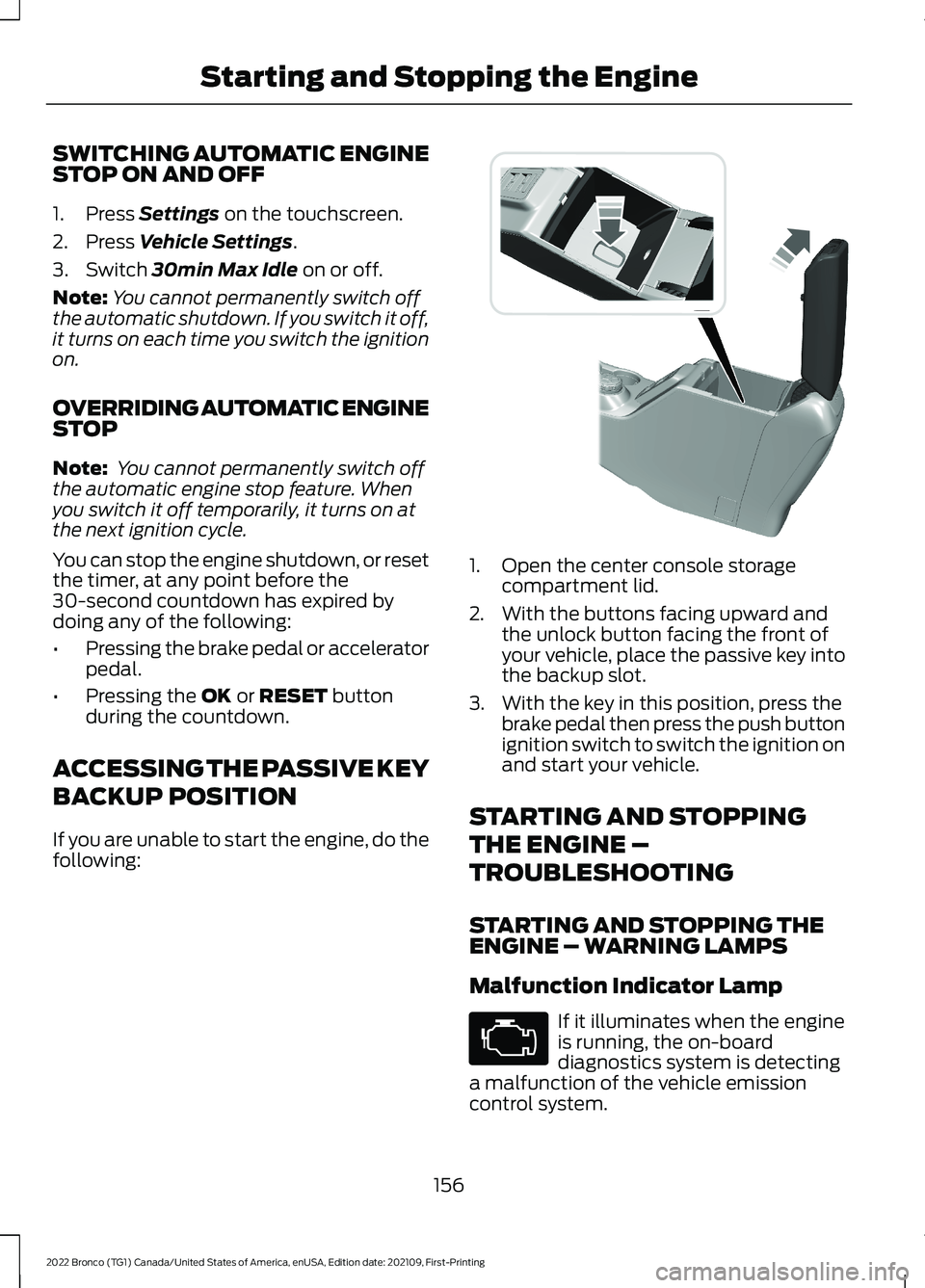
If you are unable to start the engine, do thefollowing:
1.Open the center console storagecompartment lid.
2.With the buttons facing upward andthe unlock button facing the front ofyour vehicle, place the passive key intothe backup slot.
3.With the key in this position, press thebrake pedal then press the push buttonignition switch to switch the ignition onand start your vehicle.
STARTING AND STOPPING
THE ENGINE –
TROUBLESHOOTING
STARTING AND STOPPING THEENGINE – WARNING LAMPS
Malfunction Indicator Lamp
If it illuminates when the engineis running, the on-boarddiagnostics system is detectinga malfunction of the vehicle emissioncontrol system.
156
2022 Bronco (TG1) Canada/United States of America, enUSA, Edition date: 202109, First-PrintingStarting and Stopping the Engine E327286
Page 211 of 562

WHAT IS TRAIL CONTROL
WARNING: The system does notcontrol speed in low traction conditionsor extremely steep slopes. The systemis designed to be an aid and does notrelieve you of your responsibility to drivewith due care and attention. Failure tofollow this instruction could result inpersonal injury.
Trail control lets you focus on steeringduring low-speed and off-road use bycontrolling your vehicle's acceleration andbraking to maintain the speed that you set.
You may hear a noise from the anti-lockbrake system pump motor when you usethe system. This is normal.
TRAIL CONTROL LIMITATIONS
Trail control is unavailable when any of thefollowing occur:
•Your vehicle speed is greater than20 mph (32 km/h) in two-wheel drivehigh (2H) or four-wheel drive high (4H)modes.
•Your vehicle speed is greater than9 mph (15 km/h) in four-wheel drivelow (4L) mode.
•Your vehicle speed is greater than5 mph (8 km/h) in reverse (R).
•The transmission is in park (P).
•The driver side door is open or yourseatbelt is off when the driver side dooris removed.
•Cruise control is on.
•Pro trailer backup assist is on.
SWITCHING TRAIL CONTROL
ON AND OFF
Press the button on the center console.
Note:If your vehicle is equipped with trailone pedal drive, this will activate trail onepedal drive if you are in four wheel drive high(4H) or four wheel drive low (4L) mode,until you set a speed for trail control.
The system switches off if you press thebutton again or exceed 40 mph (64 km/h).
SETTING THE TRAIL CONTROL
SPEED
Note:The buttons are on the steeringwheel.
Drive to the speed you prefer.
Press the button to set orincrease the set speed. Pressand hold to adjust the speed inlarger increments.
207
2022 Bronco (TG1) Canada/United States of America, enUSA, Edition date: 202109, First-PrintingTrail Control (If Equipped)E329455
Page 221 of 562

WHAT IS HILL DESCENT
CONTROL
Hill descent control allows the driver to setand maintain vehicle speed whiledescending steep slopes in various surfaceconditions.
HOW DOES HILL DESCENT
CONTROL WORK
Hill descent control can maintain vehiclespeeds on downhill slopes between2–20 mph (3–32 km/h). Above 20 mph(32 km/h), the system remains on but thedescent speed cannot be set ormaintained.
Note:The system does not function below2 mph (3 km/h).
The system requires a cool down intervalafter a period of sustained use. Hill descentcontrol provides a warning in the messagecenter and a tone sounds when the systemis about to disengage for cooling. At thistime, manually apply the brakes as neededto maintain descent speed.
Note:The amount of time that the systemcan remain active before cooling varies withconditions.
HILL DESCENT CONTROL
PRECAUTIONS
WARNING: The system does notcontrol speed in low traction conditionsor extremely steep slopes. The systemis designed to be an aid and does notrelieve you of your responsibility to drivewith due care and attention. Failure tofollow this instruction could result inpersonal injury.
WARNING: The system does notreplace the parking brake. When youleave your vehicle, always apply theparking brake.
SWITCHING HILL DESCENT
CONTROL ON AND OFF
Press the button on the centerconsole. A light in the instrumentcluster illuminates when thesystem is active.
SETTING THE HILL DESCENT
SPEED
To increase or decrease the descent speed,press the accelerator or brake pedal, or usethe SET + and SET - buttons on thesteering wheel. Once you reach thepreferred speed remove your feet from thepedals.
HILL DESCENT CONTROL
INDICATOR
Illuminates when you switch hilldescent control on.
217
2022 Bronco (TG1) Canada/United States of America, enUSA, Edition date: 202109, First-PrintingHill Descent Control - Manual TransmissionE328593 E328593
Page 352 of 562

11.Make sure that the door bumperarrow is aligned to the service coverplate mark.
12.Gently close the door to the fullyclosed position and make sure thatthe bumper is under slightcompression. If the bumper is notslightly compressed while the door isin the fully closed position, adjust thebumper as needed.
Note:To avoid body damage, do not slamthe door until the bumper adjustments arefinalized.
13.Open and close the installed door afew times to make sure it is properlyaligned and that it operates normally.
14.To install additional doors, repeatsteps 3-13.
15.Return the hex tool and dooralignment pin to the tool kit andsecure the tool kit in the vehicle’scenter console.
16.Return the mirrors to the drivingposition.
Note:Rear seat occupant alert does notfunction with tube doors.
Latch Alignment Adjustments
Vertical Adjustments
To make vertical adjustments:
1.Loosen the upper and lower hingemounting bolts.
2.Engage the latch on the striker to makesure it is properly aligned.
3.Tighten the upper and lower hingemounting bolts, but do not apply finaltorque.
4.Disengage and reengage the latch fromthe striker and confirm properalignment.
5.Tighten the upper and lower hingemounting bolts to 41 lb.ft (55 Nm).
Horizontal Adjustments
To make horizontal adjustments:
348
2022 Bronco (TG1) Canada/United States of America, enUSA, Edition date: 202109, First-PrintingRemovable Vehicle ComponentsE344794 E344855 E344781
Page 353 of 562

1.Loosen the upper and lower hingemounting bolts.
2.Add or remove shims as necessary toattain proper latch alignment, startwith no shims.
3.Tighten the upper and lower hingemounting bolts, but do not apply finaltorque.
4.Disengage the latch from the strikerand confirm proper alignment.
5.Tighten the upper and lower hingemounting bolts to 41 lb.ft (55 Nm).
Removing the Doors
WARNING: Removal of doors foroff-road use only. Removing the doorsfrom the vehicle will affect protectionprovided by the doors and may affectsafety system performance, includingsafety canopy and front seat mountedside airbags, during a crash or rollover.
1.Switch your vehicle off.
2.Fold the mirrors completely toward thefront of your vehicle before removingthe front doors.
3.Fully open the door you are removing.
4.Use the provided hex tool to loosenand remove the lower hinge bolt.
5.Loosen and remove the upper hingebolt.
Note:You can store the hinge bolts in thetool pouch zipped pocket, if needed.
6.Lift the door vertically to separate itfrom the vehicle.
Note:Use caution when removing the doorsas they are heavy.
Note:Store the doors in a secure area.
Note:Store the doors out of the elementsto prevent damage.
7.To remove additional doors, repeatsteps 3-6.
8.Return the hex tool to the tool kit andsecure the tool kit in the vehicle’scenter console.
9.Return the mirrors to the drivingposition.
Note:When you remove the doors, the rearseat occupant alert no longer functions.
Cleaning the Tube Doors
We recommend that you wash the tubedoors with mild soap and rinse with astandard pressure water hose. Whilerinsing, avoid spraying water directly ontothe latch mechanism. Dry with a microfibercloth or leave to air dry.
DOORS AND LOCKS AUDIBLEWARNINGS
Sounds when a door is not fully closed orremoved and your vehicle is moving.
349
2022 Bronco (TG1) Canada/United States of America, enUSA, Edition date: 202109, First-PrintingRemovable Vehicle ComponentsE344781