2022 FORD BRONCO ad blue
[x] Cancel search: ad bluePage 537 of 562
ELECTROMAGNETIC
COMPATIBILITY
WARNING: Do not place objectsor mount equipment on or near theairbag cover, on the side of the front orrear seatbacks, or in areas that maycome into contact with a deployingairbag. Failure to follow theseinstructions may increase the risk ofpersonal injury in the event of a crash.
WARNING: Do not fasten antennacables to vehicle wiring, fuel pipes andbrake pipes.
WARNING: Keep antenna andpower cables at least 4 in (10 cm) fromany electronic modules and airbags.
Note:We test and certify your vehicle tomeet electromagnetic compatibilitylegislation. It is your responsibility to makesure that any equipment an authorizeddealer installs on your vehicle complies withapplicable local legislation and otherrequirements. Installation of someaftermarket electronic devices coulddegrade the performance of vehiclefunctions, which use radio frequency signalssuch as broadcast radio receiver, tirepressure monitoring system, push buttonstart,Bluetooth® connectivity or satellitenavigation.
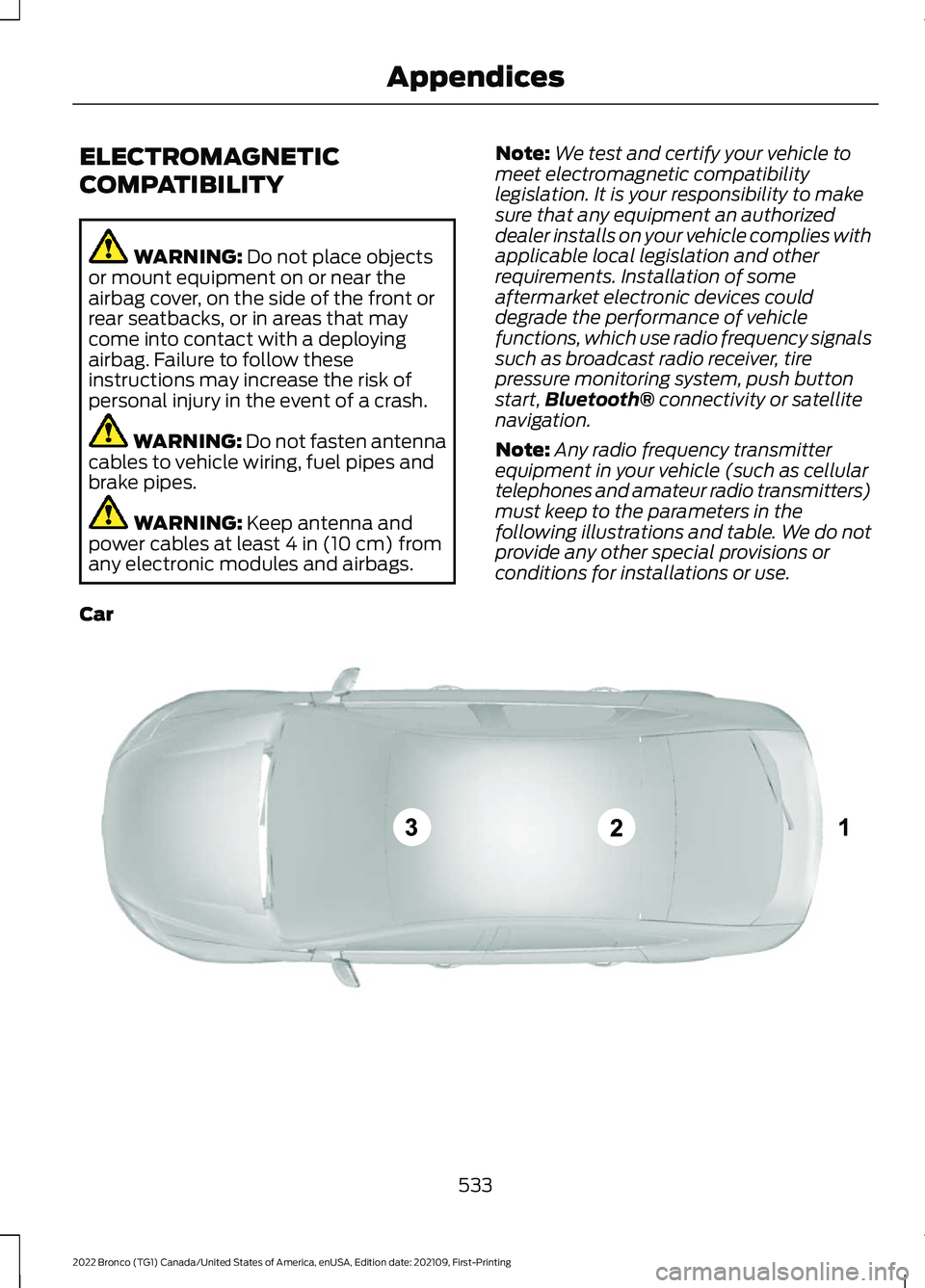
Note:Any radio frequency transmitterequipment in your vehicle (such as cellulartelephones and amateur radio transmitters)must keep to the parameters in thefollowing illustrations and table. We do notprovide any other special provisions orconditions for installations or use.
Car
533
2022 Bronco (TG1) Canada/United States of America, enUSA, Edition date: 202109, First-PrintingAppendicesE239120
Page 543 of 562
Automatic Transmission PositionIndicators......................................................179Automatic Transmission Positions........178Drive (D).................................................................178Manual (M)...........................................................178Neutral (N)............................................................178Park (P)..................................................................178Reverse (R)...........................................................178Sport (S)................................................................179Automatic TransmissionPrecautions..................................................178Auto Mode......................................................120Auto Mode Indicators........................................120Switching Auto Mode On and Off................120Switching Dual Mode On and Off..................121Auto-Start-Stop............................................161Auto-Start-Stop – Troubleshooting...........163Auto-Start-Stop Indicators......................163Auto-Start-Stop Precautions -Automatic Transmission..........................161Auto-Start-Stop Precautions - ManualTransmission................................................161Auto-Start-Stop –Troubleshooting.........................................163Auto-Start-Stop – Frequently AskedQuestions.........................................................165Auto-Start-Stop – InformationMessages..........................................................163Autounlock........................................................78Autounlock Requirements................................79Switching Autounlock On and Off.................79What Is Autounlock.............................................78Auxiliary Switches.......................................454
B
BatterySee: Changing the 12V Battery......................331Blind Spot Information System.............256Blind Spot Information System –Troubleshooting............................................258Blind Spot Information SystemIndicators.....................................................258Blind Spot Information SystemLimitations..................................................256Blind Spot Information SystemPrecautions.................................................256
Blind Spot Information SystemRequirements - AutomaticTransmission...............................................257Blind Spot Information SystemRequirements - ManualTransmission..............................................256Blind Spot Information System –Troubleshooting........................................258Blind Spot Information System –Information Messages................................258Bluetooth®....................................................443Body Control Module Fuse Box...............316Accessing the Body Control Module FuseBox......................................................................316Identifying the Fuses in the Body ControlModule Fuse Box............................................317Locating the Body Control Module FuseBox......................................................................316Bonnet LockSee: Opening and Closing the Hood..........320Booster Seats..................................................48Brake Fluid Specification...........................195Brake Over Accelerator..............................194Brake Precautions........................................194Brakes...............................................................194Anti-Lock Braking System..............................194Brakes – Troubleshooting...............................195Brake Shift Interlock...................................180Brake Shift Interlock Precautions................180Using Brake Shift Interlock.............................180What Is Brake Shift Interlock.........................180Brakes – Troubleshooting.........................195Brakes – Frequently AskedQuestions..........................................................197Brakes – Information Messages...................196Brakes – Warning Lamps................................195Breaking-In....................................................298
C
Calculating Payload....................................274Calculating the Load Limit.......................274Canceling the Set Speed.........................208Capacities and Specifications................401Catalytic Converter.......................................173Catalytic Converter –Troubleshooting..............................................173Catalytic Converter Precautions.............173
539
2022 Bronco (TG1) Canada/United States of America, enUSA, Edition date: 202109, First-PrintingIndex
Page 545 of 562

Connected Vehicle –Troubleshooting.........................................418Connected Vehicle – Frequently AskedQuestions.........................................................418Connecting a Bluetooth® Device..........443Connecting a Trailer.....................................281Connecting a Trailer –Troubleshooting............................................282Connecting a Trailer Precautions...........281Connecting a Trailer –Troubleshooting........................................282Connecting a Trailer – InformationMessages.........................................................282Connecting the Vehicle to a MobileNetwork.........................................................417Connecting FordPass to the Modem...........417Enabling and Disabling the Modem............417What Is the Modem...........................................417Connecting the Vehicle to a Wi-FiNetwork.........................................................417Connecting Your Phone............................438Contacting Us...................................................15Cooling System Capacity andSpecification - 2.3L EcoBoost™........408Cooling System Capacity andSpecification - 2.7L EcoBoost™.........409Crash and Breakdown Information.......301Automatic Crash Shutoff...............................305Jump Starting the Vehicle..............................302Post-Crash Alert System................................304Post Impact Braking.........................................304Recovery Towing................................................305Crash Sensors and Airbag Indicator.......66Crawler Gear...................................................174Using Crawler Gear.............................................174What Is Crawler Gear.........................................174Creating a MyKey............................................75Creating a Vehicle Wi-Fi Hotspot..........420Cross Traffic Alert........................................259Cross Traffic Alert – Troubleshooting.........261Cross Traffic Alert Indicators..................260Cross Traffic Alert Limitations................259Cross Traffic Alert Precautions...............259Cross Traffic Alert –Troubleshooting.........................................261Cross Traffic Alert – InformationMessages..........................................................261Cruise Control................................................232
Cruise Control Indicators...........................233Customer Information...............................469Radio Frequency Certification Labels........472
D
Data Privacy......................................................22Department of Transportation UniformTire Quality Grades...................................376Digital Radio..................................................425Digital Radio Indicators...................................426Digital Radio Limitations................................425How Does Digital Radio Work.......................425Switching Digital Radio Reception On andOff......................................................................426What Is Digital Radio........................................425Directing the Flow of Air..............................119Disposing of Airbags.....................................67Distance Indication.....................................264Distance Indication Indicator........................266Switching Distance Indication On andOff......................................................................266What Is Distance Indication..........................264Doors and Locks.............................................78Autolock...................................................................79Autounlock..............................................................78Doors and Locks – Troubleshooting.............79Mislock......................................................................79Operating the Doors From Inside YourVehicle.................................................................78Operating the Doors From Outside YourVehicle.................................................................78Doors and Locks – Troubleshooting.......79Doors and Locks – Frequently AskedQuestions............................................................81Doors and Locks – InformationMessages...........................................................80Doors and Locks – Warning Lamps..............79Drive Belt Routing - 2.3LEcoBoost™.................................................336Drive Belt Routing - 2.7LEcoBoost™..................................................337Driver Alert.....................................................269Driver Alert – Troubleshooting......................270Driver Alert Indicators.................................270Driver Alert Limitations.............................269Driver Alert Precautions............................269
541
2022 Bronco (TG1) Canada/United States of America, enUSA, Edition date: 202109, First-PrintingIndex
Page 552 of 562
Changing the Tire Pressure Unit....................114Personal Safety SystemComponents.................................................58Personal Safety System™..........................58Phone Menu..................................................438Phone...............................................................438Phone Precautions.....................................438Playing Media Using Bluetooth®..........443Playing Media Using the USB Port.........143Playing or Pausing the AudioSource...........................................................422Post-Crash Alert System..........................304How Does the Post-Crash Alert SystemWork..................................................................304Post-Crash Alert SystemLimitations......................................................304Switching the Post-Crash Alert SystemOff......................................................................304What Is the Post-Crash AlertSystem.............................................................304Post Impact Braking..................................304How Does Post Impact BrakingWork..................................................................304Overriding Post Impact Braking...................305Post Impact Braking Indicators....................305Post Impact Braking Limitations.................304Power Outlet Indicators.............................145Power Outlet..................................................145Power Outlet Precautions.........................145Power Seats...................................................130Adjusting the Head Restraint.........................130Adjusting the Lumbar Support......................132Adjusting the Seat Backrest...........................132Adjusting the Seat Cushion.............................132Adjusting the Seat Height................................132Head Restraint Components.........................130Installing the Head Restraint...........................131Moving the Seat Backward andForward..............................................................131Removing the Head Restraint.........................131Pre-Collision Assist Limitations.............263Pre-Collision Assist Precautions............262Pre-Collision Assist.....................................262Automatic Emergency Braking....................266Distance Indication...........................................264Evasive Steering Assist....................................266Pre-Collision Assist –Troubleshooting............................................267
Pre-Collision Assist –Troubleshooting........................................267Pre-Collision Assist – Frequently AskedQuestions........................................................268Pre-Collision Assist – InformationMessages..........................................................267Pre-Collision Assist – WarningLamps................................................................267Preparing Your Vehicle forStorage..........................................................374Programming a MyKey.................................75Programming the Garage Door Openerto Your Garage Door OpenerMotor.............................................................140Programming the Garage Door Openerto Your Gate Opener Motor.....................141Programming the Garage Door Openerto Your Hand-Held Transmitter...........140Programming the Remote Control..........72Properly Adjusting the Driver and FrontPassenger Seats..........................................62PunctureSee: Changing a Flat Tire................................395Push Button Ignition Switch......................151
R
Radio Frequency CertificationLabels............................................................472Blind Spot Information SystemSensors.............................................................472Body Control Module.......................................478Garage Door Opener.........................................481Keys and Remote Controls.............................481Radio Transceiver Module..............................487SYNC......................................................................489Telematics Control Unit..................................495Tire Pressure Monitoring SystemSensors............................................................496Wireless Accessory ChargingModule.............................................................500Rear Axle Fluid Capacity andSpecification...............................................414Rear Cargo Area Anchor Points.............280Locating the Rear Cargo Area AnchorPoints................................................................280Rear Cargo Area Anchor Point LoadCapacities.......................................................280
548
2022 Bronco (TG1) Canada/United States of America, enUSA, Edition date: 202109, First-PrintingIndex