2022 FIAT 500X ABS
[x] Cancel search: ABSPage 6 of 312

4
STOP/START SYSTEM ........................................... 91Automatic Mode ...............................................91
Possible Reasons The Engine Does Not
Autostop ............................................................91
To Start The Engine While In Autostop
Mode .................................................................92
To Manually Turn Off The Stop/Start
System ..............................................................92
To Manually Turn On The Stop/Start
System ..............................................................92
System Malfunction .........................................92
CRUISE CONTROL SYSTEMS — IF EQUIPPED..... 93
Cruise Control ...................................................93
Adaptive Cruise Control (ACC) .........................94
FRONT/REAR PARK ASSIST — IF EQUIPPED ... 102
Park Assist Sensors....................................... 103
Park Assist Warning Display ......................... 103Park Assist Display ........................................ 103
Enabling And Disabling Park Assist.............. 106
Service The Park Assist System ................... 106
Cleaning The Park Assist System ................. 106Park Assist System Usage Precautions ....... 106
LANESENSE — IF EQUIPPED ............................. 108
LaneSense Operation ................................... 108Turning LaneSense On Or Off ....................... 108
LaneSense Warning Message ...................... 108Changing LaneSense Status ........................ 110
PARKVIEW REAR BACK UP CAMERA .............. 110
REFUELING THE VEHICLE .................................. 111
VEHICLE LOADING .............................................. 112
Certification Label ......................................... 112 TRAILER TOWING ................................................ 113
Common Towing Definitions......................... 113
Trailer Hitch Classification ............................ 115
Trailer Towing Weights (Maximum Trailer
Weight Ratings) ............................................. 115Trailer And Tongue Weight............................ 116
Towing Requirements .................................. 116
Towing Tips .................................................... 118
RECREATIONAL TOWING (BEHIND
MOTORHOME) ..................................................... 119
Towing This Vehicle Behind Another
Vehicle ........................................................... 119
DRIVING TIPS ....................................................... 119
Driving On Slippery Surfaces ........................ 119
Driving Through Water ................................. 120
MULTIMEDIA
UCONNECT SYSTEMS ........................................ 122
CYBERSECURITY ................................................ 122
UCONNECT SETTINGS ........................................ 123Customer Programmable Features.............. 123
UCONNECT INTRODUCTION ............................... 138
System Overview .......................................... 138
Drag & Drop Menu Bar ................................. 140
Safety And General Information ................... 140
UCONNECT MODES ............................................. 141
Steering Wheel Audio Controls .................... 141
Radio Mode .................................................. 142
Media Mode .................................................. 150
Phone Mode ................................................. 152 ANDROID AUTO™ & APPLE CARPLAY® —
IF EQUIPPED ......................................................... 162
Android Auto™
S
........................................ 162
Apple CarPlay® ............................................. 164 Android Auto™ And Apple CarPlay® Tips
And Tricks ...................................................... 166
NAVIGATION MODE — IF EQUIPPED .................. 166
Navigation Main Menu ................................. 166
Navigating A Route........................................ 168
Search............................................................ 168
Current Route ................................................ 169
My Places....................................................... 171Parking ........................................................... 171
Gas Stations .................................................. 172Settings .......................................................... 172
RADIO OPERATION AND MOBILE PHONES...... 173
Regulatory And Safety Information .............. 173
SAFETY
SAFETY FEATURES .............................................. 174Anti-Lock Brake System (ABS)...................... 174
Electronic Brake Control (EBC) System ....... 175
AUXILIARY DRIVING SYSTEMS .......................... 178
Blind Spot Monitoring (BSM) —
If Equipped ................................................... 178
Full Brake Control System With
Mitigation ....................................................... 182Tire Pressure Monitoring System (TPMS) .... 185
22_FD_OM_EN_USC_t.book Page 4
Page 12 of 312
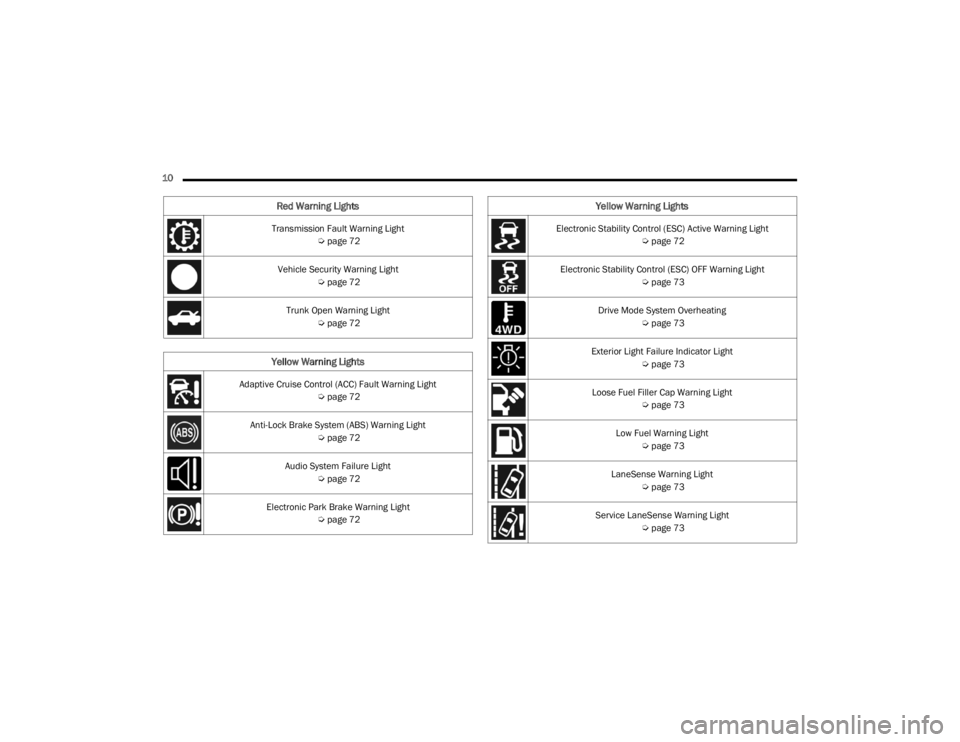
10 Transmission Fault Warning Light Úpage 72
Vehicle Security Warning Light Úpage 72
Trunk Open Warning Light Úpage 72
Yellow Warning Lights
Adaptive Cruise Control (ACC) Fault Warning Light
Úpage 72
Anti-Lock Brake System (ABS) Warning Light Úpage 72
Audio System Failure Light Úpage 72
Electronic Park Brake Warning Light Úpage 72
Red Warning Lights
Electronic Stability Control (ESC) Active Warning Light
Úpage 72
Electronic Stability Control (ESC) OFF Warning Light Úpage 73
Drive Mode System Overheating Úpage 73
Exterior Light Failure Indicator Light Úpage 73
Loose Fuel Filler Cap Warning Light Úpage 73
Low Fuel Warning Light Úpage 73
LaneSense Warning Light Úpage 73
Service LaneSense Warning Light Úpage 73
Yellow Warning Lights
22_FD_OM_EN_USC_t.book Page 10
Page 72 of 312

70GETTING TO KNOW YOUR INSTRUMENT PANEL
Brake Warning Light
This warning light monitors various brake
functions, including brake fluid level and
parking brake application. If the brake
light turns on it may indicate that the
parking brake is applied, that the brake fluid level
is low, or that there is a problem with the Anti-Lock
Brake System reservoir.
If the light remains on when the parking brake has
been disengaged, and the fluid level is at the full
mark on the master cylinder reservoir, it indicates
a possible brake hydraulic system malfunction or
that a problem with the Brake Booster has been
detected by the Anti-Lock Brake System (ABS) /
Electronic Stability Control (ESC) system. In this
case, the light will remain on until the condition has
been corrected. If the problem is related to the
brake booster, the ABS pump will run when
applying the brake, and a brake pedal pulsation
may be felt during each stop.
The dual brake system provides a reserve braking
capacity in the event of a failure to a portion of the
hydraulic system. A leak in either half of the dual
brake system is indicated by the Brake Warning
Light, which will turn on when the brake fluid level
in the master cylinder has dropped below a
specified level.
The light will remain on until the cause is corrected.
NOTE:The light may flash momentarily during sharp
cornering maneuvers, which change fluid level
conditions. The vehicle should have service
performed, and the brake fluid level checked.
If brake failure is indicated, immediate repair is
necessary.
Vehicles equipped with the Anti-Lock Brake System
(ABS) are also equipped with Electronic Brake
Force Distribution (EBD). In the event of an EBD
failure, the Brake Warning Light will turn on along
with the ABS Light. Immediate repair to the ABS
system is required.
Operation of the Brake Warning Light can be
checked by turning the ignition switch from the OFF
position to the ON/RUN position. The light should
illuminate for approximately two seconds. The light
should then turn off unless the parking brake is
applied or a brake fault is detected. If the light does
not illuminate, have the light inspected by an
authorized dealer. The light also will turn on when the parking brake
is applied with the ignition switch in the ON/RUN
position.
NOTE:This light shows only that the parking brake is
applied. It does not show the degree of brake appli
-
cation.
Battery Charge Warning Light
This warning light will illuminate when the
battery is not charging properly. If it stays
on while the engine is running, there may
be a malfunction with the charging
system. Contact an authorized dealer as soon as
possible.
This indicates a possible problem with the
electrical system or a related component.
Coolant Temperature Warning Light
This light warns of an overheated engine
condition. If the light turns on while driving,
safely pull over and stop the vehicle. If the
Air Conditioning (A/C) system is on, turn it
off. Also, shift the transmission into NEUTRAL and
idle the vehicle. If the temperature reading does not
return to normal, turn the engine off immediately
and call for service.
NOTE:As the coolant temperature gauge approaches "H",
this indicator will illuminate and a single chime will
sound.
WARNING!
Driving a vehicle with the red brake light on is
dangerous. Part of the brake system may have
failed. It will take longer to stop the vehicle. You
could have a collision. Have the vehicle checked
immediately.
22_FD_OM_EN_USC_t.book Page 70
Page 74 of 312

72GETTING TO KNOW YOUR INSTRUMENT PANEL
Transmission Fault Warning Light
This light will illuminate (together with a
message in the instrument cluster
display and a buzzer) to indicate a
transmission fault. Contact an authorized
dealer if the message remains after restarting the
engine.
Vehicle Security Warning Light —
If Equipped
This light will flash at a fast rate for
approximately 15 seconds when the
vehicle security system is arming, and
then will flash slowly until the vehicle is
disarmed.
Trunk Open Warning Light
This indicator will illuminate when the
trunk is open and not fully closed.
YELLOW WARNING LIGHTS
Adaptive Cruise Control (ACC) Fault
Warning Light — If Equipped
This warning light will illuminate to
indicate a fault in the ACC system.
Contact a local authorized dealer for
service Ú page 94.
Anti-Lock Brake System (ABS) Warning
Light
This warning light monitors the ABS. The
light will turn on when the ignition is
placed in the ON/RUN position and may
stay on for as long as four seconds.
If the ABS light remains on or turns on while
driving, then the Anti-Lock portion of the brake
system is not functioning and service is required as
soon as possible. However, the conventional brake
system will continue to operate normally,
assuming the Brake Warning Light is not also on.
If the ABS light does not turn on when the ignition
is placed in the ON/RUN position, have the brake
system inspected by an authorized dealer.
Audio System Failure Light — If Equipped
This light will illuminate to report a failure
of the Audio System. Contact an
authorized dealership as soon as
possible.
Electronic Park Brake Warning Light
This warning light will illuminate to
indicate the Electronic Park Brake is not
functioning properly and service is
required. Contact an authorized dealer.
Electronic Stability Control (ESC) Active
Warning Light — If Equipped
This warning light will indicate when the
ESC system is Active. The ESC Indicator
Light in the instrument cluster will come
on when the ignition is placed in the ON/
RUN position, and when ESC is activated. It should
go out with the engine running. If the ESC Indicator
Light comes on continuously with the engine
running, a malfunction has been detected in the
ESC system. If this warning light remains on after
several ignition cycles, and the vehicle has been
driven several miles (kilometers) at speeds greater
than 30 mph (48 km/h), see an authorized dealer
as soon as possible to have the problem
diagnosed and corrected.
The ESC OFF Indicator Light and the ESC Indi -
cator Light come on momentarily each time the
ignition is placed in the ON/RUN position.
The ESC system will make buzzing or clicking
sounds when it is active. This is normal; the
sounds will stop when ESC becomes inactive.
This light will come on when the vehicle is in an
ESC event.
22_FD_OM_EN_USC_t.book Page 72
Page 98 of 312

96STARTING AND OPERATING
Adaptive Cruise Control (ACC) Menu
The instrument cluster display shows the current
ACC system settings. The information it displays
depends on ACC system status.
Push the Adaptive Cruise Control (ACC) on/off
button until one of the following shows in the
instrument cluster display:
Adaptive Cruise Control Off
When ACC is deactivated, the display will read
“Adaptive Cruise Control Off.”
Adaptive Cruise Control Ready
When ACC is activated but the vehicle speed
setting has not been selected, the display will read
“Adaptive Cruise Control Ready.”
Adaptive Cruise Control Set
When the SET (+) or the SET (-) button is pushed,
the display will read “ACC SET.”
When ACC is set, the set speed will appear in the
instrument cluster display.
The ACC screen may display once again if any of
the following ACC activity occurs:
System Cancel
Driver Override
System Off
ACC Proximity Warning
ACC Unavailable Warning The instrument cluster display will return to the last
display selected after five seconds of no ACC
display activity.
Activating Adaptive Cruise Control (ACC)
The minimum set speed for the ACC system is
20 mph (32 km/h).
When the system is turned on and in the ready
state, the instrument cluster display will read “ACC
Ready.”
When the system is off, the instrument cluster
display will read “Adaptive Cruise Control (ACC)
Off.”
NOTE:You cannot engage ACC under the following condi
-
tions:
When in 4WD Low
When the brakes are applied
When the parking brake is applied
When the transmission is in PARK, REVERSE or
NEUTRAL
When the vehicle speed is below the minimum
speed range
When the brakes are overheated
When the Electronic Stability Control (ESC),
Anti-Lock Brake System (ABS), or other stability
control systems are operating or have just oper -
ated
During automatic braking by the Full Brake
Control system (if equipped)
When Cruise Control is activated
To Activate/Deactivate
Push and release the Adaptive Cruise Control
(ACC) on/off button. The ACC menu in the
instrument cluster display will read “ACC Ready.”
To turn the system off, push and release the
Adaptive Cruise Control (ACC) on/off button again.
At this time, the system will turn off and the
instrument cluster display will read “Adaptive
Cruise Control (ACC) Off.”
WARNING!
Leaving the Adaptive Cruise Control (ACC)
system on when not in use is dangerous. You
could accidentally set the system or cause it to
go faster than you want. You could lose control
and have a collision. Always ensure the system
is off when you are not using it.
22_FD_OM_EN_USC_t.book Page 96
Page 99 of 312

STARTING AND OPERATING97
To Set A Desired ACC Speed
When the vehicle reaches the speed desired, push
the SET (+) button or the SET (-) button and
release. The instrument cluster display will show
the set speed.
NOTE:Fixed Speed Cruise Control can be used without
ACC enabled. To change between the different
modes, push the ACC on/off button which turns
the ACC and the Fixed Speed Cruise Control off.
Pushing the Fixed Speed Cruise Control on/off
button will result in turning on (changing to) Fixed
Speed Cruise Control mode.
ACC or Fixed Speed Cruise Control is set when the
vehicle speed is above 20 mph (32 km/h), the set speed shall be the current speed of the vehicle.
Neither system can be set below 20 mph
(32 km/h).
NOTE:
Keeping your foot on the accelerator pedal can
cause the vehicle to continue to accelerate
beyond the set speed. If this occurs, the
message “Adaptive Cruise Control Override” will
display in the instrument cluster display.
If you continue to accelerate beyond the set
speed while ACC is enabled, the system will not
be controlling the distance between your vehicle
and the vehicle ahead. The vehicle speed will
only be determined by the position of the accel-
erator pedal.
To Cancel
The following conditions cancel the system:
The brake pedal is applied.
The CANC button is pushed.
An Anti-Lock Brake System (ABS) event occurs.
The gear selector is removed from the DRIVE
position.
The braking temperature exceeds normal range
(overheated).
The Electronic Stability Control/Traction Control
System (ESC/TCS) activates.
The vehicle parking brake is applied.
The driver switches ESC to Full Off mode.
To Turn Off
The system will turn off and erase the set speed in
memory if:
The Adaptive Cruise Control (ACC) on/off button
is pushed.
The Fixed Speed Cruise Control on/off button is
pushed.
The ignition is placed in the OFF position.
To Resume Speed
If there is a set speed in the memory, push the RES
button and then remove your foot from the
accelerator pedal. The instrument cluster display
will show the last set speed.
ACC or Fixed Speed Cruise Control can only be
resumed at speeds above 20 mph (32 km/h).
NOTE:ACC cannot be resumed if there is a stationary
vehicle in front of your vehicle in close proximity.
WARNING!
In Fixed Speed Cruise Control mode, the system
will not react to vehicles ahead. In addition, the
proximity warning does not activate and no
alarm will sound even if you are too close to the
vehicle ahead since neither the presence of the
vehicle ahead nor the vehicle-to-vehicle distance
is detected. Be sure to maintain a safe distance
between your vehicle and the vehicle ahead.
Always be aware which mode is selected.
WARNING!
The Resume function should only be used if
traffic and road conditions permit. Resuming a
set speed that is too high or too low for
prevailing traffic and road conditions could
cause the vehicle to accelerate or decelerate too
sharply for safe operation. Failure to follow these
warnings can result in a collision and death or
serious personal injury.
4
22_FD_OM_EN_USC_t.book Page 97
Page 148 of 312

146MULTIMEDIA
FAVORITES
Press the Favorites button on the touchscreen to
activate the favorites menu, which will time out
within 20 seconds in absence of user interaction.
You can exit the Favorites Menu by a press of the X
button.
The Favorites feature enables you to set a favorite
artist or song that is currently playing. The radio
then uses this information to alert you when either
the favorite artist or song is being played at any
time by any of the SiriusXM® Channels.
The maximum number of favorites that can be
stored in the Radio is 50.
Favorite Artist: While the song is playing, to set a
favorite artist, press the Favorites button on the
touchscreen and then the Favorite Artist button on
the touchscreen.
Favorite Song: While the song is playing, to set a
favorite song, press the Favorites button on the
touchscreen and then the Favorite Song button on
the touchscreen.
BROWSE IN SXM
Uconnect 4/4 NAV With 7-inch Display Browse Button
Press the Browse button on the touchscreen to
edit Presets, Favorites, Game Zone, and Jump
settings, along with providing the SiriusXM®
Channel List.
This Screen contains many submenus. You can
exit submenus to return to a parent menu by
pressing the Back arrow. All
Press the All button on the Browse Screen. When
pressing the All button, the following categories
become available:
Channel List:
Press the Channel List to display
all the SiriusXM® Channel Numbers. You can
scroll the Channel List by pressing the Up and
Down arrows, located on the right side of the
screen. Scrolling can also be done by operating
the Tune/Scroll knob.
Genre List: Press the Genre button on the touch -
screen to display a list of Genres. You can select
any desired Genre by pressing the Genre List.
The radio tunes to a channel with the content in
the selected Genre.
Presets — If Equipped
Press the Presets button (if equipped) located at
the left of the Browse screen.
You can scroll the Presets list by pressing the Up
and Down arrows located at the right side of the
screen. Scrolling can also be done by operating the
Tune/Scroll knob as well.
Preset Selection
A preset can be selected by pressing any of the
listed Presets, or by pushing the Enter/Browse
button on the Tune/Scroll knob to select the
currently highlighted Preset. When selected, the
Radio tunes to the station stored in the Preset.
1 — All Button
2 — Presets Button
3 — Favorites Button
4 — Game Zone Button
22_FD_OM_EN_USC_t.book Page 146
Page 176 of 312

174 (Continued)
SAFETY
SAFETY FEATURES
ANTI-LOCK BRAKE SYSTEM (ABS)
The ABS provides increased vehicle stability and
brake performance under most braking conditions.
The system automatically prevents wheel lock and
enhances vehicle control during braking.
The ABS performs a self-check cycle to ensure that
the ABS is working properly each time the vehicle
is started and driven. During this self-check, you
may hear a slight clicking sound as well as some
related motor noises.
The ABS is activated during braking when the
system detects one or more wheels are beginning
to lock. Road conditions such as ice, snow, gravel,
bumps, railroad tracks, loose debris, or panic stops
may increase the likelihood of ABS activation(s).
You also may experience the following normal
characteristics when the ABS activates:
The ABS motor noise or clicking sounds (you may
continue to hear for a short time after the stop).
Brake pedal pulsations.
A slight drop of the brake pedal at the end of the
stop.The ABS is designed to function with the Original
Equipment Manufacturer (OEM) tires. Modification
may result in degraded ABS performance.
Anti-Lock Brake System (ABS) Warning
Light
The yellow ABS Warning Light will turn on when the
ignition is placed in the ON/RUN mode and may
stay on for as long as four seconds.
If the ABS Warning Light remains on or comes on
while driving, it indicates that the anti-lock portion
of the brake system is not functioning and that
service is required. However, the conventional
brake system will continue to operate normally if
the ABS Warning Light is on.
If the ABS Warning Light is on, the brake system
should be serviced as soon as possible to restore
the benefits of Anti-Lock Brakes. If the ABS
WARNING!
The ABS contains sophisticated electronic
equipment that may be susceptible to interfer
-
ence caused by improperly installed or high
output radio transmitting equipment. This
interference can cause possible loss of
anti-lock braking capability. Installation of
such equipment should be performed by qual -
ified professionals.
Pumping of the Anti-Lock Brakes will diminish
their effectiveness and may lead to a collision.
Pumping makes the stopping distance longer.
Just press firmly on your brake pedal when you
need to slow down or stop.
The ABS cannot prevent the natural laws of
physics from acting on the vehicle, nor can it
increase braking or steering efficiency beyond
that afforded by the condition of the vehicle
brakes and tires or the traction afforded.
The ABS cannot prevent collisions, including
those resulting from excessive speed in turns,
following another vehicle too closely, or hydro -
planing.
The capabilities of an ABS equipped vehicle
must never be exploited in a reckless or
dangerous manner that could jeopardize the
user’s safety or the safety of others.
WARNING!
22_FD_OM_EN_USC_t.book Page 174