2022 DODGE DURANGO door lock
[x] Cancel search: door lockPage 26 of 332
24GETTING TO KNOW YOUR VEHICLE
Grab The Door Handle To Unlock
NOTE:Either the driver door only or all doors will unlock
when you grab hold of the front driver’s door
handle, depending on the selected setting in the
Uconnect system Ú page 156.
Preventing Inadvertent Locking Of Passive Entry
Key Fob In Vehicle
To minimize the possibility of unintentionally
locking a Passive Entry key fob inside your vehicle,
the Passive Entry system is equipped with an
automatic door unlock feature, which will function
if the ignition is in the OFF position.
If one of the vehicle doors is open, and the door
panel switch is used to lock the vehicle, once all
open doors have been closed, the vehicle checks
the inside and outside of the vehicle for any
valid Passive Entry key fob. If one of the vehicle's Passive Entry key fobs is detected inside the
vehicle, and no other valid Passive Entry key fobs
are detected outside the vehicle, the Passive Entry
system automatically unlocks all vehicle doors and
chirps the horn three times (on the third attempt,
ALL doors will lock, and the Passive Entry key fob
can be locked in the vehicle).
To Unlock/Enter The Liftgate
The liftgate Passive Entry unlock feature is built
into the electronic liftgate handle. With a valid
Passive Entry key fob within 5 ft (1.5 m) of the
liftgate, pull the electronic liftgate handle for a
power open on vehicles equipped with a power
liftgate. Pull the electronic liftgate handle and lift
for manual liftgate vehicles.
NOTE:
If the vehicle is unlocked, the liftgate will open
with the handle and no key fob is required.
The liftgate will either unlock along with the
vehicle doors, or it will need to be unlocked by
pushing the electronic liftgate release,
depending on the selected setting in the
Uconnect system Ú page 156.
The liftgate (and vehicle doors if unlocked) must
be locked using the lock button on the key fob,
the Passive Entry lock button, or the lock
buttons on the interior front door panels.
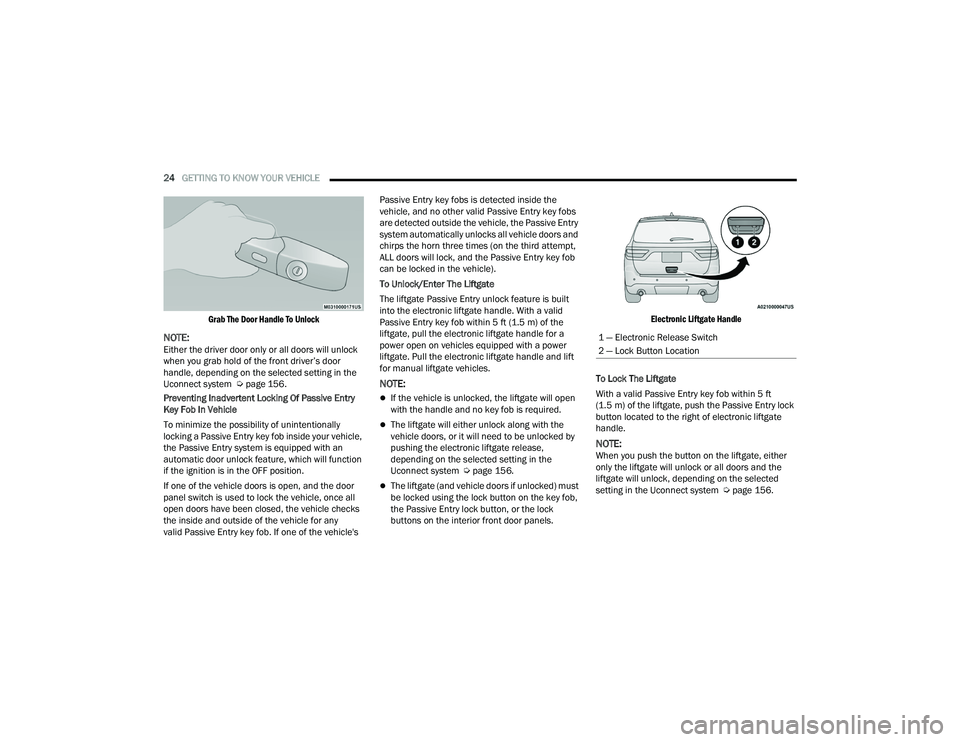
Electronic Liftgate Handle
To Lock The Liftgate
With a valid Passive Entry key fob within 5 ft
(1.5 m) of the liftgate, push the Passive Entry lock
button located to the right of electronic liftgate
handle.
NOTE:When you push the button on the liftgate, either
only the liftgate will unlock or all doors and the
liftgate will unlock, depending on the selected
setting in the Uconnect system Ú page 156.
1 — Electronic Release Switch
2 — Lock Button Location
22_WD_OM_EN_USC_t.book Page 24
Page 27 of 332

GETTING TO KNOW YOUR VEHICLE25
To Lock The Vehicle’s Doors And Liftgate
With one of the vehicle’s Passive Entry key fobs
within 5 ft (1.5 m) of the driver or passenger front
door handle, push the door handle lock button to
lock all four doors and liftgate.
NOTE:This feature will cause the horn to chirp when the
doors are locked with the door handle lock button.
This feature can be turned on or off within
Uconnect Settings Ú page 156.
Push The Door Handle Button To Lock
NOTE:Do NOT grab the door handle when pushing the
door handle button. This could unlock the door(s).
Do NOT Grab The Door Handle When Locking
NOTE:
After pushing the door handle button, you must
wait two seconds before you can lock or unlock
the doors, using either Passive Entry door
handle or door handle button. This is done to
allow you to check if the vehicle is locked by
pulling the door handle without the vehicle
unlocking.
The Passive Entry system will not operate if the
key fob battery is depleted.
Close proximity to mobile devices can affect the
Passive Entry system.
The vehicle doors can also be locked by using the
key fob lock button or the lock button located on
the vehicle’s interior door panel Ú page 316.
AUTOMATIC UNLOCK ON EXIT
F
EATURE — IF EQUIPPED
If Auto Unlock is enabled within Uconnect Settings
Ú page 156, this feature will unlock all the doors
when any door is opened if the vehicle is in PARK.
AUTOMATIC DOOR LOCKS —
I
F EQUIPPED
When enabled, the door locks will lock
automatically when the vehicle’s speed exceeds
15 mph (24 km/h). Auto door lock feature is
enabled/disabled within Uconnect Settings
Ú page 156.
CHILD-PROTECTION DOOR LOCK
S
YSTEM — REAR DOORS
To provide a safer environment for small children
riding in the rear seats, the rear doors are
equipped with Child-Protection Door Lock system.
To Engage Or Disengage The Child Protection Door
Lock System
1. Open the rear door.
2. Insert the tip of the emergency key into the
lock and rotate to the lock or unlock position.
3. Repeat steps 1 and 2 for the opposite rear door.
2
22_WD_OM_EN_USC_t.book Page 25
Page 28 of 332

26GETTING TO KNOW YOUR VEHICLE
Child-Protection Door Lock Function
NOTE:For emergency exit with the system engaged, move
the lock knob up (unlocked position), roll down the
window, and open the door with the outside door
handle.
STEERING WHEEL
MANUAL TILT/TELESCOPING STEERING
C
OLUMN — IF EQUIPPED
This feature allows you to tilt the steering column
upward or downward. It also allows you to lengthen
or shorten the steering column. The tilt/
telescoping lever is located below the steering
wheel at the end of the steering column.
Manual Tilt/Telescoping Steering Column Handle
To unlock the steering column, push the lever
downward (toward the floor). To tilt the steering
column, move the steering wheel upward or
downward as desired. To lengthen or shorten the
steering column, pull the steering wheel outward
or push it inward as desired. To lock the steering
column in position, push the lever upward until
fully engaged.
POWER TILT/TELESCOPING STEERING
C
OLUMN — IF EQUIPPED
This feature allows you to tilt the steering column
upward or downward. It also allows you to lengthen
or shorten the steering column. The power tilt/
telescoping steering column control is located
below the multifunction lever on the steering
column.
Power Tilt/Telescoping Steering Control Location
WARNING!
Avoid trapping anyone in a vehicle in a collision.
Remember that the rear doors can only be
opened from the outside with the
Child-Protection locks are engaged (locked).
WARNING!
Do not adjust the steering column while driving.
Adjusting the steering column while driving or
driving with the steering column unlocked, could
cause the driver to lose control of the vehicle.
Failure to follow this warning may result in
serious injury or death.
22_WD_OM_EN_USC_t.book Page 26
Page 29 of 332

GETTING TO KNOW YOUR VEHICLE27
Use the four-way control to adjust the steering
column.
NOTE:For vehicles equipped with Driver Memory Settings
Ú page 27, you can use your key fob or the
memory switch on the driver's door trim panel to
return the tilt/telescopic steering column to saved
positions.
HEATED STEERING WHEEL —
I
F EQUIPPED
The steering wheel contains a heating
element that helps warm your hands in
cold weather. The heated steering wheel
has only one temperature setting. Once
the heated steering wheel has been turned on, it
will stay on until the operator turns it off. The
heated steering wheel may not turn on when it is
already warm. The heated steering wheel control button is
located on the center stack below the radio screen,
or within the Uconnect system.
Push the heated steering wheel button once to
turn the heating element on.
Push the heated steering wheel button a second
time to turn the heating element off.
NOTE:The engine must be running for the heated
steering wheel to operate.
For information on use with the Remote Start
system, see Ú
page 20.
DRIVER MEMORY SETTINGS — IF EQUIPPED
This feature allows the driver to save up to two
different memory profiles for easy recall through a
memory switch. Each memory profile saves
desired position settings for the following features:
Driver seat
Easy Entry/Exit seat (if equipped)
Side mirrors
Power tilt and telescopic steering column
(if equipped)
A set of desired radio station presets
NOTE:
Your vehicle is equipped with two key fobs, each
can be linked to either memory position 1 or 2.
Be sure to program the radio presets prior to
programming the memory settings.
The memory setting switch is located on the
driver’s door trim panel. The switch consists of
three buttons:
The set (S) button, which is used to activate the
memory save function.
The (1) and (2) buttons which are used to recall
either of two saved memory profiles.
WARNING!
Do not adjust the steering column while driving.
Adjusting the steering column while driving or
driving with the steering column unlocked, could
cause the driver to lose control of the vehicle.
Failure to follow this warning may result in
serious injury or death.
WARNING!
Persons who are unable to feel pain to the
skin because of advanced age, chronic illness,
diabetes, spinal cord injury, medication,
alcohol use, exhaustion, or other physical
conditions must exercise care when using the
steering wheel heater. It may cause burns
even at low temperatures, especially if used
for long periods.
Do not place anything on the steering wheel
that insulates against heat, such as a blanket
or steering wheel covers of any type and mate -
rial. This may cause the steering wheel heater
to overheat.
2
22_WD_OM_EN_USC_t.book Page 27
Page 51 of 332

GETTING TO KNOW YOUR VEHICLE49
To opt out of the Advanced Auto High-Beam
Sensitivity Control (default) and enter Reduced
High-Beam Sensitivity Control (not recom -
mended), toggle high beam lever six full on/off
cycles within 10 seconds of ignition ON. System
will return to default setting upon ignition off.
FLASH-TO-PASS
You can signal another vehicle with your headlights
by lightly pulling the multifunction lever toward you.
This will cause the high beam headlights to turn on,
and remain on, until the lever is released.
AUTOMATIC HEADLIGHTS
This system automatically turns the headlights on
or off according to ambient light levels. To turn the
system on, rotate the headlight switch
counterclockwise to the AUTO position. When the
system is on, the headlight time delay feature is
also on. This means the headlights will stay on for
up to 90 seconds after you place the ignition into
the OFF position. The headlight time delay can be
programmed 0/30/60/90 seconds within
Uconnect Settings Ú page 156.
To turn the automatic system off, move the
headlight switch out of the AUTO position.
NOTE:The engine must be running before the headlights
will come on in the automatic mode.
PARKING LIGHTS AND PANEL LIGHTS
To turn on the parking lights and instrument panel
lights, rotate the headlight switch clockwise. To
turn off the parking lights, rotate the headlight
switch back to the O (off) position.
NOTE:Vehicles sold in Canada are equipped with a head -
light switch with an AUTO and ON detent but
without an OFF detent. Headlights will be deacti -
vated when the headlight switch is placed in the
parking lights position. However, the Daytime
Running Lights (DRLs) will be activated along with
the front and rear marker lights. The DRLs may be
deactivated when the parking brake is engaged.
AUTOMATIC HEADLIGHTS WITH WIPERS
If your vehicle is equipped with Automatic
Headlights, it also has this
customer-programmable feature. When your
headlights are in the automatic mode and the
engine is running, they will automatically turn on
when the wiper system is on. This feature is
programmable through the Uconnect system
Ú page 156.
NOTE:When your headlights come on during the daytime,
the vehicle will monitor outside brightness and
decide if the instrument panel needs to be dimmed
or not Ú page 51.
HEADLIGHT DELAY
To assist when exiting the vehicle, the headlight
delay feature will leave the headlights on for up to
90 seconds. This delay is initiated when the
ignition is placed in the OFF position while the
headlight switch is on, and then the headlight
switch is cycled off. Headlight delay can be
canceled by either turning the headlight switch on
then off, or by placing the ignition in the ON
position.
NOTE:The headlight delay time is programmable through
the Uconnect system Ú page 156.
LIGHTS-ON REMINDER
If the headlights, parking lights, or cargo lights are
left on after the ignition is placed in the OFF
position, the vehicle will chime when the driver’s
door is opened.
FOG LIGHTS — IF EQUIPPED
The fog lights are turned on by pushing fog light
button on the headlight switch.
2
22_WD_OM_EN_USC_t.book Page 49
Page 52 of 332

50GETTING TO KNOW YOUR VEHICLE
Fog Light Operation
Fog Light Operation (Vehicles Sold In Canada)
The fog lights will operate only when the parking
lights are on or when the vehicle headlights are on
low beam. An indicator light located in the
instrument cluster display will illuminate when the
fog lights are on. The fog lights will turn off when
the switch is pushed a second time, when the headlight switch is rotated to the off position, or
the high beam is selected.
TURN SIGNALS
Move the multifunction lever up or down to
activate the turn signals. The arrows on each side
of the instrument cluster flash to show proper
operation.
NOTE:If either light remains on and does not flash, or
there is a very fast flash rate, check for a defective
outside light bulb.
LANE CHANGE ASSIST — IF EQUIPPED
Lightly push the multifunction lever up or down,
without moving beyond the detent, and the turn
signal will flash three times then automatically turn
off.
AUTOMATIC HEADLIGHT LEVELING —
I
F EQUIPPED
This feature prevents the headlights from
interfering with the vision of oncoming drivers.
Headlight leveling automatically adjusts the height
of the headlight beam in reaction to changes in
vehicle pitch.
BATTERY SAVER
Timers are set to both the interior and exterior
lights to protect the life of your vehicle’s battery.
After 10 minutes, if the ignition is OFF and any door
is left open or the dimmer control is rotated all the
way up to the dome light on position, the interior
lights will automatically turn off.
NOTE:Battery saver mode is canceled if the ignition is ON.
If the headlights remain on while the ignition is
placed in the OFF position, the exterior lights will
automatically turn off after eight minutes. If the
headlights are turned on and left on for eight
minutes while the ignition is OFF, the exterior lights
will automatically turn off.
INTERIOR LIGHTS
Courtesy and dome lights are turned on when the
front doors are opened or when the dimmer control
is rotated to its upward most position. If your
vehicle is equipped with a key fob and the unlock
button is pushed, the courtesy and dome lights will
turn on. When a door is open and the interior lights
are on, rotating the dimmer control all the way
down, to the O (off) position, will cause all the
interior lights to go out. This allows the doors to
stay open for extended periods of time without
discharging the vehicle’s battery.
22_WD_OM_EN_USC_t.book Page 50
Page 53 of 332

GETTING TO KNOW YOUR VEHICLE51
COURTESY LIGHTS
The courtesy lights can be turned on by pushing
the top corner of the lens. To turn the lights off,
push the lens a second time.
Courtesy Lights
Front Map/Reading Lights — If Equipped
Lights are mounted in the overhead console. Each
light can be turned on by pushing the switch on
either side of the console. These buttons are
backlit for nighttime visibility.
Front Map/Reading Lights
To turn the lights off, push the switch a second
time. The lights also turn on when a door is
opened. The lights will also turn on when the
unlock button on the key fob is pushed.
Front Map/Reading Light Switches
Ambient Light — If Equipped
The overhead console is equipped with an ambient
light feature. This light illuminates for improved
visibility of the floor and center console area.
Ambient Light
Dimmer Control
The brightness of the instrument panel lighting can
be regulated by rotating the dimmer control up
(brighter) or down (dimmer). When the headlights
are on you can supplement the brightness of the
odometer, trip odometer, radio and overhead
console by rotating the control to its upward most
position until you hear a click. This is useful when
headlights are required during the day.
2
22_WD_OM_EN_USC_t.book Page 51
Page 54 of 332

52GETTING TO KNOW YOUR VEHICLE
Dimmer Control
Dimmer Control (Vehicles Sold In Canada)
Illuminated Entry
When programmed with the Uconnect system, the
headlights and courtesy lights will turn on when
you use the key fob to unlock the doors or open any
door Ú page 156. The time the lights stay on is programmable up to
90 seconds. The lights will fade to off after the
programmed time, or they will immediately fade to
off once the ignition switch is placed in the ON/
RUN position from the OFF position.
The front courtesy overhead console and door
courtesy lights will not turn off if the instrument
panel dimmer switch is rotated to the upward most
position, past the detent. The overhead and door
courtesy lights will turn off after 10 minutes when
the ignition is placed in the OFF position to protect
the battery.
The illuminated entry system will not operate if the
instrument panel dimmer switch is rotated all the
way downward to the O (off) position.
WINDSHIELD WIPERS AND WASHERS
The windshield wiper/washer controls are located
on the multifunction lever on the left side of the
steering column. The front wipers are operated by
rotating a switch, located on the end of the lever.
WINDSHIELD WIPER OPERATION
Rotate the end of the lever to one of the first four
detent positions for intermittent settings, the fifth
detent for low wiper operation and the sixth detent
for high wiper operation.
Windshield Wiper Operation
CAUTION!
Always remove any buildup of snow that
prevents the windshield wiper blades from
returning to the “park” position. If the windshield
wiper switch is turned off, and the blades cannot
return to the “park” position, damage to the
wiper motor may occur.
1 — Push End Of Lever And Hold For Front Washer
2 — Rotate Downward For Mist
3 — Rotate For Rear Wiper/Washer Operation
4 — Rotate For Front Wiper Operation
22_WD_OM_EN_USC_t.book Page 52