2022 DODGE DURANGO audio
[x] Cancel search: audioPage 169 of 332

MULTIMEDIA167
Voice
Device Manager This setting will open the Device Manager main screen.
Do Not Disturb All This setting will open the “Do Not Disturb All” settings menu. The available
options are “On” and “Off”.
Paired Phones This setting will show the list of paired phones.
Paired Audio Sources This setting will show the list of paired audio sources.
Enable Two Active Phones This setting will enable or disable two active phones with the vehicle.
The setting options are “On” and “Off”.
Paired Phones And Audio Devices This setting will show the list of paired phones and audio devices.
Setting Name Description
When the Voice button is pressed on the touchscreen, the system displays the options related to the vehicle’s Voice Recognition feature.
NOTE:Depending on the vehicle’s options, feature settings may vary.
Setting NameDescription
Voice OptionsThis setting will change the voice type during a Voice Recognition session.
The available options are “Male” and “Female”.
Voice Response Length This setting will change the response length for the Voice Recognition system.
The “Brief” setting provides a shortened audio description from the system.
The “Detailed” setting provides the full audio description from the system.
5
22_WD_OM_EN_USC_t.book Page 167
Page 177 of 332

MULTIMEDIA175
Audio
When the Audio button is pressed on the touchscreen, the system displays options related to the vehicle’s sound system. These settings can change the audio
location within the vehicle, adjust the bass or treble levels, and auto-play settings from an audio device or smartphone.
NOTE:Depending on the vehicle’s options, feature settings may vary.
Setting Name Description
Balance/FadeThis setting will adjust audio levels from specific speakers in the front/back
and left/right of the vehicle. The Speaker icon can be moved to set audio
location.
Equalizer This setting will adjust the “Bass”, “Mid”, and “Treble” ranges of the audio.
Speed Adjusted Volume This setting will adjust audio volume as speeds increase. At a higher setting,
the volume will increase more as the vehicle speeds up. The available settings
are “Off”, “1”, “2”, and “3”.
Surround Sound This setting will turn the Surround Sound system on or off.
AUX Volume Offset This setting will tune the audio levels from a device connected through the
AUX port. The available settings are “+” and “-”.
Auto Play This setting will automatically begin playing audio from a connected device.
Auto On Radio This setting will turn the radio on with vehicle start and recall the last known
radio state. The available options are “On”, “Off”, and “Last Recall”.
Volume Adjustment This setting will let you adjust the volume levels for “Media”, “Phone”,
“Navigation”, and “VR” (Voice Recognition).
5
22_WD_OM_EN_USC_t.book Page 175
Page 183 of 332
MULTIMEDIA181
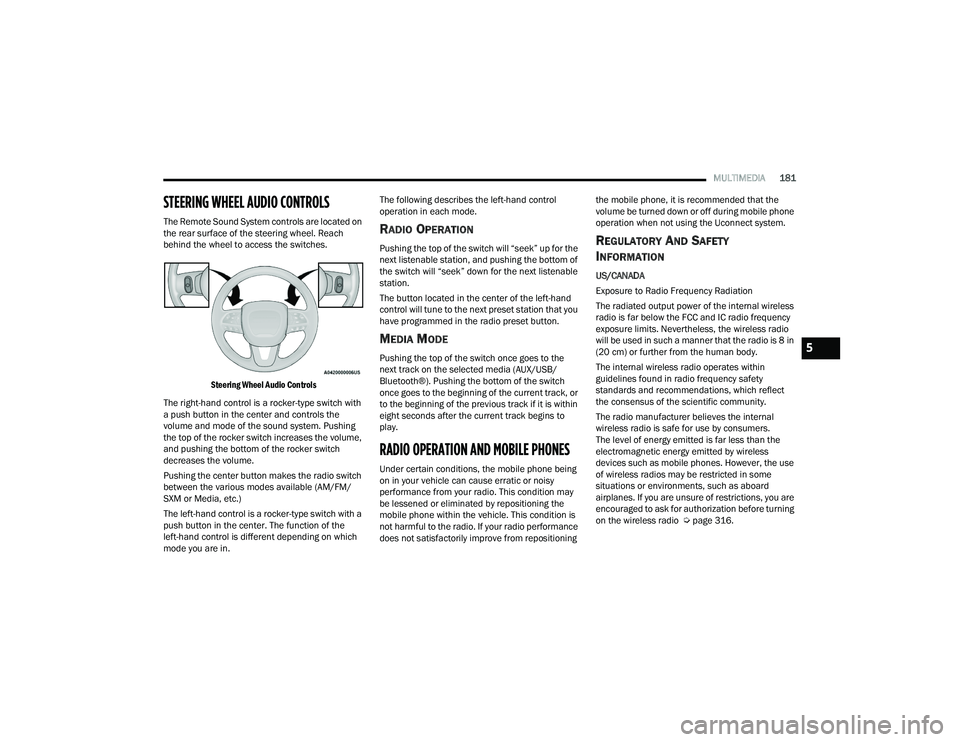
STEERING WHEEL AUDIO CONTROLS
The Remote Sound System controls are located on
the rear surface of the steering wheel. Reach
behind the wheel to access the switches.
Steering Wheel Audio Controls
The right-hand control is a rocker-type switch with
a push button in the center and controls the
volume and mode of the sound system. Pushing
the top of the rocker switch increases the volume,
and pushing the bottom of the rocker switch
decreases the volume.
Pushing the center button makes the radio switch
between the various modes available (AM/FM/
SXM or Media, etc.)
The left-hand control is a rocker-type switch with a
push button in the center. The function of the
left-hand control is different depending on which
mode you are in. The following describes the left-hand control
operation in each mode.RADIO OPERATION
Pushing the top of the switch will “seek” up for the
next listenable station, and pushing the bottom of
the switch will “seek” down for the next listenable
station.
The button located in the center of the left-hand
control will tune to the next preset station that you
have programmed in the radio preset button.
MEDIA MODE
Pushing the top of the switch once goes to the
next track on the selected media (AUX/USB/
Bluetooth®). Pushing the bottom of the switch
once goes to the beginning of the current track, or
to the beginning of the previous track if it is within
eight seconds after the current track begins to
play.
RADIO OPERATION AND MOBILE PHONES
Under certain conditions, the mobile phone being
on in your vehicle can cause erratic or noisy
performance from your radio. This condition may
be lessened or eliminated by repositioning the
mobile phone within the vehicle. This condition is
not harmful to the radio. If your radio performance
does not satisfactorily improve from repositioning
the mobile phone, it is recommended that the
volume be turned down or off during mobile phone
operation when not using the Uconnect system.
REGULATORY AND SAFETY
I
NFORMATION
US/CANADA
Exposure to Radio Frequency Radiation
The radiated output power of the internal wireless
radio is far below the FCC and IC radio frequency
exposure limits. Nevertheless, the wireless radio
will be used in such a manner that the radio is 8 in
(20 cm) or further from the human body.
The internal wireless radio operates within
guidelines found in radio frequency safety
standards and recommendations, which reflect
the consensus of the scientific community.
The radio manufacturer believes the internal
wireless radio is safe for use by consumers.
The level of energy emitted is far less than the
electromagnetic energy emitted by wireless
devices such as mobile phones. However, the use
of wireless radios may be restricted in some
situations or environments, such as aboard
airplanes. If you are unsure of restrictions, you are
encouraged to ask for authorization before turning
on the wireless radio Ú page 316.
5
22_WD_OM_EN_USC_t.book Page 181
Page 238 of 332

236IN CASE OF EMERGENCY
ASSIST Call
The ASSIST Button is used to automatically
connect you to any one of the following support
centers:
Roadside Assistance – If you get a flat tire, or
need a tow, just push the ASSIST button and you
will be connected to a representative for assis-
tance. Roadside Assistance will know what
vehicle you’re driving and its location. Additional
fees may apply for roadside assistance.
SiriusXM Guardian™ Customer Care – In-vehicle
support for SiriusXM Guardian™.
Vehicle Customer Care – Total support for all
other vehicle issues.
Uconnect Customer Care - Total support for
Radio, Phone and NAV issues.
SOS Call
1. Push the SOS Call button on the Rearview Mirror.
NOTE:In case the SOS Call button is pushed in error,
there will be a 10 second delay before the SOS Call
system initiates a call to a SOS operator. To cancel
the SOS Call connection, push the SOS call button
on the Rearview Mirror or press the cancellation
button on the Device Screen. Termination of the
SOS Call will turn off the green LED light on the
Rearview Mirror. 2. The LED light located between the SOS and
ASSIST buttons on the Rearview Mirror will
turn green once a connection to a SOS
operator has been made.
3. Once a connection between the vehicle and a SOS operator is made, the SOS Call system
may transmit the following important vehicle
information to a SOS operator:
Indication that the occupant placed a
SOS Call
The vehicle brand
The last known GPS coordinates of the
vehicle
4. You should be able to speak with the SOS operator through the vehicle audio system to
determine if additional assistance is needed.
NOTE:
Your vehicle may be transmitting data as
authorized by the subscriber.
Once a connection is made between the
vehicle’s SOS Call system and the SOS oper -
ator, the SOS operator may be able to open
a voice connection with the vehicle to deter -
mine if additional assistance is needed.
Once the SOS operator opens a voice
connection with the vehicle’s SOS Call
system, the operator should be able to
speak with you or other vehicle occupants
and hear sounds occurring in the vehicle.
The vehicle’s SOS Call system will attempt
to remain connected with the SOS operator
until the SOS operator terminates the
connection.
WARNING!
ALWAYS obey traffic laws and pay attention to
the road. ALWAYS drive safely with your hands on
the steering wheel. You have full responsibility
and assume all risks related to the use of the
features and applications in this vehicle. Only
use the features and applications when it is safe
to do so. Failure to do so may result in an
accident involving serious injury or death.
22_WD_OM_EN_USC_t.book Page 236
Page 239 of 332

IN CASE OF EMERGENCY237
(Continued)
5. The SOS operator may attempt to contact
appropriate emergency responders and
provide them with important vehicle
information and GPS coordinates. SOS Call System Limitations
Vehicles sold in Mexico
DO NOT have SOS Call
system capabilities.
SOS or other emergency line operators in Mexico
may not answer or respond to SOS system calls.
If the SOS Call system detects a malfunction, any
of the following may occur at the time the
malfunction is detected, and at the beginning of
each ignition cycle:
The Rearview Mirror light located between the
SOS and ASSIST buttons will continuously illumi -
nate red.
The Device Screen will display the following
message “Vehicle device requires service.
Please contact an authorized dealer.”
An In-Vehicle Audio message will state “Vehicle
device requires service. Please contact an
authorized dealer.”
WARNING!
If anyone in the vehicle could be in danger
(e.g., fire or smoke is visible, dangerous road
conditions or location), do not wait for voice
contact from an Emergency Services Agent. All
occupants should exit the vehicle immediately
and move to a safe location.
Never place anything on or near the vehicle’s
operable network and GPS antennas. You
could prevent operable network and GPS
signal reception, which can prevent your
vehicle from placing an emergency call. An
operable network and GPS signal reception is
required for the SOS Call system to function
properly.
The SOS Call system is embedded into the
vehicle’s electrical system. Do not add after -
market electrical equipment to the vehicle’s
electrical system. This may prevent your
vehicle from sending a signal to initiate an
emergency call. To avoid interference that can
cause the SOS Call system to fail, never add
aftermarket equipment (e.g., two-way mobile
radio, CB radio, data recorder, etc.) to your
vehicle’s electrical system or modify the
antennas on your vehicle. IF YOUR VEHICLE
LOSES BATTERY POWER FOR ANY REASON
(INCLUDING DURING OR AFTER AN ACCI -
DENT), THE UCONNECT FEATURES, APPS AND
SERVICES, AMONG OTHERS, WILL NOT
OPERATE.
Modifications to any part of the SOS Call
system could cause the air bag system to fail
when you need it. You could be injured if the
air bag system is not there to help protect you.
WARNING!
7
22_WD_OM_EN_USC_t.book Page 237
Page 319 of 332

317
INDEX
A
About Your Brakes......................................... 307Adaptive Cruise Control (ACC)
(Cruise Control).................................... 116, 118Adding Engine Coolant (Antifreeze)............... 273Adding Fuel.................................................... 137Additives, Fuel............................................... 309AdjustDown.................................................... 34, 35Forward................................................ 34, 35Rearward.............................................. 34, 35Up......................................................... 34, 35Air BagAir Bag Operation...................................... 206Air Bag Warning Light...................... 204, 207Driver Knee Air Bag................................... 211Enhanced Accident Response......... 214, 254Event Data Recorder (EDR)....................... 254Front Air Bag............................................. 207If Deployment Occurs................................ 213Knee Impact Bolsters................................ 211Maintaining Your Air Bag System.............. 215Maintenance............................................. 215
Redundant Air Bag Warning Light............. 205Side Air Bags............................................ 211Transporting Pets..................................... 232Air Bag Light.................................. 89, 204, 232Air Cleaner, Engine
(Engine Air Cleaner Filter)............................. 263Air Conditioner Maintenance........................ 264Air Conditioner Refrigerant.................. 264, 265Air Conditioner System................................. 264Air ConditioningRear............................................................. 59Air Conditioning Filter.................... 61, 264, 265Air Conditioning System................................... 60Air Conditioning, Operating Tips....................... 61Air Filter........................................................ 263Air PressureTires......................................................... 293AlarmArm The System................................... 21, 22Disarm The System..................................... 21Rearm The System...................................... 22Security Alarm............................................. 92Alarm SystemSecurity Alarm............................................. 21
All Wheel Drive (AWD)................................... 109Alterations/ModificationsVehicle.........................................................10Antifreeze (Engine Coolant).................. 272, 311Disposal.................................................... 273Anti-Lock Brake System (ABS)....................... 182Anti-Lock Warning Light...................................92Assist, Hill Start............................................. 186Audio Systems (Radio).................................. 156Auto Down Power Windows..............................70Automatic Headlights.......................................49Automatic High Beams.....................................48Automatic Temperature Control (ATC)..............60Automatic Transmission......................... 99, 105Adding Fluid.............................................. 275Fluid And Filter Change............................. 275Fluid Change............................................. 275Fluid Level Check...................................... 275Fluid Type........................................ 276, 312Special Additives...................................... 275Automatic Transmission Limp Home Mode... 108Auxiliary Driving Systems.............................. 188Auxiliary Electrical Outlet (Power Outlet)..........66Auxiliary Power Outlet......................................66Axle Fluid....................................................... 31211
22_WD_OM_EN_USC_t.book Page 317
Page 322 of 332

320 Fuel
............................................................... 308Additives................................................... 309Clean Air.................................................... 309Economy Mode.......................................... 105Ethanol...................................................... 309Gasoline.................................................... 308Materials Added........................................ 309Methanol................................................... 309Octane Rating................................. 308, 309Requirements................................. 308, 311Specifications............................................ 312Tank Capacity............................................ 311Fueling........................................................... 137Fuses............................................................. 277
G
Garage Door Opener (HomeLink).................... 43Gasoline, (Fuel)............................................. 308Gasoline, Clean Air........................................ 309Gasoline, Reformulated................................. 309Gear Ranges.................................................. 106Glass Cleaning............................................... 306Gross Axle Weight Rating............................... 140Gross Vehicle Weight Rating.......................... 139GVWR............................................................ 138
H
Hazard Warning Flashers.............................. 235Head Restraints............................................... 37Headlights Automatic.................................................... 49Cleaning................................................... 304High Beam/Low Beam Select Switch.......... 48Lights On Reminder..................................... 49On With Wipers............................................ 49Passing........................................................ 49Heated Mirrors................................................. 42Heated Seats................................................... 36Heated Steering Wheel.................................... 27Hill Start Assist.............................................. 186HitchesTrailer Towing........................................... 141HomeLink (Garage Door Opener)..................... 43Hood Prop........................................................ 73Hood Release.................................................. 73
I
Ignition............................................................. 17Key Fob Battery Low Or Dead...................... 17Key Fob Not Detected................................. 17Keyless Ignition........................................... 17Keyless Push Button................................... 17Push Button Ignition.................................... 17Switch.......................................................... 17
Illuminated Entry..............................................52Immobilizer (Sentry Key)..................................17Inside Rearview Mirror........................... 41, 235Instrument Cluster....................................80, 81Display........................................... 81, 82, 85Menu Items.................................................86Instrument Cluster DisplayAudio...........................................................87Driver Assist.................................................86Messages....................................................87Screen Setup...............................................87Speedometer...............................................86Trailer Tow...................................................87Trip..............................................................87Vehicle Info..................................................86Instrument Panel Lens Cleaning................... 306Integrated Trailer Brake Control.................... 145Interior And Instrument Lights.........................50Interior Appearance Care.............................. 305Interior Lights...................................................50Intermittent Wipers (Delay Wipers)..................52InverterPower...........................................................68iPod/USB/MP3 Control....................................64
22_WD_OM_EN_USC_t.book Page 320
Page 326 of 332

324 Vented
......................................................... 37Ventilated.................................................... 37Security AlarmArm The System.......................................... 21Disarm The System..................................... 21Security System........................................ 21, 92Sentry Key (Immobilizer).................................. 17Sentry Key Replacement................................. 16Service Assistance......................................... 313Service Contract............................................ 314Service Manuals............................................ 315Shifting.......................................................... 104Automatic Transmission.................. 104, 105Shoulder Belts............................................... 198Signals, Turn..................................96, 234, 285Snow Chains (Tire Chains)............................. 300Snow Tires..................................................... 297Spare Tires................................. 240, 297, 298Speed ControlAccel/Decel............................................... 117Accel/Decel (ACC Only)............................. 122Cancel....................................................... 118Resume..................................................... 118Set............................................................. 117Speed Control (Cruise Control)... 116, 117, 118Starting............................................................ 99Button......................................................... 17Cold Weather............................................ 102Engine Fails To Start................................. 102Remote....................................................... 18
Starting And Operating..................................... 99Starting Procedures......................................... 99Steering........................................................... 26Power....................................................... 114Tilt Column.................................................. 26Wheel, Heated............................................. 27Wheel, Tilt.................................................... 26Steering Wheel Audio Controls..................... 181Steering Wheel Mounted Sound
System Controls............................................ 181Storage............................................................ 62Storage, Vehicle......................................61, 304Storing Your Vehicle...................................... 304Sun Roof................................................... 71, 72Sun Visor......................................................... 41Sunglasses Storage......................................... 63Sunshade Operation........................................ 72Sway Control, Trailer..................................... 187Symbol Glossary.............................................. 10Synthetic Engine Oil...................................... 263SystemVehicle Security........................................... 21System, Remote Starting................................. 18
T
Telescoping Steering Column.......................... 26Temperature Control, Automatic (ATC)............. 60Tie Down Hooks, Cargo.................................... 75Tilt Steering Column........................................ 26Tire And Loading Information Placard........... 290
Tire Markings................................................ 286Tire Safety Information.................................. 286Tires.................................. 233, 293, 297, 303Aging (Life Of Tires)................................... 295Air Pressure.............................................. 293Chains...................................................... 300Changing.................................................. 239Compact Spare......................................... 297General Information........................ 293, 297High Speed............................................... 294Inflation Pressure..................................... 293Life Of Tires.............................................. 295Load Capacity........................................... 290Pressure Monitoring System(TPMS)........................................... 94, 193Quality Grading......................................... 303Radial....................................................... 294Replacement............................................ 296Rotation.................................................... 302Safety.............................................. 286, 293Sizes......................................................... 287Snow Tires................................................ 297Spare Tires.............................240, 297, 298Spinning................................................... 295Trailer Towing........................................... 145Tread Wear Indicators.............................. 295Wheel Nut Torque..................................... 307To Open Hood..................................................73Tongue Weight/Trailer Weight...................... 143Tow N Go....................................................... 112
22_WD_OM_EN_USC_t.book Page 324