2022 DODGE CHALLENGER mirror
[x] Cancel search: mirrorPage 4 of 336

2
INTRODUCTION
SYMBOLS KEY ...........................................................9
VEHICLE MODIFICATIONS/ALTERATIONS .............9
SYMBOL GLOSSARY.............................................. 10
GETTING TO KNOW YOUR VEHICLE
KEYS ....................................................................... 13 Key Fob .............................................................13
SENTRY KEY ........................................................... 16
IGNITION SWITCH .................................................. 17
Keyless Enter ‘n Go™ Ignition .........................17
REMOTE START — IF EQUIPPED .......................... 18
How To Use Remote Start ................................18
To Exit Remote Start Mode ..............................19
Remote Start Front Defrost Activation —
If Equipped........................................................20
Remote Start Comfort Systems —
If Equipped........................................................20
Remote Start Windshield Wiper De–Icer
Activation — If Equipped ..................................20
Remote Start Cancel Message —
If Equipped........................................................20
VEHICLE SECURITY SYSTEM — IF EQUIPPED ..... 21
To Arm The System ..........................................21
To Disarm The System .....................................21
Rearming The System ......................................21
Security System Manual Override ...................21
Tamper Alert .....................................................21 DELUXE VEHICLE SECURITY SYSTEM —
IF EQUIPPED ...........................................................22
To Arm The System ..........................................22
To Disarm The System .....................................22
Security System Manual Override ...................23
DOORS ....................................................................23
Manual Door Locks ..........................................23
Power Door Locks ...........................................24
Keyless Enter ‘n Go™ — Passive Entry............24
Automatic Unlock Doors On Exit......................27
Automatic Door Locks — If Equipped ..............27
STEERING WHEEL ..................................................27
Manual Tilt/Telescoping Steering
Column — If Equipped ...................................27
Power Tilt/Telescoping Steering
Column — If Equipped .....................................28
Heated Steering Wheel — If Equipped ............28
UCONNECT VOICE RECOGNITION ........................29
Introducing Voice Recognition.........................29
Basic Voice Commands ...................................29
Get Started .......................................................29
Additional Information .....................................30
DRIVER MEMORY SETTINGS — IF EQUIPPED .....30
Programming The Memory Feature ................31
Linking And Unlinking The Key Fob
To Memory ........................................................31
Memory Position Recall ...................................31 SEATS ..................................................................... 32
Manual Adjustment (Front Seats) —
If Equipped .......................................................32
Manual Adjustment (Rear Seats).................... 33
Power Adjustment (Front Seats) —
If Equipped .......................................................34
Heated Seats — If Equipped ........................... 35
Front Ventilated Seats — If Equipped ............. 36
Vehicles Without Passenger Seating
Installed ............................................................ 36
Passenger Seat Easy Entry.............................. 37
Head Restraints ............................................... 37
MIRRORS ............................................................... 39
Inside Rearview Mirror..................................... 39
Illuminated Vanity Mirrors .............................. 39
Outside Mirrors ................................................ 40
Power Mirrors .................................................. 40
Heated Mirrors — If Equipped ......................... 40
UNIVERSAL GARAGE DOOR OPENER
(HOMELINK®) ....................................................... 40
Before You Begin Programming
HomeLink® ...................................................... 41
Erasing All The HomeLink® Channels ............ 41
Identifying Whether You Have A Rolling
Code Or Non-Rolling Code Device ................... 41
Programming HomeLink® To A Garage
Door Opener ..................................................... 42
22_LA_OM_EN_USC_t.book Page 2
Page 7 of 336

5
MULTIMEDIA
UCONNECT SYSTEMS ......................................... 122
CYBERSECURITY ................................................. 122
UCONNECT SETTINGS ........................................ 123Customer Programmable Features .............. 123
UCONNECT INTRODUCTION................................ 141
System Overview ........................................... 141Drag & Drop Menu Bar ................................. 143Safety And General Information ................... 143
UCONNECT MODES ............................................. 144
Steering Wheel Audio Controls ..................... 144
Radio Mode .................................................. 145
Media Mode .................................................. 154
Phone Mode ................................................. 156
ANDROID AUTO™ & APPLE CARPLAY® —
IF EQUIPPED ........................................................ 167
Android Auto™ .............................................. 167Apple CarPlay®.............................................. 169Android Auto™ And Apple CarPlay®
Tips And Tricks............................................... 171
PERFORMANCE PAGES ...................................... 171
Home .............................................................. 172
Timers ............................................................ 174
Gauges ........................................................... 176G-Force ........................................................... 177Engine ............................................................ 178
Dynamometer (Dyno) .................................... 178 DODGE DRIVE MODES — IF EQUIPPED ............ 179
Performance Control — If Equipped ............. 179
RADIO OPERATION AND MOBILE
PHONES ............................................................... 184
Regulatory And Safety Information .............. 184
SAFETY
SAFETY FEATURES .............................................. 185 Anti-Lock Brake System (ABS) ..................... 185
Electronic Brake Control (EBC) System ...... 186
AUXILIARY DRIVING SYSTEMS.......................... 191
Blind Spot Monitoring (BSM) —
If Equipped..................................................... 191Forward Collision Warning (FCW)
Operation — If Equipped ............................... 194
Tire Pressure Monitoring System (TPMS) .... 196
OCCUPANT RESTRAINT SYSTEMS ................... 200
Occupant Restraint Systems Features ....... 200
Important Safety Precautions ...................... 200Seat Belt Systems ........................................ 201Supplemental Restraint Systems (SRS) ...... 207Child Restraints ............................................ 216 SAFETY TIPS ........................................................ 230
Transporting Passengers.............................. 230
Transporting Pets ....................................... 230
Safety Checks You Should Make
Inside The Vehicle ........................................ 230
Periodic Safety Checks You Should
Make Outside The Vehicle ............................ 231
Exhaust Gas................................................... 232
Carbon Monoxide Warnings ........................ 232
IN CASE OF EMERGENCY
HAZARD WARNING FLASHERS ........................ 233
ASSIST AND SOS MIRROR — IF EQUIPPED...... 233
JACKING AND TIRE CHANGING ......................... 237Preparations For Jacking ............................ 237
Jack Location/Spare Tire Stowage ............. 237
Jacking And Changing A Tire ....................... 238
TIRE SERVICE KIT — IF EQUIPPED ..................... 241
Tire Service Kit Storage ................................ 241Tire Service Kit Components And
Operation ....................................................... 242Tire Service Kit Usage Precautions .............. 242
Sealing A Tire With Tire Service Kit .............. 244
22_LA_OM_EN_USC_t.book Page 5
Page 16 of 336
14GETTING TO KNOW YOUR VEHICLE
NOTE:
If the vehicle is unlocked with the key fob, and
no door is opened within 60 seconds, the
vehicle will relock and the Vehicle Security
system (if equipped) will arm.
If one or more doors are open, or the trunk is
open, the doors will lock. The doors will unlock
again automatically if the key is left inside the
passenger compartment, otherwise the doors
will stay locked.
All doors can be programmed to unlock on the first
push of the unlock button through Uconnect
Settings Ú page 123.
NOTE:When you use the key fob to open any door, the
courtesy lights, overhead lights, and approach
lighting in the outside mirrors (if equipped) will turn
on.
Key Left Vehicle Feature
If a valid key fob is no longer detected inside the
vehicle while the vehicle’s ignition system is in the
ON/RUN or START position, the message “Key Left
Vehicle” will be shown in the instrument cluster
display along with an interior chime. An exterior
audible and visual alert will also be activated to
warn the driver. The vehicle’s horn will rapidly chirp three times
along with a single flash of the vehicle’s exterior
lights.
NOTE:
The doors have to be open and then closed in
order for the vehicle to check for the presence of
a key fob; the Key Left Vehicle feature will not
activate until all of the doors are closed.
These alerts will not be activated in situations
where the vehicle’s engine is left running with
the key fob inside.
To Unlatch The Trunk
Push the trunk button on the key fob two times
within five seconds to unlatch the trunk.
Replacing The Battery In The Key Fob
The recommended replacement battery is one
CR2032 battery.
NOTE:
Customers are recommended to use a battery
obtained from Mopar®. Aftermarket coin
battery dimensions may not meet the original
OEM coin battery dimensions.
Perchlorate Material — special handling may
apply. See www.dtsc.ca.gov/hazard
-
ouswaste/perchlorate for further information.
Do not touch the battery terminals that are on
the back housing or the printed circuit board.
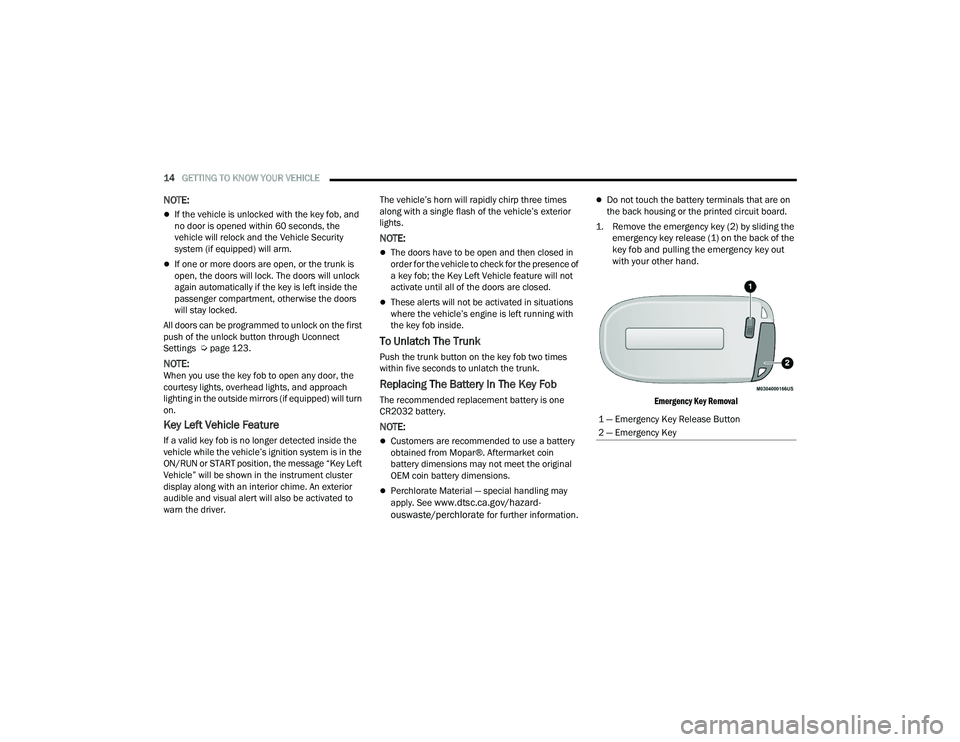
1. Remove the emergency key (2) by sliding the emergency key release (1) on the back of the
key fob and pulling the emergency key out
with your other hand.
Emergency Key Removal
1 — Emergency Key Release Button
2 — Emergency Key
22_LA_OM_EN_USC_t.book Page 14
Page 32 of 336

30GETTING TO KNOW YOUR VEHICLE
Each time you give a Voice Command, you must
first push the Voice Recognition (VR) button,
wait until after the beep, then say your Voice
Command.
You can interrupt the help message or system
prompts by pushing the VR button and saying a
Voice Command from the current category.
Uconnect Voice Command Buttons
ADDITIONAL INFORMATION
© 2021 FCA US LLC. All rights reserved. Mopar and
Uconnect are registered trademarks and Mopar
Owner Connect is a trademark of FCA US LLC.
SiriusXM® and all related marks and logos are
trademarks of SiriusXM® Radio Inc. Ú page 322.
Uconnect System Support:
US residents visit www.DriveUconnect.com or
call: 1-877-855-8400 (24 hours a day 7 days a
week)
Canadian residents visit www.DriveUcon -
nect.ca or call: 1-800-465-2001 (English) or
1-800-387-9983 (French)
SiriusXM Guardian™ services support:
US residents visit www.driveuconnect.com/
sirius-xm-guardian or call: 1-844-796-4827
Canadian residents visit https://www.driveu -
connect.ca/en/sirius-xm-guardian or call:
1-877-324-9091
DRIVER MEMORY SETTINGS — IF EQUIPPED
This feature allows the driver to save up to two
different memory profiles for easy recall through a
memory switch. Each memory profile saves
desired position settings for the following features:
Driver seat cushion
Easy Entry/Exit seat operation (if equipped)
Side mirrors
Power tilt/telescoping steering column
(if equipped)
A set of desired radio station presets
NOTE:
Your vehicle is equipped with two key fobs, each
can be linked to either memory position 1 or 2.
Be sure to program the radio presets prior to
programming the memory settings.
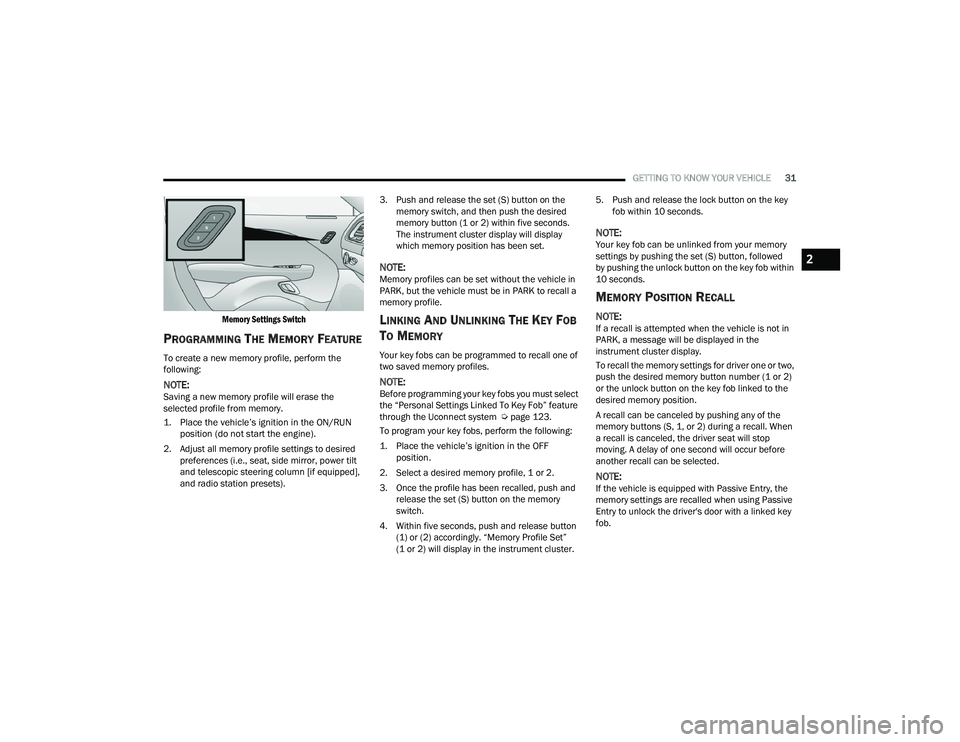
The memory settings switch is located on the
driver’s door trim panel. The switch consists of
three buttons:
The set (S) button, which is used to activate the
memory save function.
The (1) and (2) buttons which are used to recall
either of two saved memory profiles.
1 — Push To Start Or Answer A Phone Call And
Send Or Receive A Text
2 — Push The Voice Recognition Button To Begin
Radio, Media, Navigation, And Climate Functions
22_LA_OM_EN_USC_t.book Page 30
Page 33 of 336
GETTING TO KNOW YOUR VEHICLE31
Memory Settings Switch
PROGRAMMING THE MEMORY FEATURE
To create a new memory profile, perform the
following:
NOTE:Saving a new memory profile will erase the
selected profile from memory.
1. Place the vehicle’s ignition in the ON/RUN position (do not start the engine).
2. Adjust all memory profile settings to desired preferences (i.e., seat, side mirror, power tilt
and telescopic steering column [if equipped],
and radio station presets). 3. Push and release the set (S) button on the
memory switch, and then push the desired
memory button (1 or 2) within five seconds.
The instrument cluster display will display
which memory position has been set.
NOTE:Memory profiles can be set without the vehicle in
PARK, but the vehicle must be in PARK to recall a
memory profile.
LINKING AND UNLINKING THE KEY FOB
T
O MEMORY
Your key fobs can be programmed to recall one of
two saved memory profiles.
NOTE:Before programming your key fobs you must select
the “Personal Settings Linked To Key Fob” feature
through the Uconnect system Ú page 123.
To program your key fobs, perform the following:
1. Place the vehicle’s ignition in the OFF position.
2. Select a desired memory profile, 1 or 2.
3. Once the profile has been recalled, push and release the set (S) button on the memory
switch.
4. Within five seconds, push and release button (1) or (2) accordingly. “Memory Profile Set”
(1 or 2) will display in the instrument cluster. 5. Push and release the lock button on the key
fob within 10 seconds.
NOTE:Your key fob can be unlinked from your memory
settings by pushing the set (S) button, followed
by pushing the unlock button on the key fob within
10 seconds.
MEMORY POSITION RECALL
NOTE:If a recall is attempted when the vehicle is not in
PARK, a message will be displayed in the
instrument cluster display.
To recall the memory settings for driver one or two,
push the desired memory button number (1 or 2)
or the unlock button on the key fob linked to the
desired memory position.
A recall can be canceled by pushing any of the
memory buttons (S, 1, or 2) during a recall. When
a recall is canceled, the driver seat will stop
moving. A delay of one second will occur before
another recall can be selected.
NOTE:If the vehicle is equipped with Passive Entry, the
memory settings are recalled when using Passive
Entry to unlock the driver's door with a linked key
fob.
2
22_LA_OM_EN_USC_t.book Page 31
Page 41 of 336

GETTING TO KNOW YOUR VEHICLE39
MIRRORS
INSIDE REARVIEW MIRROR
Automatic Dimming Mirror
The rearview mirror can be adjusted up, down, left,
and right. The mirror should be adjusted to center
on the view through the rear window.
This mirror automatically adjusts for headlight
glare from vehicles behind you.
NOTE:The Automatic Dimming Mirror feature is disabled
when the vehicle is in REVERSE to improve the
driver’s rear view.
The Automatic Dimming feature can be turned on
or off through the touchscreen.
Automatic Dimming Mirror
ILLUMINATED VANITY MIRRORS
To access an illuminated vanity mirror, flip down
one of the visors and lift the cover.
Illuminated Vanity Mirror
Sun Visor “Slide-On-Rod” And Extender
Feature
The sun visor “Slide-On-Rod” feature allows for
additional flexibility in positioning the sun visor to
block out the sun.
1. Fold down the sun visor.
2. Unclip the visor from the corner clip.
3. Pivot the sun visor toward the side window.
4. Extend the sun visor for additional sun blockage.
Slide-On-Rod Extender
To use the extender feature of the sun visor, grab
the extender which is located at the rear of the
visor and pull rearward.
CAUTION!
To avoid damage to the mirror during cleaning,
never spray any cleaning solution directly onto
the mirror. Apply the solution onto a clean cloth
and wipe the mirror clean.
2
22_LA_OM_EN_USC_t.book Page 39
Page 42 of 336

40GETTING TO KNOW YOUR VEHICLE
OUTSIDE MIRRORS
The outside mirror(s) can be adjusted to the center
of the adjacent lane of traffic to achieve the
optimal view.
NOTE:The passenger side convex outside mirror will give
a much wider view to the rear, and especially of the
lane next to your vehicle.
POWER MIRRORS
The power mirror switch is located on the driver's
side door trim panel.
The power mirror controls consist of mirror select
buttons and a four-way mirror control switch. To
adjust a mirror, push the mirror select button for
the mirror that you want to adjust. Using the mirror
control switch, push on any of the four arrows for
the direction that you want the mirror to move.
Power Mirror Control
NOTE:A light in the select button will illuminate indicating
the mirror is activated and can be adjusted.
HEATED MIRRORS — IF EQUIPPED
These mirrors are heated to melt frost or
ice. This feature will be activated
whenever you turn on the rear window
defroster (if equipped) Ú
page 51.
UNIVERSAL GARAGE DOOR OPENER
(HOMELINK®)
HomeLink® Buttons And Indicator Light
Use this QR code to access your
digital experience.
HomeLink® replaces up to
three hand-held transmitters
that operate devices such as
garage door openers, motor -
ized gates, lighting, or home
security systems. The HomeLink® unit is
powered by your vehicle’s 12 Volt battery.
The HomeLink® buttons that are located in the
overhead console or sunvisor designate the
three different HomeLink® channels.
WARNING!
Vehicles and other objects seen in an outside
convex mirror will look smaller and farther away
than they really are. Relying too much on side
convex mirrors could cause you to collide with
another vehicle or other object. Use your inside
mirror when judging the size or distance of a
vehicle seen in a side convex mirror.1 — Left Mirror Selection
2 — Mirror Adjustment
3 — Right Mirror Selection
22_LA_OM_EN_USC_t.book Page 40
Page 48 of 336

46GETTING TO KNOW YOUR VEHICLE
NOTE:
The Automatic High Beam Headlamp Control
can be turned on or off using the Uconnect
system Úpage 123.
Broken, muddy, or obstructed headlights and
taillights of vehicles in the field of view will
cause headlights to remain on longer (closer to
the vehicle). Also, dirt, film, and other obstruc -
tions on the windshield or camera lens will
cause the system to function improperly.
To opt out of the Advanced Auto High-Beam
Sensitivity Control and enter Reduced
High-Beam Sensitivity Control (not recom -
mended), toggle the high beam lever six full
on/off cycles within 10 seconds of placing the
ignition in the ON position. The system will
return to the default setting upon placing the
ignition in the OFF position.
If the windshield or Automatic High Beam Head -
lamp Control mirror is replaced, the mirror must
be re-aimed to ensure proper performance. See
a local authorized dealer.
FLASH-TO-PASS
You can signal another vehicle with your headlights
by lightly pulling the multifunction lever toward you.
This will cause the high beam headlights to turn on,
and remain on, until the lever is released.
NOTE:If the multifunction lever is held in the flash-to pass
position for more than 20 seconds, the high beams
will shut off.
AUTOMATIC HEADLIGHTS
This system automatically turns the headlights on
or off according to ambient light levels. To turn the
system on, rotate the headlight switch
counterclockwise to the AUTO position.
When the system is on, the Headlight Delay feature
is also on. This means the headlights will stay on
for up to 90 seconds after you place the ignition
into the OFF position. To turn the automatic
headlights off, turn the headlight switch out of the
AUTO position.
NOTE:The engine must be running before the headlights
will come on in the automatic mode.
PARKING LIGHTS
To turn on the parking lights and instrument panel
lights, rotate the headlight switch clockwise. To
turn off the parking lights, rotate the headlight
switch back to the O (off) position.
NOTE:For vehicles sold in Canada, rotate the headlight
switch to the AUTO position to turn off the parking
lights.
AUTOMATIC HEADLIGHTS WITH WIPERS
If your vehicle is equipped with Automatic
Headlights, it also has this
customer-programmable feature. When your
headlights are in the automatic mode and the
engine is running, they will automatically turn on
when the wiper system is on. This feature is
programmable through the Uconnect system
Ú page 123.
In addition, the headlights will turn off when the
wipers are turned off if they were turned on by this
feature.
22_LA_OM_EN_USC_t.book Page 46