2022 DODGE CHALLENGER battery
[x] Cancel search: batteryPage 5 of 336

3
Programming HomeLink® To A
Miscellaneous Device ......................................42
Reprogramming A Single HomeLink®
Button ...............................................................43
Canadian/Gate Operator Programming .........43
Security .............................................................44
Troubleshooting Tips ........................................44
EXTERIOR LIGHTS.................................................. 44
Headlight Switch...............................................44
Multifunction Lever .........................................45
Daytime Running Lights (DRLs) —
If Equipped........................................................45
High/Low Beam Switch ...................................45
Automatic High Beam Headlamp
Control — If Equipped ......................................45
Flash-To-Pass ..................................................46
Automatic Headlights ......................................46
Parking Lights ..................................................46
Automatic Headlights With Wipers..................46
Headlight Time Delay .......................................47
Lights-On Reminder..........................................47
Fog Lights — If Equipped ..................................47
Turn Signals ......................................................47
Lane Change Assist — If Equipped ..................47
INTERIOR LIGHTS ................................................. 48
Front Map/Reading Lights ..............................48
Ambient Light — If Equipped ............................48
Dimmer Controls .............................................49
Illuminated Entry .............................................49 WINDSHIELD WIPERS AND WASHERS............... 50
Windshield Wiper Operation ............................50
Rain Sensing Wipers — If Equipped ................51
CLIMATE CONTROLS .............................................51
Automatic Climate Control Descriptions
And Functions ..................................................51
Automatic Temperature Control (ATC) ...........54
Climate Voice Commands................................55
Operating Tips .................................................55
INTERIOR STORAGE AND EQUIPMENT ............... 56
Storage..............................................................56
Illuminated Cupholders — If Equipped............57
USB/AUX Control .............................................57
Electrical Power Outlets ..................................57
WINDOWS ..............................................................59
Power Window Controls ...................................59
Wind Buffeting ..................................................60
POWER SUNROOF — IF EQUIPPED ...................... 60
Opening And Closing The Sunroof...................61
Pinch Protect Feature — If Equipped ..............61
Sunshade Operation ........................................61
Sunroof Maintenance ......................................61
Ignition Off Operation.......................................61
HOOD .......................................................................62
Opening The Hood............................................62
Closing The Hood .............................................62
TRUNK......................................................................62
Opening The Trunk ...........................................62
Closing The Trunk.............................................63
Trunk Safety .....................................................63
GETTING TO KNOW YOUR
INSTRUMENT PANEL
INSTRUMENT CLUSTER ........................................ 64
Instrument Cluster Descriptions ..................... 65
INSTRUMENT CLUSTER DISPLAY ........................ 65
Location And Controls...................................... 66
Engine Oil Life Reset ....................................... 67
Performance Shift Indicator
(PSI) — If Equipped ........................................... 68
Instrument Cluster Display Selectable
Menu Items ...................................................... 68
Battery Saver On/Battery Saver Mode
Message — Electrical Load Reduction
Actions — If Equipped ..................................... 72
WARNING LIGHTS AND MESSAGES ................... 73
Red Warning Lights ..........................................73
Yellow Warning Lights ...................................... 76
Yellow Indicator Lights ..................................... 79
Green Indicator Lights ..................................... 79
White Indicator Lights ...................................... 80
Blue Indicator Lights ........................................ 80
ONBOARD DIAGNOSTIC SYSTEM — OBD II ........ 80
Onboard Diagnostic System
(OBD II) Cybersecurity ...................................... 80
EMISSIONS INSPECTION AND MAINTENANCE
PROGRAMS .......................................................... 81
22_LA_OM_EN_USC_t.book Page 3
Page 8 of 336

6
JUMP STARTING .................................................. 246 Preparations For Jump Start......................... 247Jump Starting Procedure .............................. 247
IF YOUR ENGINE OVERHEATS ........................... 248
MANUAL PARK RELEASE — 8–SPEED
TRANSMISSION .................................................. 249
FREEING A STUCK VEHICLE .............................. 250
TOWING A DISABLED VEHICLE .......................... 252 Rear-Wheel Drive (RWD) Models.................. 253
ENHANCED ACCIDENT RESPONSE SYSTEM
(EARS) .................................................................. 253
EVENT DATA RECORDER (EDR) ......................... 253
SERVICING AND MAINTENANCE
SCHEDULED SERVICING .................................... 254
3.6L And 5.7L Engines ................................. 254
ENGINE COMPARTMENT .................................... 259
3.6L Engine ................................................... 2595.7L Engine ................................................... 260Checking Oil Level ......................................... 261
Adding Washer Fluid ................................... 261Maintenance-Free Battery ........................... 262
Pressure Washing ......................................... 262 VEHICLE MAINTENANCE..................................... 263
Engine Oil ...................................................... 263
Engine Oil Filter ........................................... 265Engine Air Cleaner Filter ............................ 265
Air Conditioner Maintenance ..................... 266
Accessory Drive Belt Inspection ................... 267Body Lubrication ......................................... 268
Windshield Wiper Blades ............................ 268
Exhaust System ............................................. 270Cooling System ............................................ 271
Brake System ............................................... 274
Clutch Hydraulic System — Manual
Transmission (If Equipped)........................... 275Manual Transmission — If Equipped............ 275
Automatic Transmission — If Equipped ....... 275
All-Wheel Drive (AWD) — If Equipped .......... 276
Rear Axle ........................................................ 276Fuses.............................................................. 277
Bulb Replacement ........................................ 286
TIRES..................................................................... 290
Tire Safety Information ................................ 290Tires — General Information ........................ 297
Tire Types....................................................... 301
Spare Tires — If Equipped ............................ 301
Wheel And Wheel Trim Care ........................ 303
Snow Traction Devices ................................. 304
Tire Rotation Recommendations ................. 306 DEPARTMENT OF TRANSPORTATION
UNIFORM TIRE QUALITY GRADES .................... 306
Treadwear...................................................... 307
Traction Grades ............................................. 307Temperature Grades..................................... 307
VEHICLE STORAGE ............................................ 307
BODYWORK .......................................................... 308
Protection From Atmospheric Agents ........ 308Body And Underbody Maintenance ............. 308
Preserving The Bodywork ............................. 308
INTERIORS ........................................................... 309
Seats And Fabric Parts ................................. 309
Plastic And Coated Parts .............................. 309
Leather Surfaces........................................... 310
Glass Surfaces ............................................. 310
TECHNICAL SPECIFICATIONS
VEHICLE IDENTIFICATION NUMBER (VIN) ........ 311
BRAKE SYSTEM .................................................. 311
WHEEL AND TIRE TORQUE
SPECIFICATIONS ................................................. 311Torque Specifications ................................... 311
22_LA_OM_EN_USC_t.book Page 6
Page 12 of 336

10
SYMBOL GLOSSARY
Some car components have colored labels with symbols indicating
precautions to be observed when using this component. It is important to
follow all warnings when operating your vehicle. See below for the definition of
each symbol Úpage 73.
NOTE:Warning and Indicator lights are different based upon equipment options and
current vehicle status. Some telltales are optional and may not appear.
WARNING!
To prevent SERIOUS INJURY or DEATH:
ALWAYS remove any “Track-Use” equipment before driving on public
roads.
ALWAYS properly use your three-point seat belts when driving on public
roads.
In a collision, you and your passengers can suffer much greater injuries if
you are not properly buckled up. You can strike the interior of your vehicle
or other passengers, or you can be thrown out of the vehicle.
Red Warning Lights
Air Bag Warning Light
Úpage 73
Brake Warning Light Úpage 73
Battery Charge Warning Light
Úpage 74
Door Open Warning Light Úpage 74
Oil Pressure Warning Light Úpage 75
Oil Temperature Warning Light Úpage 75
Seat Belt Reminder Warning Light Úpage 74
Electronic Throttle Control (ETC) Warning Light Úpage 75
Engine Coolant Temperature Warning Light Úpage 75
Transmission Temperature Warning Light Úpage 76
Red Warning Lights
22_LA_OM_EN_USC_t.book Page 10
Page 15 of 336

13
GETTING TO KNOW YOUR VEHICLE
KEYS
KEY FOB
Your vehicle is equipped with a key fob which
supports Passive Entry, Remote Keyless Entry
(RKE), Keyless Enter ‘n Go™ (if equipped), Remote
Start (if equipped), and remote trunk operation.
The key fob allows you to lock or unlock the doors
and trunk from distances up to approximately 66 ft
(20 m). The key fob does not need to be pointed at
the vehicle to activate the system. The key fob also
contains an emergency key, which is stored in the
rear of the key fob.
NOTE:
The key fob’s wireless signal may be blocked if
the key fob is located next to a mobile phone,
laptop, or other electronic device. This may
result in poor performance.
With ignition in the ON position and the vehicle
moving at 2 mph (4 km/h), all RKE commands are disabled.
Key Fob
NOTE:
In case the ignition switch does not change with
the push of a button, the key fob may have a low or
fully depleted battery. A low key fob battery can be
verified by referring to the instrument cluster,
which will display directions to follow
Úpage 322.
To Lock/Unlock The Doors And Trunk
Push and release the unlock button on the key fob
once to unlock the driver's door or twice within five
seconds to unlock all doors. Push and release the
lock button on the key fob to lock all doors.
When the doors are unlocked, the turn signals will
flash and the illuminated entry system will be
activated. When the doors are locked, the turn
signals will flash and the horn will chirp. This
setting can be adjusted in the Uconnect system
Úpage 123.
1 — Unlock
2 — Trunk Open
3 — Lock
4 — Remote Start (If Equipped)
5 — PANIC Button
6 — Emergency Key
2
22_LA_OM_EN_USC_t.book Page 13
Page 16 of 336
14GETTING TO KNOW YOUR VEHICLE
NOTE:
If the vehicle is unlocked with the key fob, and
no door is opened within 60 seconds, the
vehicle will relock and the Vehicle Security
system (if equipped) will arm.
If one or more doors are open, or the trunk is
open, the doors will lock. The doors will unlock
again automatically if the key is left inside the
passenger compartment, otherwise the doors
will stay locked.
All doors can be programmed to unlock on the first
push of the unlock button through Uconnect
Settings Ú page 123.
NOTE:When you use the key fob to open any door, the
courtesy lights, overhead lights, and approach
lighting in the outside mirrors (if equipped) will turn
on.
Key Left Vehicle Feature
If a valid key fob is no longer detected inside the
vehicle while the vehicle’s ignition system is in the
ON/RUN or START position, the message “Key Left
Vehicle” will be shown in the instrument cluster
display along with an interior chime. An exterior
audible and visual alert will also be activated to
warn the driver. The vehicle’s horn will rapidly chirp three times
along with a single flash of the vehicle’s exterior
lights.
NOTE:
The doors have to be open and then closed in
order for the vehicle to check for the presence of
a key fob; the Key Left Vehicle feature will not
activate until all of the doors are closed.
These alerts will not be activated in situations
where the vehicle’s engine is left running with
the key fob inside.
To Unlatch The Trunk
Push the trunk button on the key fob two times
within five seconds to unlatch the trunk.
Replacing The Battery In The Key Fob
The recommended replacement battery is one
CR2032 battery.
NOTE:
Customers are recommended to use a battery
obtained from Mopar®. Aftermarket coin
battery dimensions may not meet the original
OEM coin battery dimensions.
Perchlorate Material — special handling may
apply. See www.dtsc.ca.gov/hazard
-
ouswaste/perchlorate for further information.
Do not touch the battery terminals that are on
the back housing or the printed circuit board.
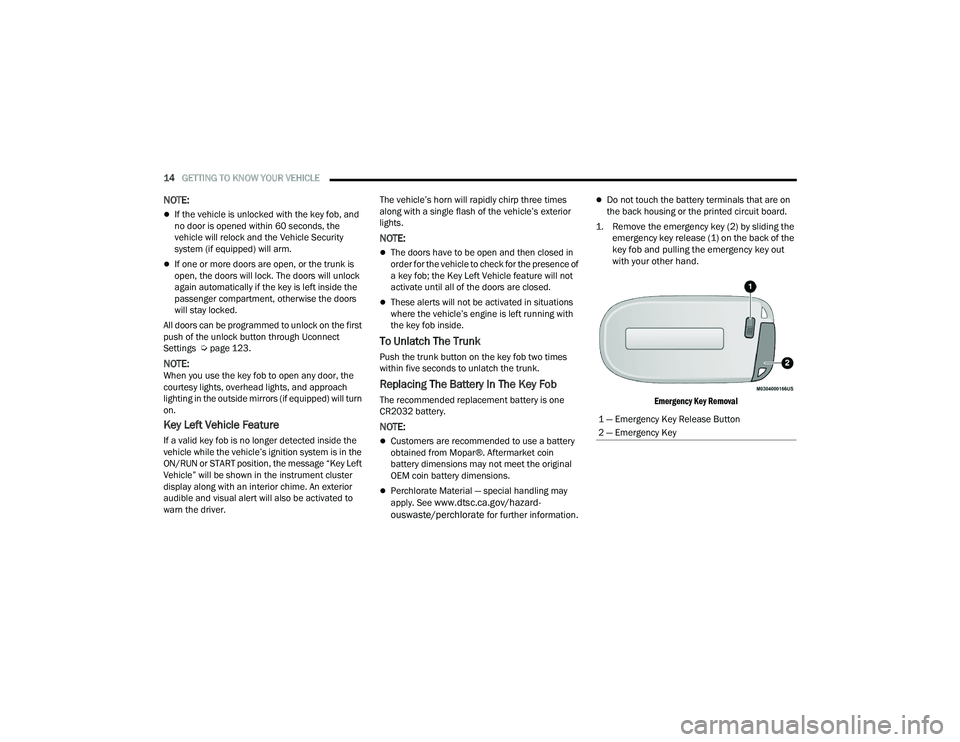
1. Remove the emergency key (2) by sliding the emergency key release (1) on the back of the
key fob and pulling the emergency key out
with your other hand.
Emergency Key Removal
1 — Emergency Key Release Button
2 — Emergency Key
22_LA_OM_EN_USC_t.book Page 14
Page 17 of 336

GETTING TO KNOW YOUR VEHICLE15
2. Separate the key fob halves using a #2 flat blade screwdriver or a coin, and gently pry the
two halves of the key fob apart. Make sure not
to damage the seal during removal.
Emergency Key Removal
Separating Case With A Coin
NOTE:Separating the case can also be done with a flat
head screwdriver.
Separating Case With A Flat Blade Screwdriver
Key Fob Battery Replacement
3. Remove the back cover to access and replace
the battery. When replacing the battery, match
the (+) sign on the battery to the (+) sign on the
inside of the battery clip, located on the back
cover. Avoid touching the new battery with your
fingers. Skin oils may cause battery deterio -
ration. If you touch a battery, clean it with
rubbing alcohol.
4. To assemble the key fob case, snap the two halves together.
WARNING!
The integrated key fob contains a coin cell
battery. Do not ingest the battery; there is a
chemical burn hazard. If the coin cell battery is
swallowed, it can cause severe internal burns
in just two hours and can lead to death.
If you think a battery may have been swal-
lowed or placed inside any part of the body,
seek immediate medical attention.
Keep new and used batteries away from chil -
dren. If the battery compartment does not
close securely, stop using the product and
keep it away from children.
2
22_LA_OM_EN_USC_t.book Page 15
Page 19 of 336

GETTING TO KNOW YOUR VEHICLE17
(Continued)
IGNITION SWITCH
KEYLESS ENTER ‘N GO™ IGNITION
This feature allows the driver to operate the
ignition switch with the push of a button as long as
the key fob is in the passenger compartment.
The START/STOP ignition button has four
operating positions, three of which are labeled and
will illuminate when in position. The three positions
are OFF, ACC, and ON/RUN. The fourth position is
START. During START, RUN will illuminate.
START/STOP Ignition Button
The push button ignition can be placed in the
following modes:
OFF
The engine is stopped.
Some electrical devices (e.g. power locks,
alarm, etc.) are still available.
ACC
Engine is not started.
Some electrical devices are available
(e.g. power windows).
ON/RUN
Driving position.
All electrical devices are available
(e.g. climate controls, etc.).
START
The engine will start.
NOTE:If the ignition switch does not change with the push
of a button, the key fob may have a low or depleted
battery. In this situation, a back up method can be
used to operate the ignition switch. Put the nose
side (side opposite of the emergency key) of the
key fob against the START/STOP ignition button
and push to operate the ignition switch.
Depleted Key Fob Battery Procedure
1 — OFF
2 — ACC
3 — ON/RUN
WARNING!
When exiting the vehicle, always remove the
key fob from the vehicle and lock your vehicle.
Never leave children alone in a vehicle, or with
access to an unlocked vehicle.
Allowing children to be in a vehicle unattended
is dangerous for a number of reasons. A child
or others could be seriously or fatally injured.
Children should be warned not to touch the
parking brake, brake pedal or the gear
selector.
2
22_LA_OM_EN_USC_t.book Page 17
Page 21 of 336

GETTING TO KNOW YOUR VEHICLE19
All of the following conditions must be met before
the engine will remote start:
Gear selector in PARK
Doors closed
Hood closed
Trunk closed
Hazard switch off
Brake switch inactive (brake pedal not pressed)
Battery at an acceptable charge level
PANIC button not pushed
System not disabled from previous remote start
event
Vehicle Security system indicator flashing
Ignition in the OFF position
Fuel level meets minimum requirement
Vehicle Security system is not signaling an
intrusion
Malfunction Indicator Light (MIL) is not
illuminated
TO EXIT REMOTE START MODE
To drive the vehicle after starting the Remote Start
system, either push and release the unlock button
on the key fob to unlock the doors, or unlock the
vehicle using Keyless Enter ‘n Go™ — Passive Entry
via the door handles, and disarm the Vehicle
Security system (if equipped). Then, prior to the
end of the 15 minute cycle, push and release the
START/STOP ignition button.
The Remote Start system will turn the engine off if
the Remote Start button on the key fob is pushed
again, or if the engine is allowed to run for the
entire 15 minute cycle. Once the ignition is placed
in the ON/RUN position, the climate controls will
resume the previously set operations
(temperature, blower control, etc.).
NOTE:
To avoid unintentional shutdowns, the system
will disable for two seconds after receiving a
valid Remote Start request.
For vehicles equipped with the Keyless
Enter ‘n Go™ — Passive Entry feature, the
message “Remote Start Active — Push Start
Button” will show in the instrument cluster
display until you push the START/STOP ignition
button.
Remote Start will also cancel if any of the following
occur:
The engine stalls or engine speed exceeds
2500 RPM.
Any engine warning lights come on.
The Low Fuel Light turns on.
The hood is opened.
The hazard switch is pushed.
The gear selector is moved out of PARK.
The brake pedal is pressed.
WARNING!
Do not start or run an engine in a closed
garage or confined area. Exhaust gas contains
Carbon Monoxide (CO) which is odorless and
colorless. Carbon Monoxide is poisonous and
can cause serious injury or death when
inhaled.
Keep key fobs away from children. Operation
of the Remote Start system, windows, door
locks or other controls could cause serious
injury or death.
2
22_LA_OM_EN_USC_t.book Page 19