2022 CITROEN BERLINGO VAN door
[x] Cancel search: doorPage 4 of 324
2
Contents
■
OverviewOverview 4
Labels 6
■
Eco-driving
1InstrumentsInstrument panels 10
Digital instrument panel 11
Warning and indicator lamps 13
Indicators 20
Trip computer 27
Touch screen BLUETOOTH audio system 28
Touch screen 29
Setting the date and time 31
2AccessElectronic key with remote control function and
built-in key, 32
Back-up procedures 38
Central locking / unlocking 41
Doors 43
General recommendations for the sliding
side doors
43
Rear roof flap 44
Alarm 45
Electric windows 47
Tilting rear door windows 49
3Ease of use and comfortGeneral recommendations for the seats 50
Front seats 50
Steering wheel adjustment 53
Mirrors 53
2-seat front bench seat 55
Rear bench seat (row 2) 56
Rear seats (row 2) 57
Rear seats (row 3) 57
Interior fittings 60
Two-position luggage cover shelf (removable) 65
Luggage cover (7-seat) 66
Warning triangle 67
Extenso Cab 68
Crew cab 70
Heating and Ventilation 73
Heating 74
Manual air conditioning 74
Dual-zone automatic air conditioning 75
Front demisting - de-icing 77
Heated windscreen 78
Demisting/de-icing the rear screen and/or
the door mirrors
78
Rear heating and air conditioning 79
Additional heating/ventilation system 79
Temperature conditioning (Electric) 81
4Lighting and visibilityLighting control stalk 83
Direction indicators 84
Automatic illumination of headlamps 84
Daytime running lamps / Sidelamps 85
Guide-me-home and welcome lighting 85
Automatic lighting systems - General
recommendations
86
Automatic headlamp dipping 86
Headlamp beam height adjustment 88
Wiper control stalk 88
Changing a wiper blade 90
Automatic wipers 90
5SafetyGeneral safety recommendations 92
Emergency or assistance 92
Hazard warning lamps 94
Horn 95
Pedestrian horn (Electric) 95
Electronic stability control (ESC) 95
Advanced Grip Control 97
Hill Assist Descent Control 98
Seat belts 99
Airbags 103
Child seats 106
Deactivating the front passenger airbag 108
ISOFIX child seats 11 2
i-Size child seats 11 5
Manual child lock 11 6
Electric child lock 11 6
6DrivingDriving recommendations 11 7
Starting/switching off the engine 11 9
Manual parking brake 123
Electric parking brake 123
Hill start assist 126
5-speed manual gearbox 126
6-speed manual gearbox 127
Automatic gearbox 127
Drive selector (Electric) 132
Driving modes 133
Gear shift indicator 134
Stop & Start (Petrol or Diesel) 134
Tyre under-inflation detection 136
Head-up display 138
Driving and manoeuvring aids - General
recommendations
139
Road signs recognition 140
Speed limiter 143
Cruise control - Specific recommendations 146
Programmable cruise control 146
Adaptive cruise control 148
Memorising speeds 152
Active Safety Brake with Collision Risk Alert and
Intelligent emergency braking assistance
152
Active lane departure warning system 155
Blind spot monitoring 158
Page 6 of 324

4
Overview
Presentation
Presentation
These illustrations and descriptions are intended
as a guide. The presence and location of some
components varies according to the version, trim
level and country of sale.
Instruments and controls
1. Bonnet release
2. Dashboard fuses
3. Horn
4. Instrument panel
5. Alarm
Courtesy lamp
Emergency or assistance call
Interior rear view mirror or Surround Rear
Vision reproduction screen (Citroën Berlingo
Van)
Monitoring mirror (Citroën Berlingo)
Warning lamps display for seat belts and
front passenger airbag (Citroën Berlingo)
Panoramic roof blind control (Citroën
Berlingo)
6. Touch screen BLUETOOTH audio system
Touch screen with CITROËN Connect Radio
or CITROËN Connect Nav
7. USB socket
8. Heating/Air conditioning
Front demisting – de-icing
Rear screen demisting – de-icing
9. Electric parking brake
"START/STOP" button
10. Gearbox (Petrol or Diesel)
Drive selector
11 . 12
V socket
12. 230
V accessory socket
13. Glove box
14. Storage compartment
Glove box 15.
Front passenger airbag deactivation (on the
side of the glove box, with the door open)
Steering-mounted controls
1.External lighting/direction indicators control
stalk
Surround Rear Vision view change button
(Citroën Berlingo Van)
Voice recognition activation button
2. Wiper/screenwash/trip computer control stalk
3. Controls to select the multimedia source
(SRC), manage music (LIST) and manage
phone calls (" telephone" symbol)
4. Speed Limiter/Programmable Cruise Control/
Adaptive cruise control controls
5. Instrument panel display mode selection
wheel
6. Voice control
Volume adjustment
7. Audio system setting controls
Page 7 of 324

5
Overview
Side control bar
1.Manual headlamp beam height adjustment
2. Stop & Start
3. Parking sensors
4. Additional heating/ventilation system (Diesel)
Temperature pre-conditioning (Electric)
5. Active Lane Departure Warning System
6. Tyre under-inflation detection
7. Electric child lock
8. Heated windscreen
9. Head-up display
Controls on the driver's door
1.Locking/unlocking the loading area (Citroën
Berlingo Van)
2. Electric child lock
Central control bar
1.Hazard warning lamps
2. Locking/unlocking from the inside
3. Hill Assist Descent
4. Eco mode
5. Advanced Grip Control
6. Electric parking brake
7. Starting/switching off the engine
8. DSC/ASR systems
Electric motor
1.Charging connectors
2. Traction battery
3. 12
V accessory battery
4. On-board charger
5. Electric motor
6. Charging cable
The charging connectors
1
allow 3 types of
charging:
–
Domestic chargin
g in mode 2 using a domestic
socket and associated charging cable
6
.
–
Accelerated charging in mode
3 using an
accelerated charging unit (Wallbox).
–
Superfast charging in mode
4 using a fast
public charger.
The 400
V traction battery 2 uses Lithium-Ion
technology. It stores and supplies the energy
required for the operation of the electric motor,
air conditioning and heating. Its charge level is
Page 10 of 324

8
Eco-driving
Eco-driving
Eco-driving refers to a range of everyday
practices that allow the motorist to optimise
the vehicle's energy consumption (fuel and/or
electricity) and CO
2 emissions.
Optimise your use of the gearbox
With a manual gearbox, move off gently and
change up promptly. While accelerating, change
up early.
With an automatic gearbox, favour automatic
mode. Do not depress the accelerator pedal
heavily or suddenly.
The gear shift indicator prompts you to engage
the most suitable gear. Whenever this indication
is displayed on the instrument panel, follow it
straight away.
With an automatic gearbox, this indicator
appears only in manual mode.
Drive smoothly
Maintain a safe distance between vehicles, use
engine braking rather than the brake pedal and
press the accelerator gradually. These practices
help to save on energy consumption, reduce
CO
2 emissions and decrease general traffic
noise.
Favour the use of the "Eco" driving mode.
With an EAT8 gearbox, with the gear selector
in mode D, favour "free-wheeling" by gradually
lifting your foot fully off the accelerator pedal in
order to save fuel. When the traffic is flowing smoothly, select the
cruise control.
Control the use of electrical equipment
Before moving off, if the passenger compartment
is too warm, ventilate it by opening the windows
and air vents before using the air conditioning.
At speeds above 31
mph (50 km/h), close the
windows and leave the air vents open.
Consider using equipment that can help keep
the temperature in the passenger compartment
down (e.g.
sunroof blind, window blinds).
Unless automatically regulated, switch off the air
conditioning as soon as the desired temperature
has been reached.
Switch off the demisting and defrosting functions,
if they are not managed automatically.
Switch off the heated seat as soon as possible.
Adapt your use of the headlamps and/or
foglamps to the level of visibility, in accordance
with current legislation in the country in which
you are driving.
Avoid running the engine before moving off,
particularly in winter (other than in severe wintry
conditions: temperature below -23°C). The
vehicle will warm up much faster while driving.
As a passenger, avoid connecting your
multimedia devices (e.g.
film, music, video
game) to help reduce the consumption of energy.
Disconnect all portable devices before leaving
the vehicle.
Limit the causes of excess consumption
Spread loads throughout the vehicle. Place the
heaviest items in the boot as close as possible to
the rear seats.
Limit the loads carried in the vehicle and
minimise wind resistance (e.g.
roof bars, roof
rack, bicycle carrier, trailer). Preferably, use a
roof box.
Remove roof bars and roof racks after use.
At the end of winter, remove snow tyres and refit
summer tyres.
Comply with the servicing instructions
Check tyre pressures regularly, with the tyres
cold, referring to the label in the door aperture on
the driver's side.
Carry out this check in particular:
–
before a long journey
.
–
at each change of season.
–
after a long period out of use.
Do not forget the spare wheel and, where
applicable, the tyres on your trailer or caravan.
Have your vehicle serviced regularly (e.g.
engine
oil, oil filter, air filter, passenger compartment
filter, etc.). Observe the schedule of operations in
the manufacturer's service schedule.
With a BlueHDi Diesel engine, if the SCR system
has a fault, your vehicle will emit pollution. Visit
a CITROËN dealer or a qualified workshop
as soon as possible to restore your vehicle's
nitrogen oxide emissions to legal levels.
When filling the fuel tank, do not continue after
the third cut-out of the nozzle, to avoid overflow.
Page 17 of 324

15
Instruments
112 V battery chargeFixed.
The battery charging circuit is faulty
(e.g.
dirty terminals, loose or severed alternator
belt).
Clean and tighten the terminals. If the warning
lamp does not go off when the engine is started,
carry out (2).
Power steeringFixed.
The power steering has a fault.
Drive carefully at moderate speed, then carry
out (3).
Seat belts not fastened/unfastenedFixed or flashing, accompanied by
an increasing audible signal.
A seat belt has not been fastened or has been
unfastened (depending on version).
Door openFixed, associated with a message
indicating which access is open.
An audible signal supplements the alert if the
speed is higher than 6 mph (10
km/h).
A door, the boot, the tailgate or the opening rear
screen is still open (depending on version).
Close whichever access is open.
If your vehicle is equipped with a right-hand side-
hinged door, this warning lamp will not indicate
that it is open.
Electric parking brakeFixed.
The electric parking brake is applied.
Flashing.
Application/release is faulty.
Carry out (1): park on flat ground (on a level
surface).
With a manual gearbox, engage a gear.
With an automatic gearbox or drive selector,
select mode
P.
Switch off the ignition and carry out (2).
Orange warning/indicator lamps
Automatic functions deactivated
(electric
parking brake)
Fixed.
The "automatic application" (on switching
off the engine) and "automatic release" (on
acceleration) functions are deactivated.
If automatic application/release is no longer
possible:
►
Start the engine.
►
Use the control to apply the electric parking
brake.
►
T
ake your foot fully off the brake pedal.
►
Hold the control pressed in the release
direction for between 10 and 15 seconds.
►
Release the control.
►
Depress and hold the brake pedal.
►
Pull the control in the application direction for
2
seconds.
►
Release the control and the brake pedal.
Malfunction (electric parking brake)Fixed, accompanied
by the message
"Parking brake fault".
The parking brake no longer delivers optimum
performance for parking the vehicle safely in all
circumstances.
Make the vehicle safe:
►
Park on a level surface.
►
With a manual gearbox, engage a gear
.
►
With an automatic gearbox, with
P
selected,
place the supplied chocks against one of the
wheels.
Then carry out (2).
Flashing, when the vehicle
is started.
The parking brake has not been properly
released.
Carry out (1) and try to fully release the parking
brake using the control lever, with your foot on
the brake pedal.
If the problem persists, carry out (2).
Fixed, accompanied by the
message "Parking brake
fault".
The electric parking brake is faulty: manual and
automatic functions may not be working.
When stationary, to immobilise the vehicle:
►
Pull the electric parking brake control and
hold it for approximately 7 to 15 seconds, until
the indicator lamp lights up on the instrument
panel.
Page 23 of 324

21
Instruments
1Have your vehicle serviced very soon.
Service spanner flashingFlashing then fixed, when the
ignition is switched on.
(With
BlueHDi Diesel engines, associated with
the Service warning lamp.)
The servicing interval has been exceeded.
Have your vehicle serviced as soon as possible.
Resetting the service indicator
The service indicator must be reset after each
service.
►
Switch the ignition off.
W
ith LCD symbols and LCD text or matrix
instrument panel
► Press and hold this button.
► Switch on the ignition; the distance recorder
display begins a countdown.
►
Release the button when =0
is displayed; the
spanner disappears.
With digital instrument panel
The service indicator is reset using the "Check" button in the Driving/Vehicle
touch screen menu.
If you have to disconnect the battery
following this operation, lock the vehicle
and wait at least 5 minutes for the reset to be
registered.
Reminder of the servicing information
You can access the servicing information at any
time.
With LCD symbols and LCD text or matrix
instrument panel
►
Press the trip distance recorder reset button.
W
ith digital instrument panel
You can view the servicing information by pressing the " Check" button in the
Driving/Vehicle touch screen menu.
The servicing
information is displayed for a few
seconds, then disappears.
Instrument panel display screen
With LCD symbols and LCD text or matrix
instrument panel
With the vehicle stationary, use the left-hand
thumbwheel on the steering wheel or the " SET"
button on the instrument panel to move through
the menus to configure certain vehicle settings.
Thumbwheel operation:
–
Press: open the
Main menu; confirm the
selection.
–
Rotate (other than in a menu): scroll through
the list of available active functions.
–
Rotate (in a menu): move up or down in the
menu.
W
ith digital instrument panel
You can configure some of the vehicle's settings by pressing the " Check" button in
the Driving/Vehicle touch screen menu.
Distance recorders
The total and trip distances are displayed for
thirty seconds when the ignition is switched off,
when the driver's door is opened and when the
vehicle is locked or unlocked.
Page 27 of 324
25
Instruments
1journeys, for as long as the cause of the fault
persists.
If the fault is temporary, the alert
disappears during the next journey, after
self-diagnostic checks of the SCR emissions
control system.
Malfunction confirmed during the
permitted driving phase (between 685
miles and 0
miles (1,100 km and 0 km))
If the fault indication is still displayed
permanently after 31 miles (50 km) of driving, the
fault in the SCR system is confirmed.
The AdBlue warning lamp flashes and
a message is displayed (" Emissions
control
fault: starting prevented in X miles
(kms)" or "NO START IN X miles (kms)"),
indicating the driving range in miles or
kilometres.
While driving, the message is displayed every 30
seconds. The alert is repeated when switching
on the ignition.
You can continue driving for up to 685 miles
(1,100
km) before the engine starting
prevention system is triggered.
Have it checked by a CITROËN dealer or
a qualified workshop.
Starting prevented
Every time the ignition is switched on, the
message "Emissions control fault: Starting
prevented" or "NO START IN" is displayed.
To restart the engine
Contact a CITROËN dealer or a qualified
workshop.
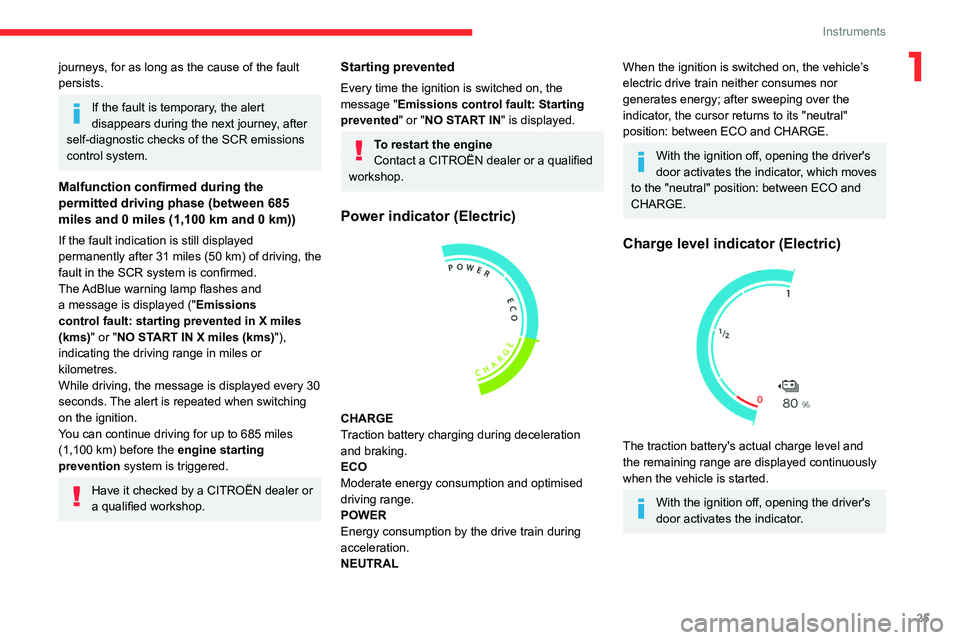
Power indicator (Electric)
CHARGE
Traction battery charging during deceleration
and braking.
ECO
Moderate energy consumption and optimised
driving range.
POWER
Energy consumption by the drive train during
acceleration.
NEUTRAL
When the ignition is switched on, the vehicle’s
electric drive train neither consumes nor
generates energy; after sweeping over the
indicator, the cursor returns to its "neutral"
position: between ECO and CHARGE.
With the ignition off, opening the driver's
door activates the indicator, which moves
to the "neutral" position: between ECO and
CHARGE.
Charge level indicator (Electric)
The traction battery's actual charge level and
the remaining range are displayed continuously
when the vehicle is started.
With the ignition off, opening the driver's
door activates the indicator.
Page 34 of 324

32
Access
Electronic key with
remote control function
and built-in key,
If one of the doors or the boot is still open
or if the electronic key for the Keyless
Entry and Start
system has been left inside
the vehicle, central locking will not take place.
However
, if the vehicle is fitted with an alarm,
it will be activated after 45
seconds.
If the vehicle is unlocked but the doors or
tailgate are not subsequently opened, the
vehicle will automatically lock itself again after
about 30
seconds. If the vehicle is fitted with
an alarm, it will be reactivated automatically.
Automatic door mirror folding and unfolding can be deactivated by a
CITROËN dealer or a qualified workshop.
As a safety measure, never leave the vehicle, even for a short time, without
taking the Keyless Entry and Start system’s
electronic key with you.
Be aware of the risk of theft of the vehicle if
the key is present in one of the defined areas
while the vehicle is unlocked.
To preserve the battery charge in the electronic key and the vehicle's battery,
the "hands-free" functions are set to
hibernation mode after 21 days without use.
To restore these functions, press one of the
remote control buttons or start the engine with
the electronic key in the reader.
For more information on starting with the
Keyless Entry and Start system, refer to the
corresponding section.
Electrical interference
The electronic key may not work if it is
close to an electronic device (e.g.
mobile
telephone (switched on or on standby), laptop
computer, strong magnetic fields). If this
occurs, move the electronic key away from
the electronic device.
Remote control key
This allows the central locking or unlocking of the
vehicle using the door lock or from a distance.
It also allows the vehicle to be located, the fuel
filler cap and charging flap to be opened and
closed and the engine to be started or switched
off, as well as providing protection against theft.
The remote control buttons are not active with the ignition switched on.
Unfolding / Folding the key
► Press this button to unfold or fold the key .
The remote control may be damaged if
you do not press the button.
Keyless Entry and Start
This allows the central locking or unlocking of the
vehicle from a distance.
It is also used to locate and start the vehicle, as
well as providing protection against theft.
Integral key
This is used to lock and unlock the vehicle when
the remote control cannot operate:
–
remote control battery discharged, vehicle
battery discharged or disconnected, etc.
–
vehicle located in an area subject to strong
electromagnetic interference.