2022 CHRYSLER VOYAGER keyless
[x] Cancel search: keylessPage 23 of 316

GETTING TO KNOW YOUR VEHICLE21
POWER DOOR LOCKS — IF EQUIPPED
A power door lock switch is on each front door trim
panel. Use this switch to lock or unlock the doors.
Driver Power Door Lock Switches
If you push the power door lock switch while the
ignition is in the ACC or ON/RUN position, and any
front door is open, the power locks will not operate.
This prevents you from accidentally locking your
keys in the vehicle. Placing the ignition in the OFF
position or closing the door will allow the locks to
operate. A chime will sound if the ignition is in the
ACC or ON/RUN position and a door is open, as a
reminder to place the ignition in the OFF position
and remove the key fob.
KEYLESS ENTER ‘N GO™ — PASSIVE
E
NTRY
The Passive Entry system is an enhancement to
the vehicle’s Remote Keyless Entry system and a
feature of Keyless Enter ‘n Go™ — Passive Entry.
This feature allows you to lock and unlock the
vehicle’s door(s) without having to push the key fob
lock or unlock buttons.
NOTE:
Passive Entry may be programmed on/off
through the Uconnect system Úpage 141.
The key fob may not be detected by the vehicle
passive entry system if it is located next to a
mobile phone, laptop, or other electronic device;
these devices may block the key fob’s wireless
signal and prevent the passive entry handle
from locking/unlocking the vehicle.
If set by the customer in the Uconnect Settings,
unlocking with Passive Entry will initiate
illuminated approach (low beams, license plate
lamp, position lamps) for the time 0, 30, 60 or
90 seconds. Passive Entry also initiates two
flashes of the turn signals.
If wearing gloves, or if it has been raining/
snowing on the Passive Entry door handle, the
unlock sensitivity can be affected, resulting in a
slower response time.
WARNING!
For personal security and safety in the event
of a collision, lock the vehicle doors before you
drive as well as when you park and leave the
vehicle.
Never use the PARK position as a substitute
for the parking brake. Always apply the
parking brake fully when parked to guard
against vehicle movement and possible injury
or damage.
When exiting the vehicle, always make sure
the keyless ignition is in the OFF position,
remove the key fob from the vehicle and lock
the vehicle.
Never leave children alone in a vehicle, or with
access to an unlocked vehicle. Allowing chil -
dren to be in a vehicle unattended is
dangerous for a number of reasons. A child or
others could be seriously or fatally injured.
Children should be warned not to touch the
parking brake, brake pedal or the gear
selector.
Do not leave the key fob in or near the vehicle,
or in a location accessible to children, and do
not leave the Keyless Enter ‘n Go™ Ignition in
the ACC or ON/RUN position. A child could
operate power windows, other controls, or
move the vehicle.
2
22_RUVG_OM_EN_USC_t.book Page 21
Page 55 of 316

GETTING TO KNOW YOUR VEHICLE53
It may be helpful to unplug the device during the
cycling process to prevent possible overheating of
the garage door or gate motor.
1. Place the ignition in the ON/RUN position.
NOTE:For vehicles equipped with Keyless Enter ‘n Go™,
place the ignition in the ON/RUN position. Make
sure while programming HomeLink® with the
engine on that your vehicle is outside of your
garage, or that the garage door remains open at all
times.
2. Place the hand-held transmitter 1 to 3 inches (3 to 8 cm) away from the HomeLink® button
you wish to program while keeping the
HomeLink® indicator light in view.
3. Continue to push and hold the HomeLink® button while you push and release (cycle) your
hand-held transmitter every two seconds until
HomeLink® has successfully accepted the
frequency signal. The indicator light will flash
slowly and then rapidly when fully trained.
4. Watch for the HomeLink® indicator to change flash rates. When it changes, it is
programmed. It may take up to 30 seconds or
longer in rare cases. The garage door may
open and close while you are programming.
5. Push and hold the programmed HomeLink® button and observe the indicator light.
NOTE:
If the indicator light stays on constantly,
programming is complete and the garage
door/device should activate when the
HomeLink® button is pushed.
To program the two remaining HomeLink®
buttons, repeat each step for each
remaining button. DO NOT erase the
channels.
If you unplugged the garage door opener/device
for programming, plug it back in at this time.
Reprogramming A Single HomeLink® Button
(Canadian/Gate Operator)
To reprogram a channel that has been previously
trained, follow these steps:
1. Place the ignition in the ON/RUN position.
2. Press and hold the desired HomeLink® button until the indicator light begins to flash after
20 seconds. Do not release the button.
3. Without releasing the button, proceed with “Canadian/Gate Operator Programming”
Step 2 and follow all remaining steps.
SECURITY
It is advised to erase all channels before you sell or
turn in your vehicle.
To do this, push and hold the two outside buttons
for 20 seconds until the indicator flashes. Note
that all channels will be erased. Individual
channels cannot be erased.
The HomeLink® Universal Transceiver is disabled
when the Vehicle Security system is active.
TROUBLESHOOTING TIPS
If you are having trouble programming
HomeLink®, here are some of the most common
solutions:
Replace the battery in the garage door opener
hand-held transmitter.
Push the LEARN button on the garage door
opener to complete the training for a rolling
code.
Did you unplug the device for programming and
remember to plug it back in?
2
22_RUVG_OM_EN_USC_t.book Page 53
Page 59 of 316

GETTING TO KNOW YOUR VEHICLE57
Turn Signal Warning
If the vehicle electronics sense that the vehicle has
traveled for about 1 mile (1.6 km) with a turn
signal on, a chime will sound and a message will
display in the cluster to alert the driver.
LANE CHANGE ASSIST — IF EQUIPPED
Tap the multifunction lever up or down once,
without moving beyond the detent, and the turn
signal (right or left) will flash three times then
automatically turn off.
BATTERY PROTECTION
This feature provides battery protection to avoid
wearing down the battery if the headlights or
parking lights are left on for extended periods of
time when the ignition is in the OFF position. After
eight minutes of the ignition being in the OFF
position and the headlight switch in any position
other than OFF or AUTO, the lights will turn off
automatically until the next cycle of the ignition or
headlight switch.
The battery protection feature will be disabled if
the ignition is placed in any position other than OFF
during the eight minute delay.
INTERIOR LIGHTS
INTERIOR COURTESY LIGHTS
The courtesy light switches are used to turn the
courtesy lights on/off.
Courtesy Light Switches
To operate the courtesy lights, push either the
driver or passenger light switch.
NOTE:
Before exiting the vehicle, make sure that the
interior lights are turned off. This will prevent the
battery from discharging once the doors are
closed.
If a light is left on, it will automatically be turned
off approximately 10 minutes after the ignition
is in the OFF position.
Rear Courtesy/Reading Lights —
If Equipped
Located above the rear passengers are courtesy/
reading lights. The lights turn on when a front door,
a sliding door or the liftgate is opened. If your
vehicle is equipped with Remote Keyless Entry
(RKE) the lights will also turn on when the unlock
button on the key fob is pushed.
The courtesy lights also function as reading lights.
Push the lens to turn these lights on while inside
the vehicle. Push the lens a second time to turn
each light off.
2
22_RUVG_OM_EN_USC_t.book Page 57
Page 106 of 316

104 (Continued)
STARTING AND OPERATING
STARTING THE ENGINE
Before starting your vehicle, adjust your seat,
adjust both inside and outside mirrors, and fasten
your seat belts. Start the engine with the gear selector in the
NEUTRAL (N) or PARK (P) position. Apply the brake
before shifting to any driving range.
NORMAL STARTING
To Turn On The Engine Using ENGINE START/STOP
Button
1. The transmission must be in PARK or NEUTRAL.
2. Press and hold the brake pedal while pushing the ENGINE START/STOP button once.
3. The system starts the vehicle. If the vehicle fails to start, the starter will disengage
automatically after 10 seconds.
4. If you wish to stop the cranking of the engine prior to the engine starting, push the button
again. ENGINE START/STOP Button Functions — With
Driver’s Foot OFF The Brake Pedal (In PARK Or
NEUTRAL Position)
The ENGINE START/STOP button operates similar
to an ignition switch. It has three positions; OFF,
ACC, and ON/RUN. To change the ignition positions
without starting the vehicle and to use the
accessories, follow these steps:
Start with the ignition in the OFF position.
Push the ENGINE START/STOP button once to
place the ignition to the ACC position (instru
-
ment cluster will display “ACC”).
Push the ENGINE START/STOP button a second
time to place the ignition to the ON/RUN posi -
tion (instrument cluster will display “ON/RUN”).
Push the ENGINE START/STOP button a third
time to return the ignition to the OFF position
(instrument cluster will display “OFF”).
NOTE:Only press one pedal at a time while driving the
vehicle. Torque performance of the vehicle could
be reduced if both pedals are pressed at the same
time. If pressure is detected on both pedals simul -
taneously, a warning message will display in the
instrument cluster
Úpage 86.
WARNING!
When exiting the vehicle, always remove the
key fob from the vehicle and lock your vehicle.
Never leave children alone in a vehicle, or with
access to an unlocked vehicle.
Allowing children to be in a vehicle unattended
is dangerous for a number of reasons. A child
or others could be seriously or fatally injured.
Children should be warned not to touch the
parking brake, brake pedal or the transmis -
sion gear selector.
Do not leave the key fob in or near the vehicle,
or in a location accessible to children, and do
not leave the ignition of a vehicle equipped
with Keyless Enter ’n Go™ in the ACC or ON/
RUN position. A child could operate power
windows, other controls, or move the vehicle.
Do not leave children or animals inside parked
vehicles in hot weather. Interior heat buildup
may cause serious injury or death.
WARNING!
22_RUVG_OM_EN_USC_t.book Page 104
Page 154 of 316

152MULTIMEDIA
Sound Horn With Lock This setting will sound the horn when the Lock button is pushed on the key
fob. The “Off” setting will not sound the horn when the Lock button is pushed.
The “1st Press” setting will sound the horn when the Lock button is pushed
once. The “2nd Press” setting will sound the horn when the Lock button is
pushed twice.
Sound Horn With Remote Start This setting will sound the horn when the remote start is activated from the
key fob.
Remote Door Unlock, Door Lock/1st Press Of Key Fob Unlocks This setting will change how many pushes of the Unlock button on the key fob
are needed to unlock all the doors. The “Driver Door” setting will only unlock
the driver door on the first push on the Unlock button. The “All Doors” setting
will unlock all doors with only one push of the Unlock button.
Passive Entry This setting will allow you to turn the Passive Entry feature (Keyless
Enter-N-Go™) on or off.
Personal Settings Linked To Key Fob This setting will recall preset radio stations and driver seat position that have
been linked to the key fob.
Power Liftgate Alert This setting will chime an audible alert when the power liftgate is raising or
lowering. Selectable options are “On” and “Off”.
Sliding Door Alert This setting will chime an audible alert when the sliding door reverses or
sense an obstacle. Selectable options are “On” and “Off”.
Flash Lights with Sliding Door This setting will flash the lights when the sliding door is opening. Selectable
options are “On” and “Off”.
Setting Name
Description
22_RUVG_OM_EN_USC_t.book Page 152
Page 269 of 316
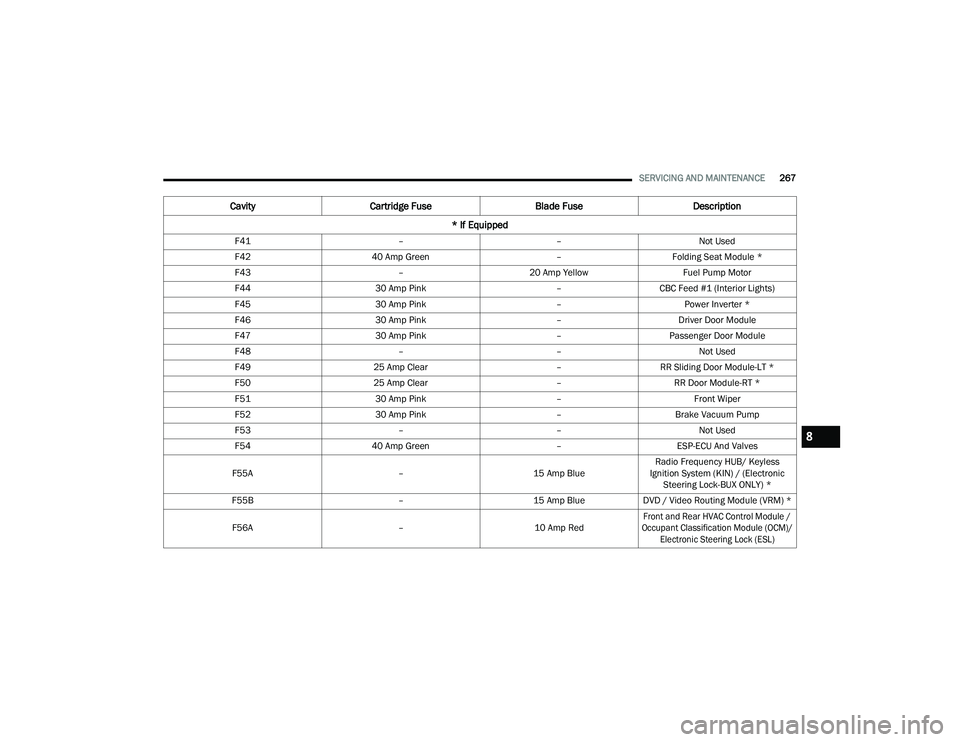
SERVICING AND MAINTENANCE267
F41 ––Not Used
F42 40 Amp Green –Folding Seat Module *
F43 –20 Amp Yellow Fuel Pump Motor
F44 30 Amp Pink –CBC Feed #1 (Interior Lights)
F45 30 Amp Pink –Power Inverter *
F46 30 Amp Pink –Driver Door Module
F47 30 Amp Pink –Passenger Door Module
F48 ––Not Used
F49 25 Amp Clear –RR Sliding Door Module-LT *
F50 25 Amp Clear –RR Door Module-RT *
F51 30 Amp Pink –Front Wiper
F52 30 Amp Pink –Brake Vacuum Pump
F53 ––Not Used
F54 40 Amp Green –ESP-ECU And Valves
F55A –15 Amp BlueRadio Frequency HUB/ Keyless
Ignition System (KIN) / (Electronic Steering Lock-BUX ONLY) *
F55B –15 Amp BlueDVD / Video Routing Module (VRM) *
F56A –10 Amp Red
Front and Rear HVAC Control Module /
Occupant Classification Module (OCM)/ Electronic Steering Lock (ESL)
Cavity Cartridge Fuse Blade FuseDescription
* If Equipped
8
22_RUVG_OM_EN_USC_t.book Page 267
Page 307 of 316

305
INDEX
A
About Your Brakes..........................................295Adding Engine Coolant (Antifreeze).................259Additives, Fuel................................................. 298AdjustDown............................................................ 42Forward......................................................... 42Rearward...................................................... 42Up................................................................. 42Air Bag.............................................................185Air Bag Operation........................................187Air Bag Warning Light....................... 185, 187Driver Knee Air Bag..................................... 191Enhanced Accident Response.......... 195, 242Event Data Recorder (EDR).........................242Front Air Bag............................................... 187If Deployment Occurs................................. 194Knee Impact Bolsters................................. 191Maintaining Your Air Bag System................ 196Maintenance............................................... 196Redundant Air Bag Warning Light...............185Side Air Bags............................................... 192Transporting Pets........................................214Air Bag Light................................... 95, 185, 214Air Cleaner, Engine
(Engine Air Cleaner Filter)................................250
Air Conditioner Maintenance.......................... 251Air Conditioner Refrigerant.................... 251, 252Air Conditioner System................................... 251Air Conditioning Filter.............................. 66, 252Air Conditioning, Operating Tips.........................65Air Filter.......................................................... 250Air PressureTires........................................................... 283AlarmArm The System............................................19Disarm The System.......................................19Security Alarm...............................................98Alterations/ModificationsVehicle............................................................ 8Antifreeze (Engine Coolant)................... 258, 299Disposal..................................................... 260Anti-Lock Brake System (ABS)........................ 158Anti-Lock Warning Light.....................................98Assist, Hill Start.............................................. 162Audio Jack.........................................................69Audio Systems (Radio).................................... 140Auto Up Power Windows....................................73Automatic Dimming Mirror.................................48Automatic Headlights........................................55Automatic Transaxle....................................... 111Automatic Transmission................................. 113
Adding Fluid...................................... 262, 300Fluid And Filter Change............................... 262Fluid Change...............................................262Fluid Level Check........................................ 262Fluid Type......................................... 262, 300Special Additives........................................ 262AutoPark.........................................................105AUX Cord........................................................... 69Auxiliary Electrical Outlet (Power Outlet)........... 70Axle Lubrication...............................................300
B
Back-Up Camera.............................................126Battery..................................................... 95, 248Charging System Light.................................. 95Jump Starting.............................................234Keyless Key Fob Replacement..................... 13Battery Saver Feature....................................... 57Belts, Seat.......................................................214Blind Spot Monitoring.....................................164Body Mechanism Lubrication..........................253B-Pillar Location.............................................. 279Brake Assist System........................................ 159Brake Control System, Electronic....................159Brake Fluid...................................................... 300Brake System........................................ 261, 295Anti-Lock (ABS)...........................................295
11
22_RUVG_OM_EN_USC_t.book Page 305
Page 310 of 316

308
Tank Capacity
............................................. 299Fuses..............................................................263
G
Garage Door Opener (HomeLink)...................... 50Gas Cap (Fuel Filler Cap)................................. 127Gasoline, (Fuel)............................................... 296Gasoline, Clean Air..........................................296Gasoline, Reformulated..................................296Gear Ranges................................................... 113Glass Cleaning................................................294Gross Axle Weight Rating................................130Gross Vehicle Weight Rating...........................130GVWR..............................................................128
H
Hazard Driving Through Flowing, Rising, Or Shallow Standing Water
.....................138Hazard Warning Flashers................................217Head Restraints................................................ 44Headlights......................................................... 54Cleaning......................................................292High Beam/Low Beam Select Switch............ 54Lights On Reminder............................... 54, 56Passing.................................................. 54, 55Switch........................................................... 54Time Delay.................................................... 54Heated Mirrors.................................................. 48Heated Seats.................................................... 43
Heater, Engine Block...................................... 108Hill Start Assist............................................... 162HitchesTrailer Towing............................................. 131HomeLink (Garage Door Opener).......................50Hood Prop..........................................................74Hood Release....................................................74
I
Ignition...............................................................15Switch...........................................................15Inside Rearview Mirror............................. 48, 217Instrument Cluster......................................83, 85Descriptions............................................... 101Display..........................................................85Display Controls............................................86KeySense Message.......................................87Menu Items...................................................88Instrument Panel Lens Cleaning..................... 294Interior And Instrument Lights...........................57Interior Appearance Care................................ 293Interior Lights....................................................57Intermittent Wipers (Delay Wipers)....................58
J
Jack Location.................................................. 221Jack Operation................................................ 220Jump Starting................................................. 234
K
Key Fob............................................................. 12Arm The System............................................ 19Disarm The Alarm......................................... 19Programming Additional Key Fobs................ 14Key Fob Battery Service
(Remote Keyless Entry)..................................... 13Key Fob Programming
(Remote Keyless Entry)..................................... 14Keyless Enter 'n Go™........................................ 21Passive Entry................................................ 21Keys.................................................................. 12
L
Lane Change And Turn Signals......................... 54Lane Change Assist.................................... 54, 57Lap/Shoulder Belts.........................................176Latches...........................................................215Hood............................................................. 74Lead Free Gasoline.........................................296Leaks, Fluid.....................................................215Life Of Tires.....................................................285Liftgate.............................................................. 75Power............................................................ 76Light Bulbs............................................ 215, 274Lights.............................................................. 215Air Bag........................................95, 185, 214Battery Saver................................................ 57Brake Assist Warning..................................162Brake Warning.............................................. 95
22_RUVG_OM_EN_USC_t.book Page 308