2022 CHRYSLER PACIFICA HYBRID sliding door
[x] Cancel search: sliding doorPage 4 of 384
2
INTRODUCTION
SYMBOLS KEY ........................................................ 10
VEHICLE MODIFICATIONS/ALTERATIONS .......... 10
SYMBOL GLOSSARY.............................................. 10
GETTING TO KNOW YOUR VEHICLE
KEYS ........................................................................ 14
Key Fob .............................................................14
SENTRY KEY ........................................................... 17
IGNITION SWITCH .................................................. 18
Keyless Enter ‘n Go™ Ignition .........................18
REMOTE START — IF EQUIPPED .......................... 19
How To Use Remote Start ................................20
To Exit Remote Start Mode ..............................20
Remote Start Front Defrost Activation —
If Equipped........................................................21
Remote Start Comfort Systems —
If Equipped........................................................21
Remote Start Windshield Wiper De-Icer
Activation — If Equipped ..................................22
Remote Start Cancel Message ........................22
VEHICLE SECURITY SYSTEM — IF EQUIPPED ..... 22
To Arm The System .........................................22
To Disarm The System .....................................22
Rearming Of The System .................................23
Security System Manual Override ...................23 DOORS .....................................................................23
Manual Door Locks — If Equipped ..................23
Power Door Locks — If Equipped.....................24
Keyless Enter ‘n Go™ — Passive Entry ...........24
Automatic Unlock Doors On Exit —
If Equipped........................................................27
Manual Sliding Side Door ................................27
Power Sliding Side Door — If Equipped...........28
Hands-Free Sliding Doors — If Equipped ........29
Child Protection Door Lock System —
Rear Doors ........................................................30
STEERING WHEEL ..................................................31
Tilt/Telescoping Steering Column ...................31
Heated Steering Wheel — If Equipped ............31
DRIVER MEMORY SETTINGS — IF EQUIPPED .....32
Programming The Memory Feature ................32
Linking And Unlinking The Key Fob
To Memory ........................................................32
Memory Position Recall ...................................33
SEATS ......................................................................33
Manual Adjustment (Front Seats) —
If Equipped........................................................33
Manual Adjustment (Rear Seats) ....................34
Power Adjustment (Front Seats) —
If Equipped........................................................47
Power Adjustment (Rear Seats) —
If Equipped........................................................49
Heated Seats ....................................................51 Ventilated Seats — If Equipped .......................52
Adjustable Armrest
(Front Seats) — If Equipped .............................52
Plastic Grocery Bag Retainer Hooks ............... 52
Head Restraints .............................................. 52
UCONNECT VOICE RECOGNITION —
IF EQUIPPED ........................................................... 56
Introducing Voice Recognition ........................ 56
Basic Voice Commands ................................... 56
Get Started .......................................................56
Additional Information ..................................... 57
MIRRORS ................................................................ 57
Inside Rearview Mirror..................................... 57
Illuminated Vanity Mirrors —
If Equipped ...................................................... 58
Outside Mirrors ................................................ 58
Driver's Outside Automatic Dimming
Mirror — If Equipped......................................... 58
Conversation Mirror ......................................... 58
Power Mirrors — If Equipped .......................... 59
Power Folding Outside Mirrors —
If Equipped .......................................................59
Automatic Power Folding
Mirrors — If Equipped....................................... 60
Outside Mirrors Folding Feature ..................... 60
Heated Mirrors — If Equipped ......................... 60
Tilt Side Mirrors In Reverse —
If Equipped .......................................................60
22_RUP_OM_EN_USC_t.book Page 2
Page 16 of 384

14
GETTING TO KNOW YOUR VEHICLE
KEYS
KEY FOB
Your vehicle is equipped with a key fob which
supports Passive Entry, Remote Keyless
Entry (RKE), Keyless Enter ‘n Go™ (if equipped),
Remote Start (if equipped), and remote power
liftgate operation. The key fob allows you to lock or
unlock the doors and liftgate, optional power
liftgate, left power sliding door, and right power
sliding door, from distances up to approximately
66 ft (20 m). When any button on the key fob is
pushed, or when any signal is being transferred
between the key fob and the vehicle, an LED light
on the key fob will flash as an indicator. The key fob
does not need to be pointed at the vehicle to
activate the system. The key fob also contains an
emergency key, which is stored in the rear of the
key fob.The emergency key allows for entry into the vehicle
should the battery in the vehicle or the key fob
become depleted. The emergency key is also for
locking/unlocking the glove compartment. You can
keep the emergency key with you when valet
parking.
NOTE:
The key fob’s wireless signal may be blocked if
the key fob is located next to a mobile phone,
laptop, or other electronic device. This may
result in poor performance.
If your vehicle is equipped with a Wireless
Charging Pad, the key fob may not be detected
if it is placed within 6 inches (15 cm) of the pad
Ú
page 91.
With the ignition in the ON position and the
vehicle moving at 2 mph (4 km/h), all RKE
commands are disabled.
Key Fob
1 — LED Light
2 — Unlock
3 — Liftgate
4 — Left Power Sliding Side Door
5 — Emergency Key
6 — Lock
7 — Remote Start
8 — Right Power Sliding Side Door
9 — PANIC Alarm
22_RUP_OM_EN_USC_t.book Page 14
Page 17 of 384

GETTING TO KNOW YOUR VEHICLE15
In case the ignition switch does not change with
the push of a button, the key fob may have a low or
fully depleted battery. A low key fob battery can be
verified by referring to the instrument cluster,
which will display directions to follow.
NOTE:
A low key fob battery condition may be indicated
by a message in the instrument cluster display,
or by the LED light on the key fob. If the LED key
fob light no longer illuminates from key fob
button pushes, then the key fob battery requires
replacement.
The key fob LED light brightness is designed for
indoor light viewing, so the LED light may not be
visible in direct sunlight Ú page 370.
To Lock/Unlock The Doors And Liftgate
Push and release the unlock button on the key fob
once to unlock the driver’s front door and sliding door
or twice within five seconds to unlock all doors and
the liftgate. Push and release the lock button on the
key fob to lock all doors and the liftgate.
When the doors are unlocked, the turn signals will
flash and the illuminated entry system will be
activated. When the doors are locked, the turn
signals will flash and the horn will chirp. Settings in
the Uconnect system can change to lights only,
chirp only, or both. Vehicles Equipped With Keyless Enter ‘n Go™ —
Passive Entry
If one or more doors are open, or the liftgate is
open, the doors can be locked. The doors will
unlock again only if the key fob is inside the
passenger compartment.
All doors can be programmed to unlock on the first
push of the unlock button within Uconnect Settings
Ú
page 188.
Key Left Vehicle Feature
If a valid key fob is no longer detected inside the
vehicle while the vehicle’s ignition system is in the
ON/RUN or START position, the message “Key Fob
Has Left The Vehicle” will be shown in the
instrument cluster display along with an interior
chime. An exterior audible and visual alert will also
be activated to warn the driver.
The vehicle’s horn will rapidly chirp three times along
with a single flash of the vehicle’s exterior lights.
NOTE:
The doors have to be open and then closed in
order for the vehicle to check for the presence of
a key fob; the Key Left Vehicle feature will not
activate until all of the doors are closed.
These alerts will not be activated in situations
where the vehicle’s engine is left running with
the key fob inside.
Replacing The Battery In The Key Fob
The recommended replacement battery is one
CR2032 battery.
NOTE:
Customers are recommended to use a battery
obtained from Mopar®. Aftermarket coin
battery dimensions may not meet the original
OEM coin battery dimensions.
Batteries contain harmful chemicals. Dispose
old batteries by placing them in correct
containers according to the law or by taking
them to a dealership, where they will be handled
appropriately.
Perchlorate Material — special handling may
apply. See www.dtsc.ca.gov/hazard -
ouswaste/perchlorate for further information.
Do not touch the battery terminals that are on
the back housing or the printed circuit board.
2
22_RUP_OM_EN_USC_t.book Page 15
Page 18 of 384

16GETTING TO KNOW YOUR VEHICLE
1. Remove the emergency key by pushing the mechanical release button on the side of the
key fob with your thumb and then pulling the
key out with your other hand.
Emergency Key Removal
2. Insert a coin or a flat blade screwdriver into the now exposed slot and carefully pry on both
sides to disengage the snaps. Gently remove
the back cover from the fob, being careful not
to damage any of the snaps.
3. Remove the battery by sliding the battery rearward in its pocket until the battery lifts up.
Remove the depleted battery from the battery
pocket and dispose appropriately.
4. Fit a new battery ensuring that the positive (+) side is facing upwards. Push the battery into
the pocket until it is firmly seated in place and
secured under both tabs. 5. Align the back cover into its original position
and snap it back in place by pushing it against
the fob until it is seated all around.
Programming And Requesting Additional
Key Fobs
Programming the key fob may be performed by an
authorized dealer.
NOTE:
Once a key fob is programmed to a vehicle, it
cannot be repurposed and reprogrammed to
another vehicle.
Only key fobs that are programmed to the
vehicle electronics can be used to start and
operate the vehicle. Once a key fob is
programmed to a vehicle, it cannot be
programmed to any other vehicle.
Duplication of key fobs may be performed at an
authorized dealer. This procedure consists of
programming a blank key fob to the vehicle
electronics. A blank key fob is one that has never
been programmed.
NOTE:
When having the Sentry Key Immobilizer system
serviced, bring all vehicle keys with you to an
authorized dealer.
Keys must be ordered to the correct key cut to
match the vehicle locks.
WARNING!
The integrated key fob contains a coin cell
battery. Do not ingest the battery; there is a
chemical burn hazard. If the coin cell battery is
swallowed, it can cause severe internal burns
in just two hours and can lead to death.
If you think a battery may have been swal-
lowed or placed inside any part of the body,
seek immediate medical attention.
Keep new and used batteries away from
children. If the battery compartment does not
close securely, stop using the product and
keep it away from children.
CAUTION!
Always remove the key fobs from the vehicle
and lock all doors when leaving the vehicle
unattended.
Always remember to place the Keyless
Enter ‘n Go™ Ignition in the OFF position.
22_RUP_OM_EN_USC_t.book Page 16
Page 24 of 384

22GETTING TO KNOW YOUR VEHICLE
REMOTE START WINDSHIELD WIPER
D
E-ICER ACTIVATION — IF EQUIPPED
When the Remote Start system is active and the
outside ambient temperature is less than 33°F
(0.6°C), the Windshield Wiper De-Icer will activate.
Exiting Remote Start will resume its previous
operation. If the Windshield Wiper De-Icer was
active, the timer and operation will continue.
REMOTE START CANCEL MESSAGE
The following messages will display in the
instrument cluster if the vehicle fails to remote
start or exits Remote Start prematurely:
Remote Start Cancelled — Door Open
Remote Start Cancelled — Hood Open
Remote Start Cancelled — Fuel Low
Remote Start Cancelled — Liftgate Open
Remote Start Cancelled — Too Cold
Remote Start Cancelled — Time Expired
Remote Start Disabled — Start Vehicle To Reset
The message will stay active until the ignition is
placed in the ON/RUN position.
VEHICLE SECURITY SYSTEM — IF EQUIPPED
The Vehicle Security system monitors the vehicle
doors for unauthorized entry and the ignition
switch for unauthorized operation. When the alarm
is activated, the interior switches for door locks,
power sliding doors and power liftgate are
disabled. The Vehicle Security system provides
both audible and visible signals. If something
triggers the alarm, the Vehicle Security system will
provide the following audible and visible signals:
the horn will pulse, the park lamps and/or turn
signals will flash, and the Vehicle Security Light in
the instrument cluster will flash.
TO ARM THE SYSTEM
Follow these steps to arm the Vehicle Security
system:
1. Make sure the vehicle’s ignition is placed in the OFF position.
For vehicles equipped with Keyless
Enter ‘n Go™ — Passive Entry, make sure
the vehicle ignition system is OFF. 2. Perform one of the following methods to lock
the vehicle:
Push lock on the interior power door lock
switch with the driver and/or passenger
door open.
Push the lock button on the exterior Passive
Entry door handle with a valid key fob avail -
able in the same exterior zone Ú page 24.
Push the lock button on the key fob.
3. If any doors are open, close them.
TO DISARM THE SYSTEM
The Vehicle Security system can be disarmed using
any of the following methods:
Push the unlock button on the key fob.
Grab the Passive Entry door handle (if equipped)
Ú page 24.
Hands-Free Liftgate Passive Entry activation
(if equipped).
22_RUP_OM_EN_USC_t.book Page 22
Page 27 of 384
GETTING TO KNOW YOUR VEHICLE25
If set by the customer in the Uconnect Settings,
unlocking with Passive Entry will initiate illumi -
nated approach (low beams, license plate light,
parking lights) for the time 0, 30, 60 or
90 seconds. Passive Entry also initiates
two flashes of the turn signals.
If wearing gloves, or if it has been raining/
snowing on the Passive Entry door handle, the
unlock sensitivity can be affected, resulting in a
slower response time.
If the vehicle is unlocked by Passive Entry and
no door is opened within 60 seconds, the
vehicle will relock and will arm the Vehicle
Security system (if equipped).
The sliding side doors can be unlocked from the
outside using the hands-free or Passive Entry
system.
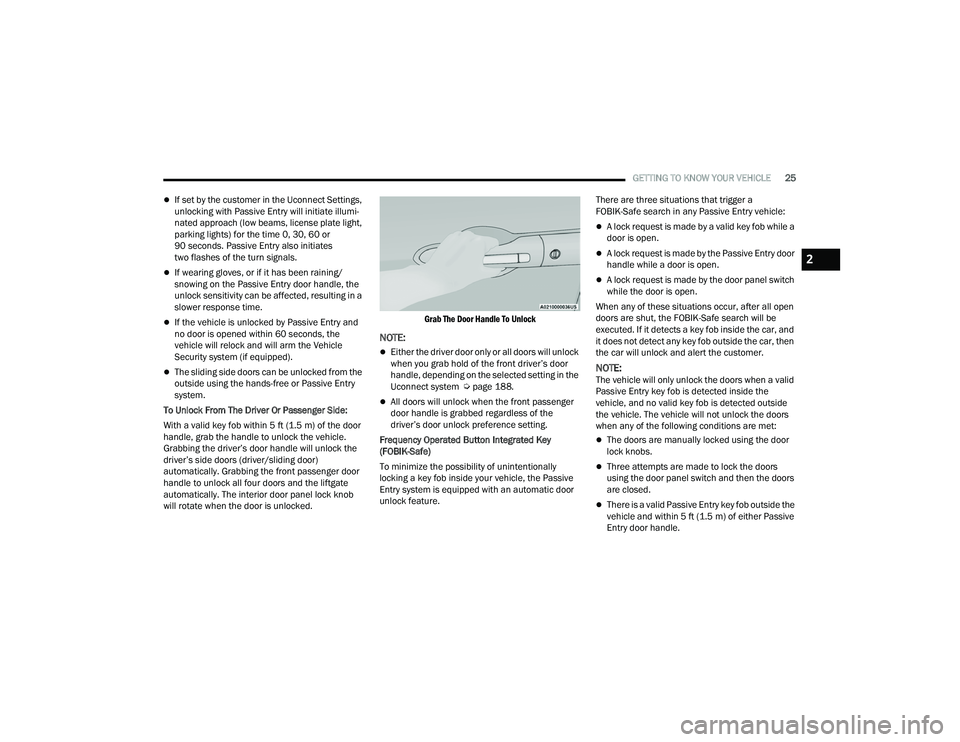
To Unlock From The Driver Or Passenger Side:
With a valid key fob within 5 ft (1.5 m) of the door
handle, grab the handle to unlock the vehicle.
Grabbing the driver’s door handle will unlock the
driver’s side doors (driver/sliding door)
automatically. Grabbing the front passenger door
handle to unlock all four doors and the liftgate
automatically. The interior door panel lock knob
will rotate when the door is unlocked.
Grab The Door Handle To Unlock
NOTE:
Either the driver door only or all doors will unlock
when you grab hold of the front driver’s door
handle, depending on the selected setting in the
Uconnect system Ú
page 188.
All doors will unlock when the front passenger
door handle is grabbed regardless of the
driver’s door unlock preference setting.
Frequency Operated Button Integrated Key
(FOBIK-Safe)
To minimize the possibility of unintentionally
locking a key fob inside your vehicle, the Passive
Entry system is equipped with an automatic door
unlock feature. There are three situations that trigger a
FOBIK-Safe search in any Passive Entry vehicle:
A lock request is made by a valid key fob while a
door is open.
A lock request is made by the Passive Entry door
handle while a door is open.
A lock request is made by the door panel switch
while the door is open.
When any of these situations occur, after all open
doors are shut, the FOBIK-Safe search will be
executed. If it detects a key fob inside the car, and
it does not detect any key fob outside the car, then
the car will unlock and alert the customer.
NOTE:The vehicle will only unlock the doors when a valid
Passive Entry key fob is detected inside the
vehicle, and no valid key fob is detected outside
the vehicle. The vehicle will not unlock the doors
when any of the following conditions are met:
The doors are manually locked using the door
lock knobs.
Three attempts are made to lock the doors
using the door panel switch and then the doors
are closed.
There is a valid Passive Entry key fob outside the
vehicle and within 5 ft (1.5 m) of either Passive
Entry door handle.
2
22_RUP_OM_EN_USC_t.book Page 25
Page 29 of 384
GETTING TO KNOW YOUR VEHICLE27
To Lock The Liftgate
With a valid Passive Entry key fob within 5 ft
(1.5 m) of the liftgate, push the Passive Entry lock
button located to the right of the liftgate release
handle.
The vehicle doors can also be locked by using the
key fob lock button, or the lock button located on
the vehicle’s interior door panel Ú page 370.
AUTOMATIC UNLOCK DOORS ON EXIT —
I
F EQUIPPED
The Unlock Doors Automatically On Exit feature
unlocks all of the vehicle doors when any door is
opened. This will occur only after the gear selector
has been placed into the PARK position, after the
vehicle has been driven (the gear selector has
been placed out of PARK and all doors closed).
The Unlock Doors Automatically On Exit feature will
not operate if there is any manual operation of the
door locks (lock or unlock).
This feature can be turned on or off in the
Uconnect system Ú page 188.
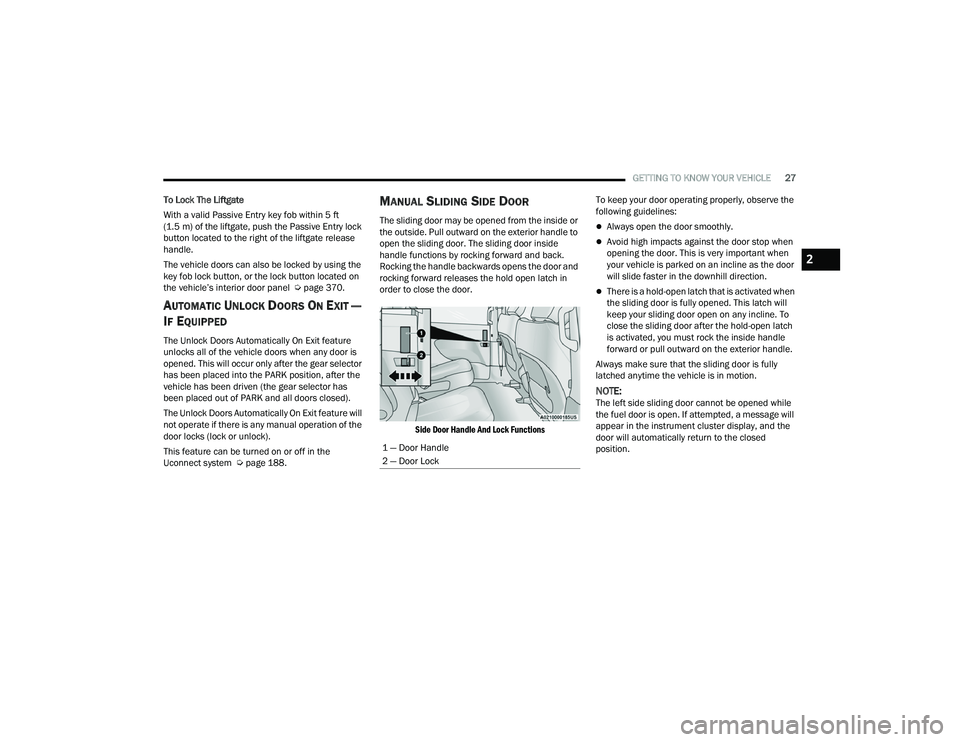
MANUAL SLIDING SIDE DOOR
The sliding door may be opened from the inside or
the outside. Pull outward on the exterior handle to
open the sliding door. The sliding door inside
handle functions by rocking forward and back.
Rocking the handle backwards opens the door and
rocking forward releases the hold open latch in
order to close the door.
Side Door Handle And Lock Functions
To keep your door operating properly, observe the
following guidelines:Always open the door smoothly.
Avoid high impacts against the door stop when
opening the door. This is very important when
your vehicle is parked on an incline as the door
will slide faster in the downhill direction.
There is a hold-open latch that is activated when
the sliding door is fully opened. This latch will
keep your sliding door open on any incline. To
close the sliding door after the hold-open latch
is activated, you must rock the inside handle
forward or pull outward on the exterior handle.
Always make sure that the sliding door is fully
latched anytime the vehicle is in motion.
NOTE:The left side sliding door cannot be opened while
the fuel door is open. If attempted, a message will
appear in the instrument cluster display, and the
door will automatically return to the closed
position.
1 — Door Handle
2 — Door Lock
2
22_RUP_OM_EN_USC_t.book Page 27
Page 30 of 384

28GETTING TO KNOW YOUR VEHICLE
POWER SLIDING SIDE DOOR —
I
F EQUIPPED
The power sliding door may be power opened or
closed in several ways:
Key fob
Inside or outside handles
Buttons located:
In the overhead console
Just inside the sliding door
On the outside handle
Push the button on the key fob twice
within five seconds to open, close, or
reverse a power sliding door.
The key fob and the overhead console button will
operate the door when the door is locked. All other
ways require the sliding door to be unlocked. If the
vehicle is equipped with Passive Entry, pushing the
button on the outside handle or Hands-Free
feature (if equipped) will unlock and open the
sliding door, with a valid Passive Entry key fob
within 5 ft (1.5 m) of the door handle.
Overhead Console Power Switches
There is a power sliding side door switch located on
the B-pillar trim panel on the driver’s and
passenger’s side, just in front of the power sliding
door for the rear seat passengers.
To operate the sliding door manually with the
handles or to avoid unintentional operation of the
power sliding doors from the rear seats, push the
power sliding door power off button, located in the
overhead console, to remove power to the handles
and buttons just inside the sliding doors. The power off LED, in the overhead console, will be
lit when the handles are manual. When the LED is
lit, pushing the power sliding door power off button
will return the handles to power operation.
NOTE:
If anything obstructs the power sliding side door
while it is closing or opening, the door will auto
-
matically reverse to the closed or open position
and an audible tone will sound, provided it
meets sufficient resistance. The turn signals will
flash with sliding door movements.
If the power sliding door stops in the middle due
to obstacles, it will power open on the next
command.
Power Sliding Side Door Switch (Left Side Shown)
1 — Liftgate
2 — Left Sliding Door
3 — Sliding Door Power Off
4 — Right Sliding Door
22_RUP_OM_EN_USC_t.book Page 28