2022 CHEVROLET MALIBU Control panel
[x] Cancel search: Control panelPage 166 of 351
Chevrolet Malibu Owner Manual (GMNA-Localizing-U.S./Canada-
14584249) - 2021 - CRC - 11/9/20
Climate Controls 165
0:Clears the windows of fog or moisture.
Air is directed to the windshield.
{: Air is directed to the instrument
panel outlets.
z: Air is directed to the floor outlets.
0MAX : Air is directed to the windshield
and the fan runs at a higher speed. This
mode overrides the previous mode selected
and clears fog or frost from the windshield
more quickly. When the button is pressed
again, the system returns to the previous
mode setting and fan speed. The current
mode setting and fan speed appear in the
display screen.
For best results, clear all snow and ice from
the windshield before defrosting.
A/C : Press to turn the air conditioning
system on or off. This status appears in the
display screen. If the fan control is turned
off or the outside temperature falls below
freezing, the air conditioner will not run.
@: Press to turn on recirculation. An
indicator light comes on and the status
appears in the display screen. Air is
recirculated to quickly cool the inside of the
vehicle or to reduce the entry of outside air
and odors. Ionizer :
If equipped, this feature helps to
clean the air inside the vehicle and remove
contaminants such as pollen, odors, and
dust. If the climate control system is on and
the ionizer is enabled, the ionizer status
indicator will be lit on the climate control
display. To turn the ionizer on or off, see
“Climate and Air Quality” underVehicle
Personalization 0100.
Rear Window Defogger
K:Press to turn the rear window defogger
on or off. An indicator light on the button
comes on to show that the rear window
defogger is on. The defogger turns off when
the ignition is turned to off or to ACC/
ACCESSORY.
The upper lines on the rear window are
antenna grids and are not intended to
defrost the glass.
The rear window defogger can be set to
automatic operation. See “Climate and Air
Quality” underVehicle Personalization 0100.
When Auto Rear Defog is selected, the rear
window defogger turns on automatically
when the interior temperature is cold and
the outside temperature is about 7 °C (44 °F)
and below. The auto rear defogger turns off
automatically. If the vehicle is equipped with heated
outside mirrors, they turn on when the rear
window defogger button is on and help to
clear fog or frost from the surface of the
mirror. See
Heated Mirrors 022.
Caution
Do not try to clear frost or other material
from the inside of the front windshield
and rear window with a razor blade or
anything else that is sharp. This may
damage the rear window defogger grid
and affect the radio's ability to pick up
stations clearly. The repairs would not be
covered by the vehicle warranty.
Remote Start Climate Control Operation :
If equipped with remote start, the climate
control system may run when the vehicle is
started remotely. The system will determine
the best mode and temperature setting for
operation. Once the vehicle is started with
the Engine Start/Stop button, the climate
control system will begin to operate at the
last customer selected operating mode and
temperature. If equipped with heated or
ventilated seats, they may come on
during a remote start. See Remote Vehicle
Start 013 and
Heated and Ventilated Front Seats 034.
Page 169 of 351
Chevrolet Malibu Owner Manual (GMNA-Localizing-U.S./Canada-
14584249) - 2021 - CRC - 11/9/20
168 Climate Controls
Air Delivery Mode Controls :PressX,Y,
or
[to change the direction of the
airflow. Any combination of the three
buttons can be selected. The indicator light
in the button will turn on. The current mode
appears in the display screen. Pressing any
button cancels automatic air delivery control
and the direction of the airflow is controlled
manually. Press AUTO to return to
automatic operation.
To change the current mode, select one or
more of the following modes:
X: Air is directed to the windshield.
Y:Air is directed to the instrument panel
outlets.
[: Air is directed to the floor outlets.
0MAX : Air is directed to the windshield,
the fan runs at a higher speed, and the
temperature of the air is increased if not
already at maximum. This mode overrides
the previous mode selected and clears fog or
frost from the windshield more quickly.
When the button is pressed again, the
system returns to the previous mode setting
and fan speed. For best results, clear all snow and ice from
the windshield before defrosting.
A/C :
Press to turn the air conditioning
system on or off. If the fan control is turned
off or the outside temperature falls below
freezing, the air conditioner will not run.
Pressing this button cancels automatic air
conditioning and turns off the air
conditioner. Press AUTO to return to
automatic operation and the air conditioner
runs automatically as needed. When the
indicator light is on, the air conditioner runs
automatically to cool the air inside the
vehicle or to dry the air needed to defog
the windshield faster.
M: Press to turn on recirculation. An
indicator light comes on. Air is recirculated
to quickly cool the inside of the vehicle or
to reduce the entry of outside air and odors.
If selected during cool or cold weather, the
windshield and windows may fog. Turn off
recirculation to help clear the windshield
and windows.
Auto Defog : The climate control system
may have a sensor to automatically detect
high humidity inside the vehicle. When high
humidity is detected, the climate control
system may adjust to outside air supply and turn on the air conditioner. The fan speed
may slightly increase to help prevent
fogging. If the climate control system does
not detect possible window fogging, it
returns to normal operation.
To turn Auto Defog off or on, see
“Climate
and Air Quality” underVehicle
Personalization 0100.
Rear Window Defogger
K:Press to turn the rear window defogger
on or off. An indicator light on the button
comes on to show that the rear window
defogger is on. The rear window defogger
only works when the ignition is on. The
defogger turns off when the ignition is
turned off or to ACC/ACCESSORY.
The upper lines on the rear window are
antenna grids and are not intended to
defrost the glass.
The rear window defogger can be set to
automatic operation. See “Climate and Air
Quality” underVehicle Personalization 0100.
When Auto Rear Defog is selected, the rear
window defogger turns on automatically
when the interior temperature is cold and
the outside temperature is about 7 °C (45 °F)
and below. The auto rear defogger turns off
automatically.
Page 170 of 351
Chevrolet Malibu Owner Manual (GMNA-Localizing-U.S./Canada-
14584249) - 2021 - CRC - 11/9/20
Climate Controls 169
If equipped with heated outside mirrors,
they turn on when the rear window
defogger button is on and help to clear fog
or frost from the surface of the mirror. See
Heated Mirrors022.
Caution
Do not try to clear frost or other material
from the inside of the front windshield
and rear window with a razor blade or
anything else that is sharp. This may
damage the rear window defogger grid
and affect the radio's ability to pick up
stations clearly. The repairs would not be
covered by the vehicle warranty.
Driver and Passenger Heated and Ventilated
Seats : If equipped, press
LorMto heat
the driver or passenger seat.
If equipped, press
{orCto ventilate the
driver or passenger seat. See Heated and
Ventilated Front Seats 034.
Remote Start Climate Control Operation :
If equipped with remote start, the climate
control system may run when the vehicle is
started remotely. The system will determine
the best mode and temperature setting for
operation. Once the vehicle is started with the Engine Start/Stop button, the climate
control system will begin to operate at the
last customer selected operating mode and
temperature. If equipped with heated or
ventilated seats, they may come on during a
remote start. See
Remote Vehicle Start 013
and
Heated and Ventilated Front Seats 034.
Sensor
The solar sensor, on top of the instrument
panel near the windshield, monitors the
solar heat.
The climate control system uses the sensor
information to adjust the temperature, fan
speed, recirculation, and air delivery mode
for best comfort.
Do not cover the sensor; otherwise the
automatic climate control system may not
work properly.
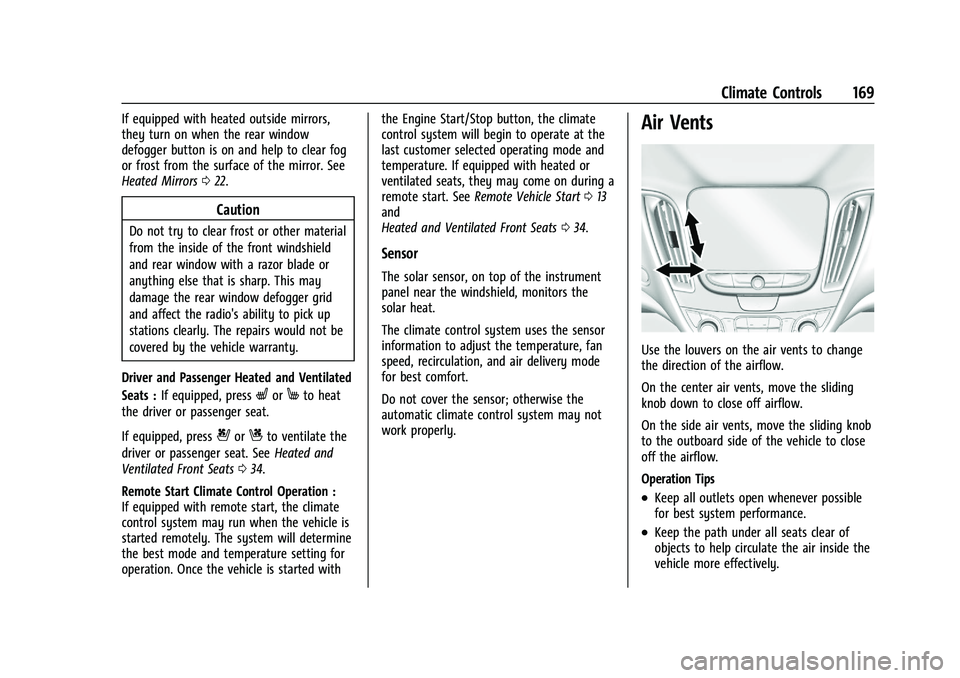
Air Vents
Use the louvers on the air vents to change
the direction of the airflow.
On the center air vents, move the sliding
knob down to close off airflow.
On the side air vents, move the sliding knob
to the outboard side of the vehicle to close
off the airflow.
Operation Tips
.Keep all outlets open whenever possible
for best system performance.
.Keep the path under all seats clear of
objects to help circulate the air inside the
vehicle more effectively.
Page 179 of 351
Chevrolet Malibu Owner Manual (GMNA-Localizing-U.S./Canada-
14584249) - 2021 - CRC - 11/9/20
178 Driving and Operating
.Turn off cruise control.
Blizzard Conditions
Stop the vehicle in a safe place and signal
for help. Stay with the vehicle unless there
is help nearby. If possible, use Roadside
Assistance. SeeRoadside Assistance Program
0 323. To get help and keep everyone in the
vehicle safe:
.Turn on the hazard warning flashers.
.Tie a red cloth to an outside mirror.
{Warning
Snow can trap engine exhaust under the
vehicle. This may cause exhaust gases to
get inside. Engine exhaust contains
carbon monoxide (CO), which cannot be
seen or smelled. It can cause
unconsciousness and even death.
If the vehicle is stuck in snow:
.Clear snow from the base of the
vehicle, especially any blocking the
exhaust pipe.
.Open a window about 5 cm (2 in) on
the vehicle side that is away from the
wind, to bring in fresh air.
(Continued)
Warning (Continued)
.Fully open the air outlets on or under
the instrument panel.
.Adjust the climate control system to
circulate the air inside the vehicle and
set the fan speed to the highest
setting. See“Climate Control Systems.”
For more information about CO, see
Engine Exhaust 0188.
To save fuel, run the engine for short
periods to warm the vehicle and then shut
the engine off and partially close the
window. Moving about to keep warm also
helps.
If it takes time for help to arrive, when
running the engine, push the accelerator
pedal slightly so the engine runs faster than
the idle speed. This keeps the battery
charged to restart the vehicle and to signal
for help with the headlamps. Do this as
little as possible, to save fuel.
If the Vehicle Is Stuck
Slowly and cautiously spin the wheels to
free the vehicle when stuck in sand, mud,
ice, or snow. If stuck too severely for the traction system
to free the vehicle, turn the traction system
off and use the rocking method. See
Traction Control/Electronic Stability Control
0
193.
{Warning
If the vehicle's tires spin at high speed,
they can explode, and you or others
could be injured. The vehicle can
overheat, causing an engine compartment
fire or other damage. Spin the wheels as
little as possible and avoid going above
56 km/h (35 mph).
Rocking the Vehicle to Get it Out
Turn the steering wheel left and right to
clear the area around the front wheels. Turn
off any traction system. Shift back and forth
between R (Reverse) and a low forward gear,
spinning the wheels as little as possible. To
prevent transmission wear, wait until the
wheels stop spinning before shifting gears.
Release the accelerator pedal while shifting,
and press lightly on the accelerator pedal
when the transmission is in gear. Slowly
spinning the wheels in the forward and
reverse directions causes a rocking motion
that could free the vehicle. If that does not
Page 200 of 351
Chevrolet Malibu Owner Manual (GMNA-Localizing-U.S./Canada-
14584249) - 2021 - CRC - 11/9/20
Driving and Operating 199
ACC will not set at a speed less than
25 km/h (15 mph), although it can be
resumed when driving at lower speeds. The
minimum allowable set speed is 25 km/h
(15 mph).
To set ACC:1. Press
5.
2. Get up to the desired speed.
3. Press and release -SET.
4. Remove your foot from the accelerator.
After ACC is set, it may immediately apply
the brakes if a vehicle ahead is detected
closer than the selected following gap.
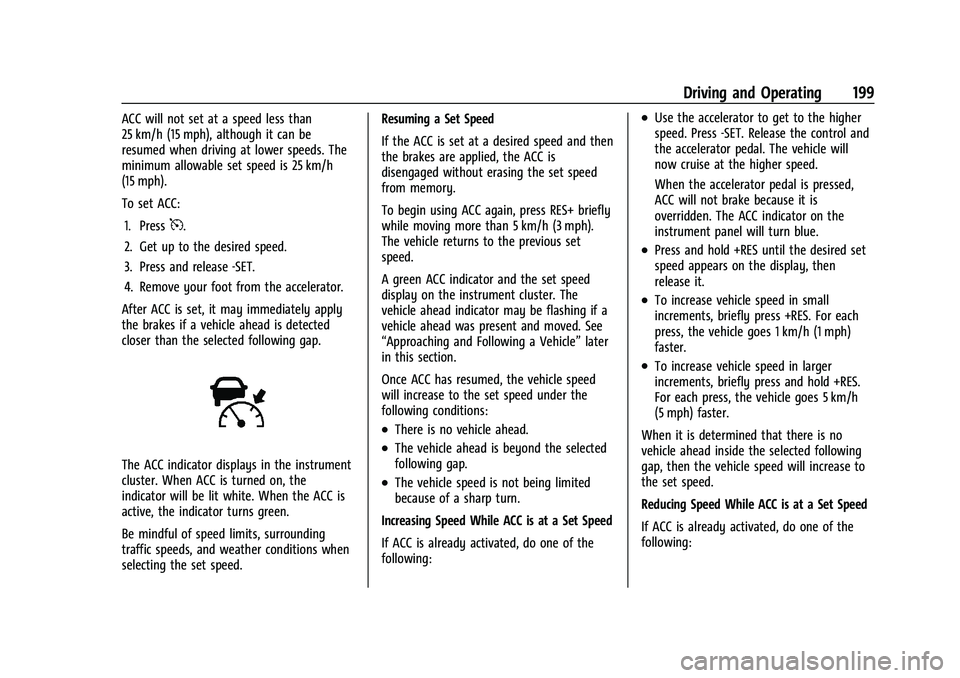
The ACC indicator displays in the instrument
cluster. When ACC is turned on, the
indicator will be lit white. When the ACC is
active, the indicator turns green.
Be mindful of speed limits, surrounding
traffic speeds, and weather conditions when
selecting the set speed. Resuming a Set Speed
If the ACC is set at a desired speed and then
the brakes are applied, the ACC is
disengaged without erasing the set speed
from memory.
To begin using ACC again, press RES+ briefly
while moving more than 5 km/h (3 mph).
The vehicle returns to the previous set
speed.
A green ACC indicator and the set speed
display on the instrument cluster. The
vehicle ahead indicator may be flashing if a
vehicle ahead was present and moved. See
“Approaching and Following a Vehicle”
later
in this section.
Once ACC has resumed, the vehicle speed
will increase to the set speed under the
following conditions:
.There is no vehicle ahead.
.The vehicle ahead is beyond the selected
following gap.
.The vehicle speed is not being limited
because of a sharp turn.
Increasing Speed While ACC is at a Set Speed
If ACC is already activated, do one of the
following:
.Use the accelerator to get to the higher
speed. Press -SET. Release the control and
the accelerator pedal. The vehicle will
now cruise at the higher speed.
When the accelerator pedal is pressed,
ACC will not brake because it is
overridden. The ACC indicator on the
instrument panel will turn blue.
.Press and hold +RES until the desired set
speed appears on the display, then
release it.
.To increase vehicle speed in small
increments, briefly press +RES. For each
press, the vehicle goes 1 km/h (1 mph)
faster.
.To increase vehicle speed in larger
increments, briefly press and hold +RES.
For each press, the vehicle goes 5 km/h
(5 mph) faster.
When it is determined that there is no
vehicle ahead inside the selected following
gap, then the vehicle speed will increase to
the set speed.
Reducing Speed While ACC is at a Set Speed
If ACC is already activated, do one of the
following:
Page 223 of 351
Chevrolet Malibu Owner Manual (GMNA-Localizing-U.S./Canada-
14584249) - 2021 - CRC - 11/9/20
222 Driving and Operating
If equipped with Lane Change Alert (LCA),
the LCA detection zones that extend back
from the side of the vehicle do not move
further back when a trailer is towed. Use
caution while changing lanes when towing a
trailer.
If equipped with Rear Cross Traffic Alert
(RCTA), use caution while backing up when
towing a trailer, as the RCTA detection zones
that extend out from the back of the vehicle
do not move further back when a trailer is
towed.
{Warning
To prevent serious injury or death from
carbon monoxide (CO), when towing a
trailer:
.Do not drive with the liftgate, trunk/
hatch, or rear-most window open.
.Fully open the air outlets on or under
the instrument panel.
.Adjust the climate control system to a
setting that brings in only outside air.
See“Climate Control Systems” in the
Index.
For more information about carbon
monoxide, see Engine Exhaust 0188. Towing a trailer requires experience. The
combination of the vehicle and trailer is
longer and not as responsive as the vehicle
itself. Get used to the handling and braking
of the combination by driving on a level
road surface before driving on public roads.
The trailer structure, the tires, and the
brakes must all be rated to carry the
intended cargo. Inadequate trailer
equipment can cause the combination to
operate in an unexpected or unsafe manner.
Before driving, inspect all trailer hitch parts
and attachments, safety chains, electrical
connectors, lamps, tires, and mirrors. See
Towing Equipment
0225. If the trailer has
electric brakes, start the combination
moving and then manually apply the trailer
brake controller to check that the trailer
brakes work. During the trip, occasionally
check that the cargo and trailer are secure
and that the lamps and any trailer brakes
are working.Towing with a Stability Control System
When towing, the stability control system
might be heard. The system reacts to
vehicle movement caused by the trailer,
which mainly occurs during cornering. This is
normal when towing heavier trailers.
Following Distance
Stay at least twice as far behind the vehicle
ahead as you would when driving without a
trailer. This can help to avoid heavy braking
and sudden turns.
Passing
More passing distance is needed when
towing a trailer. The combination of the
vehicle and trailer will not accelerate as
quickly and is much longer than the vehicle
alone. It is necessary to go much farther
beyond the passed vehicle before returning
to the lane. Pass on level roadways. Avoid
passing on hills if possible.
Backing Up
Hold the bottom of the steering wheel with
one hand. To move the trailer to the left,
move that hand to the left. To move the
trailer to the right, move that hand to the
right. Always back up slowly and, if possible,
have someone guide you.
Page 228 of 351
Chevrolet Malibu Owner Manual (GMNA-Localizing-U.S./Canada-
14584249) - 2021 - CRC - 11/9/20
Vehicle Care 227
Vehicle Care
General Information
General Information . . . . . . . . . . . . . . . . . . . 228
California Proposition 65 Warning . . . . . 228
California Perchlorate MaterialsRequirements . . . . . . . . . . . . . . . . . . . . . . . . 228
Accessories and Modifications . . . . . . . . . 229
Vehicle Checks
Doing Your Own Service Work . . . . . . . . 229
Hood . . . . . . . . . . . . . . . . . . . . . . . . . . . . . . . . . . 229
Engine Compartment Overview . . . . . . . . 231
Engine Oil . . . . . . . . . . . . . . . . . . . . . . . . . . . . . 234
Engine Oil Life System . . . . . . . . . . . . . . . . 236
Automatic Transmission Fluid . . . . . . . . . 236
Engine Air Filter Life System . . . . . . . . . . . 237
Engine Air Cleaner/Filter . . . . . . . . . . . . . . . 237
Cooling System . . . . . . . . . . . . . . . . . . . . . . . . 238
Engine Overheating . . . . . . . . . . . . . . . . . . . . 241
Washer Fluid . . . . . . . . . . . . . . . . . . . . . . . . . . 242
Brakes . . . . . . . . . . . . . . . . . . . . . . . . . . . . . . . . . 243
Brake Fluid . . . . . . . . . . . . . . . . . . . . . . . . . . . . 243
Battery - North America . . . . . . . . . . . . . . . 244
Automatic Transmission Shift Lock Control Function Check . . . . . . . . . . . . . . 247
Park Brake and P (Park) Mechanism Check . . . . . . . . . . . . . . . . . . . . . . . . . . . . . . . . 247
Wiper Blade Replacement . . . . . . . . . . . . . 247
Windshield Replacement . . . . . . . . . . . . . . 248 Gas Strut(s) . . . . . . . . . . . . . . . . . . . . . . . . . . . 248
Headlamp Aiming
Front Headlamp Aiming . . . . . . . . . . . . . . . 249
Bulb Replacement
Bulb Replacement . . . . . . . . . . . . . . . . . . . . . 249
Halogen Bulbs . . . . . . . . . . . . . . . . . . . . . . . . . 249
LED Lighting . . . . . . . . . . . . . . . . . . . . . . . . . . . 249
Headlamps, Front Turn Signal,
Sidemarker, and Parking Lamps . . . . . . 250
Taillamps, Turn Signal, Stoplamps, and Back-Up Lamps (LS and LT) . . . . . . . . . . 250
Taillamps, Turn Signal, Stoplamps, and Back-Up Lamps (LT and Premier) . . . . . 251
License Plate Lamp . . . . . . . . . . . . . . . . . . . . 252
Electrical System
High Voltage Devices and Wiring . . . . . . 253
Electrical System Overload . . . . . . . . . . . . . 253
Fuses and Circuit Breakers . . . . . . . . . . . . . 253
Engine Compartment Fuse Block . . . . . . 254
Instrument Panel Fuse Block . . . . . . . . . . . 258
Wheels and Tires
Tires . . . . . . . . . . . . . . . . . . . . . . . . . . . . . . . . . . 259
All-Season Tires . . . . . . . . . . . . . . . . . . . . . . . 260
Winter Tires . . . . . . . . . . . . . . . . . . . . . . . . . . 260
Low-Profile Tires . . . . . . . . . . . . . . . . . . . . . . . 261
Tire Sidewall Labeling . . . . . . . . . . . . . . . . . 261
Tire Designations . . . . . . . . . . . . . . . . . . . . . . 263 Tire Terminology and Definitions . . . . . . 263
Tire Pressure . . . . . . . . . . . . . . . . . . . . . . . . . . 266
Tire Pressure for High-Speed
Operation . . . . . . . . . . . . . . . . . . . . . . . . . . . 267
Tire Pressure Monitor System . . . . . . . . . 268
Tire Pressure Monitor Operation . . . . . . 269
Tire Inspection . . . . . . . . . . . . . . . . . . . . . . . . . 272
Tire Rotation . . . . . . . . . . . . . . . . . . . . . . . . . . 272
When It Is Time for New Tires . . . . . . . . 273
Buying New Tires . . . . . . . . . . . . . . . . . . . . . 274
Different Size Tires and Wheels . . . . . . . . 275
Uniform Tire Quality Grading . . . . . . . . . . 275
Wheel Alignment and Tire Balance . . . . 276
Wheel Replacement . . . . . . . . . . . . . . . . . . . 276
Tire Chains . . . . . . . . . . . . . . . . . . . . . . . . . . . . 277
If a Tire Goes Flat . . . . . . . . . . . . . . . . . . . . . 278
Tire Sealant and Compressor Kit . . . . . . . 279
Storing the Tire Sealant and
Compressor Kit . . . . . . . . . . . . . . . . . . . . . . 284
Tire Changing . . . . . . . . . . . . . . . . . . . . . . . . . 285
Compact Spare Tire . . . . . . . . . . . . . . . . . . . 289
Jump Starting
Jump Starting - North America . . . . . . . . 290
Towing the Vehicle
Towing the Vehicle . . . . . . . . . . . . . . . . . . . . 292
Recreational Vehicle Towing . . . . . . . . . . . 293
Page 257 of 351
Chevrolet Malibu Owner Manual (GMNA-Localizing-U.S./Canada-
14584249) - 2021 - CRC - 11/9/20
256 Vehicle Care
The vehicle may not be equipped with all of
the fuses, relays, and features shown.Fuses Usage
1 –
2 –
3 Antilock brake system pump/Electric brake
booster
5 –
6 Rear closure 7 –
8 Memory seat module
9 –
10 –
11 DC DC converter 1
12 Rear window defogger
13 Heated mirrors
14 –
15 Passive entry/Passive start
16 Front wiper 17 Passenger power seat Fuses
Usage
18 Antilock brake system valve
19 Driver power seat 21 Sunroof
22 Parking lamp
23 Automatic headlamp leveling/Adaptive forward
lighting
24 –
26 Transmission control module/Ignition
27 Instrument panel/Body/ Ignition
28 –
29 Rear vision camera/ Ventilated seats
30 Malfunction indicator lamp/Ignition
32 Canister vent solenoid/Evap leak check module
33 Front heated seat
34 – Fuses
Usage
35 Body control module 6/ Body control module 7
36 Fuel module
38 –
39 –
40 Steering column lock 41 –
43 Heated steering wheel
44 Headlamp leveling 45 –
46 Engine control module/ Ignition
47 –
48 –
49 DC DC converter 2 50 –
51 –
52 –
53 –
54 –