2022 CHEVROLET CAMARO climate control
[x] Cancel search: climate controlPage 164 of 357
Chevrolet Camaro Owner Manual (GMNA-Localizing-U.S./Canada/Mexico-
14583589) - 2021 - CRC - 3/24/20
Infotainment System 163
.HD Radio: This allows HD Radio reception
to be turned on or off.
Touch the controls on the infotainment
display to disable or enable.
.Explicit Content Filter: This setting allows
access to explicit content SiriusXM
channels.
Touch Off or On.
.Manage Phones: Select to connect to a
different phone source, disconnect a
phone, or delete a phone.
.Reset Music Index: This allows the music
index to be reset if you are having
difficulty accessing all of the media
content on your device.
Touch Yes or No.
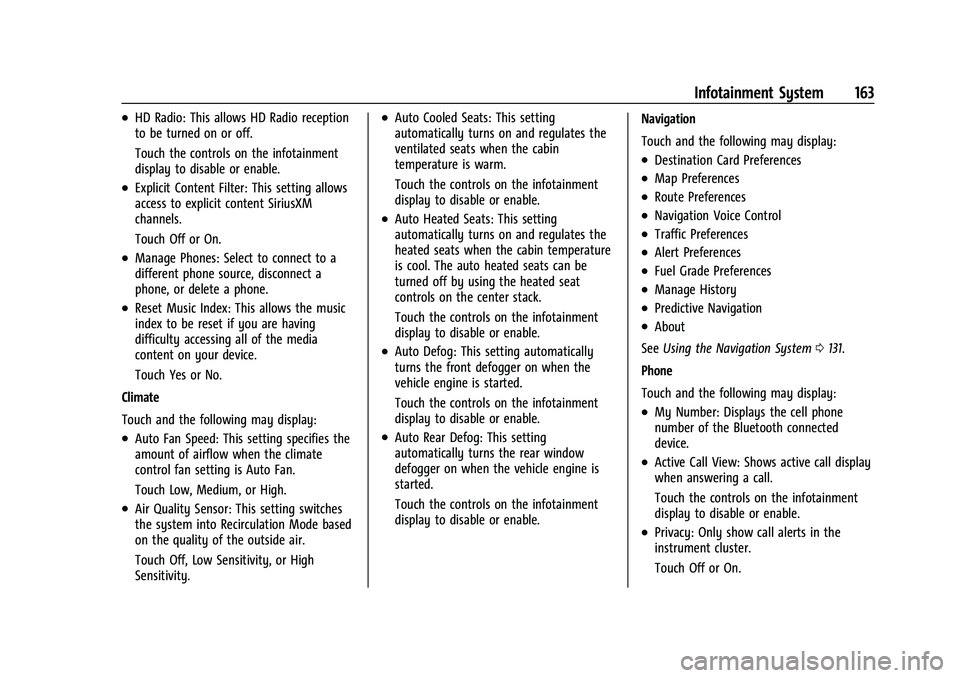
Climate
Touch and the following may display:
.Auto Fan Speed: This setting specifies the
amount of airflow when the climate
control fan setting is Auto Fan.
Touch Low, Medium, or High.
.Air Quality Sensor: This setting switches
the system into Recirculation Mode based
on the quality of the outside air.
Touch Off, Low Sensitivity, or High
Sensitivity.
.Auto Cooled Seats: This setting
automatically turns on and regulates the
ventilated seats when the cabin
temperature is warm.
Touch the controls on the infotainment
display to disable or enable.
.Auto Heated Seats: This setting
automatically turns on and regulates the
heated seats when the cabin temperature
is cool. The auto heated seats can be
turned off by using the heated seat
controls on the center stack.
Touch the controls on the infotainment
display to disable or enable.
.Auto Defog: This setting automatically
turns the front defogger on when the
vehicle engine is started.
Touch the controls on the infotainment
display to disable or enable.
.Auto Rear Defog: This setting
automatically turns the rear window
defogger on when the vehicle engine is
started.
Touch the controls on the infotainment
display to disable or enable. Navigation
Touch and the following may display:
.Destination Card Preferences
.Map Preferences
.Route Preferences
.Navigation Voice Control
.Traffic Preferences
.Alert Preferences
.Fuel Grade Preferences
.Manage History
.Predictive Navigation
.About
See Using the Navigation System 0131.
Phone
Touch and the following may display:
.My Number: Displays the cell phone
number of the Bluetooth connected
device.
.Active Call View: Shows active call display
when answering a call.
Touch the controls on the infotainment
display to disable or enable.
.Privacy: Only show call alerts in the
instrument cluster.
Touch Off or On.
Page 177 of 357
Chevrolet Camaro Owner Manual (GMNA-Localizing-U.S./Canada/Mexico-
14583589) - 2021 - CRC - 3/24/20
176 Climate Controls
Climate Controls
Climate Control Systems
Automatic Climate Control System . . . . 176
Dual Automatic Climate ControlSystem . . . . . . . . . . . . . . . . . . . . . . . . . . . . . . 179
Air Vents
Air Vents . . . . . . . . . . . . . . . . . . . . . . . . . . . . . . 182
Maintenance
Passenger Compartment Air Filter . . . . . 182
Service . . . . . . . . . . . . . . . . . . . . . . . . . . . . . . . . . 183
Climate Control Systems
Automatic Climate Control System
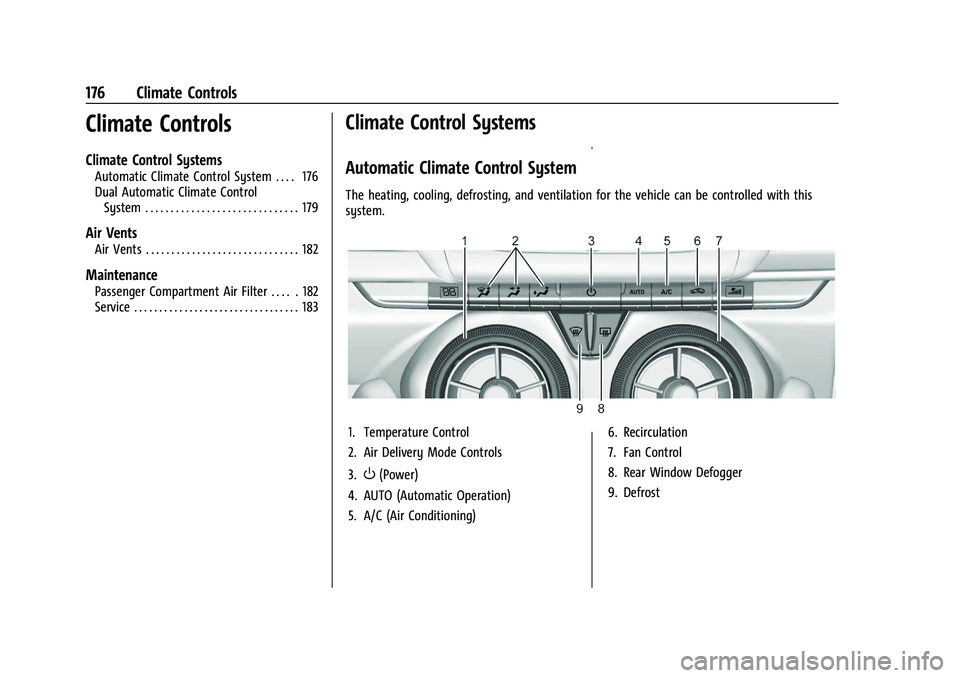
The heating, cooling, defrosting, and ventilation for the vehicle can be controlled with this
system.
1. Temperature Control
2. Air Delivery Mode Controls
3.
O(Power)
4. AUTO (Automatic Operation)
5. A/C (Air Conditioning) 6. Recirculation
7. Fan Control
8. Rear Window Defogger
9. Defrost
Page 178 of 357

Chevrolet Camaro Owner Manual (GMNA-Localizing-U.S./Canada/Mexico-
14583589) - 2021 - CRC - 3/24/20
Climate Controls 177
Climate Control Display
1. Temperature Setting
2. Fan Control
3. Air Delivery Mode Control
4. Air Recirculation
5. Auto (Automatic Operation)
6. A/C (Air Conditioning)
7. On/Off (Power)
8. Temperature Controls
Climate Control Status Display
The climate control status display appears
briefly when the climate controls on the
center stack are adjusted.
Automatic Operation
The system automatically controls the fan
speed, air delivery, air conditioning, and
recirculation in order to heat or cool the
vehicle to the desired temperature:
When AUTO is lit, all four functions operate
automatically. Each function can also be
manually set and the setting is displayed.
Functions not manually set will continue to
be automatically controlled, even if the
AUTO indicator is not lit. For automatic operation:
1. Press AUTO.
2. Set the temperature. Allow the system time to stabilize. Adjust the temperature
as needed for best comfort.
O:Press to turn the fan off or on.
Temperature Control : Turn the outer ring of
the air vent clockwise or counterclockwise to
increase or decrease the temperature
setting.
Fan Control : Turn the outer ring of the air
vent clockwise or counterclockwise to
increase or decrease the fan speed.
Air Delivery Mode Controls : Press
X,Y,
or
[to change the direction of the
airflow. Any combination of the three
buttons can be selected. The indicator light
in the button will turn on. The current mode
appears in the display screen. Pressing any
of the three buttons cancels automatic air
delivery control and the direction of the
airflow is controlled manually. Press AUTO
to return to automatic operation.
Page 179 of 357

Chevrolet Camaro Owner Manual (GMNA-Localizing-U.S./Canada/Mexico-
14583589) - 2021 - CRC - 3/24/20
178 Climate Controls
To change the current mode, select one or
more of the following:
X:Clears the windows of fog or moisture.
Air is directed to the windshield and side
window outlets.
Y: Air is directed to the instrument panel
outlets.
[: Air is directed to the floor outlets.
0:Clears the windshield of fog or frost
more quickly. Air is only directed to the
windshield and side window outlets. The air
conditioning may turn on automatically to
remove fog.
For best results, clear all snow and ice from
the windshield before defrosting.
Do not drive the vehicle until all windows
are clear.
Air Conditioning
A/C : Press to turn the air conditioning on
or off. An indicator light turns on. If the fan
is turned off or the outside temperature
falls below freezing, the air conditioning will
not run, but the indicator light will be lit.
The air conditioning might automatically
come on when
0is selected.
@: Press to turn on recirculation. An
indicator light comes on. Air is recirculated
inside the vehicle. It helps to quickly cool
the air inside the vehicle or reduce the
outside air and odors that may enter.
Operation in the recirculation mode while
the air conditioner is off increases humidity
and may cause the windows to fog.
Recirculation is not available in the defrost
or defog modes.
To improve fuel efficiency and to cool the
vehicle faster, recirculation may be
automatically selected in warm weather. The
recirculation light will not come on. Press
@to select recirculation; press it again to
select outside air.
Rear Window Defogger
1: Press to turn the rear window
defogger on or off. An indicator light on the
button comes on to show that the rear
window defogger is on. The defogger turns
off if the ignition is turned off or to ACC/
ACCESSORY.
The rear window defogger can be set to
automatic operation. See “Climate and Air
Quality” underVehicle Personalization 0105.
When Auto Rear Defog is selected, the rear
window defogger turns on automatically
when the interior temperature is cold and
the outside temperature is about 7 °C (44 °F)
and below.
The heated outside mirrors turn on when
the rear window defogger button is on and
help to clear fog or frost from the surface of
the mirrors.
Do not drive the vehicle until all windows
are clear.
Page 180 of 357

Chevrolet Camaro Owner Manual (GMNA-Localizing-U.S./Canada/Mexico-
14583589) - 2021 - CRC - 3/24/20
Climate Controls 179
Caution
Do not use a razor blade or sharp object
to clear the inside rear window. Do not
adhere anything to the defogger grid
lines in the rear glass. These actions may
damage the rear defogger. Repairs would
not be covered by the vehicle warranty.
Remote Start Climate Control Operation, If
Equipped : The climate control system may
run when the vehicle is started remotely,
depending on the outside temperature. See
Remote Vehicle Start 014. The rear defog
may come on during remote start based on
cold ambient conditions. The rear defog
indicator light does not come on during a
remote start. When enabled, the front
heated seats, if equipped, will turn on
automatically if it is cold outside. See
Vehicle Personalization 0105. The heated
seat indicator lights do not come on during
a remote start.
Dual Automatic Climate Control System
The heating, cooling, defrosting, and ventilation for the vehicle can be controlled with this
system.
1. Driver and Passenger Temperature Controls
2. Air Delivery Mode Controls
3.
O(Power)
4. SYNC (Synchronized Temperature)
5. AUTO (Automatic Operation)
6. A/C (Air Conditioning) 7. Recirculation
8. Driver and Passenger Heated and
Ventilated Seats (If Equipped)
9. Defrost
10. Rear Window Defogger
11. Fan Control
Page 181 of 357

Chevrolet Camaro Owner Manual (GMNA-Localizing-U.S./Canada/Mexico-
14583589) - 2021 - CRC - 3/24/20
180 Climate Controls
Climate Control Display
1. Driver and Passenger TemperatureSettings
2. Fan Control
3. Driver and Passenger Temperature Controls
4. Sync (Synchronized Temperature)
5. Recirculation
6. Air Delivery Mode Controls
7. Auto (Automatic Operation)
8. A/C (Air Conditioning)
9. On/Off (Power) The fan, air delivery mode, air conditioning,
driver and passenger temperatures, and Sync
settings can be controlled by touching
CLIMATE on the infotainment Home Page or
the climate button in the climate control
display application tray. A selection can then
be made on the front climate control page
displayed. See the infotainment manual.
Climate Control Status Display
The climate control status display appears
briefly when the center stack climate
controls are adjusted.
Automatic Operation
The system automatically controls the fan
speed, air delivery, air conditioning, and
recirculation in order to heat or cool the
vehicle to the desired temperature:
When AUTO is lit, all four functions operate
automatically. Each function can also be
manually set and the setting is displayed.
Functions not manually set will continue to
be automatically controlled, even if the
AUTO indicator is not lit.
For automatic operation:
1. Press AUTO.
2. Set the temperature. Allow the system time to stabilize. Adjust the temperature
as needed for best comfort.
Driver and Passenger Temperature
Controls : The temperature can be adjusted
separately for the driver and the passenger.
Turn the outer ring of the air vents
clockwise or counterclockwise to increase or
decrease the driver or passenger
temperature setting. The setting will appear
on the temperature display.
Page 182 of 357

Chevrolet Camaro Owner Manual (GMNA-Localizing-U.S./Canada/Mexico-
14583589) - 2021 - CRC - 3/24/20
Climate Controls 181
SYNC :Press to link the passenger climate
temperature settings to the driver setting.
The SYNC indicator light will turn on. When
the passenger settings are adjusted, the
SYNC indicator light turns off.
Manual Operation
O: Press to turn the fan off or on.
hori:Press to increase or decrease the
fan speed.
Air Delivery Mode Controls : Press
X,Y,
or
[to change the direction of the
airflow. Any combination of the three
buttons can be selected. The indicator light
in the button will turn on. The current mode
appears in the display screen. Pressing any
of the three buttons cancels automatic air
delivery control and the direction of the
airflow is controlled manually. Press AUTO
to return to automatic operation.
To change the current mode, select one or
more of the following:
X: Clears the windows of fog or moisture.
Air is directed to the windshield and side
window outlets.
Y: Air is directed to the instrument panel
outlets.
[: Air is directed to the floor outlets.
0:Clears the windshield of fog or frost
more quickly. Air is only directed to the
windshield and side window outlets. The air
conditioning may turn on automatically to
remove fog.
For best results, clear all snow and ice from
the windshield before defrosting.
Do not drive the vehicle until all windows
are clear.
Air Conditioning
A/C : Press to turn the air conditioning on
or off. An indicator light turns on. If the fan
is turned off or the outside temperature
falls below freezing, the air conditioning will
not run, but the indicator light will be lit.
The air conditioning might automatically
come on when
0is selected.
@: Press to turn on recirculation. An
indicator light comes on. Air is recirculated
inside the vehicle. It helps to quickly cool
the air inside the vehicle or reduce the
outside air and odors that may enter.
Operation in the recirculation mode while
the air conditioner is off increases humidity
and may cause the windows to fog. Recirculation is not available in the defrost
or defog modes.
To improve fuel efficiency and to cool the
vehicle faster, recirculation may be
automatically selected in warm weather. The
recirculation light will not come on. Press
@to select recirculation; press it again to
select outside air.
Rear Window Defogger
1: Press to turn the rear window
defogger on or off. An indicator light on the
button comes on to show that the rear
window defogger is on. The defogger turns
off if the ignition is turned off or to ACC/
ACCESSORY.
The rear window defogger can be set to
automatic operation. See “Climate and Air
Quality” underVehicle Personalization 0105.
When Auto Rear Defog is selected, the rear
window defogger turns on automatically
when the interior temperature is cold and
the outside temperature is about 7 °C (44 °F)
and below.
The heated outside mirrors turn on when
the rear window defogger button is on and
help to clear fog or frost from the surface of
the mirrors.
Page 183 of 357

Chevrolet Camaro Owner Manual (GMNA-Localizing-U.S./Canada/Mexico-
14583589) - 2021 - CRC - 3/24/20
182 Climate Controls
Do not drive the vehicle until all windows
are clear.
Caution
Do not use a razor blade or sharp object
to clear the inside rear window. Do not
adhere anything to the defogger grid
lines in the rear glass. These actions may
damage the rear defogger. Repairs would
not be covered by the vehicle warranty.
LorM(If Equipped) :PressLorMto
heat the driver or passenger seat.
Press
{orC, if equipped, to ventilate the
driver or passenger seat. See Heated and
Ventilated Front Seats 040.
Remote Start Climate Control Operation, If
Equipped : The climate control system may
run when the vehicle is started remotely,
depending on the outside temperature. See
Remote Vehicle Start 014. The rear defog
may come on during remote start based on
cold ambient conditions. The rear defog
indicator light does not come on during a
remote start. When enabled, the front
heated seats, if equipped, will turn on automatically if it is cold outside. See
Vehicle Personalization
0105. The heated
seat indicator lights do not come on during
a remote start.
Air Vents
Use the air outlets in the center and on the
side of the instrument panel to direct the
airflow. Turn the center knobs on the air
outlets clockwise or counterclockwise to
open or close off the airflow.
Operation Tips
.In defog or defrost mode, warm air flows
from side air outlets. To improve side
window defogging or defrosting, direct
side air outlets toward the side windows.
.Clear away any ice, snow, or leaves from
air inlets at the base of the windshield
that could block the flow of air into the
vehicle.
.Clear snow off the hood to improve
visibility and help decrease moisture
drawn into the vehicle.
.Keep the path under the front seats clear
of objects to help circulate the air inside
of the vehicle more effectively.
.Use of non-GM approved hood deflectors
can adversely affect the performance of
the system. Check with your dealer
before adding equipment to the outside
of the vehicle.
Maintenance
Passenger Compartment Air Filter
The passenger compartment air filter
reduces dust, pollen, and other airborne
irritants from outside air that is pulled into
the vehicle. The filter will need to be
replaced periodically. See Maintenance
Schedule 0310.
Using the climate control system without an
air filter installed is not recommended.
Water or other debris could enter the