2022 CADILLAC XT6 seats
[x] Cancel search: seatsPage 136 of 447

Cadillac XT6 Owner Manual (GMNA-Localizing-U.S./Canada-15218998) -
2022 - CRC - 10/22/21
INSTRUMENTS AND CONTROLS 135
closed, and you walk away from the
vehicle with the RKE transmitter. See
Remote Keyless Entry (RKE) System
Operation07.
Touch Off, On with Horn Chirp, or On.
Remote Left in Vehicle Alert
This feature sounds an alert when the
RKE transmitter is left in the vehicle.
This menu also enables Remote No
Longer in Vehicle Alert.
Touch Off or On.
Seating Position
Touch and the following may display:
.Seat Entry Memory
.Seat Exit Memory
Seat Entry Memory
This feature automatically recalls the
previously stored 1 or 2 button
positions when the ignition is changed
from off to on or ACC/ACCESSORY.
See Memory Seats 043.
Touch Off or On. Seat Exit Memory
This feature automatically recalls the
previously stored exit button positions
when the ignition is changed from on
or ACC/ACCESSORY to off if the driver
door is open or opened. See
Memory
Seats 043.
Touch Off or On.
Teen Driver
See “Teen Driver” underSettings 0186.
Valet Mode
This will lock the infotainment system
and steering wheel controls. It may
also limit access to vehicle storage
locations, if equipped.
To enable valet mode:
1. Enter a four-digit code on the keypad.
2. Touch Enter to go to the confirmation screen.
3. Re-enter the four-digit code.
Touch Lock or Unlock to lock or
unlock the system. Touch Back to go
back to the previous menu.
Universal Remote
System
See Radio Frequency Statement 0421.
Universal Remote System
Programming
If equipped, these buttons are in the
overhead console.
This system can replace up to three
remote control transmitters used to
activate devices such as garage door
openers, security systems, and home
automation devices. These
Page 157 of 447

Cadillac XT6 Owner Manual (GMNA-Localizing-U.S./Canada-15218998) -
2022 - CRC - 10/22/21
156 INFOTAINMENT SYSTEM
Radio Reception
Unplug electronic devices from the
accessory power outlets if there is
interference or static in the radio.
FM
FM signals only reach about 16 to
65 km (10 to 40 mi). Although the
radio has a built-in electronic circuit
that automatically works to reduce
interference, some static can occur,
especially around tall buildings or
hills, causing the sound to fade in
and out.
AM
The range for most AM stations is
greater than for FM, especially at
night. The longer range can cause
station frequencies to interfere with
each other. Static can also occur when
things like storms and power lines
interfere with radio reception. When
this happens, try reducing the treble
on the radio.
SiriusXM Satellite Radio Service
If equipped, SiriusXM Satellite Radio
Service provides digital radio
reception. Tall buildings or hills can
interfere with satellite radio signals,
causing the sound to fade in and out.
In addition, traveling or standing
under heavy foliage, bridges, garages,
or tunnels may cause loss of the
SiriusXM signal for a period of time.
Some cellular services may interfere
with SXM reception causing loss of
signal.
Mobile Device Usage
Mobile device usage, such as making
or receiving calls, charging, or just
having the mobile device on may
cause static interference in the radio.
Unplug the mobile device or turn it
off if this happens.
Multi-Band Antenna
The roof antenna may be used for
radio, navigation, and OnStar,
depending on the equipped options.
Keep clear of obstructions for clearreception. If the vehicle has a sunroof,
and it is open, reception can also be
affected.
Audio Players
Avoiding Untrusted Media
Devices
When using media devices such as SD
cards, USB devices, and mobile
devices, consider the source.
Untrusted media devices could
contain files that affect system
operation or performance. Avoid use if
the content or origin cannot be
trusted.
USB Port
Audio stored on a USB device may be
listened to.
The vehicle may be equipped with two
USB ports in the center console under
the armrest. These ports are for data
and charging. There may also be two
USB ports at the rear of the center
console and a USB port on each side
of the third row seats for
charging only.
Page 192 of 447

Cadillac XT6 Owner Manual (GMNA-Localizing-U.S./Canada-15218998) -
2022 - CRC - 10/22/21
INFOTAINMENT SYSTEM 191
.Bose AudioPilot Noise
Compensation Technology (If
Equipped): This feature adjusts the
volume based on the noise in the
vehicle and the speed.
Touch Off or On.
.Manage Favorites: Touch to display
a list of Audio, Mobile Devices, and
Navigation favorites.
Favorites can be moved, renamed,
or deleted.
To move, touch and hold the
favorite, and then drag up or down
to rearrange the position.
.Set Number of Audio Favorites:
Touch to select how many favorites
pages can be viewed from the audio
application. The Auto setting will
automatically adjust this number
based on the number of favorites
you have saved. Touch Auto, 5, 10,
15, 20, 25, 30, 35, or 40.
.RDS: This allows the Radio Data
System (RDS) to be turned on or off.
Touch the controls on the
infotainment display to disable or
enable.
.HD Radio: This allows HD Radio
reception to be turned on or off.
Touch the controls on the
infotainment display to disable or
enable.
.Explicit Content Filter: This setting
allows access to explicit content
SiriusXM channels.
Touch Off or On.
.Manage Phones: Select to connect
to a different phone source,
disconnect a phone, or delete a
phone.
.Reset Music Index: This allows the
music index to be reset if you are
having difficulty accessing all of the
media content on your device.
Touch Yes or No.
Climate
Touch and the following may display:
.Auto Fan Speed: This setting
specifies the amount of airflow
when the climate control fan setting
is Auto Fan.
Touch Low, Medium, or High.
.Air Quality Sensor: This setting
switches the system into
Recirculation Mode based on the
quality of the outside air.
Touch Off, Low Sensitivity, or High
Sensitivity.
.Auto Cooled Seats: This setting
automatically turns on and
regulates the ventilated seats when
the cabin temperature is warm.
Touch the controls on the
infotainment display to disable or
enable.
.Auto Heated Seats: This setting
automatically turns on and
regulates the heated seats when the
cabin temperature is cool. The auto
heated seats can be turned off by
using the heated seat controls on
the center stack.
Touch the controls on the
infotainment display to disable or
enable.
.Auto Defog: This setting
automatically turns the front
defogger on when the vehicle engine
is started.
Page 207 of 447

Cadillac XT6 Owner Manual (GMNA-Localizing-U.S./Canada-15218998) -
2022 - CRC - 10/22/21
206 CLIMATE CONTROLS
Climate Controls
Climate Control Systems
Dual Automatic Climate ControlSystem . . . . . . . . . . . . . . . . . . . . . . . . . . 206
Rear Climate Control System . . . . 211
Air Vents
Air Vents . . . . . . . . . . . . . . . . . . . . . . . . . . 213
Maintenance
Passenger Compartment Air Filter . . . . . . . . . . . . . . . . . . . . . . . . . . . . . 213
Service . . . . . . . . . . . . . . . . . . . . . . . . . . . . 214
Climate Control Systems
Dual Automatic Climate Control System
The climate control buttons on the center stack and on the climate control
display are used to adjust the heating, cooling, and ventilation.
Center Stack Climate Controls
1. Driver and Passenger Temperature Controls
2. Fan Control
3. Driver and Passenger Heated and Ventilated Seats (If Equipped)
4. Rear Window Defogger
5. Defrost 6. OFF (Fan)
7. Recirculation
8. AUTO (Automatic Operation)
Page 211 of 447

Cadillac XT6 Owner Manual (GMNA-Localizing-U.S./Canada-15218998) -
2022 - CRC - 10/22/21
210 CLIMATE CONTROLS
Caution
Do not try to clear frost or other
material from the inside of the
front windshield and rear window
with a razor blade or anything else
that is sharp. This may damage the
rear window defogger grid and
affect the radio's ability to pick up
stations clearly. The repairs would
not be covered by the vehicle
warranty.
Driver and Passenger Heated and
Ventilated Seats (If Equipped) :
Press
MorLto heat the driver or
passenger seat cushion.
Press
Cor{to ventilate the driver
or passenger seat. See Heated and
Ventilated Front Seats 046.
Auto Heated and Ventilated Seats :
When the vehicle is on, this feature
will automatically activate the heated
or ventilated seats at the level
required by the vehicle's interior
temperature. The active high, medium,
low, or off heated or ventilated seat
level will be indicated by the manual
heated and ventilated seat buttons on the center stack. Use the manual
heated and ventilated seat buttons on
the center stack to turn auto heated
or ventilated seats off. If the
passenger seat is unoccupied, the auto
heated or ventilated seats feature will
not activate that seat. The auto heated
and ventilated seats feature can be
programmed to always be enabled
when the vehicle is on. If equipped
with a heated steering wheel, the auto
heated steering wheel activation will
follow the heated seat auto activation
and the heated wheel indicator will
follow the state of the steering wheel
heat. See
Heated and Ventilated Front
Seats 046 and
Vehicle Personalization 0130.
Remote Start Climate Control
Operation : If equipped with the
remote start feature, the climate
control system may run when the
vehicle is started remotely. The system
uses the driver’s previous settings to
heat or cool the inside of the vehicle.
The rear defog may come on during
remote start based on cold ambient
conditions. The rear defog indicator
light does not come on during a
remote start. If equipped, the heated seats will turn
on if it is cold outside or the
ventilated seats will turn on if it is hot
outside. The heated and ventilated
seat indicator lights may not come on
during a remote start. If equipped, the
heated steering wheel will come on in
a remote start if it is cold outside. The
heated steering wheel indicator light
may not come on. See
Remote Vehicle
Start 015 and
Heated and Ventilated Front Seats 046.
Sensor
The solar sensor, on top of the
instrument panel near the windshield,
monitors the solar heat.
Page 212 of 447
Cadillac XT6 Owner Manual (GMNA-Localizing-U.S./Canada-15218998) -
2022 - CRC - 10/22/21
CLIMATE CONTROLS 211
The climate control system uses the
sensor information to adjust the
temperature, fan speed, recirculation,
and air delivery mode for best
comfort.
If the sensor is covered, the automatic
climate control system may not work
properly.
Afterblow Feature
If equipped, under certain conditions,
the fan may stay on or may turn on
and off several times after you turn
off and lock the vehicle. This is
normal.
Rear Climate Control
System
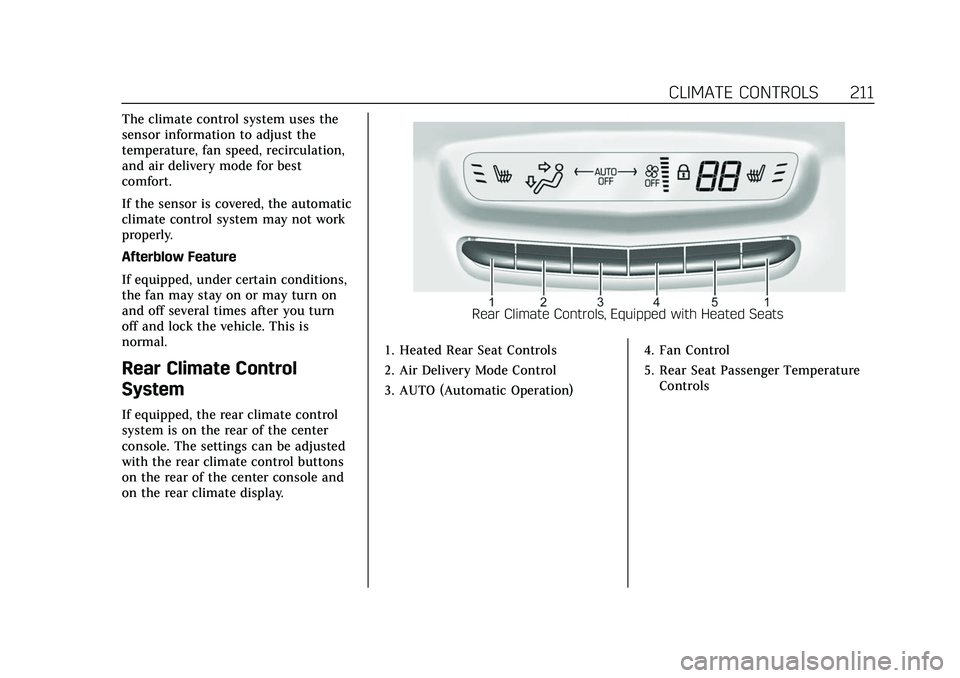
If equipped, the rear climate control
system is on the rear of the center
console. The settings can be adjusted
with the rear climate control buttons
on the rear of the center console and
on the rear climate display.
Rear Climate Controls, Equipped with Heated Seats
1. Heated Rear Seat Controls
2. Air Delivery Mode Control
3. AUTO (Automatic Operation) 4. Fan Control
5. Rear Seat Passenger Temperature
Controls
Page 213 of 447

Cadillac XT6 Owner Manual (GMNA-Localizing-U.S./Canada-15218998) -
2022 - CRC - 10/22/21
212 CLIMATE CONTROLS
Rear Climate Controls, Not Equipped with Heated Seats
1. Air Delivery Mode Control
2. AUTO (Automatic Operation)
3. Fan Control
4. Temperature Down
5. Temperature Up
6. On/Off
Rear Climate Display Controls
1. Rear Temperature Display 2. Fan Control
3. Sync (Synchronized Temperatures)
4. Rear Control Lockout
5. Air Delivery Mode Control
6. Auto (Rear Automatic Operation)
7. On/Off
8. Rear Climate Temperature Control
Rear : Touch this button on the front
climate control display to open the
rear climate control display. The rear
climate control settings can now be
adjusted from the front
passenger area.
On/Off : Touch On/Off on the display
to turn the rear climate control on or
off. If the rear climate control is
turned off using On/Off on the display,
the rear climate control buttons must
be pressed twice to turn the system
back on.
Sync : Touch Sync on the display to
match the rear climate control
settings to the front climate control
driver settings. The Sync button is
highlighted. Press the temperature
Page 214 of 447

Cadillac XT6 Owner Manual (GMNA-Localizing-U.S./Canada-15218998) -
2022 - CRC - 10/22/21
CLIMATE CONTROLS 213
button twice to unlink the set driver
and rear settings. The Sync button is
no longer highlighted.
Q:Touch to lock or unlock control of
the rear climate control system from
the rear seat passengers. When locked,
the rear climate controls can only be
adjusted from the front seat.
Automatic Operation
AUTO : Press to turn on or off. The
air delivery is controlled
automatically. The AUTO indicator
appears on the display. If the air
delivery mode or fan speed is
manually adjusted, this cancels full
automatic operation.
Manual Operation
]: Press the rear fan control up or
down to increase or decrease the
airf low to the rear panel outlets.
Temperature Controls : Press up or
down to adjust the rear passenger
temperature. The rear passenger
temperature can also be adjusted by
touching
Qfor warmer air orRfor
cooler air on the rear climate display. Air Delivery Mode Control :
Press up
or down to select the desired air
delivery mode. The air delivery mode
can also be changed by touching
[,
\, orYon the rear climate display.
This changes the direction of the
airf low in the rear seating area.
If the rear floor air delivery mode is
selected, the rear fan speed indicator
will change when adjusted, but the
airf low amount directed to the floor
will not. This is normal operation for
the system.
To activate the rear floor air delivery
mode, touch
[on the rear climate
display.
Air Vents
Use the slider switch on the air outlets
to change the direction of the airf low,
or to open and close off the airf low.
There are also outlets overhead in the
rear passenger area; adjust as needed.
Keep all outlets open whenever
possible for best system performance.
Operation Tips
.Clear away any ice, snow, or leaves
from the air inlets at the base of the
windshield that can block the flow
of air into the vehicle.
.Clear snow off the hood to improve
visibility and help decrease moisture
drawn into the vehicle.
.Use of non-GM approved hood
deflectors can adversely affect the
performance of the system.
.Keep the path under all seats clear
of objects to help circulate the air
inside the vehicle more effectively.
.If fogging reoccurs while in vent or
bi-level modes with mild
temperature throughout the vehicle,
turn on the air conditioner to
reduce windshield fogging.
Maintenance
Passenger Compartment
Air Filter
The filter reduces dust, pollen, and
other airborne irritants from outside
air that is pulled into the vehicle. The