2022 CADILLAC XT6 brake
[x] Cancel search: brakePage 271 of 447

Cadillac XT6 Owner Manual (GMNA-Localizing-U.S./Canada-15218998) -
2022 - CRC - 10/22/21
270 DRIVING AND OPERATING
Other Vehicles Entering Your Lane
Super Cruise may not detect a vehicle
that enters your lane, or may not
brake fast enough to avoid a crash.
You must manually brake and steer
the vehicle.Intersections; Vehicles Crossing the
Road Ahead
Super Cruise will not brake the vehicle
when approaching an intersection that
is controlled by a traffic light or stop
sign. Super Cruise will not detect
vehicles crossing the road ahead,
including at intersections, and will not
automatically steer or brake to
prevent a collision. You must
manually brake and steer the vehicle.
Towing a Trailer
Do not use Super Cruise when towing
a trailer. For towing capability, see
General Towing Information
0305.
Super Cruise on Hills
Do not use Super Cruise while driving
on steep hills. Super Cruise Indicator Light
SummaryThe steering wheel light bar and
instrument cluster light provide the
following important information about
Super Cruise operation:
Page 272 of 447

Cadillac XT6 Owner Manual (GMNA-Localizing-U.S./Canada-15218998) -
2022 - CRC - 10/22/21
DRIVING AND OPERATING 271
Steering WheelLight Bar Instrument Cluster Light Super Cruise Description
Off Off Super Cruise is off. There is no automatic steering. Operate the
vehicle manually.
Off White Super Cruise is available and can be engaged.
Solid Green Solid Green Super Cruise is steering. Pay attention to the road and vehicle
operation.
Pulsing Blue Solid Blue Super Cruise is not steering. Operate the vehicle manually. See
“Steering Manually and Changing Lanes”
previously in this section.
Flashing Green Solid Green Super Cruise has detected you are not paying sufficiently close
attention to the road. Pay attention to the road. See
“Attention to
the Road” previously in this section.
Flashing Red Solid Red Take over steering immediately. Super Cruise will disengage. See
“Take Over Alert
”previously in this section.
Disengaging Super Cruise
There are two ways to disengage
Super Cruise:
.Press]while your hands are on
the steering wheel. The Super Cruise
steering will disengage.
.Press the brake pedal while your
hands are on the steering wheel.
Both Super Cruise steering and
Adaptive Cruise Control will
disengage.
Super Cruise Messages
If
^does not appear,]can be
pressed to display a DIC message as to
why the system is unavailable. Immediately after a disengagement,
pressing the
]within 10 seconds will
display a DIC message with the reason
for Super Cruise disengagement.
Page 273 of 447
Cadillac XT6 Owner Manual (GMNA-Localizing-U.S./Canada-15218998) -
2022 - CRC - 10/22/21
272 DRIVING AND OPERATING
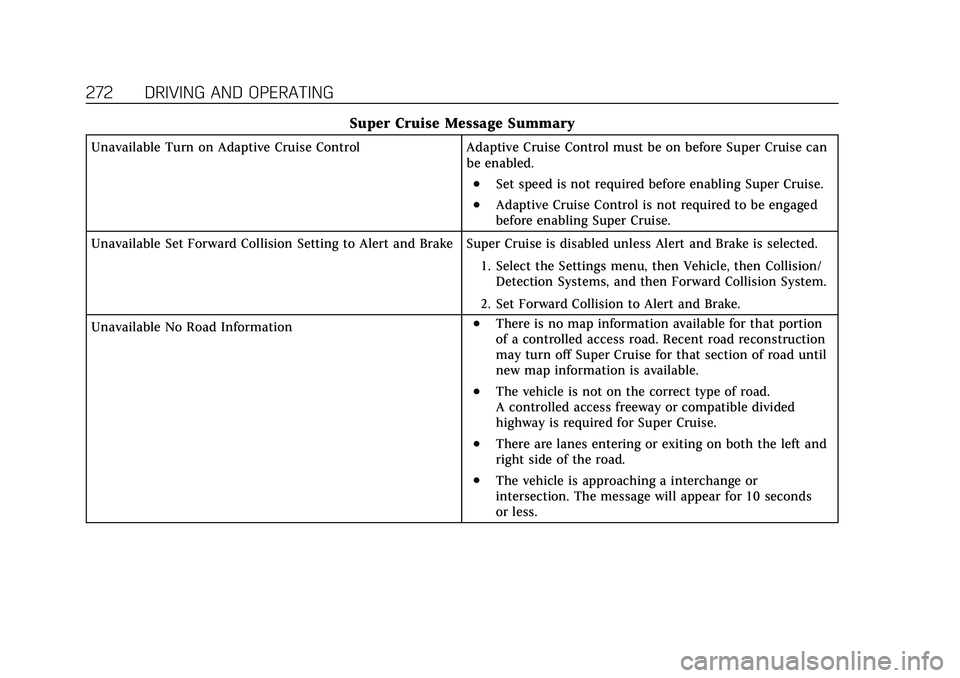
Super Cruise Message Summary
Unavailable Turn on Adaptive Cruise ControlAdaptive Cruise Control must be on before Super Cruise can
be enabled.
.Set speed is not required before enabling Super Cruise.
.Adaptive Cruise Control is not required to be engaged
before enabling Super Cruise.
Unavailable Set Forward Collision Setting to Alert and Brake Super Cruise is disabled unless Alert and Brake is selected. 1. Select the Settings menu, then Vehicle, then Collision/Detection Systems, and then Forward Collision System.
2. Set Forward Collision to Alert and Brake.
Unavailable No Road Information
.There is no map information available for that portion
of a controlled access road. Recent road reconstruction
may turn off Super Cruise for that section of road until
new map information is available.
.The vehicle is not on the correct type of road.
A controlled access freeway or compatible divided
highway is required for Super Cruise.
.There are lanes entering or exiting on both the left and
right side of the road.
.The vehicle is approaching a interchange or
intersection. The message will appear for 10 seconds
or less.
Page 275 of 447

Cadillac XT6 Owner Manual (GMNA-Localizing-U.S./Canada-15218998) -
2022 - CRC - 10/22/21
274 DRIVING AND OPERATING
Super Cruise Message Summary (cont'd)
Unavailable Driving Too FastThe vehicle is traveling faster than 137 km/h (85 mph).
The maximum Super Cruise speed in curves will vary based
on how sharp the curve is. The vehicle will automatically
decrease speed if needed.
Unavailable Driving in Exit Lane The Super Cruise system has detected that the vehicle is in
an exit lane.
Unavailable Press OnStar Button
.The owner’s required Connected Services subscription
may have ended.
.There may be poor GPS reception (e.g., in isolated
areas).
.The GPS reception may be blocked by objects such as
tall buildings or large structures.
.Press the blue OnStar button in your vehicle to speak
with an OnStar representative, who can help determine
the issue and what actions to take.
Unavailable You Have Taken Vehicle Control
.The brake pedal is being pressed.
.The Adaptive Cruise Control has been canceled or
turned off.
Unavailable Sensor Blocked Clear snow, ice, dirt, or other contaminants from the front
and rear areas of the vehicle.
Unavailable Sharp Curve Some curves are too sharp to be navigated by the Super
Cruise system. Super Cruise will be available after the curve
is traveled.
Page 278 of 447

Cadillac XT6 Owner Manual (GMNA-Localizing-U.S./Canada-15218998) -
2022 - CRC - 10/22/21
DRIVING AND OPERATING 277
Warning (Continued)
.Work if the detection sensor
viewing zone is interrupted by an
installed accessory, such as a
bike rack, or hitch mounted
cargo carrier.
.Work if the area surrounding the
detection sensor is damaged or
not properly repaired.
Complete attention is always
required while driving, and you
should be ready to take action and
apply the brakes and/or steer the
vehicle to avoid crashes.
Audible or Safety Alert Seat
Some driver assistance features alert
the driver of obstacles by beeping. To
change the volume of the warning
chime, see “Comfort and Convenience ”
under Vehicle Personalization 0130.
If equipped with the Safety Alert Seat,
the driver seat cushion may provide a
vibrating pulse alert instead of
beeping. To change this, see
“Collision/Detection Systems” under
Vehicle Personalization 0130. Cleaning
Depending on vehicle options, keep
these areas of the vehicle clean to
ensure the best driver assistance
feature performance. Driver
Information Center (DIC) messages
may display when the systems are
unavailable or blocked.
.Front and rear bumpers and the
area below the bumpers
.Front grille and headlamps
.Front camera lens in the front grille
or near the front emblem
.Front side and rear side panels
.Outside of the windshield in front of
the rearview mirror
.Side camera lens on the bottom of
the outside mirrors
.Rear side corner bumpers
.Rear Vision Camera above the
license plate
Page 281 of 447

Cadillac XT6 Owner Manual (GMNA-Localizing-U.S./Canada-15218998) -
2022 - CRC - 10/22/21
280 DRIVING AND OPERATING
Camera Views
Touch the camera view buttons along
the bottom of the infotainment
display.
Front/Rear Standard View :Displays
an image of the area in front or
behind the vehicle. Touch Front/Rear
Standard View on the infotainment
display when a camera view is active.
Touching the button multiple times
will toggle between front and rear
camera views.
If equipped, the front view camera
also displays when the Park Assist
system detects an object within
30 cm (12 in). Front/Rear Overhead View :
Displays
a front or rear overhead view of the
vehicle. Touching the button will
toggle between the two views.
Side Forward/Rearward View :
Displays a view that shows objects
next to the front or rear sides of the
vehicle. Touch Side Forward/Rearward
View on the infotainment display
when a camera view is active.
Touching the button multiple times
will toggle between forward and
rearward views. Park Assist and RCTA
overlays are not available when Side
Forward/Rearward view is active.
Hitch View : If equipped, assists while
connecting to a trailer. Displays a
zoomed-in view of the hitch to help
align the vehicle’s hitch ball with the
trailer coupler. Shifting into P (Park)
while in this view will automatically
engage the Electronic Parking
Brake (EPB).
Guidance Lines : Displays available
guidelines. The horizontal markings
represent distance from the vehicle.
Top Down View : Displays an image
of the area surrounding the vehicle,
along with other views in the infotainment display. Top Down can
be enabled or disabled by touching
the Top Down View button multiple
times.
Hitch Guidance
If equipped, this feature displays a
single, centered guideline on the
camera display to assist with aligning
a vehicle’s hitch ball with a trailer
coupler. Select the trailer guidance
line button, then align the trailer
guidance line over the trailer coupler.
Continuously steer the vehicle to keep
the guidance line centered on the
coupler when backing. RVC Park
Assist overlays will not display when
the trailer guidance line is active.
Hitch Guidance is only available in
Standard View.
To check the trailer when in a forward
gear above 12 km/h (8 mph), touch
CAMERA on the infotainment display
to view the rear camera. Touch X to
exit the view or it will be removed
automatically after eight seconds.
Page 283 of 447

Cadillac XT6 Owner Manual (GMNA-Localizing-U.S./Canada-15218998) -
2022 - CRC - 10/22/21
282 DRIVING AND OPERATING
Turning the System On and Off
The Park Assist System can be turned
on or off using the infotainment
system. SeeVehicle Personalization
0 130.
The
Xbutton is used to turn on or
off the Park Assist, which also turns
on or off the Backing Warning and
Reverse Automatic Braking (RAB) at
the same time. When the system is
turned off, a system off message is
shown on the display. This message
disappears after a short period
of time.
Turn off Park Assist when towing a
trailer to prevent unwanted beeps and
when a bike rack is attached to ensure
proper operation. When the System Does Not Seem to
Work Properly
If a service message displays, check
the following conditions:
.The sensors may not be clean. Keep
the vehicle's front and rear bumpers
free of mud, dirt, snow, ice, and
slush. For cleaning instructions, see
Exterior Care
0384.
.The Park Assist sensors may be
covered by frost or ice. Frost or ice
can form around and behind the
sensors and may not always be
seen; this can occur after washing
the vehicle in cold weather. The
message may not clear until the
frost or ice has melted.
If a service message displays and the
above conditions do not exist, take the
vehicle to your dealer for repairs.
If the Park Assist System does not
activate due to a temporary condition,
a system off message is shown on the
display. This can occur under the
following conditions:
.The driver has disabled the system.
.An object is currently blocking the
rear sensors (for example, bike rack,
tailgate, trailer hitch, etc.). Once the
object is removed, Park Assist will
return to normal operation.
.The bumper is damaged. Take the
vehicle to your dealer for repairs.
.Other conditions, such as vibrations
from a jackhammer or the
compression of air brakes on a very
large truck, are affecting system
performance.
Automatic Parking
Assist (APA)
Automatic Parking Assist (APA)
with Braking
If equipped, under certain conditions
APA with Braking can use sensors
based on sonar technology along the
vehicle’s front, rear and sides to detect
a parking spot, and automatically park
the vehicle with some driver
assistance. The vehicle will
automatically maneuver into a
detected spot moving at or near idle
speed. It does this by automatically
steering and braking while the driver
Page 284 of 447

Cadillac XT6 Owner Manual (GMNA-Localizing-U.S./Canada-15218998) -
2022 - CRC - 10/22/21
DRIVING AND OPERATING 283
is responsible for acceleration and
gear shifting as needed. The driver
must always be prepared to apply
braking or additional acceleration, as
needed. A display and audible beeps
help to guide the parking maneuvers.
{Warning
APA may not always detect objects
in the parking space, objects that
are not rigid (e.g. shrubs and
chain-link fences), objects below the
bumper, objects high off the ground
(e.g. flatbed trucks), hanging
objects, objects below ground level
(e.g. large potholes), or moving
objects (e.g. pedestrians, cyclists,
vehicles). Always verify that the
parking space is appropriate for
parking a vehicle. APA may not
respond to changes in the parking
space, such as movement of an
adjacent vehicle, or a person or
object entering the parking space.
APA does not detect or avoid traffic
that is behind or alongside of the(Continued)
Warning (Continued)
vehicle. Always be prepared to stop
the vehicle during the parking
maneuver.
How to Activate Automatic Parking
To activate APA, press the soft-touch
button or hard switch
Ofor the
system to begin searching for a
parking space while driving forward at
no greater than 30 km/h (18 mph). By
default, APA searches for parallel
parking spaces to the right of the
vehicle up to the sensors’ range of
1.5 m (5 ft). To search for a parking
space to the left, turn on the left turn
signal or, if available, change the side
selection in the infotainment display.
To switch the parking mode between
parallel and perpendicular press and
hold
Owhile searching for a valid
parking spot or, if available, change
the parking mode in the infotainment
display.
APA cannot park in all empty parking
spots. The parking spot must:
.Be sufficiently large to fit the
vehicle comfortably.
.Have an adjacent vehicle, wall,
or pillar for the system to align to.
After completely passing an eligible
parking spot, a beep sounds and a red
stop symbol is displayed in the driver
information center. Generally, APA
selects the nearest empty parking spot
behind the vehicle, but under some
conditions may select a space that is
further back. Slow down and bring the
vehicle to a complete stop to begin.
Follow the displayed instructions.
When instructed to drive in reverse,
shift to R (Reverse) while holding the
brakes. The steering wheel will vibrate
briefly as a reminder to remove hands
from the steering wheel. After the
vibration stops, check your
surroundings and release the brakes
to begin automatic parking. As the