2022 CADILLAC XT6 instrument cluster
[x] Cancel search: instrument clusterPage 142 of 447
Cadillac XT6 Owner Manual (GMNA-Localizing-U.S./Canada-15218998) -
2022 - CRC - 10/22/21
LIGHTING 141
Exterior Lamps Off
Reminder
A warning chime sounds if the driver
door is opened while the ignition is off
and the exterior lamps are on.
Headlamp High/Low-Beam
Changer
3:Push the turn signal lever away
from you and release, to turn the high
beams on. To return to low beams,
push the lever again or pull it toward
you and release.
This indicator light turns on in the
instrument cluster when the
high-beam headlamps are on.
Flash-to-Pass
To flash the high beams, pull the turn
signal lever toward you, and release.
Daytime Running
Lamps (DRL)
DRL can make it easier for others to
see the front of your vehicle during
the day. Fully functional DRL are
required on all vehicles first sold in
Canada.
The dedicated DRL will come on when
all of the following conditions are met:
.The ignition is on.
.The exterior lamp control is
in AUTO.
.The light sensor determines it is
daytime.
.The parking brake is released or the
vehicle is not in P (Park).
When the DRL are on, the taillamps,
sidemarker lamps, and other lamps
will not be on.
The DRL turn off when the headlamps
are turned to
Oor the ignition is off.
For vehicles first sold in Canada, the
DRL can only be turned off when the
vehicle is parked.
Automatic Headlamp
System
When the exterior lamp control is set
to AUTO and it is dark enough
outside, the headlamps come on
automatically.
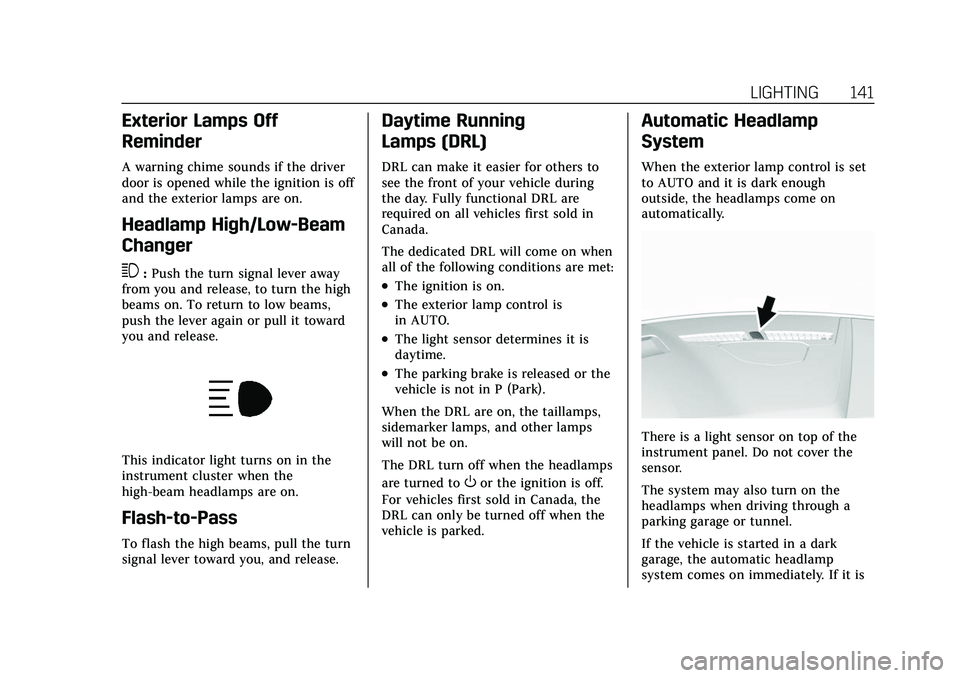
There is a light sensor on top of the
instrument panel. Do not cover the
sensor.
The system may also turn on the
headlamps when driving through a
parking garage or tunnel.
If the vehicle is started in a dark
garage, the automatic headlamp
system comes on immediately. If it is
Page 143 of 447

Cadillac XT6 Owner Manual (GMNA-Localizing-U.S./Canada-15218998) -
2022 - CRC - 10/22/21
142 LIGHTING
light outside when the vehicle leaves
the garage, there is a slight delay
before the automatic headlamp
system changes to the Daytime
Running Lamps (DRL). During that
delay, the instrument cluster may not
be as bright as usual. Make sure the
instrument panel brightness control is
in the full bright position. See
Instrument Panel Illumination Control
0143.
When it is bright enough outside, the
headlamps will turn off or may change
to DRL.
The automatic headlamp system turns
off when the exterior lamp control is
turned to
Oor the ignition is off.
For vehicles sold in Canada, this
control only works when the
transmission is in P (Park).
Lights On with Wipers
If the windshield wipers are activated
in daylight with the engine on, and
the exterior lamp control is in AUTO,
the headlamps, parking lamps, and
other exterior lamps come on. The
transition time for the lamps coming
on varies based on wiper speed. When the wipers are not operating, these
lamps turn off. Move the exterior
lamp control to
Oor;to disable
this feature.
Hazard Warning Flashers
|: Touch|on the center stack to
make the front and rear turn signal
lamps flash on and off. Touch again to
turn the flashers off.
The hazard warning flashers turn on
automatically if the airbags deploy.
Turn and Lane-Change
Signals
Move the lever all the way up or down
to signal a turn.
An arrow on the instrument cluster
flashes in the direction of the turn or
lane change.
Raise or lower the lever until the
arrow starts to flash to signal a lane
change. Hold it there until the lane
change is completed. If the lever is
briefly pressed and released, the turn
signal flashes three times.
The turn and lane-change signal can
be turned off manually by moving the
lever back to its original position.
Page 147 of 447

Cadillac XT6 Owner Manual (GMNA-Localizing-U.S./Canada-15218998) -
2022 - CRC - 10/22/21
146 INFOTAINMENT SYSTEM
Infotainment System
Introduction
Introduction . . . . . . . . . . . . . . . . . . . . . . 146
Overview . . . . . . . . . . . . . . . . . . . . . . . . . . 147
Steering Wheel Controls . . . . . . . . . 148
Using the System . . . . . . . . . . . . . . . . . 149
Software Updates . . . . . . . . . . . . . . . . . 152
Radio
AM-FM Radio . . . . . . . . . . . . . . . . . . . . . 152
HD Radio Technology . . . . . . . . . . . . 154
Radio Data System (RDS) . . . . . . . . 155
Satellite Radio . . . . . . . . . . . . . . . . . . . . 155
Radio Reception . . . . . . . . . . . . . . . . . . 156
Multi-Band Antenna . . . . . . . . . . . . . 156
Audio Players
Avoiding Untrusted MediaDevices . . . . . . . . . . . . . . . . . . . . . . . . . . 156
USB Port . . . . . . . . . . . . . . . . . . . . . . . . . . 156
Bluetooth Audio . . . . . . . . . . . . . . . . . . 159
Navigation
Using the Navigation System . . . . 160
Maps . . . . . . . . . . . . . . . . . . . . . . . . . . . . . . 163
Navigation Symbols . . . . . . . . . . . . . . 164
Destination . . . . . . . . . . . . . . . . . . . . . . . 165
OnStar System . . . . . . . . . . . . . . . . . . . . 171
Global Positioning System (GPS) . . . . . . . . . . . . . . . . . . . 172 Vehicle Positioning . . . . . . . . . . . . . . . 172
Problems with Route
Guidance . . . . . . . . . . . . . . . . . . . . . . . . 172
If the System Needs Service . . . . . 173
Map Data Updates . . . . . . . . . . . . . . . 173
Database Coverage Explanations . . . . . . . . . . . . . . . . . . . . 173
Voice Recognition
Voice Recognition . . . . . . . . . . . . . . . . 173
Phone
Bluetooth (Overview) . . . . . . . . . . . . . 179
Bluetooth (Pairing and Using aPhone) . . . . . . . . . . . . . . . . . . . . . . . . . . . 180
Apple CarPlay and Android Auto . . . . . . . . . . . . . . . . . . . 184
Settings
Settings . . . . . . . . . . . . . . . . . . . . . . . . . . . 186
Teen Driver . . . . . . . . . . . . . . . . . . . . . . . 193
Trademarks and License
Agreements
Trademarks and LicenseAgreements . . . . . . . . . . . . . . . . . . . . . 197
Introduction
Read the following pages to become
familiar with the features.
{Warning
Taking your eyes off the road for
too long or too often while using
any infotainment feature can cause
a crash. You or others could be
injured or killed. Do not give
extended attention to infotainment
tasks while driving. Limit your
glances at the vehicle displays and
focus your attention on driving. Use
voice commands whenever possible.
The infotainment system has built-in
features intended to help avoid
distraction by disabling some features
when driving. These features may gray
out when they are unavailable. Many
infotainment features are also
available through the instrument
cluster and steering wheel controls.
Before driving:
.Become familiar with the operation,
center stack controls, steering wheel
controls, and infotainment display.
Page 150 of 447

Cadillac XT6 Owner Manual (GMNA-Localizing-U.S./Canada-15218998) -
2022 - CRC - 10/22/21
INFOTAINMENT SYSTEM 149
When in Valet Mode, if equipped,
access to the infotainment functions
is disabled. See“Valet Mode,”in
Vehicle Personalization 0130.
g:Press to answer an incoming call
or start voice recognition. See
Bluetooth (Overview) 0179 or
Bluetooth (Pairing and Using a Phone)
0 180.
c:Press to decline an incoming call
or end a current call. Press to mute or
unmute the infotainment system
when not on a call.
CorB: Press to go to the next or
previous favorite when listening to the
radio. Press to go to the next or
previous track when listening to a
media source.
SorT: Press to move between the
interactive displays in the instrument
cluster. Press
Sto go back to the
previous menu.
yorz: Use the thumbwheel to
scroll to the previous or next
selection.
V: Press the thumbwheel to open a
menu or select a menu item. Press
and hold to reset certain displays.
x+ orx– :Press to increase or
decrease the volume.
Using the System
Audio
Touch the Audio icon to display the
active audio source page. Examples of
available sources may include AM,
FM, SXM (if equipped), MyMedia,
USB, and Bluetooth.
Phone
Touch the Phone icon to display the
Phone main page. See Bluetooth
(Overview) 0179 or
Bluetooth (Pairing and Using a Phone)
0 180.
Nav
If equipped, touch the Nav icon to
display the navigation map. See Using
the Navigation System 0160.
Wi-Fi Hotspot
Touch the Wi-Fi Hotspot icon to
display the Wi-Fi Hotspot information.
See Settings 0186.
Climate
Touch the Climate icon to display the
Climate main page. See Dual
Automatic Climate Control System
0 206.
Users
If equipped, touch the Users icon to
sign in or create a new user profile,
and follow the on-screen instructions.
Page 175 of 447
Cadillac XT6 Owner Manual (GMNA-Localizing-U.S./Canada-15218998) -
2022 - CRC - 10/22/21
174 INFOTAINMENT SYSTEM
For example, tasks that take more
than one or two touches, such as a
song or artist to play from a media
device, would be supported by voice
commands. Other tasks, like adjusting
the volume or seeking up or down, are
audio features that are easily
performed by touching one or two
options, and are not supported by
voice commands.
In general there are flexible ways to
speak commands for completing the
tasks.
If your language supports it, try
stating a one-shot command, such as
“Directions to address
the ZIP code while stating the address
during the command. Another
example of a one-shot Destination
Entry command is, “Directions to
Place of Interest at
commands do not work, try saying,
“Take me to Place of Interest ”or “Find
address ”and the system will walk you
through by asking additional
questions.Hybrid Speech Recognition
If equipped, this feature helps
distinguish words by using
Internet-based information along with
the system’s voice recognition
database. This allows you to speak
more naturally when using voice
recognition.
Using Voice Recognition
Voice recognition becomes available
once the system has been initialized.
This begins when the ignition is
turned on. Initialization may take a
few moments.
1. Press
gon the steering wheel
controls to activate voice
recognition.
2. The audio system mutes and the system plays a prompt.
3. Clearly speak one of the commands described in this section.
A voice recognition system prompt
can be interrupted while it is
playing by pressing
gagain.
Once voice recognition is started, both
the infotainment display and
instrument cluster show the selections and visual dialog content. These
displays can be turned on or off in the
Tutorial Mode under
Settings0186.
There are three voice prompt modes
supported:
.Informative verbal prompts: This
type of prompt will provide more
information regarding the supported
actions.
.Short prompts: This type of prompt
will provide simple instructions
about what can be stated.
.Auto informative prompts: This type
of prompt plays during the first few
speech sessions, then automatically
switches to the short prompt after
some experience has been gained
through using the system.
If a command is not spoken, the voice
recognition system says a help
prompt.
Prompts and Infotainment Displays
While a voice recognition session is
active, there may be corresponding
options showing on the displays.
A selection can be made by manually
touching the option, or by speaking
the number for the option to select.
Page 193 of 447

Cadillac XT6 Owner Manual (GMNA-Localizing-U.S./Canada-15218998) -
2022 - CRC - 10/22/21
192 INFOTAINMENT SYSTEM
Touch the controls on the
infotainment display to disable or
enable.
.Auto Rear Defog: This setting
automatically turns the rear
defogger on when the vehicle engine
is started.
Touch the controls on the
infotainment display to disable or
enable.
.Ionizer: This setting purifies the air
in the interior of the vehicle..
Touch the controls on the
infotainment display to disable or
enable.
Navigation
Touch and the following may display:
.Destination Card Preferences
.Map Preferences
.Route Preferences
.Navigation Voice Control
.Traffic Preferences
.Alert Preferences
.Fuel Grade Preferences
.Manage History
.Predictive Navigation (if equipped)
.About See
Using the Navigation System 0160.
Phone
Touch and the following may display:
.My Number: Displays the cell phone
number of the Bluetooth connected
device.
.Active Call View: Shows active call
display when answering a call.
Touch the controls on the
infotainment display to disable or
enable.
.Privacy: Only show call alerts in the
instrument cluster.
Touch Off or On.
.Sort Contacts: Touch to sort by first
or last name.
.Re-sync Device Contacts: Allows the
device contacts to re-sync if you are
having difficulty accessing all of the
contacts on your cell phone.
.Delete All Vehicle Contacts: Touch
to delete all vehicle stored contacts.
.OnStar Phone TTY Mode: This
enables OnStar cell phone
TTY mode.
Touch Disable or Enable. SiriusXM
Touch and the following may display:
.Account Information: Displays the
account information and
subscription information.
.Listener Options: Based on the
current vehicle profile selected.
Touch and the following may
display:
.SiriusXM Favorites: Favorites
shown can be moved or deleted.
.Listener Settings: Selections
include hide explicit language,
channels and content, reset
listening history, and start songs
at the beginning when tuning to
a music channel.
.System Settings: Enable or disable
SiriusXM location services. Also
shows radio ID.
.Contact SiriusXM: Displays radio ID
and phone number to call SiriusXM
Customer Care.
.SiriusXM Policies: Shows
information on the Customer
Agreement and Privacy Policy.
Page 196 of 447

Cadillac XT6 Owner Manual (GMNA-Localizing-U.S./Canada-15218998) -
2022 - CRC - 10/22/21
INFOTAINMENT SYSTEM 195
Set Audio Volume Limit :Allows a
maximum radio volume to be set. Use
the arrows to choose the maximum
allowable level for the audio volume.
Teen Driver Speed Limiter : Limits
the maximum speed of the vehicle.
When the speed limiter is turned on
and the vehicle is started with a Teen
Driver key, the DIC displays a message
that the top speed is limited.
On certain vehicles, when the Speed
Limiter is turned ON, the vehicle’s
maximum acceleration will be limited.
The DIC will display a message that
the acceleration is limited.
Teen Driver Speed Warning : Allows
the speed warning to be turned on or
off. Touch Set Teen Driver Speed
Warning to set the warning speed.
Set Teen Driver Speed Warning :
Displays a warning in the DIC when
exceeding a selectable speed. Choose
the desired speed warning level. The
speed warning does not limit the
speed of the vehicle. SiriusXM Explicit Content Filter (if
equipped) :
Allows the SiriusXM
Explicit Content Filter to be turned
ON or OFF. When ON, the teen driver
will not be able to listen to SiriusXM
stations that contain explicit content,
and the Explicit Content Filter
selection in the Audio Settings will be
unavailable for change.
When Teen Driver is Active:
.If equipped with Buckle to Drive,
shifting out of P (Park) will be
prevented if the driver seat belt, and
in some vehicles the front passenger
seat belt, is not buckled.
.The radio will mute when the driver
seat belt, and in some vehicles the
front passenger seat belt, is not
buckled. The audio from any device
paired to the vehicle will also be
muted.
.An object placed on the front
passenger seat, such as a briefcase,
handbag, grocery bag, laptop,
or other electronic device, could
cause the passenger sensing system
to falsely sense an unbuckled front
passenger and mute the radio. If this happens, remove the object
from the seat. See
Passenger Sensing
System 067.
.Some safety systems, such as
Forward Collision Alert, if equipped,
cannot be turned off.
.The gap setting for the Forward
Collision Alert and Adaptive Cruise
Control, if equipped, cannot be
changed.
.When trying to change a safety
feature that is not configurable in
Teen Driver, the DIC displays a
message indicating that Teen Driver
is active and the action is not
available.
.Super Cruise, if equipped, is not
available.
.Enhanced Low Fuel Warning (if
equipped) –When the vehicle is low
on fuel, the low fuel light on the
instrument cluster flashes and the
DIC low fuel warning cannot be
dismissed.
.Do not tow a trailer.
Page 209 of 447

Cadillac XT6 Owner Manual (GMNA-Localizing-U.S./Canada-15218998) -
2022 - CRC - 10/22/21
208 CLIMATE CONTROLS
English units can be changed to
metric units through the instrument
cluster. See“Options”underInstrument
Cluster 0109.
OFF : Press to turn the fan on or off.
The front and rear climate displays
turn off when the fan is turned off
and the system will stop air from
flowing into the cabin. If on is
selected, or any other buttons are
pressed, the climate control system
will turn on and operate at the
current setting. The temperature
control and air delivery mode can still
be adjusted.
w/x: The temperature can be
adjusted separately for the driver and
the passenger. Press to increase or
decrease the temperature. Press and
hold to rapidly increase or decrease
the temperature.
The driver and passenger
temperatures can also be adjusted by
touching the buttons on the climate
control display.
SYNC : Touch SYNC on the climate
control display to link all climate zone
settings to the driver settings. Adjust the driver side temperature control to
change the linked temperature. When
the front or rear passenger settings
are adjusted, the SYNC indicator light
turns off when the temperatures are
unlinked.
Rear :
If equipped, touch Rear on the
front climate control display to open
the rear climate control display. The
rear climate control settings can now
be adjusted from the front passenger
area. See Rear Climate Control System
0 211.
Manual OperationQ 9 R:Press the fan controls on the
center stack or the climate control
display to increase or decrease the fan
speed. Press and hold the controls to
adjust speed more quickly. The fan
speed setting displays. Pressing either
button cancels automatic fan control
and the fan can be controlled
manually. Press AUTO to return to
automatic operation. To turn off the
fan and climate control system, press
and hold the fan down control on the
center stack or the climate control
display until it goes off. Air Delivery Mode Control :
When
the climate information is displayed,
touch the desired air delivery mode on
the climate control display to change
the direction of the airf low. The
selected air delivery mode button is
lit. Touching any of the air delivery
buttons cancels automatic air delivery
control and the direction of the
airf low can be controlled manually.
Press AUTO to return to automatic
operation.
To change the current mode, select
one of the following:Y: Air is directed to the instrument
panel outlets.
\: Air is divided between the
instrument panel outlets and the floor
outlets.
[: Air is directed to the floor
outlets.
-: Clears the windows of fog or
moisture. Air is directed to the
windshield and floor outlets.