2022 CADILLAC XT6 trailer
[x] Cancel search: trailerPage 254 of 447

Cadillac XT6 Owner Manual (GMNA-Localizing-U.S./Canada-15218998) -
2022 - CRC - 10/22/21
DRIVING AND OPERATING 253
Disabling the TCS or StabiliTrak/ESC
system will disengage and prevent
engagement of ACC.
ACC can reduce the need for you to
frequently brake and accelerate,
especially when used on expressways,
freeways, and interstate highways.
When used on other roads, you may
need to take over the control of
braking or acceleration more often.
{Warning
ACC has limited braking ability and
may not have time to slow the
vehicle down enough to avoid a
collision with another vehicle you
are following. This can occur when
vehicles suddenly slow or stop
ahead, or enter your lane. Also see
“Alerting the Driver”in this section.
Complete attention is always
required while driving and you
should be ready to take action and
apply the brakes. See Defensive
Driving 0217.
{Warning
ACC will not detect or brake for
children, pedestrians, animals,
or other objects.
Do not use ACC when:
.On winding and hilly roads or
when the sensors are blocked by
snow, ice, or dirt. The system
may not detect a vehicle ahead.
Keep the entire front of the
vehicle clean.
.Visibility is poor due to rain,
snow, fog, dirt, insect residue,
or dust; when other foreign
objects obscure the camera and/
or radar; or when the vehicle in
front or oncoming traffic causes
additional environmental
obstructions, such as road spray.
ACC performance is limited
under these conditions.
.On slippery roads where fast
changes in tire traction can
cause excessive wheel slip.
.Towing a trailer
5:Press to turn the system on or off.
The indicator turns white on the
instrument cluster when ACC is
turned on.
RES+ : Press briefly to resume the
previous set speed or to increase
vehicle speed if ACC is already
activated. To increase speed by about
1 km/h (1 mph), press RES+ to the first
detent. To increase speed to the next
5 km/h (5 mph) mark on the
speedometer, press RES+ to the
second detent.
SET– :Press briefly to set the speed
and activate ACC or to decrease
vehicle speed if ACC is already
activated. To decrease speed by about
Page 262 of 447

Cadillac XT6 Owner Manual (GMNA-Localizing-U.S./Canada-15218998) -
2022 - CRC - 10/22/21
DRIVING AND OPERATING 261
Objects Not Directly in Front of Your
Vehicle
The detection of objects in front of
the vehicle may not be possible if:
.The vehicle or object ahead is not
within your lane.
.The vehicle ahead is shifted, not
centered, or is shifted to one side of
the lane.
Driving in Narrow Lanes
Vehicles in adjacent traffic lanes or
roadside objects may be incorrectly
detected when located along the
roadway.
Do Not Use ACC on Hills
Do not use ACC when driving on steep
hills as ACC may not detect a vehicle
ahead. Do Not Use ACC When Towing a
Trailer
ACC should not be used when towing
a trailer.
Disengaging ACC
There are three ways to
disengage ACC:
.Step lightly on the brake pedal.
.Press*.
.Presso.
Erasing Speed Memory
The cruise control set speed is erased
from memory if
ois pressed or if the
ignition is turned off.
Weather Conditions Affecting ACC
System operation may be limited
under snow, heavy rain, or road spray
conditions.
Accessory Installations and Vehicle
Modifications
Do not install or place any object
around the front camera windshield
area that would obstruct the front
camera view. Do not install objects on top of the
vehicle that overhang and obstruct the
front camera, such as a canoe, kayak,
or other items that can be transported
on a roof rack system. See
Roof Rack
System 098.
Do not modify the hood, headlamps,
or fog lamps, as this may limit the
camera’s ability to detect an object.
Cleaning the Sensing System
The camera sensor on the windshield
behind the rearview mirror can
become blocked by snow, ice, dirt,
mud, or debris. This area needs to be
cleaned for ACC to operate properly.
The vehicle headlamps may need to
be cleaned due to dirt, snow, or ice.
Objects that are not illuminated
correctly may be difficult to detect.
If ACC will not operate, regular cruise
control may be available. See
“Switching Between ACC and Regular
Cruise Control ”previously in this
section. Always consider driving
conditions before using either cruise
control system.
Page 265 of 447
Cadillac XT6 Owner Manual (GMNA-Localizing-U.S./Canada-15218998) -
2022 - CRC - 10/22/21
264 DRIVING AND OPERATING
Warning (Continued)
.Not during heavy or emergency
braking.
.Not on surface streets.
.Not on a road shoulder, service
drive, or under an elevated
freeway.
.Not in tunnels.
.Not when towing a trailer.
.Not in a freeway exit lane.
When Super Cruise is Available
Super Cruise Indicator
Super Cruise is designed to operate
only when:
.ACC is on. See Adaptive Cruise
Control (Advanced) 0252.
.Automatic Emergency Braking is on.
See Automatic Emergency Braking
(AEB) 0290.
.Teen Driver is not active.
.The GPS detects the vehicle is on a
compatible highway.
.Both the camera and the radar
sensors are functioning and not
covered, obstructed, or damaged.
.The Driver Attention System (DAS)
detects the driver's head and eyes
are directed toward the road.
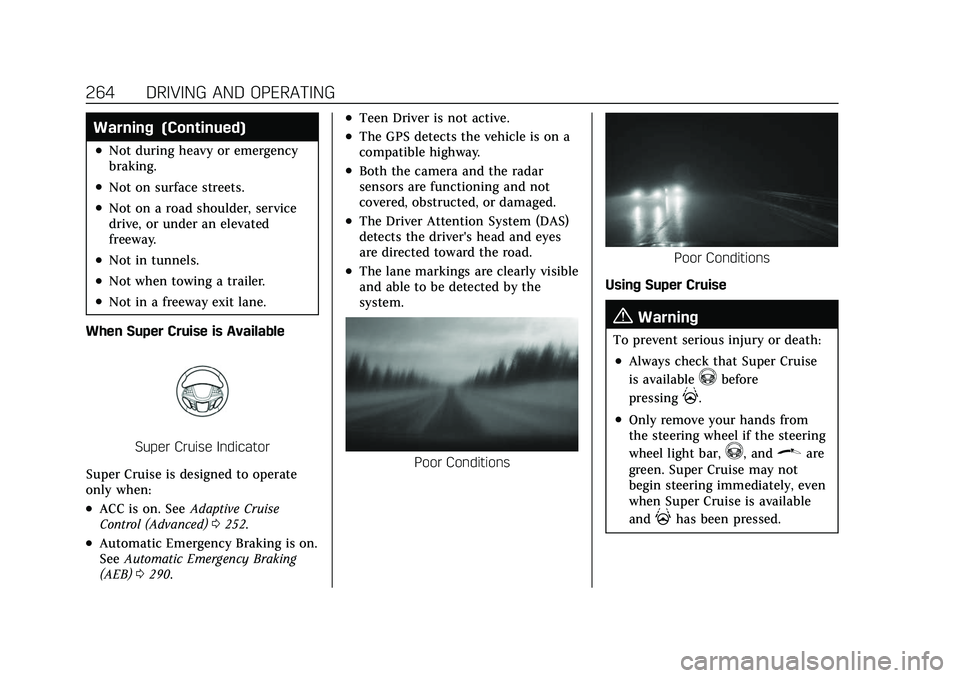
.The lane markings are clearly visible
and able to be detected by the
system.
Poor Conditions
Poor Conditions
Using Super Cruise
{Warning
To prevent serious injury or death:
.Always check that Super Cruise
is available
^before
pressing
].
.Only remove your hands from
the steering wheel if the steering
wheel light bar,
^, and\are
green. Super Cruise may not
begin steering immediately, even
when Super Cruise is available
and
]has been pressed.
Page 271 of 447

Cadillac XT6 Owner Manual (GMNA-Localizing-U.S./Canada-15218998) -
2022 - CRC - 10/22/21
270 DRIVING AND OPERATING
Other Vehicles Entering Your Lane
Super Cruise may not detect a vehicle
that enters your lane, or may not
brake fast enough to avoid a crash.
You must manually brake and steer
the vehicle.Intersections; Vehicles Crossing the
Road Ahead
Super Cruise will not brake the vehicle
when approaching an intersection that
is controlled by a traffic light or stop
sign. Super Cruise will not detect
vehicles crossing the road ahead,
including at intersections, and will not
automatically steer or brake to
prevent a collision. You must
manually brake and steer the vehicle.
Towing a Trailer
Do not use Super Cruise when towing
a trailer. For towing capability, see
General Towing Information
0305.
Super Cruise on Hills
Do not use Super Cruise while driving
on steep hills. Super Cruise Indicator Light
SummaryThe steering wheel light bar and
instrument cluster light provide the
following important information about
Super Cruise operation:
Page 281 of 447

Cadillac XT6 Owner Manual (GMNA-Localizing-U.S./Canada-15218998) -
2022 - CRC - 10/22/21
280 DRIVING AND OPERATING
Camera Views
Touch the camera view buttons along
the bottom of the infotainment
display.
Front/Rear Standard View :Displays
an image of the area in front or
behind the vehicle. Touch Front/Rear
Standard View on the infotainment
display when a camera view is active.
Touching the button multiple times
will toggle between front and rear
camera views.
If equipped, the front view camera
also displays when the Park Assist
system detects an object within
30 cm (12 in). Front/Rear Overhead View :
Displays
a front or rear overhead view of the
vehicle. Touching the button will
toggle between the two views.
Side Forward/Rearward View :
Displays a view that shows objects
next to the front or rear sides of the
vehicle. Touch Side Forward/Rearward
View on the infotainment display
when a camera view is active.
Touching the button multiple times
will toggle between forward and
rearward views. Park Assist and RCTA
overlays are not available when Side
Forward/Rearward view is active.
Hitch View : If equipped, assists while
connecting to a trailer. Displays a
zoomed-in view of the hitch to help
align the vehicle’s hitch ball with the
trailer coupler. Shifting into P (Park)
while in this view will automatically
engage the Electronic Parking
Brake (EPB).
Guidance Lines : Displays available
guidelines. The horizontal markings
represent distance from the vehicle.
Top Down View : Displays an image
of the area surrounding the vehicle,
along with other views in the infotainment display. Top Down can
be enabled or disabled by touching
the Top Down View button multiple
times.
Hitch Guidance
If equipped, this feature displays a
single, centered guideline on the
camera display to assist with aligning
a vehicle’s hitch ball with a trailer
coupler. Select the trailer guidance
line button, then align the trailer
guidance line over the trailer coupler.
Continuously steer the vehicle to keep
the guidance line centered on the
coupler when backing. RVC Park
Assist overlays will not display when
the trailer guidance line is active.
Hitch Guidance is only available in
Standard View.
To check the trailer when in a forward
gear above 12 km/h (8 mph), touch
CAMERA on the infotainment display
to view the rear camera. Touch X to
exit the view or it will be removed
automatically after eight seconds.
Page 282 of 447

Cadillac XT6 Owner Manual (GMNA-Localizing-U.S./Canada-15218998) -
2022 - CRC - 10/22/21
DRIVING AND OPERATING 281
{Warning
Use Hitch Guidance only to help
back the vehicle to a trailer hitch
or, when traveling above 12 km/h
(8 mph), to briefly check the status
of your trailer. Do not use for any
other purpose, such as making lane
change decisions. Before making a
lane change, always check the
mirrors and glance over your
shoulder. Improper use could result
in serious injury to you or others.
Park Assist
The vehicle may be equipped with
Front and Rear Park Assist (FRPA).
Under certain conditions, the Park
Assist system can assist the driver
during backing and parking
maneuvers when the vehicle is driven
at no more than 9 km/h (6 mph). An
illuminated indicator in the Park
Assist button indicates the system is
ready.
Sensors located in the bumpers
measure the distance between the
vehicle and objects using sonartechnology. These sensors are
designed to detect certain objects up
to 2.5 m (8 ft) behind and 1.2 m (4 ft)
in front of your vehicle that are taller
than 25 cm (10 in).
Different environmental conditions
may affect whether and how far the
Park Assist system can detect objects.
Keep the sensors clean of mud, dirt,
snow, ice, and slush; and clean
sensors after a car wash in freezing
temperatures. Sensors that are not
clean may not detect objects or may
cause the system to alert when not
required.{Warning
The Park Assist System is no
substitute for careful and attentive
driving. The Park Assist system
does not detect children,
pedestrians, bicyclists, animals,
or objects located below the
bumper or that are too close or too
far from the vehicle. It is not
available at speeds greater than
9 km/h (6 mph). To prevent injury,
death, or vehicle damage, even with
(Continued)
Warning (Continued)
Park Assist, always check the area
around the vehicle and check all
mirrors before moving forward or
backing.
How the System Works
The vehicle may have a Park
Assist amphitheatre-like display on
the cluster with bars that represent
the estimated location of a detected
object and the vehicle’s distance from
the object. As a detected object
becomes closer, more bars light up
and change color from yellow to
amber to red.
When an object is first detected in the
rear, one beep will be heard from the
rear, or the driver's seat will pulse two
times, if equipped with Safety Alert
Seat. When an object is very close,
five beeps will sound from the front or
rear (depending on the object's
location), or the driver's seat will pulse
five times. Beeps for front are higher
pitched than the rear.
Page 283 of 447

Cadillac XT6 Owner Manual (GMNA-Localizing-U.S./Canada-15218998) -
2022 - CRC - 10/22/21
282 DRIVING AND OPERATING
Turning the System On and Off
The Park Assist System can be turned
on or off using the infotainment
system. SeeVehicle Personalization
0 130.
The
Xbutton is used to turn on or
off the Park Assist, which also turns
on or off the Backing Warning and
Reverse Automatic Braking (RAB) at
the same time. When the system is
turned off, a system off message is
shown on the display. This message
disappears after a short period
of time.
Turn off Park Assist when towing a
trailer to prevent unwanted beeps and
when a bike rack is attached to ensure
proper operation. When the System Does Not Seem to
Work Properly
If a service message displays, check
the following conditions:
.The sensors may not be clean. Keep
the vehicle's front and rear bumpers
free of mud, dirt, snow, ice, and
slush. For cleaning instructions, see
Exterior Care
0384.
.The Park Assist sensors may be
covered by frost or ice. Frost or ice
can form around and behind the
sensors and may not always be
seen; this can occur after washing
the vehicle in cold weather. The
message may not clear until the
frost or ice has melted.
If a service message displays and the
above conditions do not exist, take the
vehicle to your dealer for repairs.
If the Park Assist System does not
activate due to a temporary condition,
a system off message is shown on the
display. This can occur under the
following conditions:
.The driver has disabled the system.
.An object is currently blocking the
rear sensors (for example, bike rack,
tailgate, trailer hitch, etc.). Once the
object is removed, Park Assist will
return to normal operation.
.The bumper is damaged. Take the
vehicle to your dealer for repairs.
.Other conditions, such as vibrations
from a jackhammer or the
compression of air brakes on a very
large truck, are affecting system
performance.
Automatic Parking
Assist (APA)
Automatic Parking Assist (APA)
with Braking
If equipped, under certain conditions
APA with Braking can use sensors
based on sonar technology along the
vehicle’s front, rear and sides to detect
a parking spot, and automatically park
the vehicle with some driver
assistance. The vehicle will
automatically maneuver into a
detected spot moving at or near idle
speed. It does this by automatically
steering and braking while the driver
Page 285 of 447

Cadillac XT6 Owner Manual (GMNA-Localizing-U.S./Canada-15218998) -
2022 - CRC - 10/22/21
284 DRIVING AND OPERATING
vehicle automatically steers, and
brakes into the parking spot, check
surroundings and continue to apply
acceleration if necessary and shift
gears as needed. Be prepared to stop
to avoid vehicles, pedestrians,
or objects.
A progress arrow displays the status
of the parking maneuver. Once
automatic parking is finished and the
vehicle has come to a full stop, APA
will beep and display a message
indicating parking is complete. Shift
the vehicle to P (Park) and apply the
parking brake
Automatic Parking
Automatic Unparking
How to Cancel Automatic Parking
To cancel automatic parking or
automatic unparking at any time,
press
O. Be prepared to resume full
control of the vehicle. APA holds the
vehicle until the parking brake or
brake is applied, or the vehicle is
shifted into P (Park). To start driving
away, press the brakes and shift into
D (Drive).
Certain vehicle conditions and driver
interferences may also cancel
automatic parking:
.The driver manually steers the
vehicle.
.The maximum allowed speed is
exceeded.
.There is a failure with the APA
system.
.Electronic stability control or
antilock brakes are activated.
.The parking brake is applied.
.Driver unbuckles the seat belt and
opens the door.
System Limitations
Automatic Parking Assist has certain
limitations. The system cannot:
.Continue to operate if the maneuver
speed exceeds 5 km/h (3 mph).
.Detect whether a parking space is
legal or restricted.
.Detect pavement markings or lines.
.Park the vehicle closely lined up
with the vehicle next to it,
particularly if the spot is
approached at an angle or if the
parking space is angled.
.Park exactly centered in a very
large spot.
.Always detect short curbs.
.Operate while towing any trailer.
.Function the vehicle is raised or
lowered by air suspension,if
equipped.