2022 CADILLAC XT6 brake
[x] Cancel search: brakePage 118 of 447

Cadillac XT6 Owner Manual (GMNA-Localizing-U.S./Canada-15218998) -
2022 - CRC - 10/22/21
INSTRUMENTS AND CONTROLS 117
The DLC is under the instrument
panel to the left of the steering wheel.
Connecting devices that are not used
to perform an Emissions Inspection/
Maintenance test or to service the
vehicle may affect vehicle operation.
SeeAdd-On Electrical Equipment 0316.
See your dealer if assistance is needed.
The vehicle may not pass
inspection if:
.The light is on when the engine is
running.
.The light does not come on when
the ignition is in Service Mode.
.Critical emission control systems
have not been completely
diagnosed. If this happens, the
vehicle would not be ready for
inspection and might require
several days of routine driving
before the system is ready for
inspection. This can happen if the 12-volt battery has recently been
replaced or run down, or if the
vehicle has been recently serviced.
See your dealer if the vehicle will not
pass or cannot be made ready for
the test.
Brake System Warning
Light
MetricEnglish
This light should come on briefly
when the vehicle is turned on. If it
does not come on then, have it fixed
so it will be ready to warn you if there
is a problem.
If the light comes on and stays on at
start up, there is a brake problem.
Have the brake system inspected
right away. If the light comes on while driving,
pull off the road and stop carefully.
If equipped with electric brake boost,
vehicle speed may be limited when
the brake system warning light comes
on. The brake pedal might be harder
to push, or the brake pedal may go
closer to the floor. It could take longer
to stop. If the light is still on, have the
vehicle towed for service. See
Towing
the Vehicle 0381.
{Warning
The brake system might not be
working properly if the brake
system warning light is on. Driving
with the brake system warning light
on can lead to a crash. If the light is
still on after the vehicle has been
pulled off the road and carefully
stopped, have the vehicle towed for
service.
Page 119 of 447

Cadillac XT6 Owner Manual (GMNA-Localizing-U.S./Canada-15218998) -
2022 - CRC - 10/22/21
118 INSTRUMENTS AND CONTROLS
Electric Parking Brake
Light
MetricEnglish Base Level
English Uplevel
This light comes on when the parking
brake is applied. If the light continues
flashing after the parking brake is
released, or while driving, there is a
problem with the Electric Parking
Brake system. A message may also
display in the Driver Information
Center (DIC).
If the light does not come on,
or remains flashing, see your dealer.
Service Electric Parking
Brake Light
This light should come on briefly
when the vehicle is turned on. If it
does not come on, have it fixed so it
will be ready to warn if there is a
problem. For vehicles with the
reconfigurable cluster, this light may
not come on when the vehicle is
started.
If this light stays on or comes on
while driving, there is a problem with
the Electric Parking Brake (EPB). Take
the vehicle to a dealer as soon as
possible. In addition to the parking
brake, other safety functions that
utilize the EPB may also be degraded.
A message may also display in the
Driver Information Center (DIC). See
Electric Parking Brake 0245.
Antilock Brake System
(ABS) Warning Light
This warning light should come on
briefly when the vehicle is turned on.
If the light does not come on, have it
fixed so it will be ready to warn if
there is a problem.
If the light comes on while driving,
safely stop as soon as it is possible
and turn off the vehicle. Then turn on
the vehicle again to reset the system.
If the ABS warning light stays on,
or comes on again while driving, the
vehicle needs service. A chime may
also sound when the light stays on.
If the ABS warning light is the only
light on, the vehicle has regular
brakes, but ABS is not functioning.
Page 120 of 447

Cadillac XT6 Owner Manual (GMNA-Localizing-U.S./Canada-15218998) -
2022 - CRC - 10/22/21
INSTRUMENTS AND CONTROLS 119
If both the ABS warning light and the
brake system warning light are on,
ABS is not functioning and there is a
problem with the regular brakes. See
your dealer for service.
SeeBrake System Warning Light 0117.
Performance Shifting Light
If equipped, this light may display
green when Sport Mode is activated
and certain driving conditions are
met. Sport Mode detects when the
vehicle is being driven in a sporty
manner, and adjusts the shifting of
the gears accordingly. See Driver Mode
Control 0248.
All-Wheel-Drive Light
All-Wheel-Drive
LightFront-Wheel-Drive Light
If equipped, the corresponding light
comes on when an All-Wheel Drive
(AWD) mode or Front-Wheel-Drive
mode is selected. See Driver Mode
Control 0248.
If the light turns amber, there may be
a malfunction. See your dealer.
Lane Keep Assist (LKA)
Light
Base LevelUplevel If equipped, this light is white if LKA
is turned on, but not ready to assist.
This light is green if LKA is turned on
and is ready to assist.
LKA may assist by gently turning the
steering wheel if the vehicle
approaches a detected lane marking.
The LKA light is amber when
assisting.
This light flashes amber as a Lane
Departure Warning (LDW) alert, to
indicate that the lane marking has
been unintentionally crossed. If the
system detects that the vehicle has
been steered intentionally across a
lane marker, the LDW may not be
given. Do not expect the LDW to
occur when intentionally crossing the
lane marker.
LKA will not assist or alert if the turn
signal is active in the direction of lane
departure, or if LKA detects that you
are accelerating, braking, or actively
steering.
See
Lane Keep Assist (LKA) 0298.
Page 131 of 447
Cadillac XT6 Owner Manual (GMNA-Localizing-U.S./Canada-15218998) -
2022 - CRC - 10/22/21
130 INSTRUMENTS AND CONTROLS
The windshield is part of the HUD
system. SeeWindshield Replacement
0 340.
Vehicle Messages
Messages displayed on the DIC
indicate the status of the vehicle or
some action that may be needed to
correct a condition. Multiple messages
may appear one after another.
The messages that do not require
immediate action can be
acknowledged and cleared by pressing
V. The messages that require
immediate action cannot be cleared
until that action is performed.
All messages should be taken
seriously; clearing the message does
not correct the problem.
If a SERVICE message appears, see
your dealer.
Follow the instructions given in the
messages. The system displays
messages regarding the following
topics:
.Service Messages
.Fluid Levels
.Vehicle Security
.Brakes
.Steering
.Ride Control Systems
.Driver Assistance Systems
.Cruise Control
.Lighting and Bulb Replacement
.Wiper/Washer Systems
.Doors and Windows
.Seat Belts
.Airbag Systems
.Engine and Transmission
.Tire Pressure
.Battery
Engine Power Messages
ENGINE POWER IS REDUCED
This message displays when the
vehicle's propulsion power is reduced.
A reduction in propulsion power can
affect the vehicle's ability to
accelerate. If this message is on, but
there is no observed reduction in
performance, proceed to your
destination. Under certain conditions
the performance may be reduced the
next time the vehicle is driven. The vehicle may be driven while this
message is on, but maximum
acceleration and speed may be
reduced. Anytime this message stays
on, or displays repeatedly, the vehicle
should be taken to your dealer for
service as soon as possible.
Under certain operating conditions,
propulsion will be disabled. Try
restarting after the ignition has been
off for 30 seconds.
Vehicle Speed Messages
SPEED LIMITED TO XXX
KM/H (MPH)
This message shows that the vehicle
speed has been limited to the speed
displayed. The limited speed is a
protection for various propulsion and
vehicle systems, such as lubrication,
thermal, brakes, suspension, Teen
Driver if equipped, or tires.
Vehicle Personalization
The following are all possible vehicle
personalization features. Depending
on the vehicle, some may not be
available.
Page 133 of 447

Cadillac XT6 Owner Manual (GMNA-Localizing-U.S./Canada-15218998) -
2022 - CRC - 10/22/21
132 INSTRUMENTS AND CONTROLS
Collision / Detection Systems
Touch and the following may display:
.Alert Type
.Forward Collision System
.Front Pedestrian Detection
.Rear Pedestrian Detection
.Adaptive Cruise Go Notifier
.Lane Change Alert
.Rear Cross Traffic Alert
Alert Type
This setting specifies the type of alert
provided from driver assistance
systems to help avoid crashes, either
Beeps or Safety Alert Seat vibration
pulses.
Touch Beeps or Safety Alert Seat.
Forward Collision System
This setting can alert of a potential
crash with a detected vehicle ahead
and can apply brakes to help reduce a
collision’s severity.
Touch Off, Alert, or Alert and Brake. Front Pedestrian Detection
This feature may help avoid or reduce
the harm caused by front-end crashes
with nearby pedestrians.
See
Front Pedestrian Braking (FPB)
System 0291.
Select Off, Alert, or Alert and Brake.
Rear Pedestrian Detection
This setting specifies if alerts will
display when the vehicle detects
pedestrians behind when in
R (Reverse). See Rear Pedestrian Alert
0 286.
Touch Off, Alert, or Alert and Brake.
Adaptive Cruise Go Notifier
This setting determines if an alert will
appear when Adaptive Cruise Control
brings the vehicle to a complete stop
and the vehicle ahead of you starts
moving again. See Adaptive Cruise
Control (Advanced) 0252.
Touch Off or On.
Lane Change Alert
This setting specifies if an alert will
display on the outside mirror to help
you avoid crashing into a vehicle in your blind spot, or rapidly
approaching your blind spot, during a
lane change maneuver. See
Lane
Change Alert (LCA) 0296.
Touch Off or On.
Rear Cross Traffic Alert
This setting specifies if an alert will
display when the vehicle detects
approaching rear cross traffic when in
R (Reverse). See Assistance Systems for
Parking or Backing 0278.
Touch Off or On.
Comfort and Convenience
Touch and the following may display:
.Chime Volume
.Hands Free Liftgate/Trunk Control
.Reverse Tilt Mirror
.Remote Mirror Folding
.Rain Sense Wipers
.Auto Wipe in Reverse Gear
Chime Volume
This setting determines the chime
volume level.
Page 142 of 447
Cadillac XT6 Owner Manual (GMNA-Localizing-U.S./Canada-15218998) -
2022 - CRC - 10/22/21
LIGHTING 141
Exterior Lamps Off
Reminder
A warning chime sounds if the driver
door is opened while the ignition is off
and the exterior lamps are on.
Headlamp High/Low-Beam
Changer
3:Push the turn signal lever away
from you and release, to turn the high
beams on. To return to low beams,
push the lever again or pull it toward
you and release.
This indicator light turns on in the
instrument cluster when the
high-beam headlamps are on.
Flash-to-Pass
To flash the high beams, pull the turn
signal lever toward you, and release.
Daytime Running
Lamps (DRL)
DRL can make it easier for others to
see the front of your vehicle during
the day. Fully functional DRL are
required on all vehicles first sold in
Canada.
The dedicated DRL will come on when
all of the following conditions are met:
.The ignition is on.
.The exterior lamp control is
in AUTO.
.The light sensor determines it is
daytime.
.The parking brake is released or the
vehicle is not in P (Park).
When the DRL are on, the taillamps,
sidemarker lamps, and other lamps
will not be on.
The DRL turn off when the headlamps
are turned to
Oor the ignition is off.
For vehicles first sold in Canada, the
DRL can only be turned off when the
vehicle is parked.
Automatic Headlamp
System
When the exterior lamp control is set
to AUTO and it is dark enough
outside, the headlamps come on
automatically.
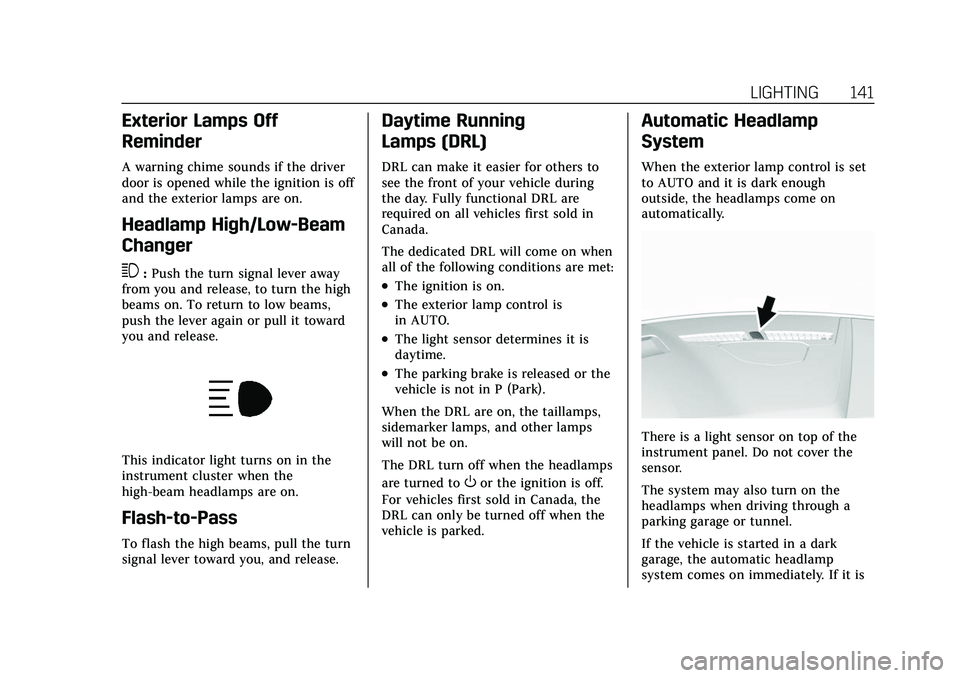
There is a light sensor on top of the
instrument panel. Do not cover the
sensor.
The system may also turn on the
headlamps when driving through a
parking garage or tunnel.
If the vehicle is started in a dark
garage, the automatic headlamp
system comes on immediately. If it is
Page 195 of 447

Cadillac XT6 Owner Manual (GMNA-Localizing-U.S./Canada-15218998) -
2022 - CRC - 10/22/21
194 INFOTAINMENT SYSTEM
2. Create a Personal IdentificationNumber (PIN) by choosing a
four-digit PIN. Re-enter the PIN to
confirm. To change the PIN, touch
Change PIN.
The PIN is required to:
.Register or unregister keys.
.Change Teen Driver settings.
.Change or clear the Teen
Driver PIN.
.Access or delete Report Card data.
Register keys to activate Teen
Driver and assign restrictions to
the key:
Any vehicle key can be registered, up
to a maximum of eight keys. Label the
key to tell it apart from the
other keys.
For a pushbutton start system: 1. Start the engine.
2. For automatic transmissions, the vehicle must be in P (Park). For
manual transmissions, the vehicle
must be stopped with the parking
brake set.
3. From the Settings menu, touch Vehicle and then Teen Driver. 4. Enter the PIN.
5. Place the Remote Keyless Entry
(RKE) transmitter key you wish to
register in the transmitter pocket.
The key does not need to be the
one that started the vehicle. See
Remote Keyless Entry (RKE) System
Operation 07for transmitter
pocket location.
6. From the Teen Driver menu, touch Setup Keys..If the transmitter key has not
previously been registered, the
option to add the key displays.
Touch Add and a confirmation
message displays. Teen Driver
restrictions will be applied
whenever this key is used to
operate the vehicle.
.If the transmitter key has
already been registered, the
option to remove the key
displays. If Remove is touched,
the transmitter key is no longer
registered. A confirmation
message displays, and Teen
Driver restrictions will not be
applied if this transmitter key is
used to operate the vehicle. In vehicles with a pushbutton start
system, if a Teen Driver and a
non-Teen Driver key are both present
at start up, the vehicle will recognize
the non-Teen Driver key to start the
vehicle. The Teen Driver settings will
not be active.
For a keyed ignition system:
1. Start the engine.
2. For automatic transmissions, the vehicle must be in P (Park). For
manual transmissions, the vehicle
must be stopped with the parking
brake set.
3. From the Settings menu, touch Vehicle and then Teen Driver.
4. Enter the PIN.
5. Touch Setup Keys. The system displays instructions for registering
or unregistering a key.
A confirmation message displays.
Manage Settings
Audio Volume Limit : Allows the
audio volume limit to be turned on or
off. Touch Set Audio Volume Limit to
choose the maximum allowable audio
volume level.
Page 197 of 447

Cadillac XT6 Owner Manual (GMNA-Localizing-U.S./Canada-15218998) -
2022 - CRC - 10/22/21
196 INFOTAINMENT SYSTEM
Report Card
The vehicle owner must secure the
driver’s consent to record certain
vehicle data when the vehicle is driven
with a registered Teen Driver key.
There is one Report Card per vehicle.
Data is only recorded when a
registered Teen Driver key is used to
operate the vehicle.
The Report Card data is collected from
the time Teen Driver is activated or
the last time the Report Card was
reset. The following items may be
recorded:
.Distance Driven–the total distance
driven.
.Maximum Speed –the maximum
vehicle speed detected.
.Overspeed Warnings –the number
of times the speed warning setting
was exceeded.
.Wide Open Throttle –the number
of times the accelerator pedal was
pressed nearly all the way down.
.Forward Collision Alerts –the
number of times the driver was
notified when approaching a vehicle
ahead too quickly and at potential
risk for a crash.
.Forward Automatic Braking, also
called Automatic Emergency
Braking (if equipped) –the number
of times the vehicle detected that a
forward collision was imminent and
applied the brakes.
.Reverse Automatic Braking (if
equipped) –the number of times
the vehicle detected that a rearward
collision was imminent and applied
the brakes.
.Traction Control –the number of
times the Traction Control System
activated to reduce wheel spin or
loss of traction.
.Stability Control –the number of
events which required the use of
electronic stability control.
.Antilock Braking System Active –
The number of Antilock Brake
System activations.
.Tailgating Alerts –the number of
times the driver was alerted for
following a vehicle ahead too
closely.
Report Card Data
Cumulative Data is saved for all trips
until the Report Card is reset or until
the maximum count is exceeded.
If the maximum count is exceeded for
a Report Card line item, that item will
no longer be updated in the Report
Card until it is reset. Each item will
report a maximum of 1,000 counts.
The distance driven will report a
maximum of 64 374 km (40,000 mi).
To delete Report Card data, do one of
the following:
.From the Report Card display, touch
Reset.
.Touch Clear All Teen Keys and PIN
from the Teen Driver menu. This
will also unregister any Teen Driver
keys and delete the PIN.
Forgotten PIN
See your dealer to reset the PIN.