2022 CADILLAC ESCALADE lock
[x] Cancel search: lockPage 213 of 508

Cadillac Escalade Owner Manual (GMNA-Localizing-U.S./Canada/Mexico-
15567102) - 2022 - CRC - 11/17/21
212 INFOTAINMENT SYSTEM
Trademarks and License
Agreements
FCC Information
SeeRadio Frequency Statement 0481.
"Made for iPod," and "Made for
iPhone," mean that an electronic
accessory has been designed to
connect specifically to iPod or iPhone,
respectively, and has been certified by
the developer to meet Apple
performance standards. Apple is not
responsible for the operation of this
device or its compliance with safety
and regulatory standards. Please note
that the use of this accessory with
iPod or iPhone may affect wireless
performance. iPhone, iPod, iPod
classic, iPod nano, iPod shuffle, and
iPod touch are trademarks of Apple
Inc., registered in the U.S. and other
countries.
If you decide to continue service after
your trial, your selected subscription
plan will automatically renew
thereafter. You will be charged at
then-current rates. Fees and taxes
apply. Please see the SiriusXM
Customer Agreement at siriusxm.com
for complete terms and how to cancel,
which includes calling SiriusXM at
1-866-635-2349. All fees and
programming are subject to change.
Fees and Taxes: Subscription fee,
taxes, one time activation fee, and
other fees may apply. Subscription fee
is consumer only. All fees and
programming subject to change.
Subscriptions subject to Customer
Agreement available at
www.siriusxm.com. SiriusXM service is
only available in the 48 contiguous
United States and Canada. In Canada: Some deterioration of
service may occur in extreme northern
latitudes. This is beyond the control of
SiriusXM Satellite Radio.
Explicit Language Notice: Channels
with frequent explicit language are
indicated with an
“XL”preceding the
channel name. Channel blocking is
available for SiriusXM Satellite Radio
receivers by notifying SiriusXM:
.USA Customers —See
www.siriusxm.com or call
1-888-601–6296.
.Canada Customers —See
www.siriusxm.ca or call
1-877-438-9677.
It is prohibited to copy, decompile,
disassemble, reverse engineer, hack,
manipulate, or otherwise make
available any technology or software
incorporated in receivers compatible
with the SiriusXM Satellite Radio
System or that support the SiriusXM
website, the Online Service or any of
its content. Furthermore, the AMBER
voice compression software included
in this product is protected by
Page 223 of 508

Cadillac Escalade Owner Manual (GMNA-Localizing-U.S./Canada/Mexico-
15567102) - 2022 - CRC - 11/17/21
222 CLIMATE CONTROLS
Automatic Operation
The system automatically controls the
fan speed, air delivery, air
conditioning, and recirculation in
order to heat or cool the vehicle to the
desired temperature.
When AUTO is underlined, the system
is in full automatic operation. If the
air delivery mode or fan setting is
manually adjusted, the auto indicator
turns off and the display will show the
selected settings. Auto operation can
be turned off individually for climate
settings.
For automatic operation:1. Press AUTO.
2. Set the temperature. Allow the system time to stabilize. Then
adjust the temperature as needed
for best comfort.
To improve fuel efficiency and to cool
the vehicle faster, recirculation may be
automatically selected in warm
weather. The recirculation light will
not come on. Press
@to select
recirculation; press it again to select
outside air. English units can be changed to
metric units through the instrument
cluster. See
“Cluster Options Menu ”
under Instrument Cluster 0115.
OFF : Press OFF to turn the fan on or
off. When off is selected, the system
will stop air from flowing into the
cabin. If on is selected or any other
buttons are pressed, the climate
control system will turn on and
operate at the current setting.
y/z: The temperature can be
adjusted separately for the driver and
the passenger. Press to decrease or lift
to increase the temperature. Press or
lift and hold to rapidly increase or
decrease the temperature.
SYNC : Touch SYNC on the climate
control display to link all climate zone
settings to the driver settings. Adjust
the driver side temperature control to
change the linked temperature. When
the passenger setting is adjusted, the
SYNC underline turns off. Rear :
Touch Rear on the
infotainment screen to open the rear
climate control screen. The rear
climate control settings can now be
adjusted from the front
passenger area.
Manual Operation
z 9 y: Press to decrease or lift to
increase the fan speed. Press or lift
and hold the fan controls to adjust
speed more quickly. The fan speed
setting displays. Any adjustment of
the fan speed cancels automatic fan
control and the fan can be controlled
manually. Press AUTO to return to
automatic operation.
To turn off the fan and climate
control system, press OFF on the
center stack climate controls. The
airf low will be blocked from entering
in all air delivery modes, except
defrost.
The maximum automatic fan speed
can be set to low, medium, or high. To
adjust Auto Fan Speed, see “Climate
and Air Quality” underVehicle
Personalization 0140.
Page 226 of 508

Cadillac Escalade Owner Manual (GMNA-Localizing-U.S./Canada/Mexico-
15567102) - 2022 - CRC - 11/17/21
CLIMATE CONTROLS 225
The solar sensor, on top of the
instrument panel near the windshield,
monitors the solar heat.
The climate control system uses the
sensor information to adjust the
temperature, fan speed, recirculation,
and air delivery mode for best
comfort.
If the sensor is covered, the automatic
climate control system may not work
properly.
Afterblow Feature
If equipped, under certain conditions,
the fan may stay on or may turn on
and off several times after you turn
off and lock the vehicle. This is
normal.Rear Climate Control System
The rear climate control system is on the rear of the center console. The settings
can be adjusted with the rear climate controls and the rear climate display.
Rear Climate Controls
1. Heated Rear Seats
2. Air Delivery Mode Control
3. Fan Control 4. Temperature Control
5. AUTO (Automatic Operation)
O
(On/Off)
Page 227 of 508

Cadillac Escalade Owner Manual (GMNA-Localizing-U.S./Canada/Mexico-
15567102) - 2022 - CRC - 11/17/21
226 CLIMATE CONTROLS
Rear Climate Display
1. Temperature Setting
2. Air Delivery Mode Control
3. Fan Control
4. SYNC (Synchronized Temperatures)
5. Rear Control Lockout
6. Rear AUTO (Automatic Operation)
7. REAR
O(On/Off)
8. Temperature Control
Rear : Touch to open the rear climate
control screen. The rear climate
control settings can now be adjusted
from the front passenger area.
O: PressOor REAROto turn the
rear climate control system on or off.
If the rear climate control system is
turned off using REAR
Oon the rear climate display, the
Obutton and the
temperature or air delivery mode
buttons on the rear climate controls
must be pressed within five seconds
to turn it back on.
SYNC : Touch SYNC on the rear
climate display to match the rear
climate control temperature to the
front climate control driver
temperature. The SYNC button will be
lit. Press the temperature, MODE,
or AUTO button to unlink the set
driver and rear temperatures. The
SYNC button turns off.
Rear Control Lockout : Touch Rear
Control Lockout on the rear climate
display to lock or unlock control of
the rear climate control system from
the front climate control display.
When locked the rear climate control
system cannot be adjusted from the
rear climate controls on the rear of
the center console.
Automatic Operation
Rear AUTO : Touch to turn on or off.
The air delivery and fan speed are
controlled automatically. The AUTO
indicator appears on the display on the rear of the center console. If the
Mode or fan control buttons are
manually adjusted, this cancels the
automatic operation.
Manual Operation
A«/ªAª:
Touch or press the
fan controls on the rear climate
display or on the rear of the center
console to increase or decrease the
airf low. Pressing
A «when the
system is off will turn the system on.
The air delivery mode remains in its
previous setting.
«/ª: Touch or press and hold the
rear temperature controls on the rear
climate display or on the rear of the
center console to adjust the rear
passenger temperature. Press
«for
warmer air and press
ªfor cooler air.
Y/\/Y: Touch the desired mode
on the rear climate display or the
MODE button on the rear of the
center console to change the direction
of the airflow in the rear seating area.
MorL: PressMorLto heat the left
or right outboard seat cushion. See
Heated Rear Seats 055.
Page 228 of 508

Cadillac Escalade Owner Manual (GMNA-Localizing-U.S./Canada/Mexico-
15567102) - 2022 - CRC - 11/17/21
CLIMATE CONTROLS 227
Air Vents
Adjustable air vents are in the center
and on the side of the instrument
panel.
1. Slider Knob
Move the slider knobs (1) to change
the direction of the airf low and to
shut off the air flow. The horizontal
vanes can rotate up and down.
A metallic click sound will be heard
every time they pass through the
horizontal position. Operation Tips
.Clear away any ice, snow, or leaves
from the air inlets at the base of the
windshield that could block the
flow of air into the vehicle.
.Clear snow off the hood to improve
visibility and help decrease moisture
drawn into the vehicle.
.When you enter a vehicle in cold
weather, press the fan up button to
the maximum fan level before
driving. This helps clear the intake
ducts of snow and moisture, and
reduces the chance of fogging the
inside of the window.
.Keep the air path under the front
seats clear of objects to help
circulate the air inside of the vehicle
more effectively.
.Use of non-GM approved hood
deflectors can adversely affect the
performance of the system. Check
with your dealer before adding
equipment to the outside of the
vehicle.
Rear System Air Vents
This vehicle has four round or
rectangular air vents in the headliner
above the second and third row seats.
Press on the center vane rear edge to
open the round outlet. Use the center
vane to rotate the outlet and change
the direction of the airf low. Press on
the center vane leading edge to shut
off the air flow.
Page 231 of 508
Cadillac Escalade Owner Manual (GMNA-Localizing-U.S./Canada/Mexico-
15567102) - 2022 - CRC - 11/17/21
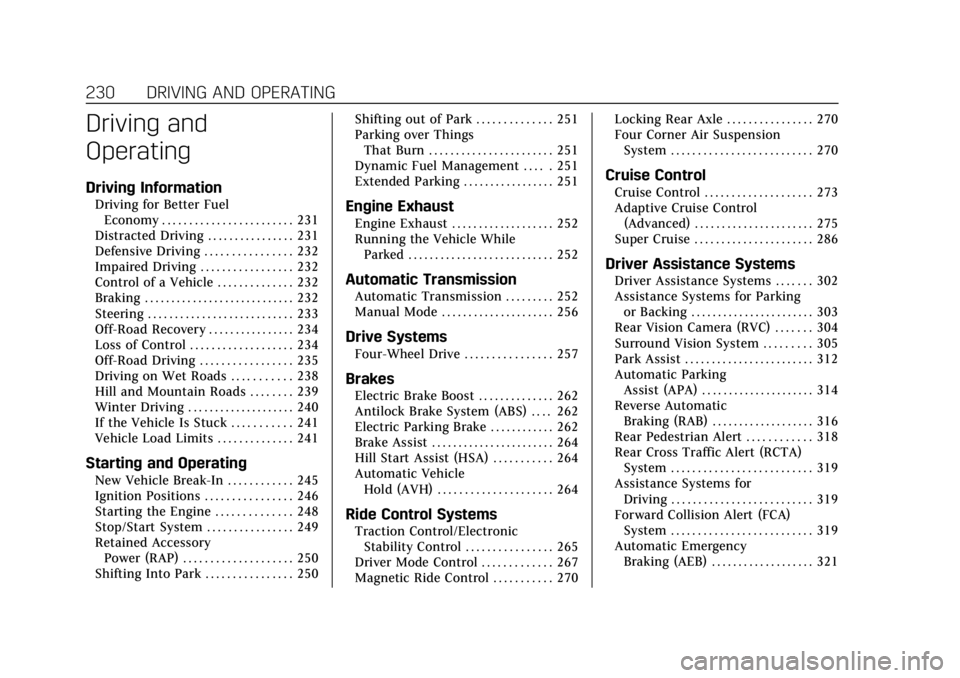
230 DRIVING AND OPERATING
Driving and
Operating
Driving Information
Driving for Better FuelEconomy . . . . . . . . . . . . . . . . . . . . . . . . 231
Distracted Driving . . . . . . . . . . . . . . . . 231
Defensive Driving . . . . . . . . . . . . . . . . 232
Impaired Driving . . . . . . . . . . . . . . . . . 232
Control of a Vehicle . . . . . . . . . . . . . . 232
Braking . . . . . . . . . . . . . . . . . . . . . . . . . . . . 232
Steering . . . . . . . . . . . . . . . . . . . . . . . . . . . 233
Off-Road Recovery . . . . . . . . . . . . . . . . 234
Loss of Control . . . . . . . . . . . . . . . . . . . 234
Off-Road Driving . . . . . . . . . . . . . . . . . 235
Driving on Wet Roads . . . . . . . . . . . 238
Hill and Mountain Roads . . . . . . . . 239
Winter Driving . . . . . . . . . . . . . . . . . . . . 240
If the Vehicle Is Stuck . . . . . . . . . . . 241
Vehicle Load Limits . . . . . . . . . . . . . . 241
Starting and Operating
New Vehicle Break-In . . . . . . . . . . . . 245
Ignition Positions . . . . . . . . . . . . . . . . 246
Starting the Engine . . . . . . . . . . . . . . 248
Stop/Start System . . . . . . . . . . . . . . . . 249
Retained Accessory Power (RAP) . . . . . . . . . . . . . . . . . . . . 250
Shifting Into Park . . . . . . . . . . . . . . . . 250 Shifting out of Park . . . . . . . . . . . . . . 251
Parking over Things
That Burn . . . . . . . . . . . . . . . . . . . . . . . 251
Dynamic Fuel Management . . . . . 251
Extended Parking . . . . . . . . . . . . . . . . . 251
Engine Exhaust
Engine Exhaust . . . . . . . . . . . . . . . . . . . 252
Running the Vehicle While Parked . . . . . . . . . . . . . . . . . . . . . . . . . . . 252
Automatic Transmission
Automatic Transmission . . . . . . . . . 252
Manual Mode . . . . . . . . . . . . . . . . . . . . . 256
Drive Systems
Four-Wheel Drive . . . . . . . . . . . . . . . . 257
Brakes
Electric Brake Boost . . . . . . . . . . . . . . 262
Antilock Brake System (ABS) . . . . 262
Electric Parking Brake . . . . . . . . . . . . 262
Brake Assist . . . . . . . . . . . . . . . . . . . . . . . 264
Hill Start Assist (HSA) . . . . . . . . . . . 264
Automatic VehicleHold (AVH) . . . . . . . . . . . . . . . . . . . . . 264
Ride Control Systems
Traction Control/ElectronicStability Control . . . . . . . . . . . . . . . . 265
Driver Mode Control . . . . . . . . . . . . . 267
Magnetic Ride Control . . . . . . . . . . . 270 Locking Rear Axle . . . . . . . . . . . . . . . . 270
Four Corner Air Suspension
System . . . . . . . . . . . . . . . . . . . . . . . . . . 270
Cruise Control
Cruise Control . . . . . . . . . . . . . . . . . . . . 273
Adaptive Cruise Control(Advanced) . . . . . . . . . . . . . . . . . . . . . . 275
Super Cruise . . . . . . . . . . . . . . . . . . . . . . 286
Driver Assistance Systems
Driver Assistance Systems . . . . . . . 302
Assistance Systems for Parking or Backing . . . . . . . . . . . . . . . . . . . . . . . 303
Rear Vision Camera (RVC) . . . . . . . 304
Surround Vision System . . . . . . . . . 305
Park Assist . . . . . . . . . . . . . . . . . . . . . . . . 312
Automatic Parking Assist (APA) . . . . . . . . . . . . . . . . . . . . . 314
Reverse Automatic Braking (RAB) . . . . . . . . . . . . . . . . . . . 316
Rear Pedestrian Alert . . . . . . . . . . . . 318
Rear Cross Traffic Alert (RCTA) System . . . . . . . . . . . . . . . . . . . . . . . . . . 319
Assistance Systems for Driving . . . . . . . . . . . . . . . . . . . . . . . . . . 319
Forward Collision Alert (FCA) System . . . . . . . . . . . . . . . . . . . . . . . . . . 319
Automatic Emergency
Braking (AEB) . . . . . . . . . . . . . . . . . . . 321
Page 235 of 508

Cadillac Escalade Owner Manual (GMNA-Localizing-U.S./Canada/Mexico-
15567102) - 2022 - CRC - 11/17/21
234 DRIVING AND OPERATING
Steering in Emergencies
.There are some situations when
steering around a problem may be
more effective than braking.
.Holding both sides of the steering
wheel allows you to turn
180 degrees without removing
a hand.
.Antilock Brake System (ABS) allows
steering while braking.
Off-Road Recovery
The vehicle's right wheels can drop off
the edge of a road onto the shoulder
while driving. Follow these tips:1. Ease off the accelerator and then,
if there is nothing in the way, steer
the vehicle so that it straddles the
edge of the pavement.
2. Turn the steering wheel about one-eighth of a turn, until the right
front tire contacts the
pavement edge.
3. Turn the steering wheel to go straight down the roadway.
Loss of Control
Skidding
There are three types of skids that
correspond to the vehicle's three
control systems:
.Braking Skid —wheels are not
rolling.
.Steering or Cornering Skid —too
much speed or steering in a curve
causes tires to slip and lose
cornering force.
.Acceleration Skid —too much
throttle causes the driving wheels
to spin. Defensive drivers avoid most skids by
taking reasonable care suited to
existing conditions, and by not
overdriving those conditions. But
skids are always possible.
If the vehicle starts to slide, follow
these suggestions:
.Ease your foot off the accelerator
pedal and steer the way you want
the vehicle to go. The vehicle may
straighten out. Be ready for a
second skid if it occurs.
.Slow down and adjust your driving
according to weather conditions.
Stopping distance can be longer and
vehicle control can be affected when
traction is reduced by water, snow,
ice, gravel, or other material on the
road. Learn to recognize warning
clues
—such as enough water, ice,
or packed snow on the road to
make a mirrored surface —and
slow down when you have any
doubt.
.Try to avoid sudden steering,
acceleration, or braking, including
reducing vehicle speed by shifting
to a lower gear. Any sudden changes
could cause the tires to slide.
Page 236 of 508

Cadillac Escalade Owner Manual (GMNA-Localizing-U.S./Canada/Mexico-
15567102) - 2022 - CRC - 11/17/21
DRIVING AND OPERATING 235
Remember: Antilock brakes help avoid
only the braking skid.
Off-Road Driving
Four-wheel-drive vehicles can be used
for off-road driving. Vehicles without
four-wheel drive and vehicles not
equipped with All Terrain (AT) or
On-Off Road (OOR) tires must not be
driven off-road except on a level, solid
surface. For contact information about
the original equipment tires, see the
warranty manual.
One of the best ways for successful
off-road driving is to control the
speed.
{Warning
When driving off-road, bouncing
and quick changes in direction can
easily throw you out of position.
This could cause you to lose control
and crash. You and your passengers
should always wear seat belts.
Before Driving Off-Road
.Have all necessary maintenance and
service work completed.
.Fuel the vehicle, fill fluid levels, and
check inflation pressure in all tires,
including the spare, if equipped.
.Read all the information about
four-wheel-drive vehicles in this
manual.
.Know the local laws that apply to
off-road driving.
Loading the Vehicle for Off-Road
Driving
{Warning
.Unsecured cargo on the load
floor can be tossed about when
driving over rough terrain. You or
your passengers can be struck by
flying objects. Secure the cargo
properly.
.Keep cargo in the cargo area as
far forward and as low as
possible. The heaviest things
should be on the floor, forward
of the rear axle.
.Heavy loads on the roof raise the
vehicle's center of gravity,
making it more likely to roll over.
You can be seriously or fatally(Continued)
Warning (Continued)
injured if the vehicle rolls over.
Put heavy loads inside the cargo
area, not on the roof.
For more information about loading
the vehicle, see Vehicle Load Limits
0 241 and
Tires 0402.
Environmental Concerns
.Always use established trails, roads,
and areas that have been set aside
for public off-road recreational
driving and obey all posted
regulations.
.Do not damage shrubs, flowers,
trees, or grasses or disturb wildlife.
.Do not park over things that burn.
See Parking over Things That Burn
0 251.
Driving on Hills
Driving safely on hills requires good
judgment and an understanding of
what the vehicle can and cannot do.