2022 CADILLAC ESCALADE light
[x] Cancel search: lightPage 75 of 508

Cadillac Escalade Owner Manual (GMNA-Localizing-U.S./Canada/Mexico-
15567102) - 2022 - CRC - 11/17/21
74 SEATS AND RESTRAINTS
For some children, including children
in child restraints, and for very small
adults, the passenger sensing system
may or may not turn off the front
outboard passenger frontal airbag,
depending upon the person's seating
posture and body build. Everyone in
the vehicle who has outgrown child
restraints should wear a seat belt
properly—whether or not there is an
airbag for that person.
{Warning
If the airbag readiness light ever
comes on and stays on, it means
that something may be wrong with
the airbag system. To help avoid
injury to yourself or others, have
the vehicle serviced right away. See
Airbag Readiness Light 0121 for
more information, including
important safety information.
If the On Indicator Is Lit for a
Child Restraint
The passenger sensing system is
designed to turn off the front
outboard passenger frontal airbag if
the system determines that an infant is present in a child restraint. If a
child restraint has been installed and
the ON indicator is lit:
1. Turn the vehicle off.
2. Remove the child restraint from the vehicle.
3. Remove any additional items from the seat such as blankets, cushions,
seat covers, seat heaters, or seat
massagers.
4. Reinstall the child restraint following the directions provided
by the child restraint manufacturer
and refer to Securing Child
Restraints (With the Seat Belt in the
Rear Seat) 092 or
Securing Child Restraints (With the
Seat Belt in the Front Passenger
Seat) 095.
Make sure the seat belt retractor is
locked by pulling the shoulder belt
all the way out of the retractor
when installing the child restraint,
even if the child restraint is
equipped with a seat belt lock off.
When the retractor lock is set, the
belt can be tightened but not
pulled out of the retractor. 5. If, after reinstalling the child
restraint and restarting the vehicle,
the ON indicator is still lit, turn the
vehicle off. Then slightly recline the
vehicle seatback and adjust the
seat cushion, if adjustable, to make
sure that the vehicle seatback is
not pushing the child restraint into
the seat cushion.
Also make sure the child restraint
is not trapped under the vehicle
head restraint. If this happens,
adjust the head restraint. See Head
Restraints 041.
6. Restart the vehicle.
The passenger sensing system may or
may not turn off the airbag for a child
in a child restraint depending upon
the child’s size. It is better to secure
child restraints in a rear seat. Consider
using another vehicle to transport the
child when a rear seat is not available.
Never put a rear-facing child restraint
in the front seat, even if the ON
indicator is not lit.
Page 78 of 508

Cadillac Escalade Owner Manual (GMNA-Localizing-U.S./Canada/Mexico-
15567102) - 2022 - CRC - 11/17/21
SEATS AND RESTRAINTS 77
sensing and diagnostic module, and
airbag wiring along with the proper
replacement procedures.
In addition, the vehicle has a
passenger sensing system for the front
outboard passenger position, which
includes sensors that are part of the
passenger's seat. The passenger
sensing system may not operate
properly if the original seat trim is
replaced with non-GM covers,
upholstery, or trim, or with GM
covers, upholstery, or trim designed
for a different vehicle. Any object,
such as an aftermarket seat heater or
a comfort enhancing pad or device,
installed under or on top of the seat
fabric, could also interfere with the
operation of the passenger sensing
system. This could either prevent
proper deployment of the passenger
airbag(s) or prevent the passenger
sensing system from properly turning
off the passenger airbag(s). See
Passenger Sensing System072.
If the vehicle has rollover roof-rail
airbags, see Different Size Tires and
Wheels 0420 for additional important
information. If the vehicle must be modified
because you have a disability and you
have questions about whether the
modifications will affect the vehicle's
airbag system, or if you have
questions about whether the airbag
system will be affected if the vehicle is
modified for any other reason, call
Customer Assistance. See
Customer
Assistance Offices 0473.
Airbag System Check
The airbag system does not need
regularly scheduled maintenance or
replacement. Make sure the airbag
readiness light is working. See Airbag
Readiness Light 0121.
Caution
If an airbag covering is damaged,
opened, or broken, the airbag may
not work properly. Do not open or
break the airbag coverings. If there
are any opened or broken airbag
coverings, have the airbag covering
and/or airbag module replaced. For
the location of the airbags, see
Where Are the Airbags? 068. See
your dealer for service.
Replacing Airbag System
Parts after a Crash
{Warning
A crash can damage the airbag
systems in the vehicle. A damaged
airbag system may not properly
protect you and your passenger(s)
in a crash, resulting in serious
injury or even death. To help make
sure the airbag systems are working
properly after a crash, have them
inspected and any necessary
replacements made as soon as
possible.
If an airbag inflates, you will need to
replace airbag system parts. See your
dealer for service.
If the airbag readiness light stays on
after the vehicle is started or comes
on when you are driving, the airbag
system may not work properly. Have
the vehicle serviced right away. See
Airbag Readiness Light 0121.
Page 97 of 508

Cadillac Escalade Owner Manual (GMNA-Localizing-U.S./Canada/Mexico-
15567102) - 2022 - CRC - 11/17/21
96 SEATS AND RESTRAINTS
an upright position, if needed, to
get a tight installation of the child
restraint.
The push button used to release
the latch plate must be visible and
not obscured by the child restraint.
There must not be direct contact of
the child restraint to the push
button.
When the passenger sensing
system has turned off the front
outboard passenger frontal airbag,
the OFF indicator on the passenger
airbag status indicator should light
and stay lit when you start the
vehicle. SeePassenger Airbag Status
Indicator 0122.
2. Put the child restraint on the seat.
3. Pick up the latch plate, and run the lap and shoulder portions of the
vehicle seat belt through or around
the child restraint. The child
restraint instructions will show
you how.
4. Push the latch plate into the buckleuntil it clicks.
Position the release button on the
buckle, away from the child
restraint, so that the seat belt
could be quickly unbuckled if
necessary.5. Pull the shoulder belt all the wayout of the retractor to set the lock.
When the retractor lock is set, the
belt can be tightened but not
pulled out of the retractor.
Page 101 of 508

Cadillac Escalade Owner Manual (GMNA-Localizing-U.S./Canada/Mexico-
15567102) - 2022 - CRC - 11/17/21
100 STORAGE
Center Console Storage
Press the button and lift to open.
There is an auxiliary jack, USB ports,
an accessory power outlet, a tote
compartment, and a device holder
inside.
On the rear of the console there are
auxiliary jacks, a power outlet, and a
storage area.
SeePower Outlets 0109 and the
infotainment section. Center Console Refrigerator/FreezerIf equipped with a center console
refrigerator/freezer, lift the armrest to
access. A light will turn on when the
armrest is up.
The refrigerator/freezer mode can only
be used while the engine is running.
If the vehicle is turned off and turned
back on again, the last operating
mode will be resumed.
{Warning
Do not store glass and aluminum
containers inside the bin when in
freezer mode. Glass and aluminum
containers can break when their
contents are frozen. Use caution
removing broken containers to
avoid personal injury.
{Warning
Do not touch bin surfaces with wet
or damp hands while the freezer is
on. Skin could stick to the bin
surface.
Caution
Do not put any objects between the
front seats and the center console
side walls. The air path could be
blocked and cause the unit to stop
working.
Page 102 of 508
Cadillac Escalade Owner Manual (GMNA-Localizing-U.S./Canada/Mexico-
15567102) - 2022 - CRC - 11/17/21
STORAGE 101
To use in refrigerator mode, press the
button once. One light on the button
will be lit. The operating temperature
is 5°C (41°F).
To use in freezer mode, press the
button twice. Two lights on the button
will be lit. The operating temperature
is -5°C (23°F).
To turn off the refrigerator or freezer,
press the button until its lights are off.
The bin light can turn on when the
refrigerator/freezer is off.
The bottom mat is removable. Clean
with water and mild soap.
Clean the refrigerator/freezer bin while
the vehicle and the feature are turned
off. Use a damp, soft rag and wipe the
bin carefully. Do not scratch or
puncture the bin surfaces.Rear Console Storage
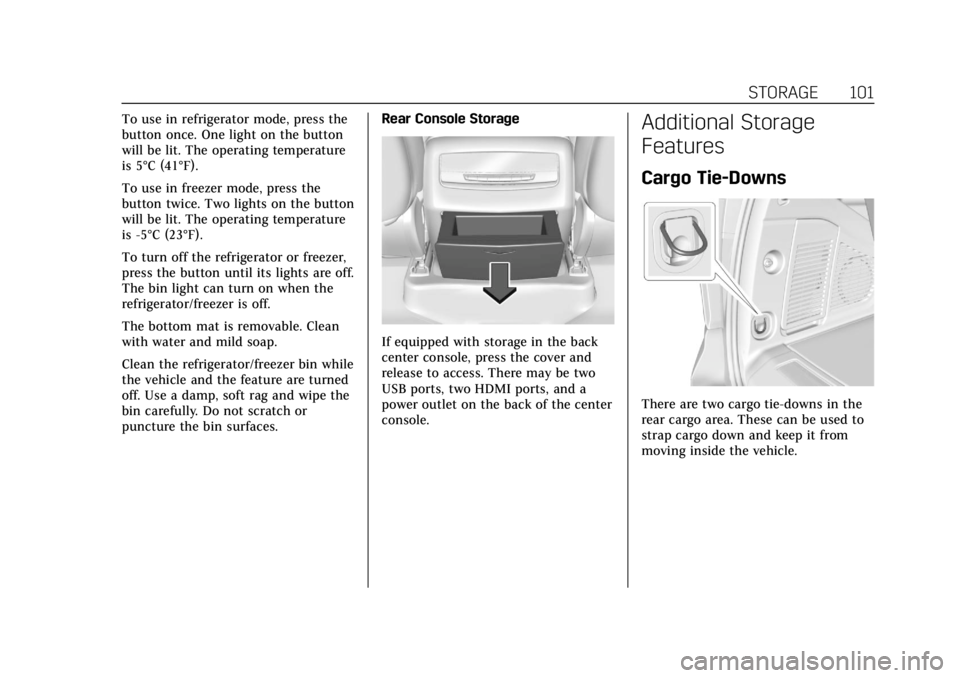
If equipped with storage in the back
center console, press the cover and
release to access. There may be two
USB ports, two HDMI ports, and a
power outlet on the back of the center
console.
Additional Storage
Features
Cargo Tie-Downs
There are two cargo tie-downs in the
rear cargo area. These can be used to
strap cargo down and keep it from
moving inside the vehicle.
Page 105 of 508

Cadillac Escalade Owner Manual (GMNA-Localizing-U.S./Canada/Mexico-
15567102) - 2022 - CRC - 11/18/21
104 INSTRUMENTS AND CONTROLS
Instruments and
Controls
Controls
Steering Wheel Adjustment . . . . . 105
Steering Wheel Controls . . . . . . . . . 105
Heated Steering Wheel . . . . . . . . . . 105
Horn . . . . . . . . . . . . . . . . . . . . . . . . . . . . . . . 105
Windshield Wiper/Washer . . . . . . . 106
Rear Window Wiper/Washer . . . . 108
Compass . . . . . . . . . . . . . . . . . . . . . . . . . . 109
Clock . . . . . . . . . . . . . . . . . . . . . . . . . . . . . . 109
Power Outlets . . . . . . . . . . . . . . . . . . . . . 109
Wireless Charging . . . . . . . . . . . . . . . . 112
Warning Lights, Gauges, and
Indicators
Warning Lights, Gauges, andIndicators . . . . . . . . . . . . . . . . . . . . . . . 114
Instrument Cluster . . . . . . . . . . . . . . . 115
Speedometer . . . . . . . . . . . . . . . . . . . . . . 116
Odometer . . . . . . . . . . . . . . . . . . . . . . . . . 117
Trip Odometer . . . . . . . . . . . . . . . . . . . . 117
Tachometer . . . . . . . . . . . . . . . . . . . . . . . 117
Fuel Gauge . . . . . . . . . . . . . . . . . . . . . . . . 117
Engine Oil Pressure Gauge . . . . . . . 117
Engine Coolant Temperature Gauge . . . . . . . . . . . . . . . . . . . . . . . . . . . . 118 Transmission Temperature
Gauge . . . . . . . . . . . . . . . . . . . . . . . . . . . . 119
Voltmeter Gauge . . . . . . . . . . . . . . . . . 120
Seat Belt Reminders . . . . . . . . . . . . . . 120
Airbag Readiness Light . . . . . . . . . . 121
Passenger Airbag Status Indicator . . . . . . . . . . . . . . . . . . . . . . . . . 122
Charging System Light . . . . . . . . . . . 123
Malfunction Indicator Lamp (Check Engine Light) . . . . . . . . . . . 123
Brake System Warning Light . . . . 125
Electric Parking Brake Light . . . . . 125
Service Electric Parking Brake Light . . . . . . . . . . . . . . . . . . . . . . . . . . . . . 126
Antilock Brake System (ABS) Warning Light . . . . . . . . . . . . . . . . . . 126
Automatic Vehicle Hold (AVH) Light . . . . . . . . . . . . . . . . . . . . . . . . . . . . . 126
Lane Keep Assist (LKA) Light . . . 127
Automatic Emergency Braking (AEB) Disabled Light . . . . . . . . . . . 127
Vehicle Ahead Indicator . . . . . . . . . 127
Pedestrian Ahead Indicator . . . . . . 127
Traction Off Light . . . . . . . . . . . . . . . . 128
StabiliTrak OFF Light . . . . . . . . . . . . 128
Traction Control System (TCS)/ StabiliTrak Light . . . . . . . . . . . . . . . . 128
Engine Coolant Temperature Warning Light . . . . . . . . . . . . . . . . . . 129
Driver Mode Control Light . . . . . . . 129 Four Corner Air Suspension
Light . . . . . . . . . . . . . . . . . . . . . . . . . . . . . 130
Tire Pressure Light . . . . . . . . . . . . . . . 130
Engine Oil Pressure Light . . . . . . . . 131
Low Fuel Warning Light . . . . . . . . . 131
Security Light . . . . . . . . . . . . . . . . . . . . . 132
High-Beam On Light . . . . . . . . . . . . . 132
Lamps On Reminder . . . . . . . . . . . . . 132
Cruise Control Light . . . . . . . . . . . . . . 132
Door Ajar Light . . . . . . . . . . . . . . . . . . . 133
Information Displays
Driver Information Center (DIC) . . . . . . . . . . . . . . . . . . . . . 133
Vehicle Information . . . . . . . . . . . . . . 136
Head-Up Display (HUD) . . . . . . . . . 136
Vehicle Messages
Vehicle Messages . . . . . . . . . . . . . . . . . 139
Engine Power Messages . . . . . . . . . . 139
Vehicle Speed Messages . . . . . . . . . 140
Vehicle Personalization
Vehicle Personalization . . . . . . . . . . 140
Universal Remote System
Universal Remote System . . . . . . . . 147
Universal Remote System Programming . . . . . . . . . . . . . . . . . . . 147
Universal Remote System Operation . . . . . . . . . . . . . . . . . . . . . . . . 149
Page 112 of 508

Cadillac Escalade Owner Manual (GMNA-Localizing-U.S./Canada/Mexico-
15567102) - 2022 - CRC - 11/18/21
INSTRUMENTS AND CONTROLS 111
With Refrigerator/Freezer
StandardWhen the ignition is on, power to the
110/120 Volt outlet is enabled after
the
-button is pressed. A green
indicator light on the
-button
indicates when the outlet is enabled.
110 Volts is supplied to the outlet
when it is enabled and electrical
equipment is plugged into that outlet.
One power outlet can be used with
electrical equipment that uses a
maximum of 400 watts.
Ensure that all connected devices do
not exceed 400 watts. The power
outlet can be turned off by pressing
the
-button.
An indicator light on the outlet
illuminates when the outlet is enabled
and no system fault is detected. The
outlet will not provide power when
the ignition is off, the
-button is
not pressed, or the plug is not fully
seated into the outlet. The outlet does
not operate while the engine is
starting. If a USB powered streaming
device is being used, it is suggested to
use a USB port for power. See USB
Port 0171. If uninterrupted power supply is
required while driving, disable the
Auto Engine Stop/Start System by
pressing the Auto Stop disable switch.
See
Stop/Start System 0249.
If equipment is connected using more
than 400 watts or a system fault is
detected, a protection circuit shuts off
the power supply and the indicator
light will flash.
Do not use a power outlet with a
missing or damaged cover.
The power outlet is not designed for
the following, and may not work
properly if they are plugged in:
.Equipment with high initial peak
wattage, such as compressor-driven
refrigerators and electric power
tools
.Other equipment requiring an
extremely stable power supply, such
as microcomputer-controlled
electric blankets and touch sensor
lamps
.Medical equipment.
Page 115 of 508

Cadillac Escalade Owner Manual (GMNA-Localizing-U.S./Canada/Mexico-
15567102) - 2022 - CRC - 11/18/21
114 INSTRUMENTS AND CONTROLS
Freescale-WCT library
Copyright (c) 2012-2014 Freescale
Semiconductor, Inc.. All rights
reserved.
Redistribution and use in source and
binary forms, with or without
modification, are permitted provided
that the following conditions are met:1. Redistributions of source code must retain the above copyright
notice, this list of conditions and
the following disclaimer.
2. Redistributions in binary form must reproduce the above
copyright notice, this list of
conditions and the following
disclaimer in the documentation
and/or other materials provided
with the distribution.
3. Neither the name of the copyright holder nor the names of its
contributors may be used to
endorse or promote products
derived from this software without
specific prior written permission. THIS SOFTWARE IS PROVIDED BY
THE COPYRIGHT HOLDERS AND
CONTRIBUTORS "AS IS" AND ANY
EXPRESS OR IMPLIED WARRANTIES,
INCLUDING, BUT NOT LIMITED TO,
THE IMPLIED WARRANTIES OF
MERCHANTABILITY AND FITNESS
FOR A PARTICULAR PURPOSE ARE
DISCLAIMED. IN NO EVENT SHALL
THE COPYRIGHT HOLDER OR
CONTRIBUTORS BE LIABLE FOR ANY
DIRECT, INDIRECT, INCIDENTAL,
SPECIAL, EXEMPLARY, OR
CONSEQUENTIAL DAMAGES
(INCLUDING, BUT NOT LIMITED TO,
PROCUREMENT OF SUBSTITUTE
GOODS OR SERVICES; LOSS OF USE,
DATA, OR PROFITS; OR BUSINESS
INTERRUPTION) HOWEVER CAUSED
AND ON ANY THEORY OF LIABILITY,
WHETHER IN CONTRACT, STRICT
LIABILITY, OR TORT (INCLUDING
NEGLIGENCE OR OTHERWISE)
ARISING IN ANY WAY OUT OF THE
USE OF THIS SOFTWARE, EVEN IF
ADVISED OF THE POSSIBILITY OF
SUCH DAMAGE.Warning Lights, Gauges,
and Indicators
Warning lights and gauges can signal
that something is wrong before it
becomes serious enough to cause an
expensive repair or replacement.
Paying attention to the warning lights
and gauges could prevent injury.
Some warning lights come on briefly
when the engine is started to indicate
they are working. When one of the
warning lights comes on and stays on
while driving, or when one of the
gauges shows there may be a problem,
check the section that explains what
to do. Waiting to do repairs can be
costly and even dangerous.