2022 CADILLAC ESCALADE suspension
[x] Cancel search: suspensionPage 245 of 508
Cadillac Escalade Owner Manual (GMNA-Localizing-U.S./Canada/Mexico-
15567102) - 2022 - CRC - 11/17/21
244 DRIVING AND OPERATING
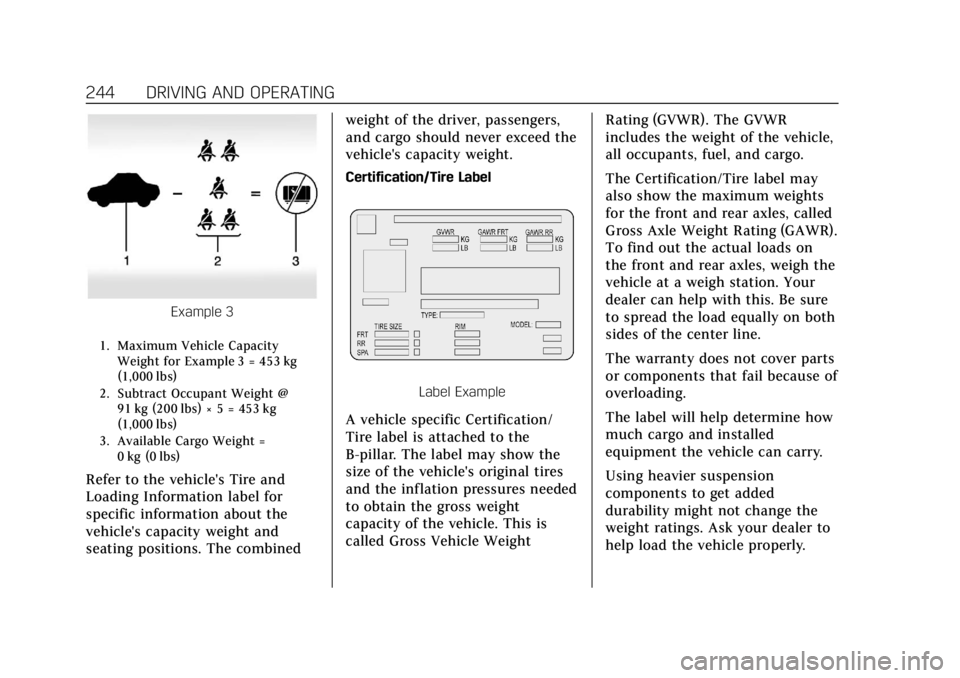
Example 3
1. Maximum Vehicle CapacityWeight for Example 3 = 453 kg
(1,000 lbs)
2. Subtract Occupant Weight @ 91 kg (200 lbs) × 5 = 453 kg
(1,000 lbs)
3. Available Cargo Weight = 0 kg (0 lbs)
Refer to the vehicle's Tire and
Loading Information label for
specific information about the
vehicle's capacity weight and
seating positions. The combined weight of the driver, passengers,
and cargo should never exceed the
vehicle's capacity weight.
Certification/Tire Label
Label Example
A vehicle specific Certification/
Tire label is attached to the
B-pillar. The label may show the
size of the vehicle's original tires
and the inflation pressures needed
to obtain the gross weight
capacity of the vehicle. This is
called Gross Vehicle Weight
Rating (GVWR). The GVWR
includes the weight of the vehicle,
all occupants, fuel, and cargo.
The Certification/Tire label may
also show the maximum weights
for the front and rear axles, called
Gross Axle Weight Rating (GAWR).
To find out the actual loads on
the front and rear axles, weigh the
vehicle at a weigh station. Your
dealer can help with this. Be sure
to spread the load equally on both
sides of the center line.
The warranty does not cover parts
or components that fail because of
overloading.
The label will help determine how
much cargo and installed
equipment the vehicle can carry.
Using heavier suspension
components to get added
durability might not change the
weight ratings. Ask your dealer to
help load the vehicle properly.
Page 268 of 508

Cadillac Escalade Owner Manual (GMNA-Localizing-U.S./Canada/Mexico-
15567102) - 2022 - CRC - 11/17/21
DRIVING AND OPERATING 267
Traction and Stability Menu
To turn off TCS, select or touch the
Traction virtual button on the screen.
The traction off light
idisplays in
the instrument cluster. See Traction
Off Light 0128.
If TCS is limiting wheel spin when
disabled, the system will not turn off
until the wheels stop spinning.
To turn TCS back on, select or touch
the Traction virtual button on the
screen. The traction off light
i
displayed in the instrument cluster
will turn off. To turn StabiliTrak/ESC off, first turn
off TCS to enable the Stability virtual
button on the screen, then select or
touch the Stability virtual button. The
StabiliTrak/ESC off light
gwill display
in the instrument cluster. See
StabiliTrak OFF Light 0128.
To turn StabiliTrak/ESC back on,
select or touch the Stability virtual
button on the screen. StabiliTrak/ESC
will turn on, but TCS will remain off.
TCS cannot be on when StabiliTrak/
ESC is off. If both systems are turned
off, selecting or touching the Traction
virtual button will turn both systems
back on.
StabiliTrak/ESC will automatically
turn on if the vehicle exceeds 56 km/h
(35 mph) and cannot be turned off
again until speed is reduced. Traction
control will remain off. Vehicles
equipped with the four corner air
suspension re-enable StabiliTrak/ESC
at 32 km/h (20 mph). The vehicle has a Trailer Sway Control
(TSC) feature and a Hill Start Assist
(HSA) feature. See
Trailer Sway Control
(TSC) 0354 or
Hill Start Assist (HSA) 0264.
Adding accessories can affect the
vehicle performance. See Accessories
and Modifications 0369.
Driver Mode Control
Driver Mode Control (DMC) allows the
driver to adjust the overall driving
experience to better suit preference by
adjusting multiple subsystems
simultaneously. Drive mode
availability and affected vehicle
subsystems are dependent upon
vehicle trim level, region, and optional
features.
Tour will be the default mode at every
ignition cycle. A unique and persistent
indicator will be displayed in the
instrument cluster for each mode.
Depending on trim level, Tour mode,
Sport mode, Snow/Ice mode, Off-Road
mode, Tow/Haul mode, Terrain mode,
and My mode may be available.
Page 269 of 508

Cadillac Escalade Owner Manual (GMNA-Localizing-U.S./Canada/Mexico-
15567102) - 2022 - CRC - 11/17/21
268 DRIVING AND OPERATING
To activate each mode, press the
MODE button on the instrument
panel to the left of the steering wheel.
To activate Terrain Mode, press
g
button located next to the MODE
button.
Tour Mode :Use this mode for
normal city and highway driving to
provide a smooth ride. This setting
provides balance between comfort and
handling. This is the standard/default
mode. There is no persistent indicator
in the instrument cluster for
this mode.
8Sport Mode : Use this mode where
road conditions or personal preference
demand a more controlled response.
When in Sport mode the vehicle
automatically down shifts. In this
mode, the vehicle also monitors
driving behaviors and automatically
enables Performance Shift Features
when spirited driving is detected.
These features maintain lower
transmission gears to increase
available engine braking and improve
acceleration response. The vehicle
resumes normal operation after a
short period when no spirited driving
is detected. The steering changes to
provide more precise control. If the
vehicle has Magnetic Ride Control, the
suspension changes to provide better
cornering performance.
6Snow/Ice Mode : Use this mode to
improve vehicle acceleration on snow
and ice covered roads. When active,
Snow/Ice Mode adjusts acceleration to
optimize traction on slippery surfaces.
This can compromise the acceleration
on dry asphalt. This feature is not
intended for use when the vehicle is stuck in sand, mud, ice, snow,
or gravel. If the vehicle becomes stuck,
see
If the Vehicle Is Stuck 0241.
7Off-Road Mode : Use this mode
for off-road recreational driving.
Off-Road mode should be used to
improve driving at moderate speeds,
on grass, gravel, dirt, unpaved roads,
or snow-covered roads. The
accelerator pedal is tuned for off-road
use. If equipped with the following
features, Off-Road mode modifies
pedal mapping, ride height, and
Traction Control System (TCS)
performance. For more information on
off-road driving, see Off-Road Driving
0 235.
_Tow/Haul Mode : Use this mode
when hauling heavy loads for
increased performance and vehicle
control. Tow/Haul Mode adjusts the
transmission shift pattern, steering,
and Electronic Stability Control (ESC)
performance.
If the vehicle is turned off while in
Tow/Haul mode and then restarted
within four hours or less, it will
Page 271 of 508

Cadillac Escalade Owner Manual (GMNA-Localizing-U.S./Canada/Mexico-
15567102) - 2022 - CRC - 11/17/21
270 DRIVING AND OPERATING
The following settings may be
available depending on region, trim
level, and optional features.
Engine Sound :Engine sound settings
adjusts the volume of engine noise.
Engine sound is quieter at lower
settings and louder at higher settings.
Steering : Steering setting adjusts the
effort required to turn the steering
wheel. Steering feel is less responsive
at lower settings and more responsive
at higher settings.
Suspension : Suspension adjusts the
stiffness of the shocks and / or
springs. The ride is more comfortable
at lower settings and stiffer at higher
settings for better control.
Visualization
This feature shows handling and
performance settings on the
infotainment display when changing
drive modes.Magnetic Ride Control
This vehicle may have a semi-active
damping system called Magnetic Ride
Control. With this feature, improved
vehicle ride and handling is provided
under a variety of passenger and
loading conditions.
Locking Rear Axle
Vehicles with a locking rear axle can
give more traction on snow, mud, ice,
sand, or gravel. It works like a
standard axle most of the time, but
when traction is low, this feature will
allow the rear wheel with the most
traction to move the vehicle.
Four Corner Air Suspension
System
The Four Corner Air Suspension
feature provides full time load leveling
capability along with the benefit of
adjusting ride height for increased
convenience and capability.
{Warning
To help avoid personal injury or
death, make sure the area
underneath the vehicle and inside
the wheel wells is clear when
lowering the vehicle.
{Warning
To help avoid personal injury or
death, always select the lowest ride
height for the current driving
conditions. Higher ride heights raise
the vehicle's center of gravity,
increasing the chance of a rollover
during extreme maneuvers.
{Warning
Heavy loads on the roof rack will
make the vehicle's center of gravity
higher, increasing the possibility of
a rollover. To avoid losing control of
the vehicle, always select the
normal height setting and avoid
high speeds, sudden starts, sharp
(Continued)
Page 273 of 508

Cadillac Escalade Owner Manual (GMNA-Localizing-U.S./Canada/Mexico-
15567102) - 2022 - CRC - 11/17/21
272 DRIVING AND OPERATING
If vehicle speed exceeds 80 km/h
(50 mph), the vehicle will
automatically lower to Normal Height.
Off-Road Driver Mode and Terrain
Driver Mode will automatically set
Increased Height when vehicle speed
is less than 80 km/h (50 mph).
If vehicle speed exceeds 80 km/h
(50 mph), the vehicle will lower to
Normal Height. Normal Height will be
maintained until vehicle speed is
slowed to less than 16 km/h (10 mph)
and then the vehicle will
automatically raise back to Increased
Height.
The vehicle will automatically lower
from Increased Height to Normal
Height to provide improved stability if
aggressive maneuvers are detected.
Maximum Height
Maximum Height is 50 mm (2 in)
higher than Normal Height. This ride
height raises the vehicle for off-road
use and is only available with specific
optional content.
To raise the vehicle to Maximum
Height, first shift the transfer case to
4
n. Once the transfer case is in 4n
and vehicle speed is less than
48 km/hr (30 mph), select Maximum
Height in the Ride Height Menu.
If vehicle speed exceeds 48 km/h, the
vehicle will automatically lower to
Increased Height.
The vehicle will automatically lower
from Maximum Height to Normal
Height to provide improved stability if
aggressive maneuvers are detected.
Aerodynamic Height
Aerodynamic Height is 20 mm
(0.75 in) lower than Normal Height.
This ride height lowers the vehicle at
higher vehicle speeds to improve
aerodynamics.
The vehicle will lower to Aerodynamic
Height when vehicle speed exceeds
105 km/h (65 mph) for a period of
time. The vehicle will raise to Normal
Height when the vehicle slows to less
than 48 km/h (30 mph).
Aerodynamic Height is automatically
disabled when a trailer is connected to
the vehicle or Tow/Haul Driver Mode
is active.Suspension Modes
The air suspension has two special
modes, Service Mode and Alignment
Mode, located in the infotainment
screen under Settings/Vehicle/
Suspension.
Service Mode
Service Mode will disable all air
suspension operation including raising
and lowering the vehicle and
operation of the air compressor. This
mode is useful when the vehicle is
being towed on a flat bed or when any
work under the vehicle is being
performed.
Service Mode is automatically enabled
when the vehicle is put on a hoist or a
floor jack is used to raise a corner.
Service Mode automatically disables
when vehicle speed exceeds 16 km/h
(10 mph).
Alignment Mode
Alignment Mode will optimize the
vehicle height to provide the most
accurate wheel alignment. This mode
should be enabled once the vehicle is
driven onto the alignment station.
Page 274 of 508

Cadillac Escalade Owner Manual (GMNA-Localizing-U.S./Canada/Mexico-
15567102) - 2022 - CRC - 11/17/21
DRIVING AND OPERATING 273
To enable Alignment Mode, ensure
the vehicle is at Normal Height and
shift the vehicle to Neutral. Alignment
Mode automatically disables when
vehicle speed exceeds 16 km/h
(10 mph).
Air Suspension Operation with
Door(s) or Hood Open
The air suspension will temporarily
suspend all height changes while the
hood or any door is open. The air
suspension resumes height changes
once the hood and all doors are
closed. An open rear liftgate does not
suspend the air suspension operation.
System Over-Temperature
If the air suspension is under heavy
use, the system may temporarily
suspend all height changes to allow
compressor cooldown. When this
occurs and a height change is
requested, a‘Leveling System
Unavailable’ message will be displayed
in the instrument cluster.
Suspension Lowered for Stability
In the event of a loss of Electronic
Stability Control, the air suspension
will lower the vehicle at higher speeds to provide increased stability. This will
be accompanied by a
‘Vehicle
Lowering for Stability’ message in the
instrument cluster.
Excessive Vehicle Loading
If the air suspension detects excessive
vehicle loading, it will not raise above
Normal Height.
Air Suspension Service
If a ‘Service Leveling System’ message
is displayed in the instrument cluster,
see your authorized dealer
immediately.
Cruise Control
{
Warning
Cruise control can be dangerous
where you cannot drive safely at a
steady speed. Do not use cruise
control on winding roads or in
heavy traffic.
Cruise control can be dangerous on
slippery roads. On such roads, fast
changes in tire traction can cause (Continued)
Warning (Continued)
excessive wheel slip, and you could
lose control. Do not use cruise
control on slippery roads.
If equipped with cruise control, a
speed of about 40 km/h (25 mph) or
more can be maintained without
keeping your foot on the accelerator.
Cruise control does not work at speeds
below about 40 km/h (25 mph).
If the Traction Control/Electronic
Stability Control system begins to
limit wheel spin while using cruise
control, the cruise control
automatically disengages. See Traction
Control/Electronic Stability Control
0 265. If a collision alert occurs when
cruise control is activated, cruise
control is disengaged. See Forward
Collision Alert (FCA) System 0319.
When road conditions allow you to
safely use it again, the cruise control
can be turned back on.
If the brakes are applied, cruise
control disengages.
Page 317 of 508

Cadillac Escalade Owner Manual (GMNA-Localizing-U.S./Canada/Mexico-
15567102) - 2022 - CRC - 11/17/21
316 DRIVING AND OPERATING
How to Cancel Automatic Parking or
Automatic Unparking
To cancel automatic parking or
automatic unparking at any time,
press
Oor "X" on the infotainment
display and be prepared to resume
control of the vehicle. APA holds the
vehicle until the parking brake or
brake is applied, or the vehicle is
shifted into P (Park). To start driving
away, press the brakes and shift into
D (Drive).
Certain vehicle conditions and driver
interferences may also cancel
automatic parking:
.The driver manually steers the
vehicle.
.The maximum allowed speed is
exceeded.
.There is a failure with the APA
system.
.Electronic stability control or
antilock brakes are activated.
.The parking brake is applied or
vehicle is shifted into Park (P).
.Driver unbuckles seat belt and
opens door.
System Limitations
Automatic Parking Assist has certain
limitations. The system cannot:
.Maneuver the vehicle at speeds
exceeding 5 km/h (3 mph).
.Detect whether a parking space is
legal or restricted.
.Detect pavement markings or lines
.Park the vehicle closely lined up
with the vehicle next to it,
particularly if the spot is
approached at an angle or if the
parking space is angled.
.Park exactly centered in a very
large spot.
.Always detect short curbs.
.Operate while towing any trailer.
.Function the vehicle is raised or
lowered by air suspension (if
equipped).
.Detect or automatically react to
approaching traffic when exiting a
parallel spot
When the System Does Not Seem to
Work Properly
If the vehicle does not reverse into the
expected parking space, the system
could be maneuvering the vehicle into
a previously detected space.
Reverse Automatic
Braking (RAB)
Vehicles with Adaptive Cruise Control
(ACC) have the Backing Warning
System and Reverse Automatic
Braking (RAB) system. When in
R (Reverse), Backing Warning alerts of
rear objects at vehicle speeds greater
than 8 km/h (5 mph), and RAB may
automatically brake hard at speeds
between 1–32 km/h (0.5–20 mph).
RAB may activate unintendedly if
there is an object attached to vehicle.
To disable RAB, press the
Xbutton.
Page 348 of 508

Cadillac Escalade Owner Manual (GMNA-Localizing-U.S./Canada/Mexico-
15567102) - 2022 - CRC - 11/17/21
DRIVING AND OPERATING 347
MeasurementHeight Example 1500 (mm)
H1 1000
H2 1050
H2-H1 50
(H2-H1)/2 25
H2- [(H2-H1)/2] 1025
Towing with the Four Corner Air
Suspension System 1. Adjust the vehicle air suspension to "Normal Ground Clearance Height."
2. Position the truck so that the trailer is ready to connect (Keep
trailer detached).
3. Enable air suspension ‘Service
Mode’ in the center infotainment
screen under Settings/Vehicle/
Suspension.
4. Measure the height of the top of the front wheel opening at the
fender to the ground (H1). 5. Attach the vehicle to the trailer, do
not attach weight distribution bars
at this time.
6. Measure the height of the top of the front wheel opening on the
fender to the ground (H2).
7. Install and adjust the tension in the weight distributing bars per the
manufacturers’ recommendations
so that the height of the front
fender is approximately
H2- [(H2-H1)/3] (1/3 between the
two measured ride heights, below
the secondary ride height {H2}). 8. Disable air suspension air
suspension "Service Mode."
9. Air suspension will automatically adjust ride height following step 8.
10. Visually inspect the trailer and weight-distributing hitch to ensure
that the manufacturers’
recommendations have been met.